tow LEXUS RX450h 2016 Workshop Manual
[x] Cancel search | Manufacturer: LEXUS, Model Year: 2016, Model line: RX450H, Model: LEXUS RX450H 2016Pages: 660, PDF Size: 10.15 MB
Page 375 of 660
3754-5. Using the driving support systems
4
Driving
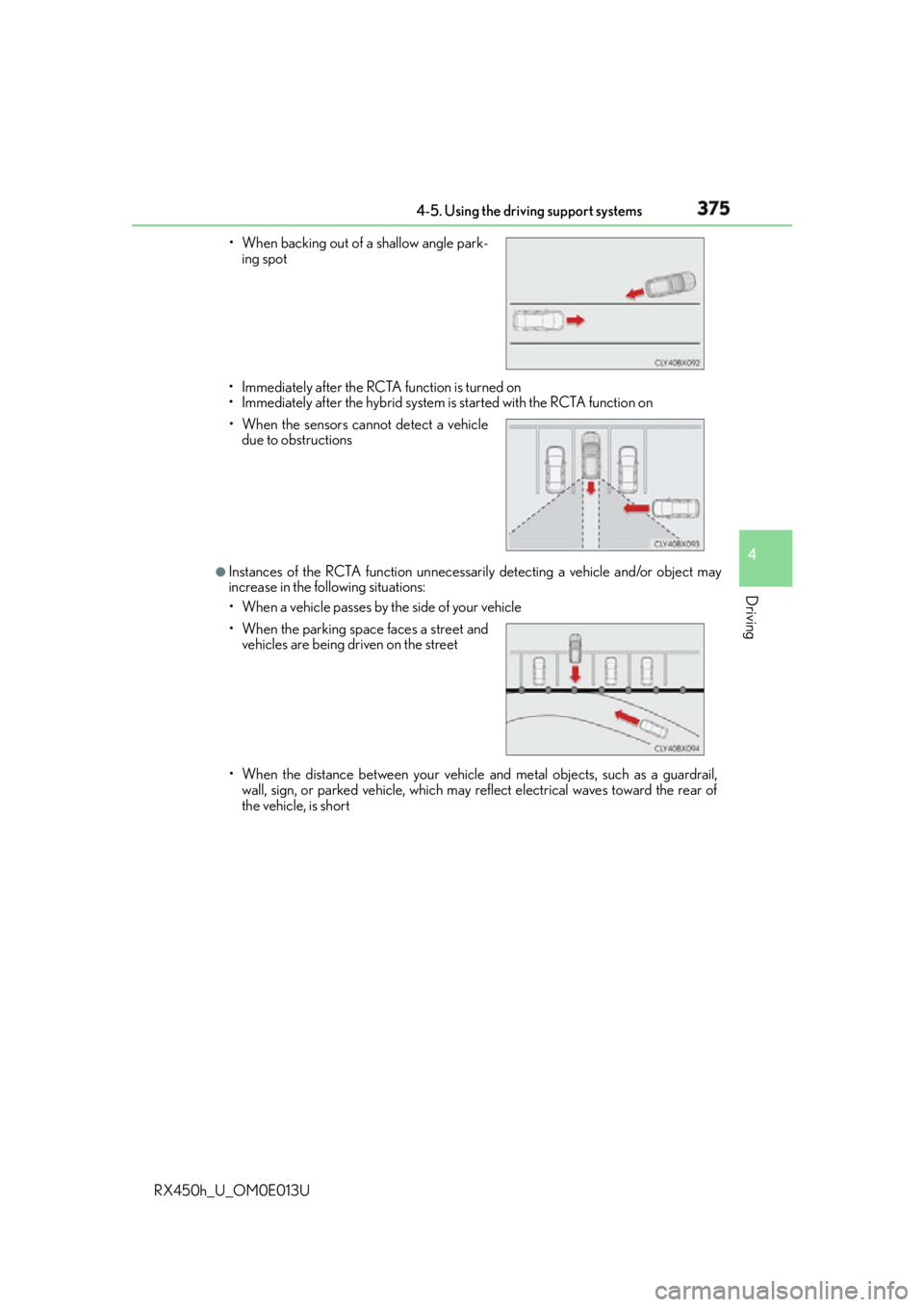
RX450h_U_OM0E013U • Immediately after the RCTA function is turned on
• Immediately after the hybrid system is started with the RCTA function on
●
Instances of the RCTA function unnecessarily detecting a vehicle and/or object may
increase in the following situations:
• When a vehicle passes by the side of your vehicle
• When the distance between your vehicle and metal objects, such as a guardrail,
wall, sign, or parked vehicle, which may reflect electrical waves toward the rear of
the vehicle, is short• When backing out of a shallow angle park-
ing spot
• When the sensors cannot detect a vehicle
due to obstructions
• When the parking spac e faces a street and
vehicles are being driven on the street
Page 386 of 660

386 4-5. Using the driving support systems
RX450h_U_OM0E013U WA R N I N G ■
Hill-start assist control does not operate effectively when ●
Do not overly rely on the hill-start assist control. The hill-start assist control may not
operate effectively on steep inclines and roads covered with ice. ●
Unlike the parking brake, hill-start assist control is not intended to hold the vehicle
stationary for an extended period of time. Do not attempt to use hill-start assist con-
trol to hold the vehicle on an incline, as doing so may lead to an accident. ■
When the VSC/Trailer Sway Control is activated
The slip indicator light flashes. Always drive carefully. Reckless driving may cause an
accident. Exercise particular care when the indicator light flashes. ■
When the TRAC/VSC/Trailer Sway Control systems are turned off
Be especially careful and drive at a speed ap propriate to the road conditions. As these
are the systems to help ensure vehicle st ability and driving force, do not turn the
TRAC/VSC/Trailer Sway Control systems off unless necessary. ■
Replacing tires
Make sure that all tires are of the specified size, brand, tread pattern and total load
capacity. In addition, make sure that the tires are inflated to the recommended tire infla-
tion pressure level.
The ABS, TRAC, VSC and Trailer Sway Control systems will not function correctly if
different tires are installed on the vehicle.
Contact your Lexus dealer for further information when replacing tires or wheels. ■
Handling of tires and the suspension
Using tires with any kind of problem or modi fying the suspension will affect the driving
assist systems, and may caus e a system to malfunction.■
Trailer Sway Control precaution
The Trailer Sway Control system is not able to reduce trailer sway in all situations.
Depending on many factors such as the condit ions of the vehicle, trailer, road surface,
and driving environment, the Trailer Sway Co ntrol system may not be effective. Refer to
your trailer owner’s manual for information on how to tow your trailer properly. ■
If trailer sway occurs
Observe the following precautions.
Failing to do so may caus e death or serious injury.●
Firmly grip the steering wh eel. Steer straight ahead.
Do not try to control trailer swaying by turning the steering wheel. ●
Begin releasing the accelerator pedal i mmediately but very gradually to reduce
speed.
Do not increase speed. Do not apply vehicle brakes.
If you make no extreme correction with the steering or brakes, your vehicle and trailer
should stabilize. ( P. 2 2 7 )
Page 396 of 660

396 4-6. Driving tips
RX450h_U_OM0E013U WA R N I N G ■
Off-road driving precautions
Always observe the following precautions to minimize the risk of death, serious injury
or damage to your vehicle: ●
Drive carefully when off the road. Do not ta ke unnecessary risks by driving in danger-
ous places. ●
Do not grip the steering wheel spokes when driving off-road. A bad bump could jerk
the wheel and injure your hands. Keep both hands and especially your thumbs on the
outside of the rim. ●
Always check your brakes for effectivenes s immediately after driving in sand, mud,
water or snow. ●
After driving through tall grass, mud, rock, sand, rivers, etc., check that there is no
grass, bush, paper, rags, stone, sand, etc. adhering or trapped on the underbody.
Clear off any such matter from the underbody. If the vehicle is used with these materi-
als trapped or adhering to the underb ody, a breakdown or fire could occur.●
When driving off-road or in rugged terrai n, do not drive at excessive speeds, jump,
make sharp turns, strike objects, etc. This may cause loss of control or vehicle rollover
causing death or serious injury. You are also risking expensive damage to your vehi-
cle’s suspension and chassis.
NOTICE ■
To prevent water damage
Take all necessary safety measures to ensure that water damage to the hybrid battery
(traction battery), hybrid system or other components does not occur. ●
Water entering the engine compartment may cause severe damage to the hybrid
system. Water entering the interior may cause the hybrid battery (traction battery)
stowed under the rear seats to short circuit. ●
Water entering the hybrid transmission and rear electric motor (traction motor)
(AWD models only) will cause deterioration in transmission qua lity. The malfunction
indicator may come on, and the vehicle may not be drivable. ●
Water can wash the grease from wheel be arings, causing rusting and premature fail-
ure, and may also enter the hybrid transmission case, reducing the gear oil’s lubricat-
ing qualities. ■
When you drive through water
If driving through water, such as when crossing shallow streams, first check the depth of
the water and the bottom of the riverbed for firmness. Drive slowly and avoid deep
water. ■
Inspection after off-road driving ●
Sand and mud that has accumulated around brake discs may affect braking efficiency
and may damage brake system components. ●
Always perform a maintenance inspection after each day of off-road driving that has
taken you through rough terr ain, sand, mud, or water. For scheduled maintenance
information, refer to the “Warranty and Services Guide/Owner’s Manual Supple-
ment/Scheduled Maintenance”.
Page 424 of 660
424 5-4. Using the storage features
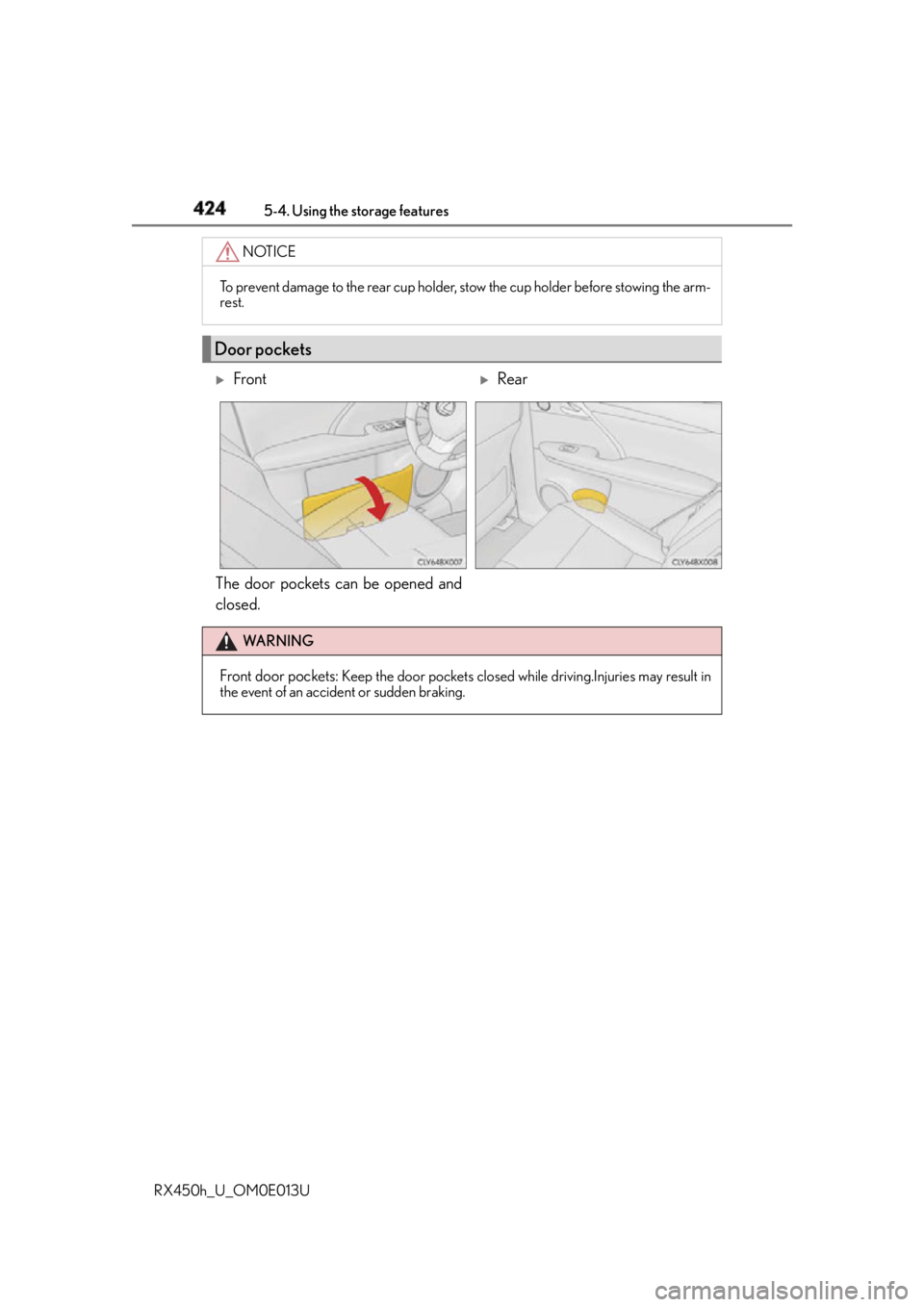
RX450h_U_OM0E013U The door pockets can be opened and
closed. NOTICE
To prevent damage to the rear cup holder, stow the cup holder before stowing the arm-
rest.
Door pockets
Front
Rear
WA R N I N G
Front door pockets: Keep the door pockets closed while driving.Injuries may result in
the event of an accident or sudden braking.
Page 427 of 660
4275-4. Using the storage features
5
Interior features
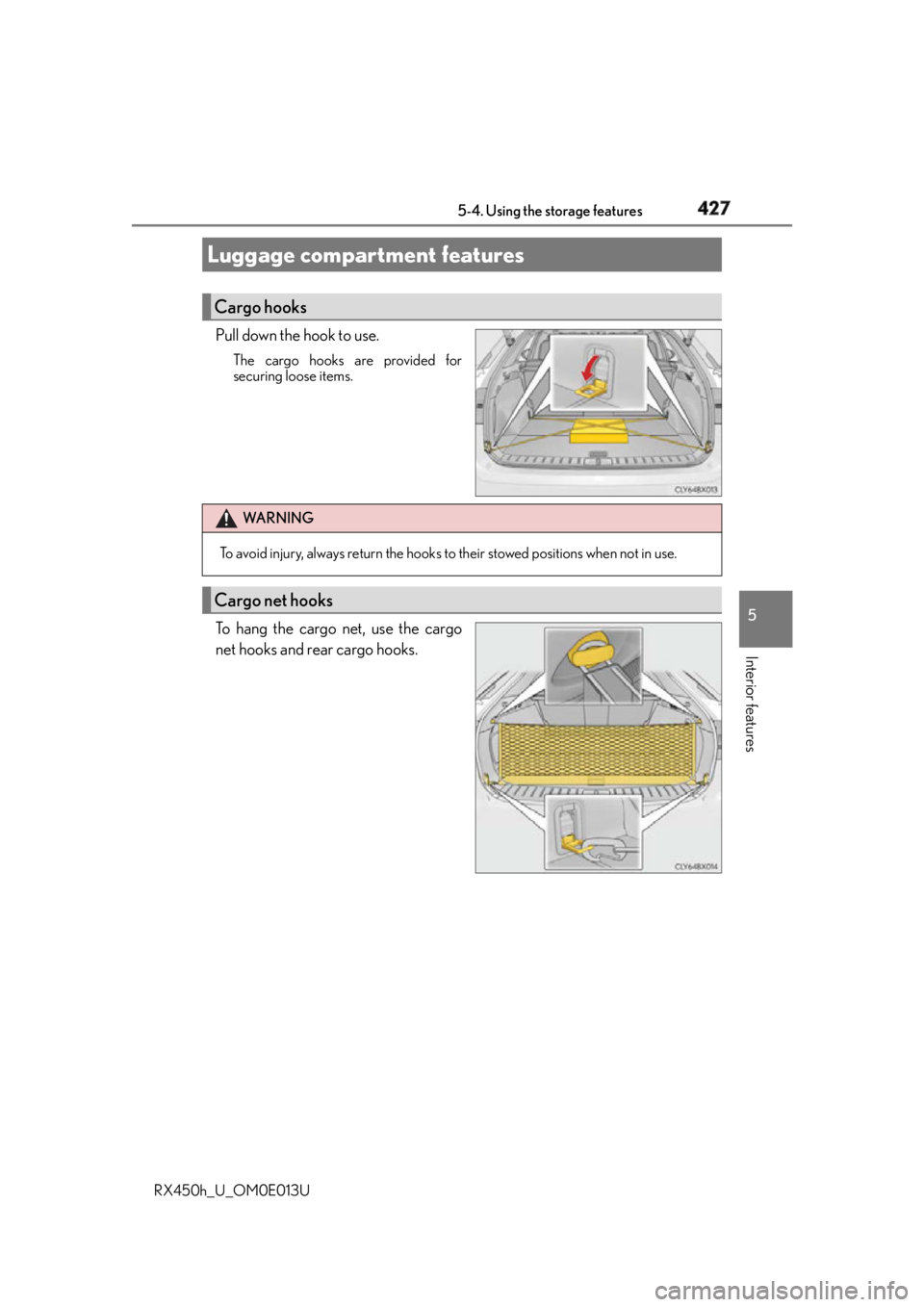
RX450h_U_OM0E013U Pull down the hook to use. The cargo hooks are provided for
securing loose items.
To hang the cargo net, use the cargo
net hooks and rear cargo hooks.Luggage compartment features Cargo hooks
WA R N I N G
To avoid injury, always return the hooks to their stowed positions when not in use.
Cargo net hooks
Page 435 of 660
4355-5. Using the other interior features
5
Interior features
RX450h_U_OM0E013U ■
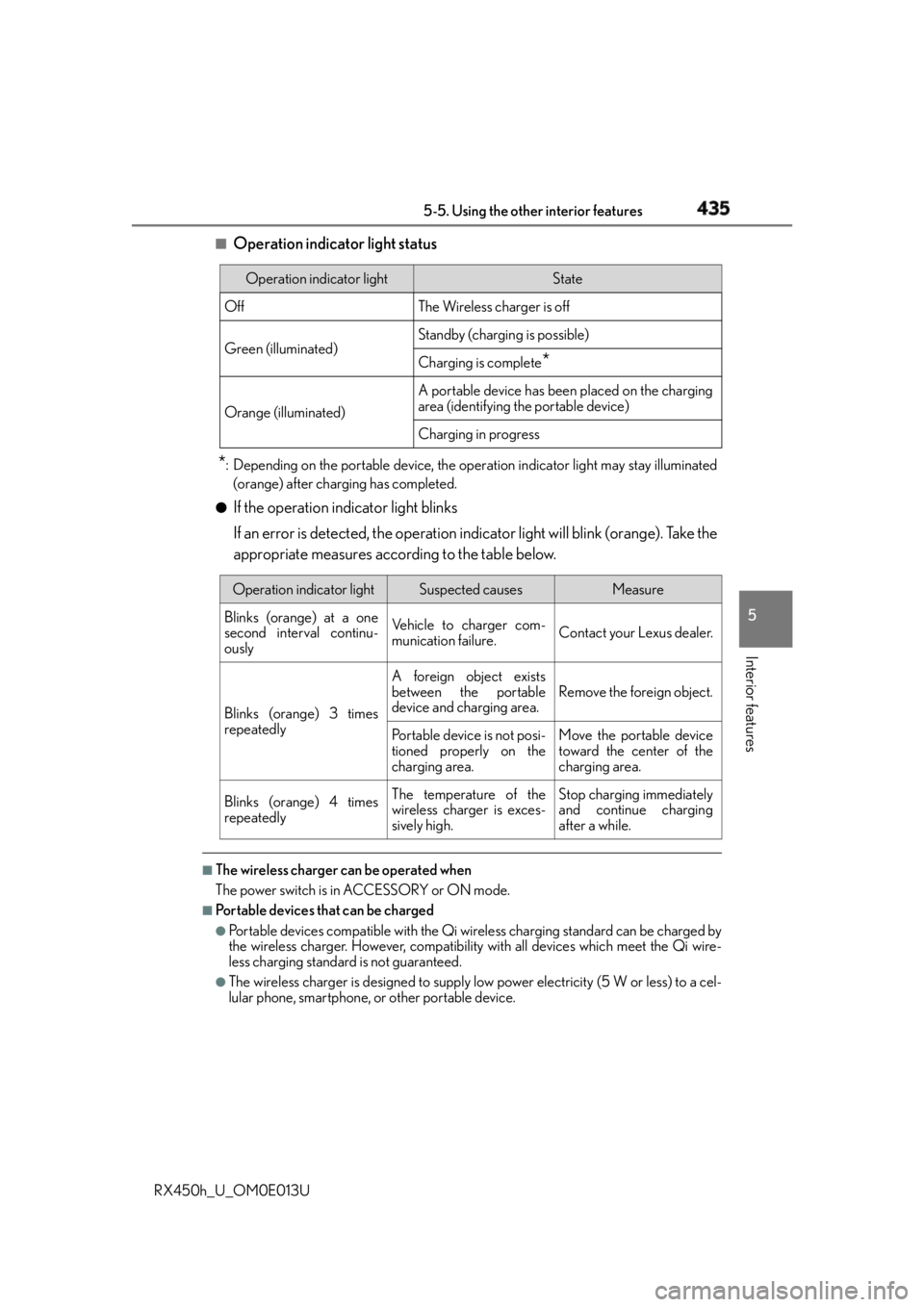
Operation indicator light status
* : Depending on the portable device, the oper ation indicator light may stay illuminated
(orange) after charging has completed.●
If the operation indicator light blinks
If an error is detected, the operation in dicator light will blink (orange). Take the
appropriate measures according to the table below.
■
The wireless charger can be operated when
The power switch is in ACCESSORY or ON mode. ■
Portable devices that can be charged ●
Portable devices compatible with the Qi wi reless charging standard can be charged by
the wireless charger. However, compatibility with all devices which meet the Qi wire-
less charging standard is not guaranteed. ●
The wireless charger is designed to supply low power electricity (5 W or less) to a cel-
lular phone, smartphone, or other portable device. Operation indicator light State
Off The Wireless charger is off
Green (illuminated) Standby (charging is possible)
Charging is complete
*Orange (illuminated) A portable device has been placed on the charging
area (identifying the portable device)
Charging in progress
Operation indicator light Suspected causes Measure
Blinks (orange) at a one
second interval continu-
ously Vehicle to charger com-
munication failure. Contact your Lexus dealer.
Blinks (orange) 3 times
repeatedly A foreign object exists
between the portable
device and charging area. Remove the foreign object.
Portable device is not posi-
tioned properly on the
charging area. Move the portable device
toward the center of the
charging area.
Blinks (orange) 4 times
repeatedly The temperature of the
wireless charger is exces-
sively high. Stop charging immediately
and continue charging
after a while.
Page 439 of 660
4395-5. Using the other interior features
5
Interior features
RX450h_U_OM0E013U NOTICE ■
Conditions in which the wireless charger may not operate correctly
In the following situations, the wireless charger may not operate correctly: ●
When a portable device is fully charged ●
When there is a foreign object between the charging area and portable device●
When a portable device becomes hot while charging ●
When a portable device is placed on the wireless area with its charging surface fac-
ing up ●
When a portable device is not centered on the charging area ●
When the vehicle is near a TV tower, electric power plant, gas station, radio station,
large display, airport or other facility that generates strong radio waves or electrical
noise ●
When the portable device is in contact with, or is covered by any of the following
metallic objects
• Cards to which aluminum foil is attached
• Cigarette boxes that have aluminum foil inside
• Metallic wallets or bags
•Coins
• Metal hand warmers
• Media such as CDs and DVDs ●
When wireless keys (that emit radio waves) other than those of your vehicle are being
used nearby.
If in situations other than above the wirele ss charger does not op erate properly or the
operation indicator light is blinking, the wireless charge r may be malfunctioning. Con-
tact your Lexus dealer. ■
To prevent failure or damage to data ●
Do not bring magnetic cards, such as a credit card, or magnetic recording media,
close to the wireless charger while chargi ng. Otherwise, data may be erased due to
the influence of magnetism.
Additionally, do not bring precision instrume nts such as wrist watches, close to the
wireless charger, as such objects may malfunction. ●
Do not leave portable devices in the cab in. The temperature inside the cabin may
become high when parked in the su n, and cause damage to the device.■
To prevent 12-volt battery discharge
Do not use the wireless charger for a long period of time with the hybrid system is
stopped.
Page 455 of 660
4555-5. Using the other interior features
5
Interior features
RX450h_U_OM0E013U ■
Automatic Collis ion Notification
In case of either airbag deployment or severe rear-end collision, the system is
designed to automatically call the response center. The responding agent
receives the vehicle’s location and attempts to speak with the vehicle occu-
pants to assess the level of emergency. If the occupants are unable to commu-
nicate, the agent automatically treats the call as an emergency, contacts the
nearest emergency services provider to describe the situation, and requests
that assistance be se nt to the location.■
Stolen Vehicle Location
If your vehicle is stolen, Safety Connect can work with local authorities to
assist them in locating and recovering the vehicle. After filing a police report,
call the Safety Connect response center at 1-800-25-LEXUS
(1-800-255-3987) and follow the prompts for Safety Connect to initiate this
service.
In addition to assisting law enforcement with recovery of a stolen vehicle,
Safety-Connect-equipped vehicle location data may, under certain circum-
stances, be shared with third parties to locate your vehicle. Further informa-
tion is available at Lexus.com. ■
Emergency Assistance Button (“SOS”)
In the event of an emergency on the ro ad, push the “SOS” button to reach the
Safety Connect response center. Th e answering agent will determine your
vehicle’s location, assess the emergency, and dispatch the necessary assis-
tance required. If you accidentally press the “SOS” button, tell the response-center agent that you
are not experiencing an emergency.■
Enhanced Roadside Assistance
Enhanced Roadside Assistance adds GP S data to the already included war-
ranty-based Lexus roadside service.
Subscribers can press the “SOS” button to reach a Safety Connect response-
center agent, who can help with a wide range of needs, such as: towing, flat
tire, fuel delivery, etc. For a description of the Roadside Assistance services
and their limitations, please see the Safety Connect Terms and Conditions,
which are available at Lexus.com.Safety Connect services
Page 471 of 660
471
RX450h_U_OM0E013U 6
Maintenance and care 6-3. Do-it-yourself maintenance
Do-it-yourself service precautions If you perform maintenance by yourself, be sure to follow the correct proce-
dure as given in these sections. Items Pa r t s a n d t o o l s
12-volt battery con-
dition ( P. 4 8 3 ) •Grease
• Conventional wrench (for terminal clamp bolts)
Brake fluid level
( P. 4 8 1 ) • FMVSS No.116 DOT 3 or SAE J1703 brake fluid
• Rag or paper towel
• Funnel (used only for adding brake fluid)
Engine/power con-
trol unit coolant level
( P. 4 7 9 ) • “Toyota Super Long Life Coolant” or a similar high quality
ethylene glycol-based non-silicate, non-amine, non-nitrite
and non-borate coolant with long-life hybrid organic acid
technology
For the U.S.A.:
“Toyota Super Long Life Coolant” is pre-mixed with 50%
coolant and 50% deionized water.
For Canada:
“Toyota Super Long Life Coolant” is pre-mixed with 55%
coolant and 45% deionized water.
• Funnel (used only for adding coolant)
Engine oil level
( P. 4 76 ) • “Toyota Genuine Motor Oil” or equivalent
• Rag or paper towel
• Funnel (used only for adding engine oil)
Fuses ( P. 5 0 8 ) • Fuse with same amperage rating as original
Headlight aim
*
( P. 511) • Phillips-head screwdriver
Light bulbs
( P. 5 1 3 ) • Bulb with same number and wattage rating as original
•Flathead screwdriver •Wrench
Radiator and con-
denser ( P. 4 8 0 )
Tire inflation pres-
sure ( P. 4 9 6 ) • Tire pressure gauge • Compressed air source
Page 477 of 660
4776-3. Do-it-yourself maintenance
6
Maintenance and care
RX450h_U_OM0E013U ■
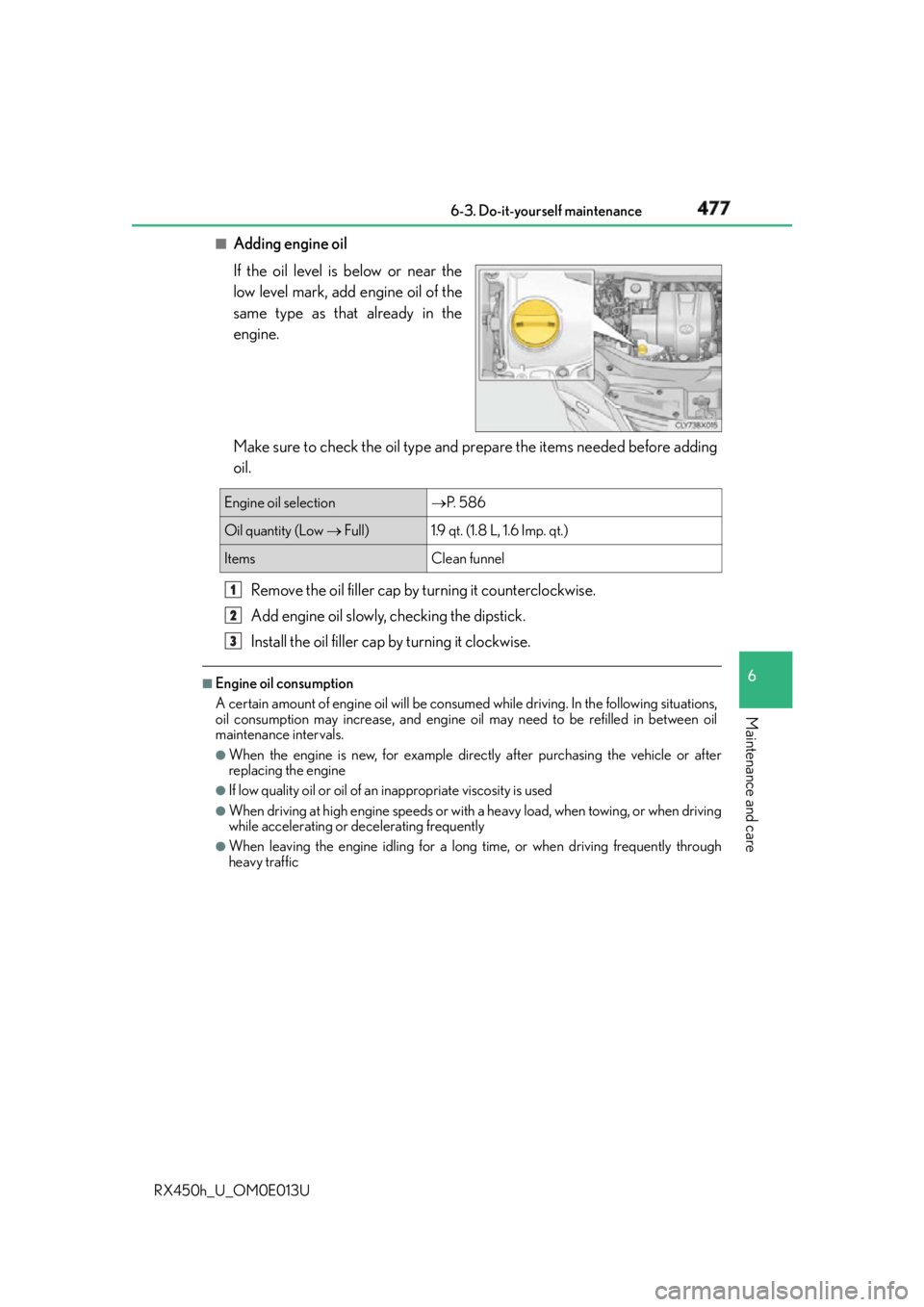
Adding engine oil
If the oil level is below or near the
low level mark, add engine oil of the
same type as that already in the
engine.
Make sure to check the oil type and prepare the items needed before adding
oil.
Remove the oil filler cap by turning it coun terclockwise.
Add engine oil slowly, checking the dipstick.
Install the oil filler cap by turning it clockwise. ■
Engine oil consumption
A certain amount of engine oil will be consum ed while driving. In th e following situations,
oil consumption may increase, and engine o il may need to be refilled in between oil
maintenance intervals. ●
When the engine is new, for example directly after purchasing the vehicle or after
replacing the engine ●
If low quality oil or oil of an inappropriate viscosity is used●
When driving at high engine speeds or with a heavy load, when towing, or when driving
while accelerating or de celerating frequently●
When leaving the engi ne idling for a long time, or when driving frequently through
heavy trafficEngine oil selection P. 5 8 6
Oil quantity (Low Full) 1.9 qt. (1.8 L, 1.6 Imp. qt.)
Items Clean funnel1
2
3