ECU LEXUS RX450h 2016 Repair Manual
[x] Cancel search | Manufacturer: LEXUS, Model Year: 2016, Model line: RX450H, Model: LEXUS RX450H 2016Pages: 660, PDF Size: 10.15 MB
Page 370 of 660

370 4-5. Using the driving support systems
RX450h_U_OM0E013U ■
Conditions under which the BSM func tion may not function correctly●
The BSM function may not detect vehicles correctly in the following situations:
• When the sensor is misaligned due to a strong impact to the sensor or its surround-
ing area
• When mud, snow, ice, a sticker, etc. is covering the sensor or surrounding area on
the rear bumper
• When driving on a road surface that is wet with standing water during bad weather,
such as heavy rain, snow, or fog
• When multiple vehicles are approaching wi th only a small gap between each vehicle
• When the distance between your vehicle and a following vehicle is short
• When there is a significant difference in speed between your vehicle and the vehicle
that enters the detection area
• When the difference in speed between your vehicle and another vehicle is changing
• When a vehicle enters a detection area traveling at about the same speed as your
vehicle
• As your vehicle starts from a stop, a vehicle remains in the detection area
• When driving up and down consecutive steep in clines, such as hills, dips in the road,
etc.
• When driving on roads with sharp bends, consecutive curves, or uneven surfaces
• When vehicle lanes are wide, or when drivin g on the edge of a lane, and the vehicle
in an adjacent lane is far away from your vehicle
• When towing a trailer (veh icles with towing package)
• When items such as a bicycle carrier ar e installed on the rear of the vehicle
• When there is a significant difference in height between your vehicle and the vehicle
that enters the detection area
• Immediately after the BSM function is turned on ●
Instances of the BSM function unnecessarily detecting a vehicle and/or object may
increase in the following situations:
• When the sensor is misaligned due to a strong impact to the sensor or its surround-
ing area
• When the distance between your vehicle and a guardrail, wall, etc. that enters the
detection area is short
• When driving up and down consecutive steep in clines, such as hills, dips in the road,
etc.
• When vehicle lanes are narrow, or when driving on the edge of a lane, and a vehicle
traveling in a lane other than the ad jacent lanes enters the detection area
• When driving on roads with sharp bends, consecutive curves, or uneven surfaces
• When the tires are slipping or spinning
• When the distance between your vehicle and a following vehicle is short
• When a bicycle carrier or other accessory is installed to the rear of the vehicle
• When towing a trailer (veh icles with towing package)
Page 427 of 660
4275-4. Using the storage features
5
Interior features
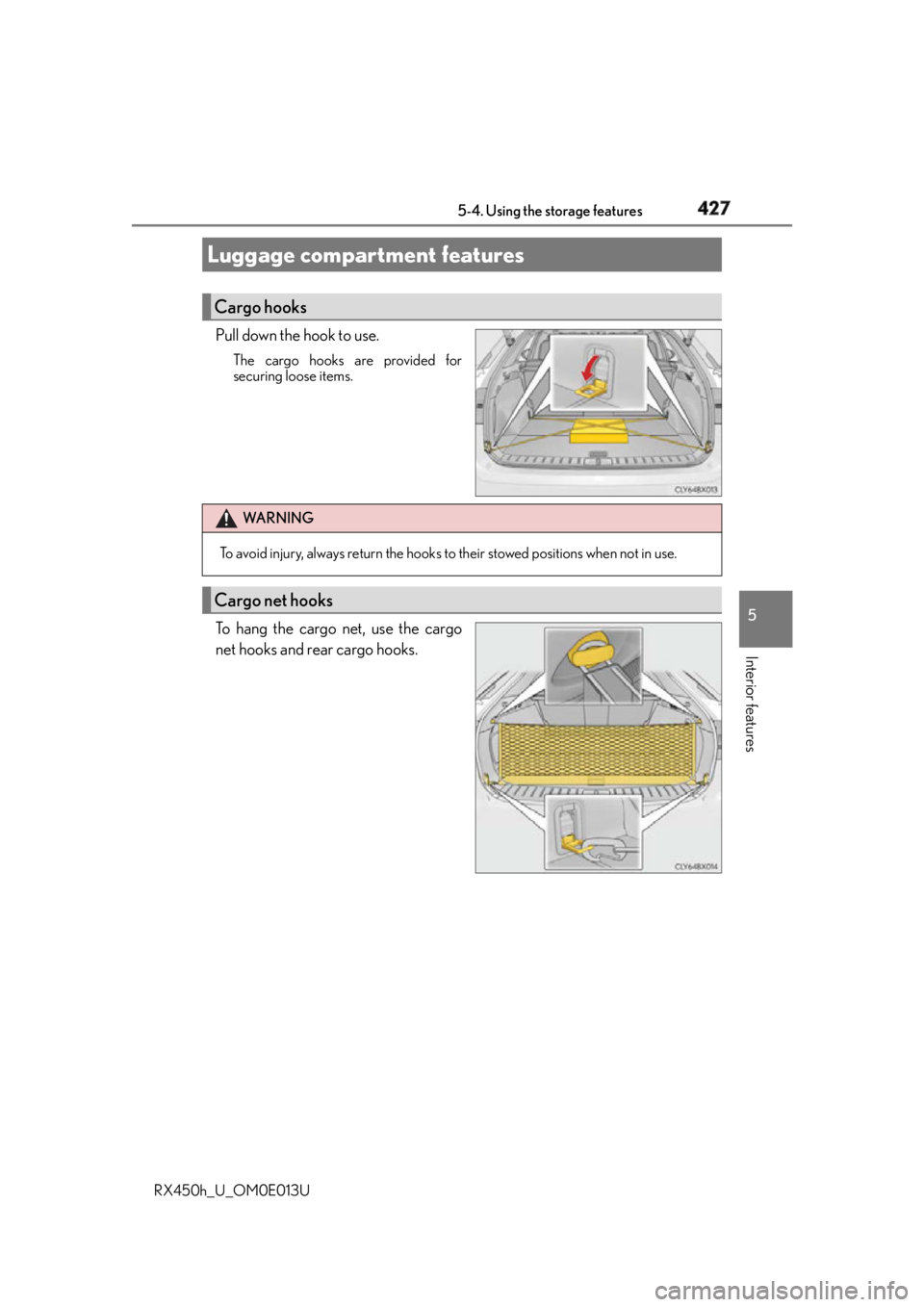
RX450h_U_OM0E013U Pull down the hook to use. The cargo hooks are provided for
securing loose items.
To hang the cargo net, use the cargo
net hooks and rear cargo hooks.Luggage compartment features Cargo hooks
WA R N I N G
To avoid injury, always return the hooks to their stowed positions when not in use.
Cargo net hooks
Page 445 of 660
4455-5. Using the other interior features
5
Interior features
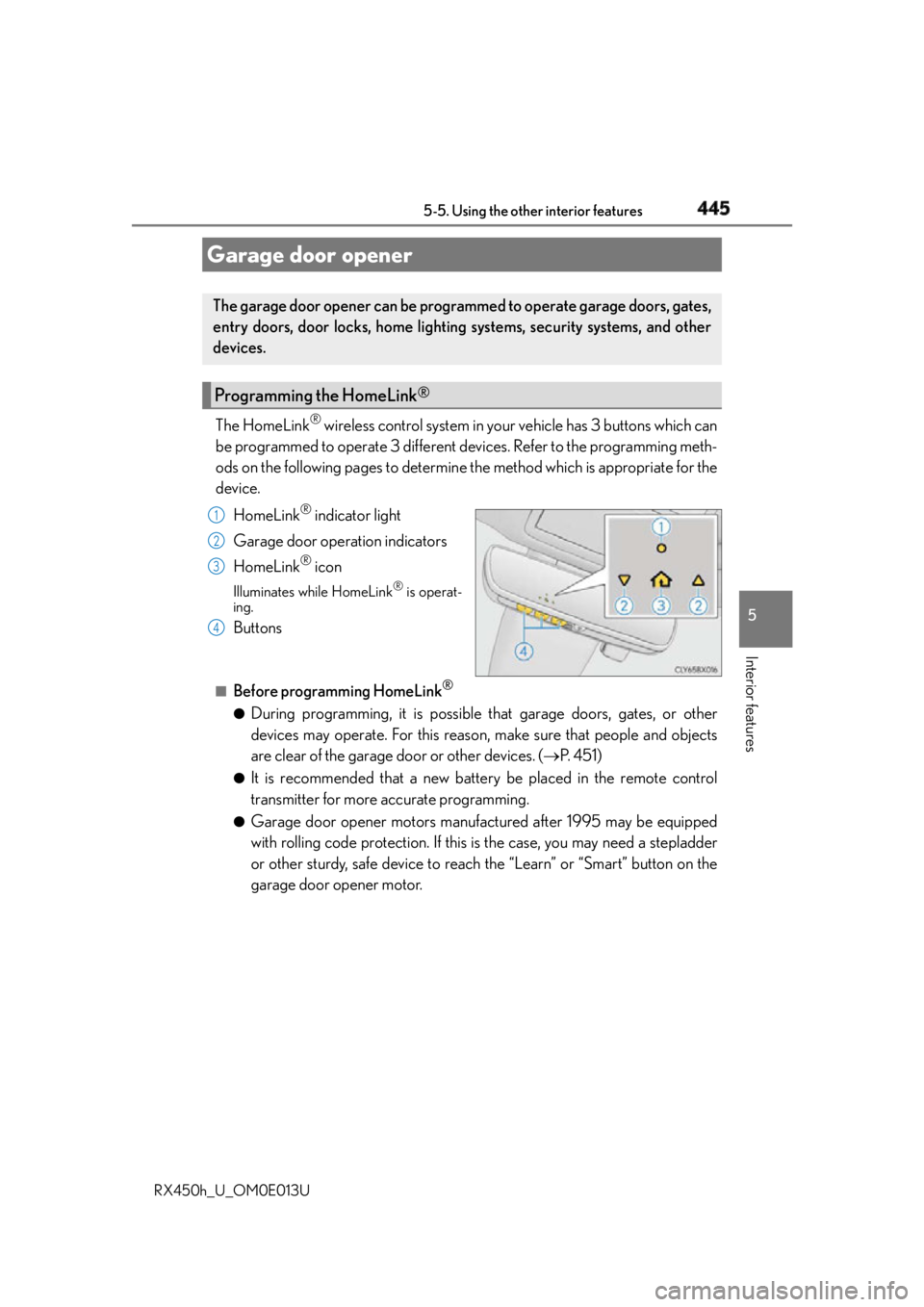
RX450h_U_OM0E013U The HomeLink ®
wireless control system in your vehicle has 3 buttons which can
be programmed to operate 3 different devices. Refer to the programming meth-
ods on the following pages to determine the method which is appropriate for the
device.
HomeLink ®
indicator light
Garage door operation indicators
HomeLink ®
iconIlluminates while HomeLink ®
is operat-
ing.
Buttons ■
Before programming HomeLink ®
●
During programming, it is possible th at garage doors, gates, or other
devices may operate. For this reason, make sure that people and objects
are clear of the garage door or other devices. ( P. 4 5 1 )●
It is recommended that a new battery be placed in the remote control
transmitter for more accurate programming. ●
Garage door opener motors manufactured after 1995 may be equipped
with rolling code protection. If this is the case, you may need a stepladder
or other sturdy, safe device to reach the “Learn” or “Smart” button on the
garage door opener motor.Garage door opener The garage door opener can be programmed to operate garage doors, gates,
entry doors, door locks, home lighting systems, security systems, and other
devices.
Programming the HomeLink ®
1
2
3
4
Page 452 of 660
452 5-5. Using the other interior features
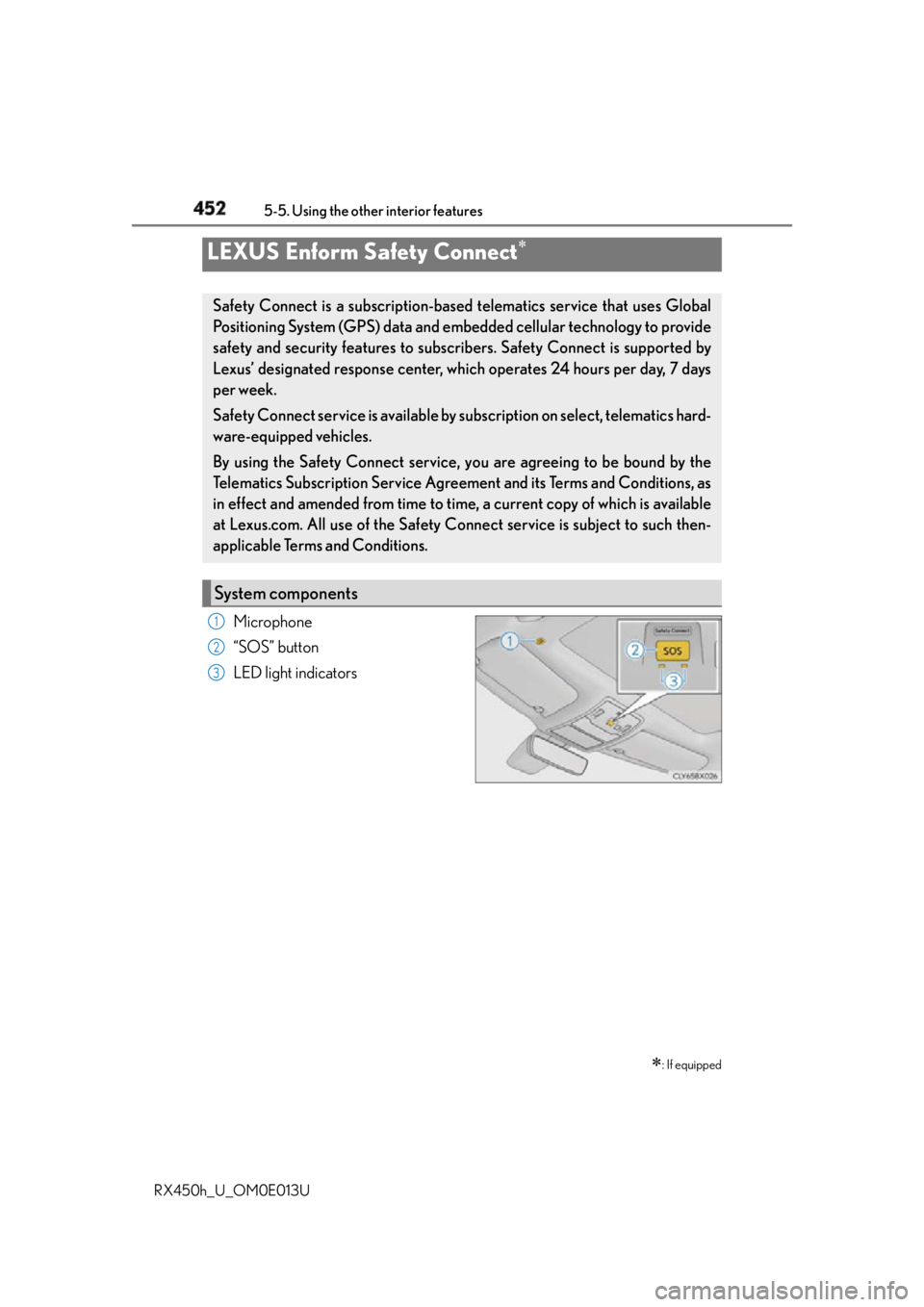
RX450h_U_OM0E013U Microphone
“SOS” button
LED light indicatorsLEXUS Enform Safety Connect
: If equippedSafety Connect is a subscription-based telematics service that uses Global
Positioning System (GPS) data and embe dded cellular techno logy to provide
safety and security features to subscribers. Safety Connect is supported by
Lexus’ designated response center, wh ich operates 24 hours per day, 7 days
per week.
Safety Connect service is available by su bscription on select, telematics hard-
ware-equipped vehicles.
By using the Safety Connect service, yo u are agreeing to be bound by the
Telematics Subscription Service Agreement and its Terms and Conditions, as
in effect and amended from time to time, a current copy of which is available
at Lexus.com. All use of the Safety Connect service is subject to such then-
applicable Terms and Conditions.
System components 1
2
3
Page 468 of 660
468 6-2. Maintenance
RX450h_U_OM0E013U * : Vehicles with sing le-beam headlightsVehicle interior Items Check points
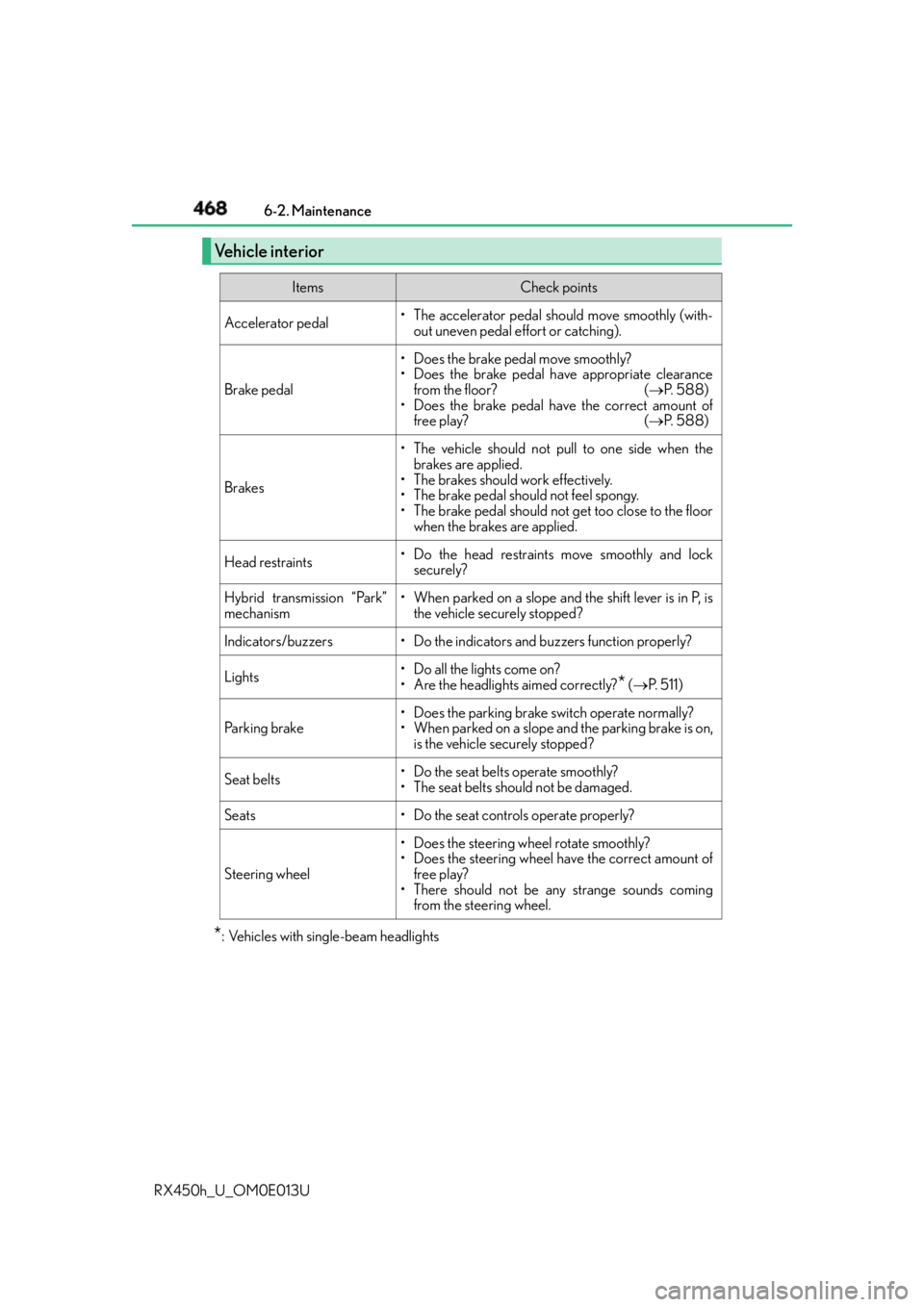
Accelerator pedal • The accelerator pedal should move smoothly (with-
out uneven pedal effort or catching).
Brake pedal • Does the brake pedal move smoothly?
• Does the brake pedal have appropriate clearance
from the floor? ( P. 588)
• Does the brake pedal have the correct amount of
free play? ( P. 588)
Brakes • The vehicle should not pull to one side when the
brakes are applied.
• The brakes should work effectively.
• The brake pedal should not feel spongy.
• The brake pedal should not get too close to the floor
when the brakes are applied.
Head restraints • Do the head restraints move smoothly and lock
securely?
Hybrid transmission “Park”
mechanism • When parked on a slope and the shift lever is in P, is
the vehicle securely stopped?
Indicators/buzzers • Do the indicators and buzzers function properly?
Lights • Do all the lights come on?
• Are the headlights aimed correctly?
* ( P. 511)
Parking brake • Does the parking brake switch operate normally?
• When parked on a slope and the parking brake is on,
is the vehicle securely stopped?
Seat belts •Do the seat belt s operate smoothly?
• The seat belts should not be damaged.
Seats • Do the seat controls operate properly?
Steering wheel • Does the steering wheel rotate smoothly?
• Does the steering wheel have the correct amount of
free play?
• There should not be an y strange sounds coming
from the steering wheel.
Page 504 of 660
504 6-3. Do-it-yourself maintenance
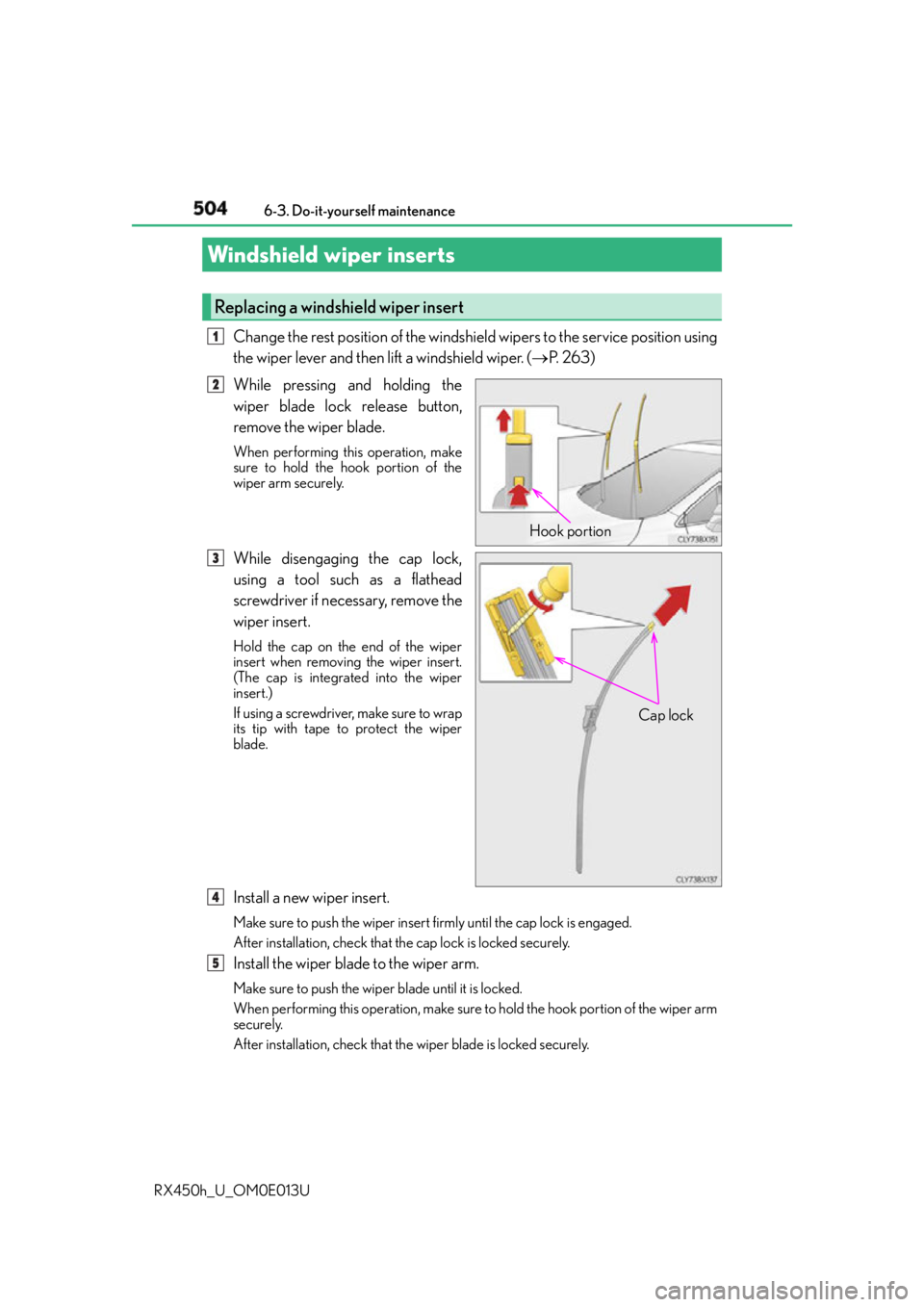
RX450h_U_OM0E013U Change the rest position of the windshield wipers to the service position using
the wiper lever and then lift a windshield wiper. ( P. 2 6 3 )
While pressing and holding the
wiper blade lock release button,
remove the wiper blade. When performing this operation, make
sure to hold the hook portion of the
wiper arm securely.
While disengaging the cap lock,
using a tool such as a flathead
screwdriver if necessary, remove the
wiper insert. Hold the cap on the end of the wiper
insert when removing the wiper insert.
(The cap is integrated into the wiper
insert.)
If using a screwdriver, make sure to wrap
its tip with tape to protect the wiper
blade.
Install a new wiper insert. Make sure to push the wiper insert firmly until the cap lock is engaged.
After installation, check that the cap lock is locked securely.
Install the wiper blade to the wiper arm. Make sure to push the wiper blade until it is locked.
When performing this operation, make sure to hold the hook portion of the wiper arm
securely.
After installation, check that the wiper blade is locked securely.Windshield wiper inserts Replacing a windshield wiper insert 1
Hook portion12
Cap lock3
14
5
Page 517 of 660
5176-3. Do-it-yourself maintenance
6
Maintenance and care
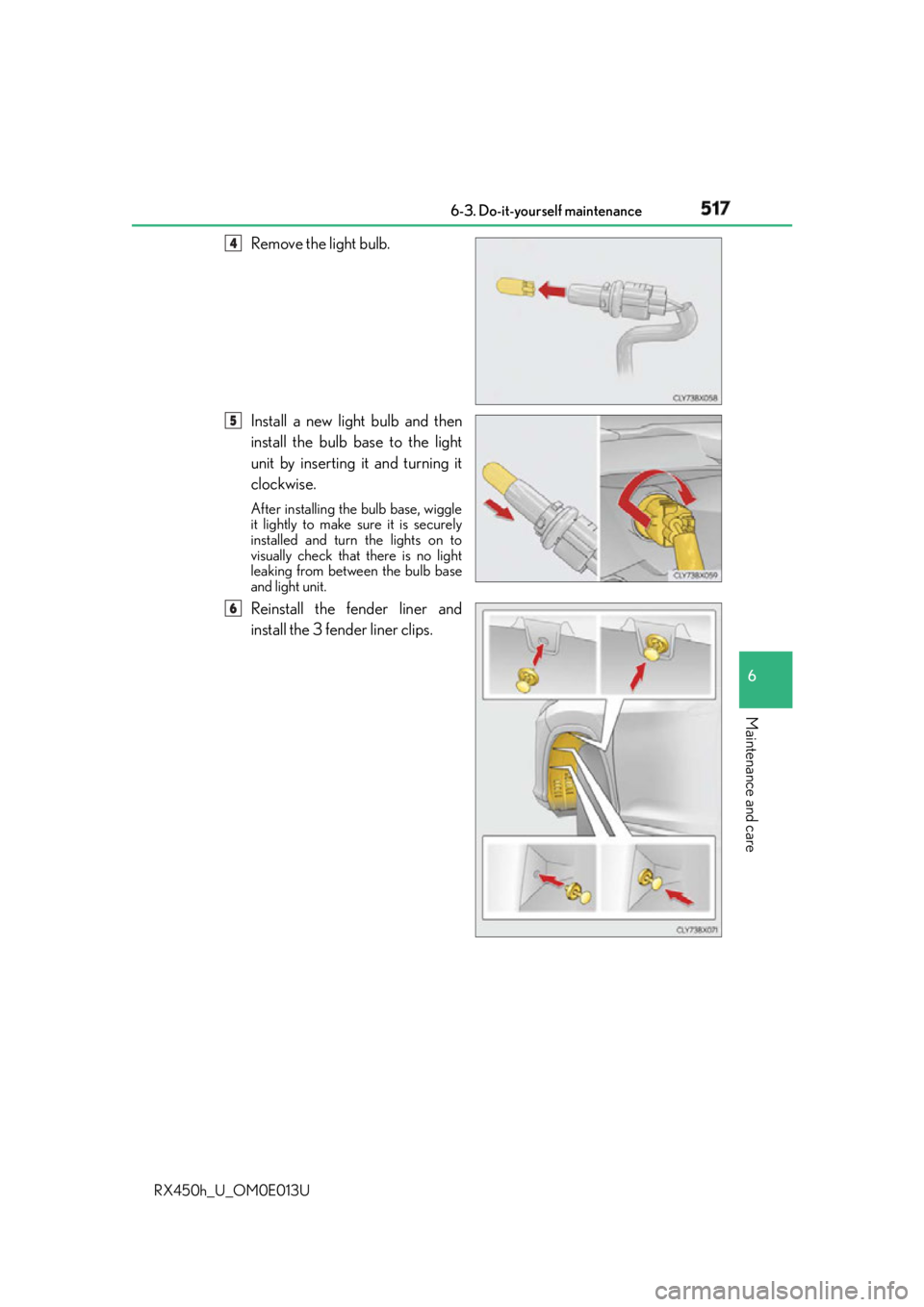
RX450h_U_OM0E013U Remove the light bulb.
Install a new light bulb and then
install the bulb base to the light
unit by inserting it and turning it
clockwise. After installing the bulb base, wiggle
it lightly to make sure it is securely
installed and turn the lights on to
visually check that there is no light
leaking from between the bulb base
and light unit.
Reinstall the fender liner and
install the 3 fender liner clips. 4
5
6
Page 519 of 660
5196-3. Do-it-yourself maintenance
6
Maintenance and care
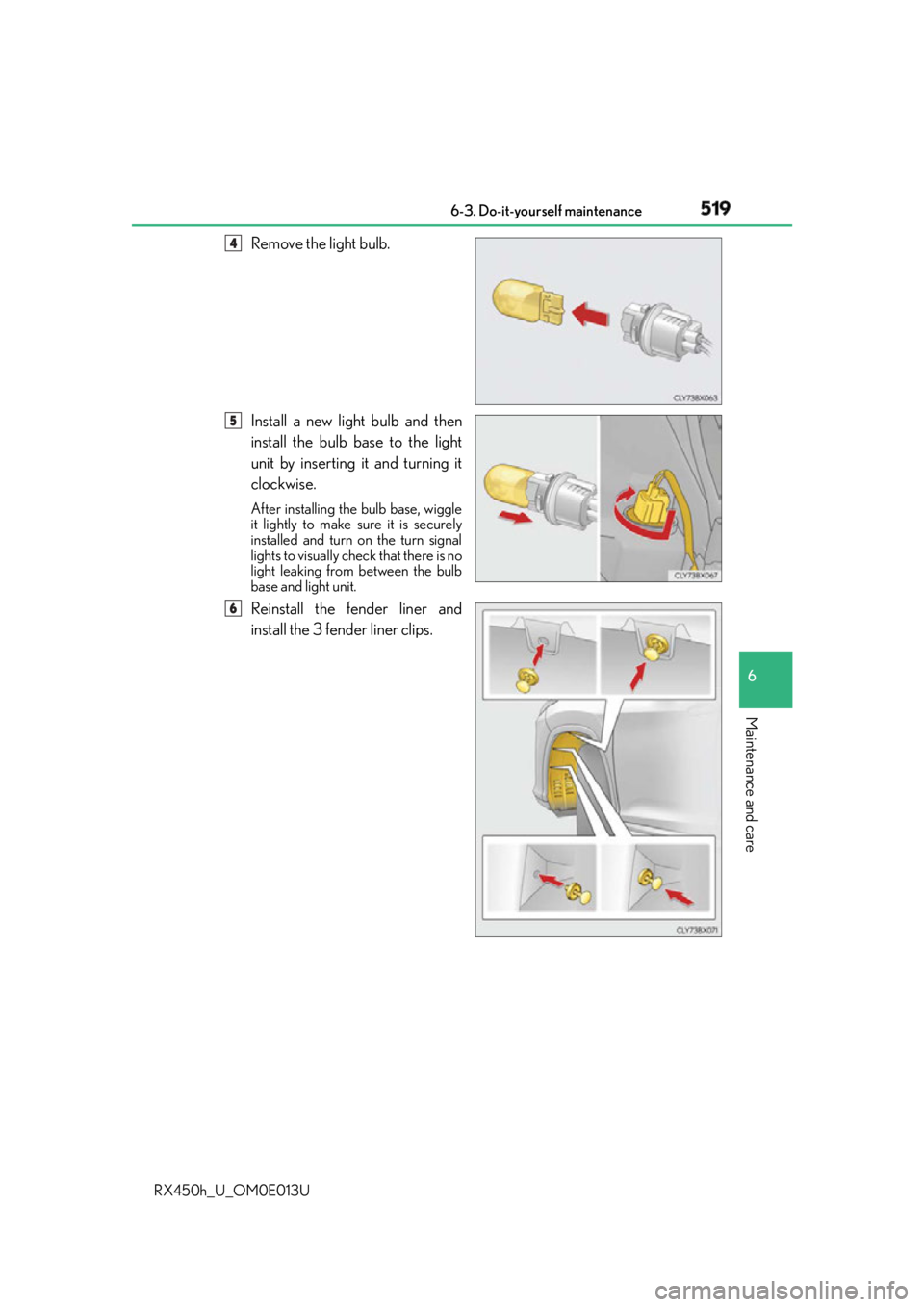
RX450h_U_OM0E013U Remove the light bulb.
Install a new light bulb and then
install the bulb base to the light
unit by inserting it and turning it
clockwise. After installing the bulb base, wiggle
it lightly to make sure it is securely
installed and turn on the turn signal
lights to visually check that there is no
light leaking from between the bulb
base and light unit.
Reinstall the fender liner and
install the 3 fender liner clips. 4
5
6
Page 522 of 660
522 6-3. Do-it-yourself maintenance
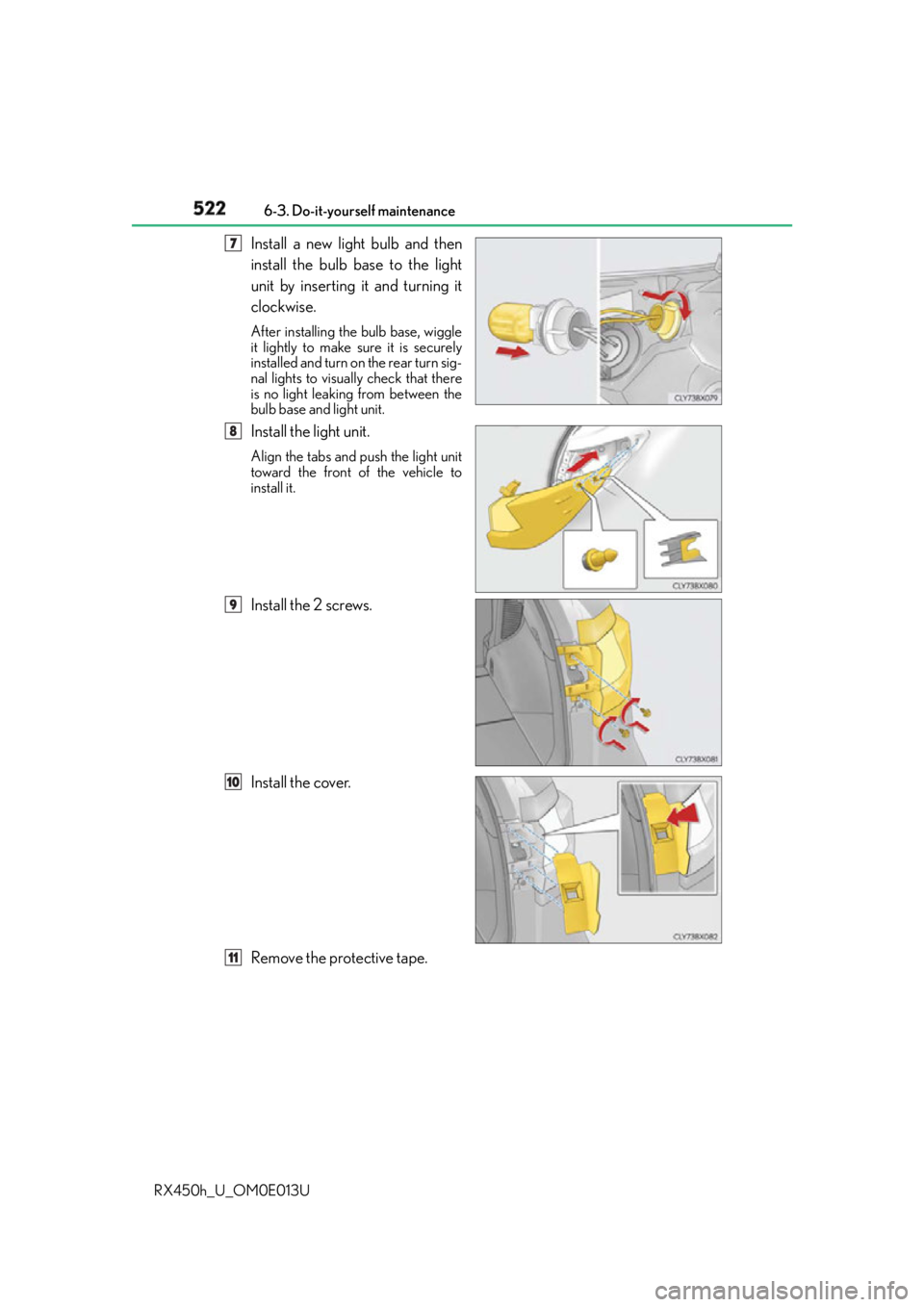
RX450h_U_OM0E013U Install a new light bulb and then
install the bulb base to the light
unit by inserting it and turning it
clockwise. After installing the bulb base, wiggle
it lightly to make sure it is securely
installed and turn on the rear turn sig-
nal lights to visually check that there
is no light leaking from between the
bulb base and light unit.
Install the light unit. Align the tabs and push the light unit
toward the front of the vehicle to
install it.
Install the 2 screws.
Install the cover.
Remove the protective tape. 47
8
9
10
11
Page 523 of 660
5236-3. Do-it-yourself maintenance
6
Maintenance and care
RX450h_U_OM0E013U ■
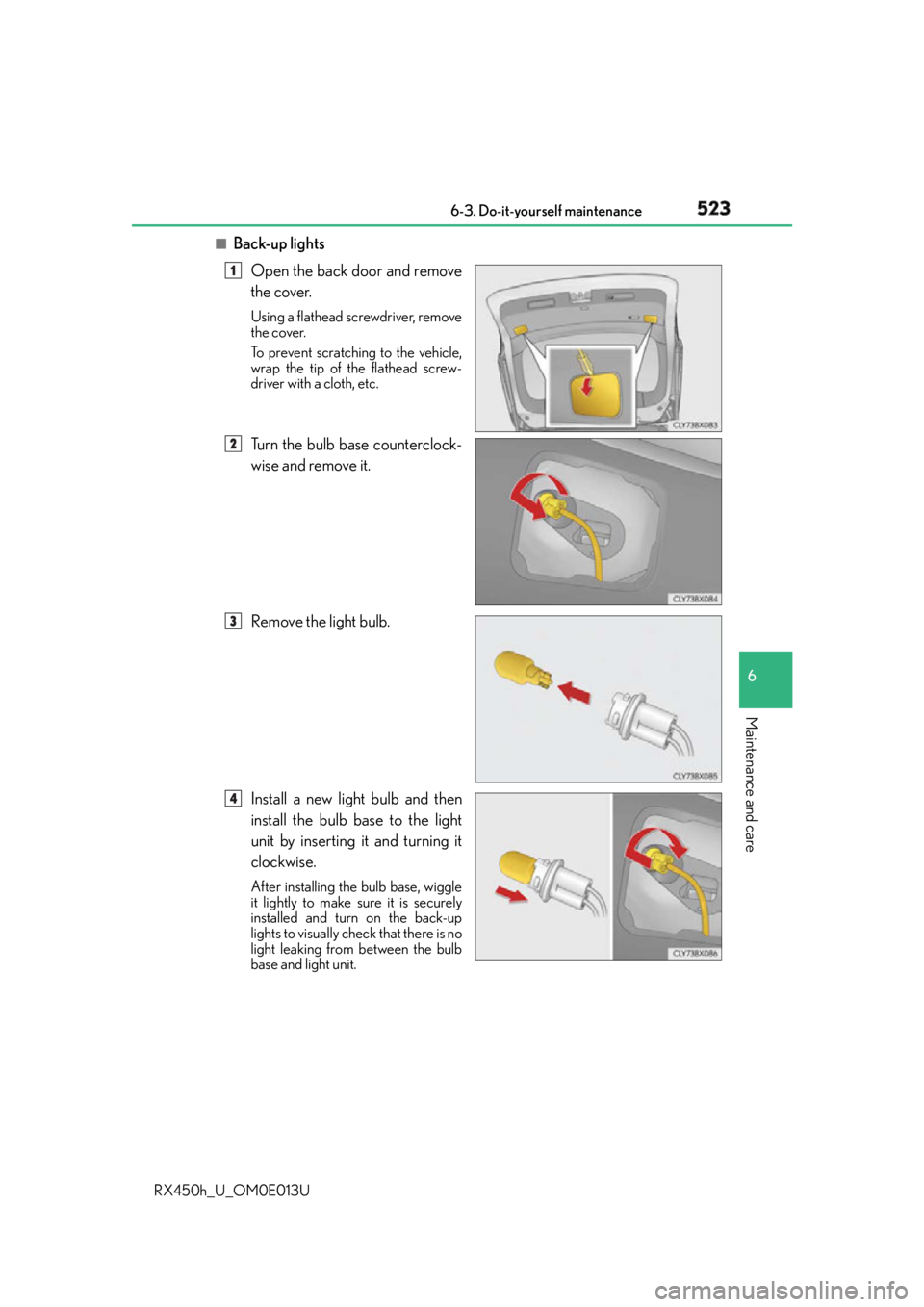
Back-up lights
Open the back door and remove
the cover. Using a flathead screwdriver, remove
the cover.
To prevent scratching to the vehicle,
wrap the tip of the flathead screw-
driver with a cloth, etc.
Turn the bulb base counterclock-
wise and remove it.
Remove the light bulb.
Install a new light bulb and then
install the bulb base to the light
unit by inserting it and turning it
clockwise. After installing the bulb base, wiggle
it lightly to make sure it is securely
installed and turn on the back-up
lights to visually check that there is no
light leaking from between the bulb
base and light unit. 1
2
3
4