display LEXUS RX450h 2016 Repair Manual
[x] Cancel search | Manufacturer: LEXUS, Model Year: 2016, Model line: RX450H, Model: LEXUS RX450H 2016Pages: 660, PDF Size: 10.15 MB
Page 241 of 660
2414-2. Driving procedures
4
Driving
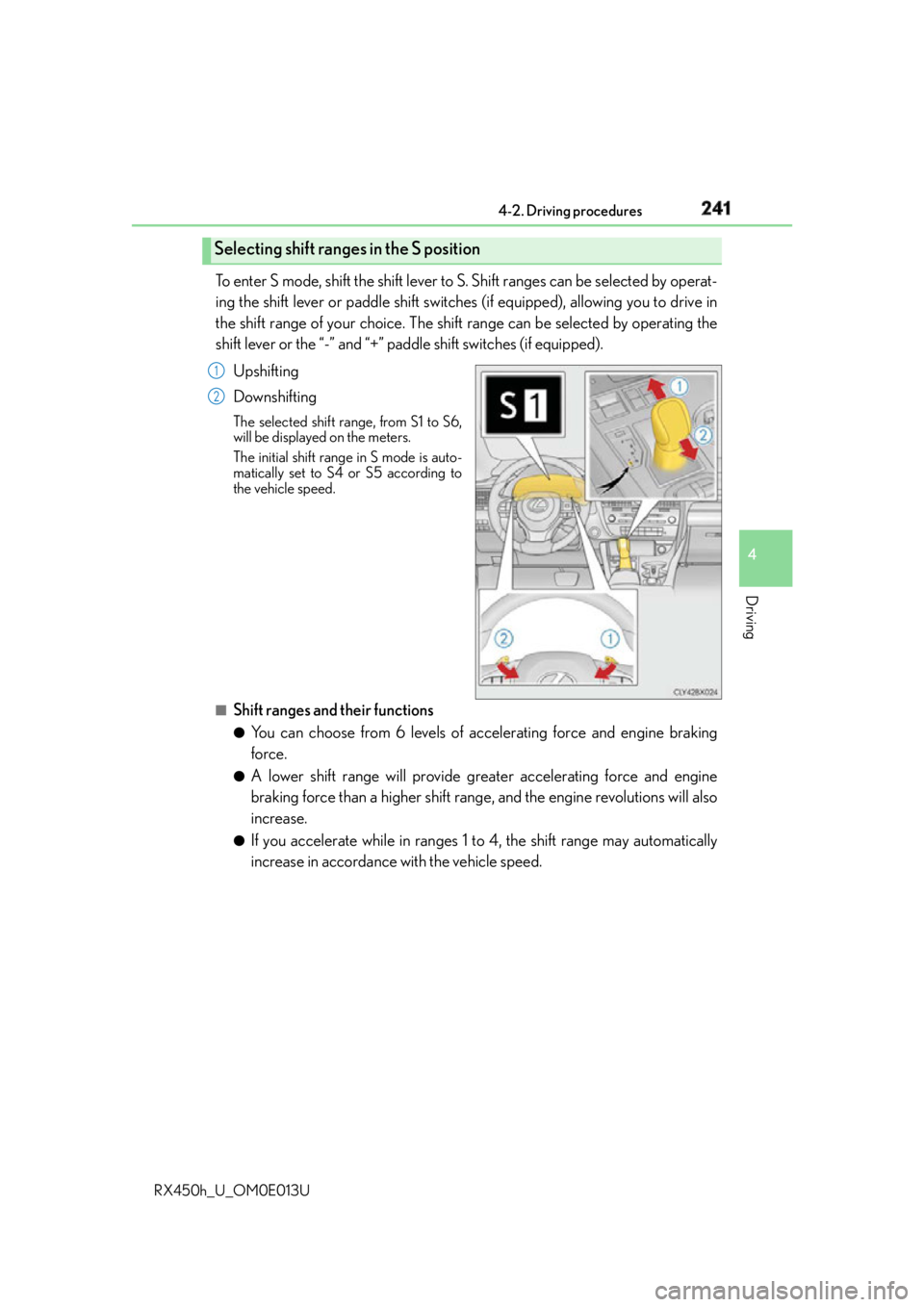
RX450h_U_OM0E013U To enter S mode, shift the shift lever to S. Shift ranges can be selected by operat-
ing the shift lever or paddle shift switches (if equipped), allowing you to drive in
the shift range of your choice. The shift range can be selected by operating the
shift lever or the “-” and “+” paddle shift switches (if equipped).
Upshifting
Downshifting The selected shift range, from S1 to S6,
will be displayed on the meters.
The initial shift range in S mode is auto-
matically set to S4 or S5 according to
the vehicle speed.
■
Shift ranges and their functions ●
You can choose from 6 levels of acce lerating force and engine braking
force. ●
A lower shift range will provide greater accelerating force and engine
braking force than a higher shift rang e, and the engine revolutions will also
increase. ●
If you accelerate while in ranges 1 to 4, the shift range may automatically
increase in accordance with the vehicle speed.Selecting shift ranges in the S position 1
2
Page 242 of 660

242 4-2. Driving procedures
RX450h_U_OM0E013U ■
When the “-” paddle shift switch is operated with the shift lever in the D position (vehi-
cles with paddle shift switches)
The shift range is downshifted to a range that enables engine braking force that is suit-
able to driving conditions. ■
Automatic deactivation of shift range select ion in the D position (vehicles with paddle
shift switches)
Shift range selection in the D position will be deactivated in the following situations:●
When the vehicle comes to a stop ●
If the accelerator pedal is depressed for more than a certain period of time ●
When the shift lever is shifted to a position other than D ■
S mode ●
When the shift range is S4 or lower, holdin g the shift lever toward “+” sets the shift
range to S6. ●
Automatically selects a higher shift range before the engine speed becomes too high. ■
Downshifting restriction warning buzzer
To help ensure safety and driving performa nce, downshifting operation may sometimes
be restricted. In some circumstances, downshifting may not be possible even when the
shift lever or paddle shift switch (if equipped ) is operated. (A buzzer will sound twice.)■
When driving with cruise control, dynamic radar cruise control or dynamic radar
cruise control with full -speed range activated
Even when performing the following actions with the intent of enabling engine braking,
engine braking will not activate because cruise control, dynamic radar cruise control or
dynamic radar cruise control with full-speed range will not be canceled.●
Vehicles without paddle shift switches: While driving in S mode, downshifting to 5 or 4.
( P. 311, 323, 335) ●
Vehicles with paddle shift switches: While dr iving in D or S mode, downshifting to 5 or
4. ( P. 311, 323, 335)●
When switching the driving mode to sp ort mode while driving in D position.
( P. 377)■
Restraining sudden start (Drive-Start Control)
When the following unusual operation is pe rformed, the hybrid system output may be
restrained. ●
When the shift lever is shifted from R to D, D to R, N to R, P to D, or P to R (D includes S)
with the accelerator pedal depressed, a wa rning message appears on the multi-infor-
mation display. If a warning message is show n on the multi-information display, read the
message and follow the instructions.●
When the accelerator pedal is depresse d too while the vehicle is in reverse.■
If the shift lever cannot be shifted from P
P. 5 6 3
Page 246 of 660
246 4-2. Driving procedures
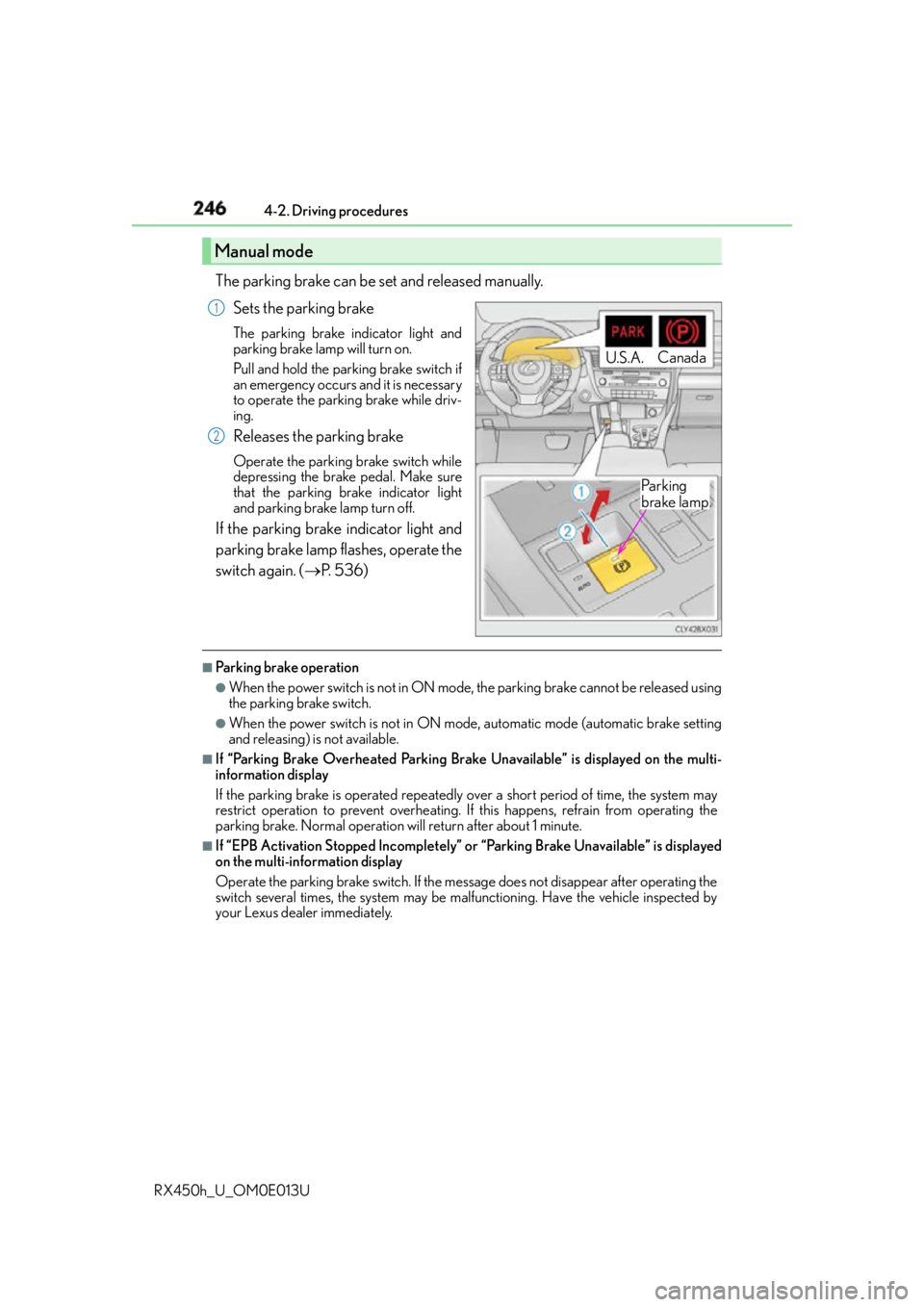
RX450h_U_OM0E013U The parking brake can be set and released manually.
Sets the parking brake The parking brake indicator light and
parking brake lamp will turn on.
Pull and hold the parking brake switch if
an emergency occurs and it is necessary
to operate the parking brake while driv-
ing.
Releases the parking brake Operate the parking brake switch while
depressing the brake pedal. Make sure
that the parking brake indicator light
and parking brake lamp turn off.
If the parking brake indicator light and
parking brake lamp flashes, operate the
switch again. ( P. 5 3 6 )■
Parking brake operation ●
When the power switch is not in ON mode, the parking brake cannot be released using
the parking brake switch. ●
When the power switch is not in ON mode, automatic mode (automatic brake setting
and releasing) is not available. ■
If “Parking Brake Overheated Parking Brake Unavailable” is displayed on the multi-
information display
If the parking brake is operated repeatedly over a short period of time, the system may
restrict operation to prevent overheating. If this happens, refrain from operating the
parking brake. Normal operation will return after about 1 minute. ■
If “EPB Activation Stopped In completely” or “Parking Brake Unavailable” is displayed
on the multi-information display
Operate the parking brake switch. If the mess age does not disappear after operating the
switch several times, the sy stem may be malfunctioning. Have the vehicle inspected by
your Lexus dealer immediately.Manual mode U.S.A. Canada
Pa r k i n g
brake lamp1
2
Page 247 of 660

2474-2. Driving procedures
4
Driving
RX450h_U_OM0E013U ■
Parking brake operation sound
When the parking brake operates, a motor sound (whirring sound) may be heard. This
does not indicate a malfunction. ■
Parking brake indicator light and parking brake lamp ●
Depending on the power switch mode, the parking brake indicator light and parking
brake lamp will turn on and stay on as described below:
ON mode: Comes on until the parking brake is released.
Not in ON mode: Stays on for approximately 15 seconds. ●
When the power switch is turned off with th e parking brake set, the parking brake indi-
cator light and parking brake lamp will stay on for about 15 seconds. This does not indi-
cate a malfunction. ■
Changing the mode
When changing the automatic mode on/off , the message will be shown on the multi-
information display and the buzzer sounds. ■
Parking brake engaged warning buzzer
A buzzer will sound if the vehicle is driven with the parking brake engaged. “Release
Parking Brake” is displayed on the multi-information display. ■
Warning messages and buzzers
Warning messages and buzzers are used to indicate a system malfunction or to inform
the driver of the need for caution. If a warn ing message is shown on the multi-information
display, read the message and follow the instructions.■
If the brake system warning light comes on
P. 5 3 6 ■
Usage in winter time
P. 3 9 1
Page 249 of 660
2494-2. Driving procedures
4
Driving
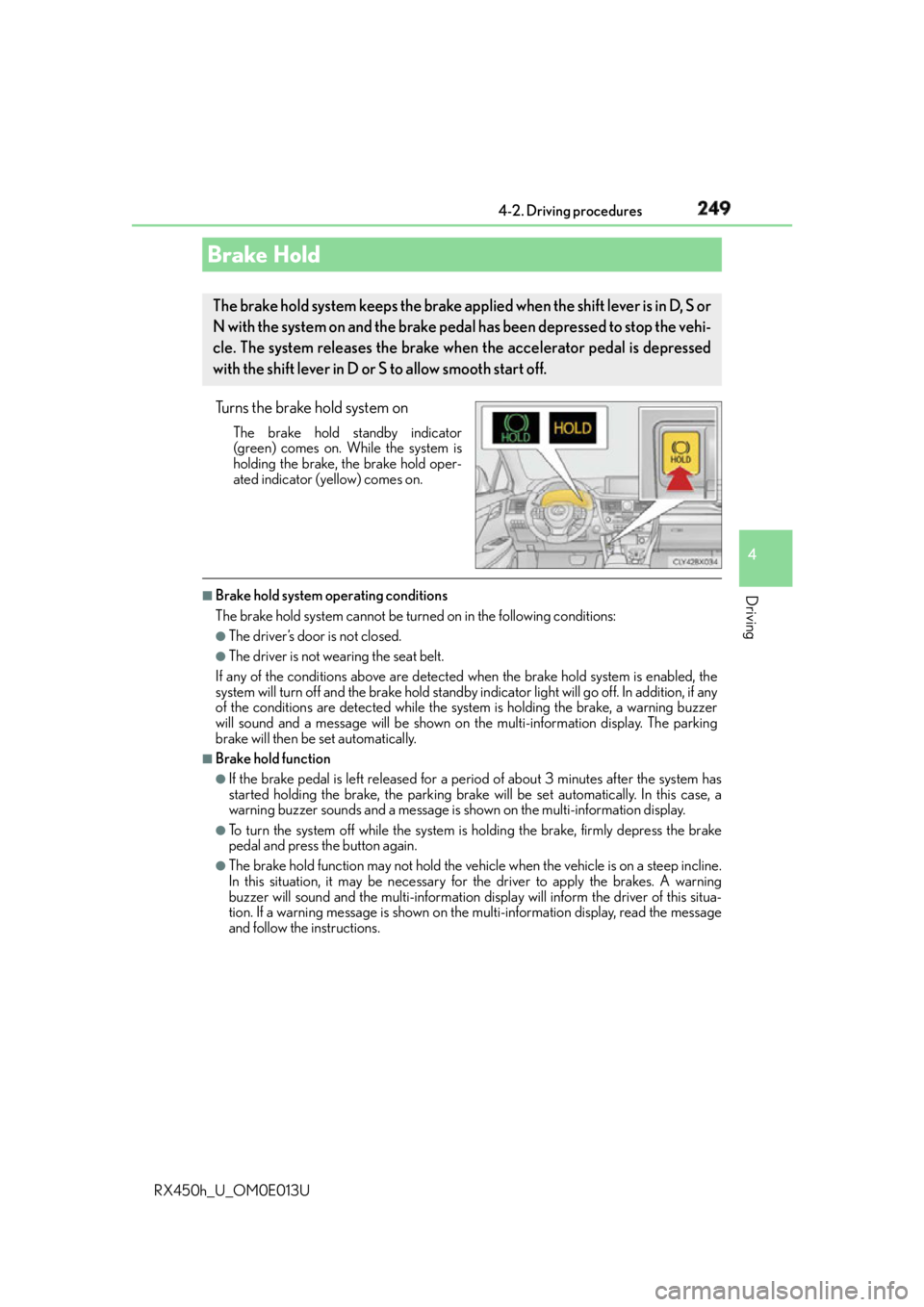
RX450h_U_OM0E013U Turns the brake hold system on The brake hold standby indicator
(green) comes on. While the system is
holding the brake, the brake hold oper-
ated indicator (yellow) comes on. ■
Brake hold system operating conditions
The brake hold system cannot be turn ed on in the following conditions:●
The driver’s door is not closed. ●
The driver is not wearing the seat belt.
If any of the conditions above are detected when the brake hold system is enabled, the
system will turn off and the brake hold standby in dicator light will go of f. In addition, if any
of the conditions are detected while the sy stem is holding the brake, a warning buzzer
will sound and a message will be shown on th e multi-information display. The parking
brake will then be set automatically. ■
Brake hold function ●
If the brake pedal is left released for a period of about 3 minutes after the system has
started holding the brake, the parking brake w ill be set automatically. In this case, a
warning buzzer sounds and a message is shown on the multi-information display.●
To turn the system off while the system is holding the brake, firmly depress the brake
pedal and press the button again. ●
The brake hold function may not hold the vehicle when the vehicle is on a steep incline.
In this situation, it may be necessary fo r the driver to apply the brakes. A warning
buzzer will sound and the multi-information di splay will inform the dr iver of this situa-
tion. If a warning message is shown on the multi-information displa y, re a d t h e m e s s a g e
and follow the instructions.Brake Hold The brake hold system keeps the brake applied when the shift lever is in D, S or
N with the system on and the brake pedal has been depressed to stop the vehi-
cle. The system releases the brake when the accelerator pedal is depressed
with the shift lever in D or S to allow smooth start off.
Page 250 of 660

250 4-2. Driving procedures
RX450h_U_OM0E013U ■
When the parking brake is set automatically while the system is holding the brakes
The parking brake will not be released automatically. With the brake pedal depressed,
release the parking brake by operating the parking brake switch, making sure that the
parking brake indicator light goes off. ( P. 2 4 5 )■
If “Brake Hold Fault Depress Brake to Deacti vate Visit Your Dealer” is displayed on the
multi-information display
The system may be malfunctioning. Have the vehicle inspected by your Lexus dealer
immediately. ■
Warning messages and buzzers
Warning messages and buzzers are used to indicate a system malfunction or to inform
the driver of the need for caution. If a warn ing message is shown on the multi-information
display, read the message and follow the instructions.■
If the brake hold operated indicator flashes
P. 5 3 6
WA R N I N G ■
When the vehicle is on a steep incline
When using the brake hold system on a stee p incline exercise caution. The brake hold
function may not hold the vehicle in such a situation. ■
When stopped on a slippery road
The system cannot stop the vehicle when the gripping ability of the tires has been
exceeded. Do not use the system when stopped on a slippery road.
NOTICE ■
When parking the vehicle
The brake hold system is not designed for use when parking the vehicle for a long
period of time. Turning the power switch of f while the system is holding the brake may
release the brake, which would cause the vehicle to move. When operating the power
switch, depress the brake pedal, shift the shift lever to P and set the parking brake.
Page 269 of 660
2694-4. Refueling
4
Driving
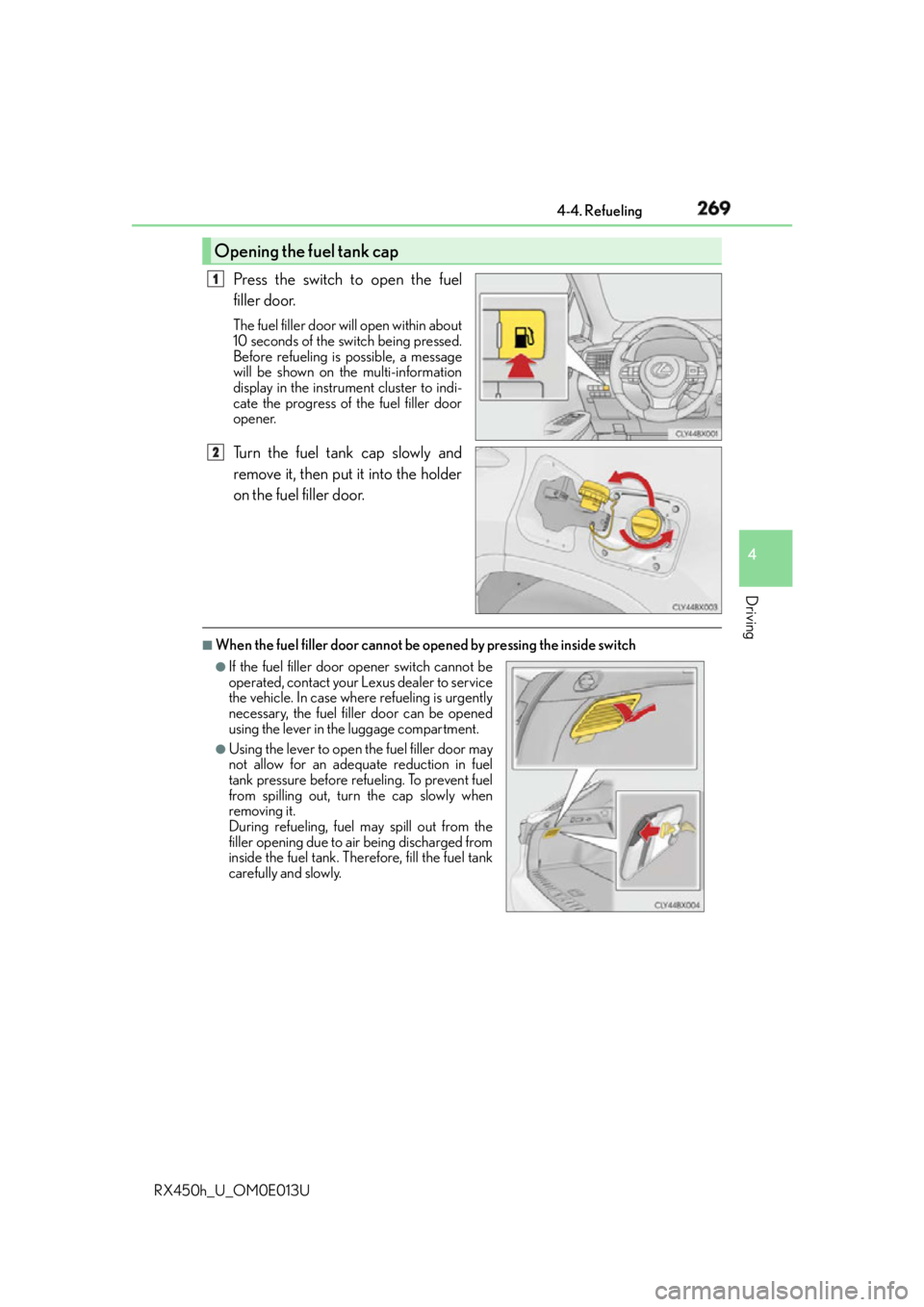
RX450h_U_OM0E013U Press the switch to open the fuel
filler door. The fuel filler door will open within about
10 seconds of the switch being pressed.
Before refueling is possible, a message
will be shown on the multi-information
display in the instrument cluster to indi-
cate the progress of the fuel filler door
opener.
Turn the fuel tank cap slowly and
remove it, then put it into the holder
on the fuel filler door. ■
When the fuel filler door cannot be opened by pressing the inside switchOpening the fuel tank cap 1
2
●
If the fuel filler door opener switch cannot be
operated, contact your Lexus dealer to service
the vehicle. In case where refueling is urgently
necessary, the fuel filler door can be opened
using the lever in the luggage compartment. ●
Using the lever to open the fuel filler door may
not allow for an adequate reduction in fuel
tank pressure before refueling. To prevent fuel
from spilling out, turn the cap slowly when
removing it.
During refueling, fuel may spill out from the
filler opening due to air being discharged from
inside the fuel tank. Therefore, fill the fuel tank
carefully and slowly.
Page 280 of 660
280 4-5. Using the driving support systems
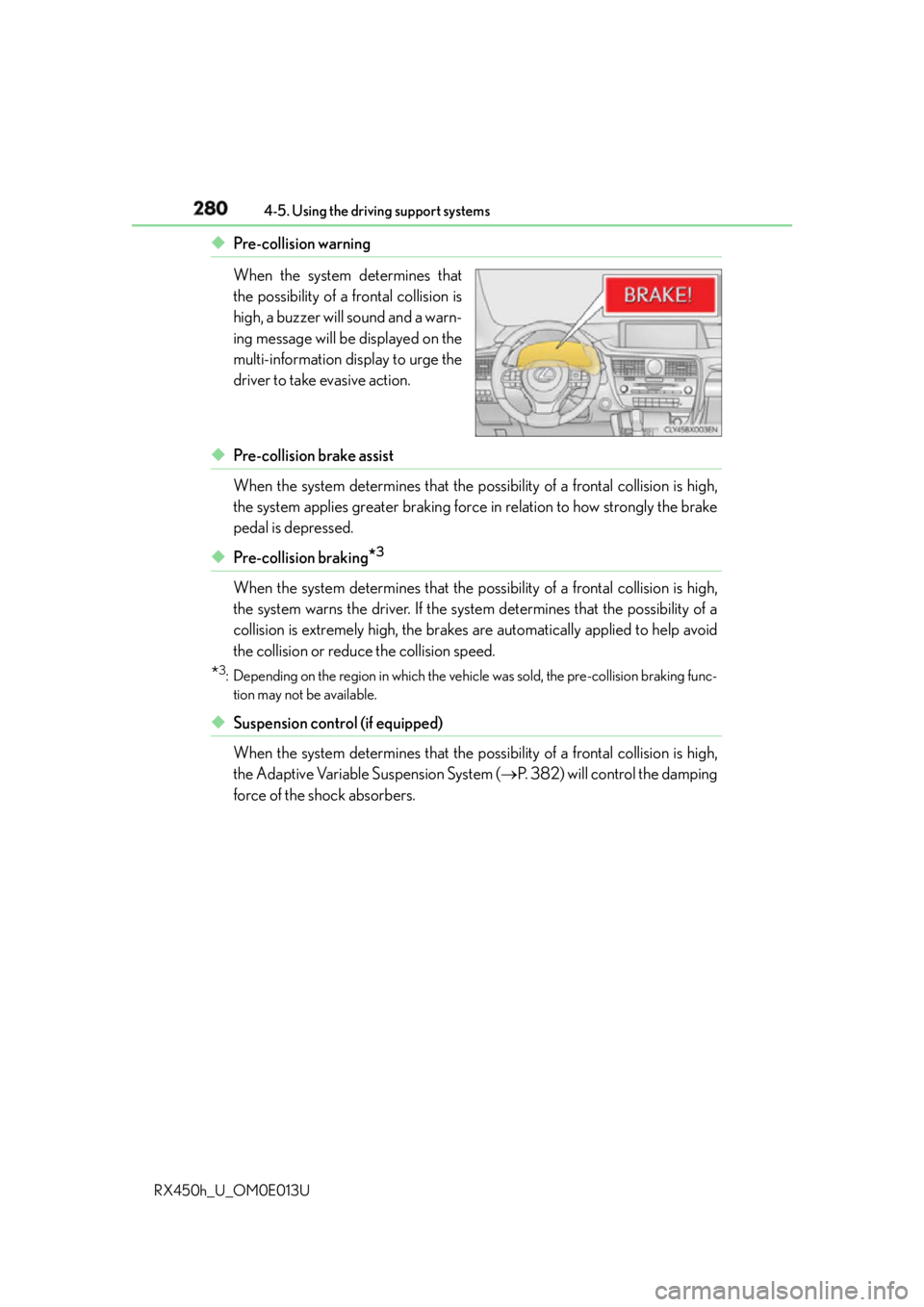
RX450h_U_OM0E013U ◆ Pre-collision warning
When the system determines that
the possibility of a frontal collision is
high, a buzzer will sound and a warn-
ing message will be displayed on the
multi-information display to urge the
driver to take evasive action.
◆ Pre-collision brake assist
When the system determines that the po ssibility of a frontal collision is high,
the system applies greater braking force in relation to how strongly the brake
pedal is depressed.
◆ Pre-collision braking
* 3
When the system determines that the po ssibility of a frontal collision is high,
the system warns the driver. If the system determines that the possibility of a
collision is extremely high, the brakes are automatically applied to help avoid
the collision or reduce the collision speed.
* 3
: Depending on the region in which the vehi cle was sold, the pre-collision braking func-
tion may not be available.
◆ Suspension control (if equipped)
When the system determines that the po ssibility of a frontal collision is high,
the Adaptive Variable Suspension System ( P. 382) will control the damping
force of the shock absorbers.
Page 283 of 660
2834-5. Using the driving support systems
4
Driving
RX450h_U_OM0E013U ■
Enabling/disabling the pre-collision system
The pre-collision system can be enabled/disabled on ( P. 1 0 9 ) o f t h e
multi-information display. The system is automatically enabled each time the power switch is turned to ON
mode.
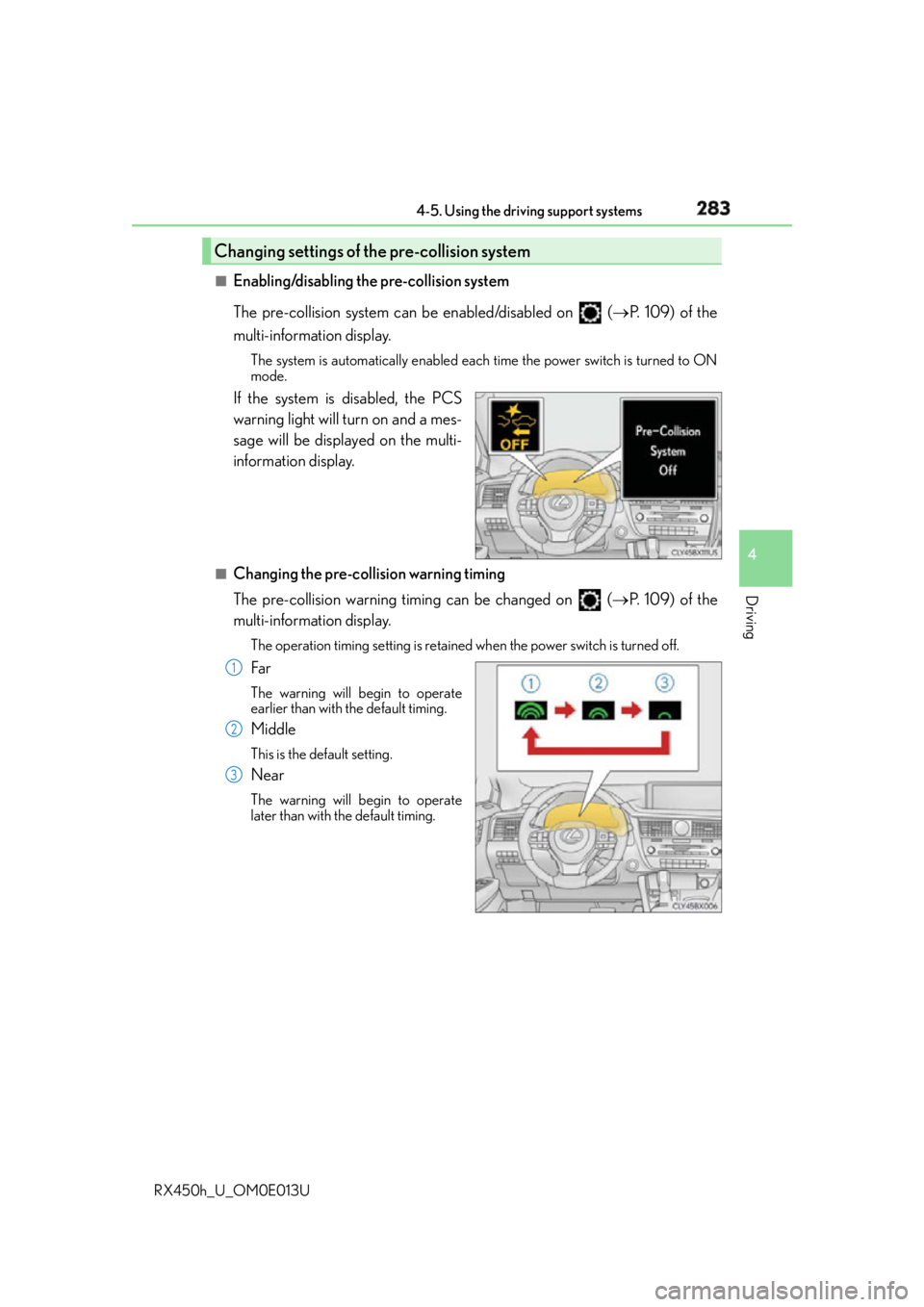
If the system is disabled, the PCS
warning light will turn on and a mes-
sage will be displayed on the multi-
information display. ■
Changing the pre-col lision warning timing
The pre-collision warning timing can be changed on ( P. 1 0 9 ) o f t h e
multi-information display. The operation timing setting is retained when the power switch is turned off.
Far The warning will begin to operate
earlier than with the default timing.
Middle This is the default setting.
Near The warning will begin to operate
later than with the default timing.Changing settings of the pre-collision system
1
2
3
Page 291 of 660

2914-5. Using the driving support systems
4
Driving
RX450h_U_OM0E013U ■
If the PCS warning light flashes and a warnin g message is displayed on the multi-infor-
mation display
The pre-collision system may be temporarily unavailable or there may be a malfunction
in the system. ●
In the following situations, the warning light will turn off, the message will disappear and
the system will become operational when normal operating conditions return:
• When the radar sensor or camera sensor or the area around either sensor is hot,
such as in the sun
• When the radar sensor or camera sensor or the area around either sensor is cold,
such as in an extremely cold environment
• When the radar sensor or front grille embl em is dirty or covered with snow, etc.
• If the camera sensor is obst ructed, such as when the h ood is open or a sticker is
attached to the windshield near the camera sensor ●
If the PCS warning light continues to flash or the warning messag e does not disappear,
the system may be malfunctioning. Have the vehicle inspected by your Lexus dealer
immediately. ■
If VSC is disabled ●
If VSC is disabled ( P. 384), the pre-collision brake assist and pre-collision braking
functions are also disabled. ●
The PCS warning light will turn on and “VSC Turned Off Pre-Collision Brake System
Unavailable” will be displayed on the multi-information display.