door lock LEXUS RX450h 2016 Repair Manual
[x] Cancel search | Manufacturer: LEXUS, Model Year: 2016, Model line: RX450H, Model: LEXUS RX450H 2016Pages: 660, PDF Size: 10.15 MB
Page 546 of 660

546 7-2. Steps to take in an emergency
RX450h_U_OM0E013U ■
If “Shift Is in N Release Accelerator Before Shifting” is shown
Message is displayed when the acceler ator pedal has been depressed and
the shift lever is in N. Release the accelerator pedal and shift the shift lever to
D or R. ■
If “Depress Brake when Vehicle Is Stopped Hybrid System May Overheat”
is shown
Message is displayed when the accelerator pedal is depressed to maintain the
vehicle position when stopped on a upward slope, etc.
If this continues, the hybrid system may overheat.
Release the accelerator pedal and depress the brake pedal. ■
If “Power Turned Off to Save Battery” is displayed
This message is displayed when the power was cut off due to the automatic
power off function.
The next time the hybrid system is star ted, increase the engine speed slightly
and maintain it at that speed for appr oximately 5 minutes to recharge the 12-
volt battery. ■
If “A New Key has been Registered Contact Your Dealer for Details” is dis-
played
This message will be displayed each time the driver's door is opened when the
doors are unlocked from the outside for approximately one week after a new
electronic key has been registered.
If this message is displayed but you have not had a new electronic key regis-
tered, ask your Lexus dealer to check if an unknown electronic key (other than
those in your possession) has been registered. ■
When “Headlight System Malfunctio n Visit Your Dealer” is displayed
The following systems may be malfunct ioning. Have the vehicle inspected by
your Lexus dealer immediately. ●
The LED headlight system ●
The automatic headlight leveling system ●
Automatic High Beam (if equipped) ●
AFS (Adaptive Front-lighting System) (if equipped)
Page 564 of 660
564 7-2. Steps to take in an emergency
RX450h_U_OM0E013U ■
Unlocking the door
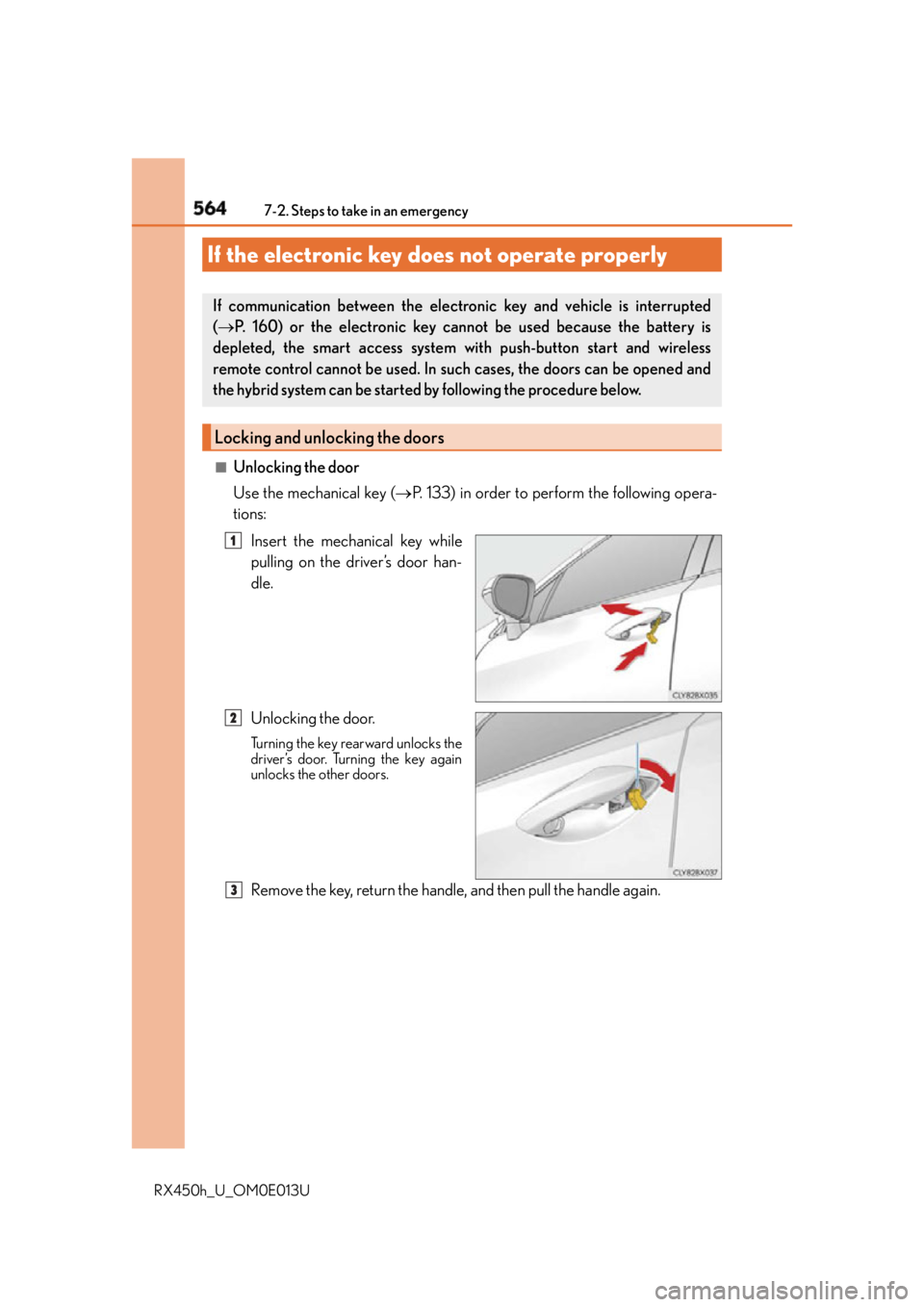
Use the mechanical key ( P. 133) in order to perform the following opera-
tions:
Insert the mechanical key while
pulling on the driver’s door han-
dle.
Unlocking the door. Turning the key rearward unlocks the
driver’s door. Turning the key again
unlocks the other doors.
Remove the key, return the handle, and then pull the handle again.If the electronic key do es not operate properlyIf communication between the electron ic key and vehicle is interrupted
( P. 160) or the electronic key ca nnot be used because the battery is
depleted, the smart access system with push-button start and wireless
remote control cannot be used. In such cases, the doors can be opened and
the hybrid system can be started by following the procedure below.
Locking and unlocking the doors 1
2
3
Page 565 of 660
5657-2. Steps to take in an emergency
7
When trouble arises
RX450h_U_OM0E013U ■
Locking the door
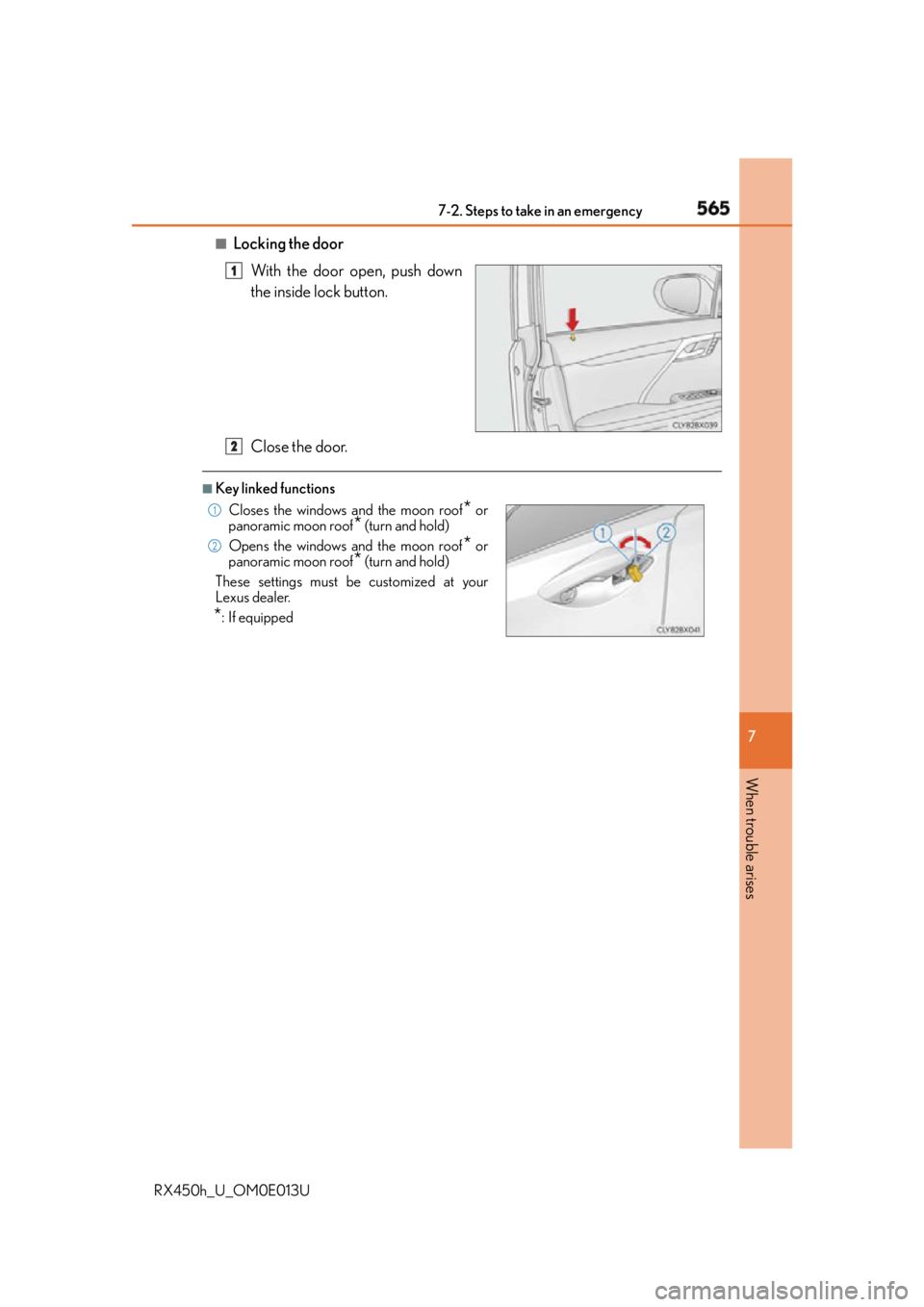
With the door open, push down
the inside lock button.
Close the door. ■
Key linked functions 1
Closes the windows and the moon roof
* or
panoramic moon roof
* (turn and hold)
Opens the windows and the moon roof
* or
panoramic moon roof
* (turn and hold)
These settings must be customized at your
Lexus dealer.
* : If equipped 2 1
2
Page 568 of 660
568 7-2. Steps to take in an emergency
RX450h_U_OM0E013U If you have a set of jumper (or booster) cables and a second vehicle with a 12-volt
battery, you can jump start your vehicle by following the steps below.
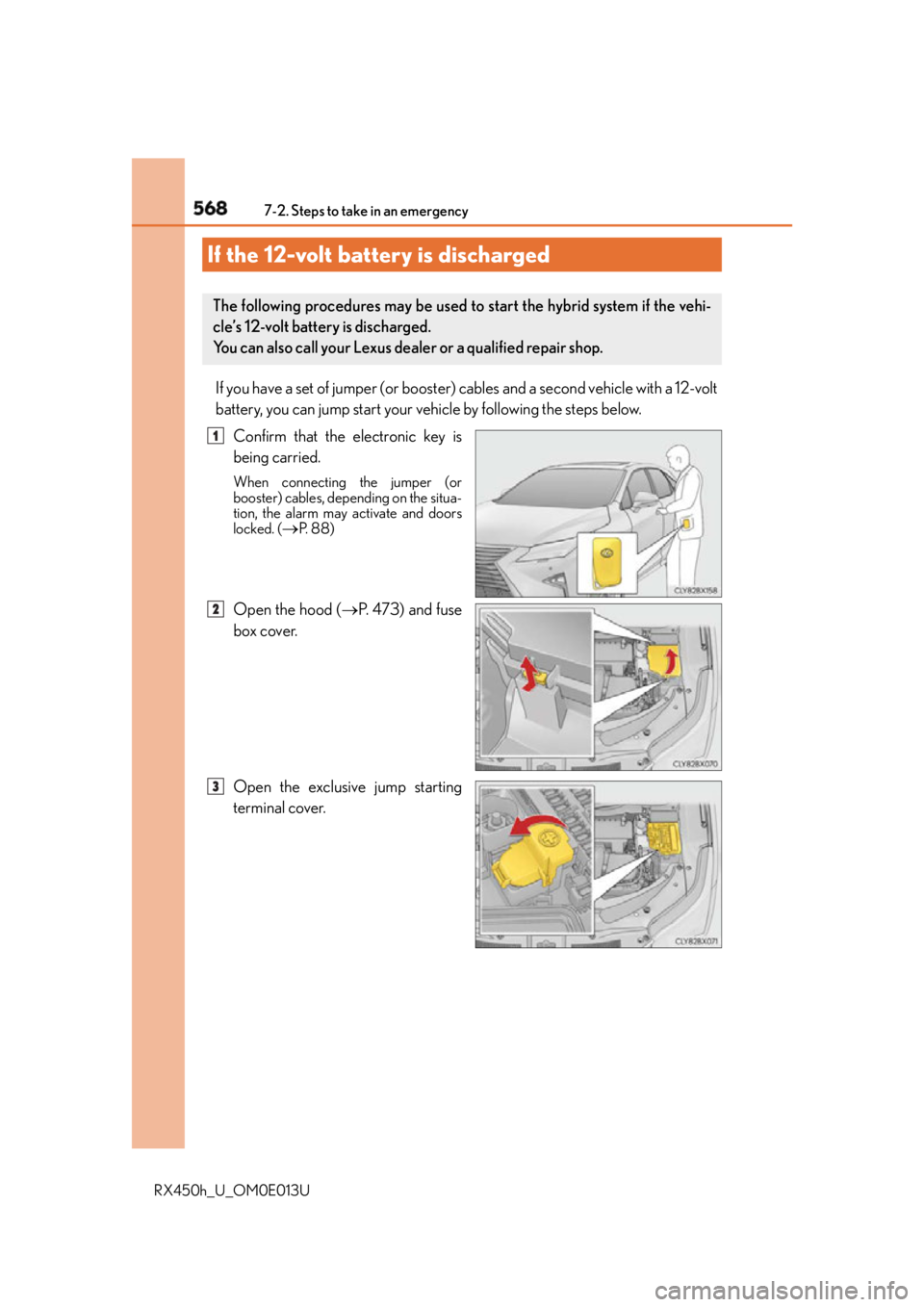
Confirm that the electronic key is
being carried. When connecting the jumper (or
booster) cables, depending on the situa-
tion, the alarm may activate and doors
locked. (
P. 8 8 )
Open the hood ( P. 4 7 3 ) a n d f u s e
box cover.
Open the exclusive jump starting
terminal cover.If the 12-volt battery is discharged The following procedures may be used to start the hybrid system if the vehi-
cle’s 12-volt battery is discharged.
You can also call your Lexus dealer or a qualified repair shop. 1
2
3
Page 570 of 660
570 7-2. Steps to take in an emergency
RX450h_U_OM0E013U Start the engine of the second vehicle. Increase the engine speed slightly and
maintain at that level for approximately 5 minutes to recharge the 12-volt bat-
tery of your vehicle.
Open and close any of the doors of your vehicle with the power switch off.
Maintain the engine speed of the second vehicle and start the hybrid system
of your vehicle by turning the power switch to ON mode.
Make sure the “READY” indicator comes on. If the indicator light does not
come on, contact your Lexus dealer.
Once the hybrid system has started, remove the jumper cables in the exact
reverse order from which they were connected.
Close the exclusive jump starting terminal cover, and reinstall the fuse box
cover to its original position.
Once the hybrid system starts, have th e vehicle inspected at your Lexus dealer
as soon as possible. ■
Starting the hybrid system when the 12-volt battery is discharged
The hybrid system cannot be started by push-starting. ■
To prevent 12-volt battery discharge ●
Turn off the headlights and the audio system while the hybrid system is off. ●
Turn off any unnecessary electrical components when the vehicle is running at a low
speed for an extended period, such as in heavy traffic. ■
Charging the 12-volt battery
The electricity stored in the 12-volt battery will discharge gradually even when the vehicle
is not in use, due to natural discharge and th e draining effects of certain electrical appli-
ances. If the vehicle is left for a long time, the 12-volt battery may discharge, and the
hybrid system may be unable to start. (The 12-volt battery recharges automatically while
the hybrid system is operating.) ■
When the 12-volt battery is removed or discharged ●
In some cases, it may not be possible to unlock the doors using the smart access system
with push-button start when the 12-volt battery is discharged. Use the wireless remote
control or the mechanical key to lock or unlock the doors. ●
The hybrid system may not start on the first attempt after the 12-volt battery has
recharged but will start normally after the second attempt. This is not a malfunction.●
The power switch mode is memorized by the vehicle. When the 12-volt battery is
reconnected, the system will return to the mode it was in before the 12-volt battery was
discharged. Before disconnecting the 12-volt battery, turn the power switch off.
If you are unsure what mode the power switch was in before the 12-volt battery dis-
charged, be especially careful when reconnecting the 12-volt battery. ●
The power back door must be initialized. ( P. 1 5 0 )6
7
8
9
10
11
Page 608 of 660
608 8-2. Customization
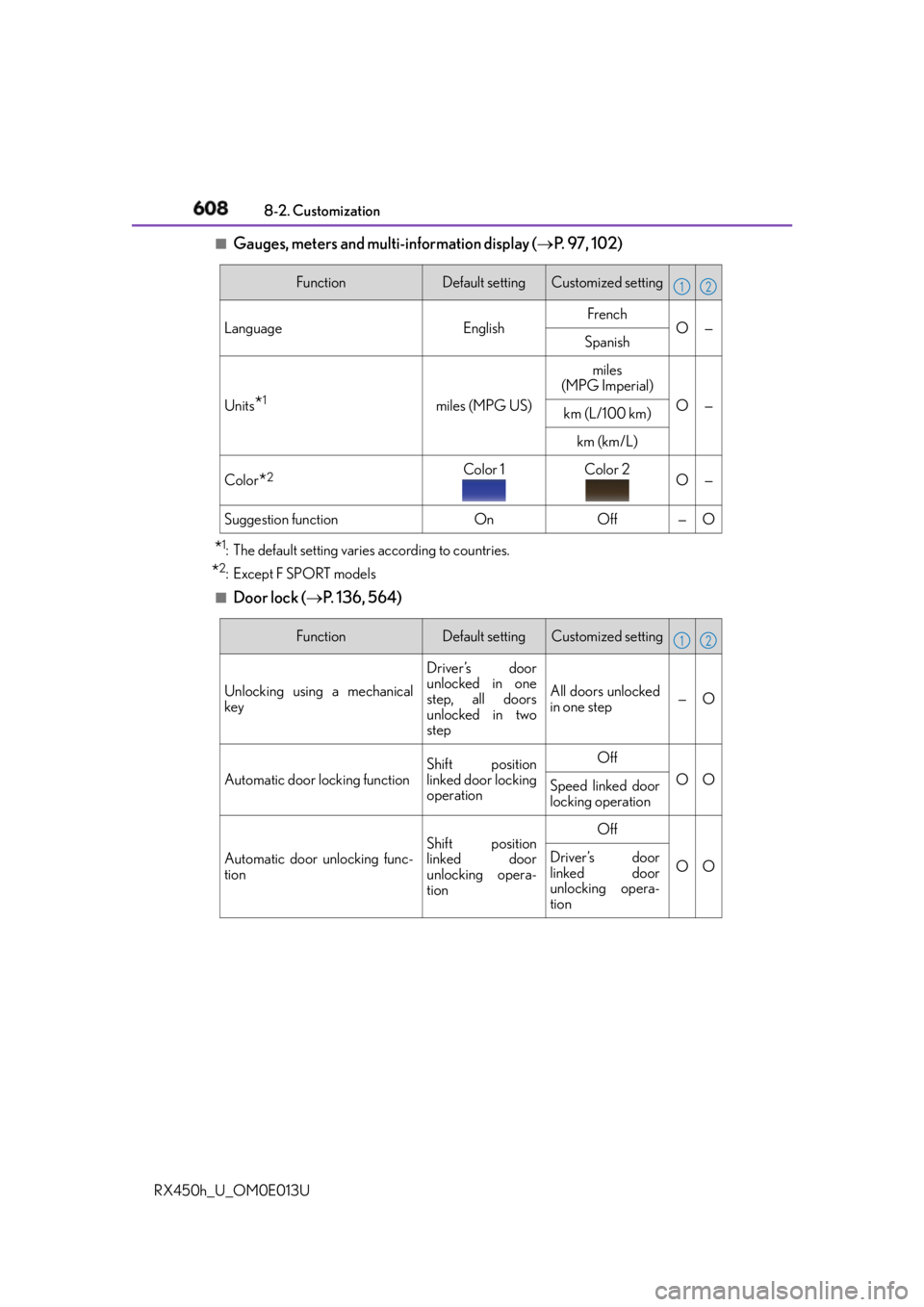
RX450h_U_OM0E013U ■
Gauges, meters and multi-information display ( P. 9 7 , 1 0 2 )
* 1
: The default setting varies according to countries.
* 2
:Except F SPORT models ■
Door lock ( P. 1 3 6 , 5 6 4 ) Function Default setting Customized setting
Language English French
O—
Spanish
Units
* 1
miles (MPG US) miles
(MPG Imperial)
O —
km (L/100 km)
km (km/L)
Color
* 2
Color 1 Color 2
O —
Suggestion function On Off — O 1 2
Function Default setting Customized setting
Unlocking using a mechanical
key Driver’s door
unlocked in one
step, all doors
unlocked in two
step All doors unlocked
in one step — O
Automatic door locking function Shift position
linked door locking
operation Off
O O
Speed linked door
locking operation
Automatic door unlocking func-
tion Shift position
linked door
unlocking opera-
tion Off
O ODriver’s door
linked door
unlocking opera-
tion 1 2
Page 610 of 660
610 8-2. Customization
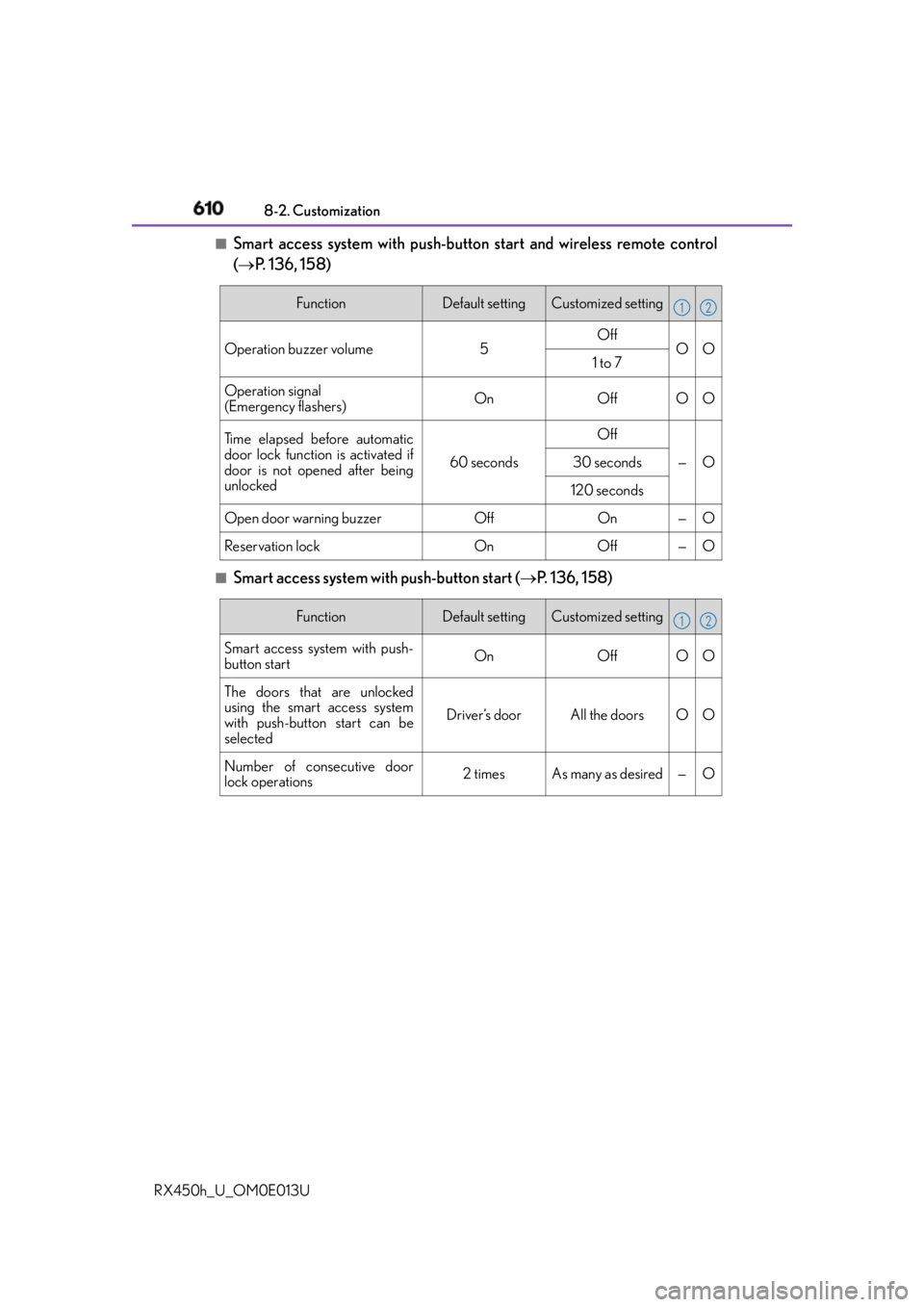
RX450h_U_OM0E013U ■
Smart access system with push-button start and wireless remote control
( P. 136, 158)
■
Smart access system with push-button start ( P. 136, 158)Function Default setting Customized setting
Operation buzzer volume 5 Off
O O
1 to 7
Operation signal
(Emergency flashers) On Off O O
Ti m e e l a p s e d b e f o r e a u t o m a t i c
door lock function is activated if
door is not opened after being
unlocked 60 seconds Off
— O30 seconds
120 seconds
Open door warning buzzer Off On — O
Reservation lock On Off — O 1 2
Function Default setting Customized setting
Smart access system with push-
button start On Off O O
The doors that are unlocked
using the smart access system
with push-button start can be
selected Driver’s door All the doors O O
Number of consecutive door
lock operations 2 times As many as desired — O 1 2
Page 611 of 660
6118-2. Customization
8
Vehicle specifications
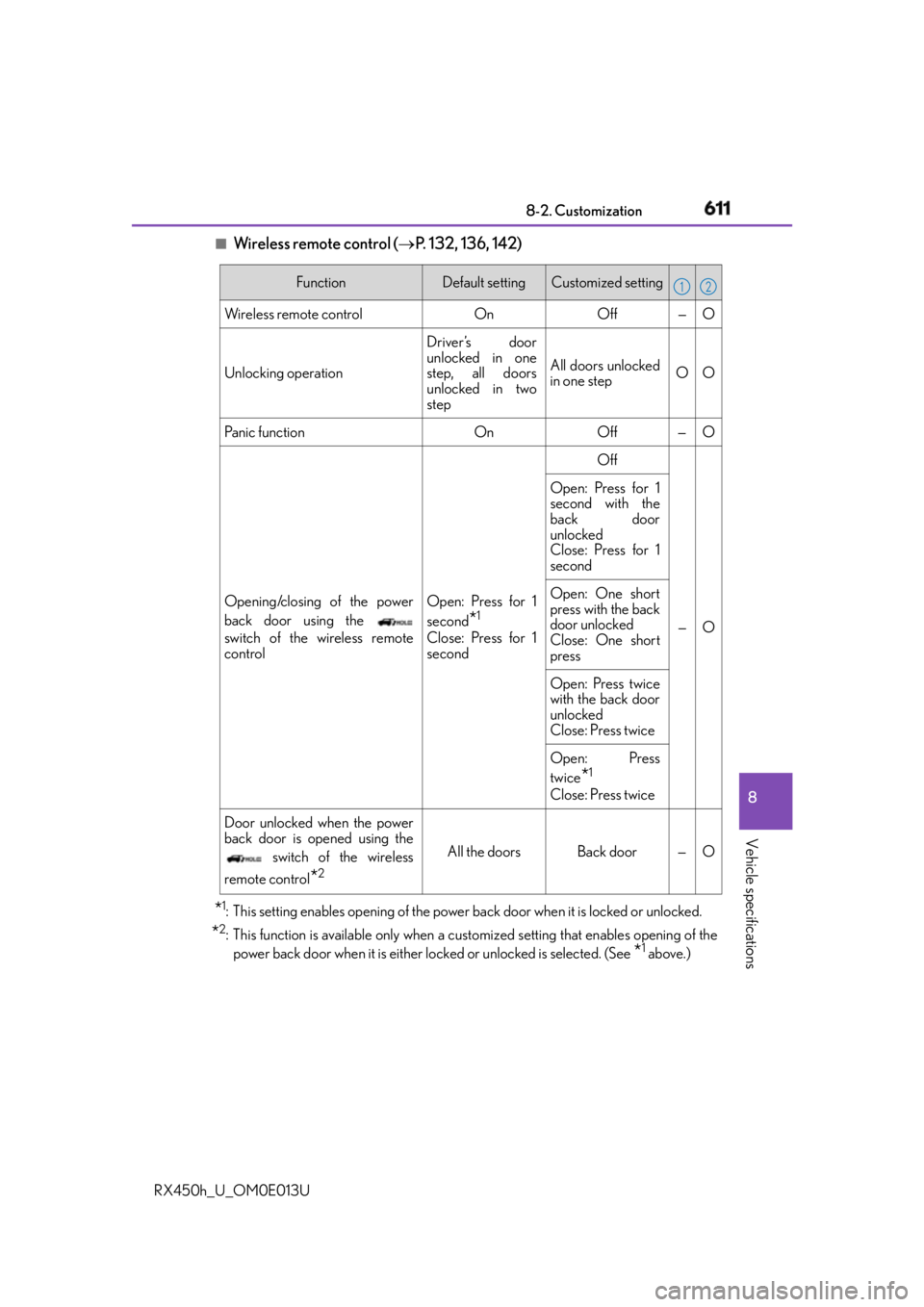
RX450h_U_OM0E013U ■
Wireless remote control ( P. 132, 136, 142)
* 1
: This setting enables opening of the power back door when it is locked or unlocked.
* 2
: This function is available only when a cust omized setting that en ables opening of the
power back door when it is either lo cked or unlocked is selected. (See
* 1
above.)Function Default setting Customized setting
Wireless remote control On Off — O
Unlocking operation Driver’s door
unlocked in one
step, all doors
unlocked in two
step All doors unlocked
in one step OO
Pa n i c f u n c t i o n O n O f f — O
Opening/closing of the power
back door using the
switch of the wireless remote
control Open: Press for 1
second
* 1
Close: Press for 1
second Off
—OOpen: Press for 1
second with the
back door
unlocked
Close: Press for 1
second
Open: One short
press with the back
door unlocked
Close: One short
press
Open: Press twice
with the back door
unlocked
Close: Press twice
Open: Press
twice
* 1
Close: Press twice
Door unlocked when the power
back door is opened using the
switch of the wireless
remote control
* 2
All the doors Back door — O 1 2
Page 612 of 660
612 8-2. Customization
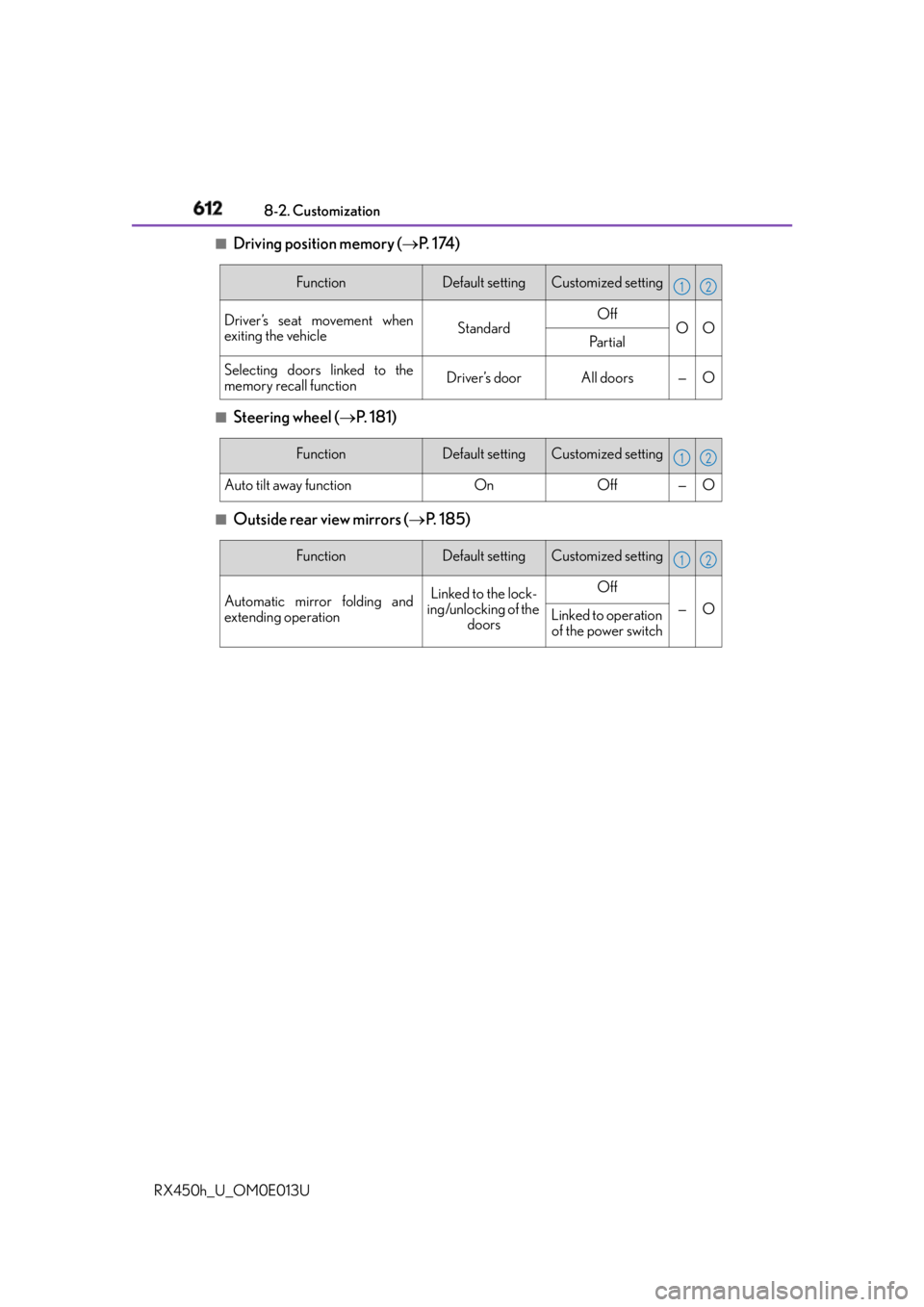
RX450h_U_OM0E013U ■
Driving position memory ( P. 1 74 )
■
Steering wheel ( P. 181)■
Outside rear view mirrors ( P. 1 8 5 )Function Default setting Customized setting
Driver’s seat movement when
exiting the vehicle Standard Off
O O
Pa r t i a l
Selecting doors linked to the
memory recall function Driver’s door All doors — O 1 2
Function Default setting Customized setting
Auto tilt away function On Off — O 1 2
Function Default setting Customized setting
Automatic mirror folding and
extending operation Linked to the lock-
ing/unlocking of the
doors Off
— O
Linked to operation
of the power switch 1 2
Page 617 of 660
6178-2. Customization
8
Vehicle specifications
RX450h_U_OM0E013U ■
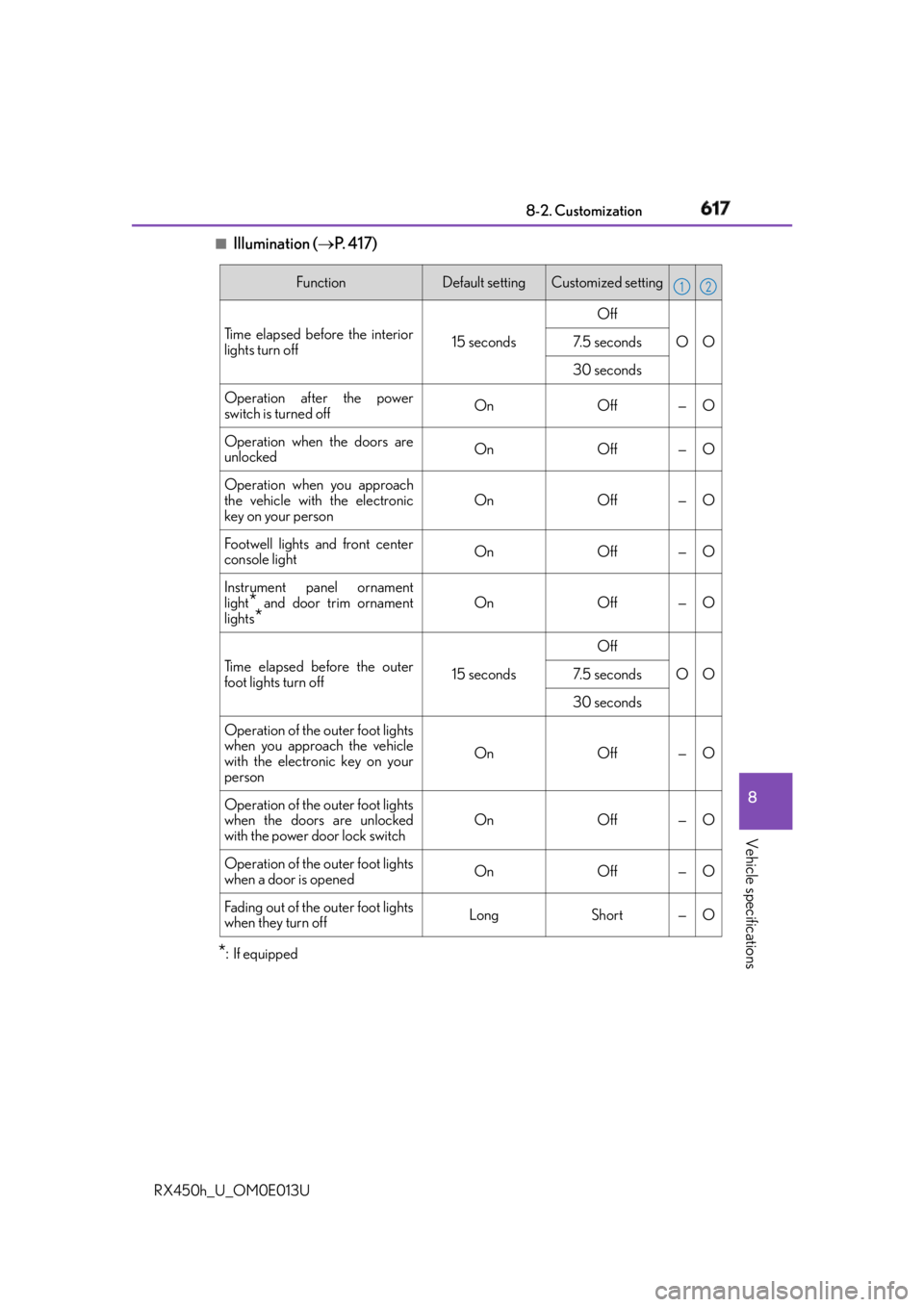
Illumination ( P. 4 1 7 )
* : If equipped Function Default setting Customized setting
Time elapsed before the interior
lights turn off 15 seconds Off
O O7. 5 s e c o n d s
30 seconds
Operation after the power
switch is turned off On Off — O
Operation when the doors are
unlocked On Off — O
Operation when you approach
the vehicle with the electronic
key on your person On Off — O
Footwell lights and front center
console light On Off — O
Instrument panel ornament
light
* and door trim ornament
lights
* On Off — O
Time elapsed before the outer
foot lights turn off 15 seconds Off
O O7. 5 s e c o n d s
30 seconds
Operation of the outer foot lights
when you approach the vehicle
with the electronic key on your
person On Off — O
Operation of the outer foot lights
when the doors are unlocked
with the power door lock switch On Off — O
Operation of the outer foot lights
when a door is opened On Off — O
Fading out of the outer foot lights
when they turn off Long Short — O 1 2