key LEXUS RX450h 2016 Repair Manual
[x] Cancel search | Manufacturer: LEXUS, Model Year: 2016, Model line: RX450H, Model: LEXUS RX450H 2016Pages: 660, PDF Size: 10.15 MB
Page 566 of 660
566 7-2. Steps to take in an emergency
RX450h_U_OM0E013U Ensure that the shift lever is in P and depress the brake pedal.
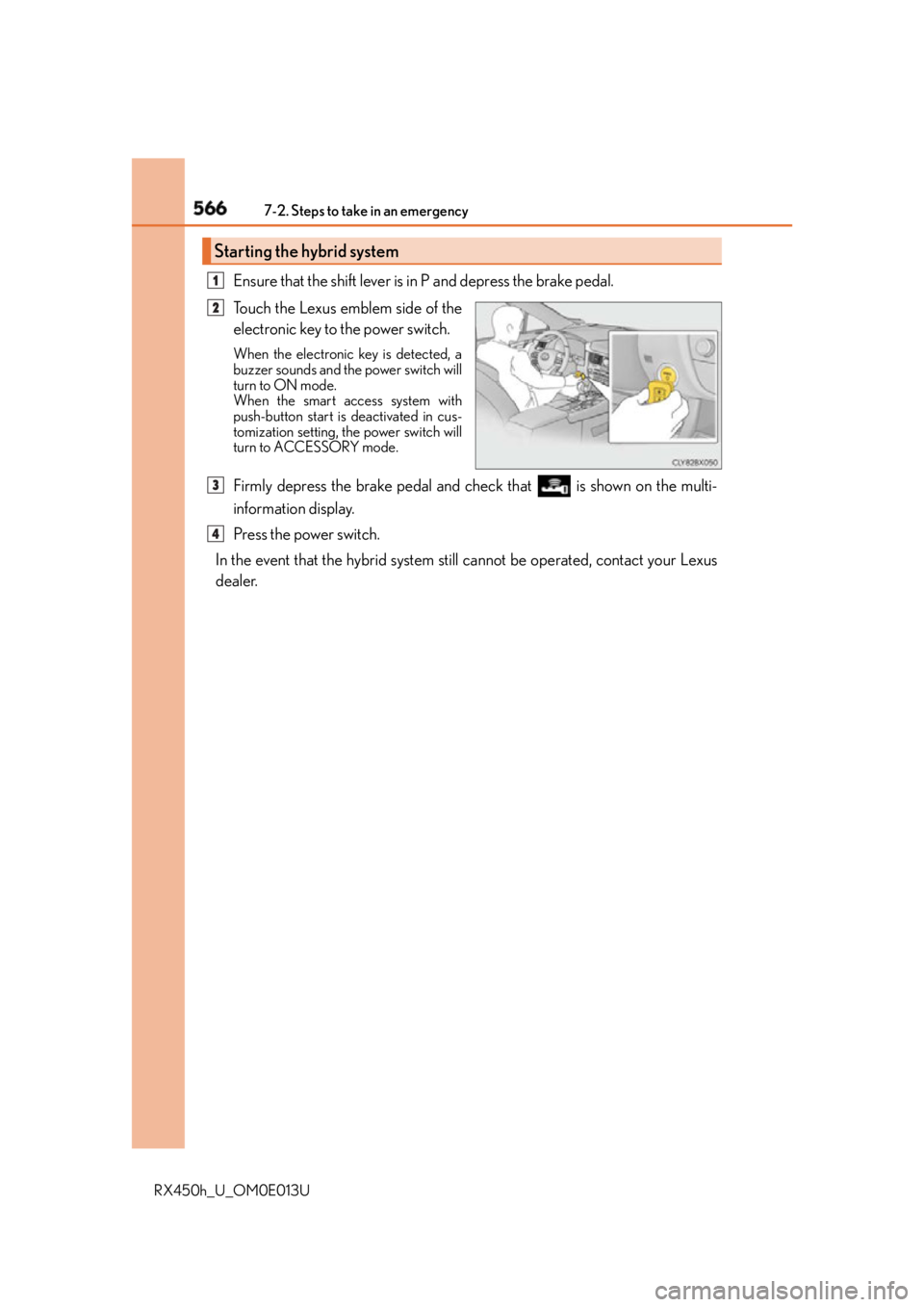
Touch the Lexus emblem side of the
electronic key to the power switch. When the electronic key is detected, a
buzzer sounds and the power switch will
turn to ON mode.
When the smart access system with
push-button start is deactivated in cus-
tomization setting, the power switch will
turn to ACCESSORY mode.
Firmly depress the brake pedal and check that is shown on the multi-
information display.
Press the power switch.
In the event that the hybrid system st ill cannot be operated, contact your Lexus
dealer.Starting the hybrid system 1
2
3
4
Page 567 of 660
5677-2. Steps to take in an emergency
7
When trouble arises
RX450h_U_OM0E013U ■
Stopping the hybrid system
Shift the shift lever to P, set the parking brake, and press the power switch as you normally
do when stopping the hybrid system. ■
Replacing the key battery
As the above procedure is a temporary measure, it is recommended that the electronic
key battery be replaced immediately when the battery is depleted. ( P. 5 0 6 )■
Changing power switch modes
Release the brake pedal and press the power switch in step above.
The hybrid system does not start and mode s will be changed each time the switch is
pressed. ( P. 2 3 3 )■
When the electronic key does not work properly ●
Make sure that the smart access system wi th push-button start has not been deacti-
vated in the custom ization setting. If it is off, turn the function on.
(Customizable features P. 6 1 0 )●
Check if battery-saving mo de is set. If it is se t, cancel the function. ( P. 1 6 0 )
WA R N I N G ■
When using the mechanical key and operating the power windows or the moon roof
or panoramic moon roof
Operate the power window or the moon roof or panoramic moon roof after checking
to make sure that there is no possibility of any passenger ha ving any of their body parts
caught in the window or the moon roof or panoramic moon roof.
Also, do not allow children to operate the mech anical key. It is possible for children and
other passengers to get caught in the powe r window or the moon roof or panoramic
moon roof. 3
Page 568 of 660
568 7-2. Steps to take in an emergency
RX450h_U_OM0E013U If you have a set of jumper (or booster) cables and a second vehicle with a 12-volt
battery, you can jump start your vehicle by following the steps below.
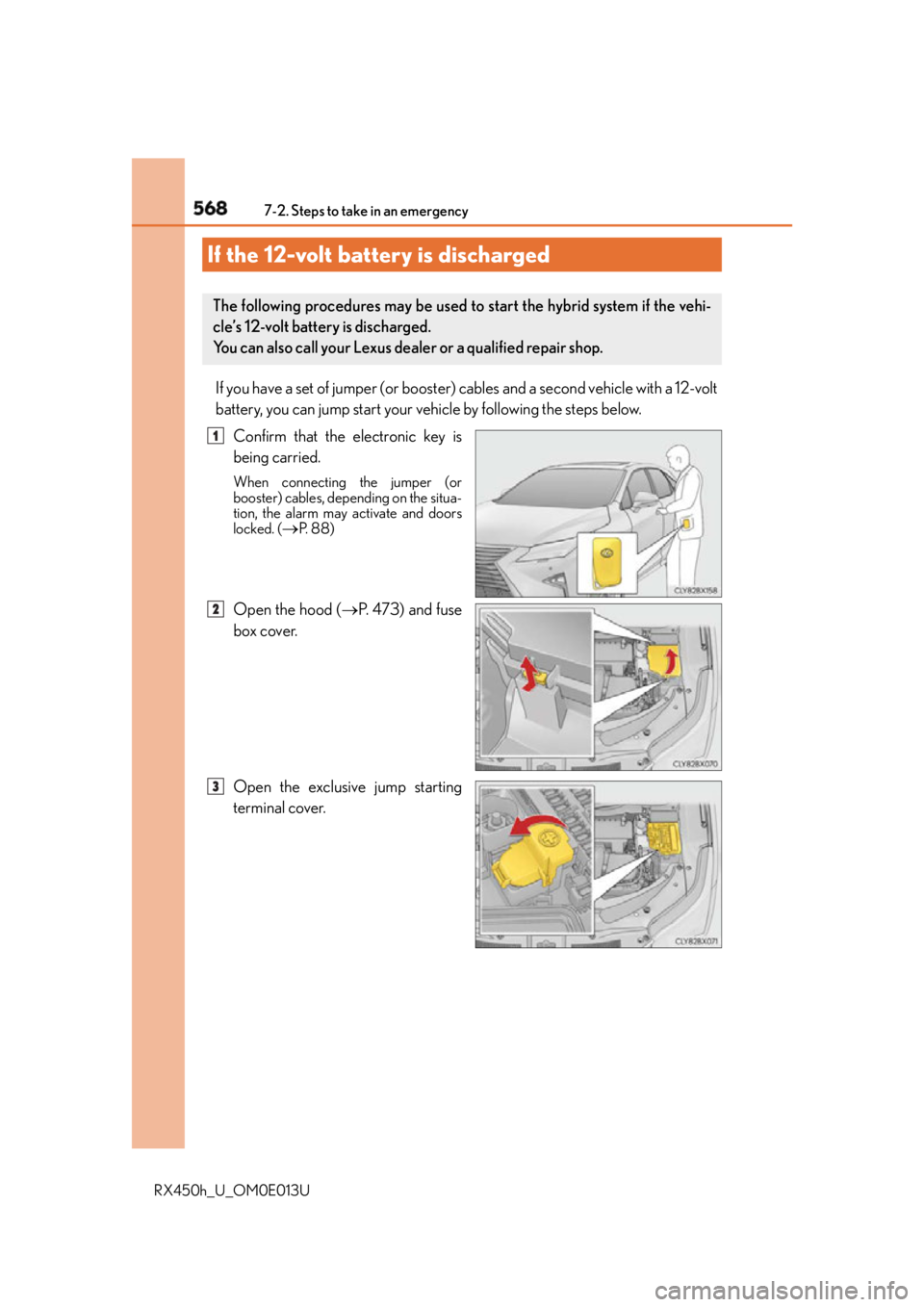
Confirm that the electronic key is
being carried. When connecting the jumper (or
booster) cables, depending on the situa-
tion, the alarm may activate and doors
locked. (
P. 8 8 )
Open the hood ( P. 4 7 3 ) a n d f u s e
box cover.
Open the exclusive jump starting
terminal cover.If the 12-volt battery is discharged The following procedures may be used to start the hybrid system if the vehi-
cle’s 12-volt battery is discharged.
You can also call your Lexus dealer or a qualified repair shop. 1
2
3
Page 570 of 660
570 7-2. Steps to take in an emergency
RX450h_U_OM0E013U Start the engine of the second vehicle. Increase the engine speed slightly and
maintain at that level for approximately 5 minutes to recharge the 12-volt bat-
tery of your vehicle.
Open and close any of the doors of your vehicle with the power switch off.
Maintain the engine speed of the second vehicle and start the hybrid system
of your vehicle by turning the power switch to ON mode.
Make sure the “READY” indicator comes on. If the indicator light does not
come on, contact your Lexus dealer.
Once the hybrid system has started, remove the jumper cables in the exact
reverse order from which they were connected.
Close the exclusive jump starting terminal cover, and reinstall the fuse box
cover to its original position.
Once the hybrid system starts, have th e vehicle inspected at your Lexus dealer
as soon as possible. ■
Starting the hybrid system when the 12-volt battery is discharged
The hybrid system cannot be started by push-starting. ■
To prevent 12-volt battery discharge ●
Turn off the headlights and the audio system while the hybrid system is off. ●
Turn off any unnecessary electrical components when the vehicle is running at a low
speed for an extended period, such as in heavy traffic. ■
Charging the 12-volt battery
The electricity stored in the 12-volt battery will discharge gradually even when the vehicle
is not in use, due to natural discharge and th e draining effects of certain electrical appli-
ances. If the vehicle is left for a long time, the 12-volt battery may discharge, and the
hybrid system may be unable to start. (The 12-volt battery recharges automatically while
the hybrid system is operating.) ■
When the 12-volt battery is removed or discharged ●
In some cases, it may not be possible to unlock the doors using the smart access system
with push-button start when the 12-volt battery is discharged. Use the wireless remote
control or the mechanical key to lock or unlock the doors. ●
The hybrid system may not start on the first attempt after the 12-volt battery has
recharged but will start normally after the second attempt. This is not a malfunction.●
The power switch mode is memorized by the vehicle. When the 12-volt battery is
reconnected, the system will return to the mode it was in before the 12-volt battery was
discharged. Before disconnecting the 12-volt battery, turn the power switch off.
If you are unsure what mode the power switch was in before the 12-volt battery dis-
charged, be especially careful when reconnecting the 12-volt battery. ●
The power back door must be initialized. ( P. 1 5 0 )6
7
8
9
10
11
Page 608 of 660
608 8-2. Customization
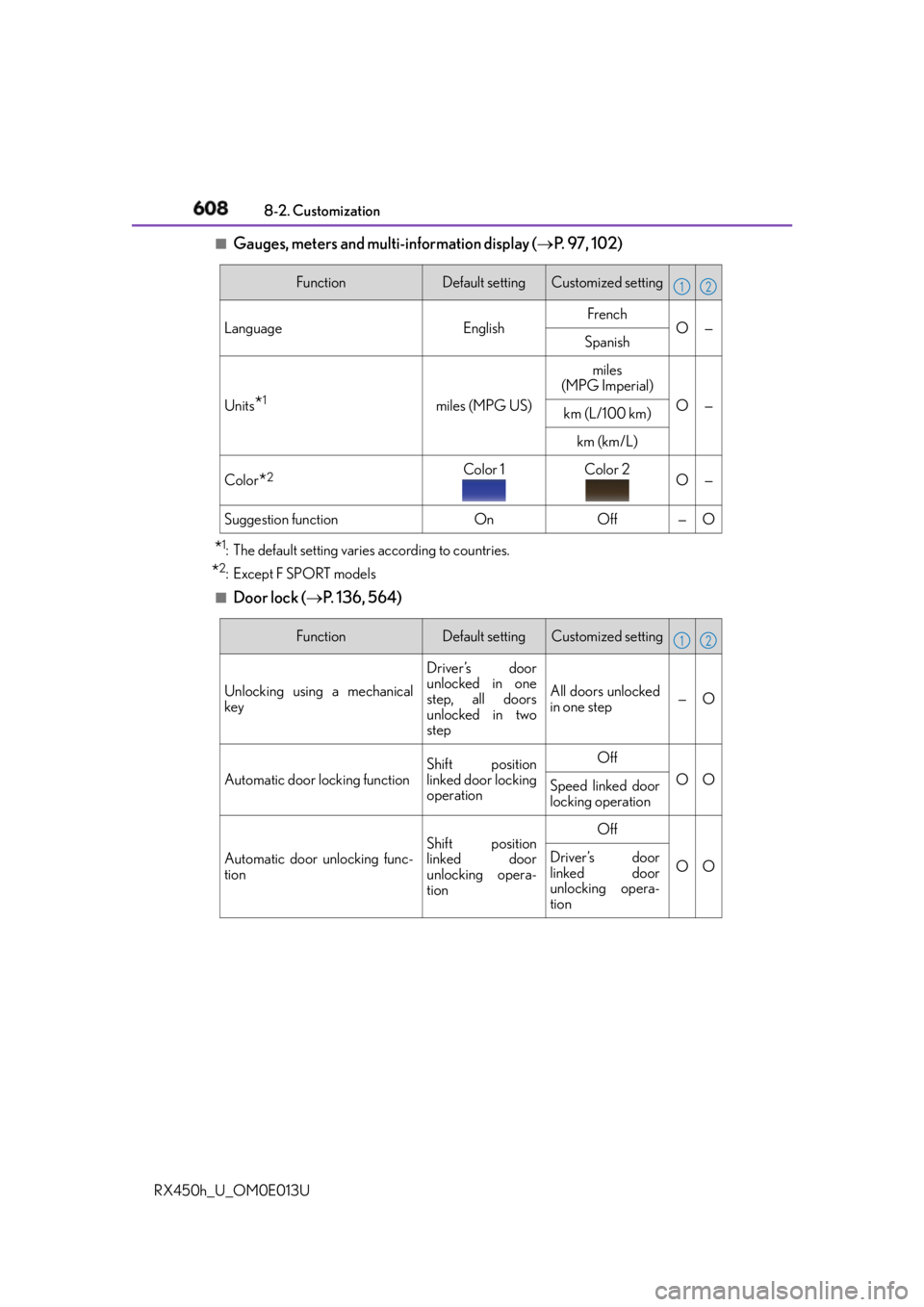
RX450h_U_OM0E013U ■
Gauges, meters and multi-information display ( P. 9 7 , 1 0 2 )
* 1
: The default setting varies according to countries.
* 2
:Except F SPORT models ■
Door lock ( P. 1 3 6 , 5 6 4 ) Function Default setting Customized setting
Language English French
O—
Spanish
Units
* 1
miles (MPG US) miles
(MPG Imperial)
O —
km (L/100 km)
km (km/L)
Color
* 2
Color 1 Color 2
O —
Suggestion function On Off — O 1 2
Function Default setting Customized setting
Unlocking using a mechanical
key Driver’s door
unlocked in one
step, all doors
unlocked in two
step All doors unlocked
in one step — O
Automatic door locking function Shift position
linked door locking
operation Off
O O
Speed linked door
locking operation
Automatic door unlocking func-
tion Shift position
linked door
unlocking opera-
tion Off
O ODriver’s door
linked door
unlocking opera-
tion 1 2
Page 613 of 660
6138-2. Customization
8
Vehicle specifications
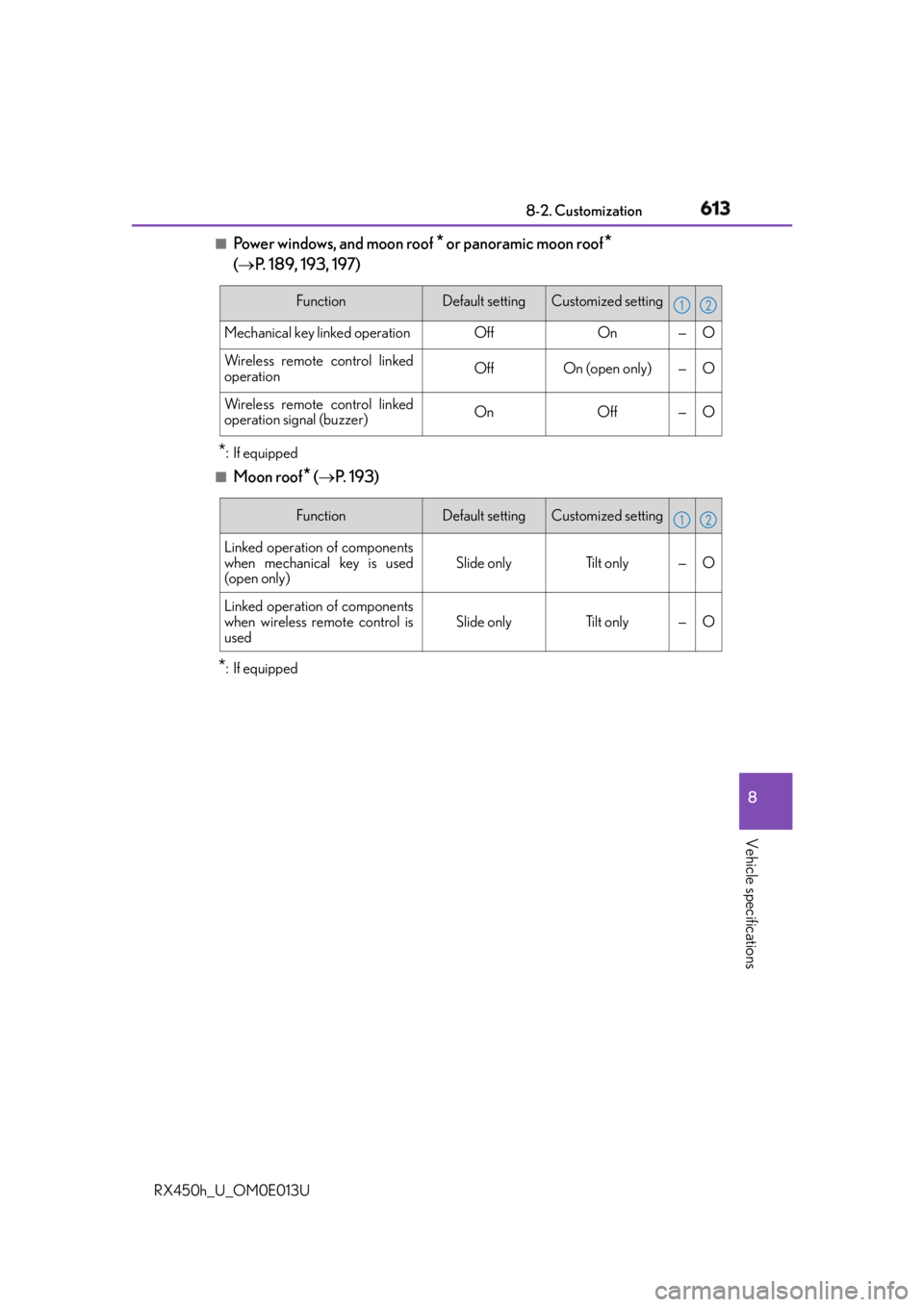
RX450h_U_OM0E013U ■
Power windows, and moon roof
* or panoramic moon roof
*
( P. 189, 193, 197)
* : If equipped■
Moon roof
* ( P. 1 9 3 )
* :If equipped Function Default setting Customized setting
Mechanical key linked operation Off On — O
Wireless remote control linked
operation Off On (open only) — O
Wireless remote control linked
operation signal (buzzer) On Off — O 1 2
Function Default setting Customized setting
Linked operation of components
when mechanical key is used
(open only) Slide only Tilt only — O
Linked operation of components
when wireless remote control is
used Slide only Tilt only — O 1 2
Page 617 of 660
6178-2. Customization
8
Vehicle specifications
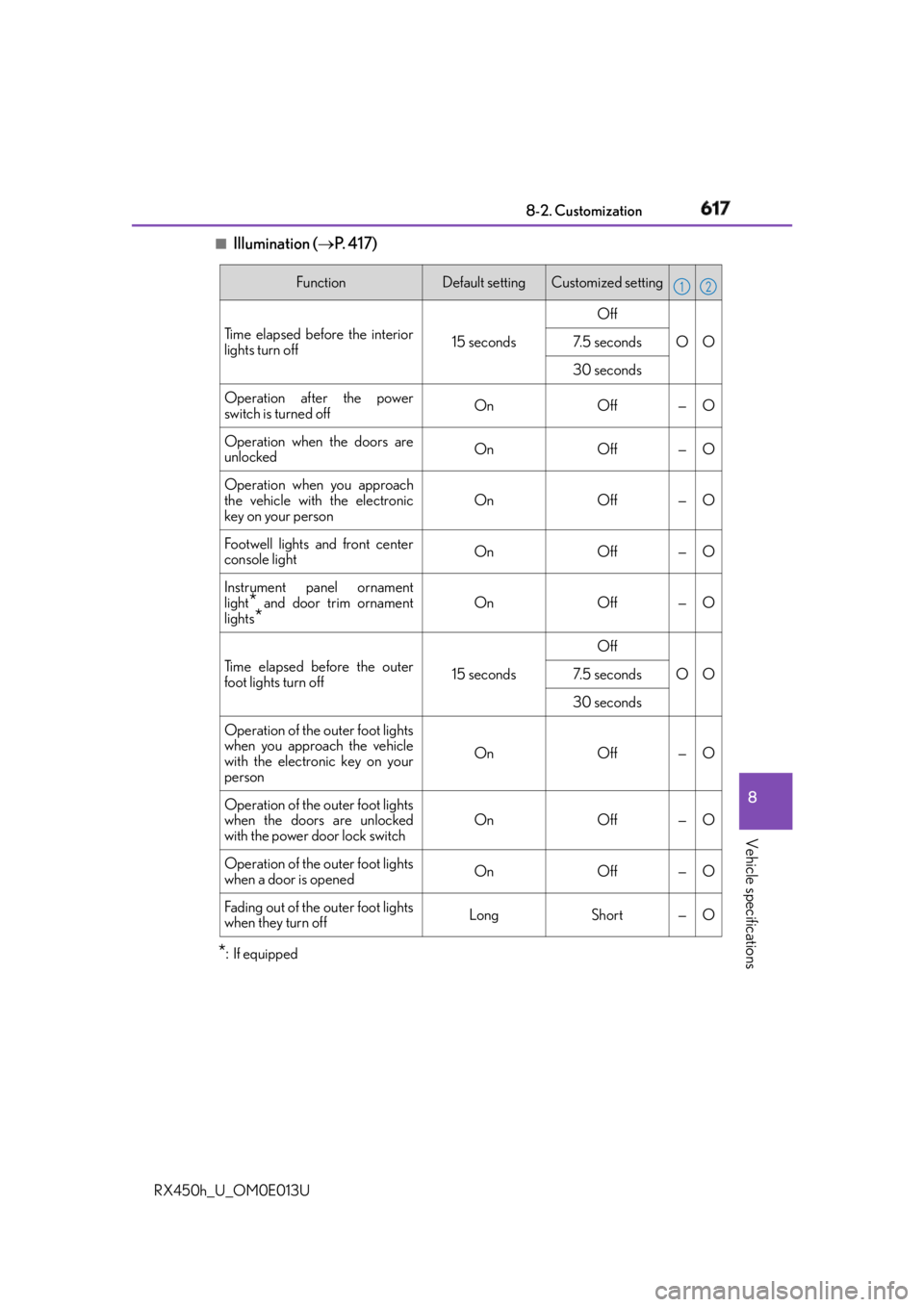
RX450h_U_OM0E013U ■
Illumination ( P. 4 1 7 )
* : If equipped Function Default setting Customized setting
Time elapsed before the interior
lights turn off 15 seconds Off
O O7. 5 s e c o n d s
30 seconds
Operation after the power
switch is turned off On Off — O
Operation when the doors are
unlocked On Off — O
Operation when you approach
the vehicle with the electronic
key on your person On Off — O
Footwell lights and front center
console light On Off — O
Instrument panel ornament
light
* and door trim ornament
lights
* On Off — O
Time elapsed before the outer
foot lights turn off 15 seconds Off
O O7. 5 s e c o n d s
30 seconds
Operation of the outer foot lights
when you approach the vehicle
with the electronic key on your
person On Off — O
Operation of the outer foot lights
when the doors are unlocked
with the power door lock switch On Off — O
Operation of the outer foot lights
when a door is opened On Off — O
Fading out of the outer foot lights
when they turn off Long Short — O 1 2
Page 636 of 660
636
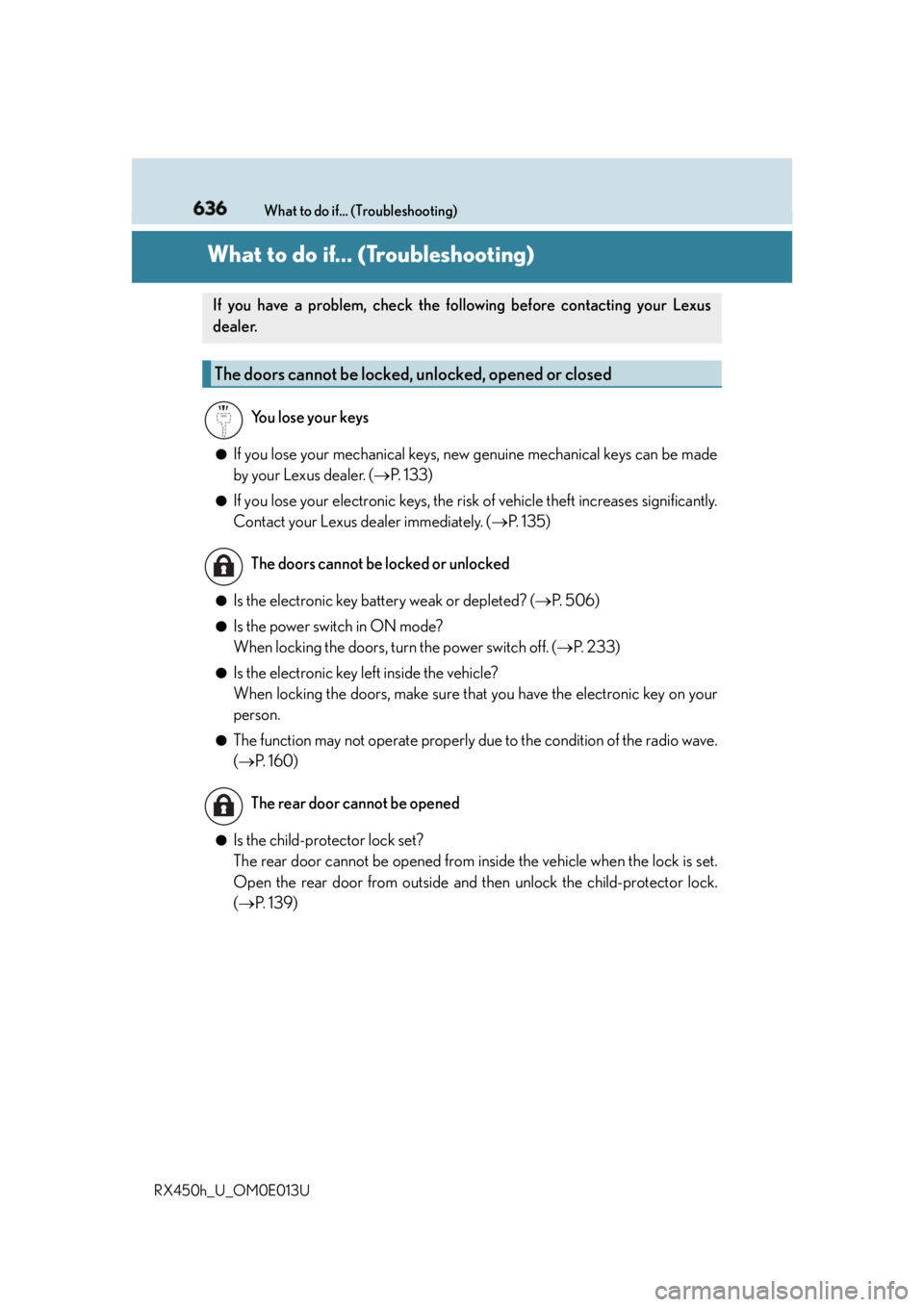
RX450h_U_OM0E013U What to do if... (Troubleshooting)
What to do if... (Troubleshooting) ●
If you lose your mechanical keys, ne w genuine mechanical keys can be made
by your Lexus dealer. ( P. 1 3 3 )●
If you lose your electronic keys, the risk of vehicle theft increases significantly.
Contact your Lexus dealer immediately. ( P. 1 3 5 )●
Is the electronic key battery weak or depleted? ( P. 5 0 6 )●
Is the power switch in ON mode?
When locking the doors, turn the power switch off. ( P. 2 3 3 )●
Is the electronic key left inside the vehicle?
When locking the doors, make sure that you have the electronic key on your
person. ●
The function may not operate properly du e to the condition of the radio wave.
( P. 1 6 0 )
●
Is the child-protector lock set?
The rear door cannot be opened from inside the vehicle when the lock is set.
Open the rear door from outside and then unlock the child-protector lock.
( P. 1 3 9 )If you have a problem, check the following before contacting your Lexus
dealer.
The doors cannot be locked, unlocked, opened or closed You lose your keys
The doors cannot be locked or unlocked
The rear door cannot be opened
Page 637 of 660
637What to do if... (Troubleshooting)
RX450h_U_OM0E013U ●
Did you press the power switch while firmly depressing the brake pedal?
( P. 232)●
Is the shift lever in P? ( P. 2 3 4 )●
Is the electronic key anywhere detectable inside the vehicle? ( P. 1 5 8 )●
Is the steering wheel unlocked? ( P. 2 3 5 )●
Is the electronic key battery weak or depleted?
In this case, the hybrid system can be started in a temporary way. ( P. 5 6 6 )●
Is the 12-volt battery discharged? ( P. 5 6 8 )●
Is the power switch in ON mode?
If you cannot release the shift lever by depressing the brake pedal with the
power switch in ON mode ( P. 5 6 3 )●
It is locked automatically to prevent theft of the vehicle. ( P. 2 3 5 )
●
Is the window lock switch pressed?
The power window except for the one at the driver’s seat cannot be operated
if the window lock switch is pressed. ( P. 1 8 9 )
●
The auto power off function will be operated if the vehicle is left in
ACCESSORY or ON mode (the hybrid system is not operating) for a period
of time. ( P. 2 3 4 )If you think something is wrong The hybrid system does not start
The shift lever cannot be shifted from P even if you depress the brake
pedal
The steering wheel cannot be turned after the hybrid system is stopped
The windows do not open or close by operating the power window
switches
The power switch is turned off automatically
Page 642 of 660

642 Alphabetical index
RX450h_U_OM0E013U Care
Aluminum wheels ............................. 459
Exterior................................................... 458
Interior ..................................................... 462
Seat belts ................................................463
Self-restoring coat ............................ 458
Cargo capacity............................ 212, 582
Cargo hooks ...........................................427
Cargo net hooks ....................................427
Chains .........................................................391
Child restraint system............................ 59
Booster seats installation...................68
Convertible seats
installation..............................................66
Front passenger occupant
classification system ...........................51
Infant seats definition ...........................65
Infant seats installation ..........................61
Installing CRS with LATCH
anchors ..................................................... 71
Installing CRS with seat
belts ..........................................................65
Installing CRS with top tether
strap.......................................................... 73
LATCH anchors ..................................... 71 Child safety .................................................... 58
12-volt battery
precautions ...........................485, 572
Airbag precautions................................ 41
Child restraint system......................... 59
How your child should
wear the seat belt .............................. 34
Installing child restraints .................... 59
Moon roof precautions ....................196
Panoramic moon roof
precautions .......................................200
Power back door
precautions ......................................... 152
Power window lock switch............ 189
Power window precautions ........... 192
Rear door child-p rotectors ............139
Removed key battery
precautions ....................................... 507
Seat belt extender
precautions .......................................... 36
Seat belt precautions .......................... 36
Seat heater precautions ................... 414
Child-protectors .................................... 139
Cleaning ....................................... 458, 462
Aluminum wheels .............................. 459
Exterior ...................................................458
Interior ..................................................... 462
Seat belts................................................ 463
Clock................................................. 97, 433
Coat hooks ..............................................444
Condenser .............................................. 480
Console box ............................................422
Consumption screen .................. 106, 124C