buttons LEXUS RX450h 2016 Owners Manual
[x] Cancel search | Manufacturer: LEXUS, Model Year: 2016, Model line: RX450H, Model: LEXUS RX450H 2016Pages: 660, PDF Size: 10.15 MB
Page 24 of 660
24 Pictorial index
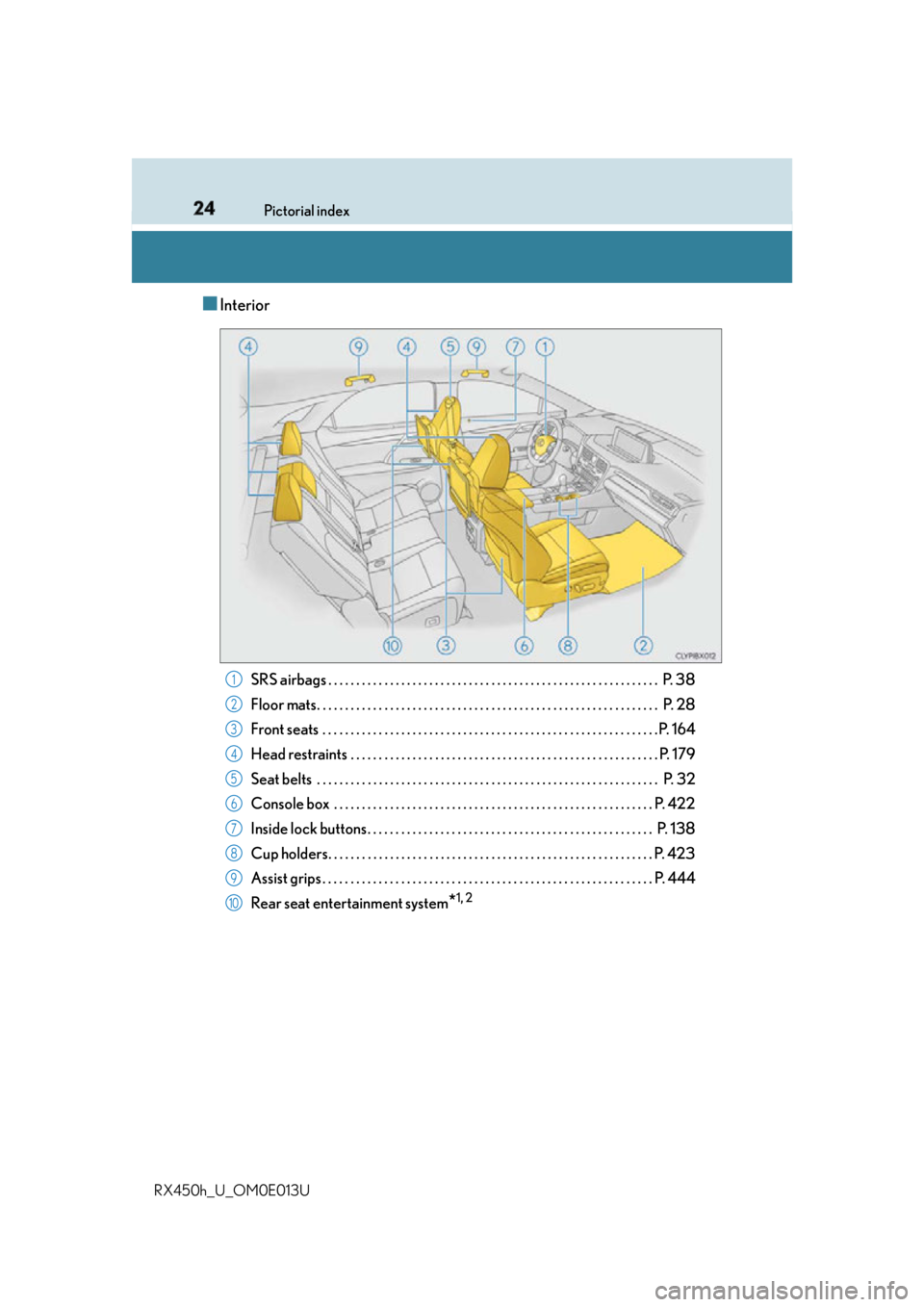
RX450h_U_OM0E013U ■ Interior
SRS airbags . . . . . . . . . . . . . . . . . . . . . . . . . . . . . . . . . . . . . . . . . . . . . . . . . . . . . . . . . . . P. 38
Floor mats. . . . . . . . . . . . . . . . . . . . . . . . . . . . . . . . . . . . . . . . . . . . . . . . . . . . . . . . . . . . . P. 28
Front seats . . . . . . . . . . . . . . . . . . . . . . . . . . . . . . . . . . . . . . . . . . . . . . . . . . . . . . . . . . . . P. 164
Head restraints . . . . . . . . . . . . . . . . . . . . . . . . . . . . . . . . . . . . . . . . . . . . . . . . . . . . . . . P. 179
Seat belts . . . . . . . . . . . . . . . . . . . . . . . . . . . . . . . . . . . . . . . . . . . . . . . . . . . . . . . . . . . . . P. 32
Console box . . . . . . . . . . . . . . . . . . . . . . . . . . . . . . . . . . . . . . . . . . . . . . . . . . . . . . . . . P. 422
Inside lock buttons. . . . . . . . . . . . . . . . . . . . . . . . . . . . . . . . . . . . . . . . . . . . . . . . . . . P. 138
Cup holders. . . . . . . . . . . . . . . . . . . . . . . . . . . . . . . . . . . . . . . . . . . . . . . . . . . . . . . . . . P . 423
Assist grips . . . . . . . . . . . . . . . . . . . . . . . . . . . . . . . . . . . . . . . . . . . . . . . . . . . . . . . . . . .P. 444
Rear seat entertainment system
* 1, 21
2
3
4
5
6
7
8
9
10
Page 71 of 660
711-2. Child safety
1
For safety and security
RX450h_U_OM0E013U ■
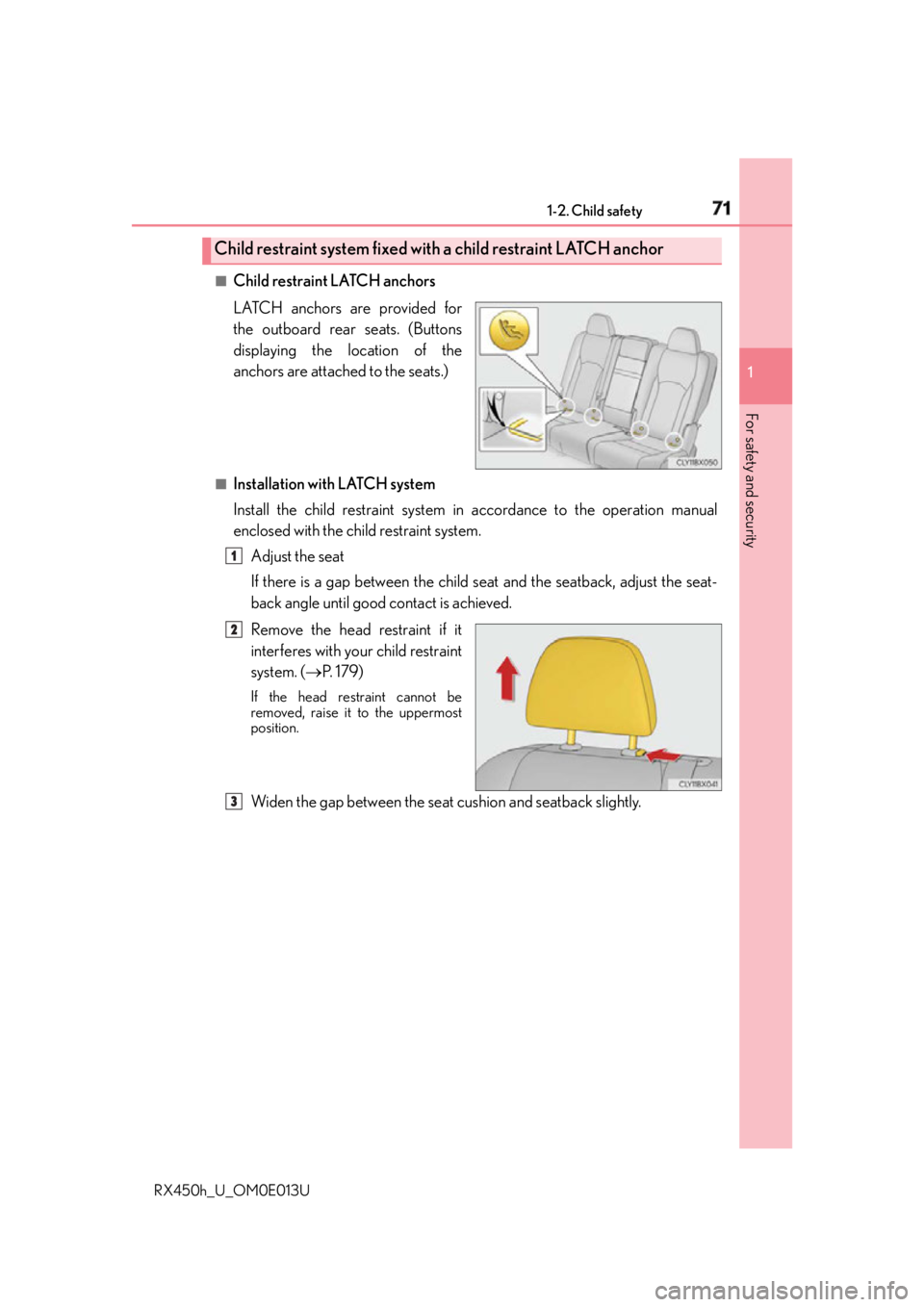
Child restraint LATCH anchors
LATCH anchors are provided for
the outboard rear seats. (Buttons
displaying the location of the
anchors are attached to the seats.) ■
Installation with LATCH system
Install the child restraint system in accordance to the operation manual
enclosed with the child restraint system.
Adjust the seat
If there is a gap between the child se at and the seatback, adjust the seat-
back angle until good contact is achieved.
Remove the head restraint if it
interferes with your child restraint
system. ( P. 1 7 9 )If the head restraint cannot be
removed, raise it to the uppermost
position.
Widen the gap between the seat cushion and seatback slightly.Child restraint system fixed with a child restraint LATCH anchor
1
2
3
Page 138 of 660
138 3-2. Opening, closing and locking the doors
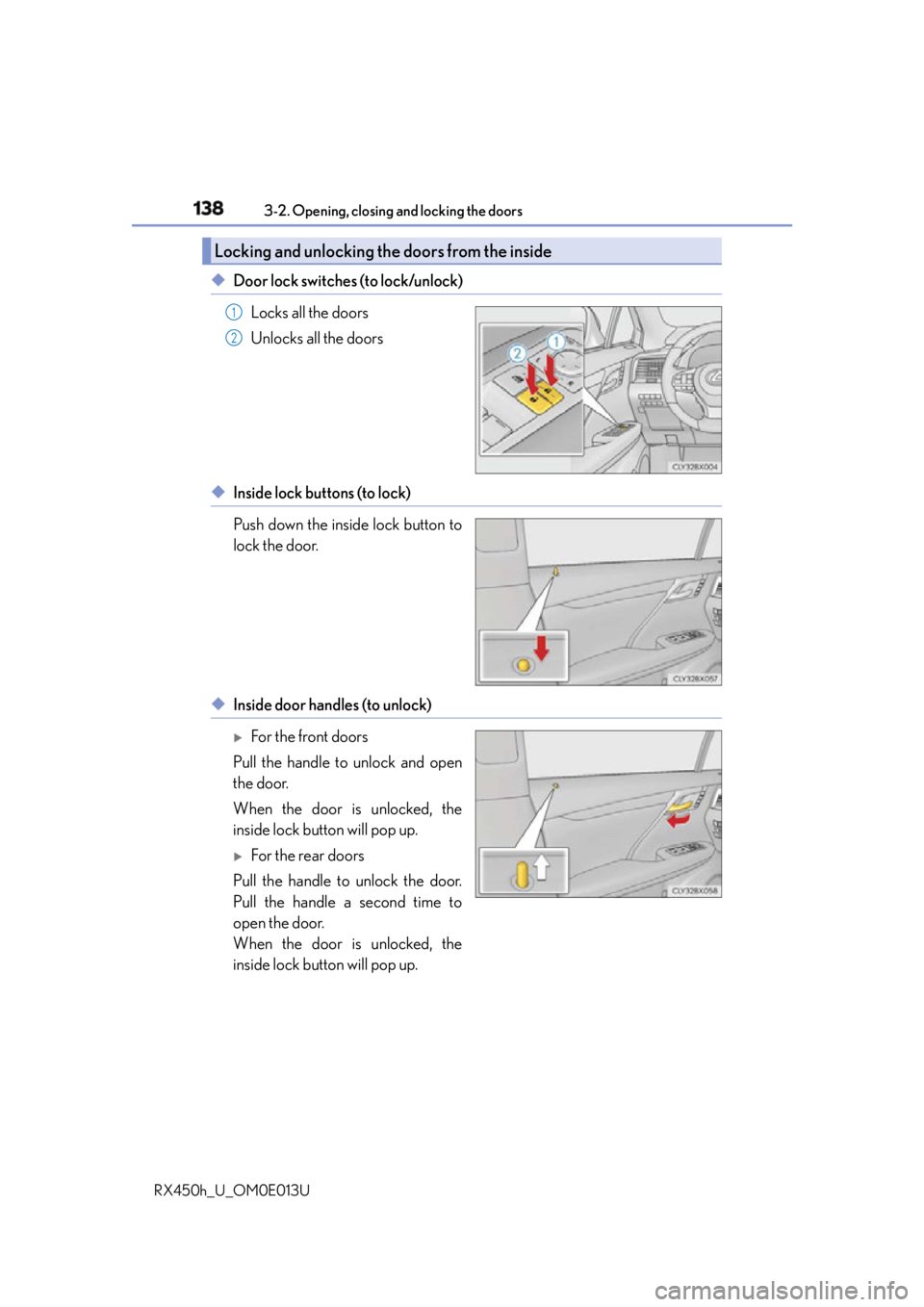
RX450h_U_OM0E013U ◆ Door lock switches (to lock/unlock)
Locks all the doors
Unlocks all the doors
◆ Inside lock buttons (to lock)
Push down the inside lock button to
lock the door.
◆ Inside door handles (to unlock)
For the front doors
Pull the handle to unlock and open
the door.
When the door is unlocked, the
inside lock button will pop up.
For the rear doors
Pull the handle to unlock the door.
Pull the handle a second time to
open the door.
When the door is unlocked, the
inside lock button will pop up.Locking and unlocking the doors from the inside 1
2
Page 140 of 660
140 3-2. Opening, closing and locking the doors
RX450h_U_OM0E013U ■
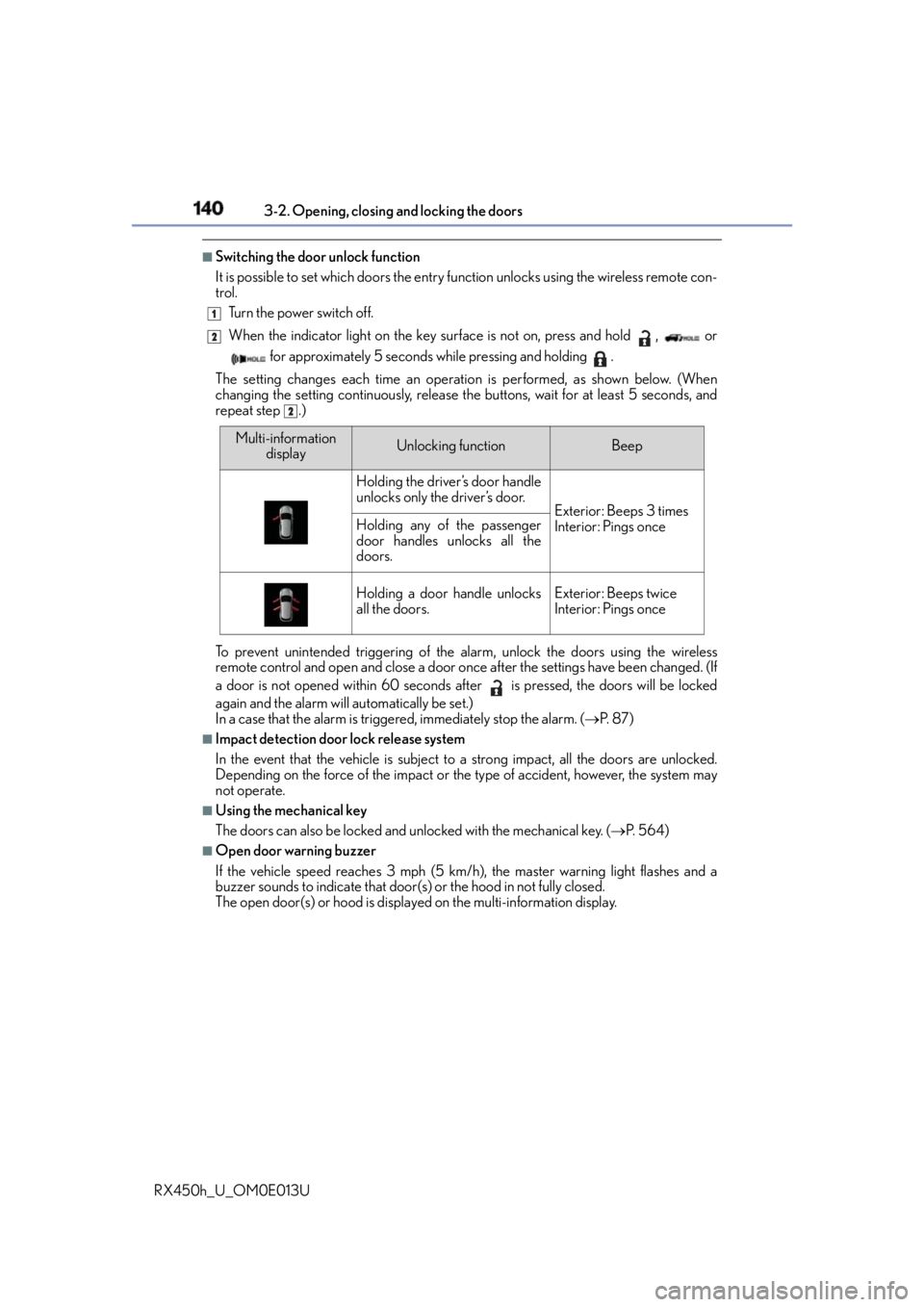
Switching the door unlock function
It is possible to set which doors the entry fu nction unlocks using the wireless remote con-
trol.
Turn the power switch off.
When the indicator light on the key surface is not on, press and hold , or
for approximately 5 seconds while pressing and holding .
The setting changes each time an operatio n is performed, as shown below. (When
changing the setting continuously, release the buttons, wait for at least 5 seconds, and
repeat step .)
To prevent unintended triggering of the alarm, unlock the doors using the wireless
remote control and open and close a door once after the settings have been changed. (If
a door is not opened within 60 seconds after is pressed, the doors will be locked
again and the alarm will automatically be set.)
In a case that the alarm is triggered, immediately stop the alarm. ( P. 8 7 )■
Impact detection door lock release system
In the event that the vehicle is subject to a strong impact, all the doors are unlocked.
Depending on the force of the impact or the type of accident, however, the system may
not operate. ■
Using the mechanical key
The doors can also be locked and unlocked with the mechanical key. ( P. 5 6 4 )■
Open door warning buzzer
If the vehicle speed reaches 3 mph (5 km/h), the master warning light flashes and a
buzzer sounds to indicate that door (s) or the hood in not fully closed.
The open door(s) or hood is displa yed on the multi-information display.1
2
2
Multi-information
display Unlocking function Beep
Holding the driver’s door handle
unlocks only the driver’s door.
Exterior: Beeps 3 times
Interior: Pings onceHolding any of the passenger
door handles unlocks all the
doors.
Holding a door handle unlocks
all the doors. Exterior: Beeps twice
Interior: Pings once
Page 141 of 660
1413-2. Opening, closing and locking the doors
3
Operation of each component
RX450h_U_OM0E013U ■
Conditions affecting the operation of the sm art access system with push-button start
or wireless remote control
P. 1 6 0 ■
Customization
Some functions can be customized. ( P. 6 0 7 )
WA R N I N G ■
To prevent an accident
Observe the following precautions while driving the vehicle.
Failure to do so may result in a door open ing and an occupant falling out, resulting in
death or serious injury. ●
Ensure that all doors are properly closed and locked. ●
Do not pull the inside handle of the doors while driving.
Be especially careful for the front doors, as the doors may be opened even if the
inside lock buttons ar e in locked position.●
Set the rear door child-protector locks wh en children are seated in the rear seats.■
When opening or closing a door
Check the surroundings of the vehicle such as whether the vehicle is on an incline,
whether there is enough space for a door to open and whether a strong wind is blow-
ing. When opening or closing the door, hold the door handle tightly to prepare for any
unpredictable movement.
Page 160 of 660
160 3-2. Opening, closing and locking the doors
RX450h_U_OM0E013U ■
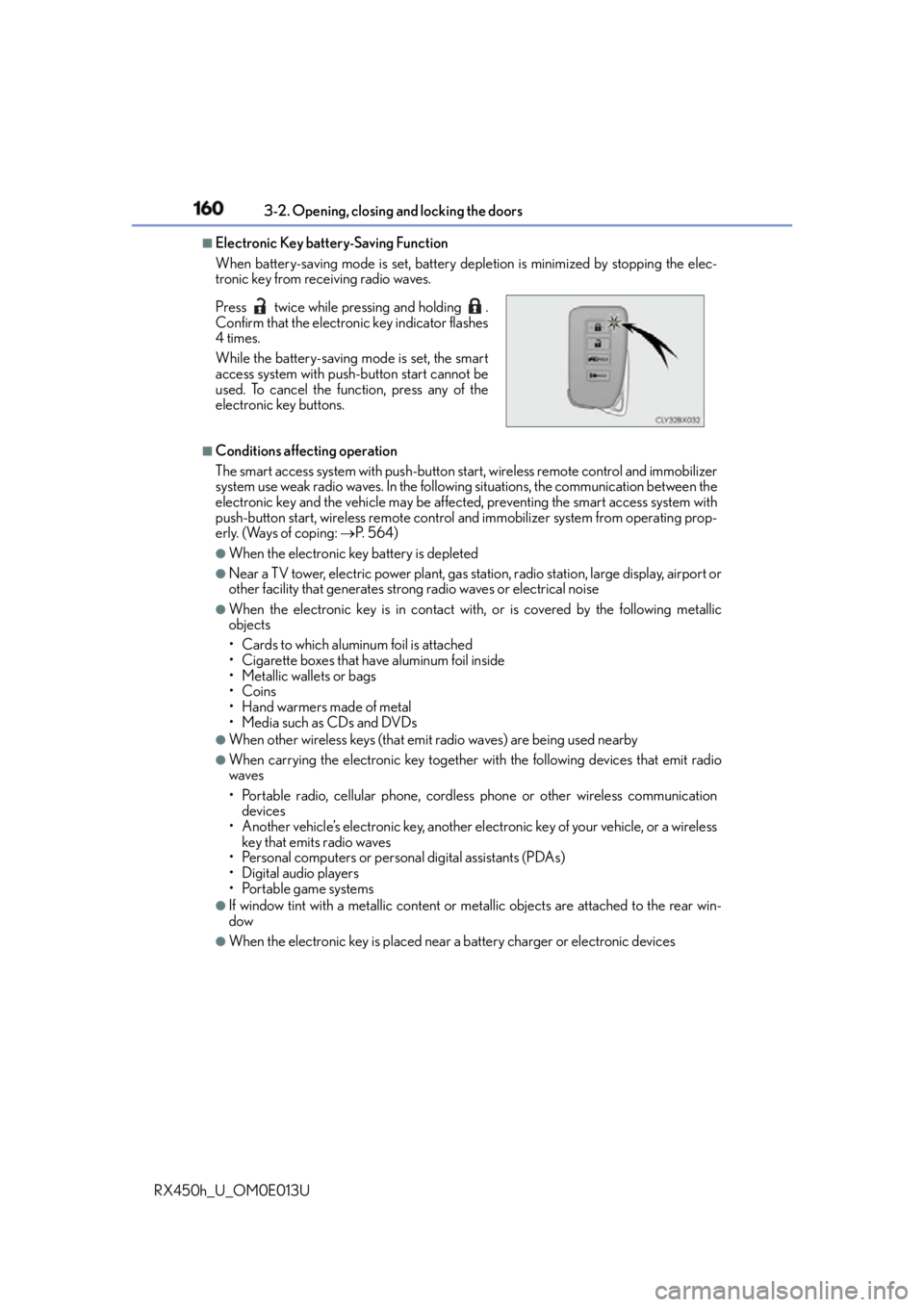
Electronic Key battery-Saving Function
When battery-saving mode is set, battery depletion is minimized by stopping the elec-
tronic key from receiving radio waves.
■
Conditions affe cting operation
The smart access system with push-button star t, wireless remote control and immobilizer
system use weak radio waves. In the followi ng situations, the communication between the
electronic key and the vehicle may be affected, preventing the smart access system with
push-button start, wireless remote control and immobilizer system from operating prop-
erly. (Ways of coping: P. 5 6 4 )●
When the electronic key battery is depleted ●
Near a TV tower, electric powe r plant, gas station, radio stat ion, large display, airport or
other facility that generates strong radio waves or electrical noise ●
When the electronic key is in contact wi th, or is covered by the following metallic
objects
• Cards to which aluminum foil is attached
• Cigarette boxes that have aluminum foil inside
• Metallic wallets or bags
•Coins
•Hand warmers made of metal
• Media such as CDs and DVDs ●
When other wireless keys (that emit radio waves) are being used nearby ●
When carrying the electronic key together with the following devices that emit radio
waves
• Portable radio, cellular phone, cordless phone or other wireless communication
devices
• Another vehicle’s electronic key, another el ectronic key of your vehicle, or a wireless
key that emits radio waves
• Personal computers or person al digital assistants (PDAs)
• Digital audio players
• Portable game systems ●
If window tint with a metallic content or me tallic objects are attached to the rear win-
dow ●
When the electronic key is placed near a battery charger or electronic devicesPress twice while pressing and holding .
Confirm that the electronic key indicator flashes
4 times.
While the battery-saving mode is set, the smart
access system with push-button start cannot be
used. To cancel the function, press any of the
electronic key buttons.
Page 176 of 660
176 3-3. Adjusting the seats
RX450h_U_OM0E013U ■
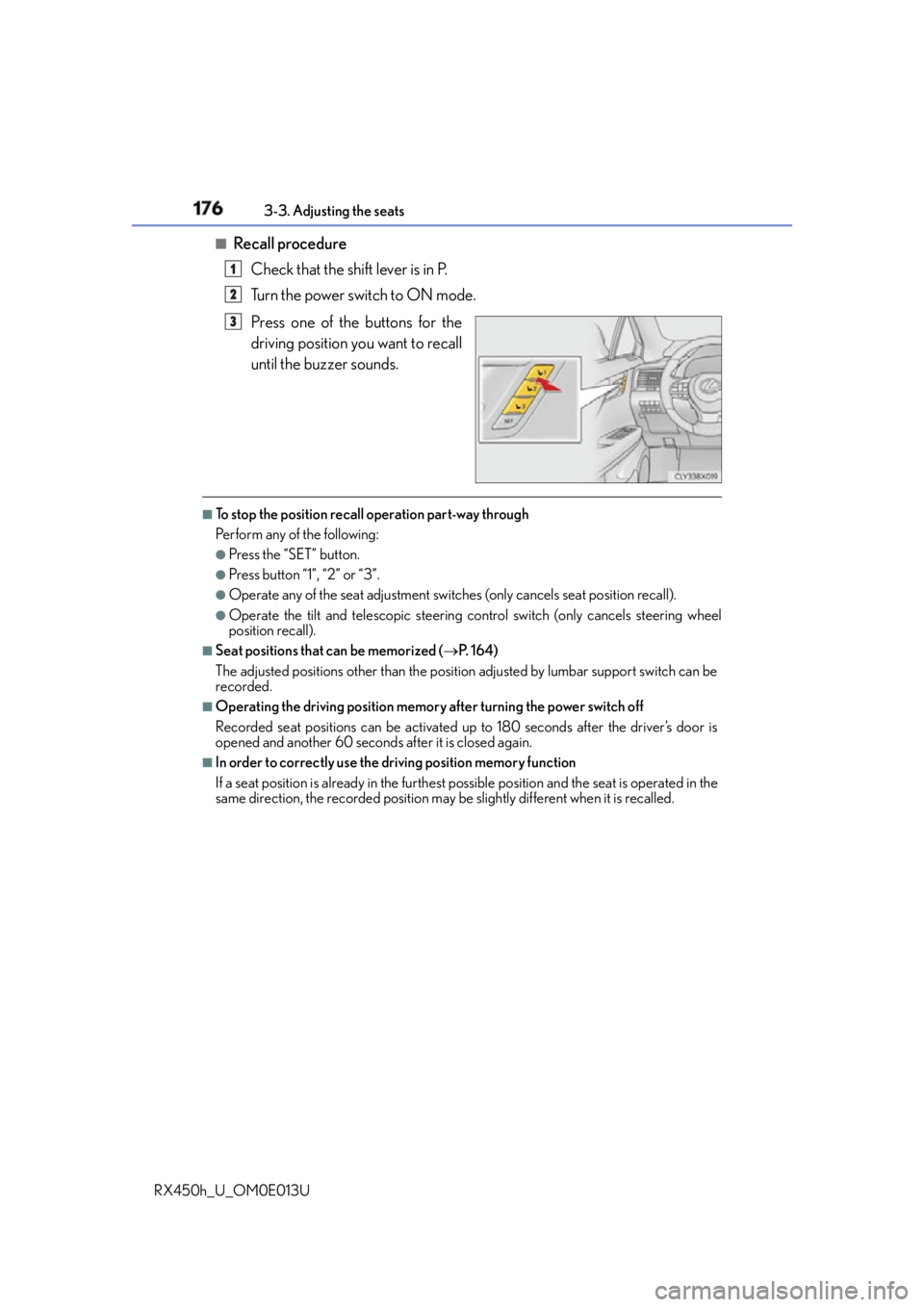
Recall procedure
Check that the shift lever is in P.
Turn the power switch to ON mode.
Press one of the buttons for the
driving position you want to recall
until the buzzer sounds. ■
To stop the position recall operation part-way through
Perform any of the following: ●
Press the “SET” button. ●
Press button “1”, “2” or “3”. ●
Operate any of the seat adjustment switch es (only cancels seat position recall).●
Operate the tilt and telescopic steering co ntrol switch (only ca ncels steering wheel
position recall). ■
Seat positions that can be memorized ( P. 1 6 4 )
The adjusted positions other than the position adjusted by lumbar support switch can be
recorded. ■
Operating the driving position memory after turning the power switch off
Recorded seat positions can be activated up to 180 seconds after the driver’s door is
opened and another 60 seconds after it is closed again. ■
In order to correctly use the dr iving position memory function
If a seat position is already in the furthest po ssible position and the seat is operated in the
same direction, the recorded position may be slightly different when it is recalled.1
2
3
Page 403 of 660
4035-1. Basic operation of the Remote Touch screen
5
Interior features
RX450h_U_OM0E013U ■
Selecting the operation screen
When selecting the main display, move the Remote Touch knob to the left.
When selecting the side display, move the Remote Touch knob to the right. ■
Main display
For details about the functions and operat ion of the main display, refer to the
respective section and “NAVIGATION SYSTEM OWNER’S MANUAL”. ■
Side display
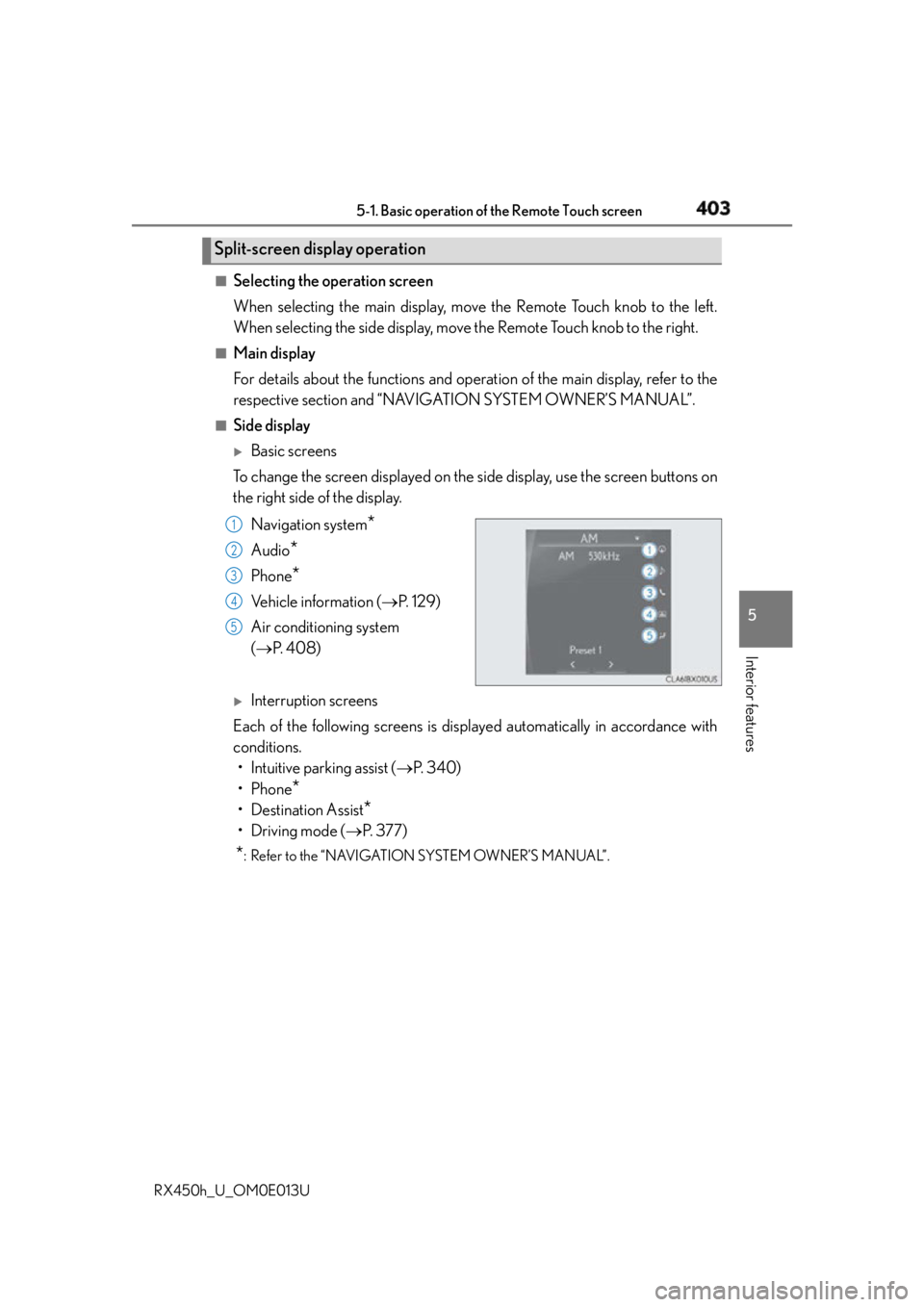
Basic screens
To change the screen displayed on the side display, use the screen buttons on
the right side of the display.
Navigation system
*Audio
* Phone
* Vehicle information ( P. 1 2 9 )
Air conditioning system
( P. 4 0 8 )
Interruption screens
Each of the following screens is displayed automatically in accordance with
conditions.
• Intuitive parking assist ( P. 3 4 0 )
•Phone
*• Destination Assist
*•Driving mode ( P. 3 7 7 )
* : Refer to the “NAVIGATION SYSTEM OWNER’S MANUAL”.Split-screen display operation
1
2
3
4
5
Page 445 of 660
4455-5. Using the other interior features
5
Interior features
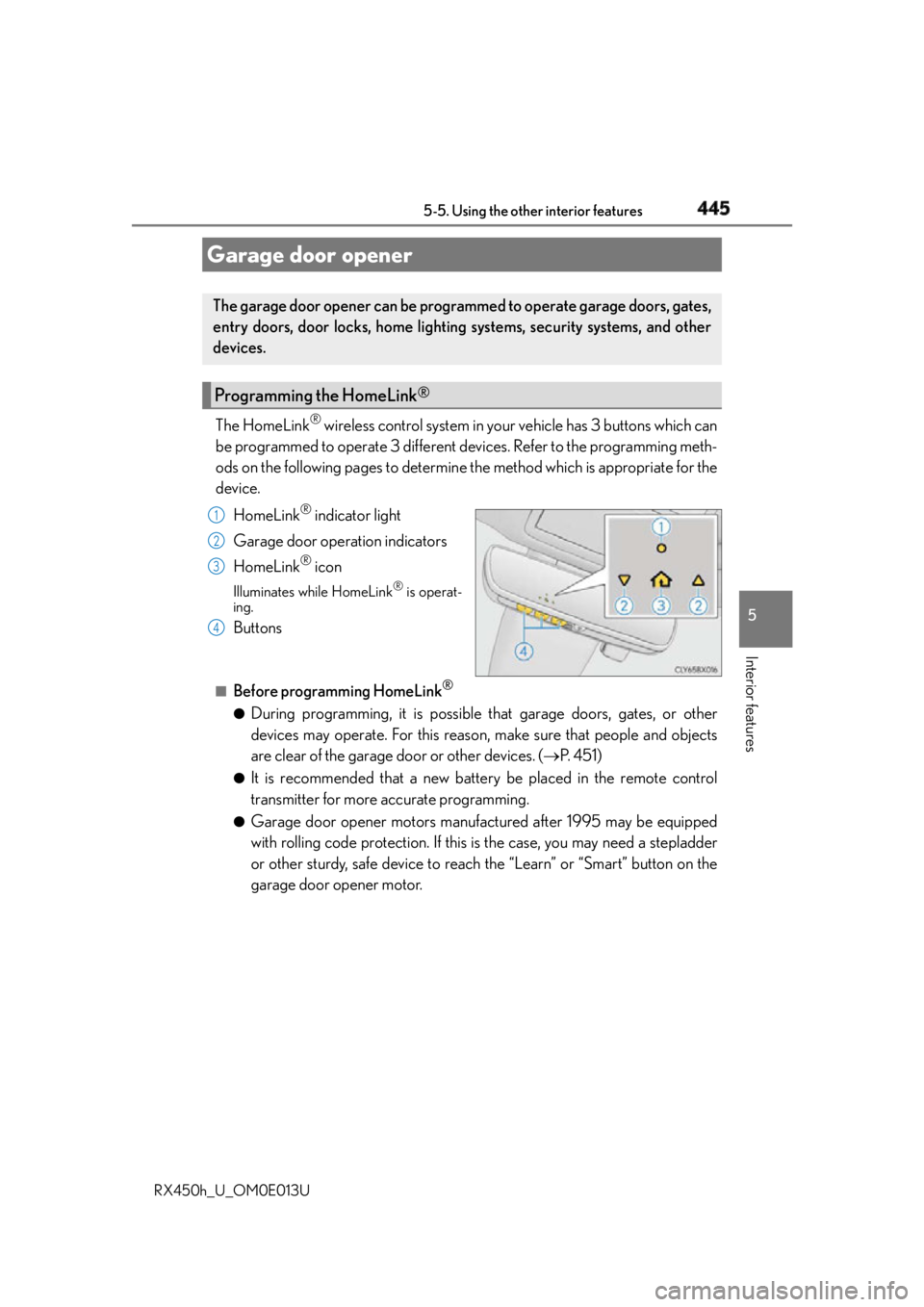
RX450h_U_OM0E013U The HomeLink ®
wireless control system in your vehicle has 3 buttons which can
be programmed to operate 3 different devices. Refer to the programming meth-
ods on the following pages to determine the method which is appropriate for the
device.
HomeLink ®
indicator light
Garage door operation indicators
HomeLink ®
iconIlluminates while HomeLink ®
is operat-
ing.
Buttons ■
Before programming HomeLink ®
●
During programming, it is possible th at garage doors, gates, or other
devices may operate. For this reason, make sure that people and objects
are clear of the garage door or other devices. ( P. 4 5 1 )●
It is recommended that a new battery be placed in the remote control
transmitter for more accurate programming. ●
Garage door opener motors manufactured after 1995 may be equipped
with rolling code protection. If this is the case, you may need a stepladder
or other sturdy, safe device to reach the “Learn” or “Smart” button on the
garage door opener motor.Garage door opener The garage door opener can be programmed to operate garage doors, gates,
entry doors, door locks, home lighting systems, security systems, and other
devices.
Programming the HomeLink ®
1
2
3
4
Page 446 of 660
446 5-5. Using the other interior features
RX450h_U_OM0E013U ■
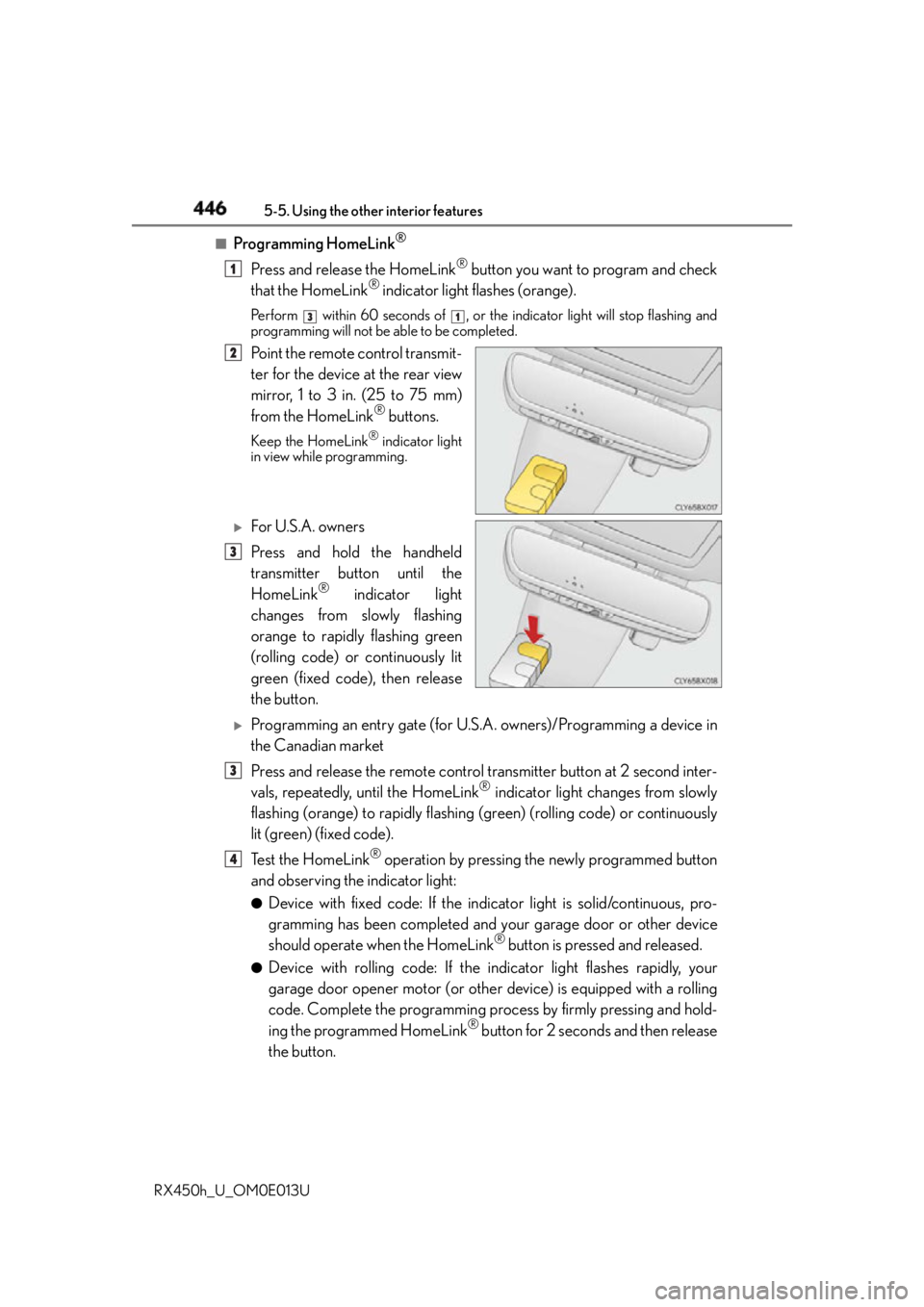
Programming HomeLink ®
Press and release the HomeLink ®
button you want to program and check
that the HomeLink ®
indicator light flashes (orange).Perform within 60 seconds of , or th e indicator light will stop flashing and
programming will not be able to be completed.
Point the remote control transmit-
ter for the device at the rear view
mirror, 1 to 3 in. (25 to 75 mm)
from the HomeLink ®
buttons.Keep the HomeLink ®
indicator light
in view while programming.
For U.S.A. owners
Press and hold the handheld
transmitter button until the
HomeLink ®
indicator light
changes from slowly flashing
orange to rapidly flashing green
(rolling code) or continuously lit
green (fixed code), then release
the button.
Programming an entry gate (for U.S. A. owners)/Programming a device in
the Canadian market
Press and release the remote control transmitter button at 2 second inter-
vals, repeatedly, until the HomeLink ®
indicator light changes from slowly
flashing (orange) to rapidly flashing (green) (rolling code) or continuously
lit (green) (fixed code).
Te s t t h e H o m e L i n k ®
operation by pressing the newly programmed button
and observing the indicator light: ●
Device with fixed code: If the indi cator light is solid/continuous, pro-
gramming has been completed and your garage door or other device
should operate when the HomeLink ®
button is pressed and released.●
Device with rolling code: If the indicator light flashes rapidly, your
garage door opener motor (or other device) is equipped with a rolling
code. Complete the programming process by firmly pressing and hold-
ing the programmed HomeLink ®
button for 2 seconds and then release
the button. 1 3 1
2
3
3
4