cruise control LEXUS RX450h 2016 Owners Manual
[x] Cancel search | Manufacturer: LEXUS, Model Year: 2016, Model line: RX450H, Model: LEXUS RX450H 2016Pages: 660, PDF Size: 10.15 MB
Page 3 of 660

3 1
876432
9
RX450h_U_OM0E013U 53-5. Opening, closing
the windows and
moon roof
Power windows ............................ 189
Moon roof .......................................193
Panoramic moon roof ................ 197
4-1. Before driving
Driving the vehicle .................... 204
Cargo and luggage..................... 212
Vehicle load limits ........................216
Trailer towing (vehicles with
towing package) ....................... 217
Trailer towing (vehicles
without towing
package)..................................... 230
Dinghy towing ...............................231
4-2. Driving procedures
Power (ignition) switch ............ 232
EV drive mode .............................237
Hybrid transmission .................. 239
Turn signal lever ...........................244
Parking brake ...............................245
Brake Hold ....................................249
4-3. Operating the lights and
wipers
Headlight switch ..........................251
Automatic High Beam............. 255
Fog light switch ........................... 259
Windshield wipers and
washer ......................................... 260
Rear window wiper and
washer ......................................... 265 4-4. Refueling
Opening the fuel tank
cap ................................................. 267
4-5. Using the driving
support systems
Lexus Safety System+ ................ 271
PCS
(Pre-Collision System) ..........279
LKA
(Lane-Keeping Assist) .......... 292
LDA (Lane Departure
Alert with steering
control)........................................ 302
Dynamic radar cruise
control with full-speed
range ............................................... 311
Dynamic radar cruise
control ......................................... 323
Cruise control ............................. 335
Intuitive parking assist .............. 339
Lexus parking assist
monitor........................................ 347
BSM
(Blind Spot Monitor) ............. 363
• BSM function..........................367
• RCTA function ........................ 371
Driving mode select
switch ............................................ 377
Driving assist systems ............... 381
4-6. Driving tips
Hybrid vehicle driving
tips ................................................. 387
Winter driving tips ..................... 390
Utility vehicle precautions...... 3944
Driving
Page 9 of 660

9
RX450h_U_OM0E013U The installation of a mobile two-way radio sy stem in your vehicle could affect electronic
systems such as: ●
Hybrid system ●
Multiport fuel injection system/sequential multiport fuel injection system ●
Dynamic radar cruise control with full-speed range ●
Dynamic radar cruise control system ●
Cruise control system ●
Anti-lock brake system ●
Vehicle dynamics in tegrated management●
SRS airbag system ●
Seat belt pretensioner system
Be sure to check with your Lexus dealer fo r precautionary measures or special instruc-
tions regarding insta llation of a mobile two-way radio system.
High voltage parts and cables on the hybrid vehicles emit approximately the same
amount of electromagnetic waves as the conventional gasoline powered vehicles or
home electronic appliances despite of their electromagnetic shielding.
Unwanted noise may occur in the rece ption of the mobile two-way radio.Installation of a mobile two-way radio system
Page 22 of 660
22 Pictorial index
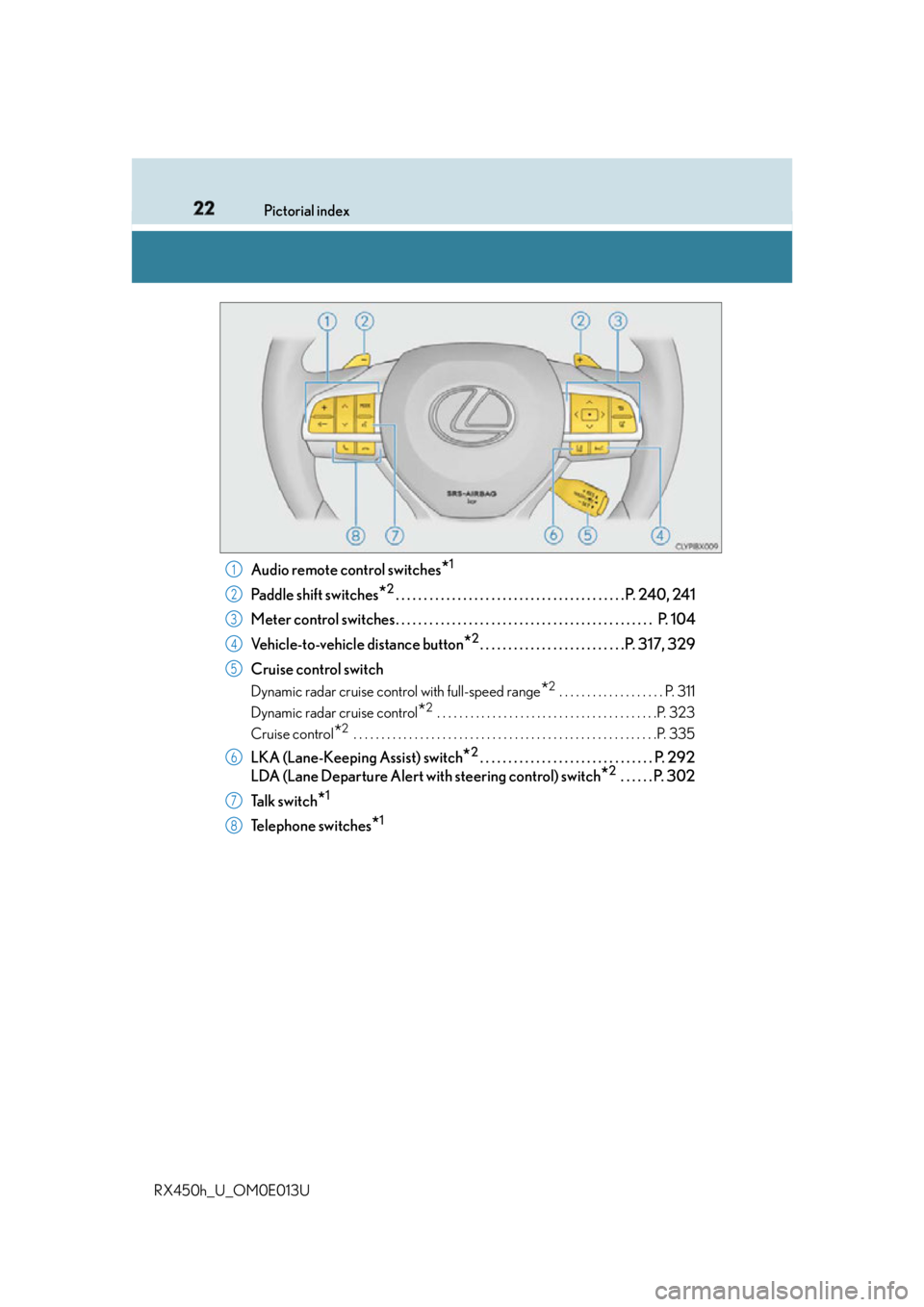
RX450h_U_OM0E013U Audio remote control switches
* 1
Paddle shift switches
* 2
. . . . . . . . . . . . . . . . . . . . . . . . . . . . . . . . . . . . . . . . . P. 240, 241
Meter control switches. . . . . . . . . . . . . . . . . . . . . . . . . . . . . . . . . . . . . . . . . . . . . . P. 104
Vehicle-to-vehicle distance button
* 2
. . . . . . . . . . . . . . . . . . . . . . . . . .P. 317, 329
Cruise control switch Dynamic radar cruise control with full-speed range
* 2
. . . . . . . . . . . . . . . . . . . P. 311
Dynamic radar cruise control
* 2
. . . . . . . . . . . . . . . . . . . . . . . . . . . . . . . . . . . . . . . .P. 323
Cruise control
* 2
. . . . . . . . . . . . . . . . . . . . . . . . . . . . . . . . . . . . . . . . . . . . . . . . . . . . . . .P. 335
LKA (Lane-Keeping Assist) switch
* 2
. . . . . . . . . . . . . . . . . . . . . . . . . . . . . . . P. 292
LDA (Lane Departure Alert with steering control) switch
* 2
. . . . . . P. 302
Ta l k s w i t c h
* 1
Telephone switches
* 11
2
3
4
5
6
7
8
Page 94 of 660
94 2. Instrument cluster
RX450h_U_OM0E013U * 1
: These lights turn on when the power switch is turned to ON mode to indicate that a
system check is being performed. They will turn off after the hybrid system is on, or
after a few seconds. There may be a malfunctio n in a system if the lights do not turn on,
or turn off. Have the vehicle inspected by your Lexus dealer.
* 2
: The light flashes to indicate a malfunction.
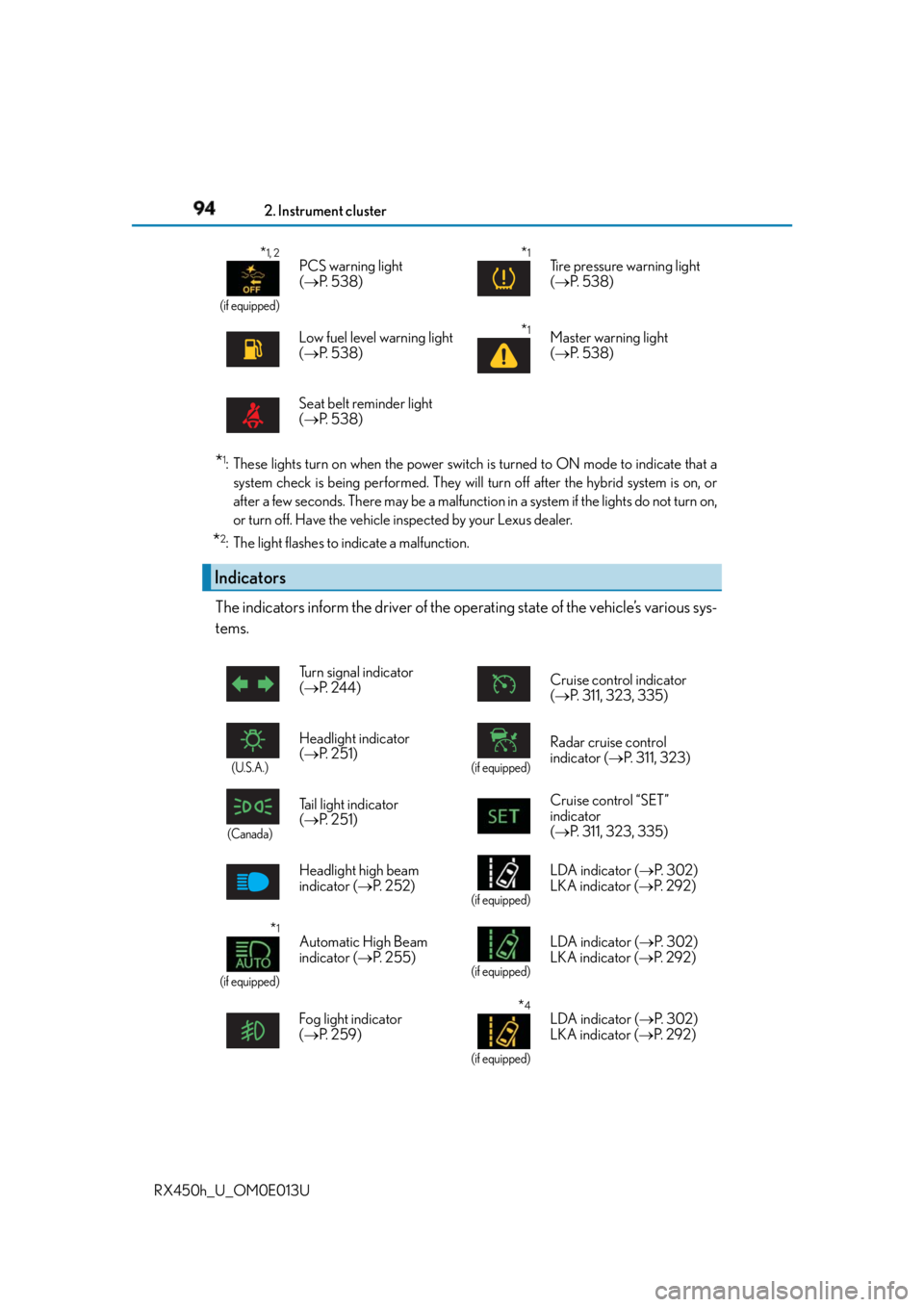
The indicators inform the driver of the op erating state of the vehicle’s various sys-
tems. * 1, 2
(if equipped)
PCS warning light
( P. 5 3 8 )
* 1
Tire pressure warning light
( P. 5 3 8 )
Low fuel level warning light
( P. 5 3 8 )
* 1
Master warning light
( P. 5 3 8 )
Seat belt reminder light
( P. 5 3 8 )
Indicators Turn signal indicator
( P. 2 4 4 ) Cruise control indicator
( P. 311, 323, 335)
(U.S.A.)
Headlight indicator
( P. 2 5 1 ) (if equipped)
Radar cruise control
indicator ( P. 311, 323)
(Canada)
Tail light indicator
( P. 2 5 1 ) Cruise control “SET”
indicator
( P. 311, 323, 335)
Headlight high beam
indicator ( P. 252) (if equipped)
LDA indicator ( P. 3 0 2 )
LKA indicator ( P. 2 9 2 )
* 1
(if equipped) Automatic High Beam
indicator ( P. 2 5 5 ) (if equipped)
LDA indicator ( P. 3 0 2 )
LKA indicator ( P. 2 9 2 )
Fog light indicator
( P. 2 5 9 ) * 4
(if equipped)LDA indicator ( P. 3 0 2 )
LKA indicator ( P. 2 9 2 )
Page 105 of 660
1052. Instrument cluster
2
Instrument cluster
RX450h_U_OM0E013U ◆ Using the odometer/trip meter display area
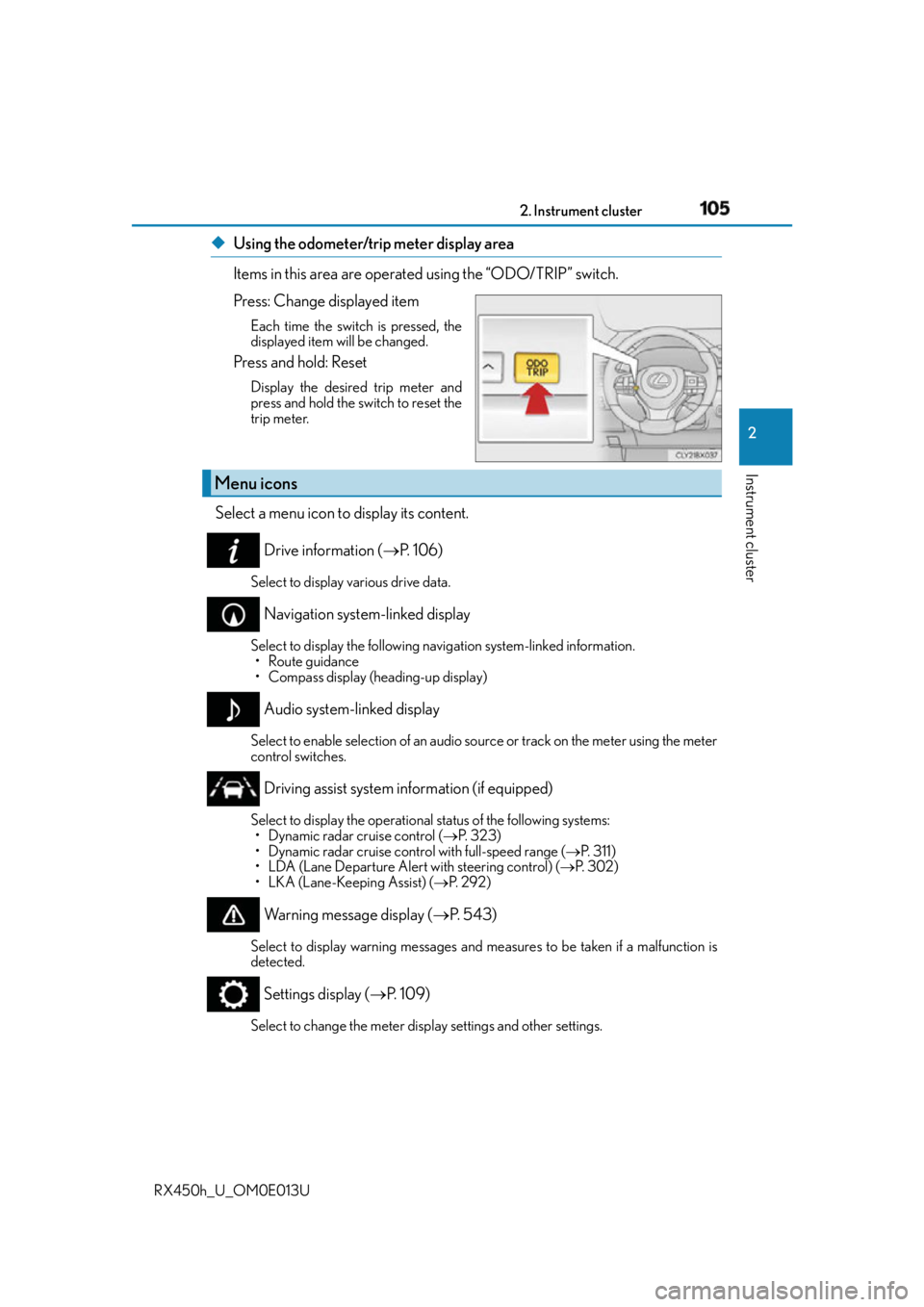
Items in this area are operated using the “ODO/TRIP” switch.
Press: Change displayed item Each time the switch is pressed, the
displayed item will be changed.
Press and hold: Reset Display the desired trip meter and
press and hold the switch to reset the
trip meter.
Select a menu icon to display its content.
Drive information ( P. 1 0 6 )Select to display various drive data.
Navigation system-linked display Select to display the following na vigation system-linked information.
• Route guidance
• Compass display (heading-up display)
Audio system-linked display Select to enable selection of an audio so urce or track on the meter using the meter
control switches.
Driving assist system information (if equipped) Select to display the operational status of the following systems:
• Dynamic radar cruise control ( P. 323)
• Dynamic radar cruise control with full-speed range ( P. 3 1 1 )
• LDA (Lane Departure Alert with steering control) ( P. 3 0 2 )
• LKA (Lane-Keeping Assist) ( P. 2 9 2 )
Warning message display ( P. 5 4 3 )Select to display warning me ssages and measures to be taken if a malfunction is
detected.
Settings display ( P. 1 0 9 )
Select to change the meter display settings and other settings.Menu icons
Page 118 of 660
118 2. Instrument cluster
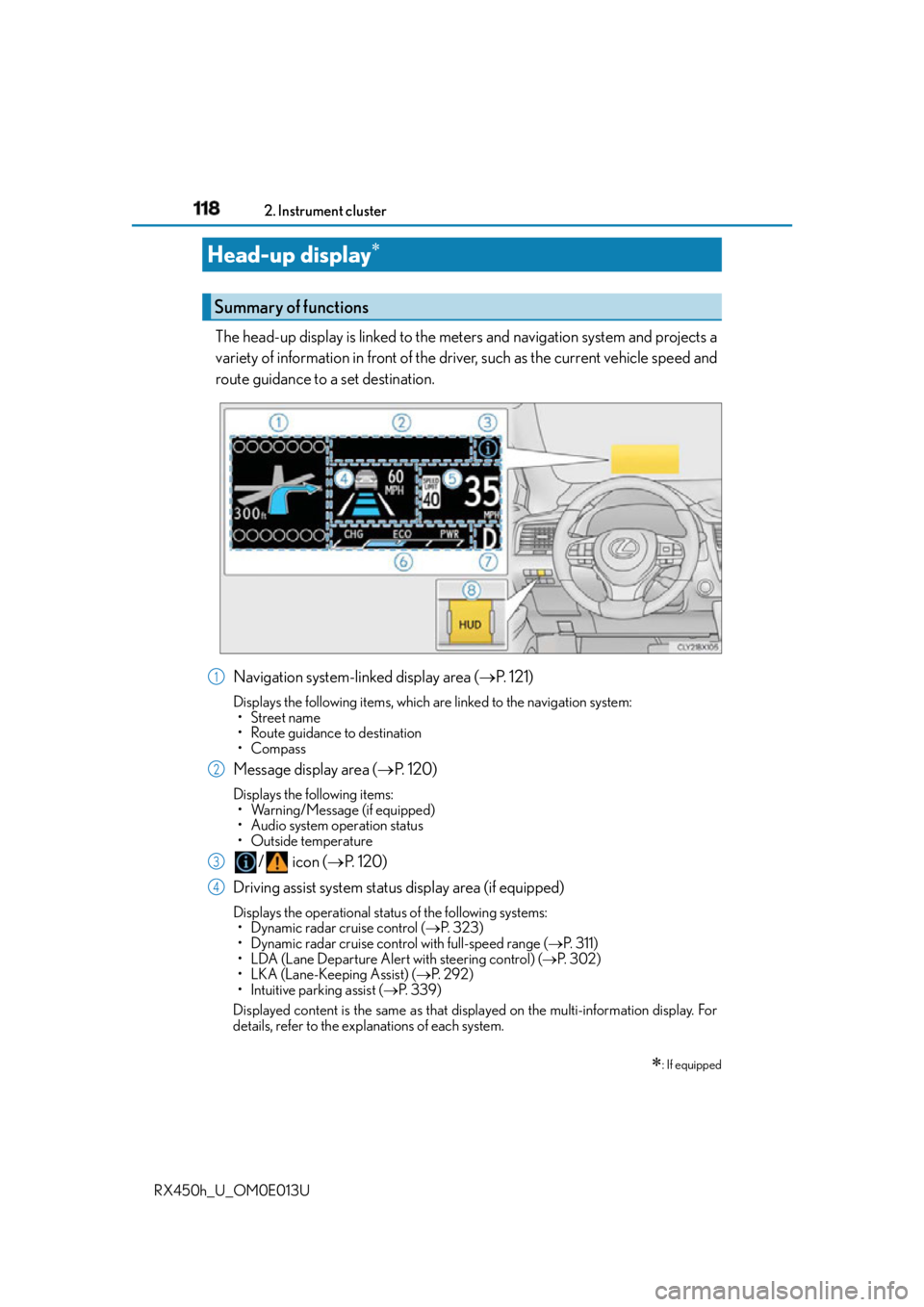
RX450h_U_OM0E013U The head-up display is linked to the meters and navigation system and projects a
variety of information in front of the driver, such as the current vehicle speed and
route guidance to a set destination.
Navigation system-linked display area ( P. 121)Displays the following items, which ar e linked to the navigation system:
• Street name
• Route guidance to destination
•Compass
Message display area ( P. 1 2 0 )Displays the following items:
• Warning/Message (if equipped)
• Audio system operation status
•Outside temperature
/ icon ( P. 1 2 0 )
Driving assist system status display area (if equipped) Displays the operational status of the following systems:
• Dynamic radar cruise control ( P. 323)
• Dynamic radar cruise control with full-speed range ( P. 3 1 1 )
• LDA (Lane Departure Alert with steering control) ( P. 3 0 2 )
• LKA (Lane-Keeping Assist) ( P. 2 9 2 )
• Intuitive parking assist ( P. 3 3 9 )
Displayed content is the same as that disp layed on the multi-information display. For
details, refer to the explanations of each system.Head-up display
: If equippedSummary of functions
1
2
3
4
Page 120 of 660

120 2. Instrument cluster
RX450h_U_OM0E013U Displays the following multi-in formation display linked icons:
: Master warning icon
Displayed when a warning message is displayed on the multi-information
display. ( P. 5 4 3 )
: Information icon
Displayed when a suggestion/advice po p-up display is displayed on the
multi-information display. ( P. 116)
Displays the following items in the appropriate situation: ■
Warning/Message (if equipped)
Displays the following system warning/messages: • Pre-collision warning (Pre-collision system)
• Notification message (Dynamic radar cruise control/Dynamic radar cruise con-
trol with full-speed range)■
Audio system operation status
Displayed when the audio system is operated. ■
Outside temperature
Displayed in the following situations: • When the power switch is turned to ON mode
• When the low outside temperature indicator is flashing
Displayed content is the same as that disp layed on the multi-information display. For
details, refer to the explanation of the outs ide temperature display on the multi-infor-
mation display. ( P. 9 7 )/ icons
Message display area
Page 203 of 660

203
4 Driving
RX450h_U_OM0E013U 4-5. Using the driving
support systems
Lexus Safety System+.................271
PCS
(Pre-Collision System) .......... 279
LKA
(Lane-Keeping Assist) .......... 292
LDA (Lane Departure
Alert with steering
control) ....................................... 302
Dynamic radar cruise
control with full-speed
range ...............................................311
Dynamic radar cruise
control ..........................................323
Cruise control..............................335 Intuitive parking assist .............. 339
Lexus parking assist
monitor ........................................ 347
BSM
(Blind Spot Moni tor).............. 363
• BSM function ......................... 367
• RCTA function ........................ 371
Driving mode select
switch ............................................377
Driving assist systems................ 381
4-6. Driving tips
Hybrid vehicle driving
tips ................................................. 387
Winter driving tips .....................390
Utility vehicle precautions ...... 394
Page 228 of 660
228 4-1. Before driving
RX450h_U_OM0E013U WA R N I N G ■
Trailer towing precautions
To tow a trailer safely, use extreme care and drive the vehicle in accordance with the
trailer’s characteristics and op erating conditions. Failure to do so could cause an acci-
dent resulting in death or serious injury. Vehicle stability and braking performance are
affected by trailer stability, brake setting and performance, and the hitch. Your vehicle
will handle differently when towing a trailer. ■
To avoid accident or injury ●
Do not exceed the TWR, unbrak ed TWR, GCWR, GVWR or GAWR.●
If the gross trailer weight is over 2000 lb. (907 kg), a sway control device with suffi-
cient capacity is required. ●
Adjust the tongue weight within the approp riate range. Place heavier loads as close
to the trailer axle as possible. ●
Do not exceed 65 mph (104 km/h), the posted towing speed limit or the speed limit
for your trailer as set forth in your trailer owner’s manual, whichever is lowest. Slow
down sufficiently before making a turn, in cr oss winds, on wet or slippery surface, etc.
to help avoid an accident. If you experience a vehicle-trailer instability from reducing
a certain speed, slow down and make sure you keep your vehicle speed under the
speed of which you expe rience the instability.●
Do not make jerky, abrupt or sharp turns. ●
Do not apply the brakes suddenly as you ma y skid, resulting in ja ckknifing and loss of
vehicle control. This is especially true on wet or slippery surfaces. ●
Do not exceed the trailer hitch assembly weight, gross vehicle weight, gross axle
weight and trailer tongue weight capacities. ●
Do not use the following systems when trailer towing.
•Cruise control
*• Dynamic radar cruise control
*• Dynamic radar cruise cont rol with full-speed range
*• LDA (Lane-Departure Alert with steering control)
*• LKA (Lane-Keeping Assist)
*• PCS (Pre-Crash Safety system)
*• BSM (Blind Spot Monitor)
* : If equipped ●
Slow down and downshift before descending steep or long downhill grades. Do not
make sudden downshifts while descen ding steep or long downhill grades.●
Vehicle-trailer instability is more likely on steep long downhills. Before descending
steep or long downhill grades, slow down and downshift. Do not make sudden down-
shifts when descending stee p or long downhill grades. Avoid holding the brake pedal
down too long or applying the brakes too frequently. This could cause the brakes to
overheat and result in reduced braking efficiency. ●
Do not tow a trailer when the compact spare tire is installed on your vehicle.
Page 242 of 660

242 4-2. Driving procedures
RX450h_U_OM0E013U ■
When the “-” paddle shift switch is operated with the shift lever in the D position (vehi-
cles with paddle shift switches)
The shift range is downshifted to a range that enables engine braking force that is suit-
able to driving conditions. ■
Automatic deactivation of shift range select ion in the D position (vehicles with paddle
shift switches)
Shift range selection in the D position will be deactivated in the following situations:●
When the vehicle comes to a stop ●
If the accelerator pedal is depressed for more than a certain period of time ●
When the shift lever is shifted to a position other than D ■
S mode ●
When the shift range is S4 or lower, holdin g the shift lever toward “+” sets the shift
range to S6. ●
Automatically selects a higher shift range before the engine speed becomes too high. ■
Downshifting restriction warning buzzer
To help ensure safety and driving performa nce, downshifting operation may sometimes
be restricted. In some circumstances, downshifting may not be possible even when the
shift lever or paddle shift switch (if equipped ) is operated. (A buzzer will sound twice.)■
When driving with cruise control, dynamic radar cruise control or dynamic radar
cruise control with full -speed range activated
Even when performing the following actions with the intent of enabling engine braking,
engine braking will not activate because cruise control, dynamic radar cruise control or
dynamic radar cruise control with full-speed range will not be canceled.●
Vehicles without paddle shift switches: While driving in S mode, downshifting to 5 or 4.
( P. 311, 323, 335) ●
Vehicles with paddle shift switches: While dr iving in D or S mode, downshifting to 5 or
4. ( P. 311, 323, 335)●
When switching the driving mode to sp ort mode while driving in D position.
( P. 377)■
Restraining sudden start (Drive-Start Control)
When the following unusual operation is pe rformed, the hybrid system output may be
restrained. ●
When the shift lever is shifted from R to D, D to R, N to R, P to D, or P to R (D includes S)
with the accelerator pedal depressed, a wa rning message appears on the multi-infor-
mation display. If a warning message is show n on the multi-information display, read the
message and follow the instructions.●
When the accelerator pedal is depresse d too while the vehicle is in reverse.■
If the shift lever cannot be shifted from P
P. 5 6 3