lock LEXUS RX450H 2016 Owners Manual
[x] Cancel search | Manufacturer: LEXUS, Model Year: 2016, Model line: RX450H, Model: LEXUS RX450H 2016Pages: 660, PDF Size: 14.85 MB
Page 516 of 660
5166-3. Do-it-yourself maintenance
RX450h_U_OM0E013U
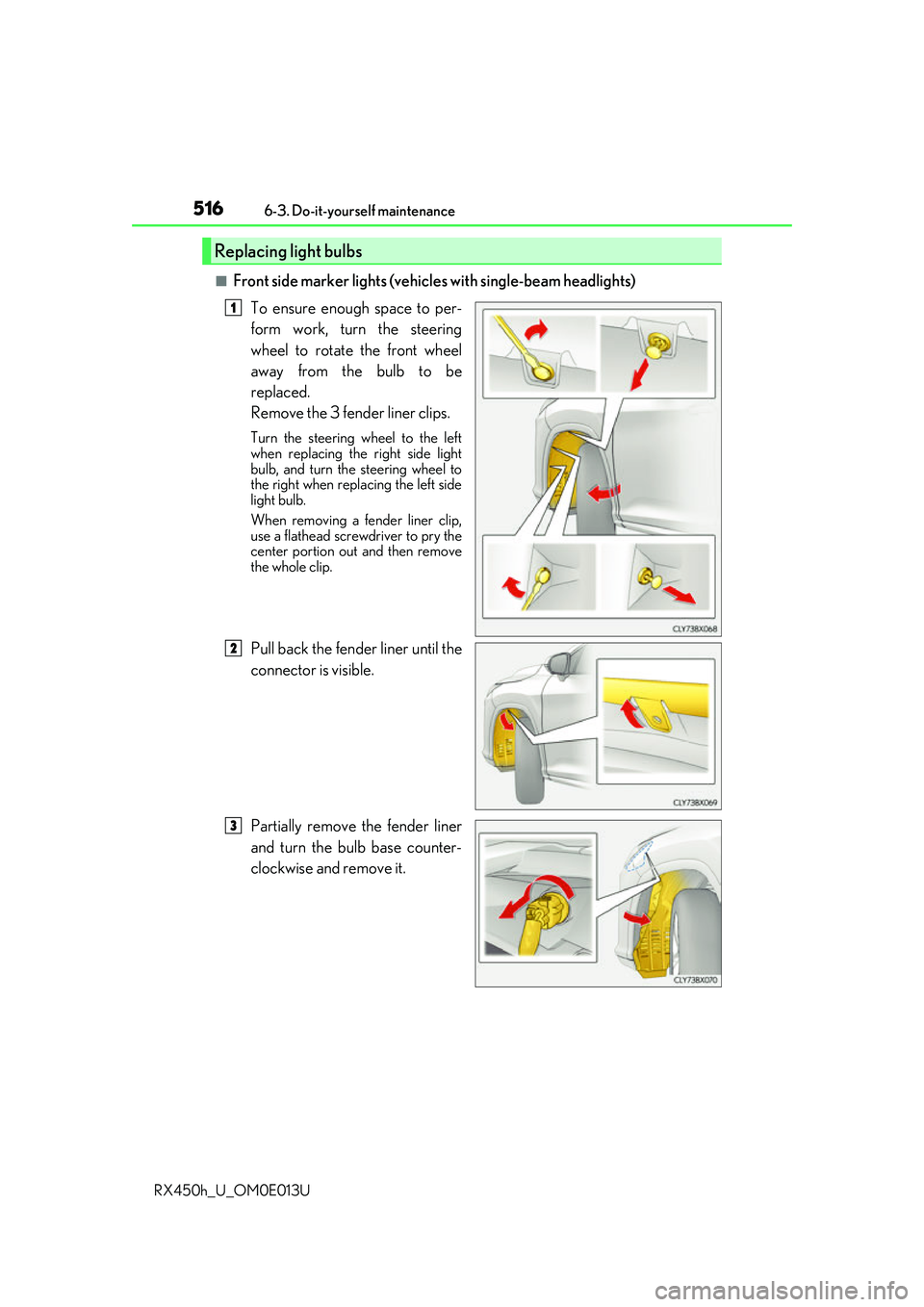
■Front side marker lights (vehicle s with single-beam headlights)
To ensure enough space to per-
form work, turn the steering
wheel to rotate the front wheel
away from the bulb to be
replaced.
Remove the 3 fender liner clips.
Turn the steering wheel to the left
when replacing the right side light
bulb, and turn the steering wheel to
the right when replacing the left side
light bulb.
When removing a fender liner clip,
use a flathead screwdriver to pry the
center portion out and then remove
the whole clip.
Pull back the fender liner until the
connector is visible.
Partially remove the fender liner
and turn the bulb base counter-
clockwise and remove it.
Replacing light bulbs
1
82
3
Page 517 of 660
5176-3. Do-it-yourself maintenance
6
Maintenance and care
RX450h_U_OM0E013U
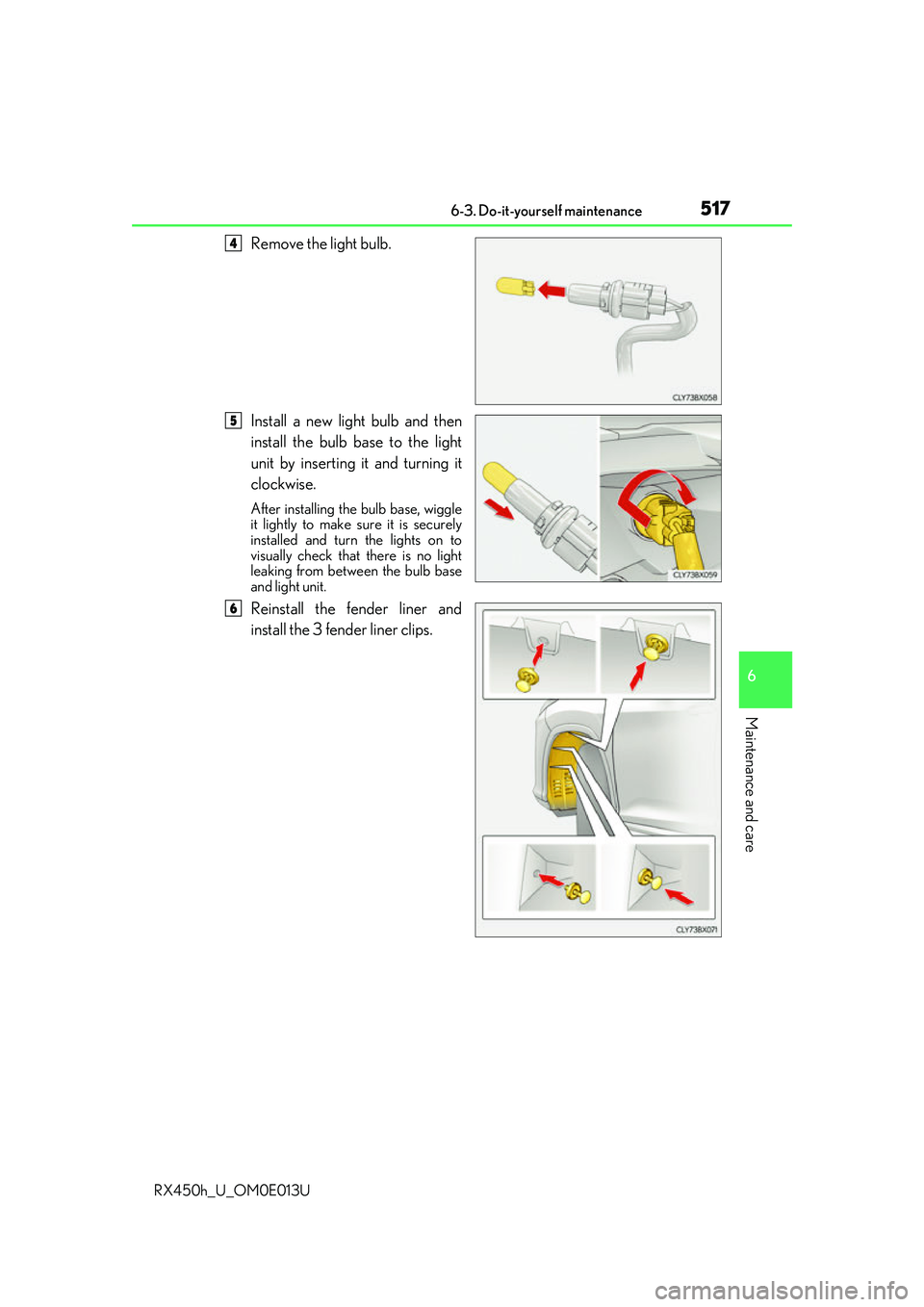
Remove the light bulb.
Install a new light bulb and then
install the bulb base to the light
unit by inserting it and turning it
clockwise.
After installing the bulb base, wiggle
it lightly to make sure it is securely
installed and turn the lights on to
visually check that there is no light
leaking from betw een the bulb base
and light unit.
Reinstall the fender liner and
install the 3 fender liner clips.
4
5
6
Page 518 of 660
5186-3. Do-it-yourself maintenance
RX450h_U_OM0E013U
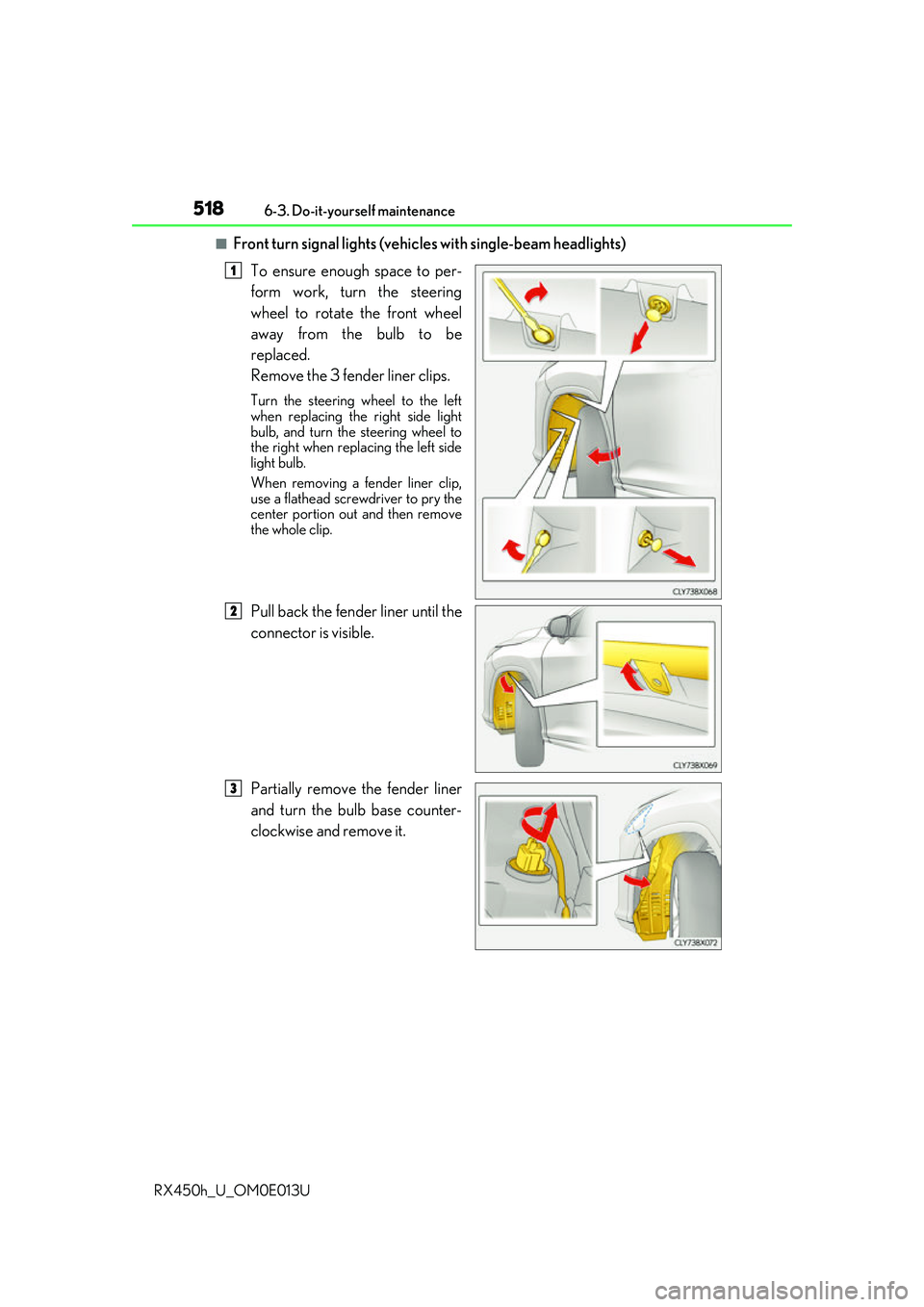
■Front turn signal lights (vehic les with single-beam headlights)
To ensure enough space to per-
form work, turn the steering
wheel to rotate the front wheel
away from the bulb to be
replaced.
Remove the 3 fender liner clips.
Turn the steering wheel to the left
when replacing the right side light
bulb, and turn the steering wheel to
the right when replacing the left side
light bulb.
When removing a fender liner clip,
use a flathead screwdriver to pry the
center portion out and then remove
the whole clip.
Pull back the fender liner until the
connector is visible.
Partially remove the fender liner
and turn the bulb base counter-
clockwise and remove it.
1
82
3
Page 519 of 660
5196-3. Do-it-yourself maintenance
6
Maintenance and care
RX450h_U_OM0E013U
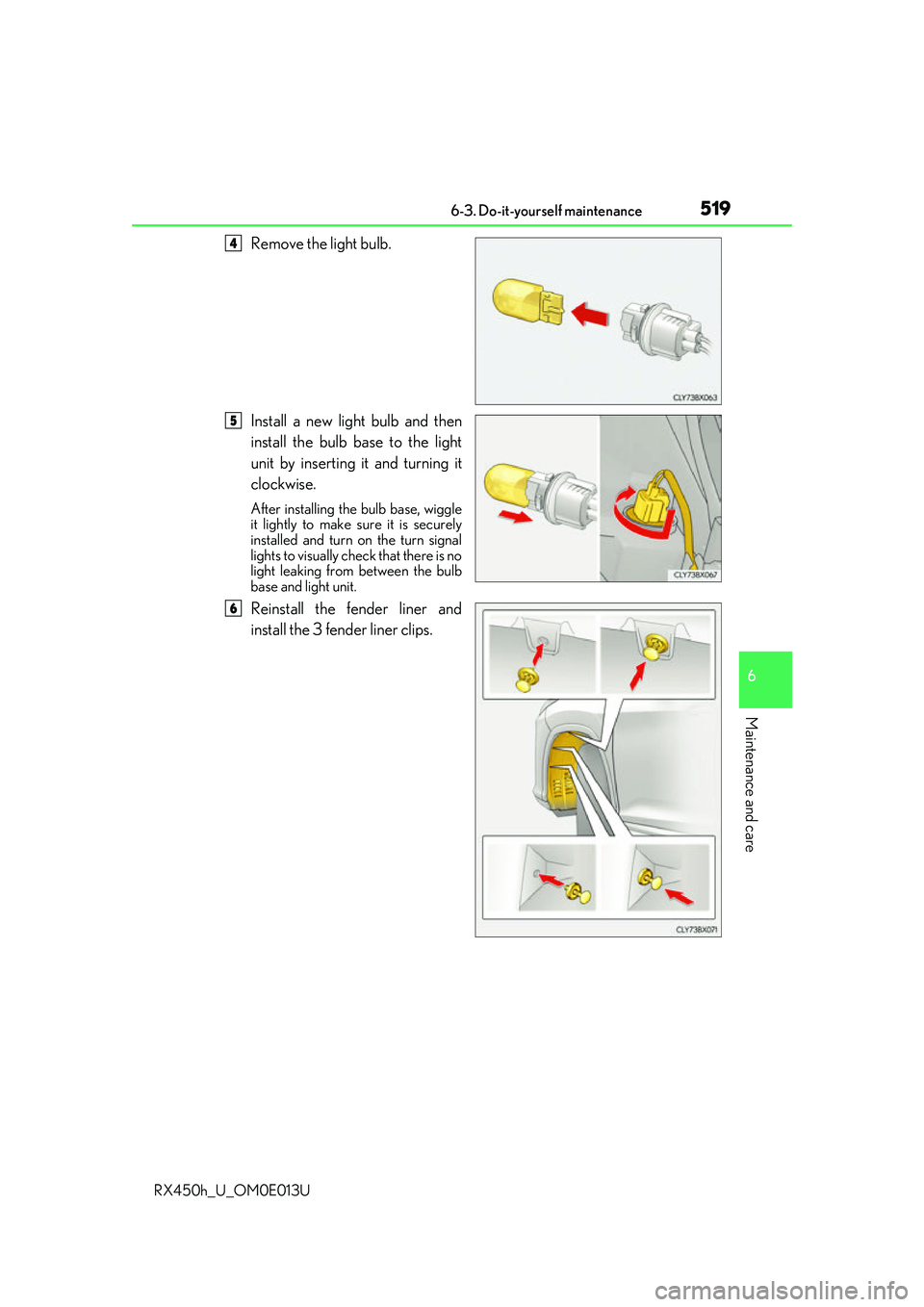
Remove the light bulb.
Install a new light bulb and then
install the bulb base to the light
unit by inserting it and turning it
clockwise.
After installing the bulb base, wiggle
it lightly to make sure it is securely
installed and turn on the turn signal
lights to visually check that there is no
light leaking from between the bulb
base and light unit.
Reinstall the fender liner and
install the 3 fender liner clips.
4
5
6
Page 521 of 660
5216-3. Do-it-yourself maintenance
6
Maintenance and care
RX450h_U_OM0E013U
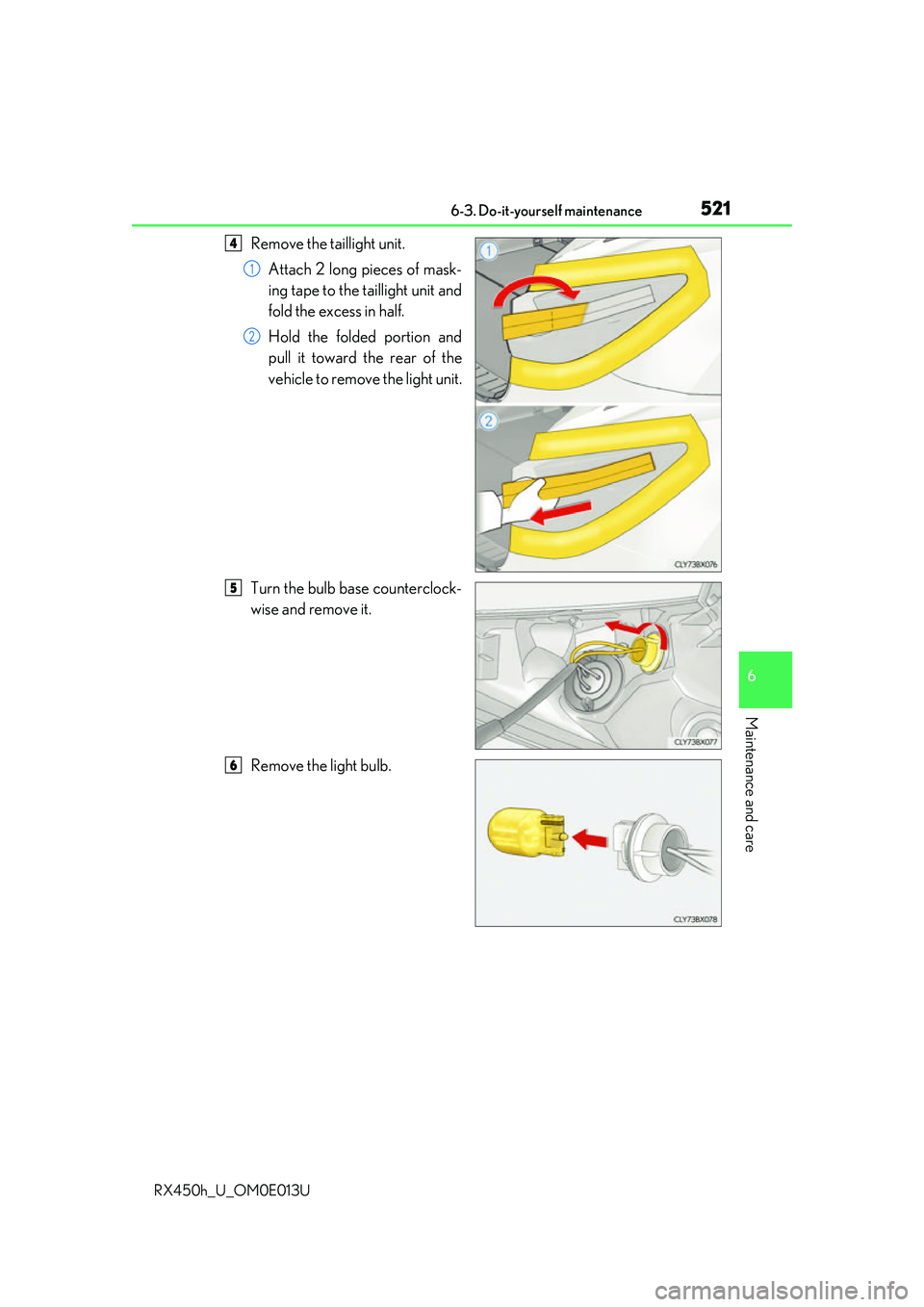
Remove the taillight unit.Attach 2 long pieces of mask-
ing tape to the taillight unit and
fold the excess in half.
Hold the folded portion and
pull it toward the rear of the
vehicle to remove the light unit.
Turn the bulb base counterclock-
wise and remove it.
Remove the light bulb.4
1
2
5
6
Page 522 of 660
5226-3. Do-it-yourself maintenance
RX450h_U_OM0E013U
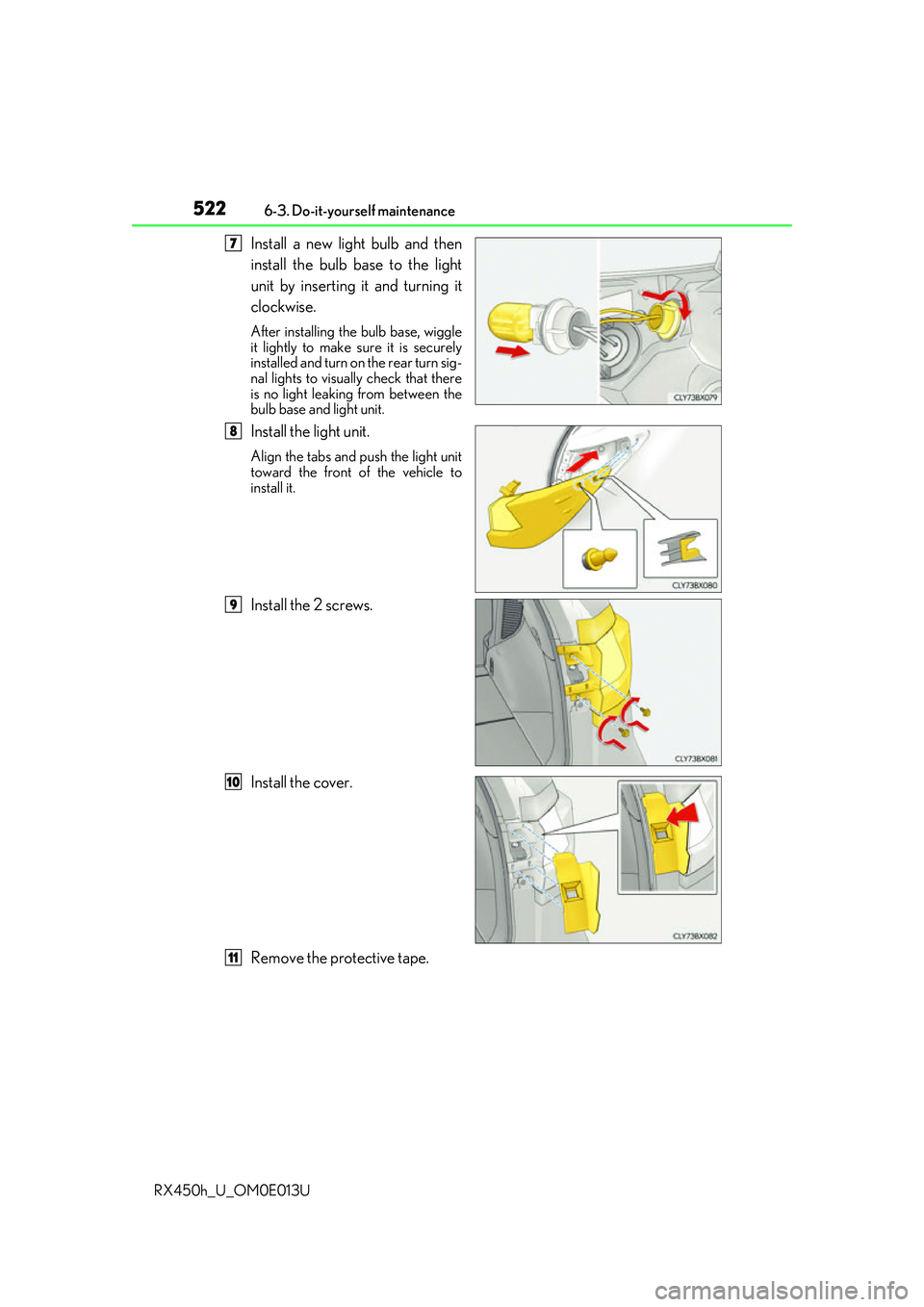
Install a new light bulb and then
install the bulb base to the light
unit by inserting it and turning it
clockwise.
After installing th e bulb base, wiggle
it lightly to make sure it is securely
installed and turn on the rear turn sig-
nal lights to visually check that there
is no light leaking from between the
bulb base and light unit.
Install the light unit.
Align the tabs and push the light unit
toward the front of the vehicle to
install it.
Install the 2 screws.
Install the cover.
Remove the protective tape.
47
8
9
10
11
Page 523 of 660
5236-3. Do-it-yourself maintenance
6
Maintenance and care
RX450h_U_OM0E013U
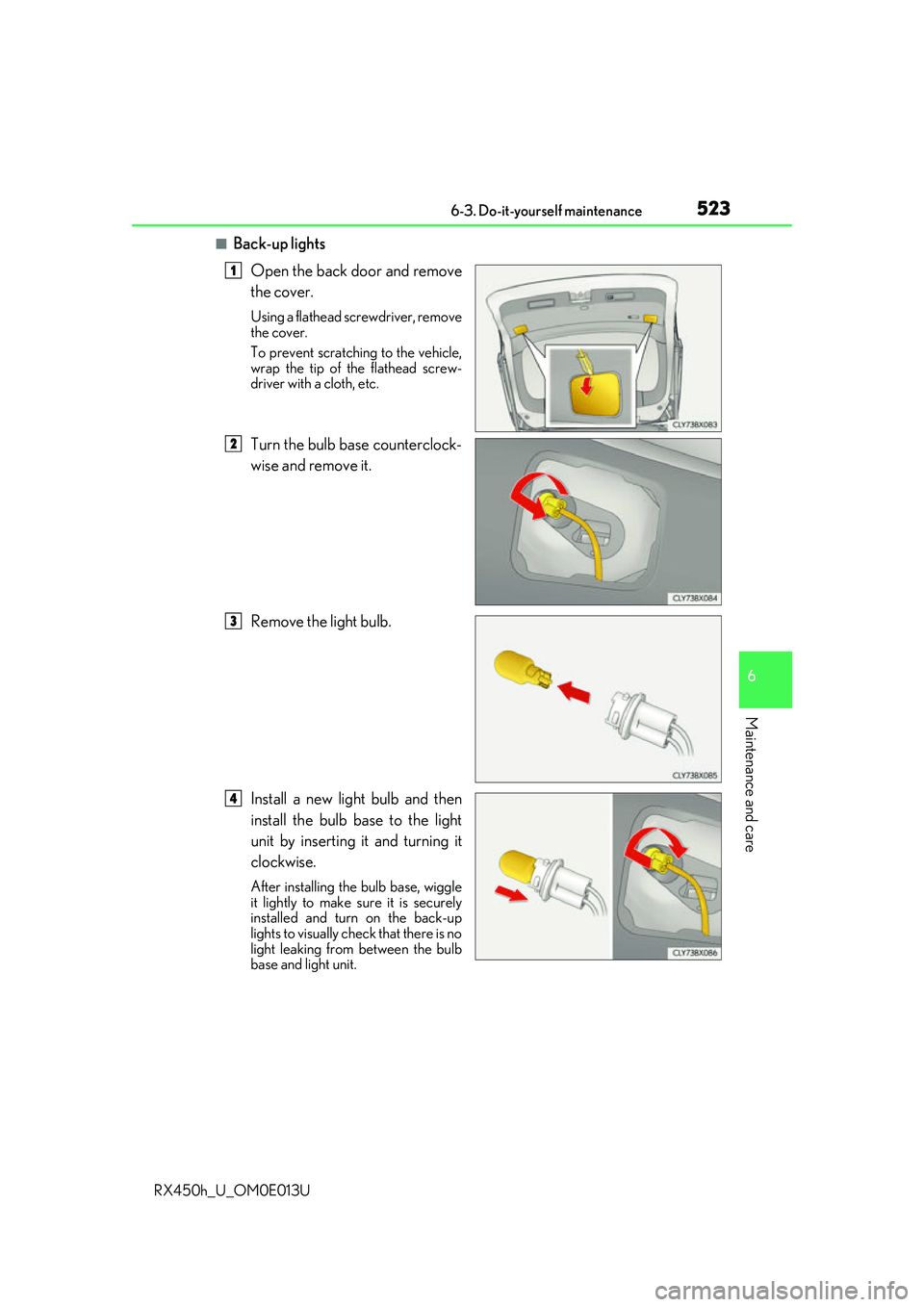
■Back-up lightsOpen the back door and remove
the cover.
Using a flathead screwdriver, remove
the cover.
To prevent scratching to the vehicle,
wrap the tip of the flathead screw-
driver with a cloth, etc.
Turn the bulb base counterclock-
wise and remove it.
Remove the light bulb.
Install a new light bulb and then
install the bulb base to the light
unit by inserting it and turning it
clockwise.
After installing th e bulb base, wiggle
it lightly to make sure it is securely
installed and turn on the back-up
lights to visually check that there is no
light leaking from between the bulb
base and light unit.
1
2
3
4
Page 525 of 660
5256-3. Do-it-yourself maintenance
6
Maintenance and care
RX450h_U_OM0E013U
■LED lights
The headlight low beams, headlight high beams, front turn signal lights (vehicles with tri-
ple-beam headlights), parking lights and daytime running lights, front fog lights, corner-
ing lights (if equipped), front side marker lights (vehicles with tr iple-beam headlights),
side turn signal lights, stop/t ail lights, rear turn signal light (vehicles with triple-beam
headlights), rear side marker lights, high moun ted stoplight, license plate lights, and outer
foot lights consist of a number of LEDs. If any of the LEDs has burned out, take your vehi-
cle to your Lexus dealer to have the light replaced.
■Condensation build-up on the inside of a lens
Temporary condensation build-up on the inside of the headlight lens does not indicate a
malfunction. Contact your Lexus dealer for more information in the following situations:
●Large drops of water have built up on the inside of a lens.
●Water has built up inside a headlight.
■When replacing light bulbs
P. 510
WARNING
■To prevent injury
Before performing any light bulb replacement procedure, be sure to turn the power
switch off. Failure to do so may result in burns from hot components or a part of your
body may get caught on an operating component, possibly causing serious injury.
■Replacing light bulbs
●Turn off the lights. Do not attempt to replac e the bulb immediately after turning off the
lights.
The bulbs become very hot and may cause burns.
●Do not touch the glass portion of the light bulb with bare hands. When it is unavoid-
able to hold the glass portion, use and hold with a clean dry cloth to avoid getting
moisture and oils on the bulb.
Also, if the bulb is scratched or dropped, it may blow out or crack.
●Fully install light bulbs and any parts used to secure them. Failure to do so may result
in heat damage, fire, or water entering th e headlight unit. This may damage the head-
lights or cause condensation to build up on the lens.
●Do not attempt to repair or disassemble th e light bulbs, connectors, electric circuits
or component parts.
Doing so may result in death or se rious injury due to electric shock.
■To prevent damage or fire
●Make sure bulbs are fully seated and locked.
●Check the wattage of the bulb before installing to prevent heat damage.
Page 534 of 660
5347-2. Steps to take in an emergency
RX450h_U_OM0E013U
NOTICE
■To prevent damage to the vehicle when towing using a wheel-lift type truck
●Do not tow the vehicle from the rear when the power switch is off. The steering lock
mechanism is not strong enough to hold the front wheels straight.
●When raising the vehicle, ensure adequate ground cleara nce for towing at the oppo-
site end of the raised vehicle. Without ad equate clearance, the vehicle could be dam-
aged while being towed.
■To prevent damage to the vehicle when towing with a sling-type truck
Do not tow with a sling-type truck, either from the front or rear.
■To prevent damage to the vehicle during emergency towing
Do not secure cables or chains to the suspension components.
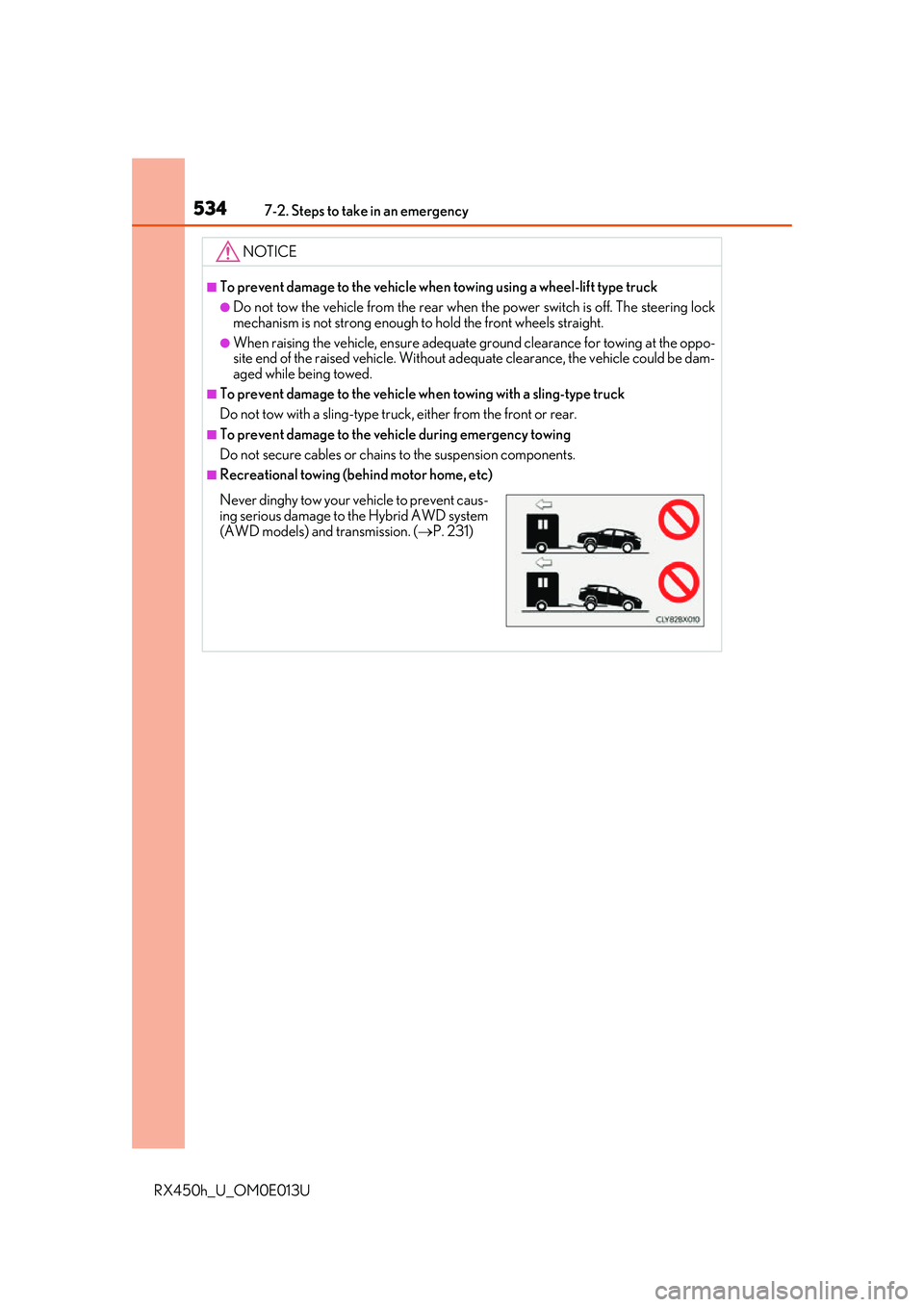
■Recreational towing (behind motor home, etc)
Never dinghy tow your vehicle to prevent caus-ing serious damage to the Hybrid AWD system
(AWD models) and transmission. ( P. 231)
Page 546 of 660
5467-2. Steps to take in an emergency
RX450h_U_OM0E013U
■If “Shift Is in N Release Accelerator Before Shifting” is shown
Message is displayed when the accelerator pedal has been depressed and
the shift lever is in N. Release the accelerator pedal and shift the shift lever to
D or R.
■If “Depress Brake when Vehicle Is Stopped Hybrid System May Overheat”
is shown
Message is displayed when the accelerato r pedal is depressed to maintain the
vehicle position when stopped on a upward slope, etc.
If this continues, the hybrid system may overheat.
Release the accelerator pedal and depress the brake pedal.
■If “Power Turned Off to Save Battery” is displayed
This message is displayed when the power was cut off due to the automatic
power off function.
The next time the hybrid system is star ted, increase the engine speed slightly
and maintain it at that speed for approximately 5 minutes to recharge the 12-
volt battery.
■If “A New Key has been Registered Contact Your Dealer for Details” is dis-
played
This message will be displayed each time the driver's door is opened when the
doors are unlocked from the outside fo r approximately one week after a new
electronic key has been registered.
If this message is displayed but you ha ve not had a new electronic key regis-
tered, ask your Lexus dealer to check if an unknown electronic key (other than
those in your possession) has been registered.
■When “Headlight System Malfunction Visit Your Dealer” is displayed
The following systems may be malfunct ioning. Have the vehicle inspected by
your Lexus dealer immediately.
●The LED headlight system
●The automatic headlight leveling system
●Automatic High Beam (if equipped)
●AFS (Adaptive Front-lighting System) (if equipped)