automatic LEXUS RX450H 2016 User Guide
[x] Cancel search | Manufacturer: LEXUS, Model Year: 2016, Model line: RX450H, Model: LEXUS RX450H 2016Pages: 660, PDF Size: 14.85 MB
Page 94 of 660
942. Instrument cluster
RX450h_U_OM0E013U
*1: These lights turn on when the power switch is turned to ON mode to indicate that a system check is being performe d. They will turn off after the hybrid system is on, or
after a few seconds. There may be a malfunctio n in a system if the lights do not turn on,
or turn off. Have the vehicle inspected by your Lexus dealer.
*2: The light flashes to indicate a malfunction.
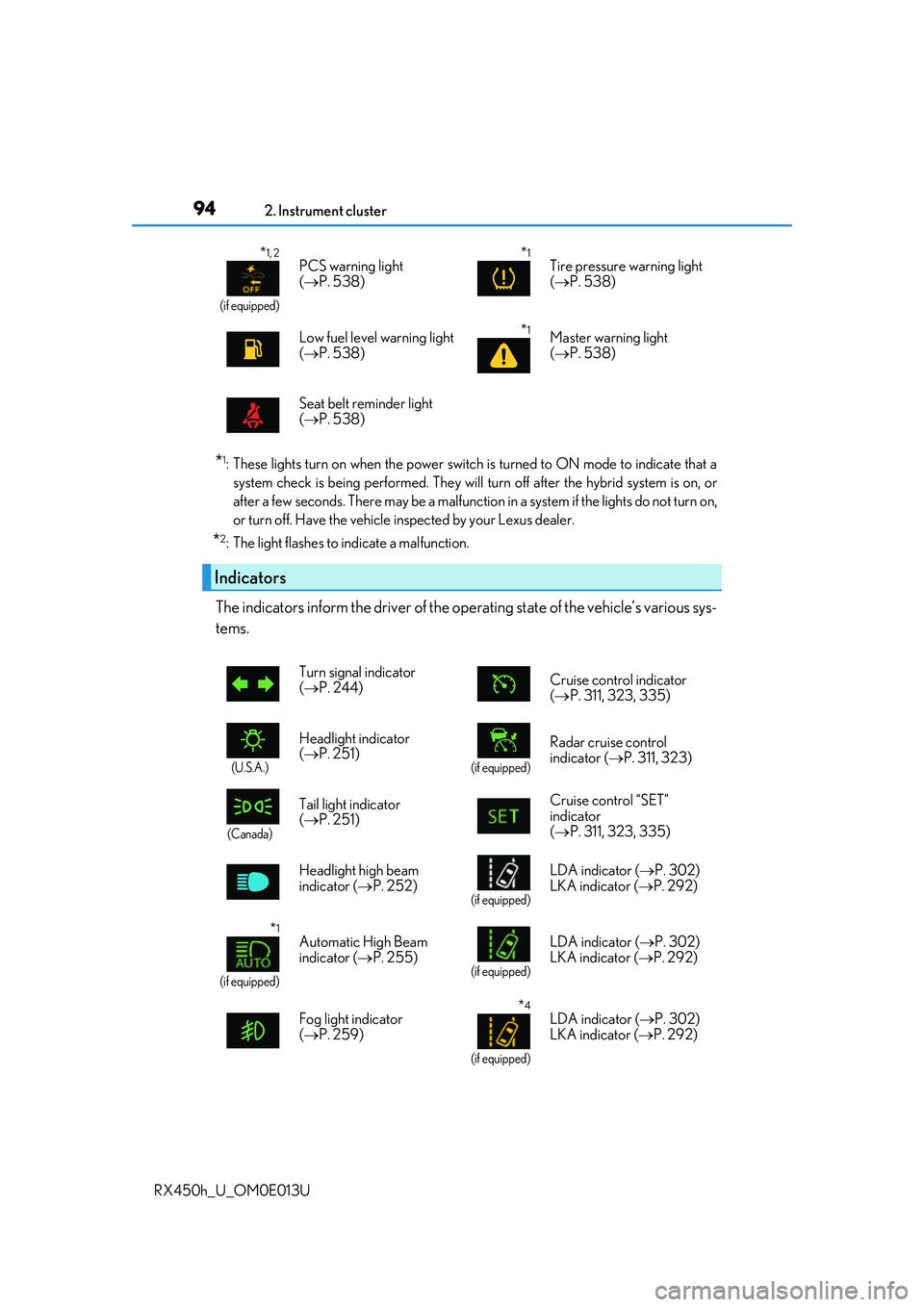
The indicators inform the driver of the op erating state of the vehicle’s various sys-
tems.
*1, 2
(if equipped)
PCS warning light
( P. 538)*1Tire pressure warning light
( P. 538)
Low fuel level warning light
( P. 538)
*1Master warning light
( P. 538)
Seat belt reminder light
( P. 538)
Indicators
Turn signal indicator
( P. 244) Cruise control indicator
(
P. 311, 323, 335)
(U.S.A.)
Headlight indicator
( P. 251)
(if equipped)
Radar cruise control
indicator ( P. 311, 323)
(Canada)
Tail light indicator
( P. 251) Cruise control “SET”
indicator
(
P. 311, 323, 335)
Headlight high beam
indicator ( P. 252)
(if equipped)
LDA indicator ( P. 302)
LKA indicator ( P. 292)
*1
(if equipped)
Automatic High Beam
indicator (P. 255)
(if equipped)
LDA indicator ( P. 302)
LKA indicator ( P. 292)
Fog light indicator
( P. 259)
*4
(if equipped)
LDA indicator ( P. 302)
LKA indicator ( P. 292)
Page 100 of 660
1002. Instrument cluster
RX450h_U_OM0E013U
■The meters and display illuminate when
The power switch is in ON mode.
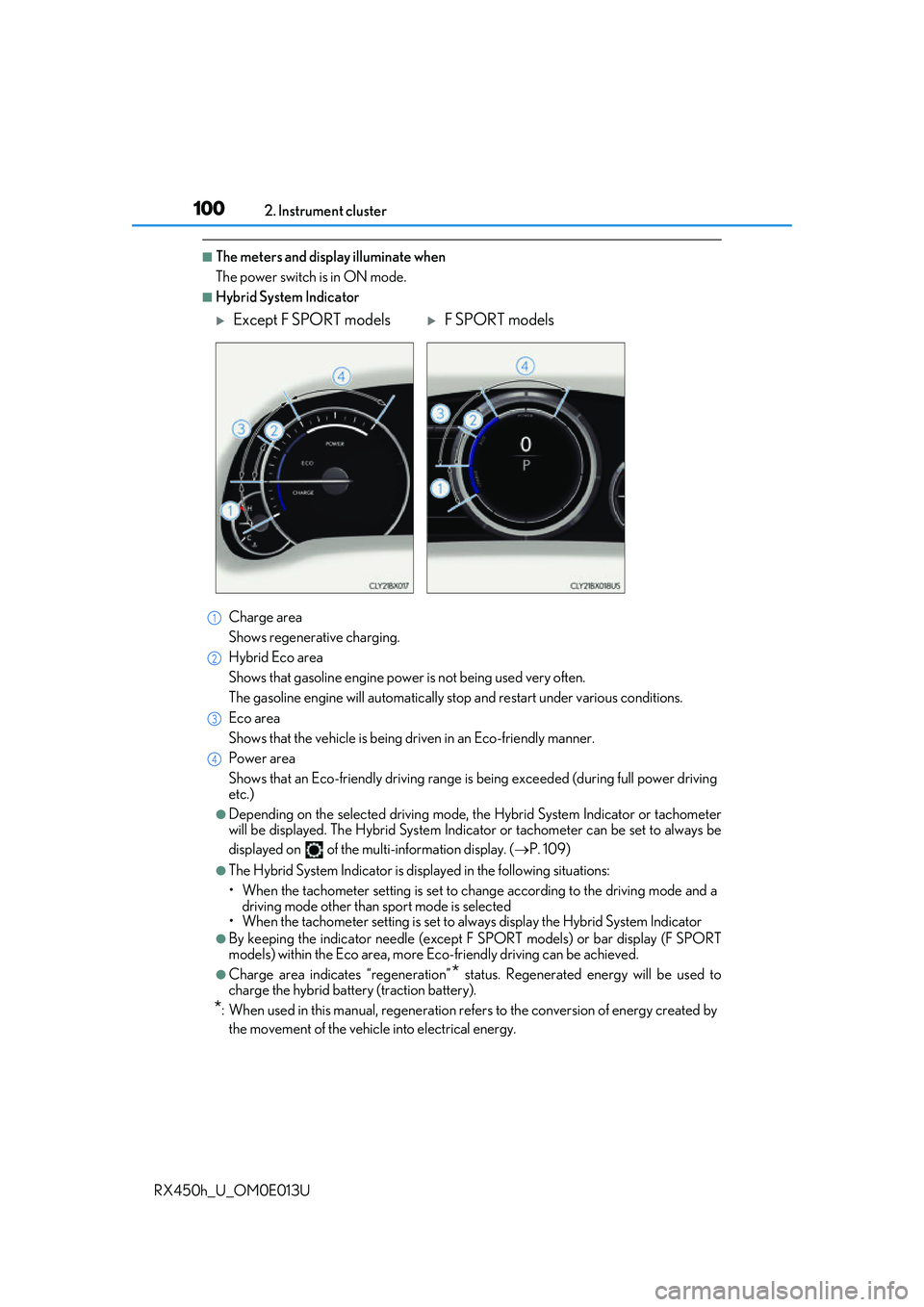
■Hybrid System Indicator Charge area
Shows regenerative charging.
Hybrid Eco area
Shows that gasoline en gine power is not being used very often.
The gasoline engine will automatically stop and restart under various conditions.
Eco area
Shows that the vehicle is being dr iven in an Eco-friendly manner.
Power area
Shows that an Eco-friendly driving range is being exceeded (during full power driving
etc.)
●Depending on the selected driving mode, th e Hybrid System Indicator or tachometer
will be displayed. The Hybrid System Indica tor or tachometer can be set to always be
displayed on of the mult i-information display. (P. 109)
●The Hybrid System Indicator is disp layed in the following situations:
• When the tachometer setting is set to ch ange according to the driving mode and a
driving mode other than sport mode is selected
• When the tachometer setting is set to al ways display the Hybrid System Indicator
●By keeping the indicator needle (except F SPORT models) or bar display (F SPORT
models) within the Eco area, more Eco-friendly driving can be achieved.
●Charge area indicates “regeneration”* status. Regenerated energy will be used to
charge the hybrid battery (traction battery).
*: When used in this manual, re generation refers to the conversion of energy created by
the movement of the vehicle into electrical energy.
Except F SPORT modelsF SPORT models
1
2
3
4
Page 109 of 660
1092. Instrument cluster
2
Instrument cluster
RX450h_U_OM0E013U
◆Changing settings
Use the meter control switches on the steering wheel to change settings.
Press or to select .
Operate the switches to select a desired item.
Change the setting by referring to the message displayed on the screen.
◆Setting items
■ LDA (Lane Departure Alert with steering control)/LKA (Lane-Keep-
ing Assist) (if equipped) ( P. 292, 302)
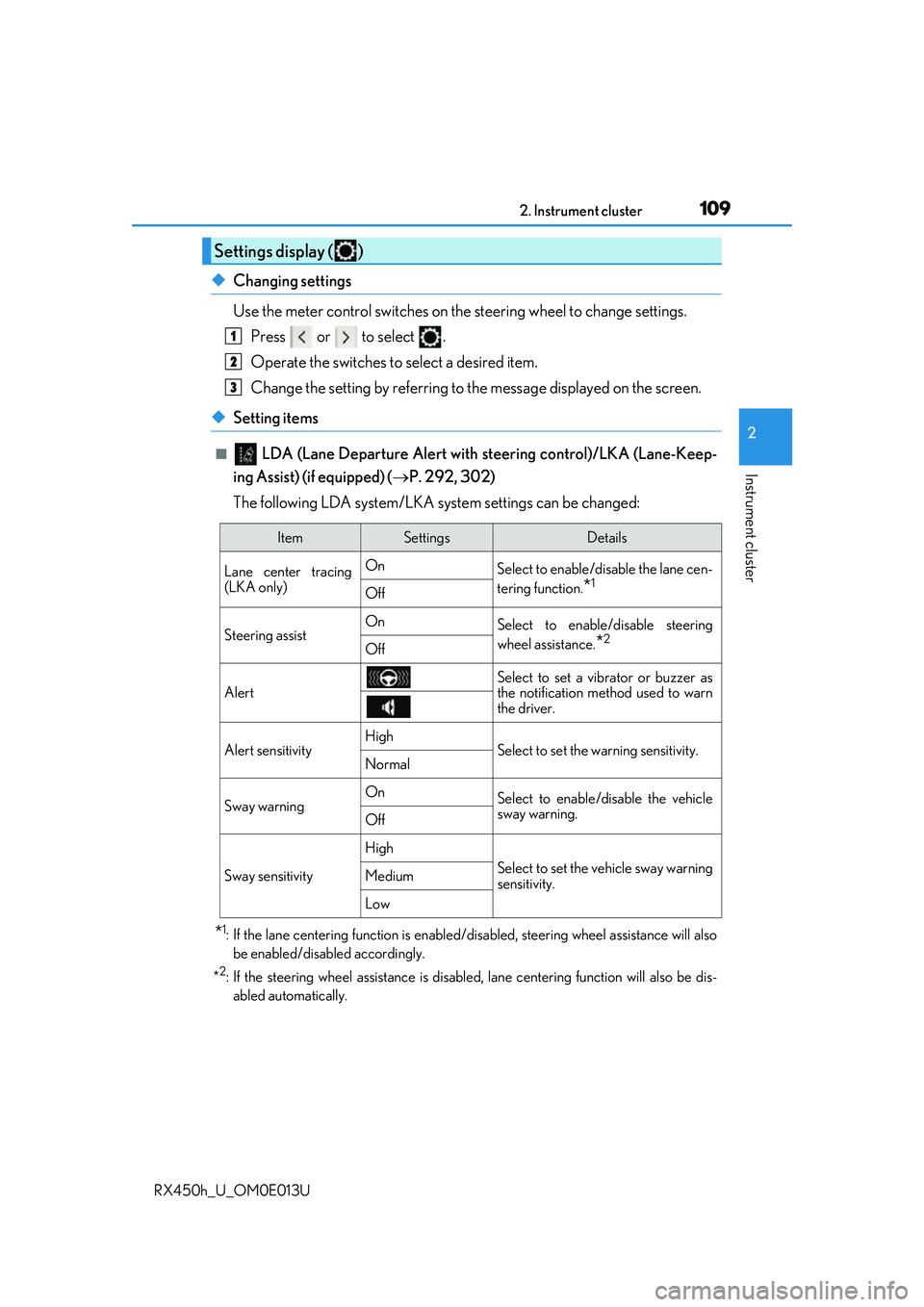
The following LDA system/LKA system settings can be changed:
*1: If the lane centering function is enabled/ disabled, steering wheel assistance will also
be enabled/disabled accordingly.
*
2: If the steering wheel assistance is disabled, lane cent ering function will also be dis-
abled automatically.
Settings display ( )
1
2
3
ItemSettingsDetails
Lane center tracing
(LKA only) On
Select to enable/disable the lane cen-
tering function.
*1Off
Steering assistOnSelect to enable/disable steering
wheel assistance.
*2Off
Alert
Select to set a vibrator or buzzer as
the notification method used to warn
the driver.
Alert sensitivityHighSelect to set the warning sensitivity.Normal
Sway warningOnSelect to enable/disable the vehicle
sway warning.
Off
Sway sensitivity
High
Select to set the vehicle sway warning
sensitivity.Medium
Low
Page 112 of 660
1122. Instrument cluster
RX450h_U_OM0E013U
■Vehicle settings
ItemSettingsDetails
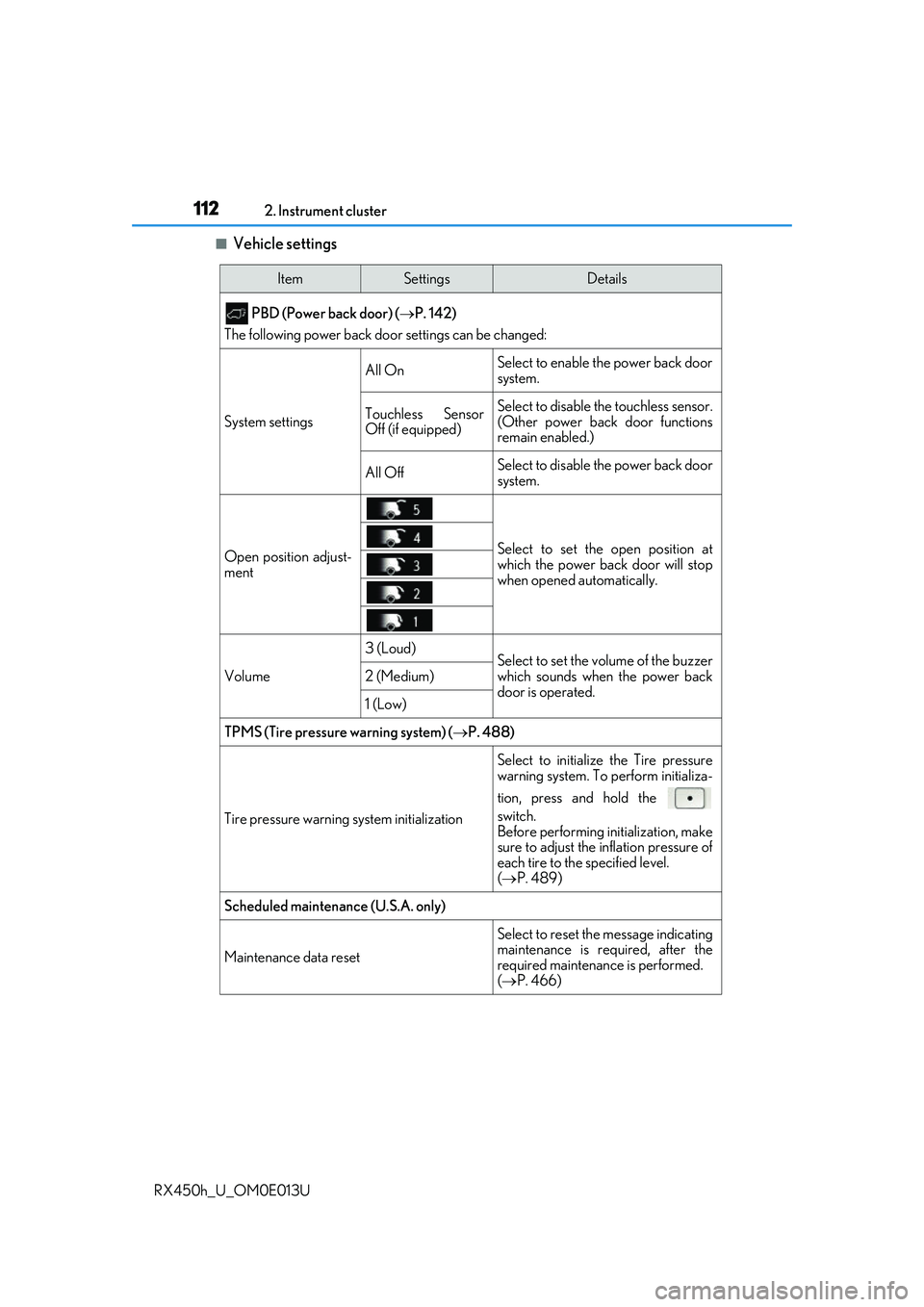
PBD (Power back door) ( P. 142)
The following power back door settings can be changed:
System settings
All OnSelect to enable the power back door
system.
Touchless Sensor
Off (if equipped)Select to disable the touchless sensor.
(Other power back door functions
remain enabled.)
All OffSelect to disable the power back door
system.
Open position adjust-
mentSelect to set the open position at
which the power back door will stop
when opened automatically.
Volume
3 (Loud)Select to set the volume of the buzzer
which sounds when the power back
door is operated.
2 (Medium)
1 (Low)
TPMS (Tire pressure warning system) (P. 488)
Tire pressure warning system initialization
Select to initialize the Tire pressure
warning system. To perform initializa-
tion, press and hold the
switch.
Before performing initialization, make
sure to adjust the inflation pressure of
each tire to the specified level.
( P. 489)
Scheduled maintenance (U.S.A. only)
Maintenance data reset
Select to reset the message indicating
maintenance is re quired, after the
required maintenanc e is performed.
( P. 466)
Page 122 of 660
1222. Instrument cluster
RX450h_U_OM0E013U
■Head-up display
The head-up display may seem dark or hard to see when viewed through sunglasses,
especially pola rized sunglasses.
Adjust the brightness of the head-up display or remove your sunglasses.
■When the 12-volt battery is disconnected
The customize settings of the head-up display will be reset.
■Display brightness
The brightness of the head-up display can be adjusted on of the multi-information
display. Also, it is automatically adju sted according to the ambient brightness.
■Enabling/disabling of the head-up display
If the head-up display is disabled, it will remain disabled when the power switch is turned
off then back to ON mode.
■Street name display (vehicle s with a navigation system)
Only street names which are included in the map data will be displayed.
WARNING
■Before using the head-up display
●Check that the position and brightness of the head-up display image does not inter-
fere with safe driving. Incorrect adjustment of the image’s position or brightness may
obstruct the driver’s view and lead to an acc ident, resulting in death or serious injury.
●Do not continuously look at the head-up display while driving as you may fail to see
pedestrians, objects on the road, etc. ahead of the vehicle.
■Caution for changing settings of the head-up display
As the hybrid system needs to be operating while changing the settings of the head-up
display, ensure that the vehicle is parked in a place with adequate ventilation. In a
closed area such as a garage, exhaust gases including harmful carbon monoxide (CO)
may collect and enter the vehicle. This may lead to death or a serious health hazard.
Page 137 of 660
1373-2. Opening, closing and locking the doors
3
Operation of each component
RX450h_U_OM0E013U
■Operation signals
Doors:
A buzzer sounds and the emergency flashers flash to indicate that the doors have been
locked/unlocked. (Locked: Once; Unlocked: Twice)
Windows and moon roof or panoramic moon roof:
A buzzer sounds.
■Security feature
If a door is not opened within approximately 60 seconds after the vehicle is unlocked, the
security feature automatically locks the vehicle again.
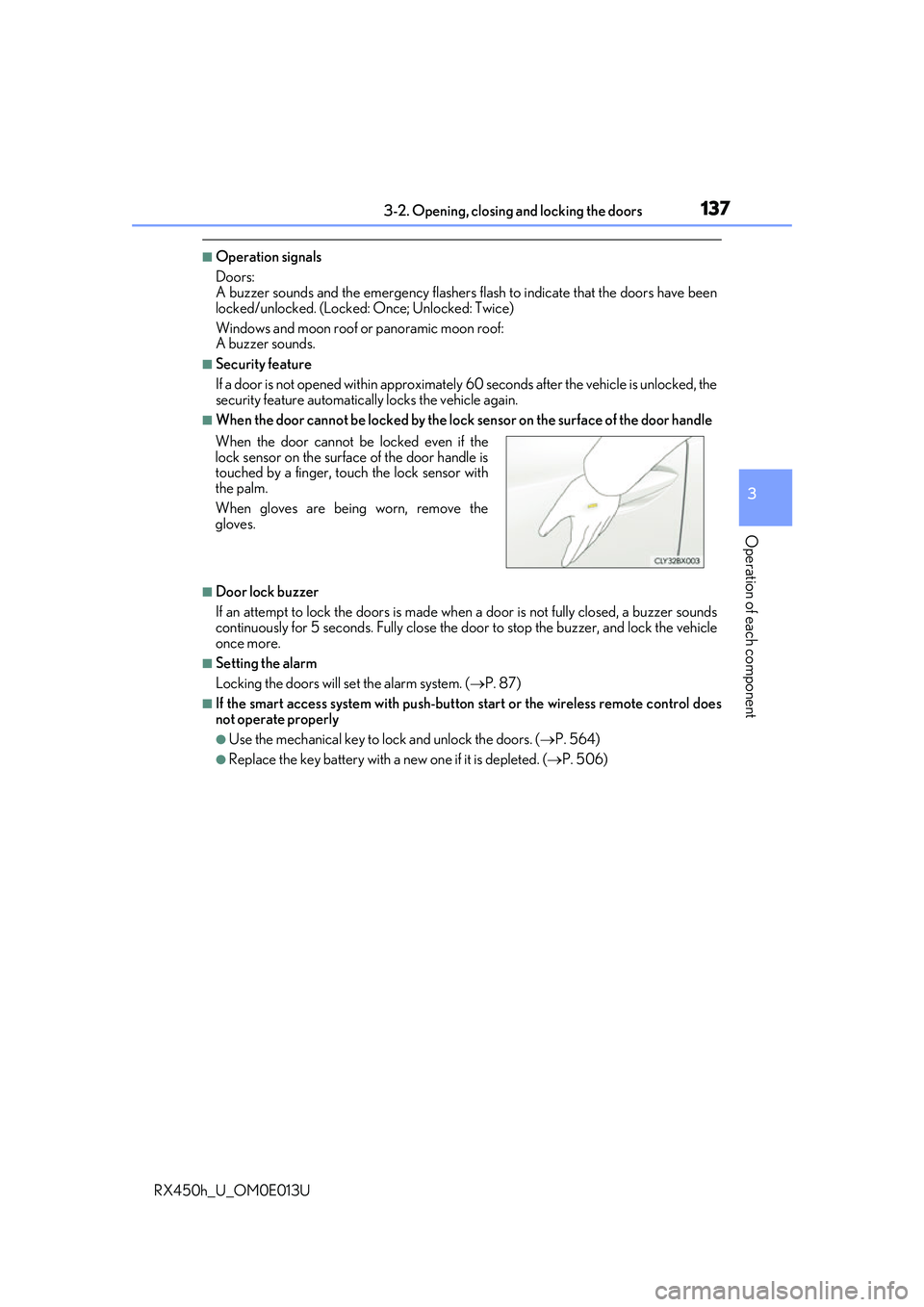
■When the door cannot be locked by the lock sensor on the surface of the door handle
■Door lock buzzer
If an attempt to lock the doors is made when a door is not fully closed, a buzzer sounds
continuously for 5 seconds. Fully close the d oor to stop the buzzer, and lock the vehicle
once more.
■Setting the alarm
Locking the doors will set the alarm system. ( P. 87)
■If the smart access system with push-button start or the wireless remote control does
not operate properly
●Use the mechanical key to lock and unlock the doors. ( P. 564)
●Replace the key battery with a new one if it is depleted. ( P. 506)
When the door cannot be locked even if the
lock sensor on the surface of the door handle is
touched by a finger, touch the lock sensor with
the palm.
When gloves are being worn, remove the
gloves.
Page 139 of 660
1393-2. Opening, closing and locking the doors
3
Operation of each component
RX450h_U_OM0E013U
Push down the inside lock button.
Close the door.
The door cannot be locked if the power switch is in ACCESSORY or ON mode, or
the electronic key is left inside the vehicle. However, the key may not be detected cor-
rectly and the door may be locked.
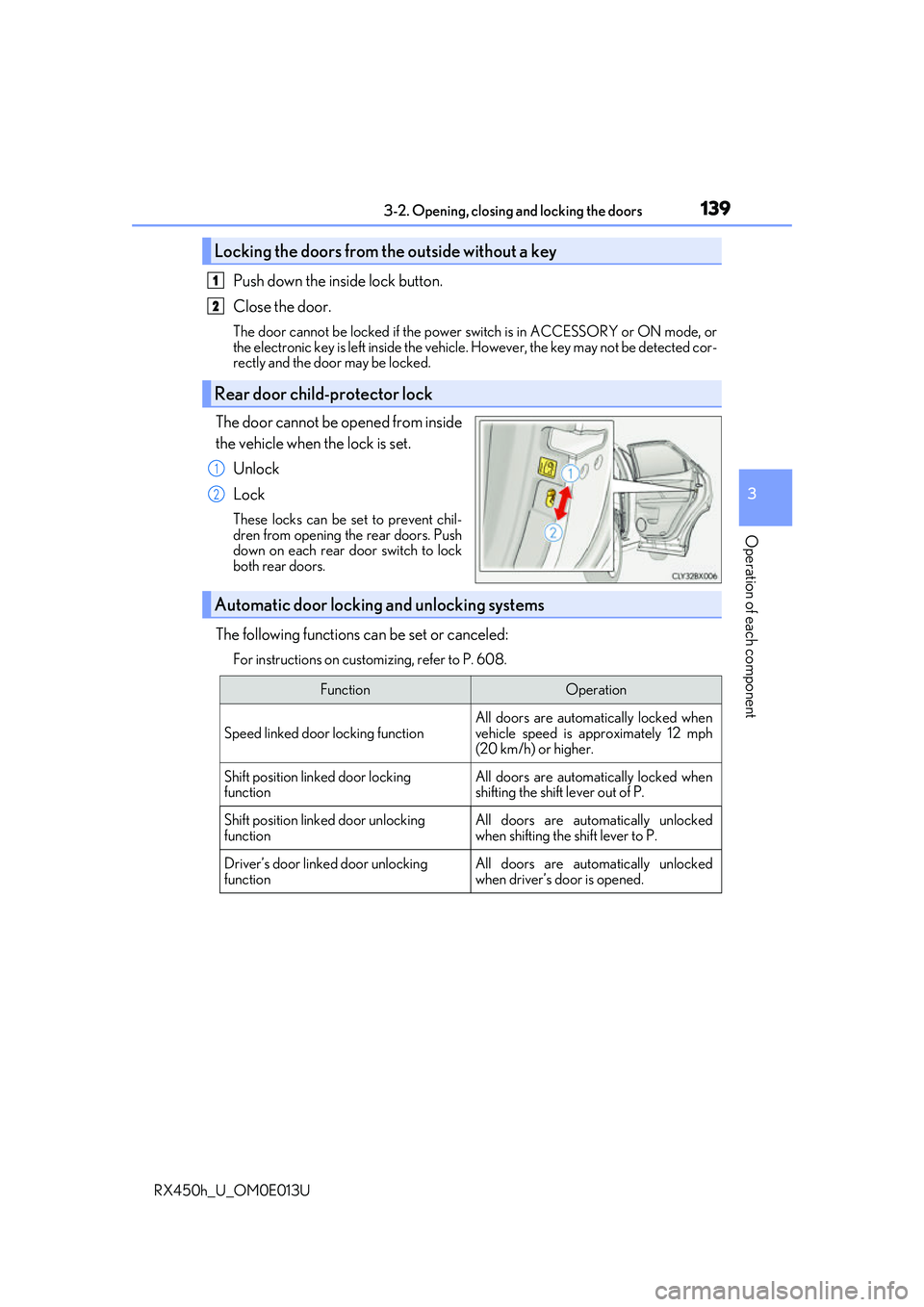
The door cannot be opened from inside
the vehicle when the lock is set.
Unlock
Lock
These locks can be set to prevent chil-
dren from opening the rear doors. Push
down on each rear door switch to lock
both rear doors.
The following functions can be set or canceled:
For instructions on customizing, refer to P. 608.
Locking the doors from the outside without a key
Rear door child-protector lock
1
2
1
2
Automatic door locking and unlocking systems
FunctionOperation
Speed linked door locking function
All doors are automatically locked when
vehicle speed is approximately 12 mph
(20 km/h) or higher.
Shift position linked door locking
functionAll doors are automatically locked when
shifting the shift lever out of P.
Shift position linked door unlocking
functionAll doors are automatically unlocked
when shifting the shift lever to P.
Driver’s door linked door unlocking
functionAll doors are automatically unlocked
when driver’s door is opened.
Page 140 of 660
1403-2. Opening, closing and locking the doors
RX450h_U_OM0E013U
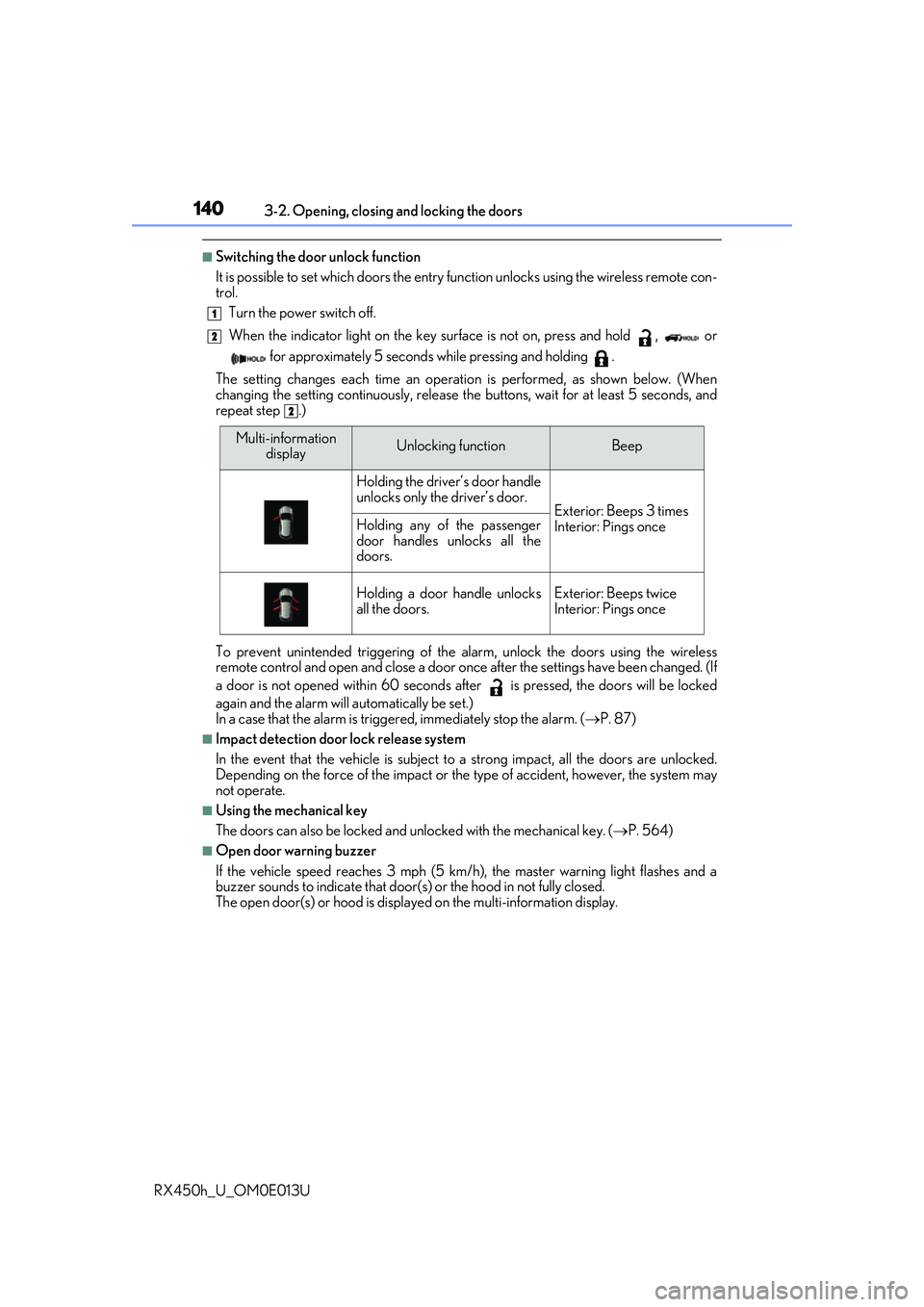
■Switching the door unlock function
It is possible to set which doors the entry function unlock s using the wireless remote con-
trol.
Turn the power switch off.
When the indicator light on the key su rface is not on, press and hold , or
for approximately 5 seconds while pressing and holding .
The setting changes each time an operation is performed, as shown below. (When
changing the setting continuously, release the buttons, wait for at least 5 seconds, and
repeat step .)
To prevent unintended triggering of the alarm, unlock the doors using the wireless
remote control and open and close a door once after the settings have been changed. (If
a door is not opened within 60 seconds af ter is pressed, the doors will be locked
again and the alarm will automatically be set.)
In a case that the alarm is triggered, immediately stop the alarm. ( P. 87)
■Impact detection door lock release system
In the event that the vehicle is subject to a strong impact, all the doors are unlocked.
Depending on the force of the impact or the type of accident, however, the system may
not operate.
■Using the mechanical key
The doors can also be locked and unlocked with the mechanical key. ( P. 564)
■Open door warning buzzer
If the vehicle speed reaches 3 mph (5 km/h), the master warning light flashes and a
buzzer sounds to indicate that door (s) or the hood in not fully closed.
The open door(s) or hood is displa yed on the multi-information display.
1
2
2
Multi-information
displayUnlocking functionBeep
Holding the driver’s door handle
unlocks only the driver’s door.
Exterior: Beeps 3 times
Interior: Pings onceHolding any of the passenger
door handles unlocks all the
doors.
Holding a door handle unlocks
all the doors.Exterior: Beeps twice
Interior: Pings once
Page 143 of 660
1433-2. Opening, closing and locking the doors
3
Operation of each component
RX450h_U_OM0E013U
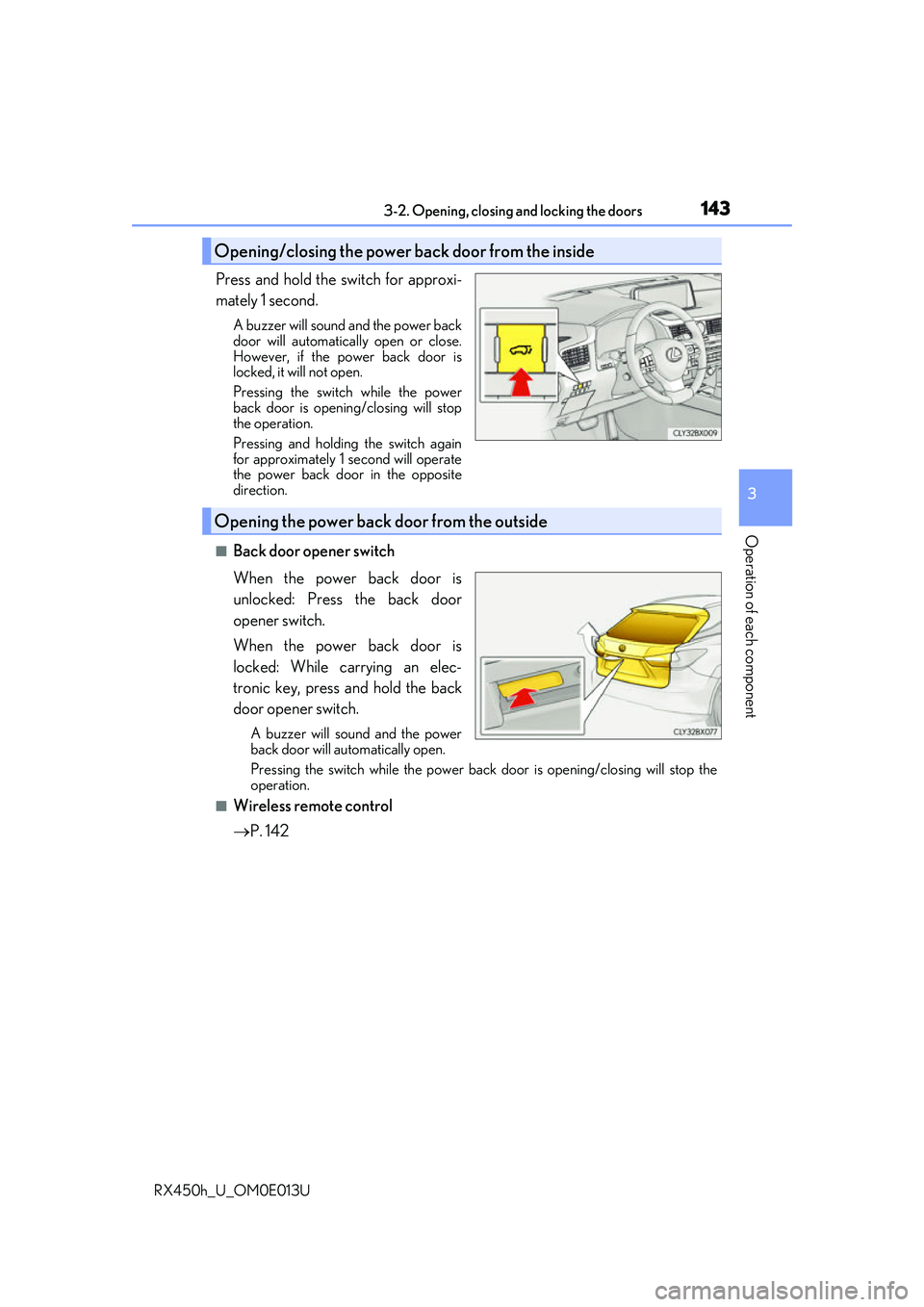
Press and hold the switch for approxi-
mately 1 second.
A buzzer will sound and the power back
door will automatically open or close.
However, if the power back door is
locked, it will not open.
Pressing the switch while the power
back door is opening/closing will stop
the operation.
Pressing and holding the switch again
for approximately 1 second will operate
the power back door in the opposite
direction.
■Back door opener switch
When the power back door is
unlocked: Press the back door
opener switch.
When the power back door is
locked: While carrying an elec-
tronic key, press and hold the back
door opener switch.
A buzzer will sound and the power
back door will automatically open.
Pressing the switch while the power back door is opening/closing will stop the
operation.
■Wireless remote control
P. 142
Opening/closing the power back door from the inside
Opening the power back door from the outside
Page 144 of 660
1443-2. Opening, closing and locking the doors
RX450h_U_OM0E013U
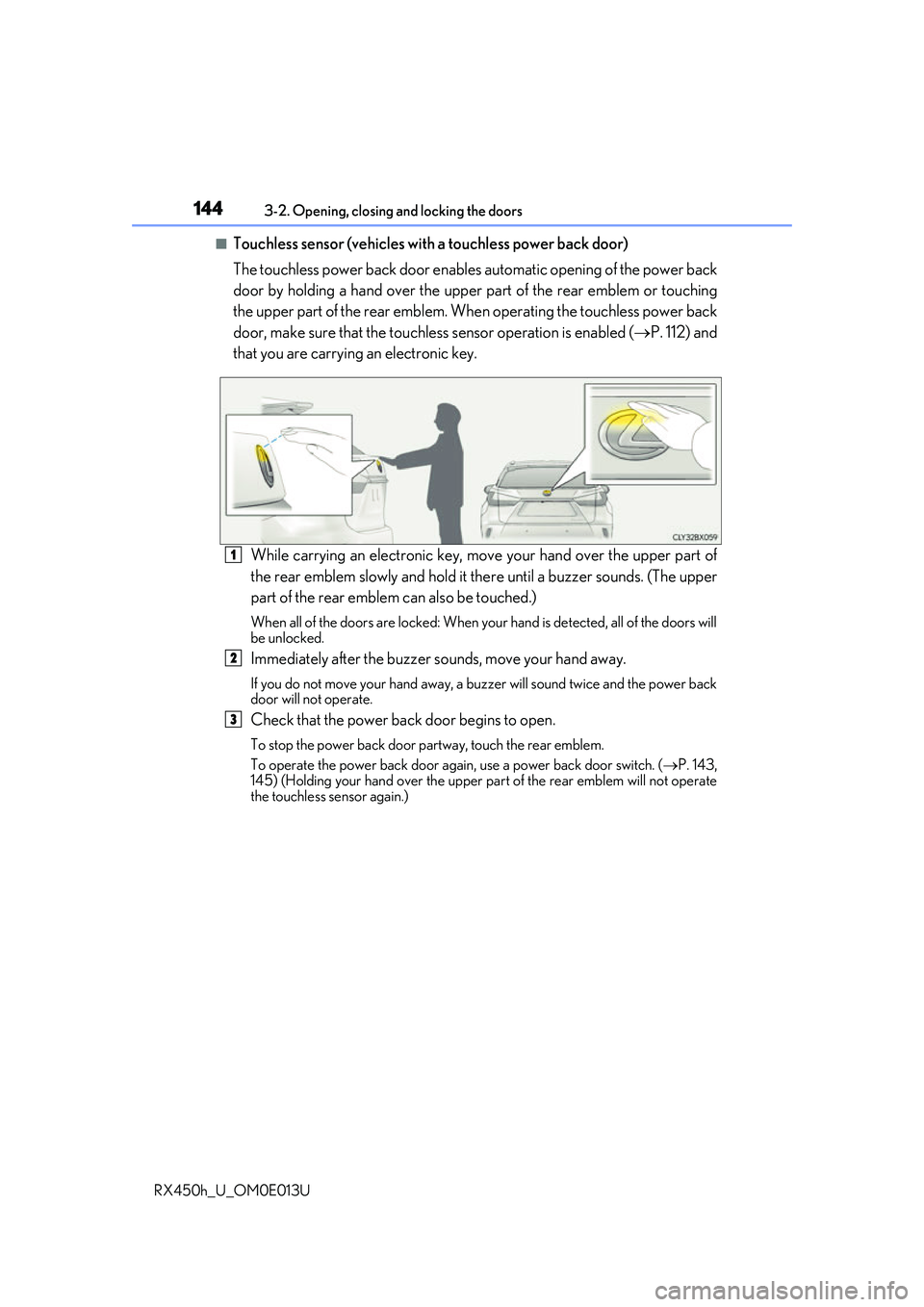
■Touchless sensor (vehicles with a touchless power back door)
The touchless power back door enable s automatic opening of the power back
door by holding a hand over the upper part of the rear emblem or touching
the upper part of the rear emblem. When operating the touchless power back
door, make sure that the touchle ss sensor operation is enabled (P. 112) and
that you are carrying an electronic key.
While carrying an electronic key, m ove your hand over the upper part of
the rear emblem slowly and hold it there until a buzzer sounds. (The upper
part of the rear emblem can also be touched.)
When all of the doors are locked: When your hand is detected, all of the doors will
be unlocked.
Immediately after the buzzer so unds, move your hand away.
If you do not move your hand away, a buzzer will sound twice and the power back
door will not operate.
Check that the power back door begins to open.
To stop the power back door partway, touch the rear emblem.
To operate the power back door again, use a power back door switch. ( P. 143,
145) (Holding your hand over the upper part of the rear emblem will not operate
the touchless sensor again.)
1
2
3