key battery LEXUS RX450H 2016 User Guide
[x] Cancel search | Manufacturer: LEXUS, Model Year: 2016, Model line: RX450H, Model: LEXUS RX450H 2016Pages: 660, PDF Size: 14.85 MB
Page 235 of 660
2354-2. Driving procedures
4
Driving
RX450h_U_OM0E013U
■Steering lock
After turning the power switch off and opening and closing the doors, the steering wheel
will be locked due to the steering lock func tion. Operating the power switch again auto-
matically cancels the steering lock.
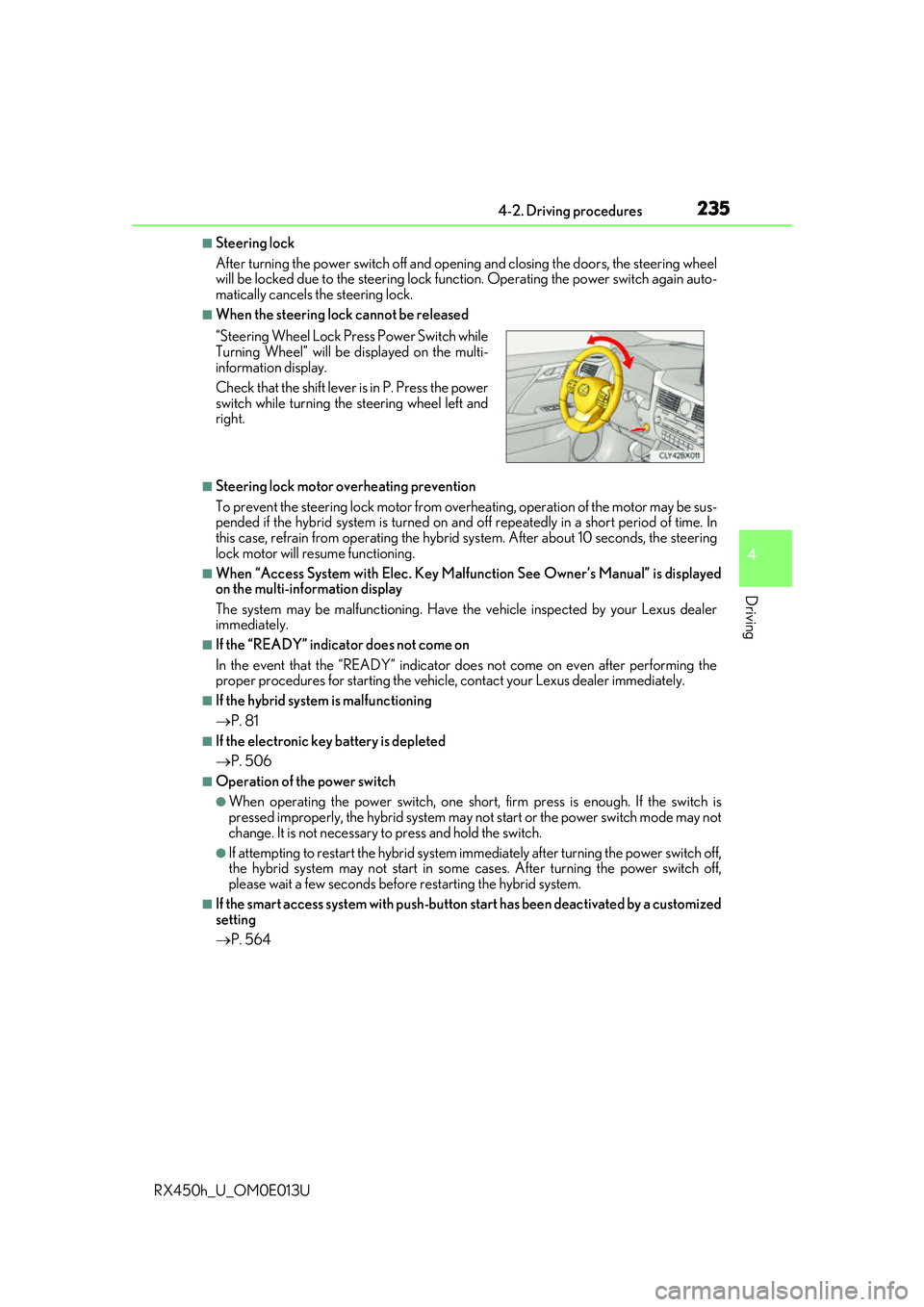
■When the steering lock cannot be released
■Steering lock motor overheating prevention
To prevent the steering lock motor from overheating, operation of the motor may be sus-
pended if the hybrid system is turned on an d off repeatedly in a short period of time. In
this case, refrain from operating the hybrid system. Afte r about 10 seconds, the steering
lock motor will resume functioning.
■When “Access System with Elec. Key Malf unction See Owner’s Manual” is displayed
on the multi-information display
The system may be malfunctio ning. Have the vehicle inspected by your Lexus dealer
immediately.
■If the “READY” indicator does not come on
In the event that the “READY” indicator does not come on even after performing the
proper procedures for starting the vehicl e, contact your Lexus dealer immediately.
■If the hybrid system is malfunctioning
P. 81
■If the electronic key battery is depleted
P. 506
■Operation of the power switch
●When operating the power switch, one short, firm press is enough. If the switch is
pressed improperly, the hybrid system may no t start or the power switch mode may not
change. It is not necessary to press and hold the switch.
●If attempting to restart the hybrid system immediately after turning the power switch off,
the hybrid system may not start in some cases. After turning the power switch off,
please wait a few seco nds before restarting the hybrid system.
■If the smart access system wi th push-button start has been deactivated by a customized
setting
P. 564
“Steering Wheel Lock Pr
ess Power Switch while
Turning Wheel” will be displayed on the multi-
information display.
Check that the shift lever is in P. Press the power
switch while turning the steering wheel left and
right.
Page 420 of 660
4205-3. Using the interior lights
RX450h_U_OM0E013U
●Illuminated entry system: The lights automatically turn on/off according to power switch
mode, the presence of the electronic key, whether the doors are locked/unlocked, and
whether the doors are opened/closed.
●If the interior lights remain on when the power switch is turned off, the lights will go off
automatically after 20 minutes.
●In the following cases, the interior lights and front personal lights may not respond as
normal.
• When water, dirt, etc., have adhered to the lens surface
• When operated with a wet hand
• When wearing gloves, etc.
●Some functions can be customized ( P. 607)
NOTICE
●Never remove the lens for the front interior light and front personal lights. Otherwise,
the lights will be damaged. If the lens need to remove, contact your Lexus dealer.
●To prevent 12-volt battery discharge, do not leave the lights on longer than necessary
when the hybrid system is off.
Page 439 of 660
4395-5. Using the other interior features
5
Interior features
RX450h_U_OM0E013U
NOTICE
■Conditions in which the wireless charger may not operate correctly
In the following situations, the wireless charger may not operate correctly:
●When a portable device is fully charged
●When there is a foreign object between the charging area and portable device
●When a portable device becomes hot while charging
●When a portable device is placed on the wireless area with its charging surface fac-
ing up
●When a portable device is not centered on the charging area
●When the vehicle is near a TV tower, electric power plant, gas station, radio station,
large display, airport or other facility that generates strong radio waves or electrical
noise
●When the portable device is in contact with, or is covered by any of the following
metallic objects
• Cards to which aluminum foil is attached
• Cigarette boxes that have aluminum foil inside
• Metallic wallets or bags
• Coins
• Metal hand warmers
• Media such as CDs and DVDs
●When wireless keys (that emit radio waves) other than those of your vehicle are being
used nearby.
If in situations other than above the wirele ss charger does not operate properly or the
operation indicator light is blinking, the wireless charger may be malfunctioning. Con-
tact your Lexus dealer.
■To prevent failure or damage to data
●Do not bring magnetic cards, such as a cr edit card, or magnetic recording media,
close to the wireless charger while charging. Otherwise, data may be erased due to
the influence of magnetism.
Additionally, do not bring pr ecision instruments such as wrist watches, close to the
wireless charger, as such objects may malfunction.
●Do not leave portable devices in the cab in. The temperature inside the cabin may
become high when parked in the sun, and cause damage to the device.
■To prevent 12-volt battery discharge
Do not use the wireless charger for a long pe riod of time with the hybrid system is
stopped.
Page 457 of 660
457
6Maintenance and care
RX450h_U_OM0E013U
6-1. Maintenance and careCleaning and protecting the vehicle exterior................ 458
Cleaning and protecting the vehicle interior ..................462
6-2. Maintenance Maintenance requirements.............................465
General maintenance .............. 467
Emission inspection and maintenance (I/M)
programs ....................................470 6-3. Do-it-yourself
maintenance
Do-it-yourself service precautions..................................471
Hood ............................................... 473
Positioning a floor jack ............ 474
Engine compartment ............... 475
12-volt battery .............................483
Tires ................................................. 487
Tire inflation pressure............... 496
Wheels ........................................... 499
Air conditioning filter ................ 501
Windshield wiper inserts ........504
Electronic key battery ..............506
Checking and replacing fuses ............................................. 508
Headlight aim ................................. 511
Light bulbs...................................... 513
Page 459 of 660
4596-1. Maintenance and care
6
Maintenance and care
RX450h_U_OM0E013U
■Note for a smart access system with push-button start
●If the door handle becomes wet while the electronic key is within the effective range,
the door may lock and unlock repeatedly. Place the key in a position 6 ft. (2 m) or more
separate from the vehicle while the vehicle is being washed. (Take care to ensure that
the key is not stolen.)
●If the electronic key is inside the vehicle and a door handle becomes wet during a car
wash, a buzzer will sound outside the vehicle. To turn off the alarm, lock all the doors.
●Set the electronic key to battery-saving mode to disable the sm art access system with
push-button start. ( P. 159)
■Aluminum wheels
●Remove any dirt immediately by using a neut ral detergent. Do not use hard brushes or
abrasive cleaners. Do not use stro ng or harsh chemical cleaners.
Use the same mild detergent as used on the paint.
●Do not use detergent on the wheels when they are hot, for example after driving for
long distance in the hot weather.
●Wash detergent from the wheels immediately after use.
■Bumpers
Do not scrub with abrasive cleaners.
■Front side windows water-repellent coating
●The following precautions can extend the effectiveness of the water-repellent coating.
• Remove any dirt, etc. from the front side windows regularly.
• Do not allow dirt and dust to accumulate on the windows for a long period. Clean the windows with a soft, damp cloth as soon as possible.
• Do not use wax or glass cleaners that co ntain abrasives when cleaning the windows.
• Do not use any metallic objects to remove condensation build up.
●When the water-repellent performance has become insufficient, the coating can be
repaired. Contact your Lexus dealer.
Page 484 of 660
4846-3. Do-it-yourself maintenance
RX450h_U_OM0E013U
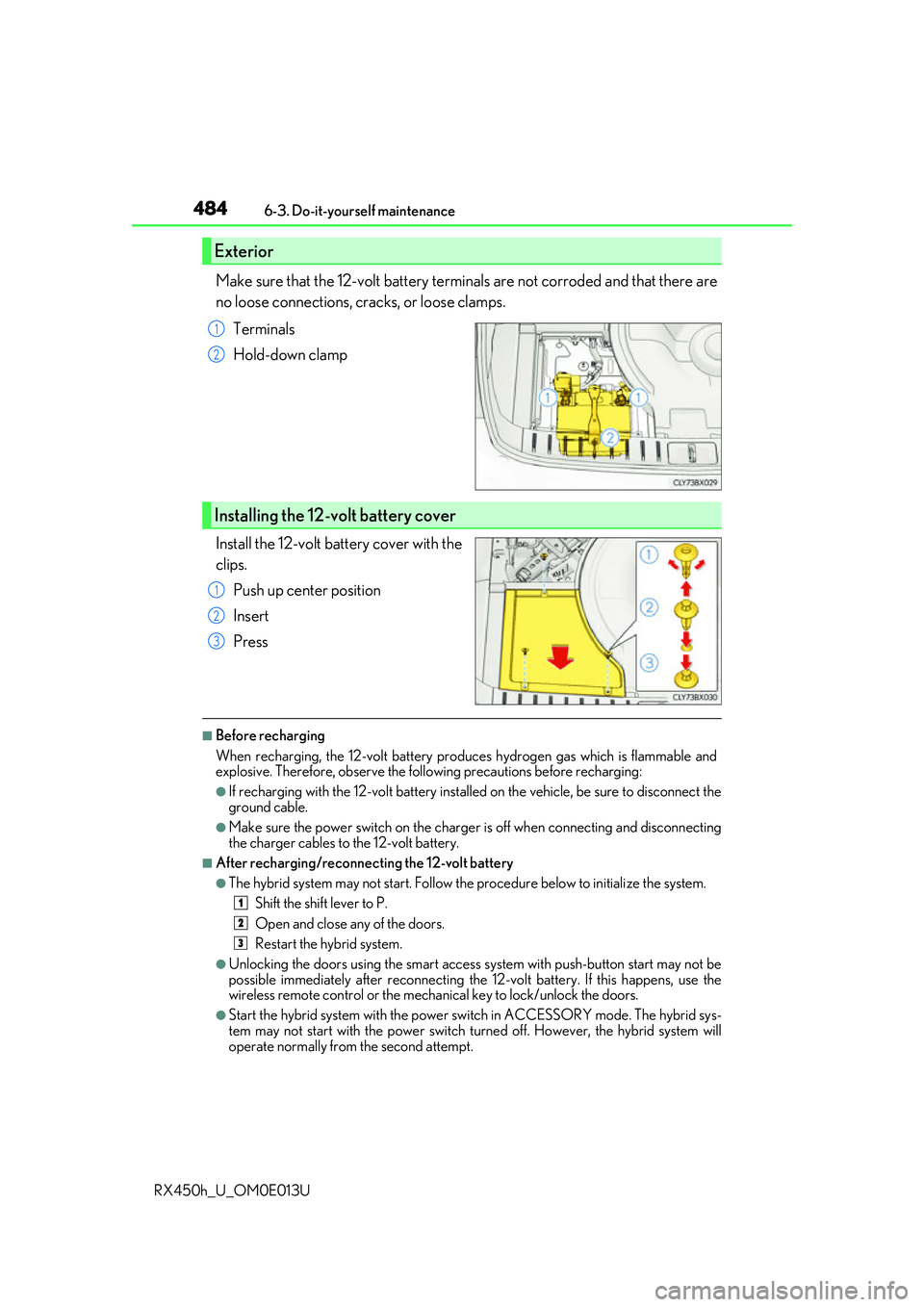
Make sure that the 12-volt battery terminals are not corroded and that there are
no loose connections, cracks, or loose clamps. Terminals
Hold-down clamp
Install the 12-volt battery cover with the
clips. Push up center position
Insert
Press
■Before recharging
When recharging, the 12-volt battery produces hydrogen gas which is flammable and
explosive. Therefore, observe the following precautions before recharging:
●If recharging with the 12-volt battery installed on the vehicle, be sure to disconnect the
ground cable.
●Make sure the power switch on the charge r is off when connecting and disconnecting
the charger cables to the 12-volt battery.
■After recharging/reconnecting the 12-volt battery
●The hybrid system may not start. Follow the procedure below to initialize the system.
Shift the shift lever to P.
Open and close any of the doors.
Restart the hybrid system.
●Unlocking the doors using the smart access system with push-button start may not be
possible immediately after reconnecting the 12-volt battery. If this happens, use the
wireless remote control or the mechan ical key to lock/unlock the doors.
●Start the hybrid system with the power sw itch in ACCESSORY mode. The hybrid sys-
tem may not start with the power switch turned off. However, the hybrid system will
operate normally from the second attempt.
Exterior
1
2
Installing the 12-volt battery cover
1
2
3
1
2
3
Page 506 of 660
5066-3. Do-it-yourself maintenance
RX450h_U_OM0E013U
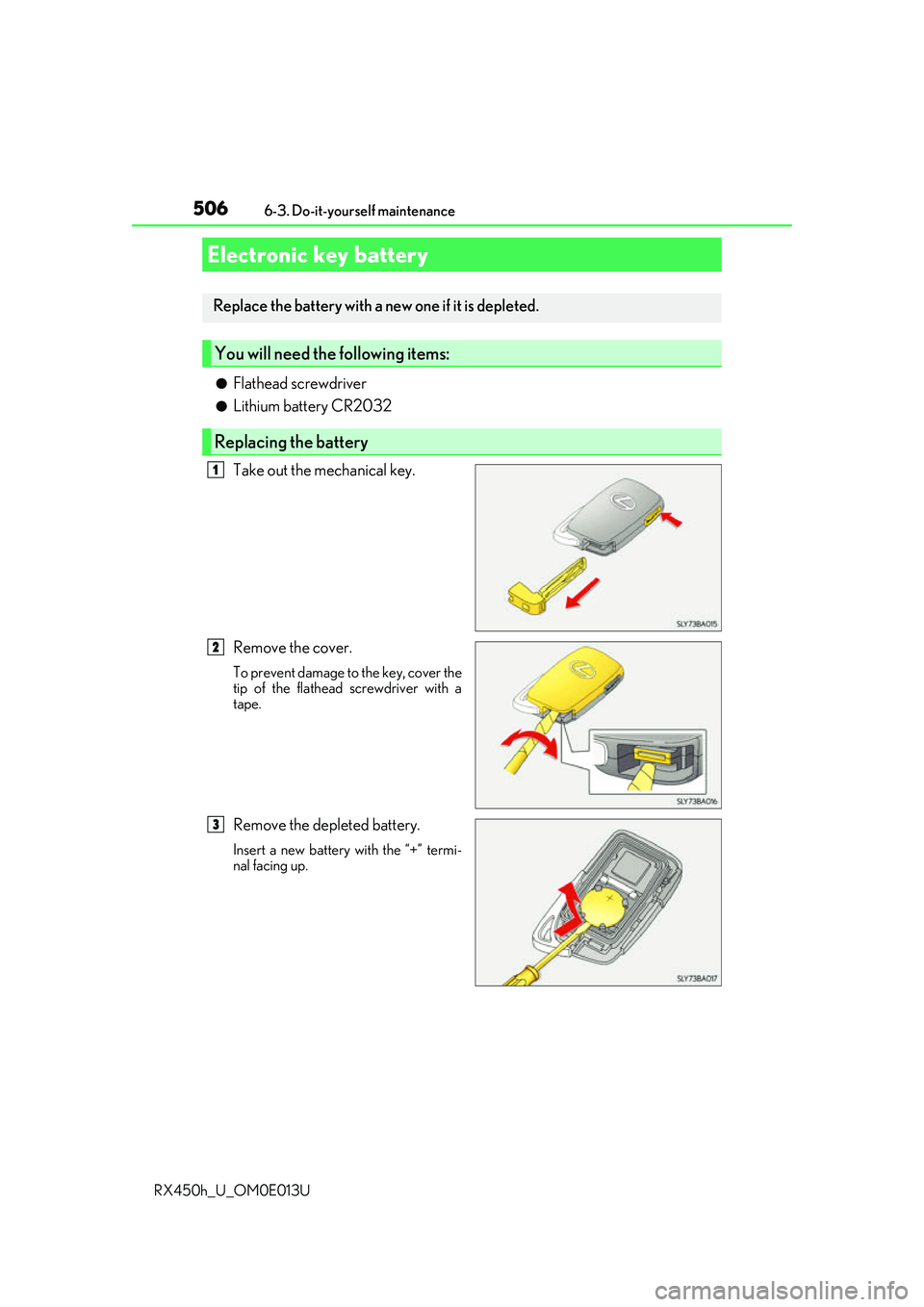
●Flathead screwdriver
●Lithium battery CR2032
Take out the mechanical key.
Remove the cover.
To prevent damage to the key, cover the
tip of the flathead screwdriver with a
tape.
Remove the depleted battery.
Insert a new battery with the “+” termi-
nal facing up.
Electronic key battery
Replace the battery with a new one if it is depleted.
You will need the following items:
Replacing the battery
1
2
3
Page 507 of 660
5076-3. Do-it-yourself maintenance
6
Maintenance and care
RX450h_U_OM0E013U
■Use a CR2032 lithium battery
●Batteries can be purchased at your Lexus dealer, local electrical appliance shops or
camera stores.
●Replace only with the same or equivalent type recommended by the manufacturer.
●Dispose of used batteries according to the local laws.
■If the electronic key battery is depleted
The following symptoms may occur:
●The smart access system with push-button start and wireless remote control will not
function properly.
●The operational range will be reduced.
WARNING
■Removed battery and other parts
These parts are small and if swallowed by a child, they can cause choking. Keep away
from children. Failure to do so coul d result in death or serious injury.
NOTICE
■For normal operation after replacing the battery
Observe the following precautions to prevent accidents:
●Always work with dry hands.
Moisture may cause the battery to rust.
●Do not touch or move any other co mponent inside the remote control.
●Do not bend either of the battery terminals.
Page 527 of 660
527
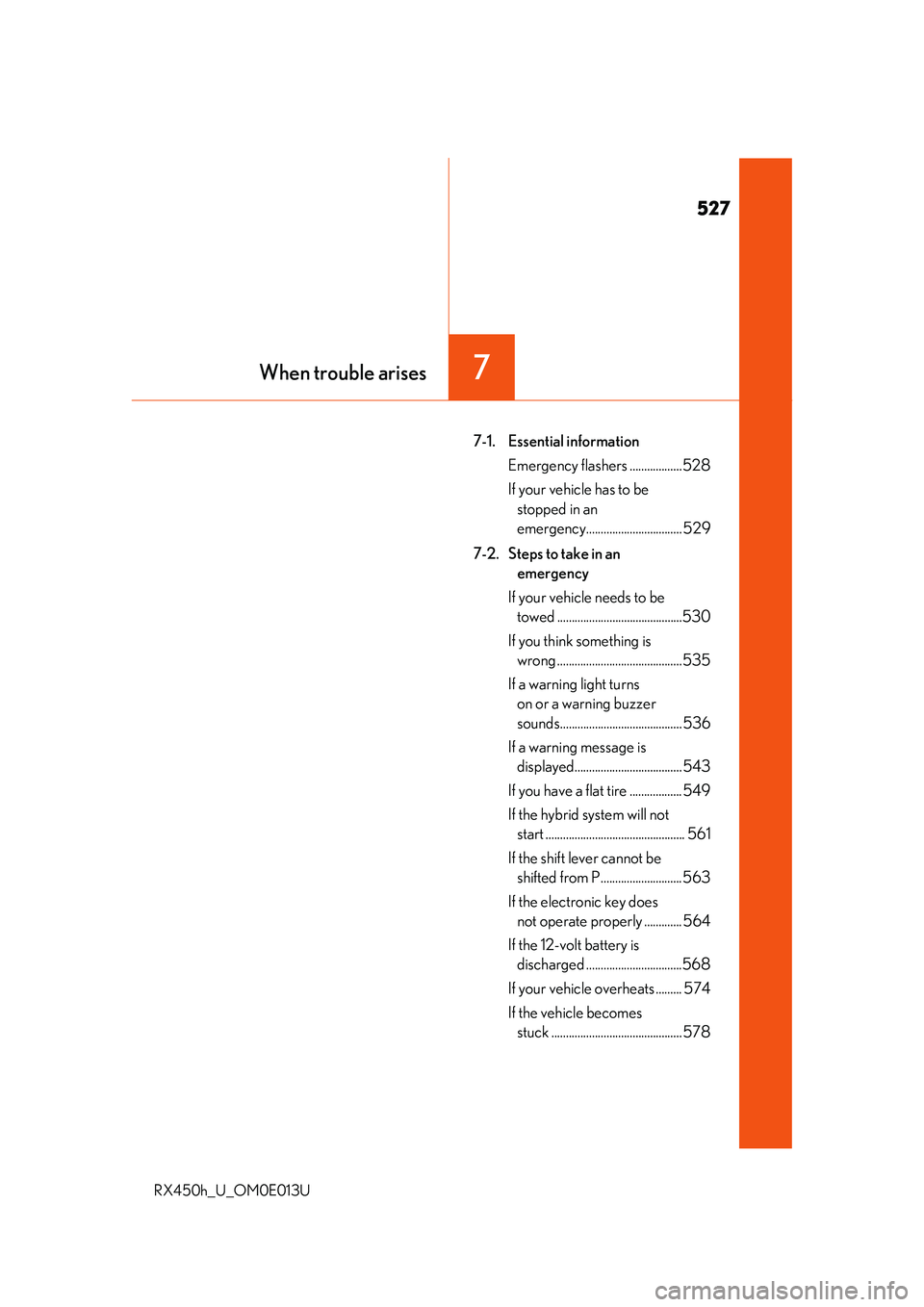
7When trouble arises
RX450h_U_OM0E013U
7-1. Essential informationEmergency flashers ..................528
If your vehicle has to be stopped in an
emergency................................. 529
7-2. Steps to take in an emergency
If your vehicle needs to be towed ...........................................530
If you think something is wrong ...........................................535
If a warning light turns on or a warning buzzer
sounds.......................................... 536
If a warning message is displayed..................................... 543
If you have a flat tire .................. 549
If the hybrid sy stem will not
start ................................................ 561
If the shift lever cannot be shifted from P............................ 563
If the electronic key does not operate properly ............. 564
If the 12-volt battery is discharged .................................568
If your vehicle overheats ......... 574
If the vehicle becomes stuck ............................................. 578
Page 544 of 660
5447-2. Steps to take in an emergency
RX450h_U_OM0E013U
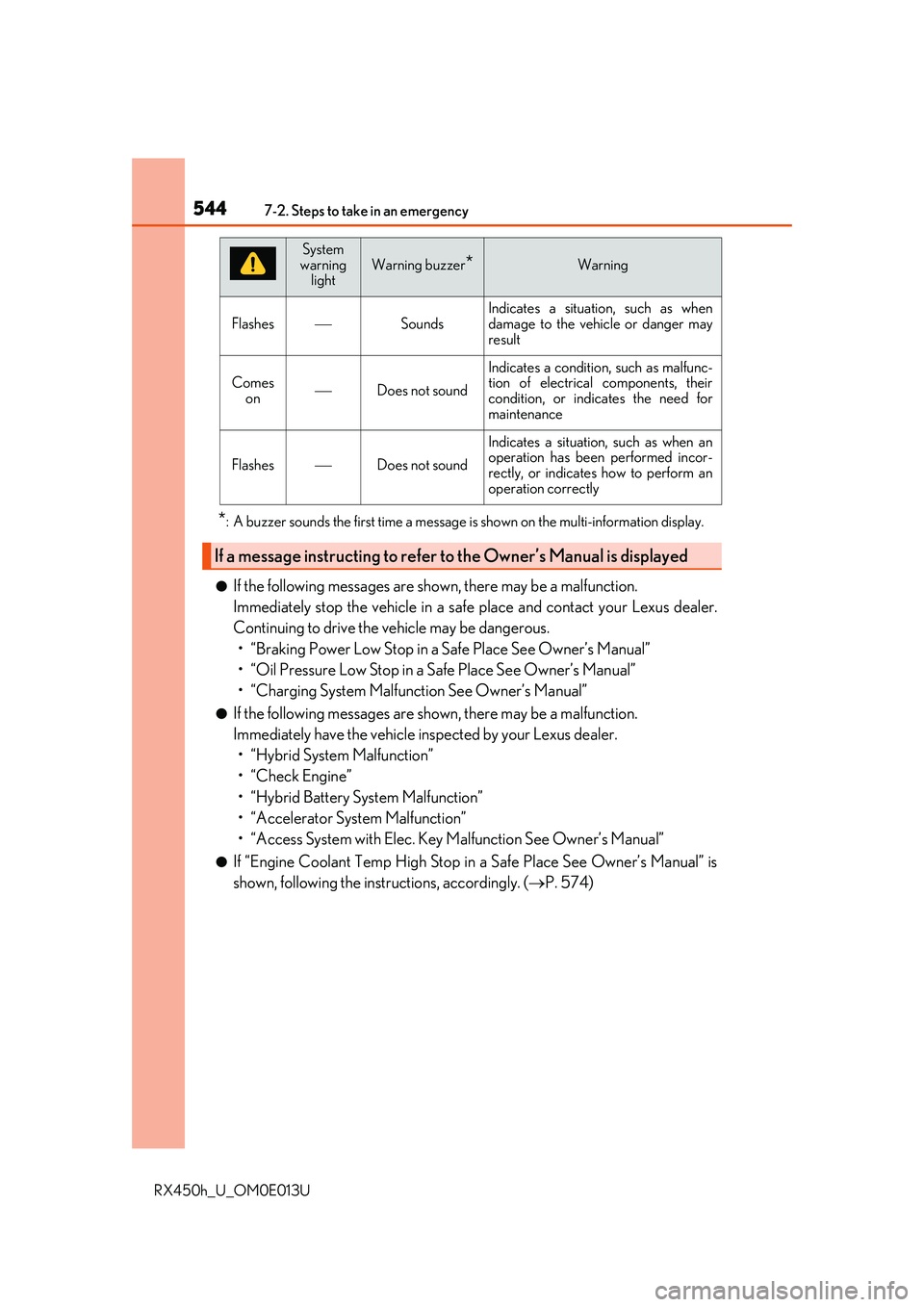
*: A buzzer sounds the first time a message is shown on the multi-information display.
●If the following messages are shown, there may be a malfunction.
Immediately stop the vehicle in a safe place and contact your Lexus dealer.
Continuing to drive the vehicle may be dangerous. • “Braking Power Low Stop in a Safe Place See Owner’s Manual”
• “Oil Pressure Low Stop in a Safe Place See Owner’s Manual”
• “Charging System Malfunction See Owner’s Manual”
●If the following messages are shown, there may be a malfunction.
Immediately have the vehicle inspected by your Lexus dealer.• “Hybrid System Malfunction”
•“Check Engine”
• “Hybrid Battery System Malfunction”
• “Accelerator System Malfunction”
• “Access System with Elec. Key Malfunction See Owner’s Manual”
●If “Engine Coolant Temp High Stop in a Safe Place See Owner’s Manual” is
shown, following the instructions, accordingly. ( P. 574)
FlashesSounds
Indicates a situation, such as when
damage to the vehicle or danger may
result
Comes
onDoes not sound
Indicates a condition, such as malfunc-
tion of electrical components, their
condition, or indicates the need for
maintenance
FlashesDoes not sound
Indicates a situation, such as when an
operation has been performed incor-
rectly, or indicates how to perform an
operation correctly
If a message instructing to refer to the Owner’s Manual is displayed
System
warning
lightWarning buzzer*Warning