radio LEXUS RX450H 2016 User Guide
[x] Cancel search | Manufacturer: LEXUS, Model Year: 2016, Model line: RX450H, Model: LEXUS RX450H 2016Pages: 660, PDF Size: 14.85 MB
Page 274 of 660
2744-5. Using the driving support systems
RX450h_U_OM0E013U
WARNING
■To avoid malfunction of the radar sensor
Observe the following precautions.
Otherwise, the radar sensor may not operate properly, possibly leading to an accident
resulting in death or serious injury.
●Keep the radar sensor and front grille emblem clean at all times.
●Do not attach accessories, stickers (includi ng transparent stickers) or other items to
the radar sensor, front grille emblem or surrounding area.
●Do not subject the radar sensor or surrounding area to a strong impact.
If the radar sensor, front grille, or front bumper has been subjected to a strong impact,
have the vehicle inspected by your Lexus dealer.
●Do not disassemble the radar sensor.
●Do not modify or paint the radar sensor, front grille emblem or surrounding area.
●If the radar sensor, front grille, or front bumper needs to be removed and installed, or
replaced, contact your Lexus dealer.
●The radar sensor complies with relevant radio wave regulations, as shown by the label
attached to the sensor. Do not remove the label. Additionally, disassembly or modifi-
cation of the radar sensor may be prohibited by law.
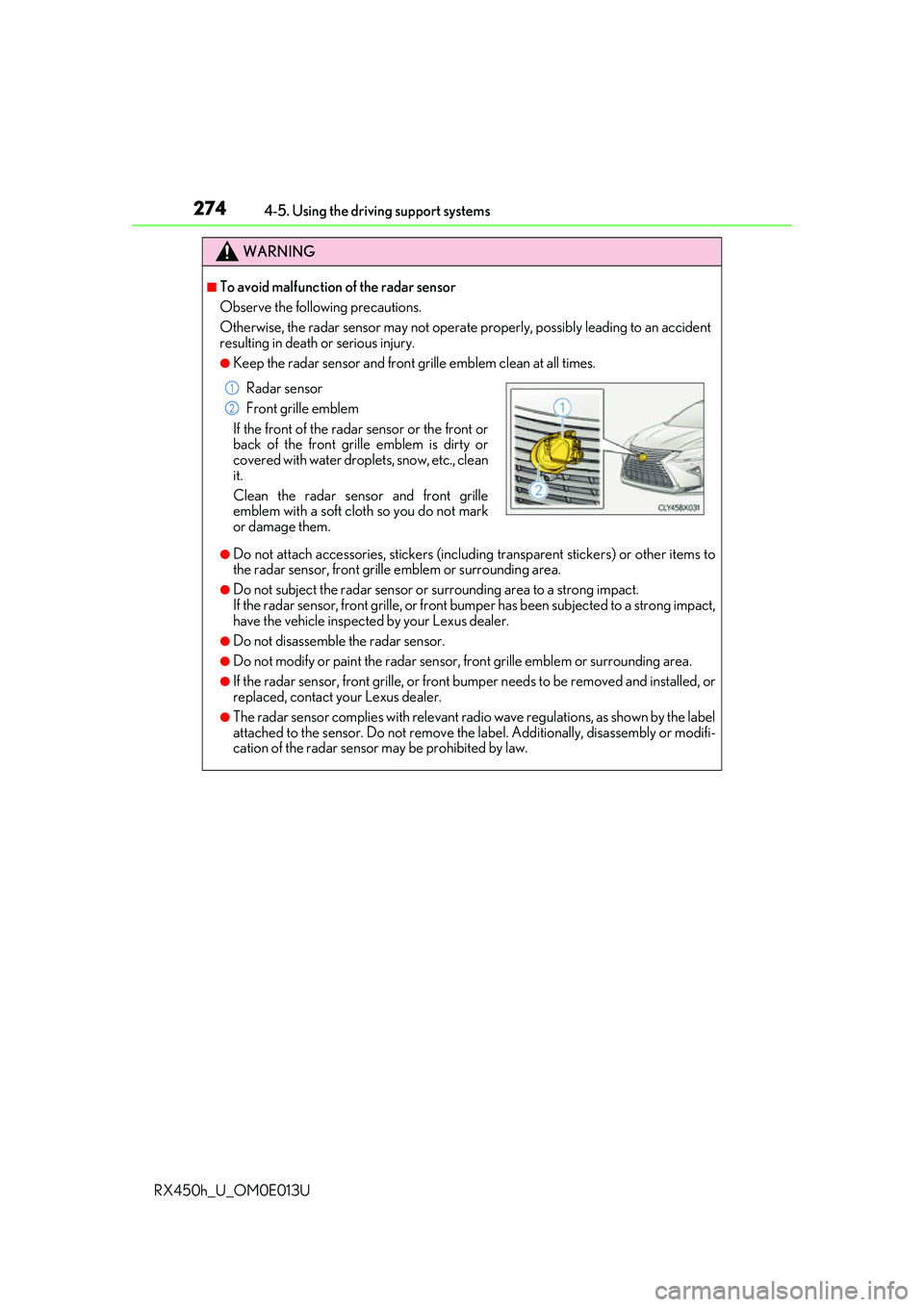
Radar sensor
Front grille emblem
If the front of the rada r sensor or the front or
back of the front grille emblem is dirty or
covered with water droplets, snow, etc., clean
it.
Clean the radar sensor and front grille
emblem with a soft cloth so you do not mark
or damage them.
1
2
Page 288 of 660
2884-5. Using the driving support systems
RX450h_U_OM0E013U • When rapidly closing on an electric toll ga
te barrier, parking area barrier, or other
barrier that opens and closes
• When using an automatic car wash
• When the vehicle is hit by water, sn ow, dust, etc. from a vehicle ahead
• When driving through steam or smoke
• When there are patterns or paint on the road or a wall that may be mistaken for a
vehicle or pedestrian
*4
• When driving near an object that reflects radio waves, such as a large truck or
guardrail
• When driving near a TV tower, broadcasting station, electric power plant, or other location where strong radio waves or electrical noise may be present
*4: Depending on the region in which the ve hicle was sold, the pedestrian detection
function may not be available.
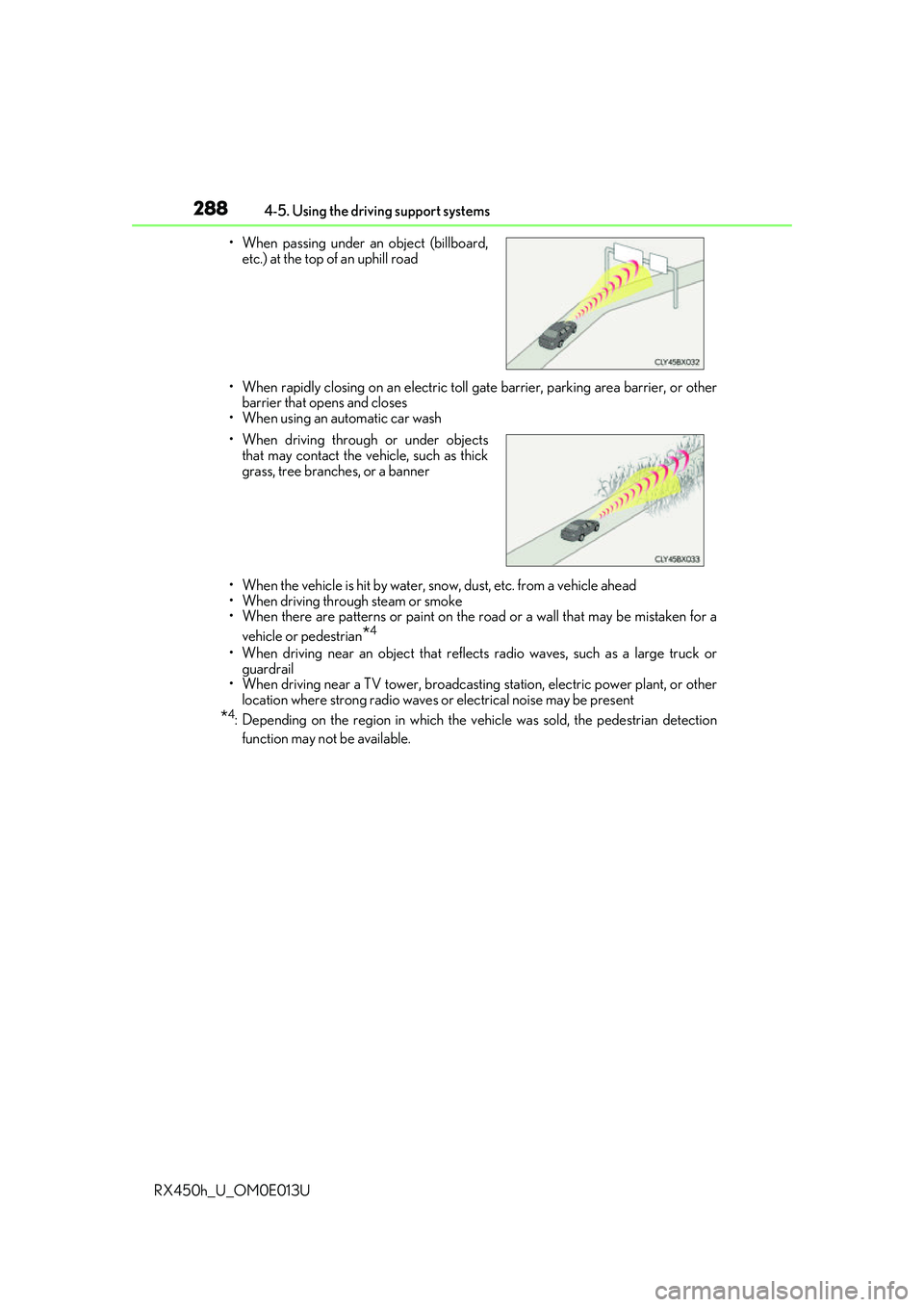
• When passing under an object (billboard,
etc.) at the top of an uphill road
• When driving through or under objects that may contact the vehicle, such as thick
grass, tree branches, or a banner
Page 401 of 660
4015-1. Basic operation of the Remote Touch screen
5
Interior features
RX450h_U_OM0E013U
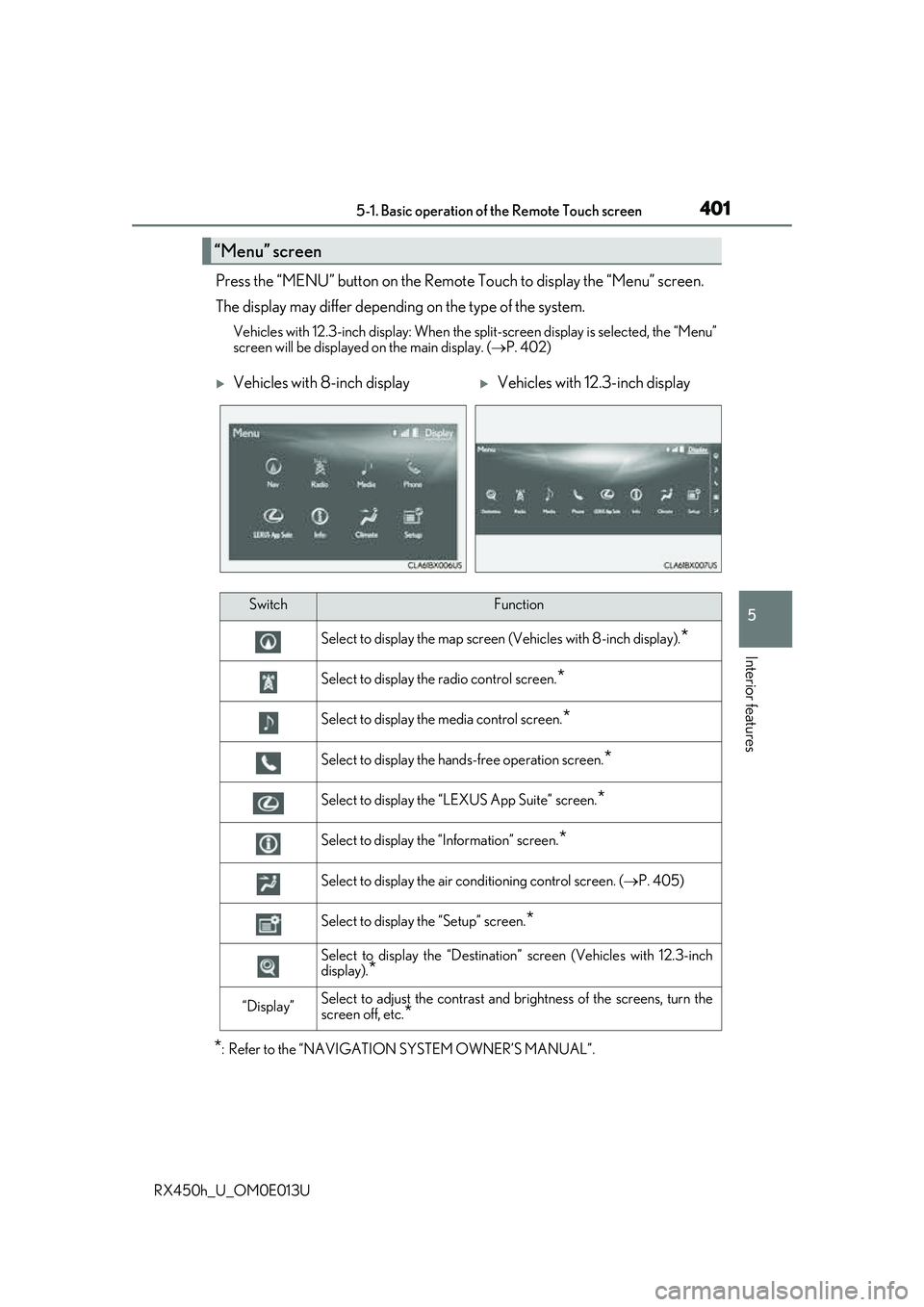
Press the “MENU” button on the Remote Touch to display the “Menu” screen.
The display may differ depending on the type of the system.
Vehicles with 12.3-inch display: When the split-screen display is selected, the “Menu”
screen will be displayed on the main display. ( P. 402)
*: Refer to the “NAVIGATION SYSTEM OWNER’S MANUAL”.
“Menu” screen
Vehicles with 8-inch displayVehicles with 12.3-inch display
SwitchFunction
Select to display the map screen (Vehicles with 8- inch display).*
Select to display the radio control screen.*
Select to display the media control screen.*
Select to display the hands-free operation screen.*
Select to display the “LEXUS App Suite” screen.*
Select to display the “Information” screen.*
Select to display the air conditioning control screen. ( P. 405)
Select to display the “Setup” screen.*
Select to display the “Destination ” screen (Vehicles with 12.3-inch
display).
*
“Display”Select to adjust the contrast and brightness of the screens, turn the
screen off, etc.
*
Page 436 of 660
4365-5. Using the other interior features
RX450h_U_OM0E013U
■If a cover or accessory is attached to the portable device
Do not charge a portable device if a cover or accessory which is not Qi compatible is
attached. Depending on the type of cover an d/or accessory attached, it may not be pos-
sible to charge the portable device. If the po rtable device is placed on the charging area
and does not charge, remove the cover and/or accessories.
■If interference is heard in AM radio broadcasts while charging
Turn off the wireless charger and check if the noise is reduced. If noise is reduced, press
and hold the power supply switch of the wireless charger for 2 seconds. The frequency of
the wireless charger is changed and noise may be reduced. When the frequency is
changed, the operation indicator lig ht will blink (orange) 2 times.
■Charging precautions
●If the electronic key cannot be detected in the cabin, charging cannot be performed.
When a door is opened and closed, ch arging may be temporarily suspended.
●While charging, the wireless charger and the po rtable device will become warm. This is
not a malfunction.
If a portable device become s warm while charging and ch arging stops due to the pro-
tection function of the portable device, wait until the portable device cools down and
charge it again.
■Sound generated during operation
When the power supply switch is turned on or while a portable device is being identified,
operation sounds may be heard. This is not a malfunction.
■Cleaning the wireless charger
P. 463
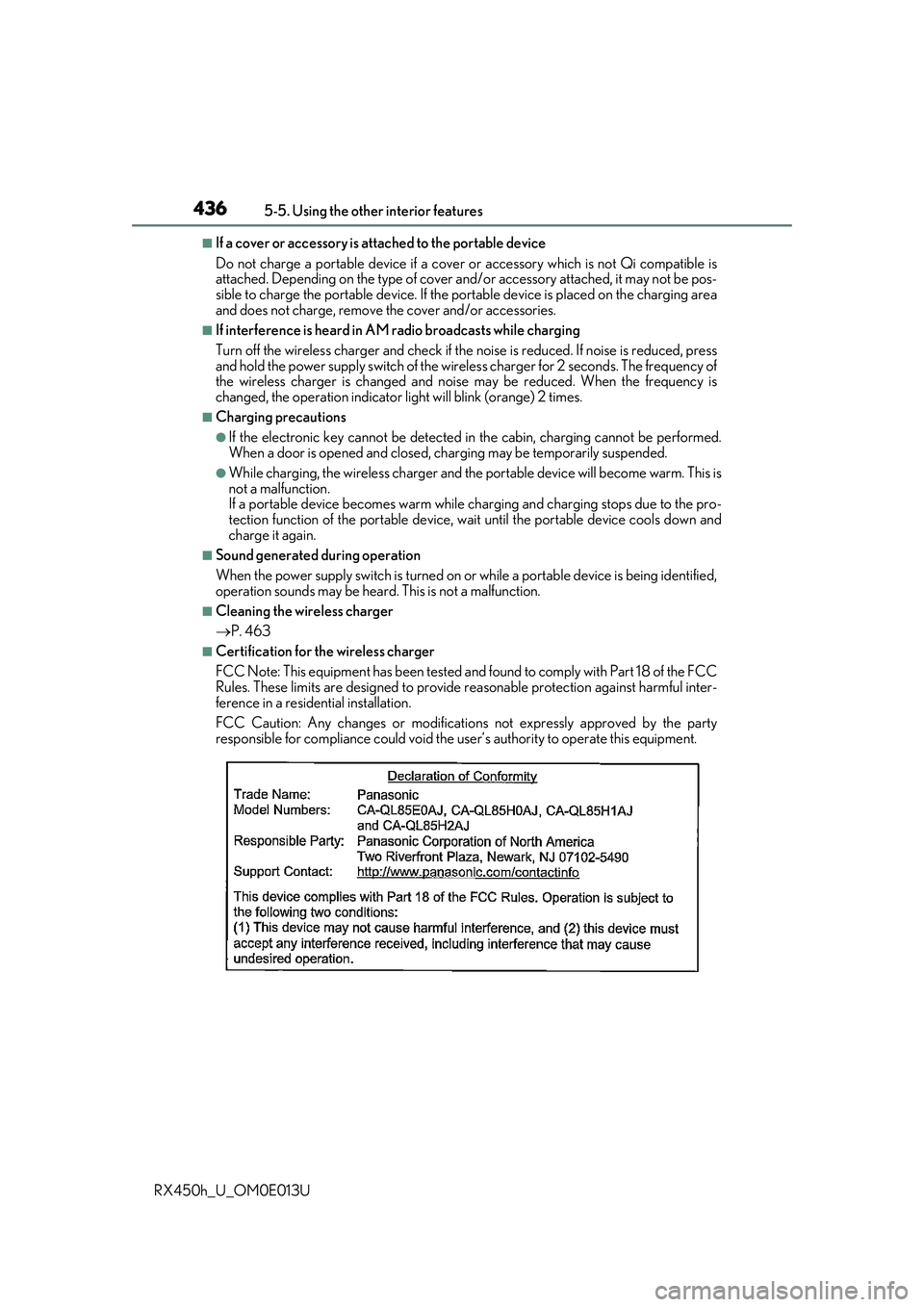
■Certification for the wireless charger
FCC Note: This equipment has been tested and found to comply with Part 18 of the FCC
Rules. These limits are designed to provide re asonable protection against harmful inter-
ference in a reside ntial installation.
FCC Caution: Any changes or modification s not expressly approved by the party
responsible for compliance could void the user’s authority to operate this equipment.
Page 439 of 660
4395-5. Using the other interior features
5
Interior features
RX450h_U_OM0E013U
NOTICE
■Conditions in which the wireless charger may not operate correctly
In the following situations, the wireless charger may not operate correctly:
●When a portable device is fully charged
●When there is a foreign object between the charging area and portable device
●When a portable device becomes hot while charging
●When a portable device is placed on the wireless area with its charging surface fac-
ing up
●When a portable device is not centered on the charging area
●When the vehicle is near a TV tower, electric power plant, gas station, radio station,
large display, airport or other facility that generates strong radio waves or electrical
noise
●When the portable device is in contact with, or is covered by any of the following
metallic objects
• Cards to which aluminum foil is attached
• Cigarette boxes that have aluminum foil inside
• Metallic wallets or bags
• Coins
• Metal hand warmers
• Media such as CDs and DVDs
●When wireless keys (that emit radio waves) other than those of your vehicle are being
used nearby.
If in situations other than above the wirele ss charger does not operate properly or the
operation indicator light is blinking, the wireless charger may be malfunctioning. Con-
tact your Lexus dealer.
■To prevent failure or damage to data
●Do not bring magnetic cards, such as a cr edit card, or magnetic recording media,
close to the wireless charger while charging. Otherwise, data may be erased due to
the influence of magnetism.
Additionally, do not bring pr ecision instruments such as wrist watches, close to the
wireless charger, as such objects may malfunction.
●Do not leave portable devices in the cab in. The temperature inside the cabin may
become high when parked in the sun, and cause damage to the device.
■To prevent 12-volt battery discharge
Do not use the wireless charger for a long pe riod of time with the hybrid system is
stopped.
Page 450 of 660
4505-5. Using the other interior features
RX450h_U_OM0E013U
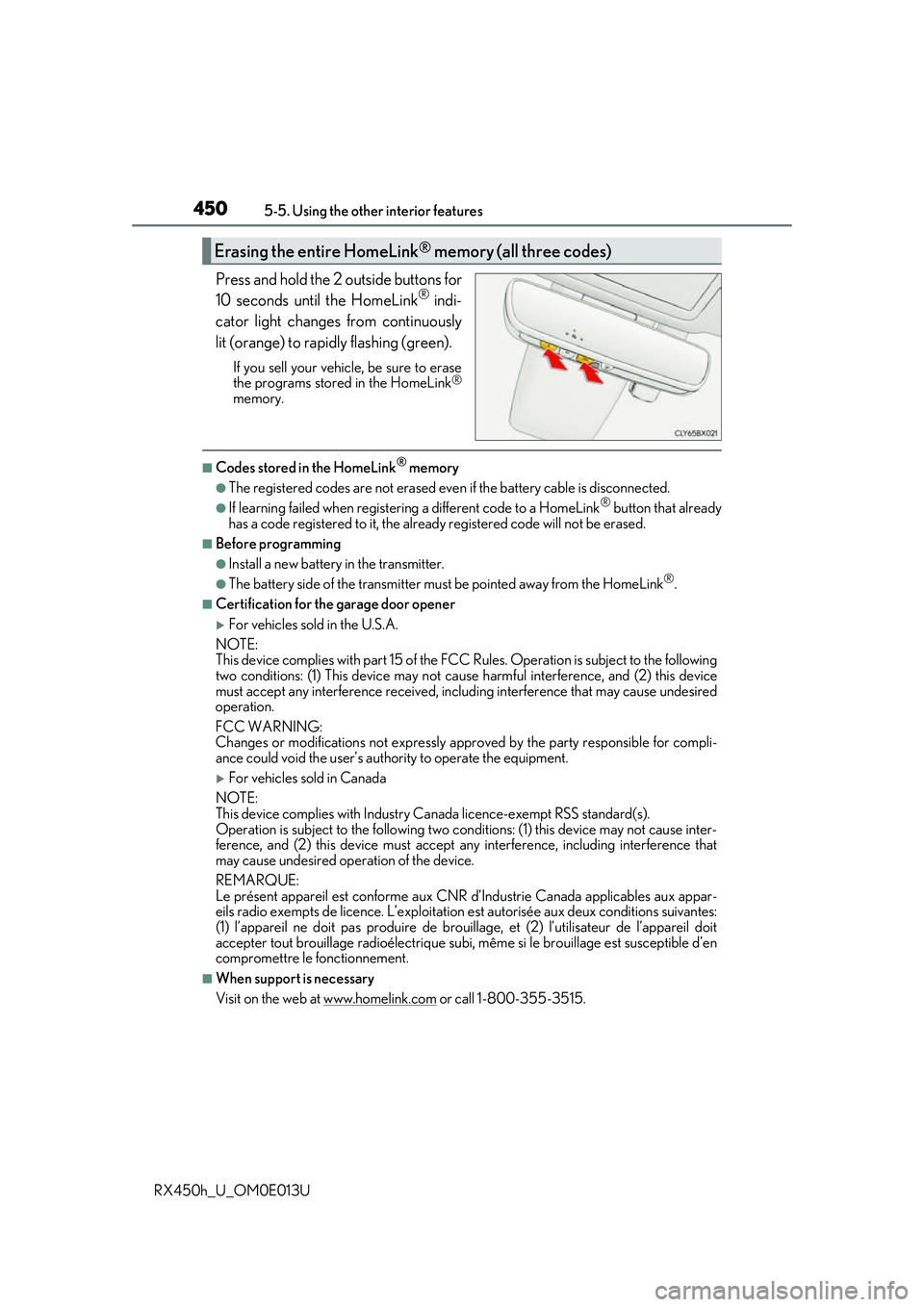
Press and hold the 2 outside buttons for
10 seconds until the HomeLink® indi-
cator light changes from continuously
lit (orange) to rapidly flashing (green).
If you sell your vehicle, be sure to erase
the programs stored in the HomeLink®
memory.
■Codes stored in the HomeLink® memory
●The registered codes are not erased even if the battery cable is disconnected.
●If learning failed when registerin g a different code to a HomeLink® button that already
has a code registered to it, the alread y registered code will not be erased.
■Before programming
●Install a new battery in the transmitter.
●The battery side of the transmitter must be pointed away from the HomeLink®.
■Certification for the garage door opener
For vehicles sold in the U.S.A.
NOTE:
This device complies with part 15 of the FC C Rules. Operation is subject to the following
two conditions: (1) This device may not caus e harmful interference, and (2) this device
must accept any interference received, includ ing interference that may cause undesired
operation.
FCC WARNING:
Changes or modifications not expressly approved by the party responsible for compli-
ance could void the user’s authority to operate the equipment.
For vehicles sold in Canada
NOTE:
This device complies with Industry Ca nada licence-exempt RSS standard(s).
Operation is subject to the following two cond itions: (1) this device may not cause inter-
ference, and (2) this device must accept any interference, including interference that
may cause undesired operation of the device.
REMARQUE:
Le présent appareil est conforme aux CNR d’Industrie Canada applicables aux appar-
eils radio exempts de licence. L’exploitation est autorisée aux deux conditions suivantes:
(1) l’appareil ne doit pas produire de brouil lage, et (2) l’utilisateur de l’appareil doit
accepter tout brouillage radioélectrique subi, même si le brouillage est susceptible d’en
compromettre le fonctionnement.
■When support is necessary
Visit on the web at www.homelink.com
or call 1-800-355-3515.
Erasing the entire HomeLink® memory (all three codes)
Page 456 of 660
4565-5. Using the other interior features
RX450h_U_OM0E013U
Important! Read this informatio n before using Safety Connect.
■Exposure to radio frequency signals
The Safety Connect system installed in your vehicle is a low-power radio\
transmitter and receiver. It receives and also sends out radio frequency (RF)
signals.
In August 1996, the Federal Commu nications Commission (FCC) adopted
RF exposure guidelines with safety levels for mobile wireless phones. Those
guidelines are consistent with the safe ty standards previously set by the fol-
lowing U.S. and internat ional standards bodies.
●ANSI (American National Stan dards Institute) C95.1 [1992]
●NCRP (National Council on Radiation Protection and Measurement)
Report 86 [1986]
●ICNIRP (International Commission on Non-Ionizing Radiation Protection)
[1996]
Those standards were based on comprehensive and periodic evaluations of
the relevant scientific literature. Over 120 scientists, engineers, and physi-
cians from universities, and governme nt health agencies and industries
reviewed the available body of rese arch to develop the ANSI Standard
(C95.1).
The design of Safety Connect complies wi th the FCC guidelines in addition to
those standards.
■Certification for Lexus Enform
FCC ID: O6Y-CDMRF101
FCC ID: XOECDMRF101B
FCC ID: N7NGTM2
FCC WARNING:
This equipment complies with FCC radiation ex posure limits set forth for an uncontrolled
environment and meets the FCC radio frequenc y (RF) Exposure Guidelines in Supple-
ment C to OET65. This equipment should be installed and operated keeping the radia-
tor at least 20 cm or more away from person’s body (excluding extremities: hands, wrists,
feet and ankles).
Safety information for Safety Connect
Page 492 of 660
4926-3. Do-it-yourself maintenance
RX450h_U_OM0E013U
■Situations in which the tire pressure warning system may not operate properly
●In the following cases, the tire pressure warning system may not operate properly.
• If non-genuine Lexus wheels are used.
• A tire has been replaced with a tire that is not an OE (Original Equipment) tire.
• A tire has been replaced with a tire that is not of the specified size.
• Tire chains etc. are equipped.
• If a window tint that affects th e radio wave signals is installed.
• If there is a lot of snow or ice on the vehi cle, particularly around the wheels or wheel
housings.
• If the tire inflation pressure is extr emely higher than the specified level.
• If wheel without the tire pressure warning valve and transmitter is used.
• If the ID code on the tire pressure warning valves and transmitters is not registered in the tire pressure warning computer.
●Performance may be affected in the following situations.
• Near a TV tower, electric power plant, gas station, radio station, large display, air-
port or other facility that generates st rong radio waves or electrical noise.
• When carrying a portable radio, cellular phone, cordless phone or other wireless
communication device.
If tire position information is not correctl y displayed due to the radio wave conditions,
the display may be corrected by driving and changing the radio wave conditions.
●When the vehicle is parked, the time taken for the warning to start or go off could be
extended.
●When tire inflation pressure declines rapidly for example when a tire has burst, the
warning may not function.
■The initialization operation
●Make sure to carry out initialization afte r adjusting the tire inflation pressure.
Also, make sure the tires are cold before carryi ng out initialization or tire inflation pres-
sure adjustment.
●If you have accidentally turned the power switch off during initialization, it is not neces-
sary to press the reset switch again as initialization will restart automatically when the
power switch has been turned to ON mode for the next time.
●If you accidentally press the re set switch when initialization is not necessary, adjust the
tire inflation pressure to the specified leve l when the tires are cold, and conduct initial-
ization again.
●While the position of each tire is being de termined and the inflation pressures are not
being displayed on the multi-info rmation display, if the inflation pressure of a tire drops,
the tire pressure warning light will come on.
Page 601 of 660
6018-1. Specifications
8
Vehicle specifications
RX450h_U_OM0E013U
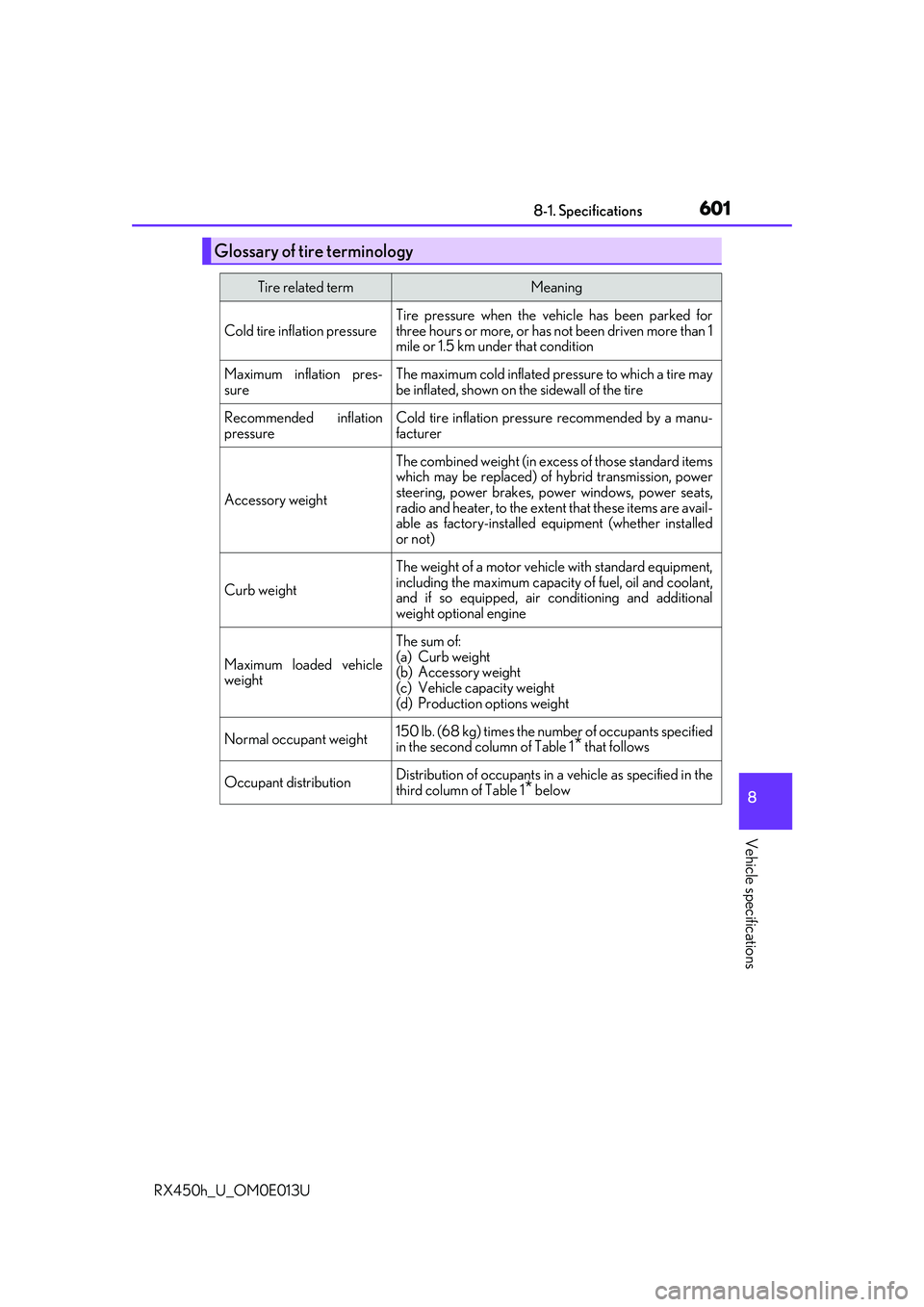
Glossary of tire terminology
Tire related termMeaning
Cold tire inflation pressure
Tire pressure when the vehicle has been parked for
three hours or more, or has not been driven more than 1
mile or 1.5 km un der that condition
Maximum inflation pres-
sureThe maximum cold inflated pr essure to which a tire may
be inflated, shown on the sidewall of the tire
Recommended inflation
pressureCold tire inflation pressure recommended by a manu-
facturer
Accessory weight
The combined weight (in exce ss of those standard items
which may be replaced) of hybrid transmission, power
steering, power brakes, power windows, power seats,
radio and heater, to the extent that these items are avail-
able as factory-installed eq uipment (whether installed
or not)
Curb weight
The weight of a motor vehicle with standard equipment,
including the maximum capacity of fuel, oil and coolant,
and if so equipped, air co nditioning and additional
weight optional engine
Maximum loaded vehicle
weight
The sum of:
(a) Curb weight
(b) Accessory weight
(c) Vehicle capacity weight
(d) Production options weight
Normal occupant weight150 lb. (68 kg) times the numb er of occupants specified
in the second column of Table 1* that follows
Occupant distributionDistribution of occupants in a vehicle as specified in the
third column of Table 1
* below
Page 631 of 660
631
9
For owners
RX450h_U_OM0E013U
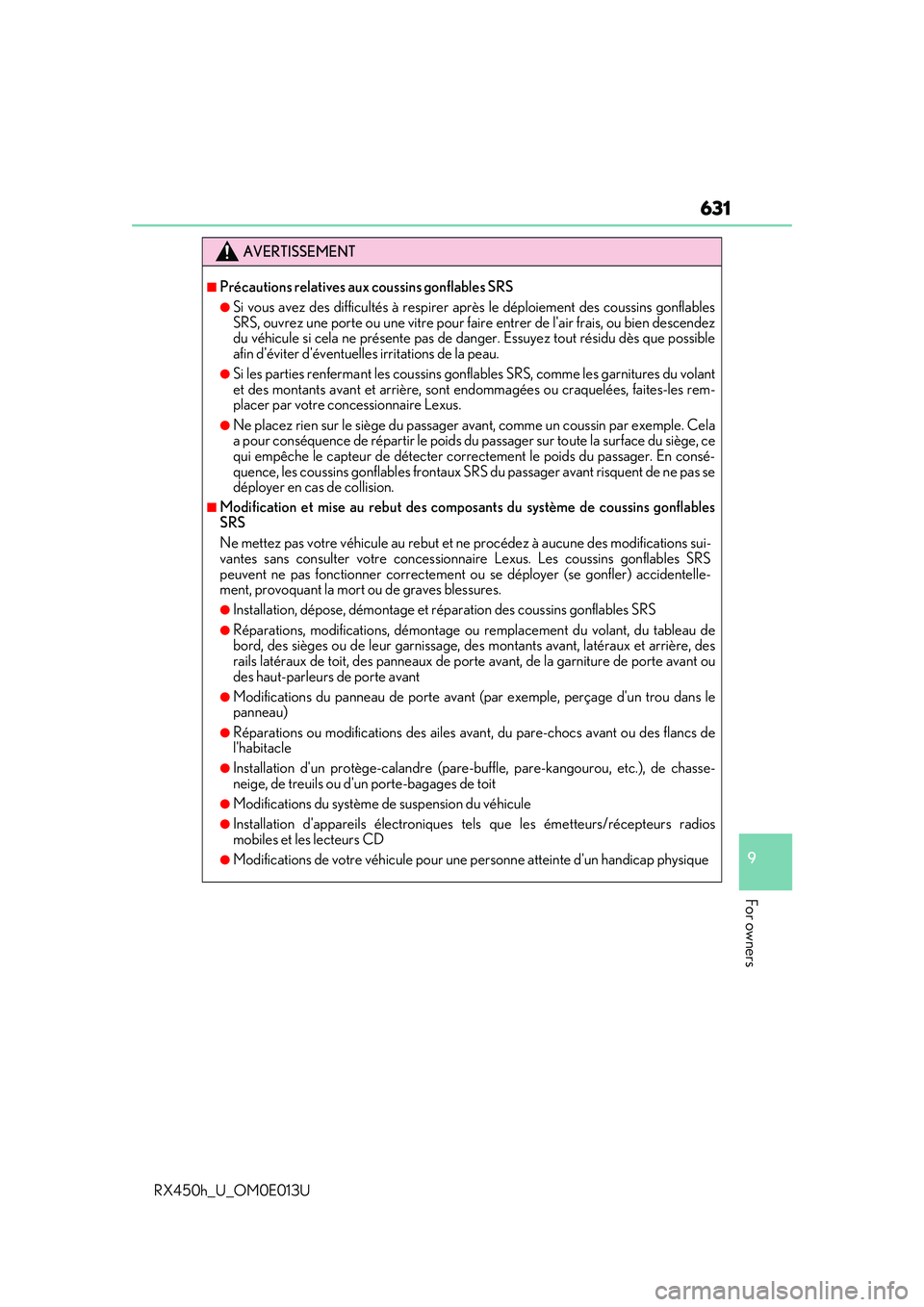
AVERTISSEMENT
■Précautions relatives aux coussins gonflables SRS
●Si vous avez des difficultés à respirer après le déploiement des coussins gonflables
SRS, ouvrez une porte ou une vitre pour faire entrer de l'air frais, ou bien descendez
du véhicule si cela ne présente pas de danger. Essuyez tout résidu dès que possible
afin d'éviter d'éventuelles irritations de la peau.
●Si les parties renferma nt les coussins gonflables SRS, comme les garnitures du volant
et des montants avant et arrière, sont endommagées ou craquelées, faites-les rem-
placer par votre concessionnaire Lexus.
●Ne placez rien sur le siège du passager avant, comme un coussin par exemple. Cela
a pour conséquence de répartir le poids du passager sur toute la surface du siège, ce
qui empêche le capteur de détecter correctement le poids du passager. En consé-
quence, les coussins gonflables frontaux SR S du passager avant risquent de ne pas se
déployer en cas de collision.
■Modification et mise au rebut des compos ants du système de coussins gonflables
SRS
Ne mettez pas votre véhicule au rebut et ne procédez à aucune des modifications sui-
vantes sans consulter votre concessionna ire Lexus. Les coussins gonflables SRS
peuvent ne pas fonctionner correctement ou se déployer (se gonfler) accidentelle-
ment, provoquant la mort ou de graves blessures.
●Installation, dépose, démontage et réparation des coussins gonflables SRS
●Réparations, modifications, démontage ou remplacement du volant, du tableau de
bord, des sièges ou de leur garnissage, des montants avant, latéraux et arrière, des
rails latéraux de toit, des pa nneaux de porte avant, de la garniture de porte avant ou
des haut-parleurs de porte avant
●Modifications du panneau de porte avant (p ar exemple, perçage d'un trou dans le
panneau)
●Réparations ou modifications des ailes avan t, du pare-chocs avant ou des flancs de
l'habitacle
●Installation d'un protège-calandre (pare- buffle, pare-kangourou, etc.), de chasse-
neige, de treuils ou d'un porte-bagages de toit
●Modifications du système de suspension du véhicule
●Installation d'appareils él ectroniques tels que les ém etteurs/récepteurs radios
mobiles et les lecteurs CD
●Modifications de votre véhicule pour une personne atteinte d'un handicap physique