sport LEXUS RX450H 2016 User Guide
[x] Cancel search | Manufacturer: LEXUS, Model Year: 2016, Model line: RX450H, Model: LEXUS RX450H 2016Pages: 660, PDF Size: 14.85 MB
Page 114 of 660
1142. Instrument cluster
RX450h_U_OM0E013U
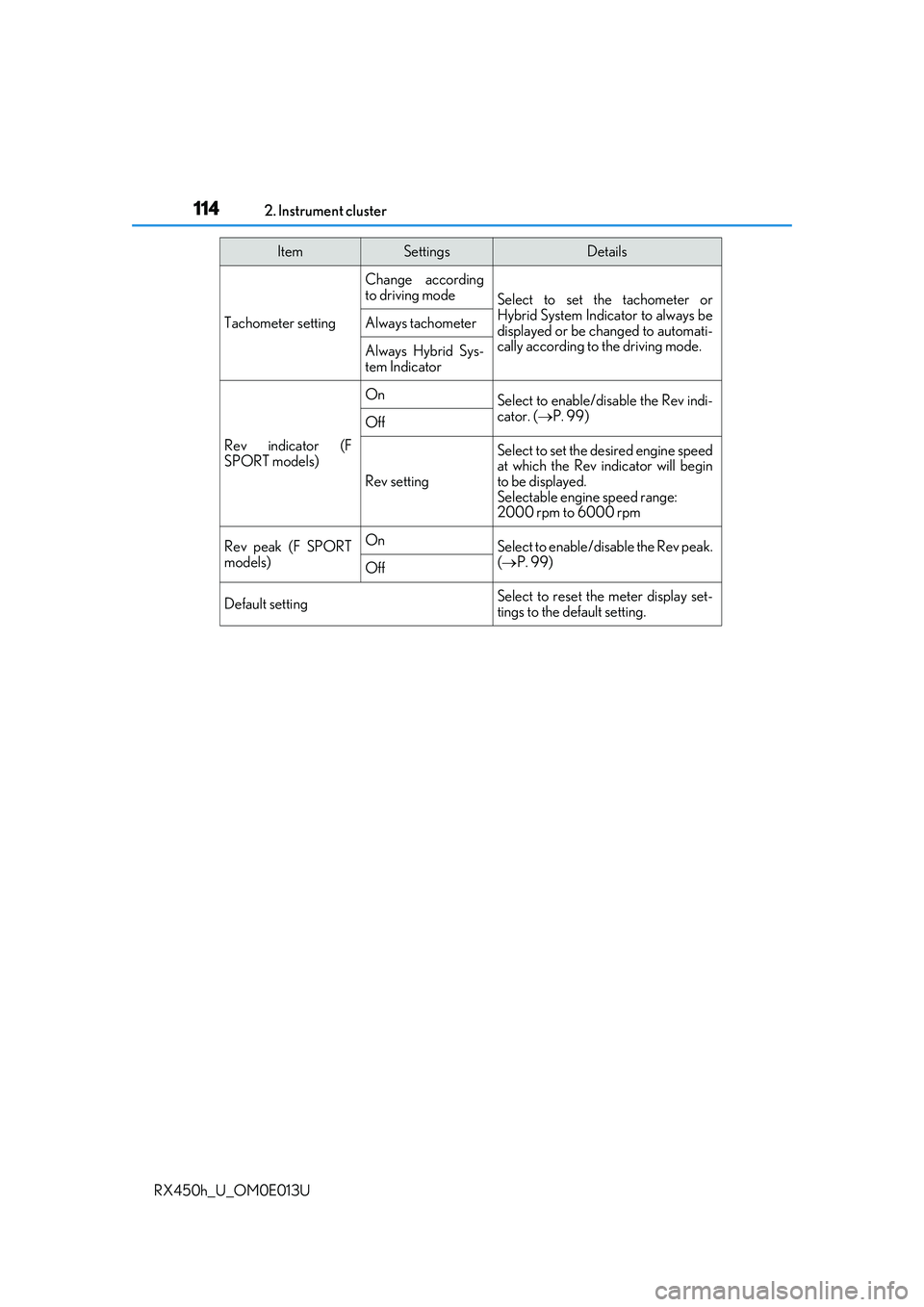
Tachometer setting
Change according
to driving mode
Select to set the tachometer or
Hybrid System Indicator to always be
displayed or be changed to automati-
cally according to the driving mode.
Always tachometer
Always Hybrid Sys-
tem Indicator
Rev indicator (F
SPORT models)
OnSelect to enable/disable the Rev indi-
cator. ( P. 99)
Off
Rev setting
Select to set the desired engine speed
at which the Rev indicator will begin
to be displayed.
Selectable engine speed range:
2000 rpm to 6000 rpm
Rev peak (F SPORT
models)OnSelect to enable/disable the Rev peak.
( P. 99)
Off
Default settingSelect to reset the meter display set-
tings to the default setting.
ItemSettingsDetails
Page 116 of 660
1162. Instrument cluster
RX450h_U_OM0E013U
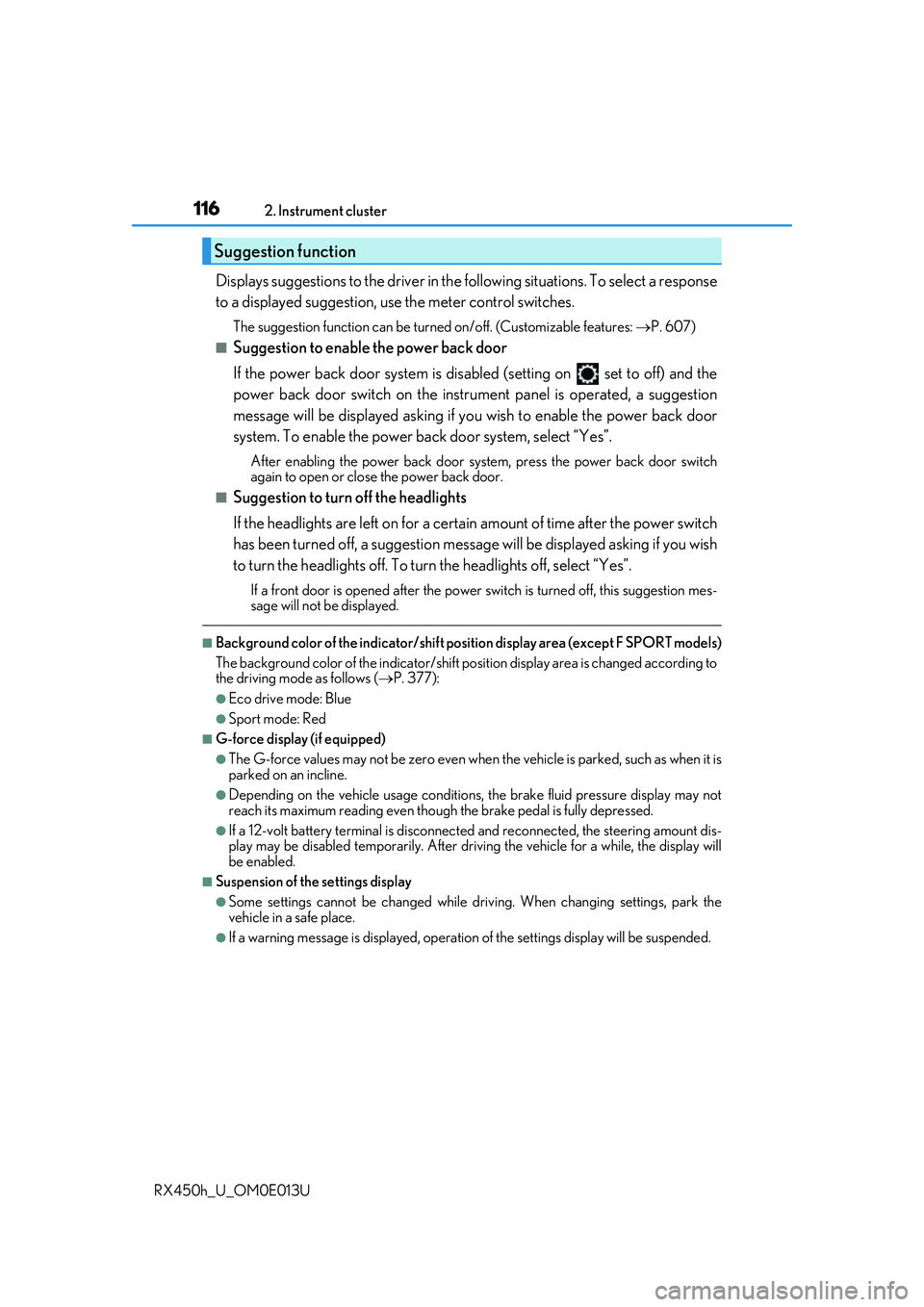
Displays suggestions to the driver in the following situations. To select a response
to a displayed suggestion, use the meter control switches.
The suggestion function can be turned on/off. (Customizable features: P. 607)
■Suggestion to enable the power back door
If the power back door system is disabled (setting on set to off) and the
power back door switch on the instru ment panel is operated, a suggestion
message will be displayed asking if yo u wish to enable the power back door
system. To enable the power back door system, select “Yes”.
After enabling the power back door syst em, press the power back door switch
again to open or close the power back door.
■Suggestion to turn off the headlights
If the headlights are left on for a certai n amount of time after the power switch
has been turned off, a su ggestion message will be displayed asking if you wish
to turn the headlights off. To turn the headlights off, select “Yes”.
If a front door is opened after the power switch is turned off, this suggestion mes-
sage will not be displayed.
■Background color of the indicator/shift posi tion display area (except F SPORT models)
The background color of the indicator/shift position display area is changed according to
the driving mode as follows ( P. 377):
●Eco drive mode: Blue
●Sport mode: Red
■G-force display (if equipped)
●The G-force values may not be zero even when the vehicle is parked, such as when it is
parked on an incline.
●Depending on the vehicle usage conditions, the brake fluid pressure display may not
reach its maximum reading even though the brake pedal is fully depressed.
●If a 12-volt battery terminal is disconnect ed and reconnected, the steering amount dis-
play may be disabled temporarily. After driv ing the vehicle for a while, the display will
be enabled.
■Suspension of the settings display
●Some settings cannot be changed while driv ing. When changing settings, park the
vehicle in a safe place.
●If a warning message is displa yed, operation of the settings display will be suspended.
Suggestion function
Page 242 of 660
2424-2. Driving procedures
RX450h_U_OM0E013U
■When the “-” paddle shift switch is operated with the shift lever in the D position (vehi-
cles with paddle shift switches)
The shift range is downshifted to a range that enables engine braking force that is suit-
able to driving conditions.
■Automatic deactivation of shif t range selection in the D position (vehicles with paddle
shift switches)
Shift range selection in the D position will be deactivated in the following situations:
●When the vehicle comes to a stop
●If the accelerator pedal is depressed fo r more than a certain period of time
●When the shift lever is shifted to a position other than D
■S mode
●When the shift range is S4 or lower, holding the shift lever toward “+” sets the shift
range to S6.
●Automatically selects a higher shift range before the engine speed becomes too high.
■Downshifting restriction warning buzzer
To help ensure safety and driving performance, downshifti ng operation may sometimes
be restricted. In some circum stances, downshifting may not be possible even when the
shift lever or paddle shift sw itch (if equipped) is operated . (A buzzer will sound twice.)
■When driving with cruise control, dynamic radar cruise control or dynamic radar
cruise control with full-speed range activated
Even when performing the following actions with the intent of enabling engine braking,
engine braking will not activate because crui se control, dynamic radar cruise control or
dynamic radar cruise control with full-speed range will not be canceled.
●Vehicles without paddle shift switches: While driving in S mode, downshifting to 5 or 4.
( P. 311, 323, 335)
●Vehicles with paddle shift sw itches: While driving in D or S mode, downshifting to 5 or
4. ( P. 311, 323, 335)
●When switching the driving mode to sport mode while driving in D position.
( P. 377)
■Restraining sudden start (Drive-Start Control)
When the following unusual operation is performed, the hybrid system output may be
restrained.
●When the shift lever is shifted from R to D, D to R, N to R, P to D, or P to R (D includes S)
with the accelerator pedal depressed, a wa rning message appears on the multi-infor-
mation display. If a warning message is shown on the multi- information display, read the
message and follow the instructions.
●When the accelerator pedal is depressed too while the vehicle is in reverse.
■If the shift lever cannot be shifted from P
P. 563
Page 282 of 660
2824-5. Using the driving support systems
RX450h_U_OM0E013U
WARNING
■When to disable the pre-collision system
In the following situations, di sable the system, as it may not operate properly, possibly
leading to an accident resulting in death or serious injury:
●When the vehicle is being towed
●When your vehicle is towing another vehicle
●When transporting the vehicle via truck, bo at, train or similar means of transportation
●When the vehicle is raised on a lift with the hybrid system on and the tires are allowed
to rotate freely
●When inspecting the vehicle using a drum tester such as a chassis dynamometer or
speedometer tester, or when using an on vehicle wheel balancer
●When a strong impact is applied to the fron t bumper or front grille, due to an accident
or other reasons
●If the vehicle cannot be driven in a stable manner, such as when the vehicle has been
in an accident or is malfunctioning
●When the vehicle is driven in a sporty manner or off-road
●When the tires are not properly inflated
●When the tires are very worn
●When tires of a size other than specified are installed
●When tire chains are installed
●When a compact spare tire or an emergency tire puncture repair kit is used
●If the suspension is modified
●If the front of the vehicle is raised or lo wered, such as when loaded with heavy lug-
gage
Page 339 of 660
3394-5. Using the driving support systems
4
Driving
RX450h_U_OM0E013U
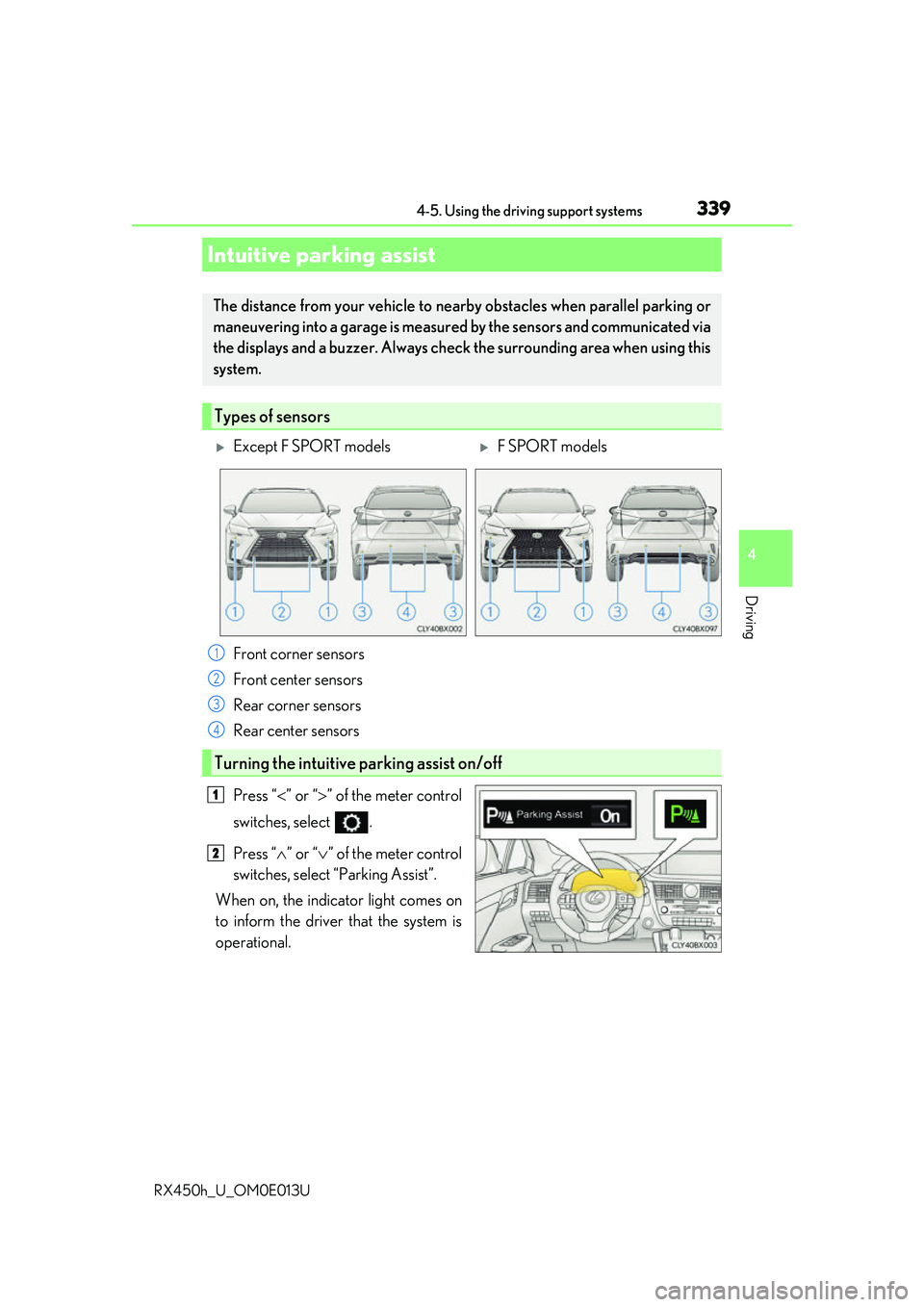
Press “” or “ ” of the meter control
switches, select .
Press “ ” or “ ” of the meter control
switches, select “Parking Assist”.
When on, the indicator light comes on
to inform the driver that the system is
operational.
Intuitive parking assist
The distance from your vehicle to nearby obstacles when parallel parking or
maneuvering into a garage is measured by the sensors and communicated via
the displays and a buzzer. Always check the surrounding area when using this
system.
Types of sensors
Except F SPORT modelsF SPORT models
Front corner sensors
Front center sensors
Rear corner sensors
Rear center sensors
Turning the intuitive parking assist on/off
1
2
3
4
1
2
Page 377 of 660
3774-5. Using the driving support systems
4
Driving
RX450h_U_OM0E013U
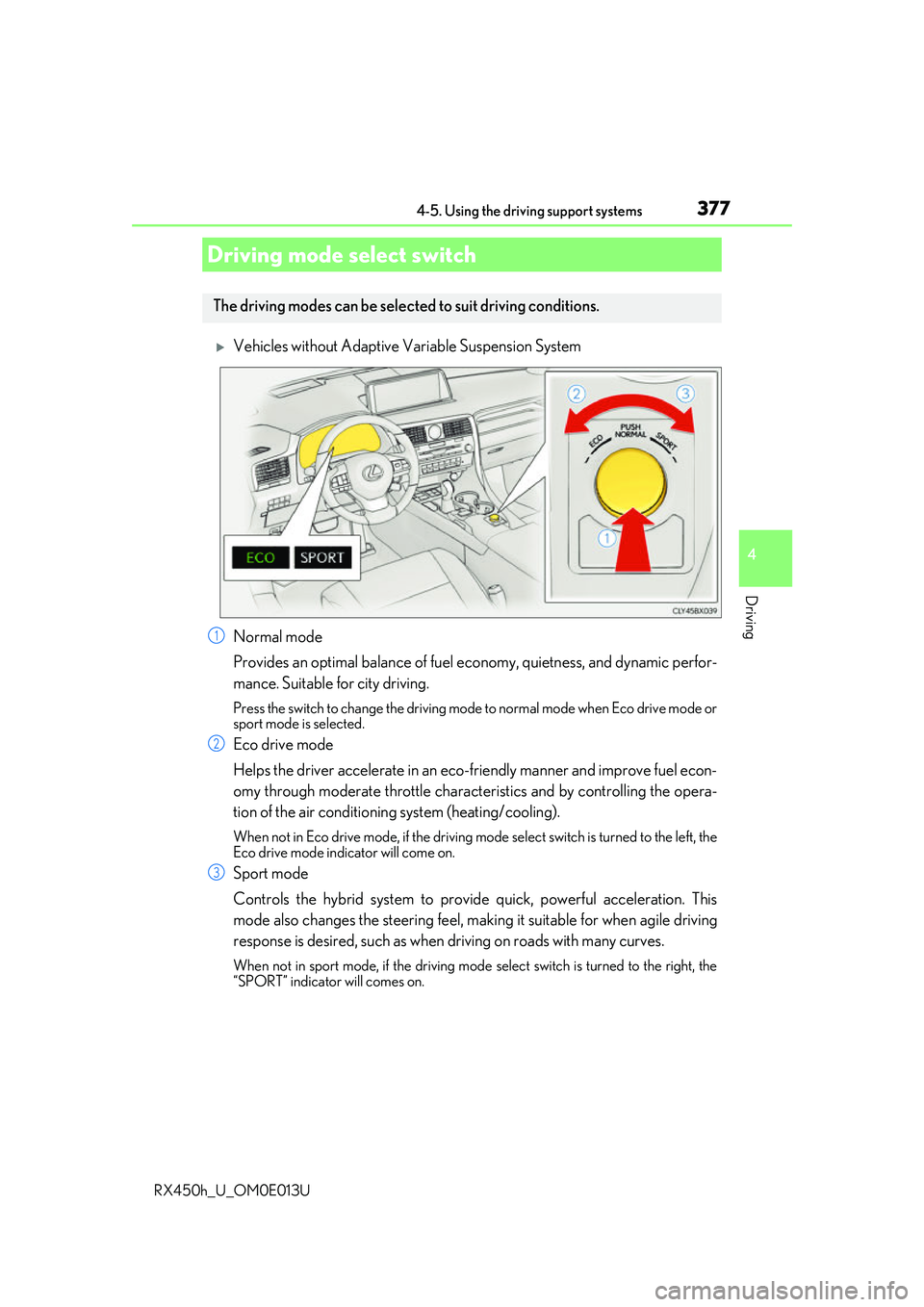
Vehicles without Adaptive Variable Suspension System
Normal mode
Provides an optimal balance of fuel economy, quietness, and dynamic perfor-
mance. Suitable for city driving.
Press the switch to change the driving mode to normal mode when Eco drive mode or
sport mode is selected.
Eco drive mode
Helps the driver accelerate in an eco-fr iendly manner and improve fuel econ-
omy through moderate throttle charact eristics and by controlling the opera-
tion of the air conditioning system (heating/cooling).
When not in Eco drive mode, if the driving mode select switch is turned to the left, the
Eco drive mode indicator will come on.
Sport mode
Controls the hybrid system to provide quick, powerful acceleration. This
mode also changes the steering feel, maki ng it suitable for when agile driving
response is desired, such as when driving on roads with many curves.
When not in sport mode, if the driving mode select switch is turned to the right, the
“SPORT” indicator will comes on.
Driving mode select switch
The driving modes can be selected to suit driving conditions.
1
2
3
Page 378 of 660
3784-5. Using the driving support systems
RX450h_U_OM0E013U
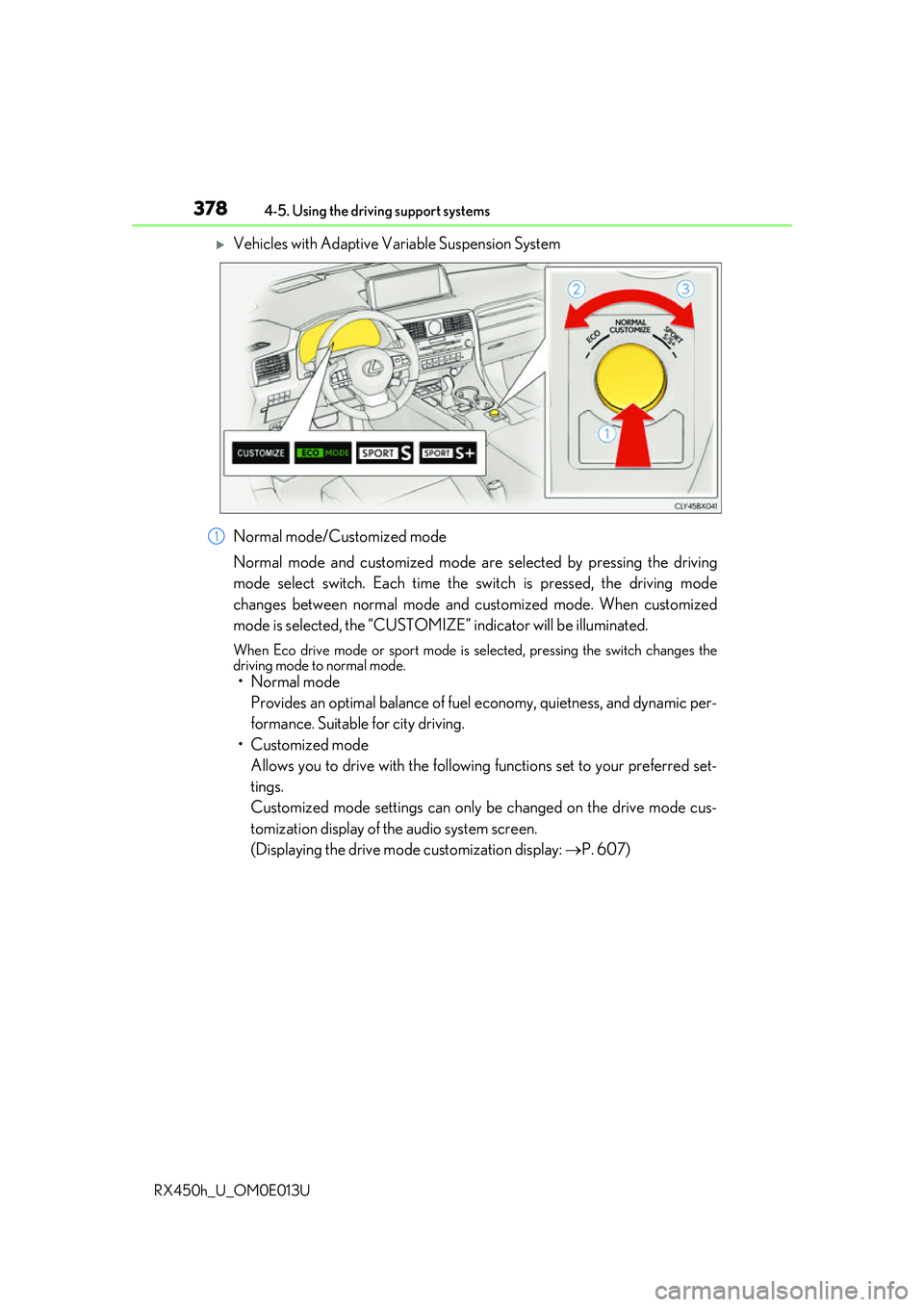
Vehicles with Adaptive Variable Suspension System
Normal mode/Customized mode
Normal mode and customized mode ar e selected by pressing the driving
mode select switch. Each time the switch is pressed, the driving mode
changes between normal mode and customized mode. When customized
mode is selected, the “CUSTOMIZE” indicator will be illuminated.
When Eco drive mode or sport mode is se lected, pressing the switch changes the
driving mode to normal mode.
• Normal mode
Provides an optimal balance of fuel economy, quietness, and dynamic per-
formance. Suitable for city driving.
• Customized mode Allows you to drive with the following functions set to your preferred set-
tings.
Customized mode settings can only be changed on the drive mode cus-
tomization display of the audio system screen.
(Displaying the drive mode customization display: P. 607)
1
Page 379 of 660
3794-5. Using the driving support systems
4
Driving
RX450h_U_OM0E013U
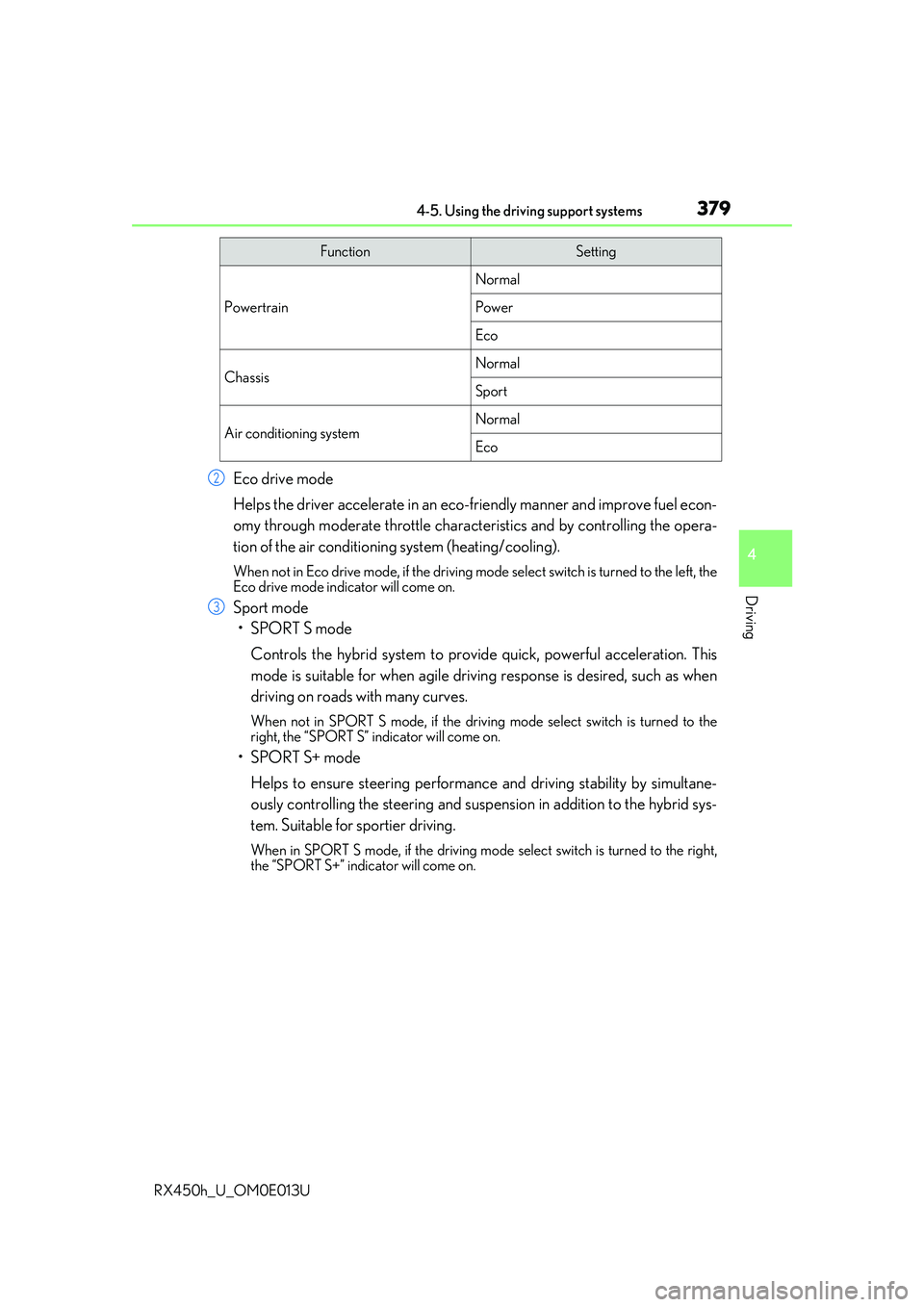
Eco drive mode
Helps the driver accelerate in an eco-friendly manner and improve fuel econ-
omy through moderate throttle charact eristics and by controlling the opera-
tion of the air conditioning system (heating/cooling).
When not in Eco drive mode, if the driving mode select switch is turned to the left, the
Eco drive mode indicator will come on.
Sport mode
•SPORT S mode
Controls the hybrid system to provide quick, powerful acceleration. This
mode is suitable for when agile drivin g response is desired, such as when
driving on roads with many curves.
When not in SPORT S mode, if the driving mode select switch is turned to the
right, the “SPORT S” indicator will come on.
•SPORT S+ mode
Helps to ensure steering performanc e and driving stability by simultane-
ously controlling the steering and suspension in addition to the hybrid sys-
tem. Suitable for sportier driving.
When in SPORT S mode, if the driving mode select switch is turned to the right,
the “SPORT S+” indicator will come on.
FunctionSetting
Powertrain
Normal
Power
Eco
ChassisNormal
Sport
Air conditioning systemNormal
Eco
2
3
Page 380 of 660
3804-5. Using the driving support systems
RX450h_U_OM0E013U
■Operation of the air conditioning system in Eco drive mode
Eco drive mode controls the heating/cooling operations and fan speed of the air condi-
tioning system to enhance fuel efficiency. To improve air conditioning performance,
adjust the fan speed or turn off Eco drive mode.
■Automatic deactivation of sport mode and customized mode
If the power switch is turned off after driv ing in sport mode or customized mode, the
drive mode will be changed to normal mode.
■Driving mode pop-up display (12.3-inch display only)
When the driving mode is changed, the sele cted driving mode will be temporarily dis-
played on the side display. ( P. 402)
Page 382 of 660
3824-5. Using the driving support systems
RX450h_U_OM0E013U
◆E-Four (AWD models)
Electronic On-Demand AWD system. Automatically switches from front-
wheel drive to all-wheel drive (AWD) according to the driving conditions,
helping to ensure reliable handling and st ability. Examples of conditions where
the system will switch to AWD are when cornering, going uphill, starting off or
accelerating, and when the road surface is slippery due to snow, rain, etc.
◆Adaptive Variable Suspension System (if equipped)
Controls the damping force of the shock absorber of each wheel according to
the road and driving conditions, helpin g achieve a comfortable ride, excellent
driveability and a high level of stability.
If SPORT S+ mode is selected using the driving mode select switch, the
damping force will become more su itable for sporty driving. (P. 378)
◆VDIM (Vehicle Dynamics Integrated Management)
Provides integrated control of the ABS, brake assist, TRAC, VSC, hill-start
assist control, and EPS systems
Helps to maintain vehicle stability when swerving on slippery road surfaces by
controlling the brakes and hybrid system output
◆Trailer Sway Control
Helps the driver to control trailer sway by selectively applying brake pressure
for individual wheels and reducing dr iving torque when trailer sway is
detected.
Trailer Sway Control is part of the VSC system and will not operate if VSC
turned off or experiences a malfunction.