remote control LEXUS RX450H 2016 Owner's Manual
[x] Cancel search | Manufacturer: LEXUS, Model Year: 2016, Model line: RX450H, Model: LEXUS RX450H 2016Pages: 660, PDF Size: 14.85 MB
Page 192 of 660
1923-5. Opening, closing the windows and moon roof
RX450h_U_OM0E013U
WARNING
Observe the following precautions.
Failing to do so may result in death or serious injury.
■Opening and closing the windows
●The driver is responsible for all the power window operations, including the operation
for the passengers. In order to prevent acci dental operation, especially by a child, do
not let a child operate the power windows. It is possible for children and other passen-
gers to have body parts caught in the powe r window. Also, when riding with a child, it
is recommended to use the window lock switch. ( P. 189)
●When using the wireless remote control or mechanical key and operating the power
windows, operate the power window after checking to make sure that there is no pos-
sibility of any passenger having any of their body parts caught in the window. Also do
not let a child operate power window by the wireless remote control or mechanical
key. It is possible for children and other passengers to get caught in the power win-
dow.
●When exiting the vehicle, turn the power switch off, carry the key and exit the vehicle
along with the child. There may be accidental operation, due to mischief, etc., that
may possibly lead to an accident.
■Jam protection function
●Never use any part of your body to intentionally activate the jam protection function.
●The jam protection function may not work if something gets caught just before the
power window fully closes.
■Pinch protection function
●Do not use a hand, arm, or clothing to inte ntionally activate the pinch protection func-
tion.
●The pinch protection function may not oper ate if something gets caught just before
the power window is fully opened. Take care so that your hands, arms, or clothing do
not get caught.
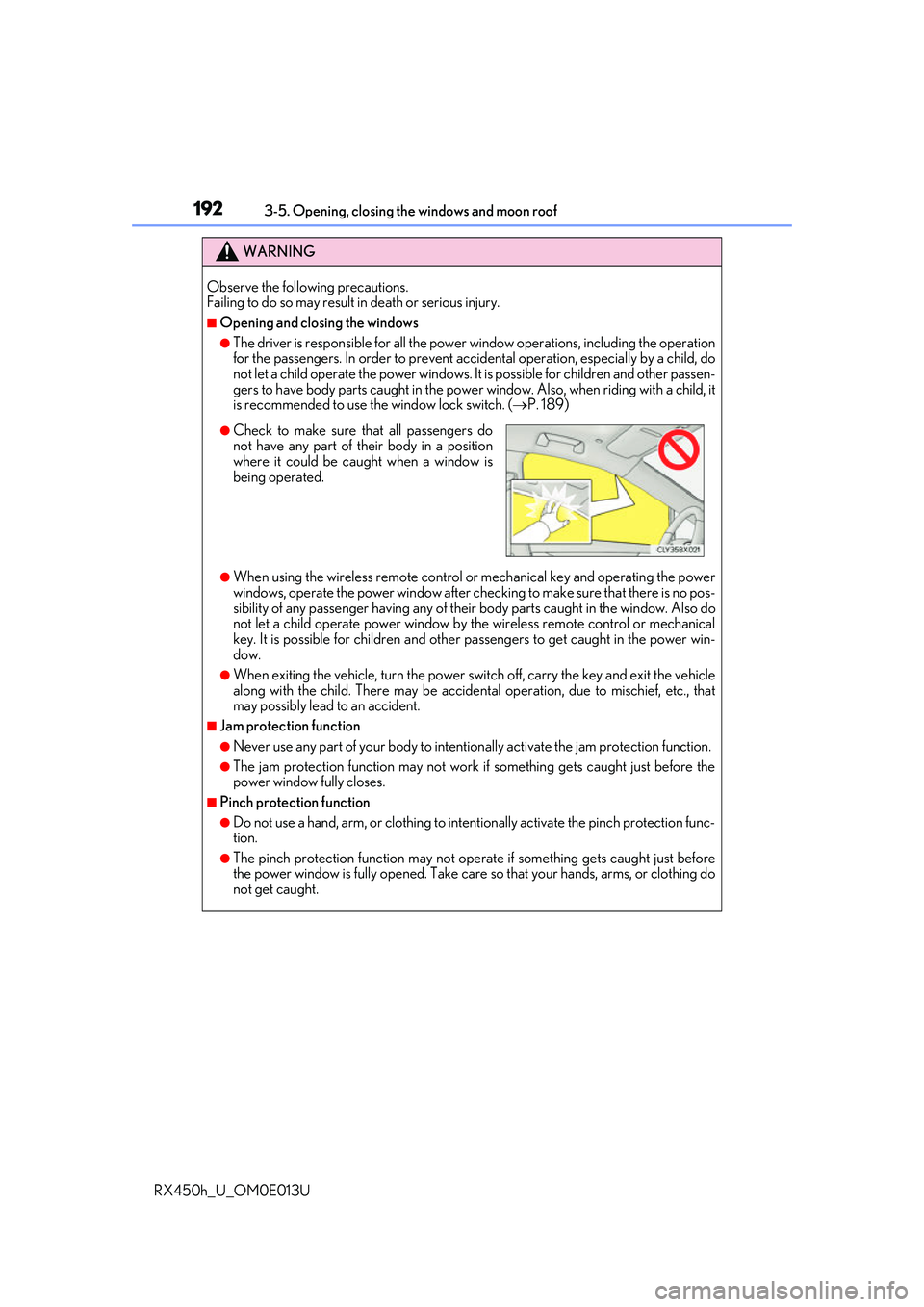
●Check to make sure th at all passengers donot have any part of their body in a position
where it could be caught when a window is
being operated.
Page 194 of 660
1943-5. Opening, closing the windows and moon roof
RX450h_U_OM0E013U
■The moon roof can be operated when
The power switch is in ON mode.
■Operating the moon roof after turning the hybrid system off
The moon roof can be operated for approximately 45 seconds after the power switch is
turned to ACCESSORY mode or turned off. It cannot, however, be operated once the
driver’s door is opened.
■Jam protection function
If an object is detected between the moon r oof and the frame while the moon roof is clos-
ing or tilting down, travel is stopped and the moon roof opens slightly.
■Sunshade
The sunshade can be opened and closed manually. However, the sunshade will open
automatically when the moon roof is opened.
■Door lock linked moon roof operation
●The moon roof can be opened and closed using the mechanical key.* ( P. 565)
●The moon roof can be opened us ing the wireless remote control.* ( P. 136)
*: These settings must be customized at your Lexus dealer.
Page 196 of 660
1963-5. Opening, closing the windows and moon roof
RX450h_U_OM0E013U
WARNING
Observe the following precautions.
Failing to do so may cause death or serious injury.
■Opening the moon roof
●Do not allow any passengers to put their hands or heads outside the vehicle while it is
moving.
●Do not sit on top of the moon roof.
■Opening and closing the moon roof
●The driver is responsible for moon roof opening and closing operations.
In order to prevent accidental operation, especially by a child, do not let a child oper-
ate the moon roof. It is possible for child ren and other passengers to have body parts
caught in the moon roof.
■Jam protection function
●Never use any part of your body to intentionally activate the jam protection function.
●The jam protection function may not work if something gets caught just before the
moon roof is fully closed. Also, the jam prot ection function is not designed to operate
while the switch is being pressed. Take care so that your fingers, etc. do not get
caught.
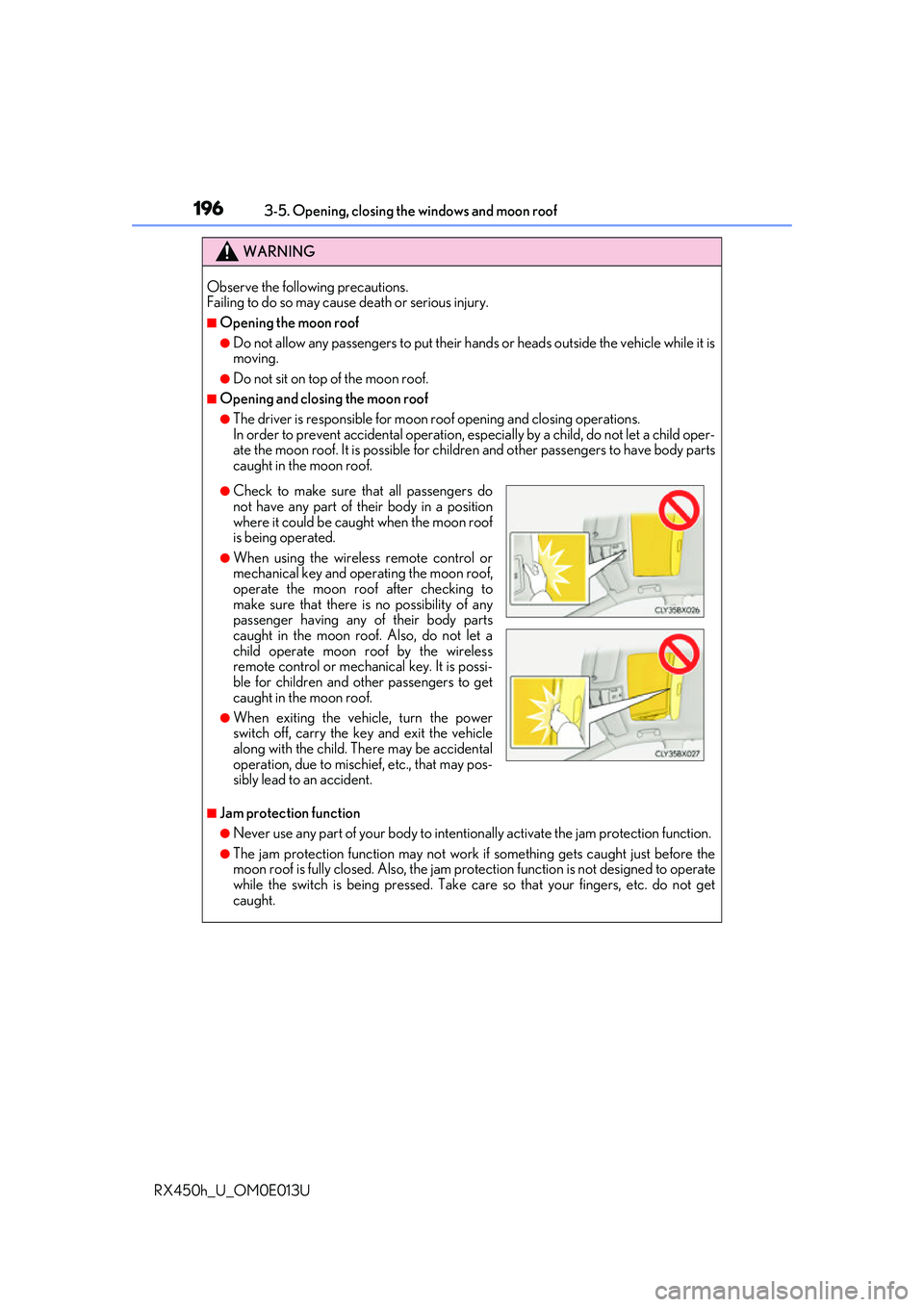
●Check to make sure th at all passengers donot have any part of their body in a position
where it could be caught when the moon roof
is being operated.
●When using the wireless remote control or
mechanical key and operating the moon roof,
operate the moon roof after checking to
make sure that there is no possibility of any
passenger having any of their body parts
caught in the moon roof. Also, do not let a
child operate moon roof by the wireless
remote control or mechanical key. It is possi-
ble for children and other passengers to get
caught in the moon roof.
●When exiting the vehicle, turn the power
switch off, carry the key and exit the vehicle
along with the child. There may be accidental
operation, due to mischief, etc., that may pos-
sibly lead to an accident.
Page 198 of 660
1983-5. Opening, closing the windows and moon roof
RX450h_U_OM0E013U
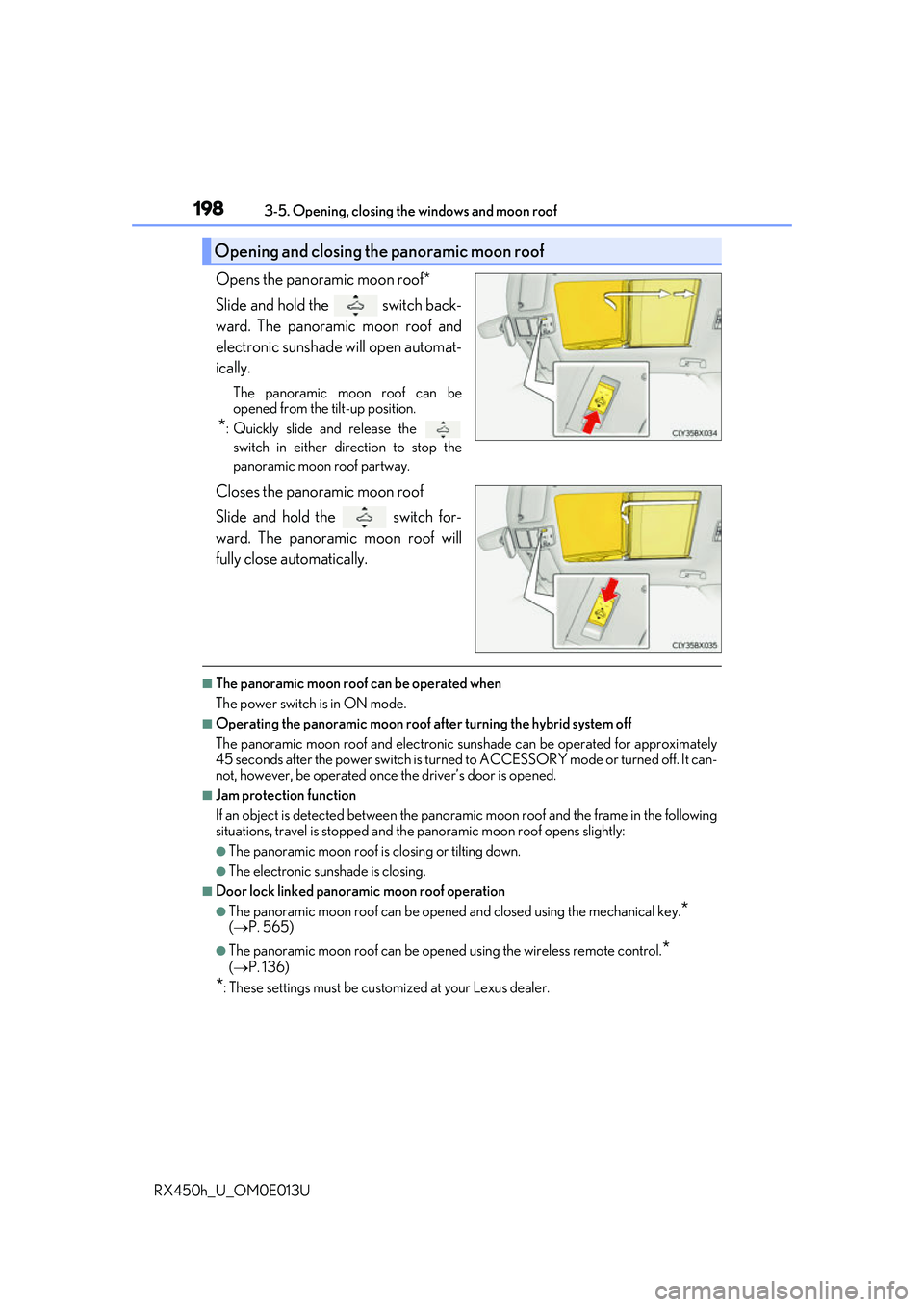
Opens the panoramic moon roof*
Slide and hold the switch back-
ward. The panoramic moon roof and
electronic sunshade will open automat-
ically.
The panoramic moon roof can be
opened from the tilt-up position.
*: Quickly slide and release the switch in either direction to stop the
panoramic moon roof partway.
Closes the panoramic moon roof
Slide and hold the switch for-
ward. The panoramic moon roof will
fully close automatically.
■The panoramic moon roof can be operated when
The power switch is in ON mode.
■Operating the panoramic moon roof af ter turning the hybrid system off
The panoramic moon roof and electronic su nshade can be operated for approximately
45 seconds after the power switch is turned to ACCESSORY mode or turned off. It can-
not, however, be operated once the driver’s door is opened.
■Jam protection function
If an object is detected be tween the panoramic moon roof and the frame in the following
situations, travel is stopped and the panoramic moon roof opens slightly:
●The panoramic moon roof is closing or tilting down.
●The electronic sunshade is closing.
■Door lock linked panoramic moon roof operation
●The panoramic moon roof can be opened and closed using the mechanical key.*
( P. 565)
●The panoramic moon roof can be open ed using the wireless remote control.*
( P. 136)
*: These settings must be customized at your Lexus dealer.
Opening and closing the panoramic moon roof
Page 200 of 660
2003-5. Opening, closing the windows and moon roof
RX450h_U_OM0E013U
WARNING
Observe the following precautions.
Failing to do so may cause death or serious injury.
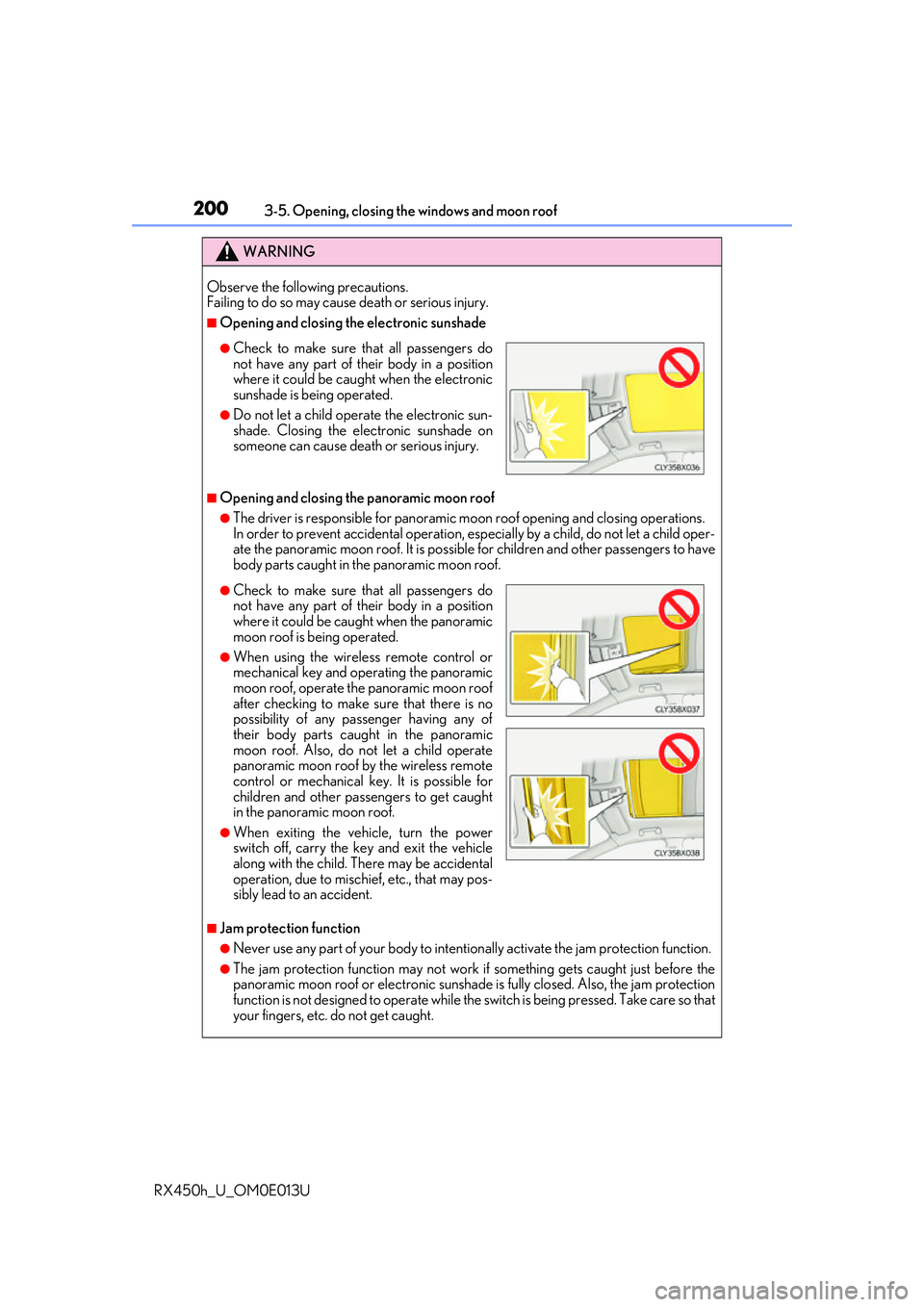
■Opening and closing the electronic sunshade
■Opening and closing the panoramic moon roof
●The driver is responsible for panoramic moon roof opening and closing operations.
In order to prevent accidental operation, especially by a child, do not let a child oper-
ate the panoramic moon roof. It is possibl e for children and other passengers to have
body parts caught in the panoramic moon roof.
■Jam protection function
●Never use any part of your body to intentionally activate the jam protection function.
●The jam protection function may not work if something gets caught just before the
panoramic moon roof or electronic sunshade is fully closed. Also, the jam protection
function is not designed to operate while the switch is being pressed. Take care so that
your fingers, etc. do not get caught.
●Check to make sure th at all passengers do
not have any part of their body in a position
where it could be caught when the electronic
sunshade is being operated.
●Do not let a child operate the electronic sun-
shade. Closing the electronic sunshade on
someone can cause death or serious injury.
●Check to make sure that all passengers donot have any part of their body in a position
where it could be caught when the panoramic
moon roof is being operated.
●When using the wireless remote control or
mechanical key and operating the panoramic
moon roof, operate the panoramic moon roof
after checking to make sure that there is no
possibility of any passenger having any of
their body parts caught in the panoramic
moon roof. Also, do not let a child operate
panoramic moon roof by the wireless remote
control or mechanical key. It is possible for
children and other passengers to get caught
in the panoramic moon roof.
●When exiting the vehicle, turn the power
switch off, carry the ke y and exit the vehicle
along with the child. There may be accidental
operation, due to mischief, etc., that may pos-
sibly lead to an accident.
Page 253 of 660
2534-3. Operating the lights and wipers
4
Driving
RX450h_U_OM0E013U
■Daytime running light system
●To make your vehicle more visible to other drivers during daytime driving, the daytime
running lights turn on automatically whenever the hybrid system is started and the park-
ing brake is released with the headlight switch in (Canada only) or posi-
tion. (Illuminate brighter than the park ing lights.) Daytime running lights are not
designed for use at night.
For the U.S.A.: Daytime running lights can be turned off by operating the headlight
switch to position.
●Compared to turning on the headlights, the daytime running light system offers greater
durability and consumes less electricity, so it can help improve fuel economy.
■Cornering lights (if equipped)
When the cornering lights are on for more than 30 minutes, they will turn off automati-
cally.
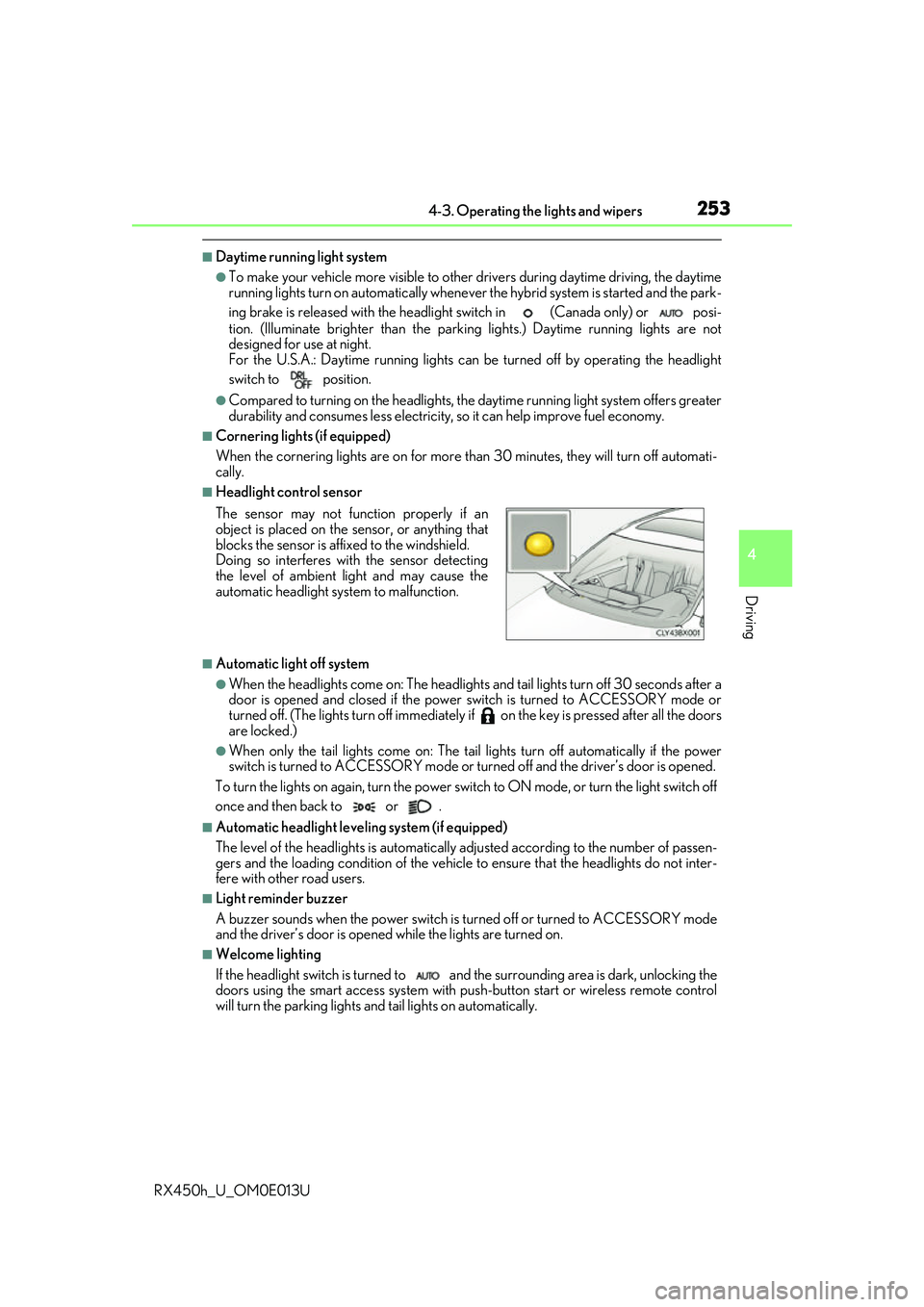
■Headlight control sensor
■Automatic light off system
●When the headlights come on: The headlights and tail lights turn off 30 seconds after a
door is opened and closed if the power switch is turned to ACCESSORY mode or
turned off. (The lights turn off immediately if on the key is pre ssed after all the doors
are locked.)
●When only the tail lights come on: The tail lights turn off automatically if the power
switch is turned to ACCESSORY mode or tu rned off and the driver’s door is opened.
To turn the lights on again, turn the power switch to ON mode, or turn the light switch off
once and then back to or .
■Automatic headlight leve ling system (if equipped)
The level of the headlights is automatically adjusted accordi ng to the number of passen-
gers and the loading condition of the vehicle to ensure that the headlights do not inter-
fere with other road users.
■Light reminder buzzer
A buzzer sounds when the power switch is turned off or turned to ACCESSORY mode
and the driver’s door is opened while the lights are turned on.
■Welcome lighting
If the headlight switch is turned to and the surrounding area is dark, unlocking the
doors using the smart access system with pu sh-button start or wireless remote control
will turn the parking lights and tail lights on automatically. The sensor may not function properly if an
object is placed on the sensor, or anything that
blocks the sensor is affixed to the windshield.
Doing so interferes with the sensor detecting
the level of ambient light and may cause the
automatic headlight system to malfunction.
Page 401 of 660
4015-1. Basic operation of the Remote Touch screen
5
Interior features
RX450h_U_OM0E013U
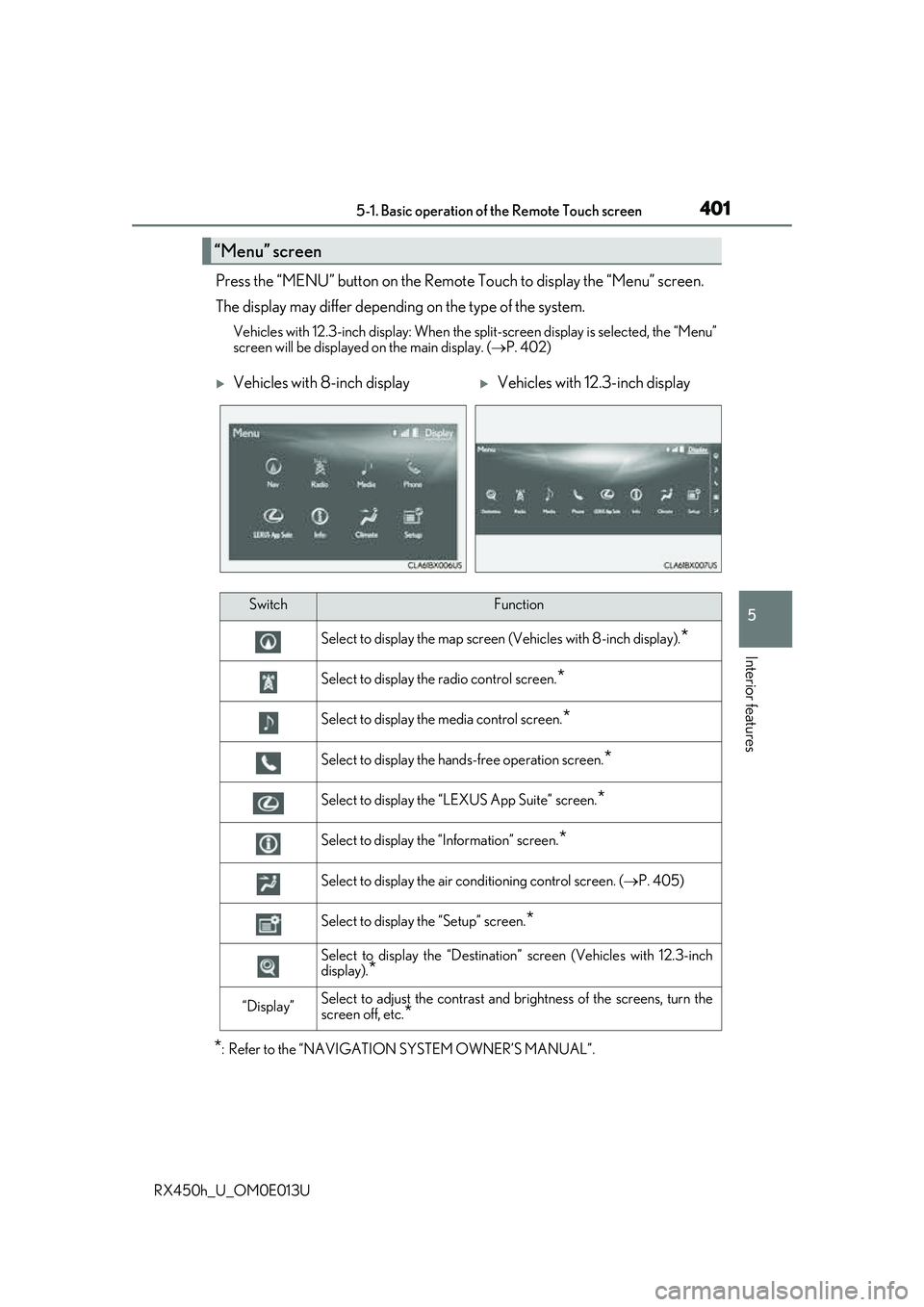
Press the “MENU” button on the Remote Touch to display the “Menu” screen.
The display may differ depending on the type of the system.
Vehicles with 12.3-inch display: When the split-screen display is selected, the “Menu”
screen will be displayed on the main display. ( P. 402)
*: Refer to the “NAVIGATION SYSTEM OWNER’S MANUAL”.
“Menu” screen
Vehicles with 8-inch displayVehicles with 12.3-inch display
SwitchFunction
Select to display the map screen (Vehicles with 8- inch display).*
Select to display the radio control screen.*
Select to display the media control screen.*
Select to display the hands-free operation screen.*
Select to display the “LEXUS App Suite” screen.*
Select to display the “Information” screen.*
Select to display the air conditioning control screen. ( P. 405)
Select to display the “Setup” screen.*
Select to display the “Destination ” screen (Vehicles with 12.3-inch
display).
*
“Display”Select to adjust the contrast and brightness of the screens, turn the
screen off, etc.
*
Page 405 of 660
4055-2. Using the air conditioning system and defogger
5
Interior features
RX450h_U_OM0E013U
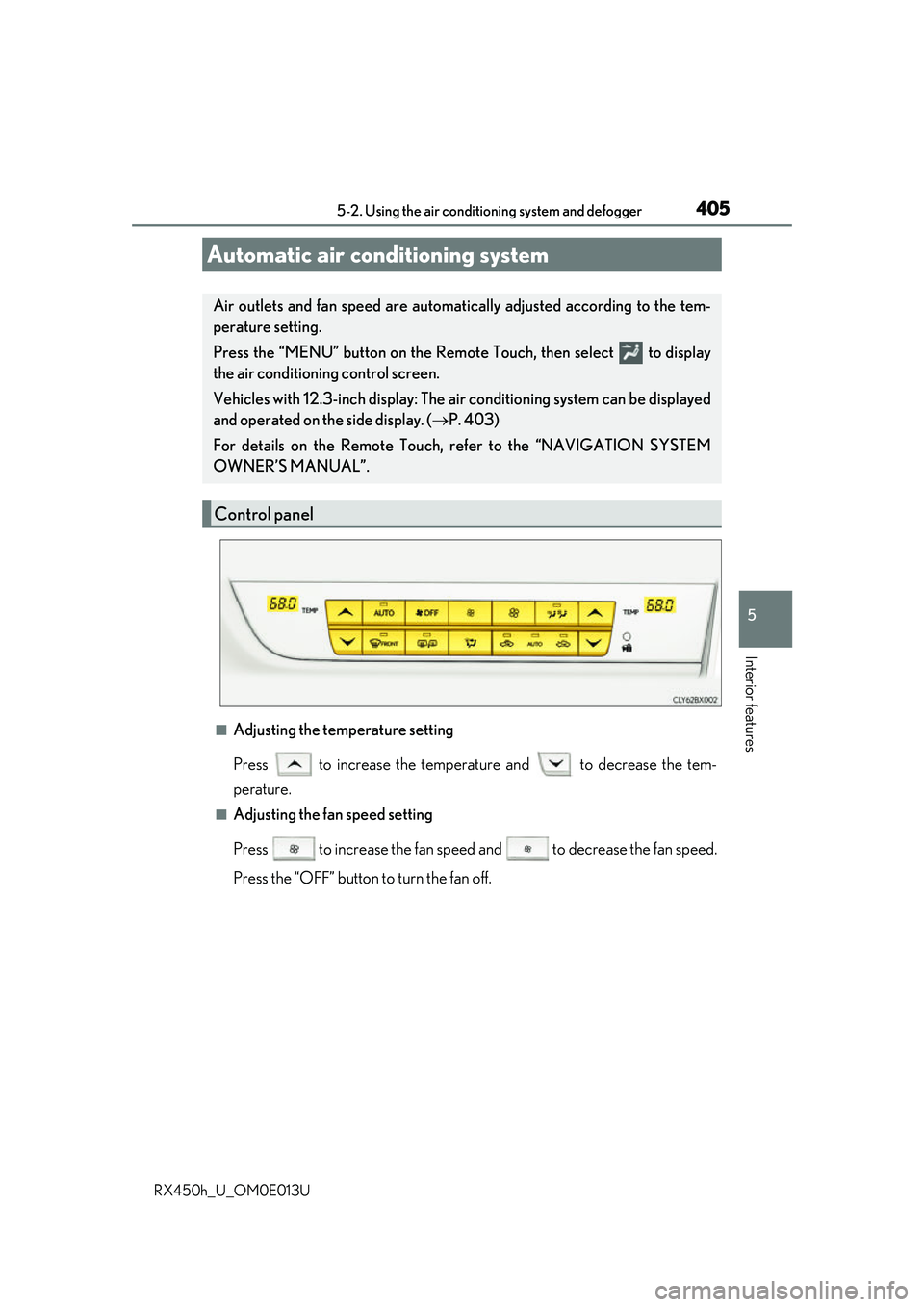
■Adjusting the temperature setting
Press to increase the temperature and to decrease the tem-
perature.
■Adjusting the fan speed setting
Press to increase the fan speed and to decrease the fan speed.
Press the “OFF” button to turn the fan off.
Automatic air conditioning system
Air outlets and fan speed are automati cally adjusted according to the tem-
perature setting.
Press the “MENU” button on the Remote Touch, then select to display
the air conditioning control screen.
Vehicles with 12.3-inch display: The ai r conditioning system can be displayed
and operated on the side display. ( P. 403)
For details on the Remote Touch, refer to the “NAVIGATION SYSTEM
OWNER’S MANUAL”.
Control panel
Page 445 of 660
4455-5. Using the other interior features
5
Interior features
RX450h_U_OM0E013U
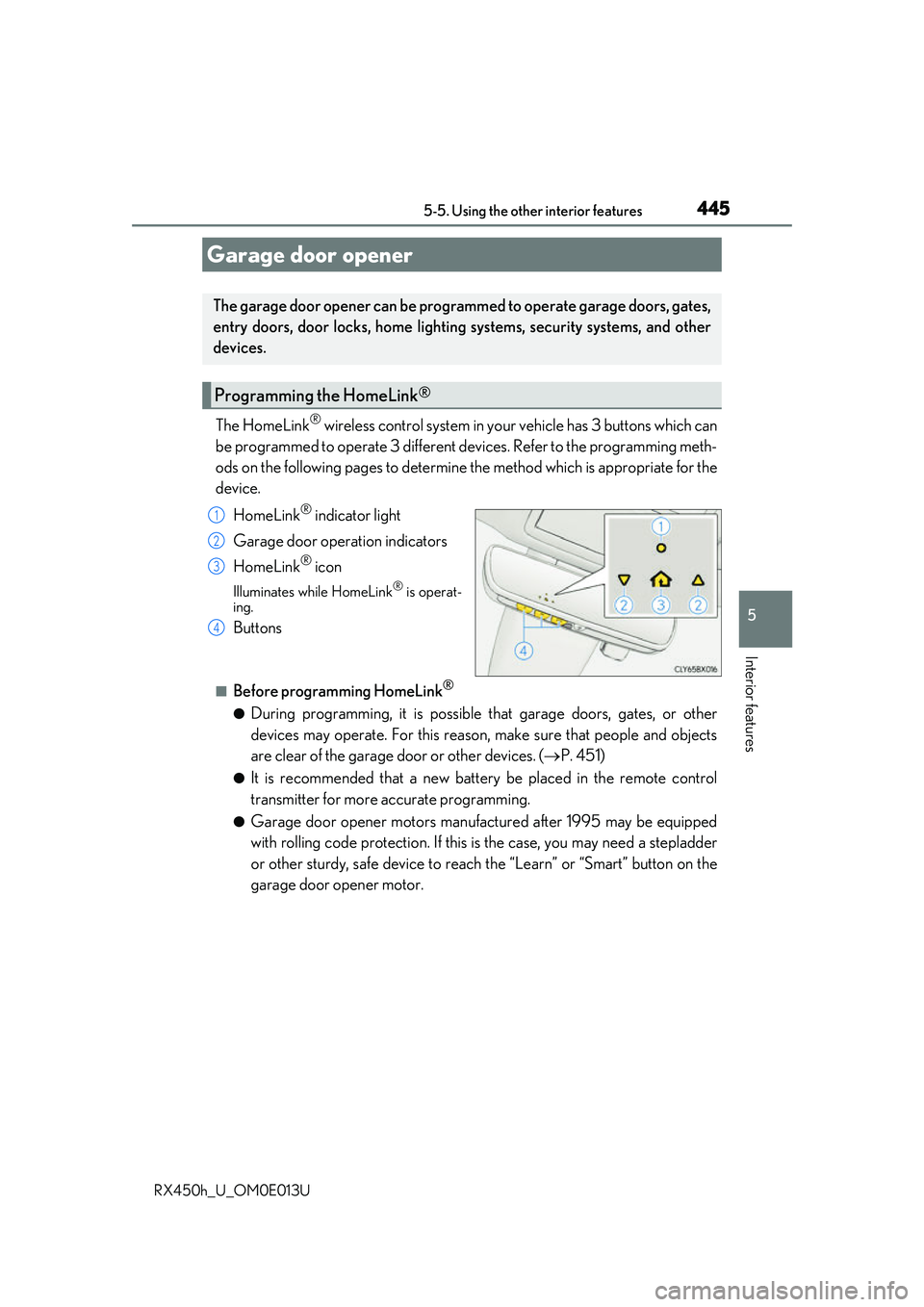
The HomeLink® wireless control system in your vehicle has 3 buttons which can
be programmed to operate 3 different de vices. Refer to the programming meth-
ods on the following pages to determine the method which is appropriate for the
device.
HomeLink
® indicator light
Garage door operation indicators
HomeLink
® icon
Illuminates while HomeLink® is operat-
ing.
Buttons
■Before programming HomeLink®
●During programming, it is possible that garage doors, gates, or other
devices may operate. For this reason, make sure that people and objects
are clear of the garage door or other devices. ( P. 451)
●It is recommended that a new batter y be placed in the remote control
transmitter for more accurate programming.
●Garage door opener motors manufa ctured after 1995 may be equipped
with rolling code protection. If this is the case, you may need a stepladder
or other sturdy, safe device to reach the “Learn” or “Smart” button on the
garage door opener motor.
Garage door opener
The garage door opener can be programmed to operate garage doors, gates,
entry doors, door locks, home lightin g systems, security systems, and other
devices.
Programming the HomeLink®
1
2
3
4
Page 446 of 660
4465-5. Using the other interior features
RX450h_U_OM0E013U
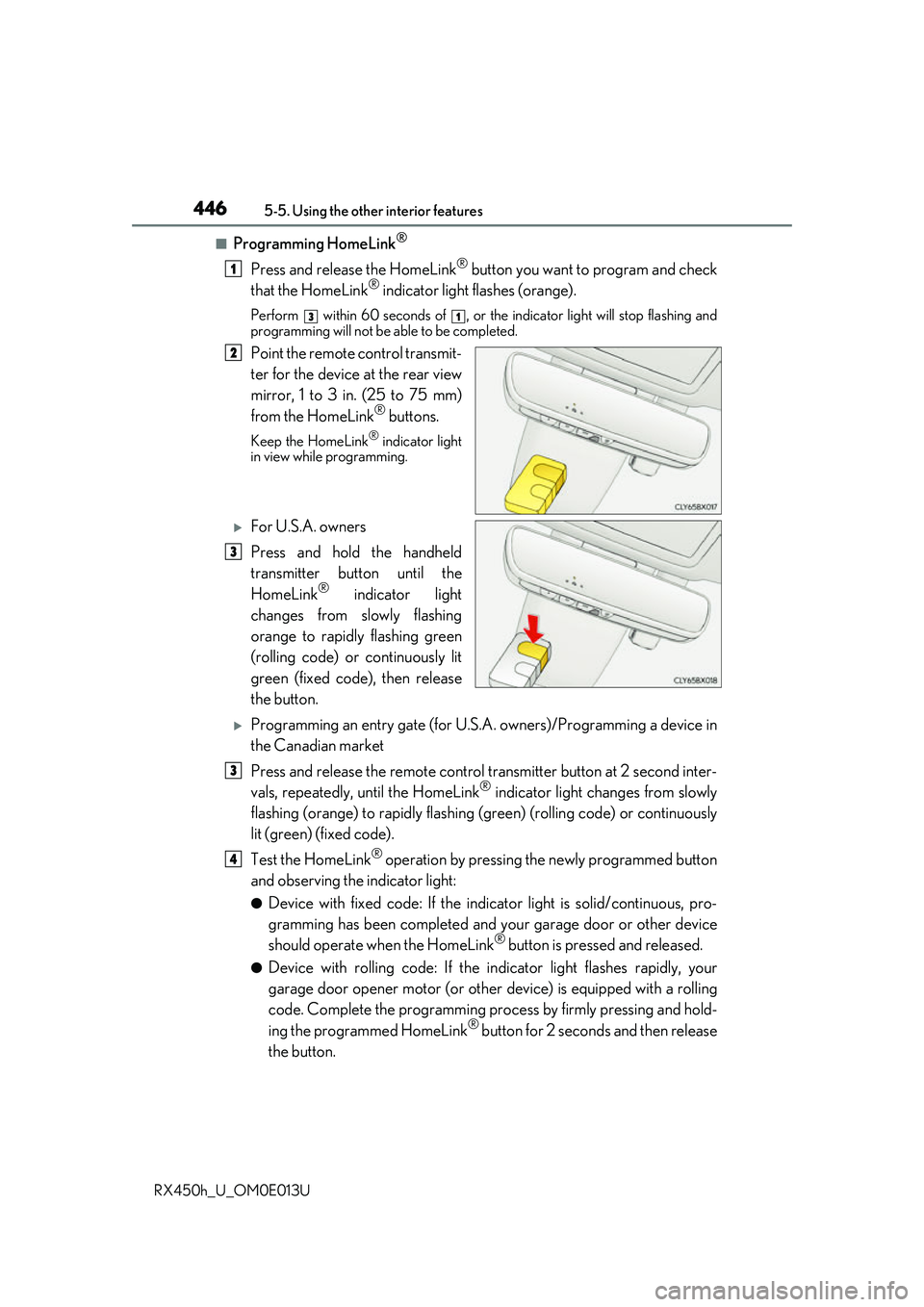
■Programming HomeLink®
Press and release the HomeLink® button you want to program and check
that the HomeLink® indicator light flashes (orange).
Perform within 60 seconds of , or the indicator light will stop flashing and
programming will not be able to be completed.
Point the remote control transmit-
ter for the device at the rear view
mirror, 1 to 3 in. (25 to 75 mm)
from the HomeLink
® buttons.
Keep the HomeLink® indicator light
in view while programming.
For U.S.A. owners
Press and hold the handheld
transmitter button until the
HomeLink
® indicator light
changes from slowly flashing
orange to rapidly flashing green
(rolling code) or continuously lit
green (fixed code), then release
the button.
Programming an entry gate (for U.S. A. owners)/Programming a device in
the Canadian market
Press and release the remote control transm itter button at 2 second inter-
vals, repeatedly, until the HomeLink
® indicator light changes from slowly
flashing (orange) to rapidly flashing (green) (rolling code) or continuously
lit (green) (fixed code).
Test the HomeLink
® operation by pressing the newly programmed button
and observing the indicator light:
●Device with fixed code: If the indicator light is solid/continuous, pro-
gramming has been completed and your garage door or other device
should operate when the HomeLink
® button is pressed and released.
●Device with rolling code: If the in dicator light flashes rapidly, your
garage door opener motor (or other device) is equipped with a rolling
code. Complete the programming process by firmly pressing and hold-
ing the programmed HomeLink
® button for 2 seconds and then release
the button.
1
31
2
3
3
4