windshield LEXUS RX450H 2016 Owner's Manual
[x] Cancel search | Manufacturer: LEXUS, Model Year: 2016, Model line: RX450H, Model: LEXUS RX450H 2016Pages: 660, PDF Size: 14.85 MB
Page 291 of 660
2914-5. Using the driving support systems
4
Driving
RX450h_U_OM0E013U
■If the PCS warning light flashes and a warning message is displayed on the multi-infor-
mation display
The pre-collision system may be temporarily unavailable or there may be a malfunction
in the system.
●In the following situations, the warning light will turn off, the message will disappear and
the system will become operational when normal operating conditions return:
• When the radar sensor or ca mera sensor or the area around either sensor is hot,
such as in the sun
• When the radar sensor or camera sensor or the area around either sensor is cold,
such as in an extremely cold environment
• When the radar sensor or front grille embl em is dirty or covered with snow, etc.
• If the camera sensor is obstructed, such as when the hood is open or a sticker is
attached to the windshield near the camera sensor
●If the PCS warning light continues to flash or the warning message does not disappear,
the system may be malfunctioning. Have the vehicle inspected by your Lexus dealer
immediately.
■If VSC is disabled
●If VSC is disabled ( P. 384), the pre-collision brake assist and pre-collision braking
functions are also disabled.
●The PCS warning light will turn on and “V SC Turned Off Pre-Collision Brake System
Unavailable” will be displayed on the multi-information display.
Page 292 of 660
2924-5. Using the driving support systems
RX450h_U_OM0E013U
When driving on highways and freeways with white or yellow lines, this function
alerts the driver when the vehicle might depart from its lane and provides assis-
tance by operating the steering wheel to keep the vehicle in its lane. Further-
more, the system also provides steering assistance when dynamic radar cruise
control with full-speed range is operat ing to keep the vehicle in its lane.
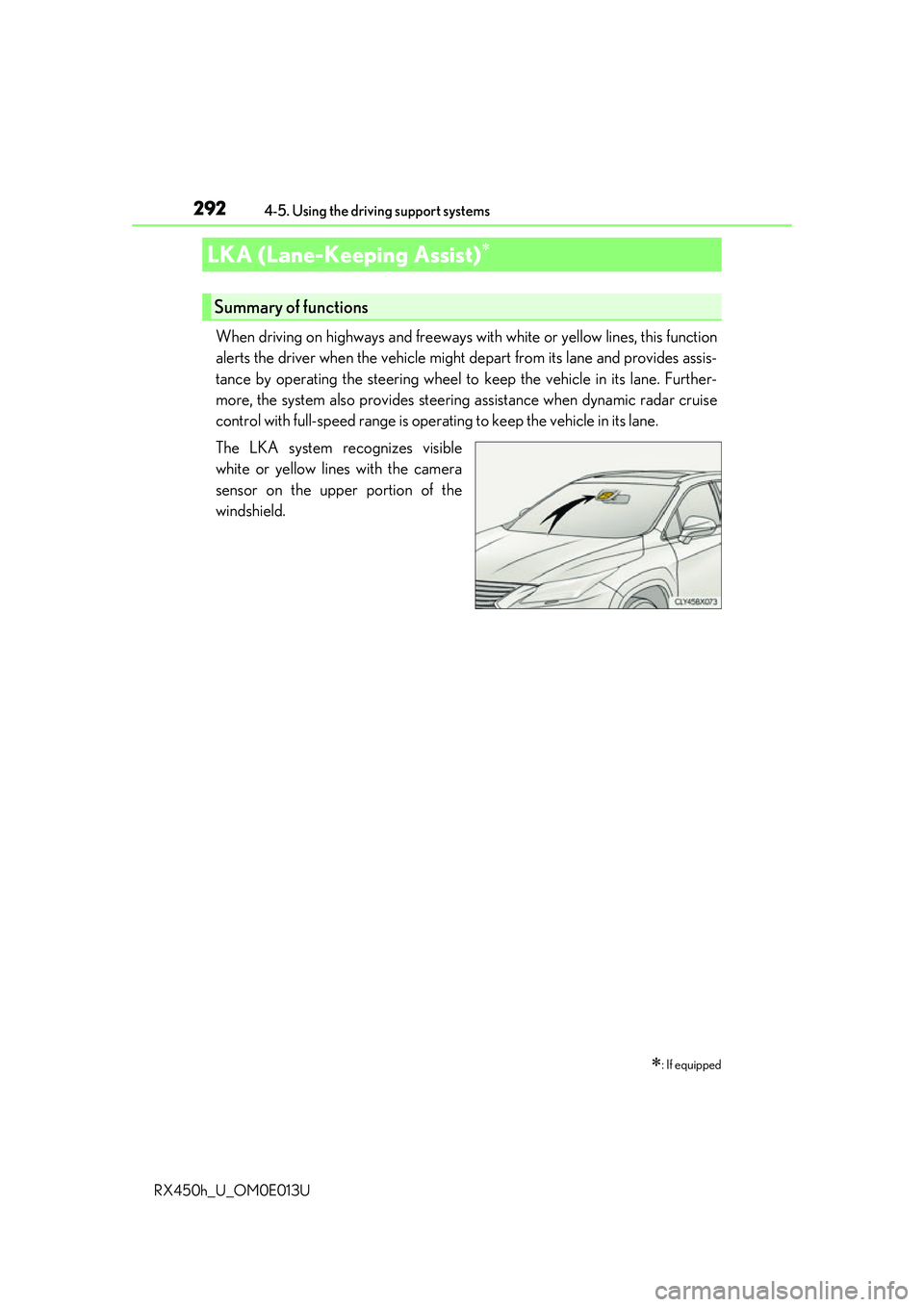
The LKA system recognizes visible
white or yellow lines with the camera
sensor on the upper portion of the
windshield.
LKA (Lane-Keeping Assist)
: If equipped
Summary of functions
Page 295 of 660
2954-5. Using the driving support systems
4
Driving
RX450h_U_OM0E013U
WARNING
■Before using LKA system
Do not rely solely upon the LKA system. LKA is not a system which automatically
drives the vehicle or reduces the amount of attention that must be paid to the area in
front of the vehicle. The driver must always assume full responsibility for driving safely
by always paying careful attention to the surrounding conditions and operate the steer-
ing wheel to correct the path of the vehicle. Also, make sure to take adequate breaks
when fatigued, such as from driving for a long period of time.
Failure to perform appropriate driving operat ions and pay careful attention may lead to
an accident, resulting in death or serious injury.
■To avoid operating LKA by mistake
When not using the LKA system, use the LKA switch to turn the system off.
■Situations unsuitable for LKA
Do not use the LKA system in the following situations.
The system may not operate properly and lead to an accident, resulting in death or
serious injury.
●A spare tire, tire chains, etc., are equipped.
●When the tires have been excessively worn, or when the tire inflation pressure is low.
●Tires which differ by structure, manufacturer, brand or tread pattern are used.
●Objects or patterns that could be mistaken for white (yellow) lines are present on the
side of the road (guardrails, curbs, reflective poles, etc.).
●Vehicle is driven on a snow-covered road.
●White (yellow) lines are difficult to see due to rain, snow, fog, dust, etc.
●Asphalt repair marks, white (y ellow) line marks, etc., are present due to road repair.
●Vehicle is driven in a temporary lane or restricted lane due to construction work.
●Vehicle is driven on a road surface which is slippery due to rainy weather, fallen snow,
freezing, etc.
●Vehicle is driven in traffic lanes other than on highways and freeways.
●Vehicle is driven in a construction zone.
●When your vehicle is towing a trailer or during emergency towing
■Preventing LKA system malfunctions and operations performed by mistake
●Do not modify the headlights or place stickers, etc., on the surface of the lights.
●Do not modify the suspension etc. If the suspension etc. needs to be replaced, con-
tact your Lexus dealer.
●Do not install or place anything on the hood or grille. Also, do not install a grille guard
(bull bars, kangaroo bar, etc.).
●If your windshield needs repair s, contact your Lexus dealer.
Page 302 of 660
3024-5. Using the driving support systems
RX450h_U_OM0E013U
When driving on highways and freeways with white or yellow lines, this function
alerts the driver when the vehicle might depart from its lane and provides assis-
tance by operating the steering whee l to keep the vehicle in its lane.
The LDA system recognizes visible
white or yellow lines with the camera
sensor on the upper portion of the
windshield.
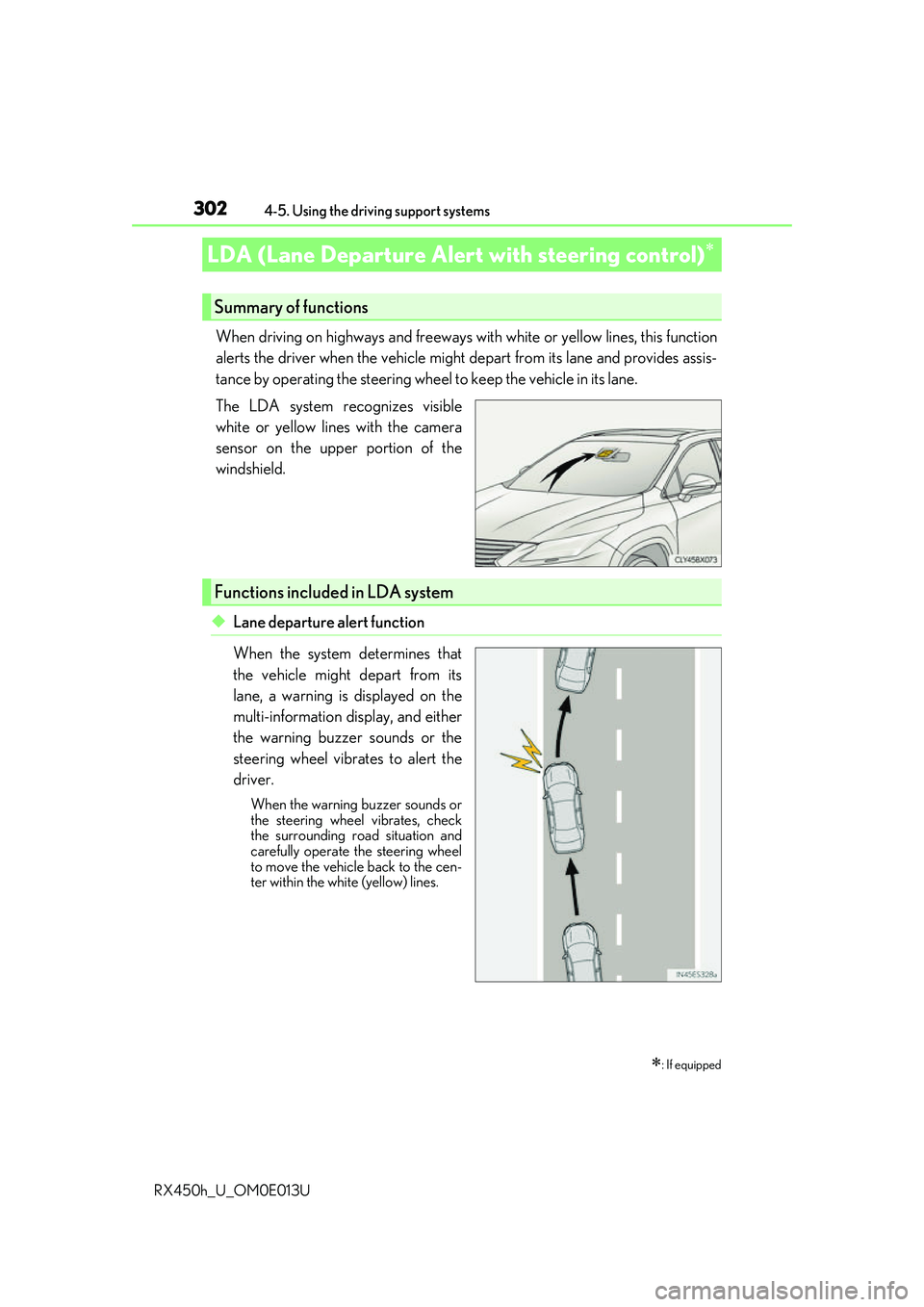
◆Lane departure alert function
When the system determines that
the vehicle might depart from its
lane, a warning is displayed on the
multi-information display, and either
the warning buzzer sounds or the
steering wheel vibrates to alert the
driver.
When the warning buzzer sounds or
the steering wheel vibrates, check
the surrounding road situation and
carefully operate the steering wheel
to move the vehicle back to the cen-
ter within the white (yellow) lines.
LDA (Lane Departure Alert with steering control)
: If equipped
Summary of functions
Functions included in LDA system
Page 304 of 660
3044-5. Using the driving support systems
RX450h_U_OM0E013U
WARNING
■Before using LDA system
Do not rely solely upon the LDA system. LDA is not a system which automatically
drives the vehicle or reduces the amount of attention that must be paid to the area in
front of the vehicle. The driver must always assume full responsibility for driving safely
by always paying careful attention to the surrounding conditions and operate the steer-
ing wheel to correct the path of the vehicle. Also, make sure to take adequate breaks
when fatigued, such as from driving for a long period of time.
Failure to perform appropriate driving operat ions and pay careful attention may lead to
an accident, resulting in death or serious injury.
■To avoid operating LDA by mistake
When not using the LDA system, use the LDA switch to turn the system off.
■Situations unsuitable for LDA
Do not use the LDA system in the following situations.
The system may not operate properly and lead to an accident, resulting in death or
serious injury.
●A spare tire, tire chains, etc., are equipped.
●When the tires have been excessively worn, or when the tire inflation pressure is low.
●Tires which differ by structure, manufacturer, brand or tread pattern are used.
●Objects or patterns that could be mistaken for white (yellow) lines are present on the
side of the road (guardrails, curbs, reflective poles, etc.).
●Vehicle is driven on a snow-covered road.
●White (yellow) lines are difficult to see due to rain, snow, fog, dust, etc.
●Asphalt repair marks, white (y ellow) line marks, etc., are present due to road repair.
●Vehicle is driven in a temporary lane or restricted lane due to construction work.
●Vehicle is driven on a road surface which is slippery due to rainy weather, fallen snow,
freezing, etc.
●Vehicle is driven in traffic lanes other than on highways and freeways.
●Vehicle is driven in a construction zone.
●When your vehicle is towing a trailer or during emergency towing
■Preventing LDA system malfunctions and operations performed by mistake
●Do not modify the headlights or place stickers, etc., on the surface of the lights.
●Do not modify the suspension etc. If the suspension etc. needs to be replaced, con-
tact your Lexus dealer.
●Do not install or place anything on the hood or grille. Also, do not install a grille guard
(bull bars, kangaroo bar, etc.).
●If your windshield needs repair s, contact your Lexus dealer.
Page 390 of 660
3904-6. Driving tips
RX450h_U_OM0E013U
●Use fluids that are appropriate to the prevailing outside temperatures.
•Engine oil
• Engine/power cont rol unit coolant
• Washer fluid
●Have a service technician inspect the condition of the 12-volt battery.
●Have the vehicle fitted with four snow tires or purchase a set of tire chains for
the front tires.
Ensure that all tires are of the specified size and the same brand, and that chains
match the size of the tires.
Perform the following according to the driving conditions:
●Do not try to forcibly open a window or move a wiper that is frozen. Pour
warm water over the frozen area to me lt the ice. Wipe away the water imme-
diately to prevent it from freezing.
●To ensure proper operation of the c limate control system fan, remove any
snow that has accumulated on the air inlet vents in front of the windshield.
●Check for and remove any excess ice or snow that may have accumulated on
the exterior lights, vehicle’s roof, chassi s, around the tires or on the brakes.
●Remove any snow or mud from the bottom of your shoes before getting in the
vehicle.
Winter driving tips
Carry out the necessary preparations an d inspections before driving the vehi-
cle in winter. Always drive the vehicle in a manner appropriate to the prevail-
ing weather conditions.
Pre-winter preparations
Before driving the vehicle
Page 392 of 660
3924-6. Driving tips
RX450h_U_OM0E013U
To enable the windshield wi pers to be lifted when heavy snow or icy conditions
are expected, change the rest position of the windshield wipers from the
retracted position below the hood to th e service position using the wiper lever.
(
P. 263)
■Tire chain installation
Observe the following precautions when installing and removing chains:
●Install and remove tire chains in a safe location.
●Install tire chains on the front tires only. Do not install tire chains on the rear tires.
●Install tire chains on front tires as tightly as possible. Retighten chains after driving
1/4 - 1/2 mile (0.5 - 1.0 km).
●Install tire chains following the instru ctions provided with the tire chains.
Windshield wipers
WARNING
■Driving with snow tires
Observe the following precautions to reduce the risk of accidents.
Failure to do so may result in a loss of vehi cle control and cause death or serious injury.
●Use tires of the specified size.
●Maintain the recommended level of air pressure.
●Do not drive in excess of 75 mph (120 km/h ), regardless of the type of snow tires
being used.
●Use snow tires on all, not just some wheels.
■Driving with tire chains
Observe the following precautions to reduce the risk of accidents.
Failure to do so may result in the vehicle being unable to be driven safely, and may
cause death or serious injury.
●Do not drive in excess of the speed limit specified for the tire chains being used, or
30 mph (50 km/h), whichever is lower.
●Avoid driving on bumpy road surfaces or over potholes.
●Avoid sudden acceleration, abrupt steering, sudden braking and shifting operations
that cause sudden engine braking.
●Slow down sufficiently before entering a curve to ensure that vehicle control is main-
tained.
●Do not use the LKA (Lane-Keepin g Assist) system. (if equipped)
●Do not use the LDA (Lane Departure Alert with steering control) system. (if
equipped)
Page 406 of 660
4065-2. Using the air conditioning system and defogger
RX450h_U_OM0E013U
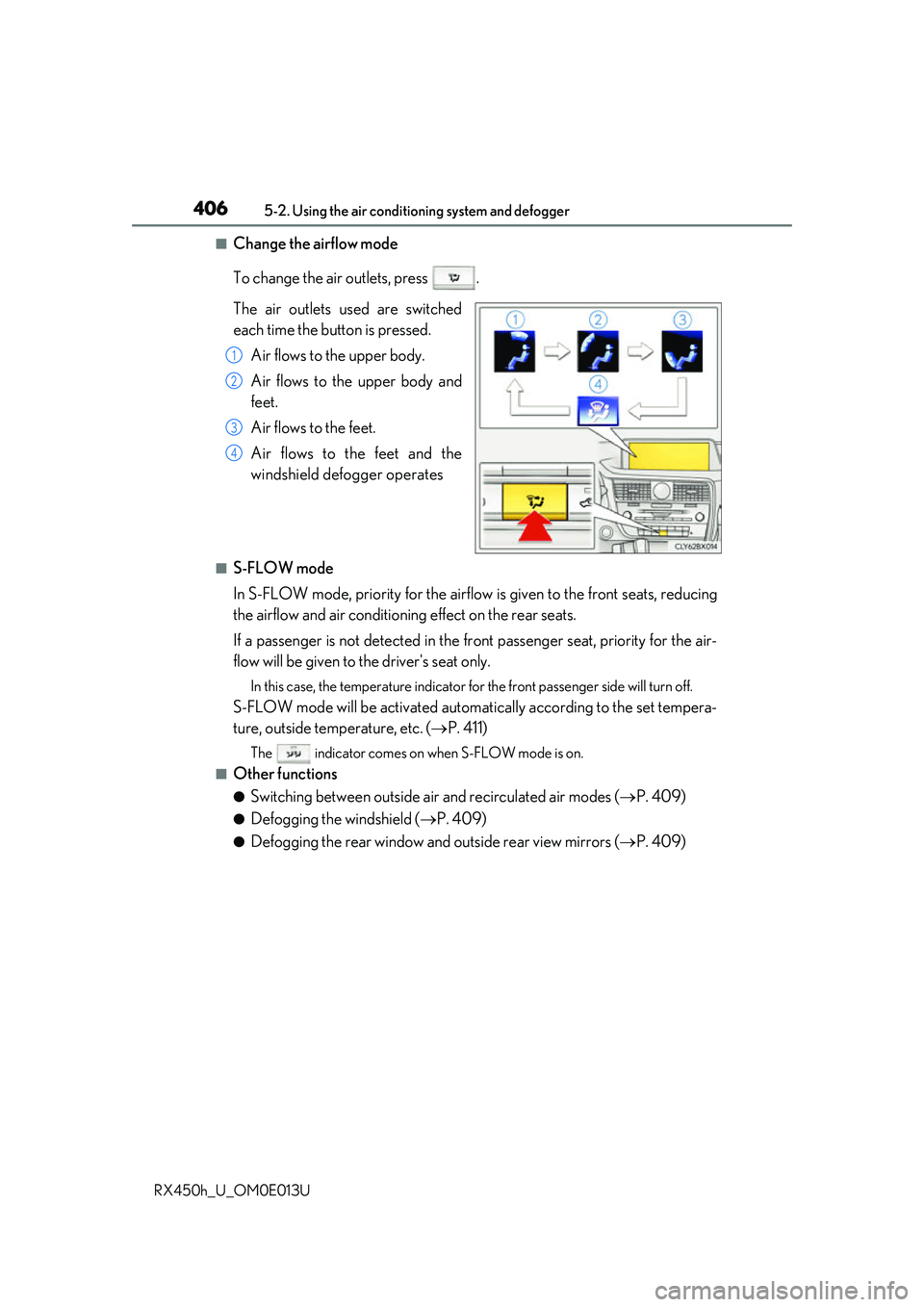
■Change the airflow mode
To change the air outlets, press .
The air outlets used are switched
each time the button is pressed. Air flows to the upper body.
Air flows to the upper body and
feet.
Air flows to the feet.
Air flows to the feet and the
windshield defogger operates
■S-FLOW mode
In S-FLOW mode, priority for the airflo w is given to the front seats, reducing
the airflow and air conditioning effect on the rear seats.
If a passenger is not detected in the fr ont passenger seat, priority for the air-
flow will be given to the driver's seat only.
In this case, the temperature indicator for the front passenger side will turn off.
S-FLOW mode will be activated automa tically according to the set tempera-
ture, outside temperature, etc. ( P. 411)
The indicator comes on when S-FLOW mode is on.
■Other functions
●Switching between outside air and recirculated air modes ( P. 409)
●Defogging the windshield ( P. 409)
●Defogging the rear window and outside rear view mirrors ( P. 409)
1
2
3
4
Page 407 of 660
4075-2. Using the air conditioning system and defogger
5
Interior features
RX450h_U_OM0E013U
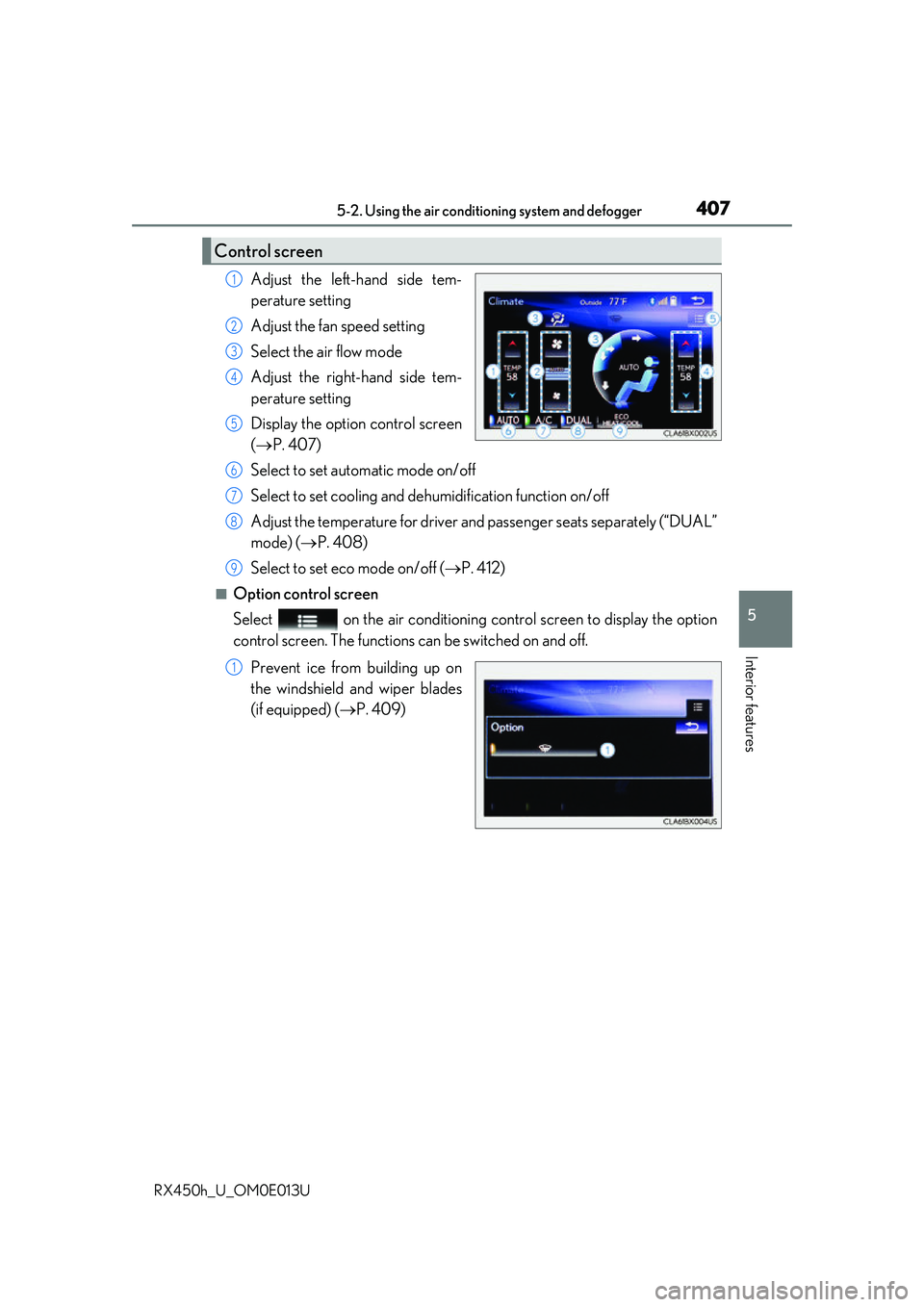
Adjust the left-hand side tem-
perature setting
Adjust the fan speed setting
Select the air flow mode
Adjust the right-hand side tem-
perature setting
Display the option control screen
(P. 407)
Select to set automatic mode on/off
Select to set cooling and dehumidification function on/off
Adjust the temperature for driver an d passenger seats separately (“DUAL”
mode) ( P. 408)
Select to set eco mode on/off ( P. 412)
■Option control screen
Select on the air conditioning control screen to display the option
control screen. The functions can be switched on and off.
Prevent ice from building up on
the windshield and wiper blades
(if equipped) ( P. 409)
Control screen
1
2
3
4
5
6
7
8
9
1
Page 409 of 660
4095-2. Using the air conditioning system and defogger
5
Interior features
RX450h_U_OM0E013U
■Switching between outside air and recirculated air modes
Press .
The mode switches between (recir culated air mode), automatic and
(outside air mode) modes each time the button is pressed.
When the system is switched to automatic mode, the air conditioning system oper-
ates automatically.
■Defogging the windshield
Defoggers are used to defog the wi ndshield and front side windows.
Press .
Set the outside/recirculated air mode button to outside air mode if the recirculated
air mode is used. (It may switch automatically.)
To defog the windshield and the side wind ows early, turn the air flow and tempera-
ture up.
To return to the previous mode, press again when the windshield is
defogged.
■Defogging the rear window and outside rear view mirrors
Defoggers are used to defog the rear window and to remove raindrops, dew
and frost from the outside rear view mirrors.
Press .
The defoggers will automatically turn off after a period of time.
■Windshield wiper de-icer (if equipped)
This feature is used to prevent ice fr om building up on the windshield and
wiper blades.
Select on the option control screen.
When the windshield wiper de-icer is on , is displayed on the air condition-
ing control screen.
The windshield wiper de-icer will automati cally turn off after a period of time.
Other functions