instrument LEXUS RX450H 2016 Workshop Manual
[x] Cancel search | Manufacturer: LEXUS, Model Year: 2016, Model line: RX450H, Model: LEXUS RX450H 2016Pages: 660, PDF Size: 14.85 MB
Page 251 of 660
251
4
Driving
RX450h_U_OM0E013U4-3. Operating the lights and wipers
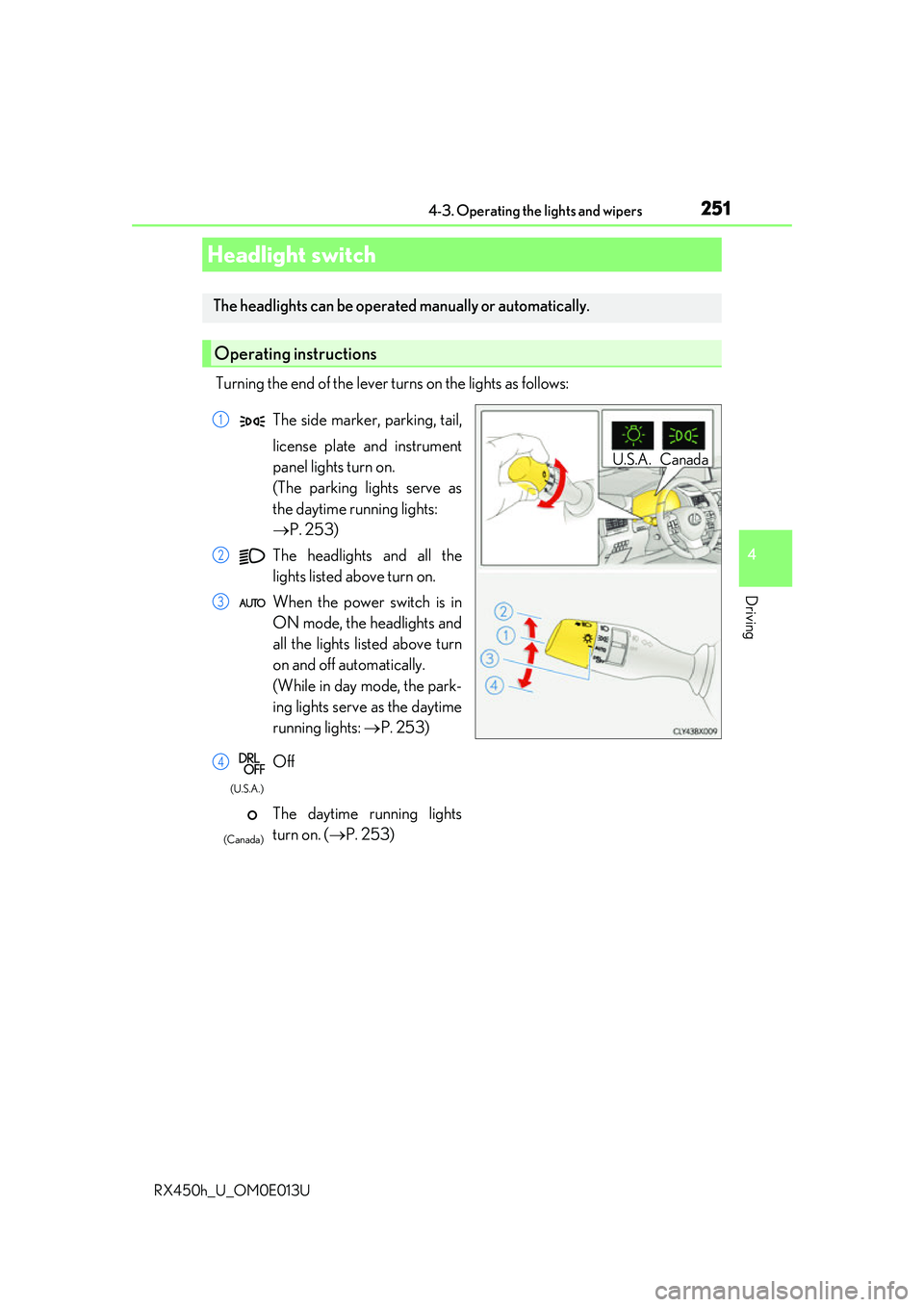
Turning the end of the lever turns on the lights as follows:
Headlight switch
The headlights can be operated
manually or automatically.
Operating instructions
U.S.A. Canada
The side marker, parking, tail,
license plate and instrument
panel lights turn on.
(The parking lights serve as
the daytime running lights:
P. 253)
The headlights and all the
lights listed above turn on.
When the power switch is in
ON mode, the headlights and
all the lights listed above turn
on and off automatically.
(While in day mode, the park-
ing lights serve as the daytime
running lights: P. 253)
Off
The daytime running lights
turn on. ( P. 253)1
2
3
4
(U.S.A.)
(Canada)
Page 269 of 660
2694-4. Refueling
4
Driving
RX450h_U_OM0E013U
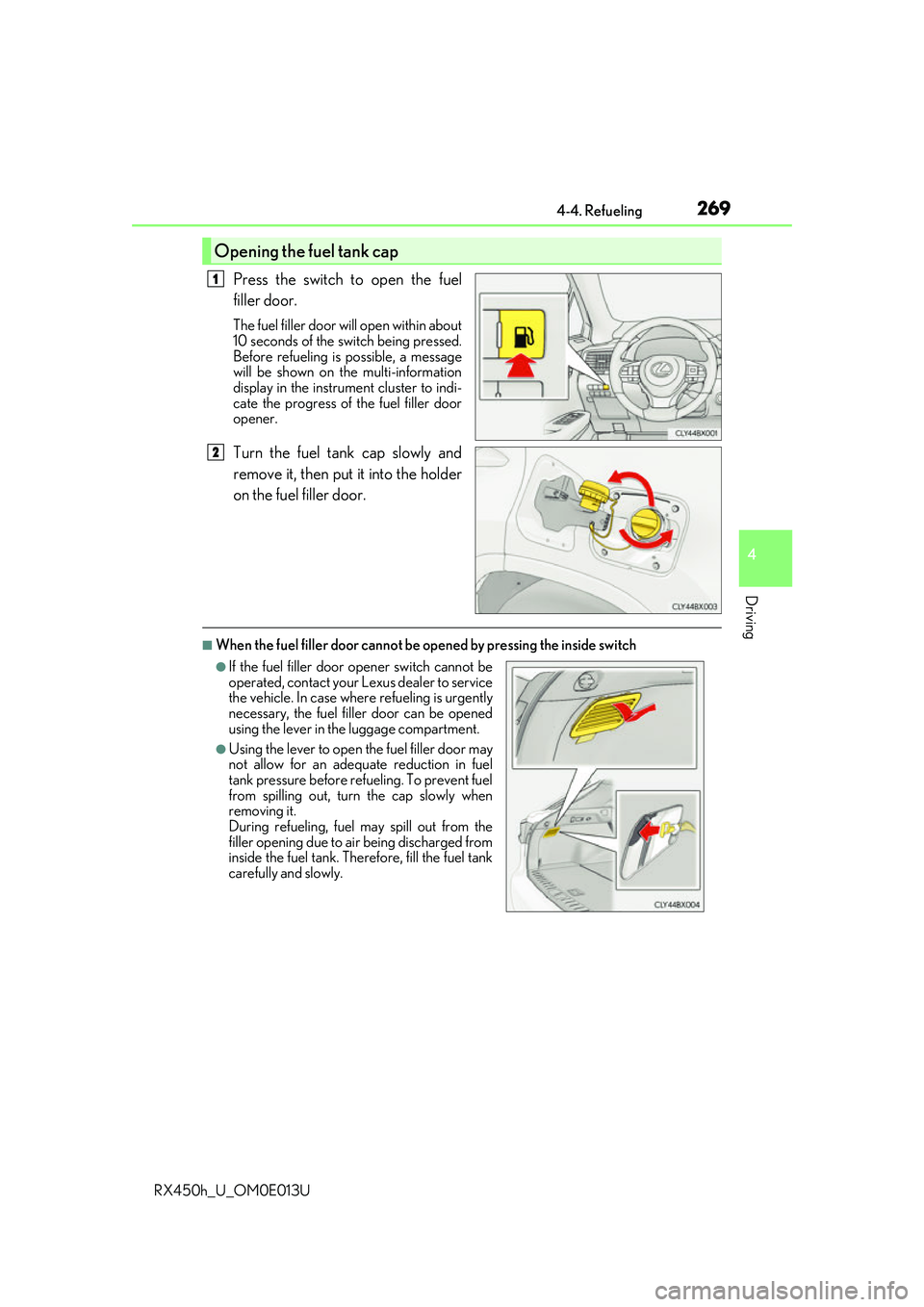
Press the switch to open the fuel
filler door.
The fuel filler door will open within about
10 seconds of the sw itch being pressed.
Before refueling is possible, a message
will be shown on the multi-information
display in the instrument cluster to indi-
cate the progress of the fuel filler door
opener.
Turn the fuel tank cap slowly and
remove it, then put it into the holder
on the fuel filler door.
■When the fuel filler door cannot be opened by pressing the inside switch
Opening the fuel tank cap
1
2
●If the fuel filler door opener switch cannot be
operated, contact your Lexus dealer to service
the vehicle. In case where refueling is urgently
necessary, the fuel filler door can be opened
using the lever in th e luggage compartment.
●Using the lever to open the fuel filler door may
not allow for an adequate reduction in fuel
tank pressure before refueling. To prevent fuel
from spilling out, turn the cap slowly when
removing it.
During refueling, fuel may spill out from the
filler opening due to ai r being discharged from
inside the fuel tank. Therefore, fill the fuel tank
carefully and slowly.
Page 413 of 660
4135-2. Using the air conditioning system and defogger
5
Interior features
RX450h_U_OM0E013U
WARNING
■To prevent the windshield from fogging up
●Do not use during cool air operation in extremely humid weather. The differ-
ence between the temperature of the outside air and that of the windshield can cause
the outer surface of the windshield to fog up, blocking your vision.
■To prevent burns
●Do not touch the rear view mirror surfaces when the outside rear view mirror defog-
gers are on.
●Do not touch the glass at lower part of the windshield or to the side of the front pillars
when the windshield wiper de-icer is on. (if equipped)
NOTICE
■Humidity sensor
■To prevent 12-volt battery discharge
Do not leave the air conditioning system on longer than necessary when the hybrid sys-
tem is off.
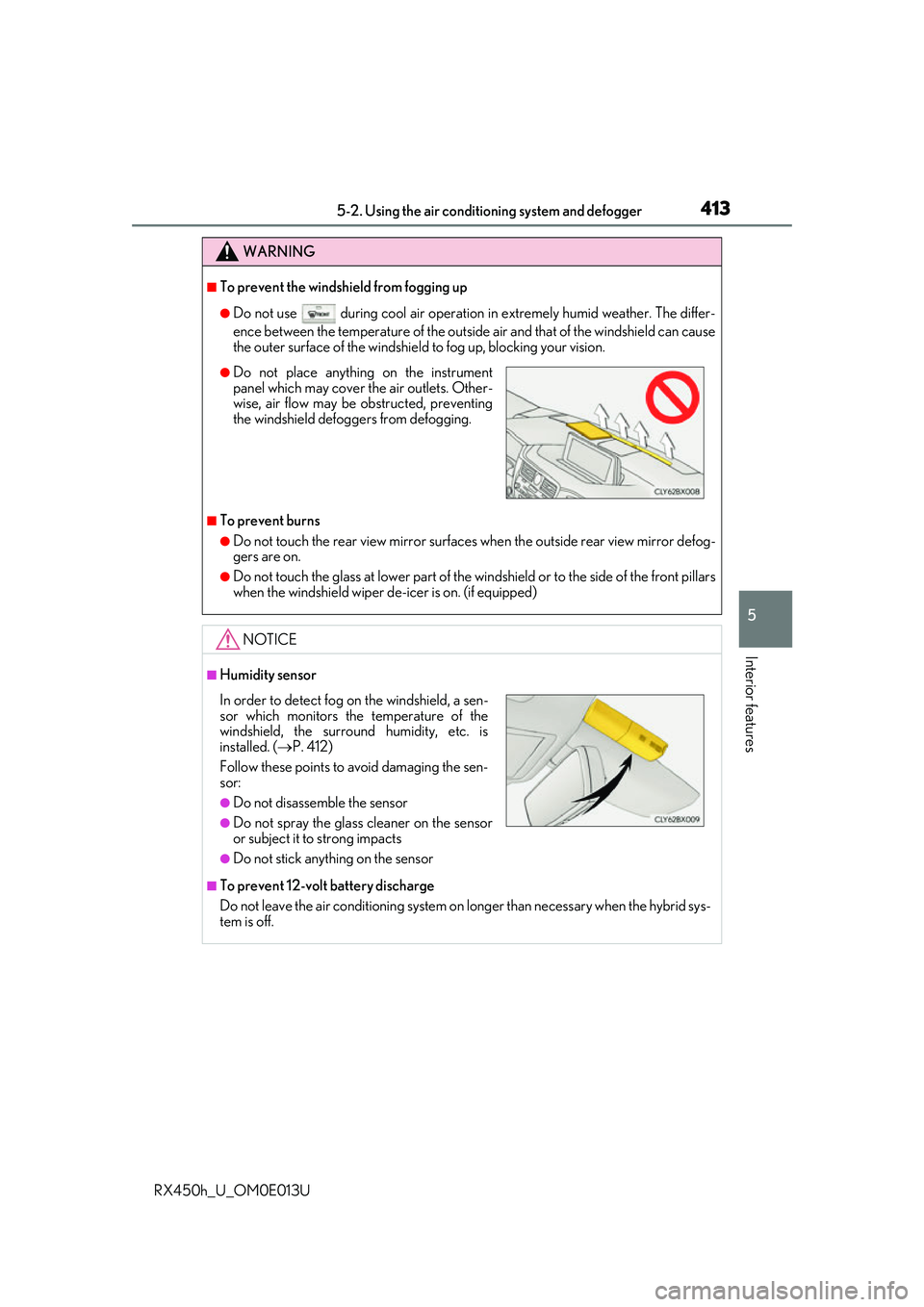
●Do not place anything on the instrument
panel which may cover the air outlets. Other-
wise, air flow may be obstructed, preventing
the windshield defoggers from defogging.
In order to detect fog on the windshield, a sen-
sor which monitors the temperature of the
windshield, the surround humidity, etc. is
installed. ( P. 412)
Follow these points to avoid damaging the sen-
sor:
●Do not disassemble the sensor
●Do not spray the glass cleaner on the sensor
or subject it to strong impacts
●Do not stick anything on the sensor
Page 417 of 660
417
RX450h_U_OM0E013U
5
Interior features
5-3. Using the interior lights
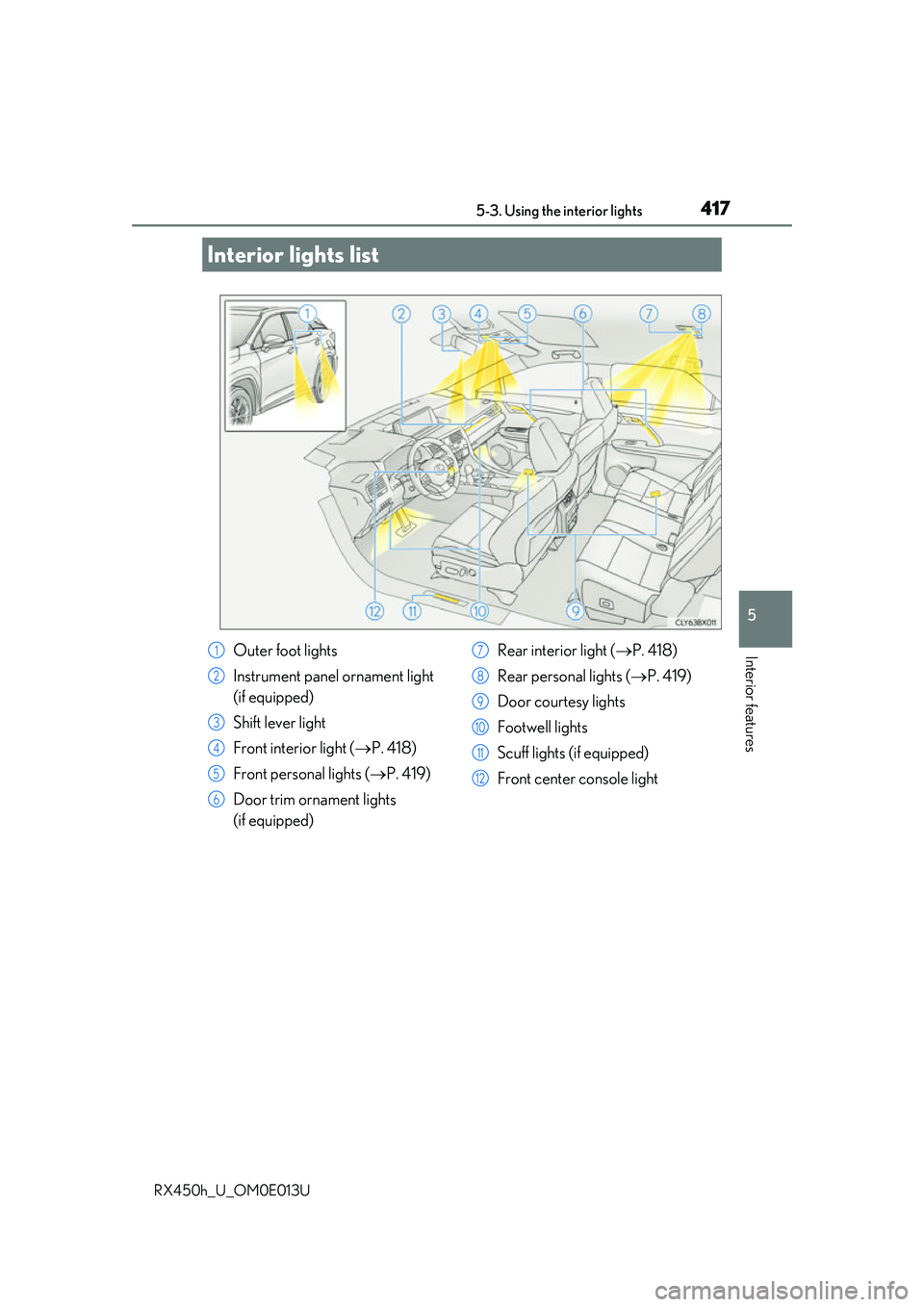
Interior lights list
Outer foot lights
Instrument panel ornament light
(if equipped)
Shift lever light
Front interior light (P. 418)
Front personal lights ( P. 419)
Door trim ornament lights
(if equipped) Rear interior light (
P. 418)
Rear personal lights ( P. 419)
Door courtesy lights
Footwell lights
Scuff lights (if equipped)
Front center console light1
2
3
4
5
6
7
8
9
10
11
12
Page 439 of 660
4395-5. Using the other interior features
5
Interior features
RX450h_U_OM0E013U
NOTICE
■Conditions in which the wireless charger may not operate correctly
In the following situations, the wireless charger may not operate correctly:
●When a portable device is fully charged
●When there is a foreign object between the charging area and portable device
●When a portable device becomes hot while charging
●When a portable device is placed on the wireless area with its charging surface fac-
ing up
●When a portable device is not centered on the charging area
●When the vehicle is near a TV tower, electric power plant, gas station, radio station,
large display, airport or other facility that generates strong radio waves or electrical
noise
●When the portable device is in contact with, or is covered by any of the following
metallic objects
• Cards to which aluminum foil is attached
• Cigarette boxes that have aluminum foil inside
• Metallic wallets or bags
• Coins
• Metal hand warmers
• Media such as CDs and DVDs
●When wireless keys (that emit radio waves) other than those of your vehicle are being
used nearby.
If in situations other than above the wirele ss charger does not operate properly or the
operation indicator light is blinking, the wireless charger may be malfunctioning. Con-
tact your Lexus dealer.
■To prevent failure or damage to data
●Do not bring magnetic cards, such as a cr edit card, or magnetic recording media,
close to the wireless charger while charging. Otherwise, data may be erased due to
the influence of magnetism.
Additionally, do not bring pr ecision instruments such as wrist watches, close to the
wireless charger, as such objects may malfunction.
●Do not leave portable devices in the cab in. The temperature inside the cabin may
become high when parked in the sun, and cause damage to the device.
■To prevent 12-volt battery discharge
Do not use the wireless charger for a long pe riod of time with the hybrid system is
stopped.
Page 440 of 660
4405-5. Using the other interior features
RX450h_U_OM0E013U
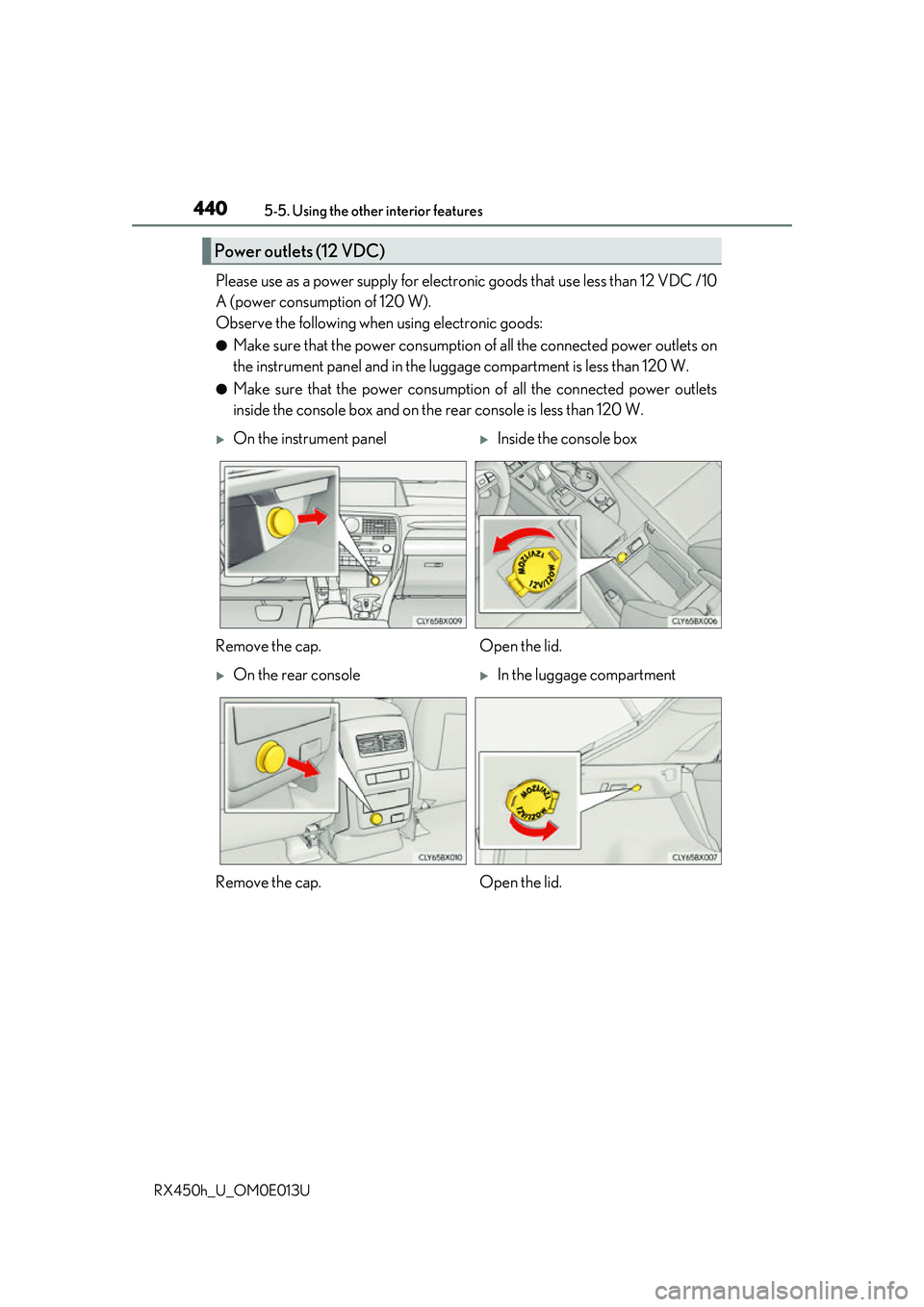
Please use as a power supply for electronic goods that use less than 12 VDC /10
A (power consumption of 120 W).
Observe the following when using electronic goods:
●Make sure that the power consumption of all the connected power outlets on
the instrument panel and in the lugg age compartment is less than 120 W.
●Make sure that the power consumptio n of all the connected power outlets
inside the console box and on the rear console is less than 120 W.
Power outlets (12 VDC)
On the instrument panelInside the console box
Remove the cap. Open the lid.
On the rear consoleIn the luggage compartment
Remove the cap. Open the lid.
Page 463 of 660
4636-1. Maintenance and care
6
Maintenance and care
RX450h_U_OM0E013U
■Caring for leather areas
Lexus recommends cleaning the interior of the vehicle at least twice a year to maintain
the quality of the vehicle’s interior.
■Shampooing the carpets
There are several commercial foaming-type cleaners available. Use a sponge or brush to
apply the foam. Rub in overlapping circles. Do not use water. Wipe dirty surfaces and let
them dry. Excellent results are obtained by keeping the carpet as dry as possible.
■Seat belts
Clean with mild soap and lukewarm water using a cloth or sponge. Also check the belts
periodically for excessive wear, fraying or cuts.
WARNING
■Water in the vehicle
●Do not splash or spill liquid in the vehicle, su ch as on the floor, in the hybrid battery
(traction battery) air vents, and in the luggage compartment.
Doing so may cause the hybrid battery, elec trical components, etc. to malfunction or
catch fire.
●Do not get any of the SRS components or wiring in the vehicle interior wet. (P. 40)
An electrical malfunction may cause the airbags to deploy or not function properly,
resulting in death or serious injury.
●Vehicles with wireless charger:
Do not let the wireless charger ( P. 434) get wet. Failure to do so may cause the
charger to become hot and cause burns or could cause electric shock resulting in
death or serious injury.
■Cleaning the interior (especially instrument panel)
Do not use polish wax or polish cleaner. Th e instrument panel may reflect off the wind-
shield, obstructing the driver’s view and leading to an accident, resulting in death or
serious injury.
Page 464 of 660
4646-1. Maintenance and care
RX450h_U_OM0E013U
NOTICE
■Cleaning detergents
●Do not use the following types of detergent, as they may discolor the vehicle interior
or cause streaks or damage to painted surfaces:
• Non-seat portions: Organic substances su ch as benzene or gasoline, alkaline or
acidic solutions, dye, and bleach
• Seats: Alkaline or ac idic solutions, such as thinner, benzene, and alcohol
●Do not use polish wax or polis h cleaner. The instrument pane l’s or other interior part’s
painted surface may be damaged.
■Preventing damage to leather surfaces
Observe the following precautions to avoid damage to and deterioration of leather
surfaces:
●Remove any dust or dirt from leather surfaces immediately.
●Do not expose the vehicle to direct sunlight for extended periods of time. Park the
vehicle in the shade, especially during summer.
●Do not place items made of vinyl, plastic, or containing wax on the upholstery, as they
may stick to the leather surface if the vehicle interior heats up significantly.
■Water on the floor
Do not wash the vehicle floor with water.
Vehicle systems such as the audio system may be damaged if wate r comes into contact
with electrical components such as the au dio system above or under the floor of the
vehicle. Water may also cause the body to rust.
■When cleaning the inside of the windshield (vehicles with Lexus Safety System+)
Do not allow glass cleaner to contact the lens. Also, do not touch the lens.
( P. 292, 302)
■Cleaning the inside of the rear window
●Do not use glass cleaner to clean the rear window, as this may cause damage to the
rear window defogger heater wires or antenna. Use a cloth dampened with luke-
warm water to gently wipe the window clean. Wipe th e window in strokes running
parallel to the heater wires or antenna.
●Be careful not to scratch or damage the heater wires or antenna.
Page 508 of 660
5086-3. Do-it-yourself maintenance
RX450h_U_OM0E013U
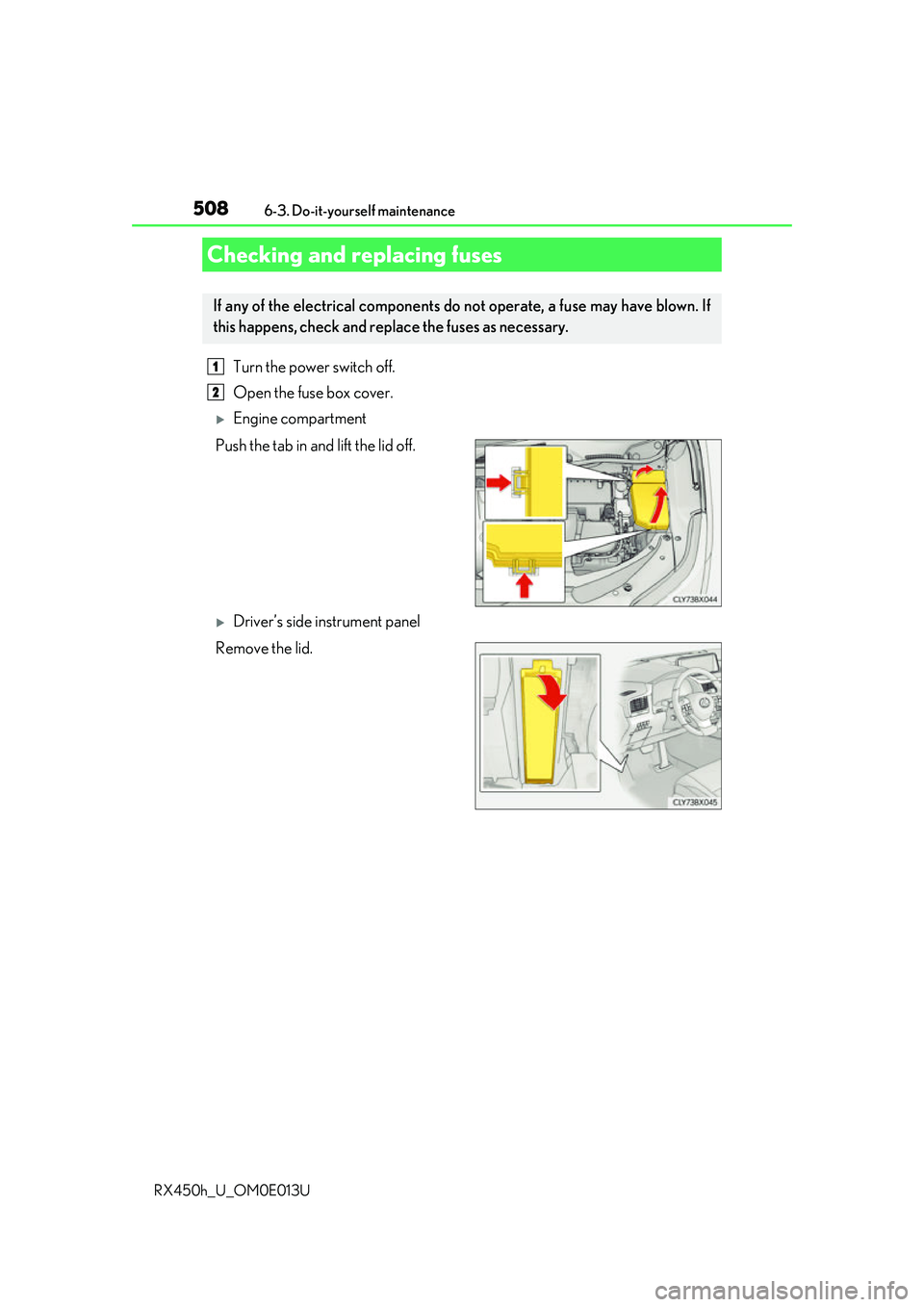
Turn the power switch off.
Open the fuse box cover.
Engine compartment
Push the tab in and lift the lid off.
Driver’s side instrument panel
Remove the lid.
Checking and replacing fuses
If any of the electrical components do not operate, a fuse may have blown. If
this happens, check and repl ace the fuses as necessary.
1
2
Page 583 of 660
5838-1. Specifications
8
Vehicle specifications
RX450h_U_OM0E013U
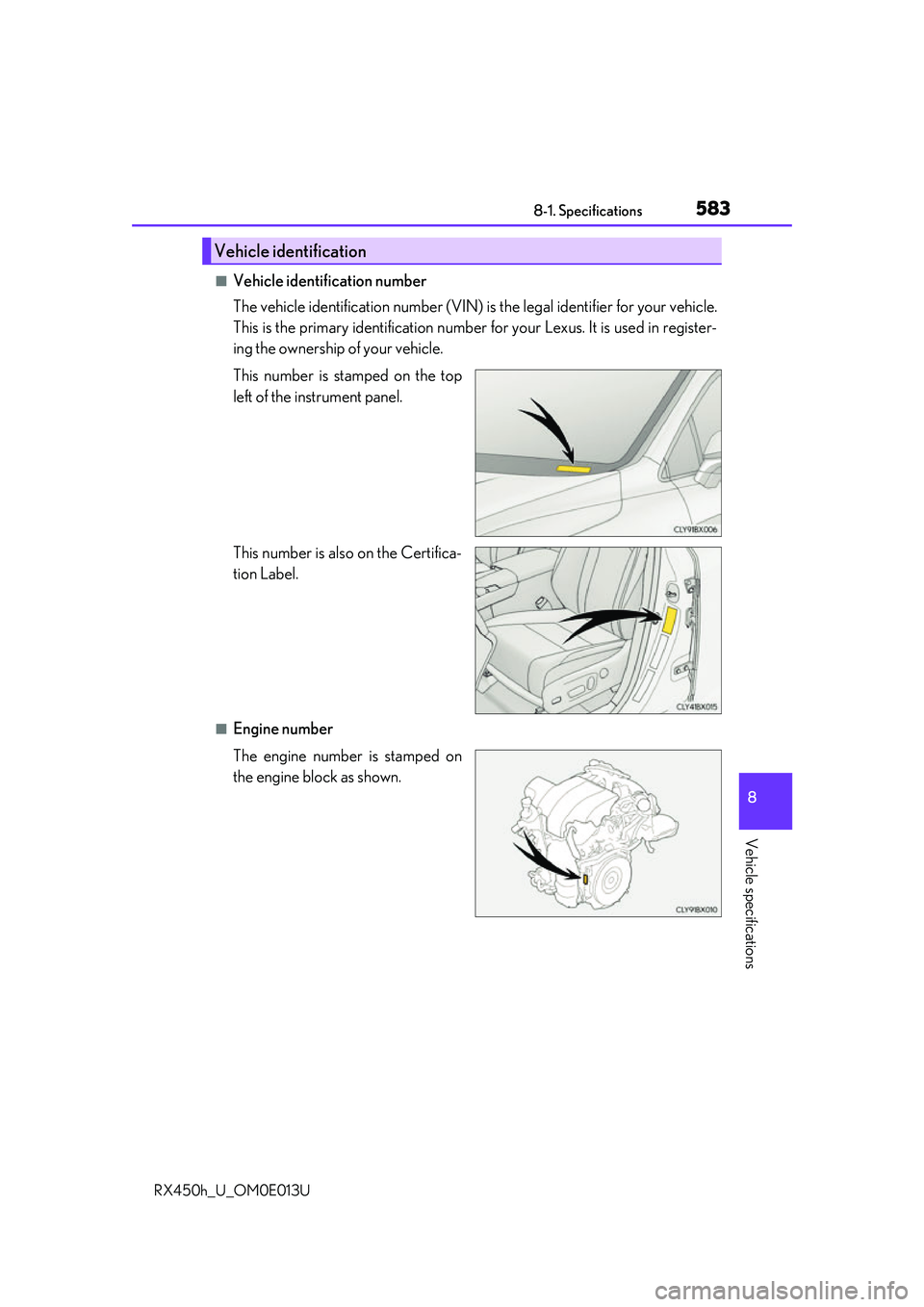
■Vehicle identification number
The vehicle identification number (VIN) is the legal identifier for your vehicle.
This is the primary identification number fo r your Lexus. It is used in register-
ing the ownership of your vehicle.
This number is stamped on the top
left of the instrument panel.
This number is also on the Certifica-
tion Label.
■Engine number
The engine number is stamped on
the engine block as shown.
Vehicle identification