audio LEXUS RX450H 2016 Owners Manual
[x] Cancel search | Manufacturer: LEXUS, Model Year: 2016, Model line: RX450H, Model: LEXUS RX450H 2016Pages: 660, PDF Size: 14.85 MB
Page 6 of 660
TABLE OF CONTENTS6
RX450h_U_OM0E013U
8-1. SpecificationsMaintenance data (fuel, oil level, etc.) .................. 582
Fuel information .......................... 591
Tire information .......................... 594
8-2. Customization Customizable features ............ 607
8-3. Initialization Items to initialize...........................619
Reporting safety defects for U.S. owners .................................... 622
Seat belt instructions for Canadian owners
(in French).............................................. 623
SRS airbag instructions for Canadian owners
(in French).............................................. 624
Headlight aim instructions for Canadian owners
(in French).............................................. 632 What to do if...
(Troubleshooting)............................... 636
Alphabetical inde x ................................ 640
8Vehicle specifications
9For owners
Index
Refer to the “NAVIGATION SYSTEM OWNER’S MANUAL” for information
regarding the equipment listed below.
• Navigation system
• Audio/visual system
• Rear seat entertainment system• Panoramic view monitor
•Lexus Enform
Page 19 of 660
19Pictorial index
RX450h_U_OM0E013U
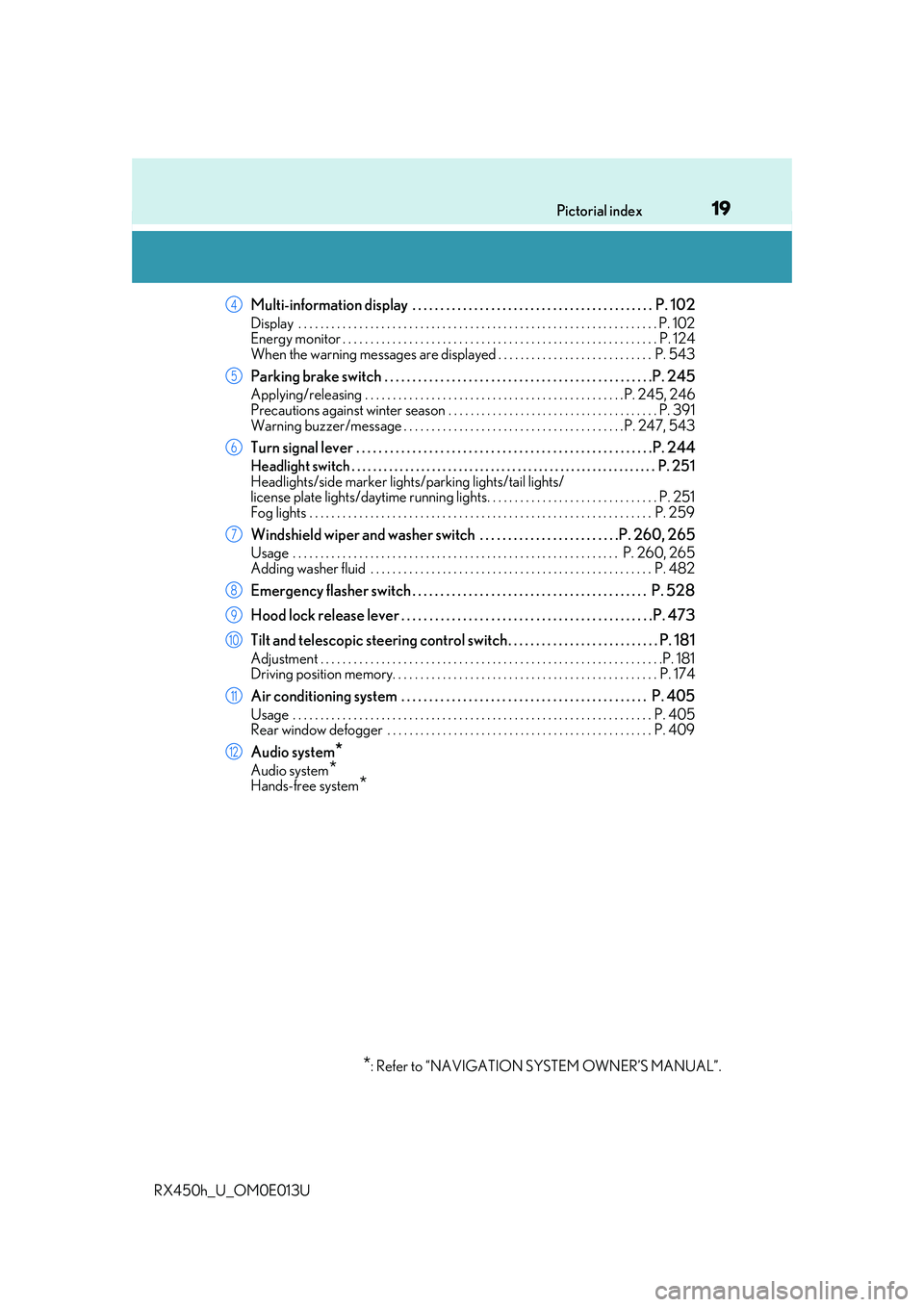
Multi-information display . . . . . . . . . . . . . . . . . . . . . . . . . . . . . . . . . . . . . . . . . . . P. 102
Display . . . . . . . . . . . . . . . . . . . . . . . . . . . . . . . . . . . . . . . . . . . . . . . . . . . . . . . . . . . . . . . . . P. 102
Energy monitor . . . . . . . . . . . . . . . . . . . . . . . . . . . . . . . . . . . . . . . . . . . . . . . . . . . . . . . . . P. 124
When the warning messages are displayed . . . . . . . . . . . . . . . . . . . . . . . . . . . . P. 543
Parking brake switch . . . . . . . . . . . . . . . . . . . . . . . . . . . . . . . . . . . . . . . . . . . . . . . .P. 245
Applying/releasing . . . . . . . . . . . . . . . . . . . . . . . . . . . . . . . . . . . . . . . . . . . . . . .P. 245, 246
Precautions against winter season . . . . . . . . . . . . . . . . . . . . . . . . . . . . . . . . . . . . . . P. 391
Warning buzzer/message . . . . . . . . . . . . . . . . . . . . . . . . . . . . . . . . . . . . . . . . P. 247, 543
Turn signal lever . . . . . . . . . . . . . . . . . . . . . . . . . . . . . . . . . . . . . . . . . . . . . . . . . . . . .P. 2 44
Headlight switch . . . . . . . . . . . . . . . . . . . . . . . . . . . . . . . . . . . . . . . . . . . . . . . . . . . . . . . . . P. 251
Headlights/side marker lights/parking lights/tail lights/
license plate lights/daytime running lig hts. . . . . . . . . . . . . . . . . . . . . . . . . . . . . . . P. 251
Fog lights . . . . . . . . . . . . . . . . . . . . . . . . . . . . . . . . . . . . . . . . . . . . . . . . . . . . . . . . . . . . . . P. 259
Windshield wiper and washer switch . . . . . . . . . . . . . . . . . . . . . . . . .P. 260, 265
Usage . . . . . . . . . . . . . . . . . . . . . . . . . . . . . . . . . . . . . . . . . . . . . . . . . . . . . . . . . . . P. 260, 265
Adding washer fluid . . . . . . . . . . . . . . . . . . . . . . . . . . . . . . . . . . . . . . . . . . . . . . . . . . . P. 48 2
Emergency flasher switch . . . . . . . . . . . . . . . . . . . . . . . . . . . . . . . . . . . . . . . . . . P. 528
Hood lock release lever . . . . . . . . . . . . . . . . . . . . . . . . . . . . . . . . . . . . . . . . . . . . . P. 473
Tilt and telescopic steering control switch . . . . . . . . . . . . . . . . . . . . . . . . . . . P. 181
Adjustment . . . . . . . . . . . . . . . . . . . . . . . . . . . . . . . . . . . . . . . . . . . . . . . . . . . . . . . . . . . . . .P. 181
Driving position memory. . . . . . . . . . . . . . . . . . . . . . . . . . . . . . . . . . . . . . . . . . . . . . . . P. 174
Air conditioning system . . . . . . . . . . . . . . . . . . . . . . . . . . . . . . . . . . . . . . . . . . . . P. 405
Usage . . . . . . . . . . . . . . . . . . . . . . . . . . . . . . . . . . . . . . . . . . . . . . . . . . . . . . . . . . . . . . . . . P. 405
Rear window defogger . . . . . . . . . . . . . . . . . . . . . . . . . . . . . . . . . . . . . . . . . . . . . . . . P. 409
Audio system*
Audio system*Hands-free system*
*
: Refer to “NAVIGATION SYSTEM OWNER’S MANUAL”.
4
5
6
7
8
9
10
11
12
Page 22 of 660
22Pictorial index
RX450h_U_OM0E013U
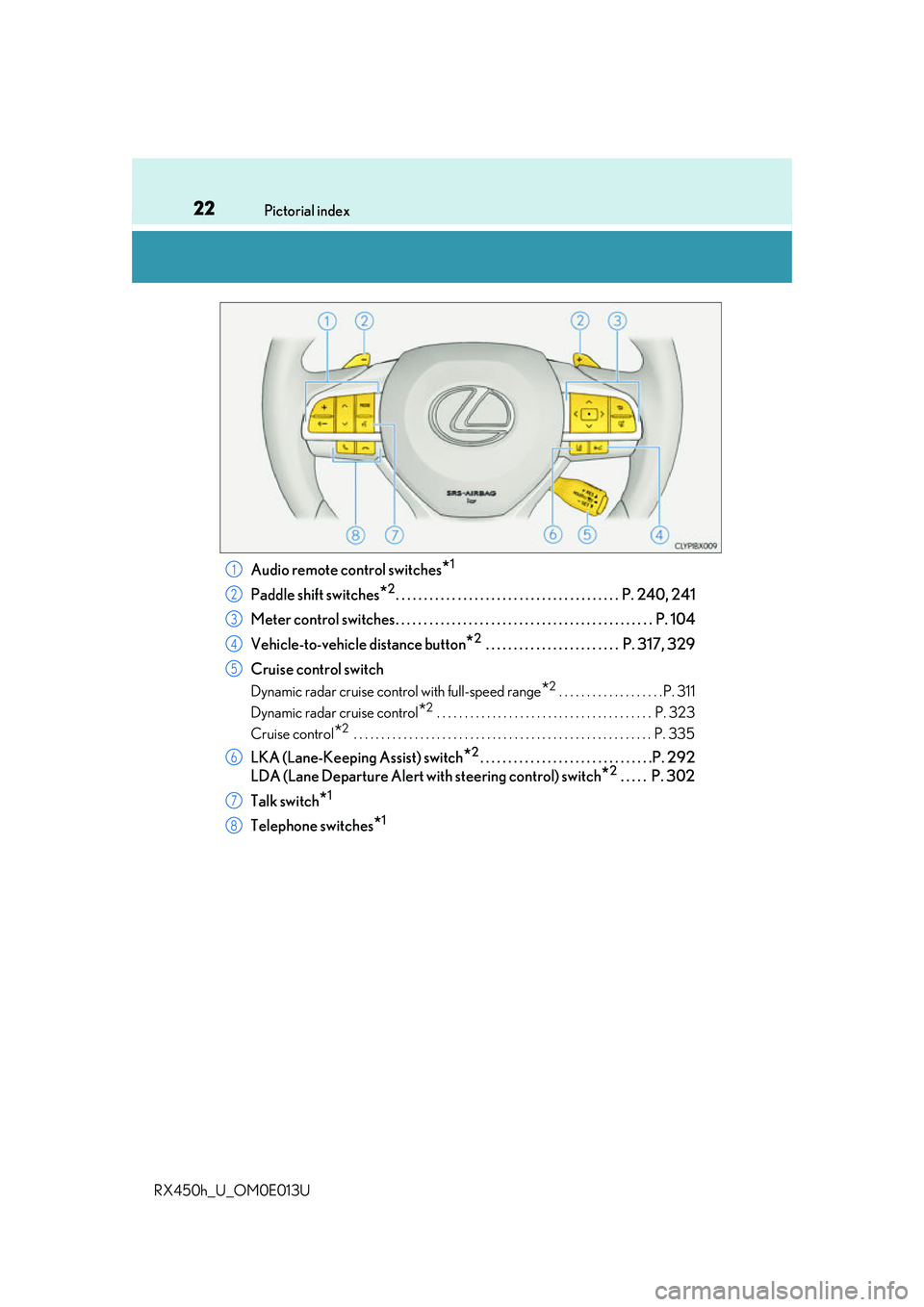
Audio remote control switches*1
Paddle shift switches*2. . . . . . . . . . . . . . . . . . . . . . . . . . . . . . . . . . . . . . . . P. 240, 241
Meter control switches. . . . . . . . . . . . . . . . . . . . . . . . . . . . . . . . . . . . . . . . . . . . . . P. 104
Vehicle-to-vehicle distance button
*2 . . . . . . . . . . . . . . . . . . . . . . . . P. 317, 329
Cruise control switch
Dynamic radar cruise control with full-speed range*2 . . . . . . . . . . . . . . . . . . . P. 311
Dynamic radar cruise control
*2 . . . . . . . . . . . . . . . . . . . . . . . . . . . . . . . . . . . . . . . P. 323
Cruise control
*2 . . . . . . . . . . . . . . . . . . . . . . . . . . . . . . . . . . . . . . . . . . . . . . . . . . . . . . P. 335
LKA (Lane-Keeping Assist) switch*2. . . . . . . . . . . . . . . . . . . . . . . . . . . . . . .P. 292
LDA (Lane Departure Alert with steering control) switch
*2 . . . . . P. 302
Talk switch
*1
Telephone switches*1
1
2
3
4
5
6
7
8
Page 105 of 660
1052. Instrument cluster
2
Instrument cluster
RX450h_U_OM0E013U
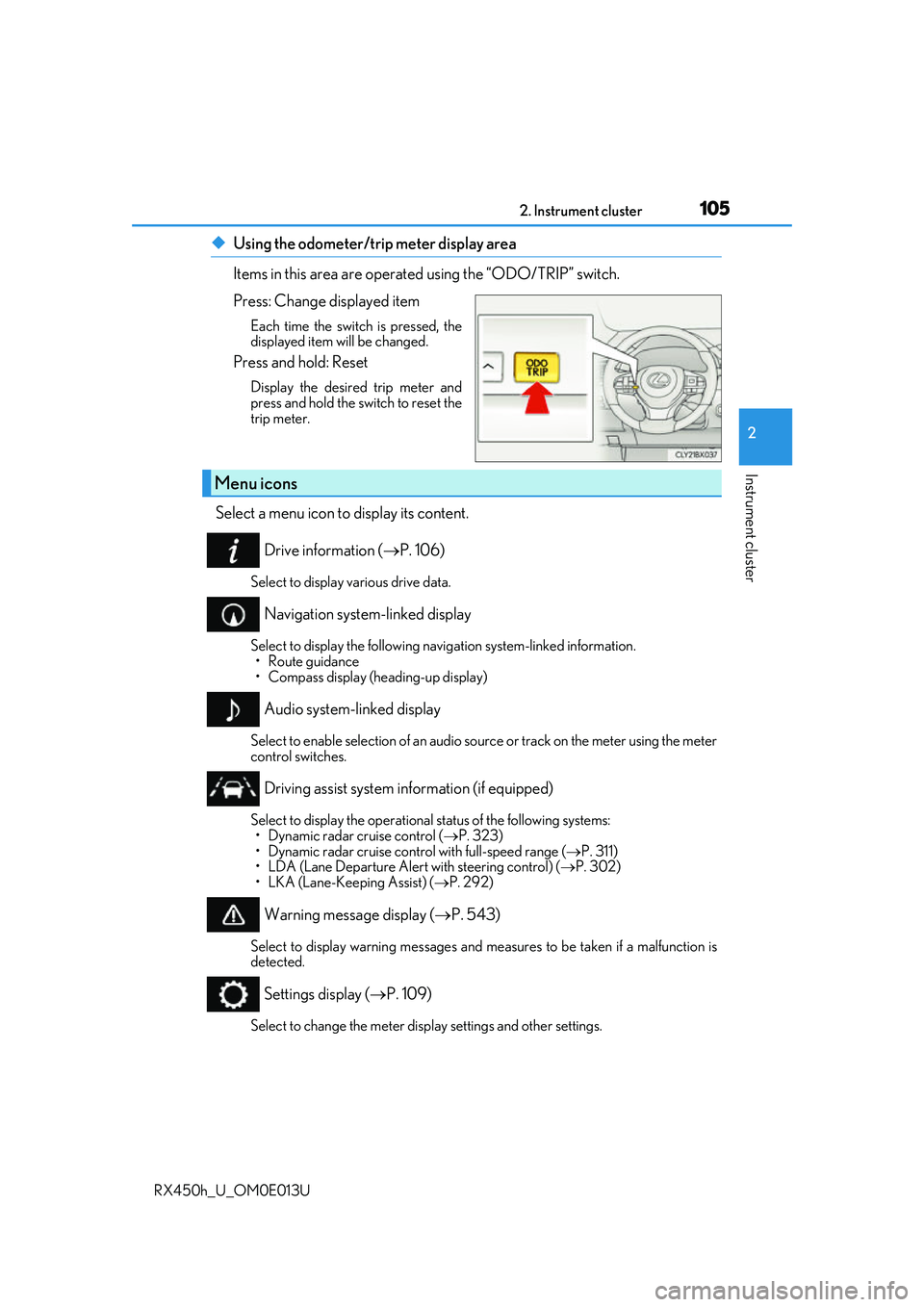
◆Using the odometer/trip meter display area
Items in this area are operated using the “ODO/TRIP” switch.
Press: Change displayed item
Each time the switch is pressed, the
displayed item will be changed.
Press and hold: Reset
Display the desired trip meter and
press and hold the switch to reset the
trip meter.
Select a menu icon to display its content.
Drive information ( P. 106)
Select to display various drive data.
Navigation system-linked display
Select to display the following na vigation system-linked information.
•Route guidance
• Compass display (heading-up display)
Audio system-linked display
Select to enable selection of an audio source or track on the meter using the meter
control switches.
Driving assist system information (if equipped)
Select to display the operational status of the following systems: • Dynamic radar cruise control ( P. 323)
• Dynamic radar cruise control with full-speed range ( P. 311)
• LDA (Lane Departure Alert with steering control) ( P. 302)
• LKA (Lane-Keeping Assist) ( P. 292)
Warning message display ( P. 543)
Select to display warning messages and me asures to be taken if a malfunction is
detected.
Settings display ( P. 109)
Select to change the meter display settings and other settings.
Menu icons
Page 111 of 660
1112. Instrument cluster
2
Instrument cluster
RX450h_U_OM0E013U
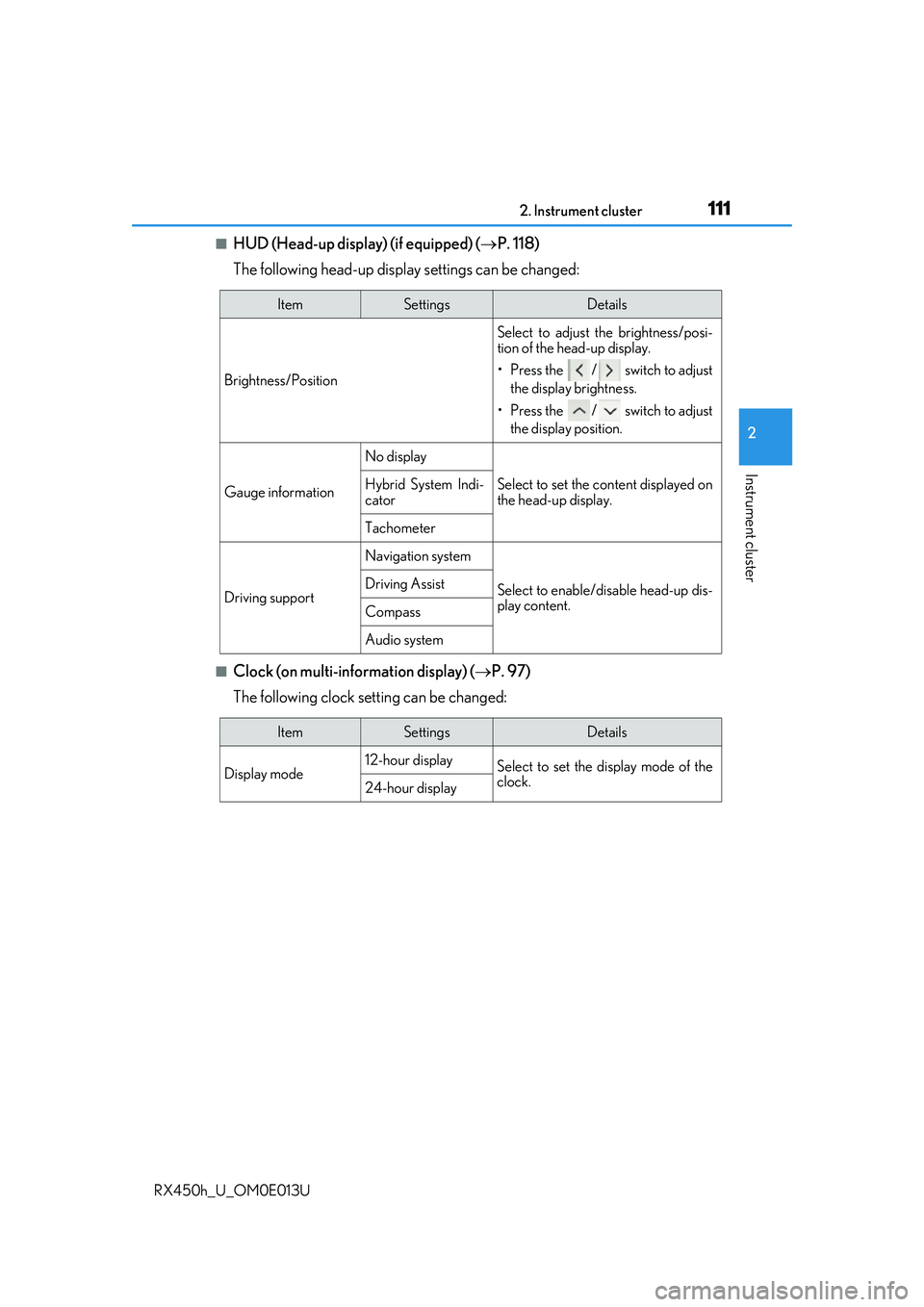
■HUD (Head-up display) (if equipped) (P. 118)
The following head-up displa y settings can be changed:
■Clock (on multi-information display) ( P. 97)
The following clock setting can be changed:
ItemSettingsDetails
Brightness/Position Select to adjust the brightness/posi-
tion of the head-up display.
• Press the / switch to adjust
the display brightness.
• Press the / switch to adjust the display position.
Gauge information
No display
Select to set the content displayed on
the head-up display.Hybrid System Indi-
cator
Tachometer
Driving support
Navigation system
Select to enable/d isable head-up dis-
play content.Driving Assist
Compass
Audio system
ItemSettingsDetails
Display mode 12-hour display
Select to set the display mode of the
clock.
24-hour display
Page 118 of 660
1182. Instrument cluster
RX450h_U_OM0E013U
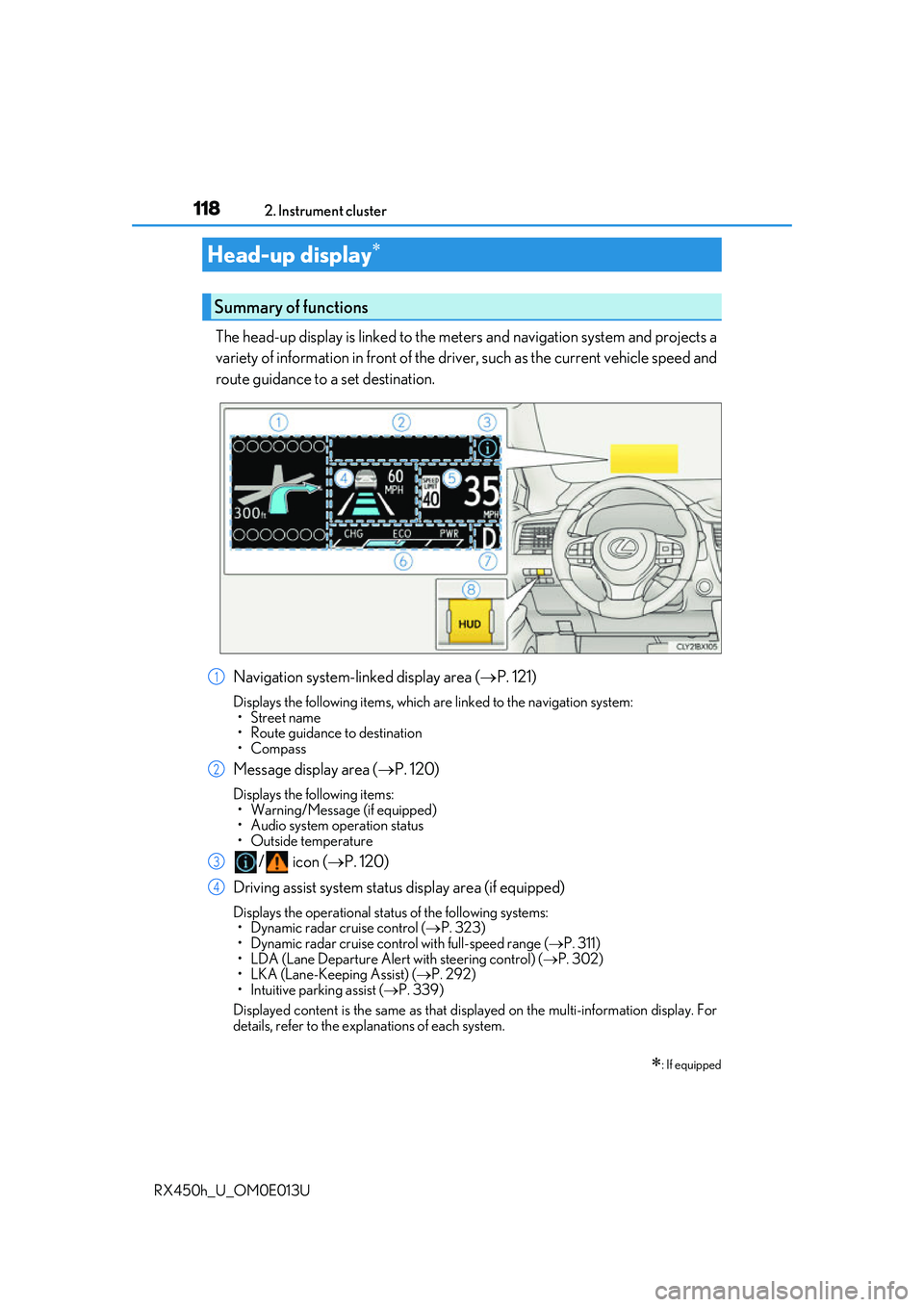
The head-up display is linked to the meters and navigation system and projects a
variety of information in front of the driv er, such as the current vehicle speed and
route guidance to a set destination.
Navigation system-linked display area ( P. 121)
Displays the following items, which are linked to the navigation system:
•Street name
• Route guidance to destination
•Compass
Message display area ( P. 120)
Displays the following items:
• Warning/Message (if equipped)
• Audio system operation status
• Outside temperature
/ icon ( P. 120)
Driving assist system status display area (if equipped)
Displays the operational stat us of the following systems:
• Dynamic radar cruise control ( P. 323)
• Dynamic radar cruise control with full-speed range ( P. 311)
• LDA (Lane Departure Alert with steering control) ( P. 302)
• LKA (Lane-Keeping Assist) ( P. 292)
• Intuitive parking assist ( P. 339)
Displayed content is the same as that disp layed on the multi-information display. For
details, refer to the explanations of each system.
Head-up display
: If equipped
Summary of functions
1
2
3
4
Page 119 of 660
1192. Instrument cluster
2
Instrument cluster
RX450h_U_OM0E013U
Vehicle speed display area
Displays the following items:• Vehicle speed
• Speed limit
Hybrid System Indicator/Tachometer ( P. 121)
Shift position display ( P. 239)
HUD (Head-up display) switch ( P. 119)
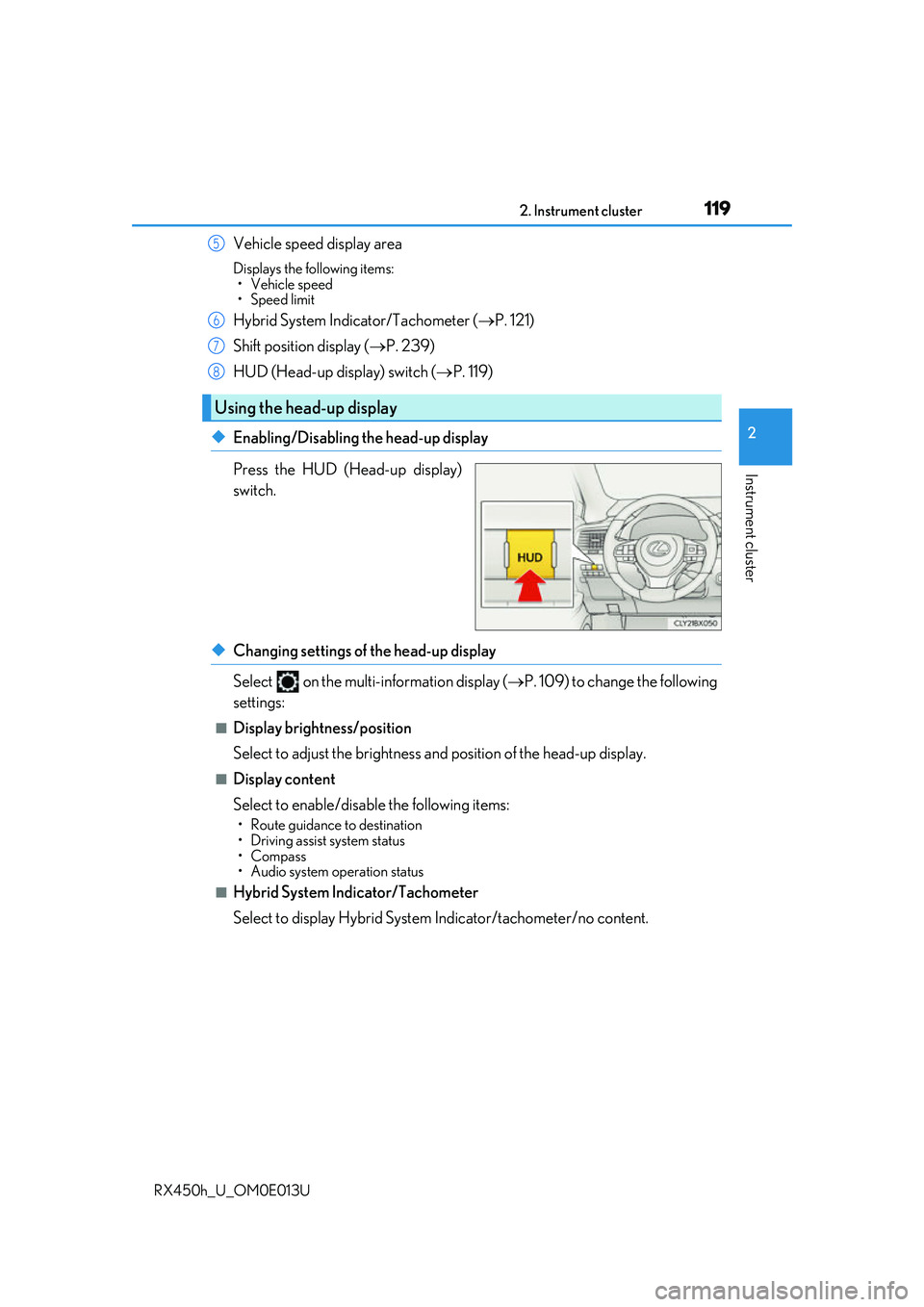
◆Enabling/Disabling the head-up display
Press the HUD (Head-up display)
switch.
◆Changing settings of the head-up display
Select on the multi-information display ( P. 109) to change the following
settings:
■Display brightness/position
Select to adjust the brightness and position of the head-up display.
■Display content
Select to enable/disable the following items:
• Route guidance to destination
• Driving assist system status
•Compass
• Audio system operation status
■Hybrid System Indicator/Tachometer
Select to display Hybrid System Indicator/tachometer/no content.
Using the head-up display
5
6
7
8
Page 120 of 660
1202. Instrument cluster
RX450h_U_OM0E013U
Displays the following multi-in formation display linked icons:
: Master warning icon Displayed when a warning message is displayed on the multi-information
display. ( P. 543)
: Information icon Displayed when a suggestion/advice po p-up display is displayed on the
multi-information display. ( P. 116)
Displays the following items in the appropriate situation:
■Warning/Message (if equipped)
Displays the following system warning/messages:
• Pre-collision warning (Pre-collision system)
• Notification message (Dynamic radar cruise control/Dynamic radar cruise con- trol with full-speed range)
■Audio system operation status
Displayed when the audio system is operated.
■Outside temperature
Displayed in the following situations:
• When the power switch is turned to ON mode
• When the low outside temperature indicator is flashing
Displayed content is the same as that disp layed on the multi-information display. For
details, refer to the explanation of the outs ide temperature display on the multi-infor-
mation display. ( P. 97)
/ icons
Message display area
Page 135 of 660
1353-1. Key information
3
Operation of each component
RX450h_U_OM0E013U
NOTICE
■To prevent key damage
●Do not drop the keys, subject them to strong shocks or bend them.
●Do not expose the keys to high temperatures for long periods of time.
●Do not get the keys wet or wash them in an ultrasonic washer, etc.
●Do not attach metallic or magnetic materials to the keys or place the keys close to
such materials.
●Do not disassemble the keys.
●Do not attach a sticker or anything else to the surface of the electronic key.
●Do not place the keys near objects that pr oduce magnetic fields, such as TVs, audio
systems and induction cookers, or medical electrical equipment, such as low-fre-
quency therapy equipment.
■Carrying the electronic key on your person
Carry the electronic key 3.9 in. (10 cm) or more away from electric appliances that are
turned on. Radio waves emitted from electric appliances within 3.9 in. (10 cm) of the
electronic key may interfere with the key, causing the key to not function properly.
■In case of a smart access system with pu sh-button start malfunction or other key-
related problems
Take your vehicle with all the electronic keys provided with your vehicle to your Lexus
dealer.
■When an electronic key is lost
If the electronic key re mains lost, the risk of vehicle th eft increases significantly. Visit
your Lexus dealer immediately with all remaining electronic keys that were provided
with your vehicle.
Page 146 of 660
1463-2. Opening, closing and locking the doors
RX450h_U_OM0E013U
The power back door settings can be ch anged on the multi-information display.
( P. 109)
The position at which the power back door will stop when opened automatically
can be changed.
When setting using the switch
Stop the power back door at the desired position. ( P. 143, 145)
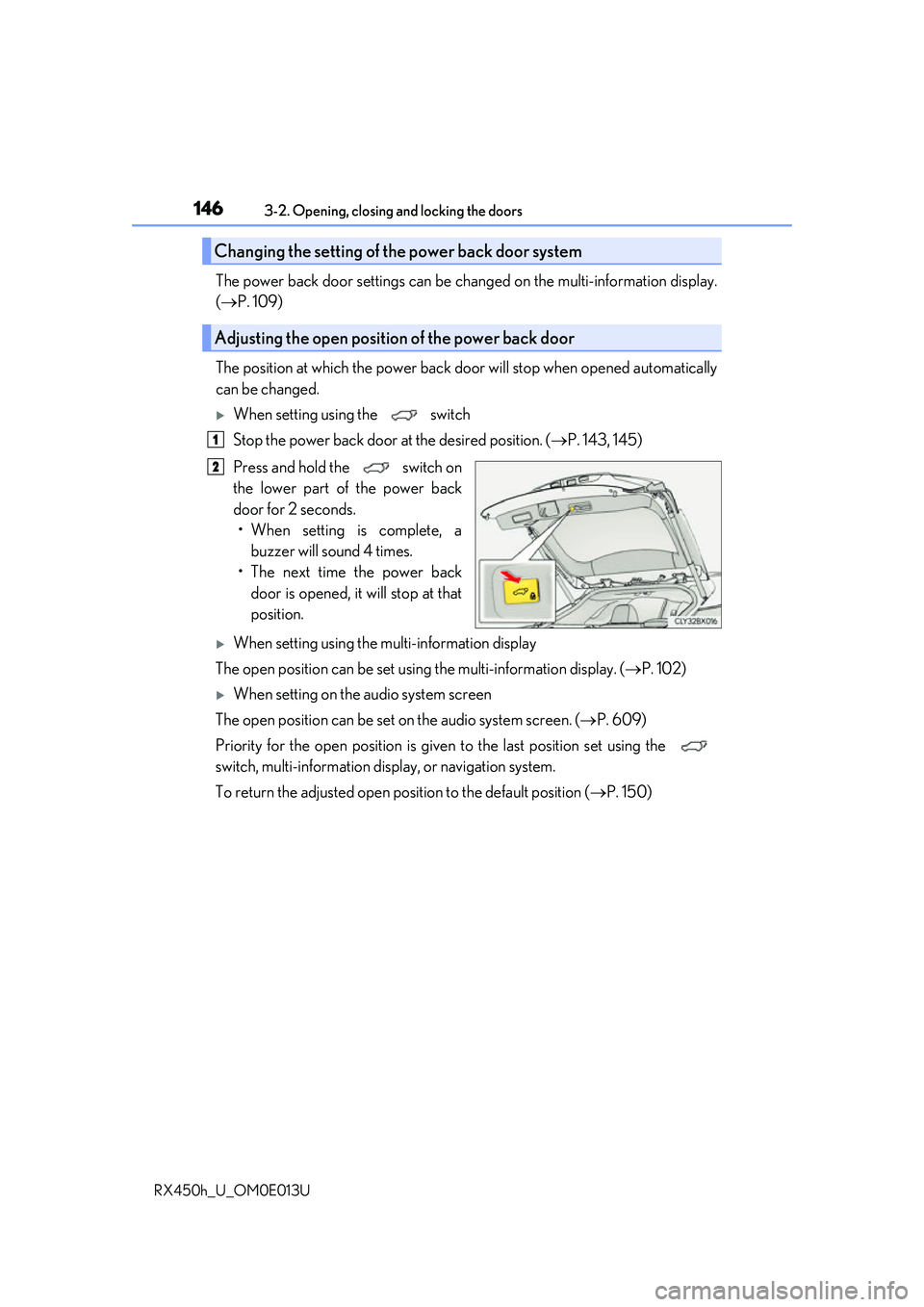
Press and hold the switch on
the lower part of the power back
door for 2 seconds. • When setting is complete, a buzzer will sound 4 times.
• The next time the power back door is opened, it will stop at that
position.
When setting using the multi-information display
The open position can be set usin g the multi-information display. (P. 102)
When setting on the audio system screen
The open position can be set on the audio system screen. ( P. 609)
Priority for the open position is give n to the last position set using the
switch, multi-information display, or navigation system.
To return the adjusted open posi tion to the default position (P. 150)
Changing the setting of the power back door system
Adjusting the open position of the power back door
1
2