light LEXUS RX450h 2018 Owners Manual
[x] Cancel search | Manufacturer: LEXUS, Model Year: 2018, Model line: RX450h, Model: LEXUS RX450h 2018Pages: 792, PDF Size: 12.5 MB
Page 294 of 792
294 4-5. Using the driving support systems
RX450h_RX450hL _U_OM48F85U■
Situations in which the system may not operate properly ●
In some situations such as the following, a vehicle may not be detected by the radar
sensor and camera sensor, preventing the system from operating properly:
• If an oncoming vehicle is approaching your vehicle
• If a vehicle ahead is a motorcycle or bicycle
• When approaching the side or front of a vehicle
• If a preceding vehicle has a small rear end, such as an unloaded truck
• If a vehicle ahead is carrying a load which protrudes past its rear bumper
• If a vehicle ahead is irregularly shap ed, such as a tractor or side car
• If the sun or other light is shin ing directly on a vehicle ahead
• If a vehicle cuts in front of your ve hicle or emerges from beside a vehicle
• If a vehicle ahead makes an abrupt maneuver (such as sudden swerving, accelera-
tion or deceleration)
• When suddenly cutting behind a preceding vehicle
• When driving in inclement we ather such as heavy rain, fog, snow or a sandstorm
• When the vehicle is hit by water, sn ow, dust, etc. from a vehicle ahead
• When driving through steam or smoke
• When driving in a place where the surrounding brightness changes suddenly, such
as at the entrance or exit of a tunnel
• When a very bright light, such as the sun or the headlights of on coming traffic, shines
directly into the camera sensor
• When the surrounding area is dim, such as at dawn or dusk, or while at night or in a
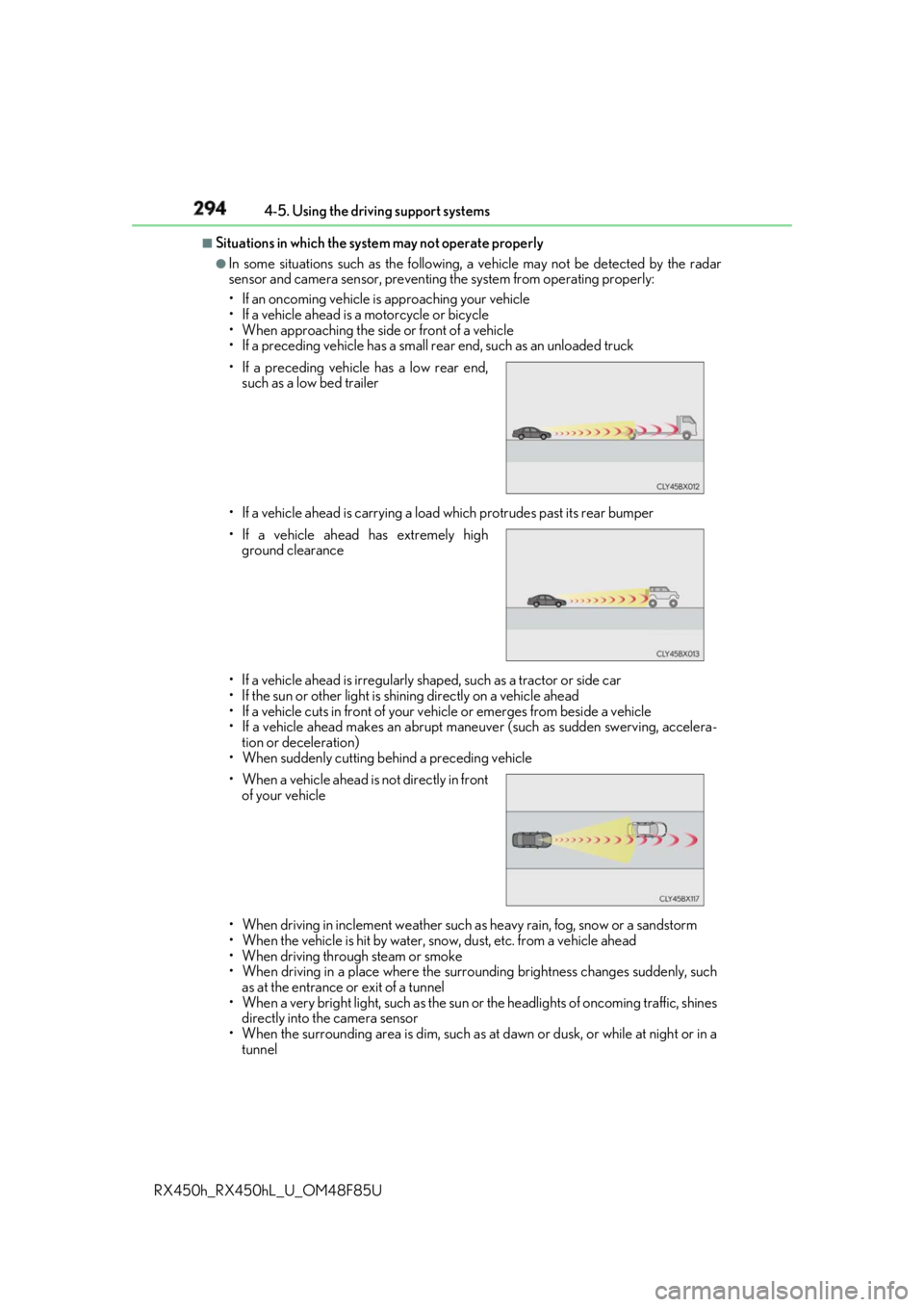
tunnel• If a preceding vehicle has a low rear end,
such as a low bed trailer
• If a vehicle ahead has extremely high
ground clearance
• When a vehicle ahead is not directly in front
of your vehicle
Page 296 of 792

296 4-5. Using the driving support systems
RX450h_RX450hL _U_OM48F85U■
If the PCS warning light flas hes or illuminates and a warning message is displayed on
the multi-inform ation display
The pre-collision system may be temporarily unavailable or there may be a malfunction
in the system. ●
In the following situations, the warning light will turn off, the message will disappear and
the system will become operational when normal operating conditions return:
• When the radar sensor or ca mera sensor or the area around either sensor is hot,
such as in the sun
• When the radar sensor or camera sensor or the area around either sensor is cold,
such as in an extremely cold environment
• When a front sensor is dirt y or covered with snow, etc.
• When the part of the windshield in front of the camera sensor is fogged up or cov-
ered with condensation or ice (Defogging the windshield: → P. 516)
• If the camera sensor is obstructed, such as when the hood is open or a sticker is
attached to the windshield near the camera sensor ●
If the PCS warning light continues to flash or remains illuminated or the warning mes-
sage does not disappear even though the vehicle has returned to normal, the system
may be malfunctioning. Have the vehicle in spected by your Lexus dealer immediately.■
If VSC is disabled ●
If VSC is disabled ( → P. 385), the pre-collision brake assist and pre-collision braking
functions are also disabled. ●
The PCS warning light will turn on and “V SC Turned Off Pre-Collision Brake System
Unavailable” will be displayed on the multi-information display.
Page 300 of 792
300 4-5. Using the driving support systems
RX450h_RX450hL _U_OM48F85UWARNING ■
Before using LKA system
Do not rely solely upon the LKA system. LKA is not a system which automatically
drives the vehicle or reduces the amount of attention that must be paid to the area in
front of the vehicle. The driver must always assume full responsibility for driving safely
by always paying careful attention to the surrounding conditions and operate the steer-
ing wheel to correct the path of the vehicle. Also, make sure to take adequate breaks
when fatigued, such as from driv ing for a long period of time.
Failure to perform appropriate driving operat ions and pay careful attention may lead to
an accident, resulting in death or serious injury. ■
To avoid operating LKA by mistake
When not using the LKA system, use the LKA switch to turn the system off. ■
Situations unsuitable for LKA
Do not use the LKA system in the following situations.
The system may not operate properly and lead to an accident, resulting in death or
serious injury. ●
A spare tire, tire chains, etc., are equipped. ●
When the tires have been excessively worn, or when the tire inflation pressure is low. ●
Tires which differ by structure, manufacturer, brand or tread pattern are used. ●
Objects or patterns that could be mistaken for white (yellow) lines are present on the
side of the road (guardrails, cu rbs, reflective poles, etc.).●
Vehicle is driven on a snow-covered road. ●
White (yellow) lines are difficult to see due to rain, snow, fog, dust, etc.●
Asphalt repair marks, white (y ellow) line marks, etc., are present due to road repair.●
Vehicle is driven in a temporary lane or restricted lane due to construction work.●
Vehicle is driven on a road surface which is slippery due to rainy weather, fallen snow,
freezing, etc. ●
Vehicle is driven in traffic lanes ot her than on highways and freeways.●
Vehicle is driven in a construction zone. ●
When your vehicle is towing a trailer or during emergency towing ■
Preventing LKA system malfunctions and operations perf ormed by mistake●
Do not modify the headlights or place stickers, etc., on the surface of the lights.●
Do not modify the suspension etc. If the suspension etc. needs to be replaced, con-
tact your Lexus dealer. ●
Do not install or place anything on the hood or grille. Also, do not install a grille guard
(bull bars, kangaroo bar, etc.). ●
If your windshield needs repair s, contact your Lexus dealer.
Page 305 of 792
3054-5. Using the driving support systems
4
Driving
RX450h_RX450hL _U_OM48F85U■
Conditions in which functions may not operate properly
In the following situations, the camera sensor may not detect white (yellow) lines and var-
ious functions may not operate normally. ●
There are shadows on the road that run parallel with, or cover, the white (yellow) lines. ●
The vehicle is driven in an ar ea without white (yellow) lines, such as in front of a tollgate
or checkpoint, or at an intersection, etc.●
The white (yellow) lines are cracked, “Botts ’ dots”, “Raised pavement marker” or stones
are present. ●
The white (yellow) lines cannot be seen or are difficult to see due to sand, etc. ●
The vehicle is driven on a road surface that is wet due to rain, puddles, etc. ●
The traffic lines are yellow (which may be more difficult to recognize than lines that are
white). ●
The white (yellow) lines cross over a curb, etc. ●
The vehicle is driven on a bright surface, such as concrete. ●
The vehicle is driven on a surface that is bright due to reflected light, etc. ●
The vehicle is driven in an area where the brightness changes suddenly, such as at the
entrances and exits of tunnels, etc.●
Light from the headlights of an oncoming vehicle, the sun, etc., enters the camera.●
The vehicle is driven where the road diverges, merges, etc. ●
The vehicle is driven on a slope. ●
The vehicle is driven on a road which t ilts left or right, or a winding road.●
The vehicle is driven on an unpaved or rough road. ●
The vehicle is driven around a sharp curve. ●
The traffic lane is excessively narrow or wide. ●
The vehicle is extremely tilted due to carry ing heavy luggage or having improper tire
pressure. ●
The distance to the preceding vehicle is extremely short. ●
The vehicle is moving up and down a large am ount due to road conditions during driv-
ing (poor roads or road seams). ●
The headlight lenses are dirty and emit a faint amount of light at night, or the beam axis
has deviated. ●
The vehicle is struck by a crosswind. ●
The vehicle has just changed lane s or crossed an intersection.●
Snow tires, etc., are equipped. ■
If the LKA indicator is illuminated in ambe r and a warning message is displayed on the
multi-information display
→ P. 660 ■
Customization
Some functions can be customized. ( → P. 108)
Page 309 of 792
3094-5. Using the driving support systems
4
Driving
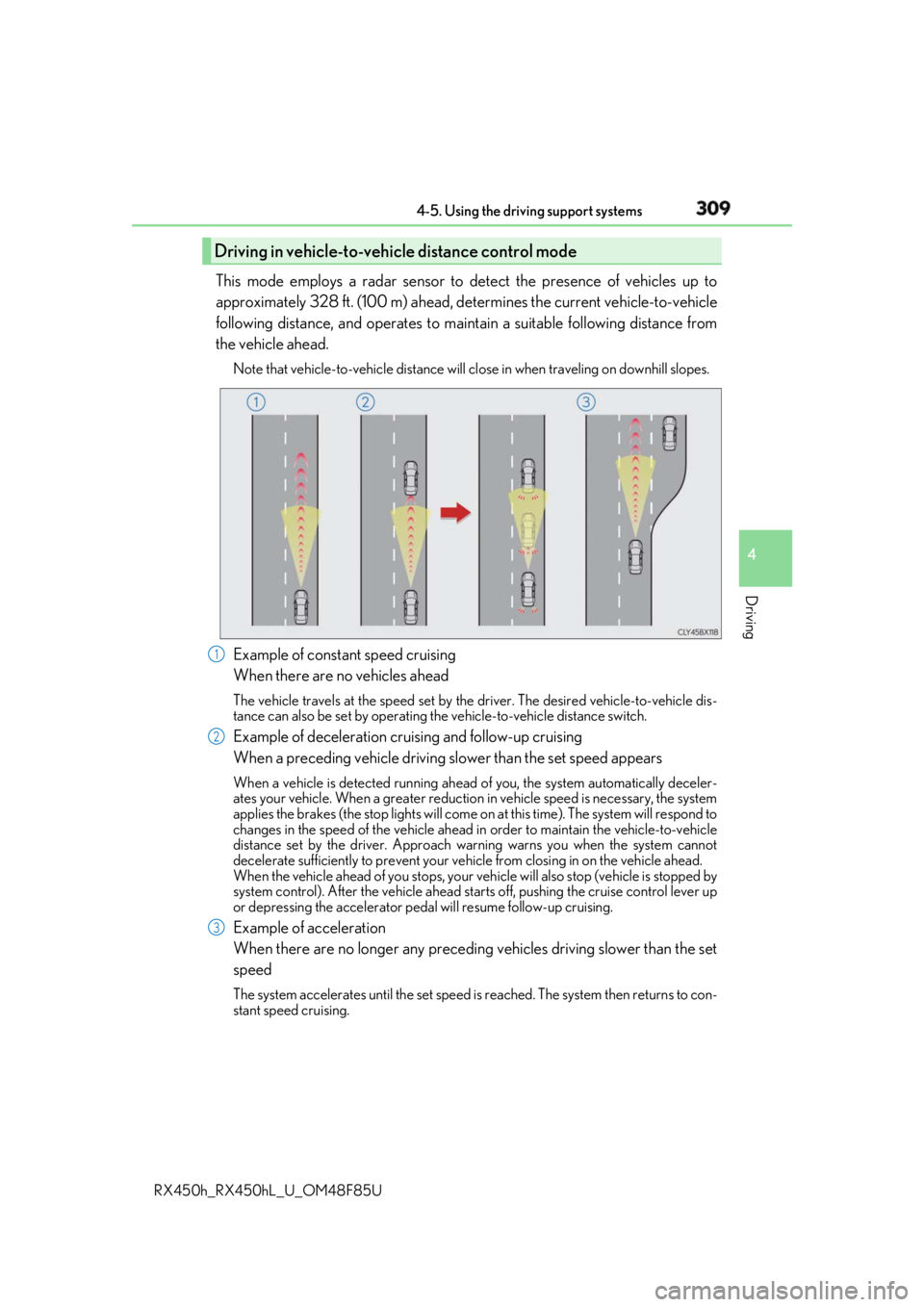
RX450h_RX450hL _U_OM48F85UThis mode employs a radar sensor to detect the presence of vehicles up to
approximately 328 ft. (100 m) ahead, de termines the current vehicle-to-vehicle
following distance, and operates to main tain a suitable following distance from
the vehicle ahead. Note that vehicle-to-vehicle distance will cl ose in when traveling on downhill slopes.
Example of constant speed cruising
When there are no vehicles ahead The vehicle travels at the speed set by the driver. The desired vehicle-to-vehicle dis-
tance can also be set by operating the vehicle-to-vehicle distance switch.
Example of deceleration cruising and follow-up cruising
When a preceding vehicle driving sl ower than the set speed appearsWhen a vehicle is detected running ahead of you, the system automatically deceler-
ates your vehicle. When a greater reduction in vehicle speed is necessary, the system
applies the brakes (the stop lights will come on at this time). Th e system will respond to
changes in the speed of the vehicle ahead in order to maintain the vehicle-to-vehicle
distance set by the driver. Approach warning warns you when the system cannot
decelerate sufficie ntly to prevent your vehicle from closing in on the vehicle ahead.
When the vehicle ahead of you stops, your vehicle will also stop (vehicle is stopped by
system control). After the vehicle ahead starts off, pushing the cruise control lever up
or depressing the accelerator pedal will resume follow-up cruising.
Example of acceleration
When there are no longer any preceding vehicles driving slower than the set
speed The system accelerates until the set speed is reached. The system then returns to con-
stant speed cruising.Driving in vehicle-to-vehicle distance control mode
1
2
3
Page 321 of 792
3214-5. Using the driving support systems
4
Driving
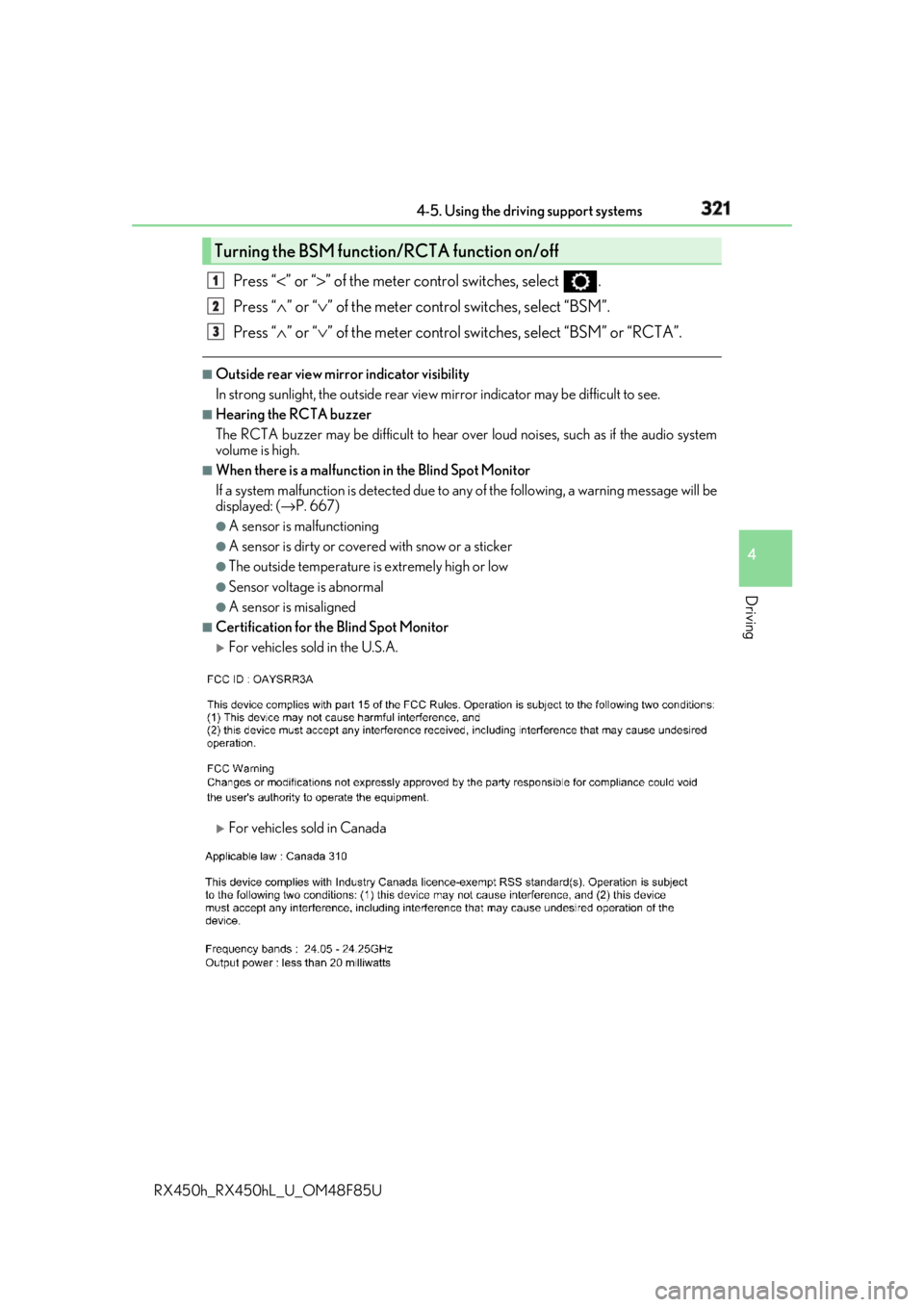
RX450h_RX450hL _U_OM48F85UPress “ < ” or “ > ” of the meter control switches, select .
Press “ ∧ ” or “ ∨ ” of the meter control switches, select “BSM”.
Press “ ∧ ” or “ ∨ ” of the meter control switch es, select “BSM” or “RCTA”.■
Outside rear view mirro r indicator visibility
In strong sunlight, the outside rear view mirror indicator may be difficult to see.■
Hearing the RCTA buzzer
The RCTA buzzer may be difficult to hear over loud noises, such as if the audio system
volume is high. ■
When there is a malfunction in the Blind Spot Monitor
If a system malfunction is detected due to any of the following, a warning message will be
displayed: ( → P. 667)●
A sensor is malfunctioning ●
A sensor is dirty or covere d with snow or a sticker●
The outside temperature is extremely high or low ●
Sensor voltage is abnormal ●
A sensor is misaligned ■
Certification for the Blind Spot Monitor
For vehicles sold in the U.S.A.
For vehicles sold in CanadaTurning the BSM function/RCTA function on/off 1
2
3
Page 322 of 792
322 4-5. Using the driving support systems
RX450h_RX450hL _U_OM48F85U■
Customization
Some functions can be customized. ( → P. 331, 667)
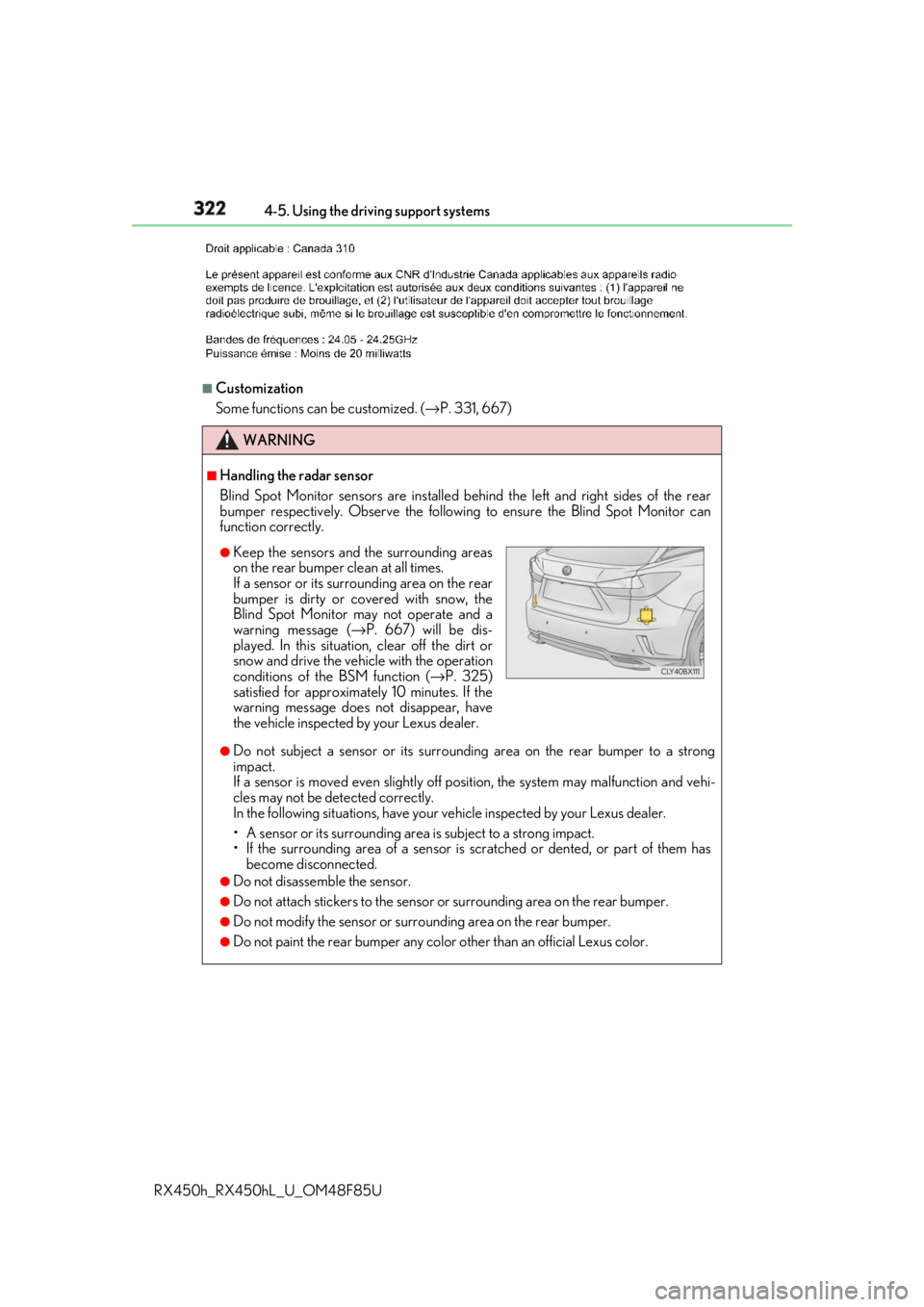
WARNING ■
Handling the radar sensor
Blind Spot Monitor sensors ar e installed behind the left and right sides of the rear
bumper respectively. Observe the following to ensure the Blind Spot Monitor can
function correctly.
●
Do not subject a sensor or its surrounding area on the rear bumper to a strong
impact.
If a sensor is moved even slightly off po sition, the system may malfunction and vehi-
cles may not be detected correctly.
In the following situations , have your vehicle inspected by your Lexus dealer.
• A sensor or its surrounding area is subject to a strong impact.
• If the surrounding area of a sensor is sc ratched or dented, or part of them has
become disconnected. ●
Do not disassemble the sensor. ●
Do not attach stickers to the sensor or surrounding area on the rear bumper.●
Do not modify the sensor or surro unding area on the rear bumper.●
Do not paint the rear bumper any colo r other than an official Lexus color.●
Keep the sensors and the surrounding areas
on the rear bumper clean at all times.
If a sensor or its surrounding area on the rear
bumper is dirty or covered with snow, the
Blind Spot Monitor may not operate and a
warning message ( → P. 667) will be dis-
played. In this situation, clear off the dirt or
snow and drive the vehicle with the operation
conditions of the BSM function ( → P. 325)
satisfied for approximately 10 minutes. If the
warning message does not disappear, have
the vehicle inspected by your Lexus dealer.
Page 332 of 792
332 4-5. Using the driving support systems
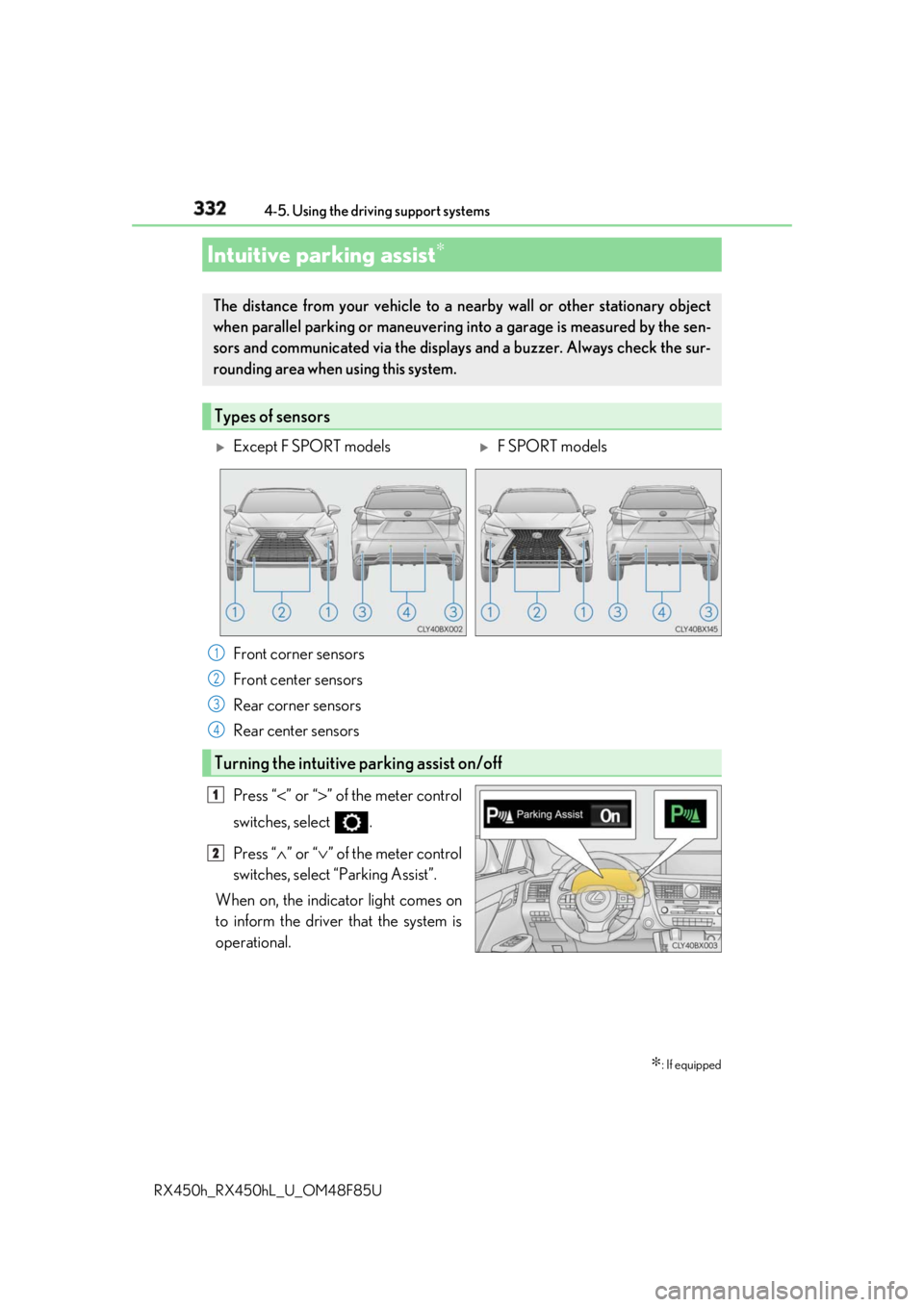
RX450h_RX450hL _U_OM48F85UPress “ < ” or “ > ” of the meter control
switches, select .
Press “ ∧ ” or “ ∨ ” of the meter control
switches, select “Parking Assist”.
When on, the indicator light comes on
to inform the driver that the system is
operational.Intuitive parking assist ∗
∗ : If equippedThe distance from your vehicle to a ne arby wall or othe r stationary object
when parallel parking or maneuvering into a garage is measured by the sen-
sors and communicated via the displays and a buzzer. Always check the sur-
rounding area when using this system.
Types of sensors
Except F SPORT models
F SPORT models
Front corner sensors
Front center sensors
Rear corner sensors
Rear center sensors
Turning the intuitive parking assist on/off 1
2
3
4
1
2
Page 339 of 792

3394-5. Using the driving support systems
4
Driving
RX450h_RX450hL _U_OM48F85U●
Vehicles with a navigation system (12.3-inch display): If the intuit ive parking assist dis-
play is set to on, detected objects will also be displayed on the panoramic view monitor.
For details, refer to “NAVIGATION SYSTEM OWNER’S MANUAL”. ■
Sensor detectio n information●
The sensor’s detection areas are limited to the areas around the vehicle’s bumper. ●
Certain vehicle conditions and the surrounding environment may affect the ability of a
sensor to correctly detect an object. Particular instances where this may occur are
listed below.
• There is dirt, snow or ice on the sensor . (Wiping the sensors will resolve this prob-
lem.)
• The sensor is frozen. (Thawing th e area will resolve this problem.)
In especially cold weather, if a sensor is frozen the screen may show an abnormal
display, or obstacles may not be detected.
• The sensor is covered in any way.
• The vehicle is leaning considerably to one side.
• When a sensor or the area around a sensor is extremely hot or cold.
• On an extremely bumpy road, on an incline, on gravel, or on grass.
• The vicinity of the vehicle is noisy due to vehicle horns, motorcycle engines, air
brakes of large vehicles, or other loud noises producing ultrasonic waves.
• There is another vehicle equipped with parking assist sensors in the vicinity.
• The sensor is coated with a sheet of spray or heavy rain.
• The bumper or sensor re ceives a strong impact.
• If the vehicle is significantly tilted.
• The vehicle is approaching a tall or curved curb.
• In harsh sunlight or intense cold weather.
• The area directly under the bumpers is not detected.
• If objects draw too close to the sensor.
• People may not be detected if they are wearing certain types of clothing.
In addition to the examples above, there ar e instances in which, because of their shape,
signs and other objects may be judged by a sensor to be closer than they are. ●
The shape of the object may prevent a sensor from detecting it. Pay particular attention
to the following objects:
• Wires, fences, ropes, etc.
• Cotton, snow and other materi als that absorb sound waves
• Sharply-angled objects
• Low obstacles
• Tall obstacles with upper sections projecting outwards in the direction of your vehi-
cle ●
The following situations may occur during use.
• Depending on the shape of the object and other factors, the detection distance may
shorten, or detectio n may be impossible.
• Objects may not be detected if they are too close to the sensor.
• There will be a short dela y between object detection and display. Even at slow
speeds, there is a possibility that the obje ct will come within the sensor’s detection
areas before the display is shown and the buzzer sounds.
• Thin posts or objects lower than the sens or may not be detected when approached,
even if they have been detected once.
• It might be difficult to hear beeps due to th e volume of audio system or air flow noise
of the air conditioning system.
Page 351 of 792
3514-5. Using the driving support systems
4
Driving
RX450h_RX450hL _U_OM48F85U■
Situations in which the Intelligent Clearance Sonar function may operate even if there
is no possibility of a collision
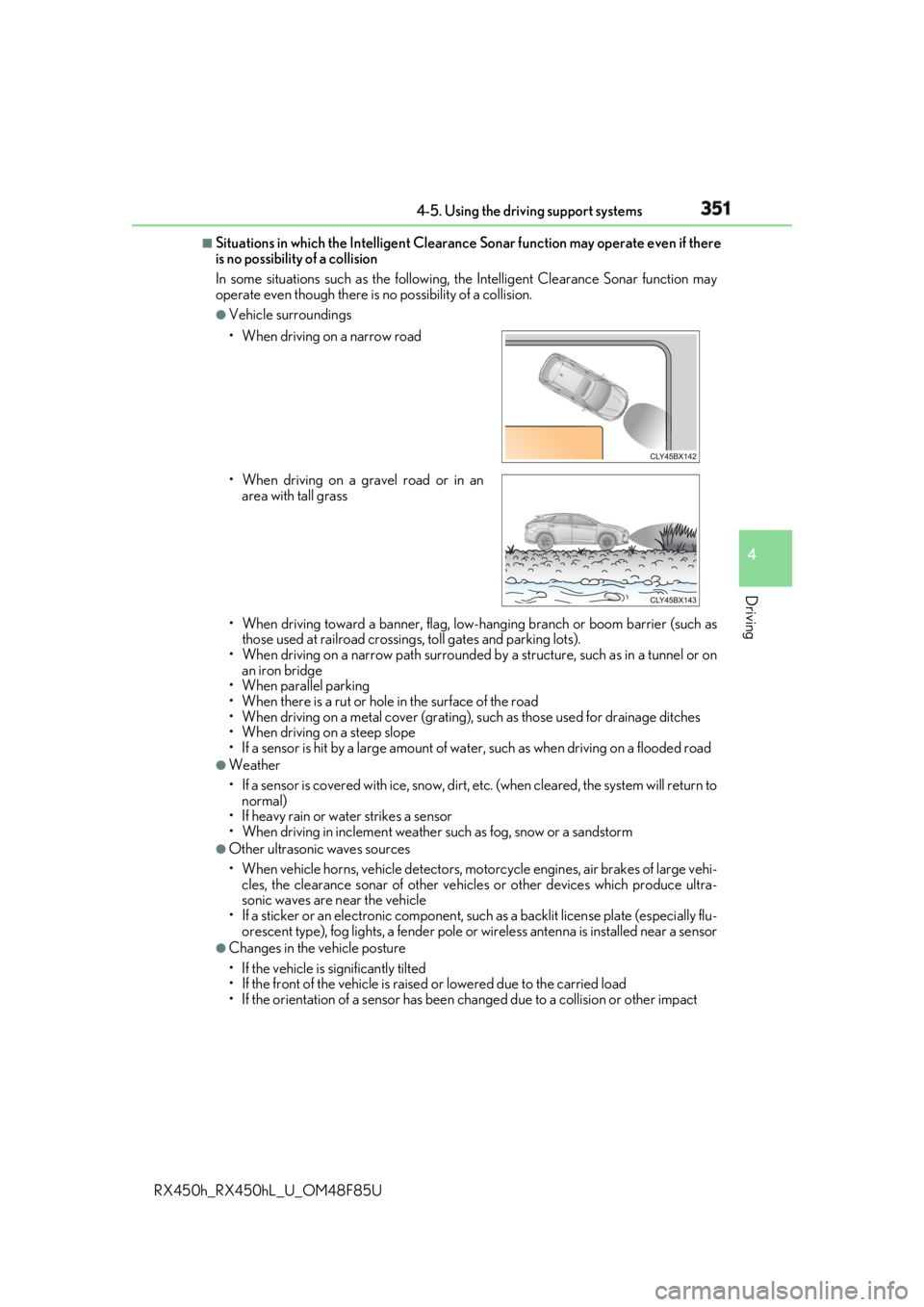
In some situations such as the following, the Intelligent Clearanc e Sonar function may
operate even though there is no possibility of a collision. ●
Vehicle surroundings
• When driving toward a banner, flag, low- hanging branch or boom barrier (such as
those used at railroad crossing s, toll gates and parking lots).
• When driving on a narrow path surrounded by a structure, such as in a tunnel or on
an iron bridge
• When parallel parking
• When there is a rut or hole in the surface of the road
• When driving on a metal cover (grating), such as those used for drainage ditches
• When driving on a steep slope
• If a sensor is hit by a large amount of wa ter, such as when driving on a flooded road●
Weather
• If a sensor is covered with ice, snow, dirt, etc. (when cleared, the system will return to
normal)
• If heavy rain or water strikes a sensor
• When driving in inclemen t weather such as fog, snow or a sandstorm●
Other ultrasonic waves sources
• When vehicle horns, vehicle detectors, motorcycle engines, air brakes of large vehi-
cles, the clearance sonar of other vehicles or other devices which produce ultra-
sonic waves are near the vehicle
• If a sticker or an electronic component, su ch as a backlit license plate (especially flu-
orescent type), fog lights, a fender pole or wireless antenna is installed near a sensor●
Changes in the vehicle posture
• If the vehicle is significantly tilted
• If the front of the vehicle is raised or lowered due to the carried load
• If the orientation of a sens or has been changed due to a collision or other impact• When driving on a narrow road
• When driving on a gravel road or in an
area with tall grass