warning LEXUS RX450h 2018 Owners Manual
[x] Cancel search | Manufacturer: LEXUS, Model Year: 2018, Model line: RX450h, Model: LEXUS RX450h 2018Pages: 792, PDF Size: 12.5 MB
Page 308 of 792
308 4-5. Using the driving support systems
RX450h_RX450hL _U_OM48F85UWARNING ■
Situations unsuitable for dynamic rada r cruise control with full-speed range
Do not use dynamic radar cruise control with full-speed range in any of the following
situations.
Doing so may result in inappropriate speed control and could cause an accident result-
ing in death or serious injury. ●
Roads where there are pedestrians, cyclers, etc. ●
In heavy traffic ●
On roads with sharp bends ●
On winding roads ●
On slippery roads, such as thos e covered with rain, ice or snow●
On steep downhills, or where there are sudden changes between sharp up and down
gradients
Vehicle speed may exceed the set speed when driving down a steep hill.●
At entrances to freeways and highways ●
When weather conditions are bad enough that they may prevent the sensors from
detecting correctly (fog, snow, sandstorm, heavy rain, etc.)●
When there is rain, snow, etc. on the fron t surface of the radar sensor or camera sen-
sor ●
In traffic conditions that require frequent repeated a cceleration and deceleration●
When your vehicle is towing a trailer or during emergency towing ●
When an approach warning buzzer is heard often
Page 309 of 792
3094-5. Using the driving support systems
4
Driving
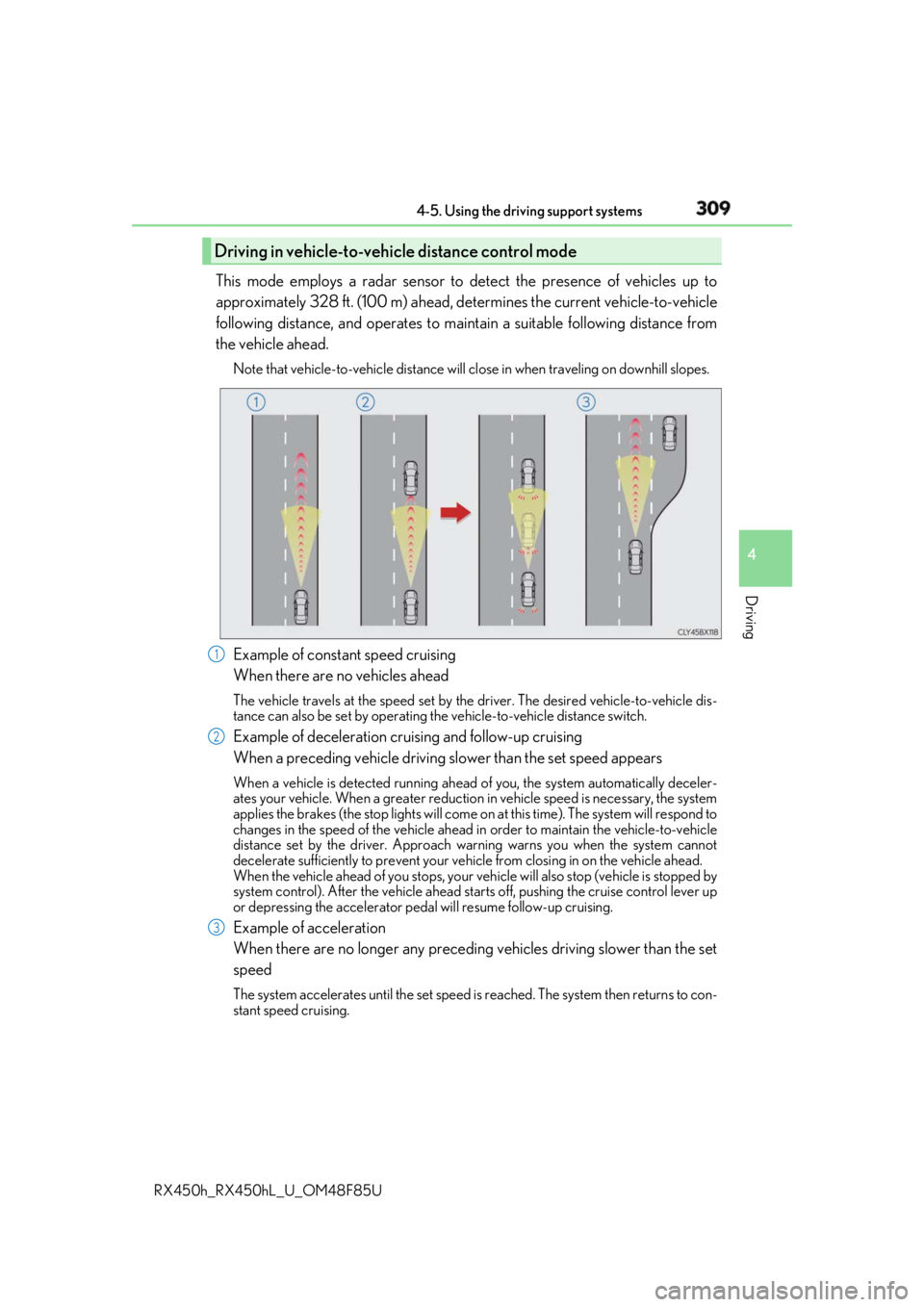
RX450h_RX450hL _U_OM48F85UThis mode employs a radar sensor to detect the presence of vehicles up to
approximately 328 ft. (100 m) ahead, de termines the current vehicle-to-vehicle
following distance, and operates to main tain a suitable following distance from
the vehicle ahead. Note that vehicle-to-vehicle distance will cl ose in when traveling on downhill slopes.
Example of constant speed cruising
When there are no vehicles ahead The vehicle travels at the speed set by the driver. The desired vehicle-to-vehicle dis-
tance can also be set by operating the vehicle-to-vehicle distance switch.
Example of deceleration cruising and follow-up cruising
When a preceding vehicle driving sl ower than the set speed appearsWhen a vehicle is detected running ahead of you, the system automatically deceler-
ates your vehicle. When a greater reduction in vehicle speed is necessary, the system
applies the brakes (the stop lights will come on at this time). Th e system will respond to
changes in the speed of the vehicle ahead in order to maintain the vehicle-to-vehicle
distance set by the driver. Approach warning warns you when the system cannot
decelerate sufficie ntly to prevent your vehicle from closing in on the vehicle ahead.
When the vehicle ahead of you stops, your vehicle will also stop (vehicle is stopped by
system control). After the vehicle ahead starts off, pushing the cruise control lever up
or depressing the accelerator pedal will resume follow-up cruising.
Example of acceleration
When there are no longer any preceding vehicles driving slower than the set
speed The system accelerates until the set speed is reached. The system then returns to con-
stant speed cruising.Driving in vehicle-to-vehicle distance control mode
1
2
3
Page 314 of 792
314 4-5. Using the driving support systems
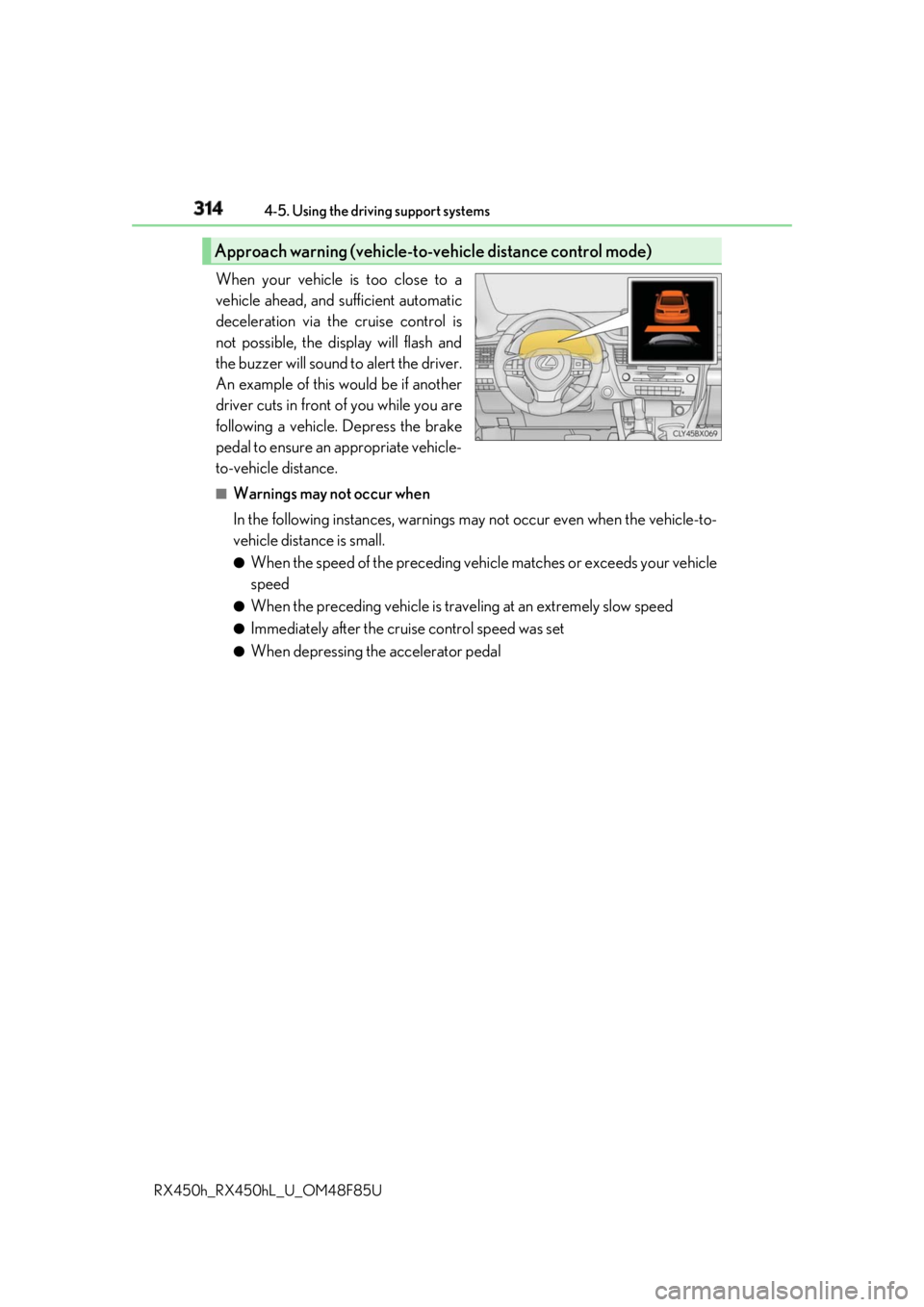
RX450h_RX450hL _U_OM48F85UWhen your vehicle is too close to a
vehicle ahead, and sufficient automatic
deceleration via the cruise control is
not possible, the display will flash and
the buzzer will sound to alert the driver.
An example of this would be if another
driver cuts in front of you while you are
following a vehicle. Depress the brake
pedal to ensure an appropriate vehicle-
to-vehicle distance. ■
Warnings may not occur when
In the following instances, warnings ma y not occur even when the vehicle-to-
vehicle distance is small. ●
When the speed of the preceding vehicle matches or exceeds your vehicle
speed ●
When the preceding vehicle is traveling at an extremely slow speed ●
Immediately after the crui se control speed was set●
When depressing the accelerator pedalApproach warning (vehicle-to-vehicle distance control mode)
Page 317 of 792
3174-5. Using the driving support systems
4
Driving
RX450h_RX450hL _U_OM48F85U■
Automatic cancelation of co nstant speed control mode
Constant speed control mode is automatica lly canceled in the following situations:●
Actual vehicle speed is more than approxim ately 10 mph (16 km/h) below the set vehi-
cle speed. ●
Actual vehicle speed falls below approximately 25 mph (40 km/h).●
VSC is activated. ●
TRAC is activated for a period of time. ●
When the VSC or TRAC system is turned off. ●
Pre-collision braking is activated.
If constant speed control mode is automati cally canceled for any other reason, there may
be a malfunction in the system . Contact your Lexus dealer.■
Warning messages and buzzers for dynamic ra dar cruise control with full-speed range
Warning messages and buzzers are used to indicate a system malfunction or to inform
the driver of the need for ca ution while driving. If a warn ing message is shown on the
multi-information display, read the message and follow the instructions.■
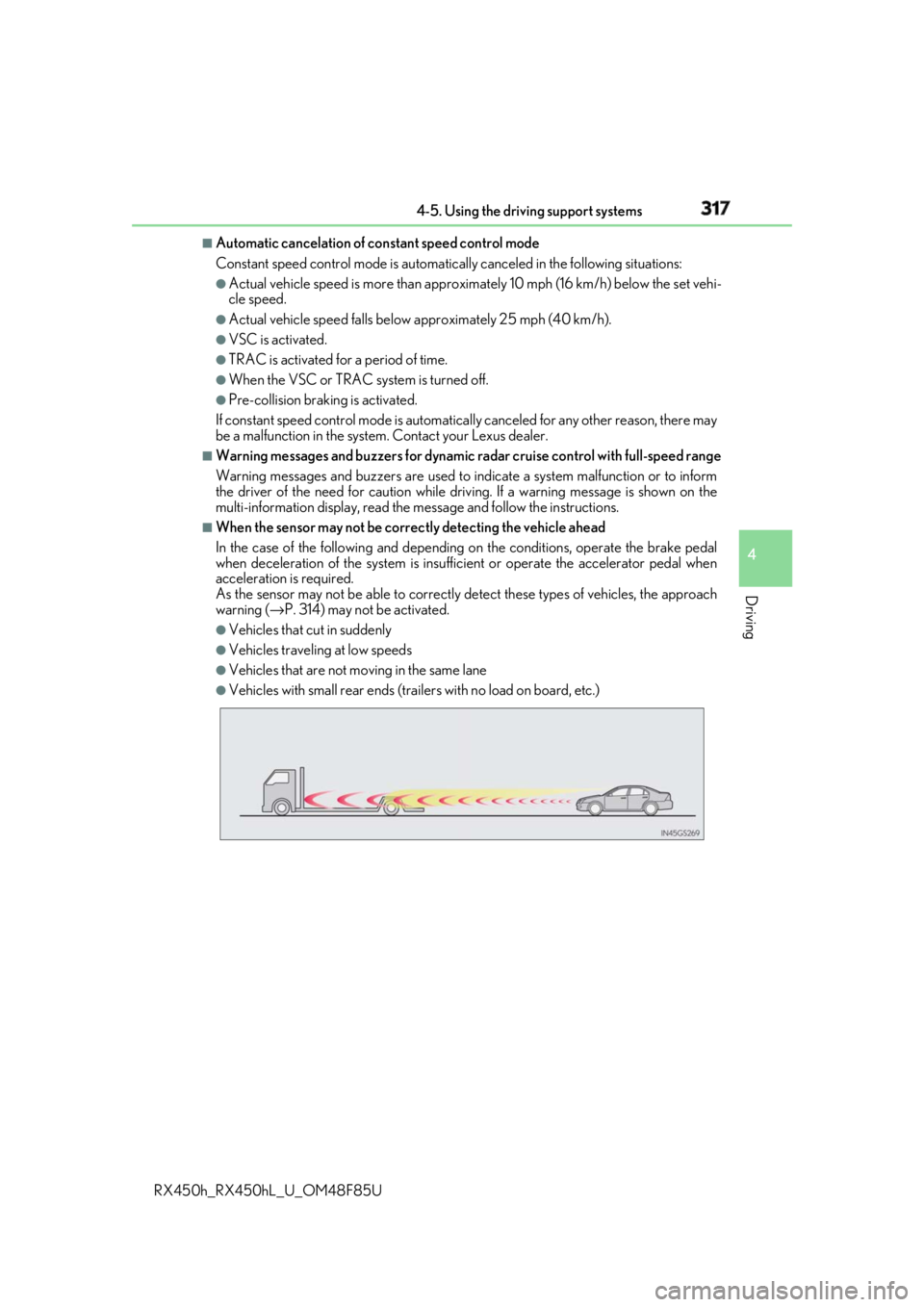
When the sensor may not be correctly detecting the vehicle ahead
In the case of the following and depending on the conditions, operate the brake pedal
when deceleration of the system is insuff icient or operate the accelerator pedal when
acceleration is required.
As the sensor may not be able to correctly detect these types of vehicles, the approach
warning ( → P. 314) may not be activated.●
Vehicles that cut in suddenly ●
Vehicles traveling at low speeds ●
Vehicles that are not moving in the same lane ●
Vehicles with small rear ends (traile rs with no load on board, etc.)
Page 321 of 792
3214-5. Using the driving support systems
4
Driving
RX450h_RX450hL _U_OM48F85UPress “ < ” or “ > ” of the meter control switches, select .
Press “ ∧ ” or “ ∨ ” of the meter control switches, select “BSM”.
Press “ ∧ ” or “ ∨ ” of the meter control switch es, select “BSM” or “RCTA”.■
Outside rear view mirro r indicator visibility
In strong sunlight, the outside rear view mirror indicator may be difficult to see.■
Hearing the RCTA buzzer
The RCTA buzzer may be difficult to hear over loud noises, such as if the audio system
volume is high. ■
When there is a malfunction in the Blind Spot Monitor
If a system malfunction is detected due to any of the following, a warning message will be
displayed: ( → P. 667)●
A sensor is malfunctioning ●
A sensor is dirty or covere d with snow or a sticker●
The outside temperature is extremely high or low ●
Sensor voltage is abnormal ●
A sensor is misaligned ■
Certification for the Blind Spot Monitor
For vehicles sold in the U.S.A.
For vehicles sold in CanadaTurning the BSM function/RCTA function on/off 1
2
3
Page 322 of 792
322 4-5. Using the driving support systems
RX450h_RX450hL _U_OM48F85U■
Customization
Some functions can be customized. ( → P. 331, 667)
WARNING ■
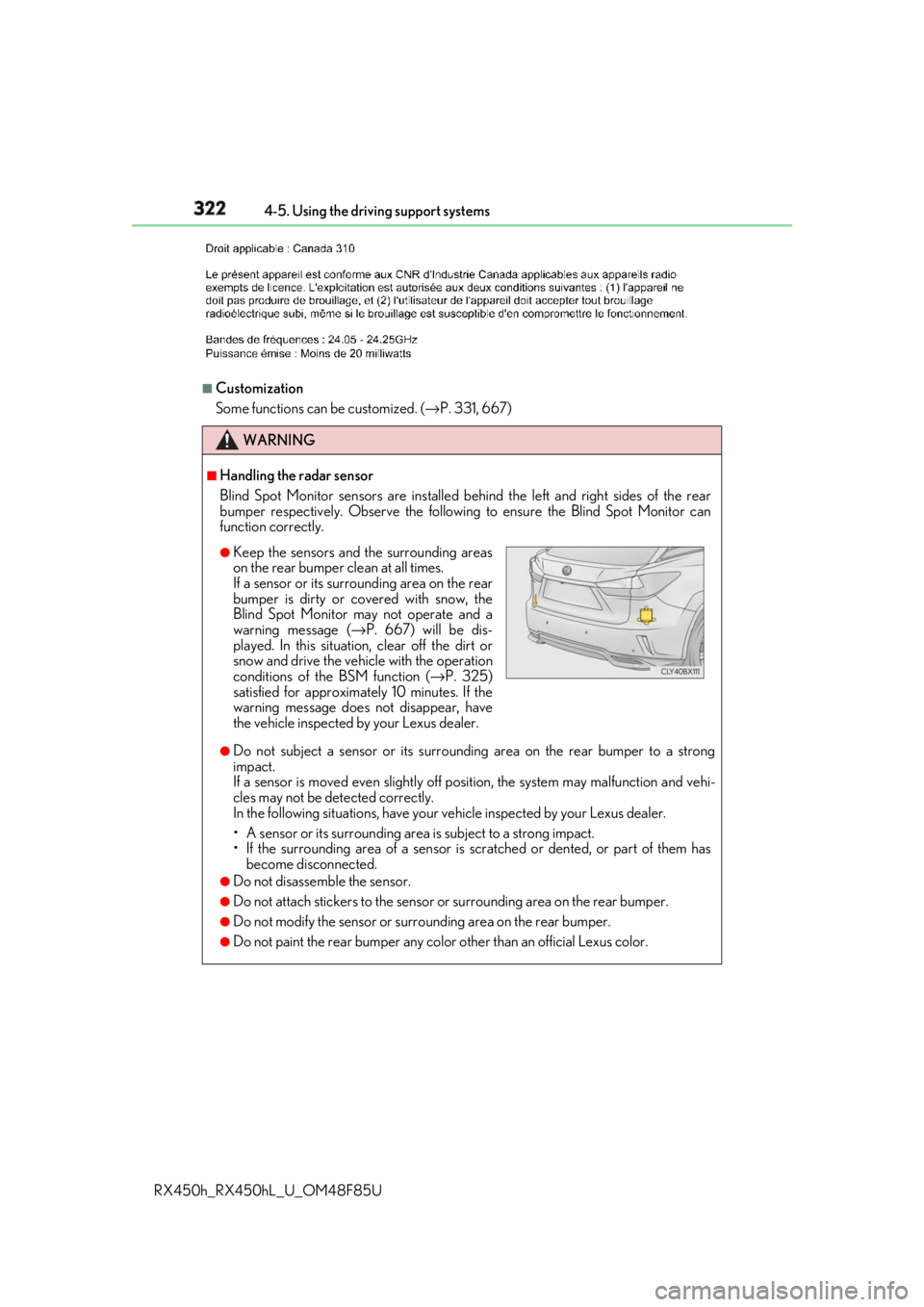
Handling the radar sensor
Blind Spot Monitor sensors ar e installed behind the left and right sides of the rear
bumper respectively. Observe the following to ensure the Blind Spot Monitor can
function correctly.
●
Do not subject a sensor or its surrounding area on the rear bumper to a strong
impact.
If a sensor is moved even slightly off po sition, the system may malfunction and vehi-
cles may not be detected correctly.
In the following situations , have your vehicle inspected by your Lexus dealer.
• A sensor or its surrounding area is subject to a strong impact.
• If the surrounding area of a sensor is sc ratched or dented, or part of them has
become disconnected. ●
Do not disassemble the sensor. ●
Do not attach stickers to the sensor or surrounding area on the rear bumper.●
Do not modify the sensor or surro unding area on the rear bumper.●
Do not paint the rear bumper any colo r other than an official Lexus color.●
Keep the sensors and the surrounding areas
on the rear bumper clean at all times.
If a sensor or its surrounding area on the rear
bumper is dirty or covered with snow, the
Blind Spot Monitor may not operate and a
warning message ( → P. 667) will be dis-
played. In this situation, clear off the dirt or
snow and drive the vehicle with the operation
conditions of the BSM function ( → P. 325)
satisfied for approximately 10 minutes. If the
warning message does not disappear, have
the vehicle inspected by your Lexus dealer.
Page 324 of 792
324 4-5. Using the driving support systems
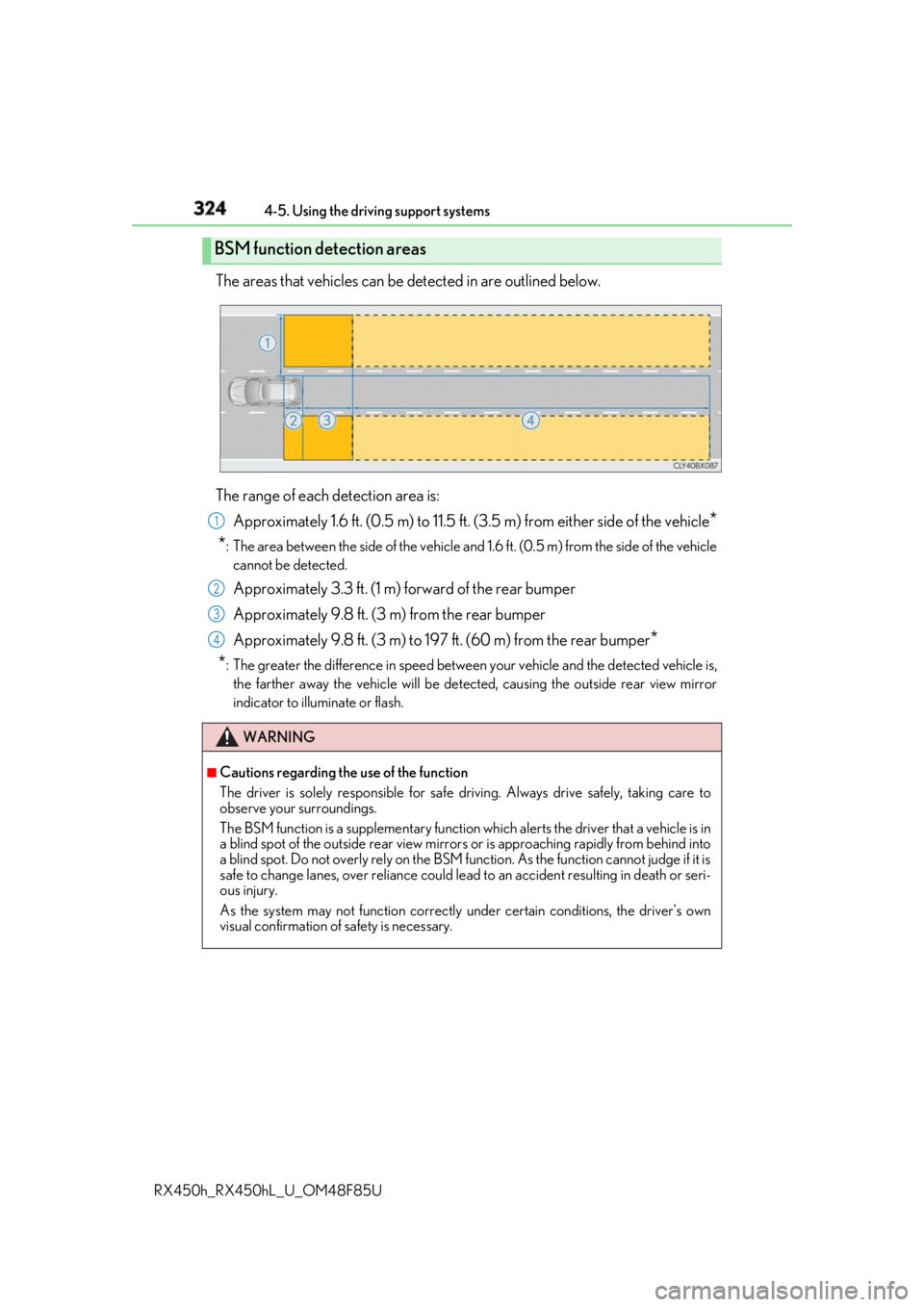
RX450h_RX450hL _U_OM48F85UThe areas that vehicles can be detected in are outlined below.
The range of each detection area is:
Approximately 1.6 ft. (0.5 m) to 11.5 ft. (3 .5 m) from either side of the vehicle
*
* : The area between the side of the vehicle and 1.6 ft. (0.5 m) from the side of the vehicle
cannot be detected.
Approximately 3.3 ft. (1 m) forward of the rear bumper
Approximately 9.8 ft. (3 m) from the rear bumper
Approximately 9.8 ft. (3 m) to 197 ft. (60 m) from the rear bumper
*
* : The greater the difference in speed betwee n your vehicle and the detected vehicle is,
the farther away the vehicle will be detect ed, causing the outside rear view mirror
indicator to illuminate or flash.BSM function detection areas
WARNING ■
Cautions regarding the use of the function
The driver is solely responsible for safe driving. Always drive safely, taking care to
observe your surroundings.
The BSM function is a supplementary function which alerts the driver that a vehicle is in
a blind spot of the outside rear view mirrors or is approaching rapidly from behind into
a blind spot. Do not overly rely on the BSM function. As the function cannot judge if it is
safe to change lanes, over reliance could lead to an accident resulting in death or seri-
ous injury.
As the system may not function correctly under certain conditions, the driver’s own
visual confirmation of safety is necessary. 1
2
3
4
Page 328 of 792
328 4-5. Using the driving support systems
RX450h_RX450hL _U_OM48F85U■
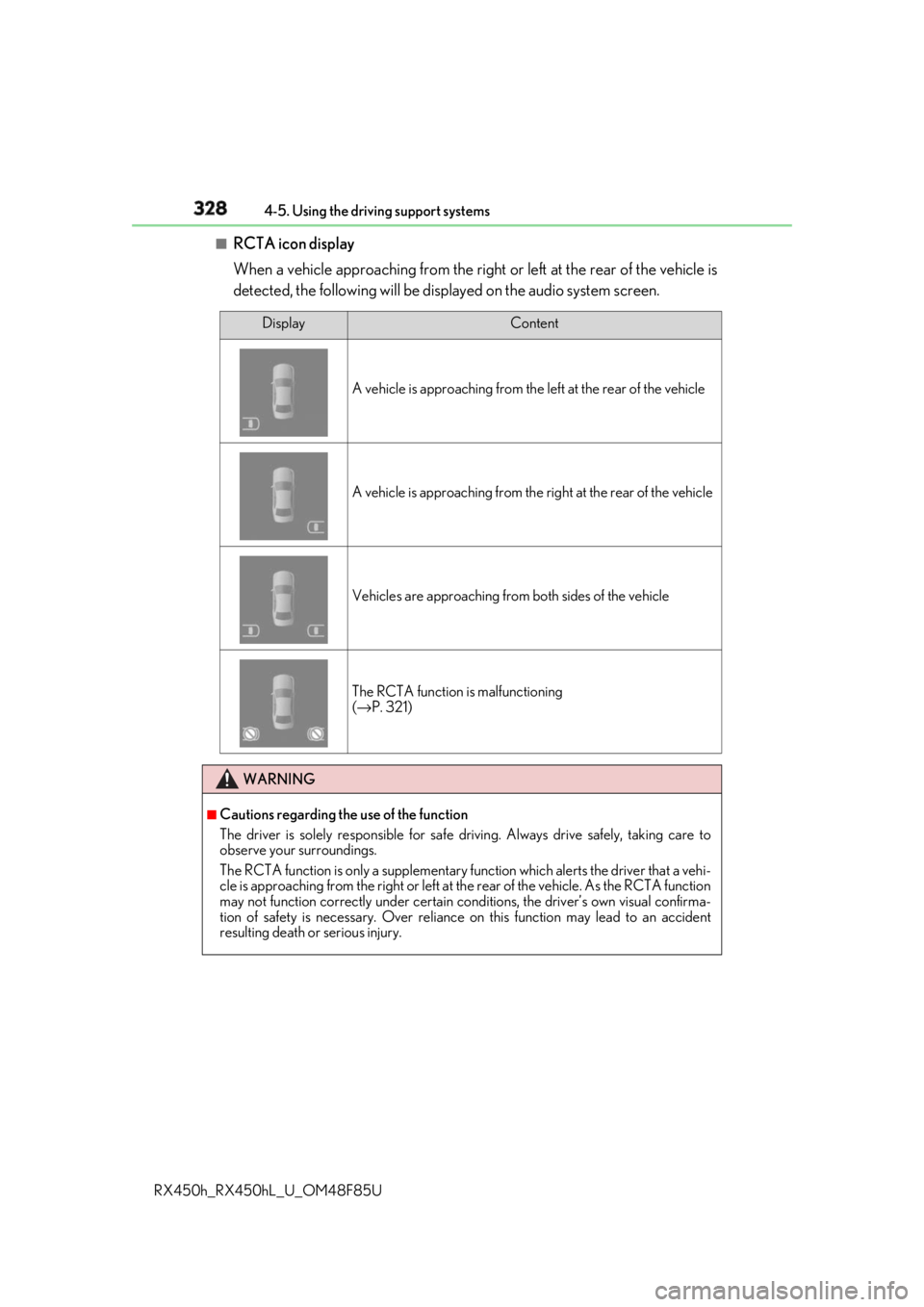
RCTA icon display
When a vehicle approaching from the right or left at the rear of the vehicle is
detected, the following will be displayed on the audio system screen. Display Content
A vehicle is approaching from the left at the rear of the vehicle
A vehicle is approaching from the right at the rear of the vehicle
Vehicles are approaching from both sides of the vehicle
The RCTA function is malfunctioning
( → P. 321)
WARNING ■
Cautions regarding the use of the function
The driver is solely responsible for safe driving. Always drive safely, taking care to
observe your surroundings.
The RCTA function is only a supplementary function which alerts the driver that a vehi-
cle is approaching from the right or left at the rear of the vehicle. As the RCTA function
may not function correctly under certain cond itions, the driver’s own visual confirma-
tion of safety is necessary. Over reliance on this function may lead to an accident
resulting death or serious injury.
Page 338 of 792
338 4-5. Using the driving support systems
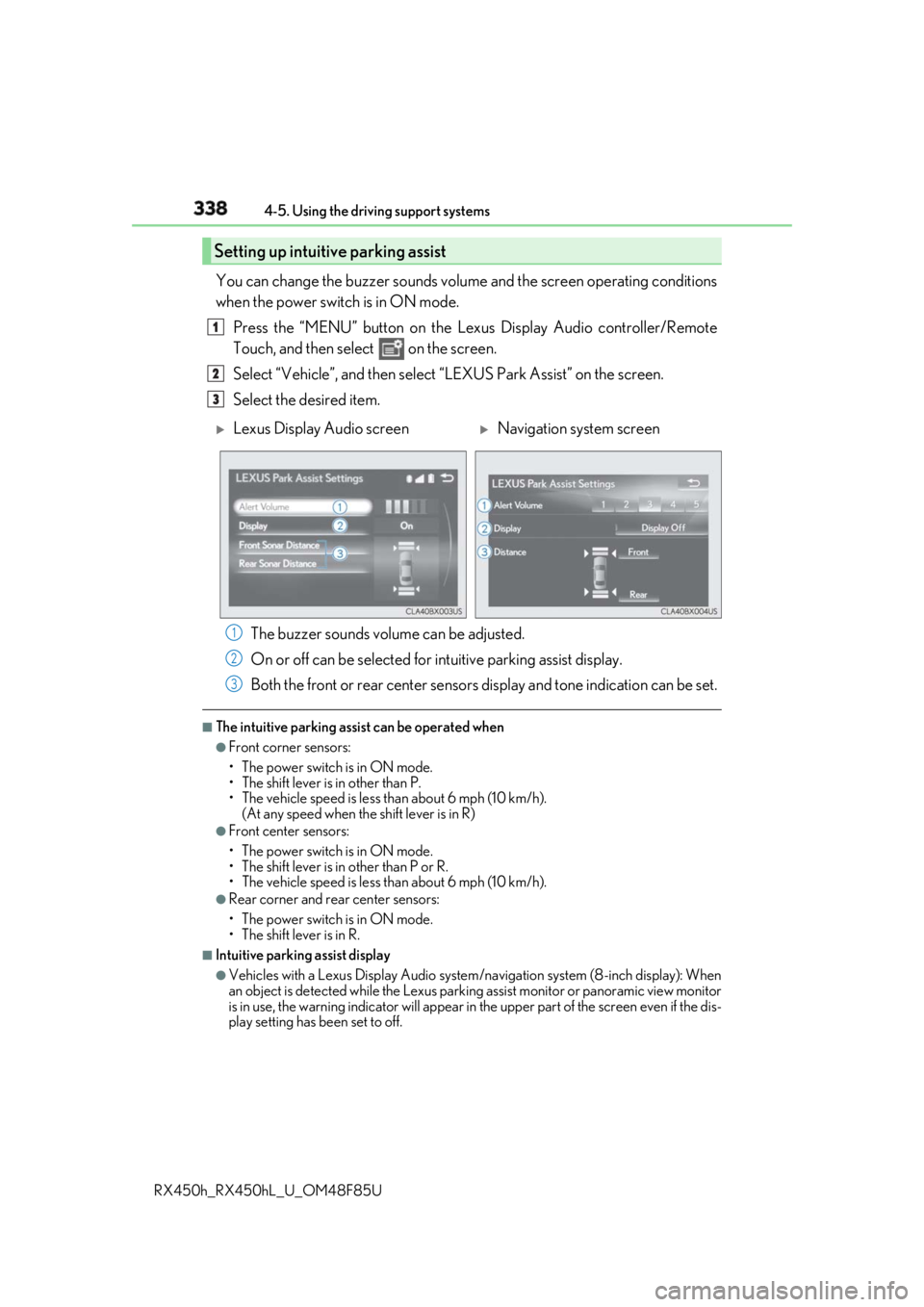
RX450h_RX450hL _U_OM48F85UYou can change the buzzer sounds volu me and the screen operating conditions
when the power switch is in ON mode.
Press the “MENU” button on the Le xus Display Audio controller/Remote
Touch, and then select on the screen.
Select “Vehicle”, and then select “LEXUS Park Assist” on the screen.
Select the desired item.
The buzzer sounds volume can be adjusted.
On or off can be selected for intuitive parking assist display.
Both the front or rear center sensors display and tone indication can be set.■
The intuitive parking assist can be operated when ●
Front corner sensors:
• The power switch is in ON mode.
• The shift lever is in other than P.
• The vehicle speed is less than about 6 mph (10 km/h).
(At any speed when the shift lever is in R) ●
Front center sensors:
• The power switch is in ON mode.
• The shift lever is in other than P or R.
• The vehicle speed is less than about 6 mph (10 km/h). ●
Rear corner and rear center sensors:
• The power switch is in ON mode.
• The shift lever is in R. ■
Intuitive parking assist display ●
Vehicles with a Lexus Display Audio system/navigation system (8-inch display): When
an object is detected while the Lexus parking assist monito r or panoramic view monitor
is in use, the warning indicator will appear in the up per part of the scre en even if the dis-
play setting has been set to off.Setting up intuitive parking assist 1
2
3
Lexus Display Audio screen
Navigation system screen
1
2
3
Page 340 of 792
340 4-5. Using the driving support systems
RX450h_RX450hL _U_OM48F85U■
If “Clean Parking Assist Sensor” is di splayed on the multi- information display
A sensor may be dirty or covered with snow or ic e. In such cases, if it is removed from the
sensor, the system should return to normal.
Also, due to the sensor being frozen at low temperatures, a malfunction display may
appear or an object may not be detected. If the sensor thaws out, the system should
return to normal. ■
If “Parking Assist Malfunction” is di splayed on the multi- information display
Depending on the malfunction of the sensor, the device may not be working normally.
Have the vehicle inspected by your Lexus dealer. ■
Certification
For vehicles sold in Canada
This ISM device complies with Canadian ICES-001.
Cet appareil ISM est conforme a la norme NMB-001 du Canada. ■
Customization
Some functions can be customized. ( → P. 338, 736)
WARNING ■
When using the intuitive parking assist
Observe the following precautions.
Failing to do so may result in the vehicle be ing unable to be driv en safely and possibly
cause an accident. ●
Do not use the sensor at speeds in excess of 6 mph (10 km/h). ●
The sensors’ detection areas and reaction ti mes are limited. When moving forward or
reversing, check the areas surrounding the vehicle (especially th e sides of the vehi-
cle) for safety, and drive slowly, using the brake to control the vehicle’s speed. ●
Do not install accessories within the sensors’ detection areas.●
The vehicle is equipped with a fender pole or wireless antenna. ●
The front or rear bumper or a se nsor receives a strong impact.●
A non-genuine Lexus suspension (lower ed suspension, etc.) is installed.●
Towing eyelets are installed. ●
A backlit licence plate is installed. ■
When using intuitive parking assist
In the following situations, the system may not function correctly due to a sensor mal-
function, etc. Have the vehicle checked by your Lexus dealer. ●
The intuitive parking assist operation disp lay flashes, and a buzzer sounds when no
obstacles are detected. ●
If the area around a sensor co llides with something, or is subjected to strong impact.●
If the bumper collides with something. ●
If the display shows continuously withou t beeping, except when the buzzer mute
switch has been turned on. ●
If a display error occurs , first check the sensor.
If the error occurs even if there is no ice, sn ow or mud on the sensor, it is likely that the
sensor is malfunctioning.