bluetooth LEXUS RX450h 2018 User Guide
[x] Cancel search | Manufacturer: LEXUS, Model Year: 2018, Model line: RX450h, Model: LEXUS RX450h 2018Pages: 792, PDF Size: 12.5 MB
Page 449 of 792
449
5
Lexus Display Audio system
RX450h_RX450hL _U_OM48F85U 5-7. Connecting Bluetooth ®
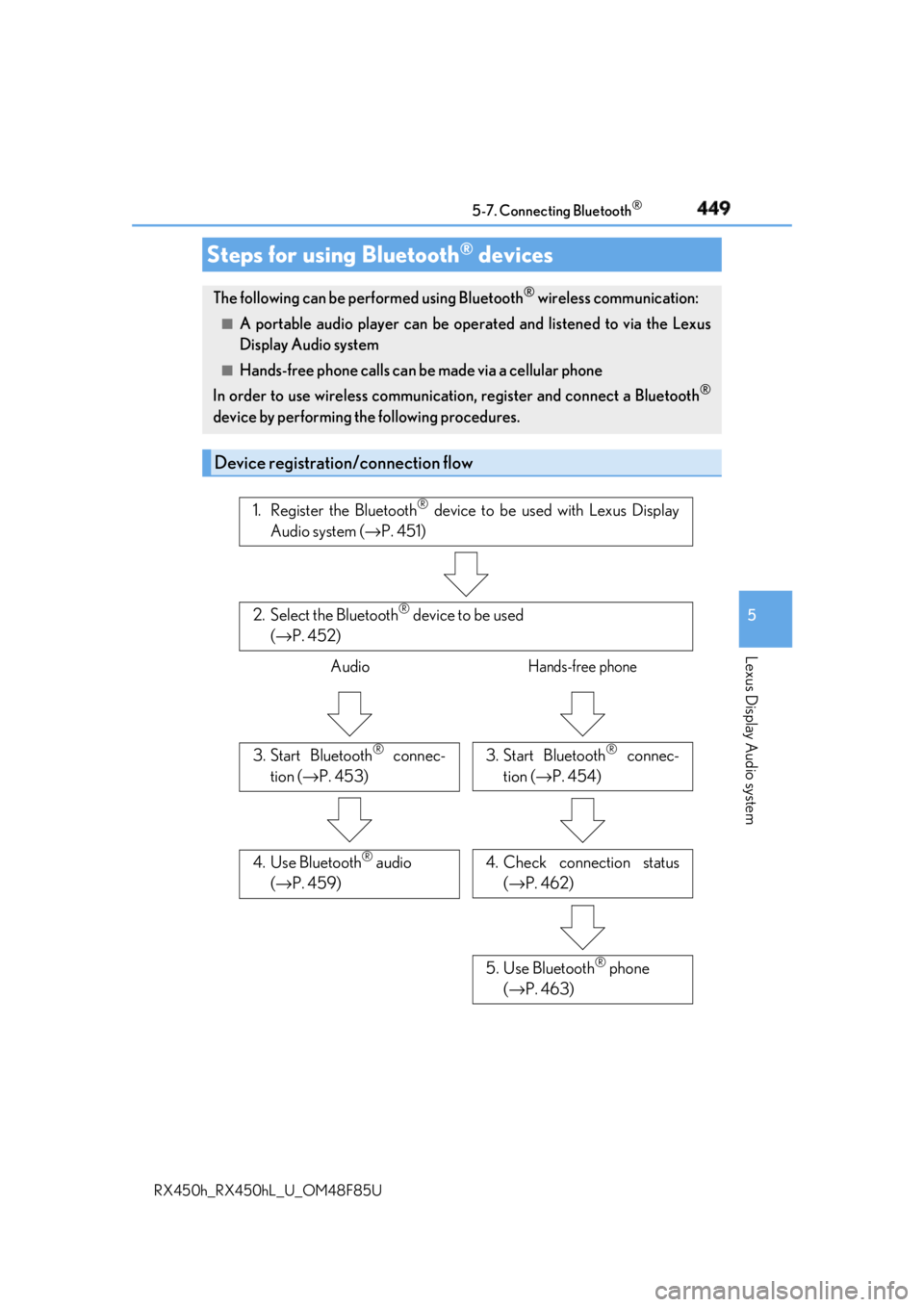
Steps for using Bluetooth ®
devicesThe following can be performed using Bluetooth ®
wireless communication:■
A portable audio player can be operated and listened to via the Lexus
Display Audio system ■
Hands-free phone calls can be made via a cellular phone
In order to use wireless communication, register and connect a Bluetooth ®
device by performing the following procedures.
Device registration/connection flow 1. Register the Bluetooth ®
device to be used with Lexus Display
Audio system ( → P. 451)
2. Select the Bluetooth ®
device to be used
( → P. 452)
Audio Hands-free phone
3. Start Bluetooth ®
connec-
tion ( → P. 453) 3. Start Bluetooth ®
connec-
tion ( → P. 454)
4. Check connection status
( → P. 462)4. Use Bluetooth ®
audio
( → P. 459)
5. Use Bluetooth ®
phone
( → P. 463)
Page 450 of 792

450 5-7. Connecting Bluetooth ®
RX450h_RX450hL _U_OM48F85UGo to “Bluetooth
* Setup”: “MENU” button → “Setup” → “Bluetooth
* ”
* : Bluetooth is a registered tr ademark of Bluetooth SIG, Inc.■
When displaying “Bluetooth
* Setup” screen from the “Bluetooth
* Audio” screen
Display the “Bluetooth
* Audio” screen. ( → P. 459)
Move the controller to the left and select “Connect”.■
When displaying “Bluetooth
* Setup” screen from the phone top screen
Display the phone top screen. ( → P. 461)
Move the controller to the left and select “Connect Phone”.
* : Bluetooth is a registered trad emark of Bluetooth SIG, Inc.“Bluetooth
* Setup” screen 1
2
1
2
Page 451 of 792
4515-7. Connecting Bluetooth ®
5
Lexus Display Audio system
RX450h_RX450hL _U_OM48F85UTurn the Bluetooth ®
connection setting of your device set to on.
Go to “Bluetooth
* Setup”: “MENU” button → “Setup” → “Bluetooth
* ”
Move the controller to the left and then select “Add Device”.
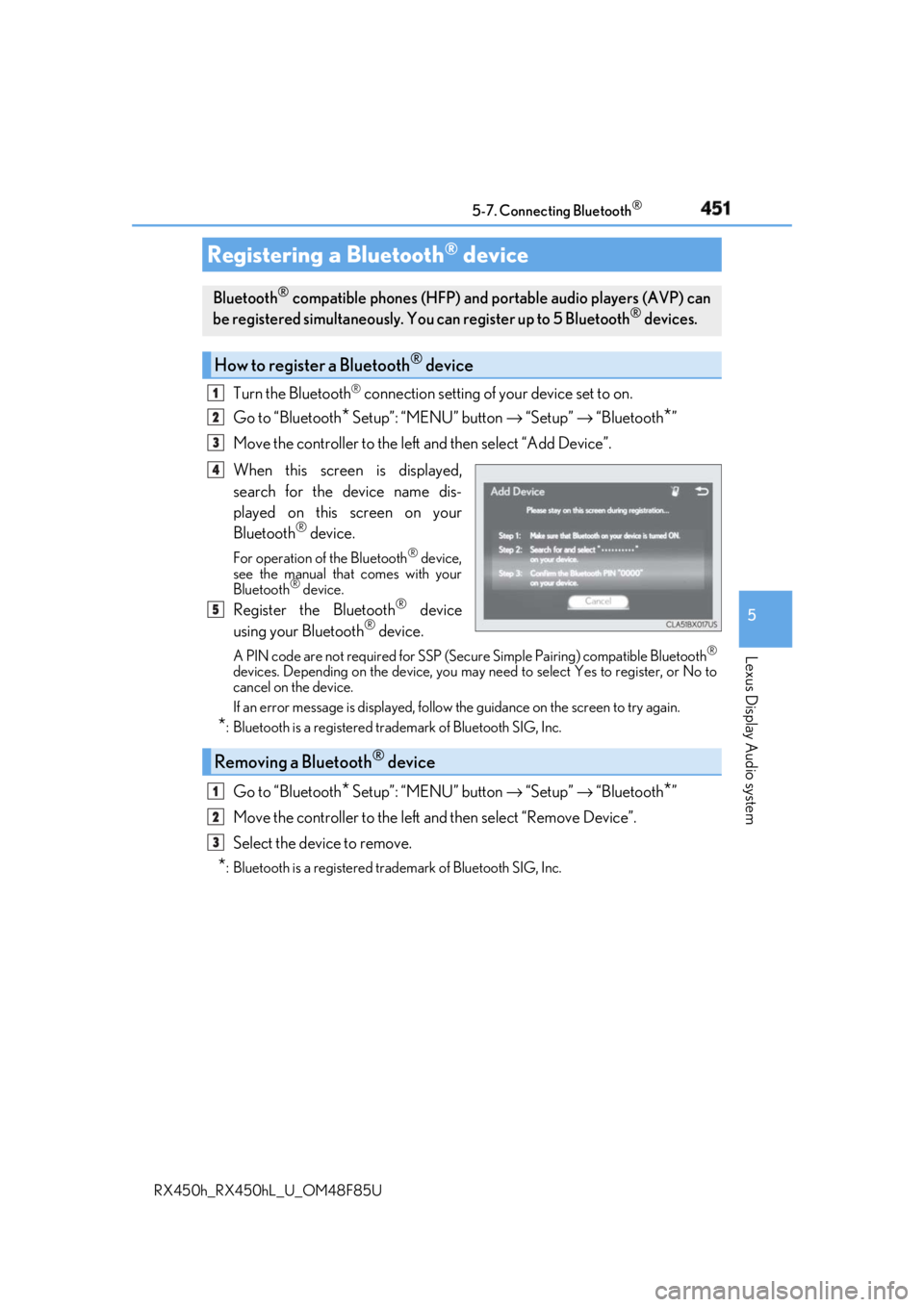
When this screen is displayed,
search for the device name dis-
played on this screen on your
Bluetooth ®
device.For operation of the Bluetooth ®
device,
see the manual that comes with your
Bluetooth ®
device.
Register the Bluetooth ®
device
using your Bluetooth ®
device.A PIN code are not required for SSP (Secur e Simple Pairing) compatible Bluetooth ®
devices. Depending on the device, you may need to select Yes to register, or No to
cancel on the device.
If an error message is disp layed, follow the guidance on the screen to try again.
* : Bluetooth is a registered trademark of Bluetooth SIG, Inc.
Go to “Bluetooth
* Setup”: “MENU” button → “Setup” → “Bluetooth
* ”
Move the controller to the left and then select “Remove Device”.
Select the device to remove.
* : Bluetooth is a registered trademark of Bluetooth SIG, Inc.Registering a Bluetooth ®
deviceBluetooth ®
compatible phones (HFP) and portable audio players (AVP) can
be registered simultaneously. You can register up to 5 Bluetooth ®
devices.
How to register a Bluetooth ®
device1
2
3
4
5
Removing a Bluetooth ®
device 1
2
3
Page 452 of 792
452 5-7. Connecting Bluetooth ®
RX450h_RX450hL _U_OM48F85UGo to “Bluetooth
* 1
Setup”: “MENU” button → “Setup” → “Bluetooth
* 1
”
Select the device to connect.
Select “Connect XX
* 2
”, “Connect as a Phone” or “Connect as an Audio
Player”.
“Connect XX
* 2
” means connect both the phon e and audio functions of one
device.
If the desired Bluetooth ®
device is not displayed, register the device.
( → P. 451)
* 1
: Bluetooth is a registered trademark of Bluetooth SIG, Inc.
* 2
: XX represents the selected device name.Selecting a Bluetooth ®
deviceIf multiple Bluetooth ®
devices are registered, follow the procedure below to
select the Bluetooth ®
device to be used. You ma y only use one device at a
time.
How to select a Bluetooth ®
device1
2
3
Page 453 of 792
4535-7. Connecting Bluetooth ®
5
Lexus Display Audio system
RX450h_RX450hL _U_OM48F85UWhen a registered Bluetooth ®
audio player is in standby for a connection, it will
automatically connect to the system when the power switch is turned to ACCES-
SORY or ON mode.
When automatic connection priority is se t to on and there is more than one reg-
istered Bluetooth ®
audio player available, the system will automatically connect
to the Bluetooth ®
audio player with the highest priority. ( → P. 456)
Operate the portable player and connect it to the Bluetooth ®
audio system.
Go to “Bluetooth
* 1
Setup”: “MENU” button → “Setup” → “Bluetooth
* 1
”
Select the device to connect.
Select “Connect XX
* 2
” or “Connect as an Audio Player”.
If the desired Bluetooth ®
device is not displayed, register the device.
( → P. 451)
* 1
: Bluetooth is a registered trademark of Bluetooth SIG, Inc.
* 2
: XX represents the selected device name.Connecting a Bluetooth ®
audio playerThere are 2 portable audio player conne ction settings available: connecting
from the vehicle and connectin g from the portable player.
Connecting method is set to “Vehicle”
Connecting method is set to “Device” 1
2
3
Page 454 of 792
454 5-7. Connecting Bluetooth ®
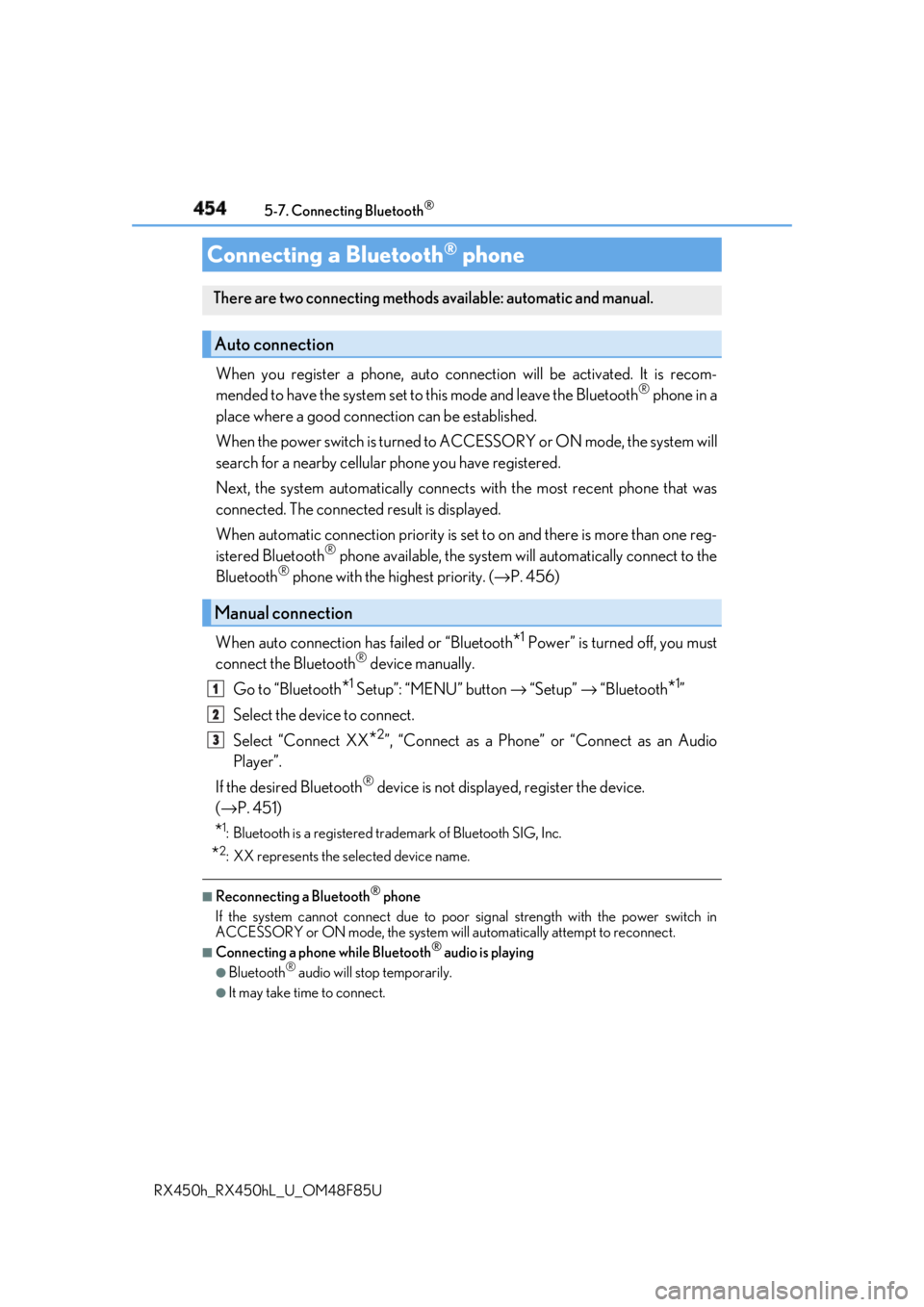
RX450h_RX450hL _U_OM48F85UWhen you register a phone, auto conn ection will be activated. It is recom-
mended to have the system set to this mode and leave the Bluetooth ®
phone in a
place where a good connection can be established.
When the power switch is turned to ACCESSORY or ON mode, the system will
search for a nearby cellular phone you have registered.
Next, the system automatically connects with the most recent phone that was
connected. The connected result is displayed.
When automatic connection priority is se t to on and there is more than one reg-
istered Bluetooth ®
phone available, the system will automatically connect to the
Bluetooth ®
phone with the highest priority. ( → P. 456)
When auto connection has failed or “Bluetooth
* 1
Power” is turned off, you must
connect the Bluetooth ®
device manually.
Go to “Bluetooth
* 1
Setup”: “MENU” button → “Setup” → “Bluetooth
* 1
”
Select the device to connect.
Select “Connect XX
* 2
”, “Connect as a Phone” or “Connect as an Audio
Player”.
If the desired Bluetooth ®
device is not displayed, register the device.
( → P. 451)
* 1
: Bluetooth is a registered trademark of Bluetooth SIG, Inc.
* 2
: XX represents the selected device name. ■
Reconnecting a Bluetooth ®
phone
If the system cannot connect due to poor signal strength with the power switch in
ACCESSORY or ON mode, the system will automatically attempt to reconnect. ■
Connecting a phone while Bluetooth ®
audio is playing●
Bluetooth ®
audio will stop temporarily.●
It may take time to connect.Connecting a Bluetooth ®
phoneThere are two connecting methods available: automatic and manual.
Auto connection
Manual connection 1
2
3
Page 455 of 792
4555-7. Connecting Bluetooth ®
5
Lexus Display Audio system
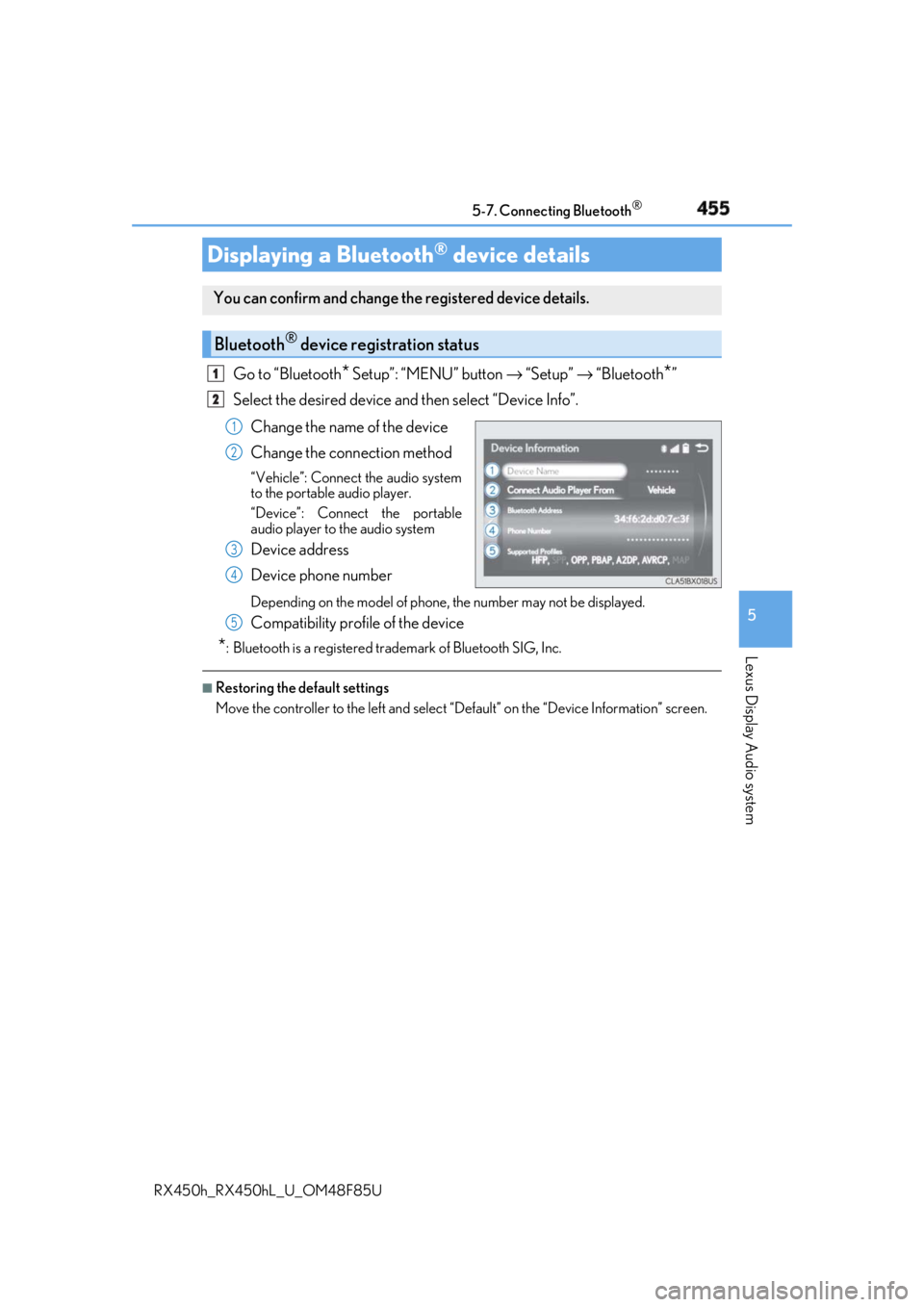
RX450h_RX450hL _U_OM48F85UGo to “Bluetooth
* Setup”: “MENU” button → “Setup” → “Bluetooth
* ”
Select the desired device and then select “Device Info”.
Change the name of the device
Change the connection method “Vehicle”: Connect the audio system
to the portable audio player.
“Device”: Connect the portable
audio player to the audio system
Device address
Device phone number Depending on the model of phone, the number may not be displayed.
Compatibility profile of the device
* : Bluetooth is a registered trademark of Bluetooth SIG, Inc. ■
Restoring the default settings
Move the controller to the left and select “D efault” on the “Device Information” screen.Displaying a Bluetooth ®
device detailsYou can confirm and change th e registered device details.
Bluetooth ®
device registration status 1
2
1
2
3
4
5
Page 456 of 792
456 5-7. Connecting Bluetooth ®
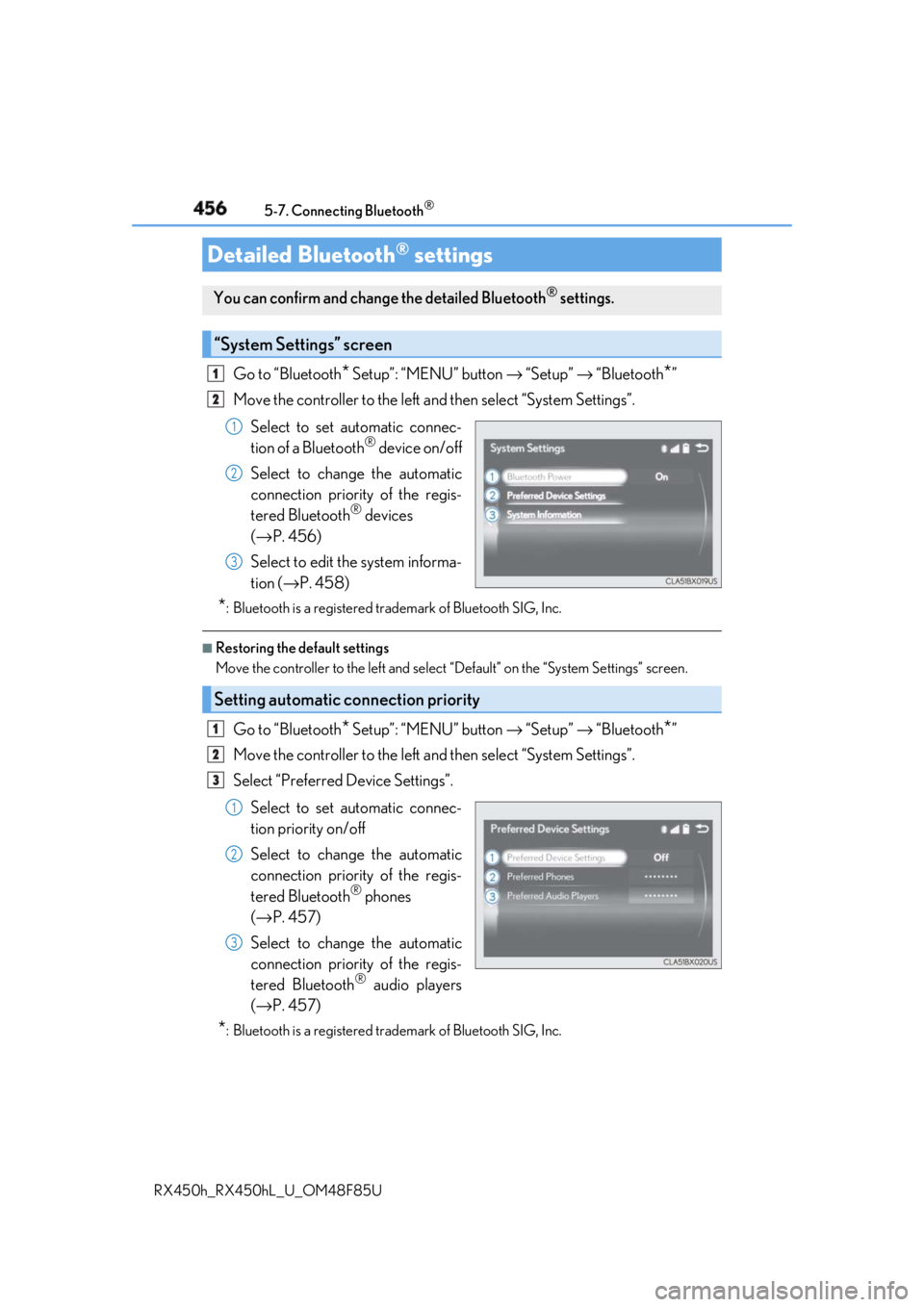
RX450h_RX450hL _U_OM48F85UGo to “Bluetooth
* Setup”: “MENU” button → “Setup” → “Bluetooth
* ”
Move the controller to the left an d then select “System Settings”.
Select to set automatic connec-
tion of a Bluetooth ®
device on/off
Select to change the automatic
connection priority of the regis-
tered Bluetooth ®
devices
( → P. 456)
Select to edit the system informa-
tion ( → P. 458)
* : Bluetooth is a registered trademark of Bluetooth SIG, Inc. ■
Restoring the default settings
Move the controller to the left and select “Default” on the “System Settings” screen.
Go to “Bluetooth
* Setup”: “MENU” button → “Setup” → “Bluetooth
* ”
Move the controller to the left an d then select “System Settings”.
Select “Preferred Device Settings”.
Select to set automatic connec-
tion priority on/off
Select to change the automatic
connection priority of the regis-
tered Bluetooth ®
phones
( → P. 457)
Select to change the automatic
connection priority of the regis-
tered Bluetooth ®
audio players
( → P. 457)
* : Bluetooth is a registered trademark of Bluetooth SIG, Inc.Detailed Bluetooth ®
settingsYou can confirm and change the detailed Bluetooth ®
settings.
“System Settings” screen 1
2
1
2
3
Setting automatic connection priority 1
2
3
1
2
3
Page 457 of 792
4575-7. Connecting Bluetooth ®
5
Lexus Display Audio system
RX450h_RX450hL _U_OM48F85U■
Restoring the default settings
Move the controller to the left and select “D efault” on the “Preferred Device Settings”
screen.
Go to “Bluetooth
* Setup”: “MENU” button → “Setup” → “Bluetooth
* ”
Move the controller to the left an d then select “System Settings”.
Select “Preferred Device Settings”.
If “Preferred Device Settings” is set to off, set it to on.
To change the automatic connection pr iority of the registered Bluetooth ®
phones, select “Preferred Phones”. To change the automatic connection pri-
ority of the registered Bluetooth ®
audio players, select “Preferred Audio
Players”.
Select the desired Bluetooth ®
device.
Move the controller to the left and then select “Up” or “Down” to change the
preferred order.
A newly registered Bluetooth ®
device will automatically be given the highest
automatic connection priority.
* : Bluetooth is a registered trademark of Bluetooth SIG, Inc.Changing Bluetooth ®
device automatic connection priority 1
2
3
4
5
6
7
Page 458 of 792
458 5-7. Connecting Bluetooth ®
RX450h_RX450hL _U_OM48F85UGo to “Bluetooth
* Setup”: “MENU” button → “Setup” → “Bluetooth
* ”
Move the controller to the left an d then select “System Settings”.
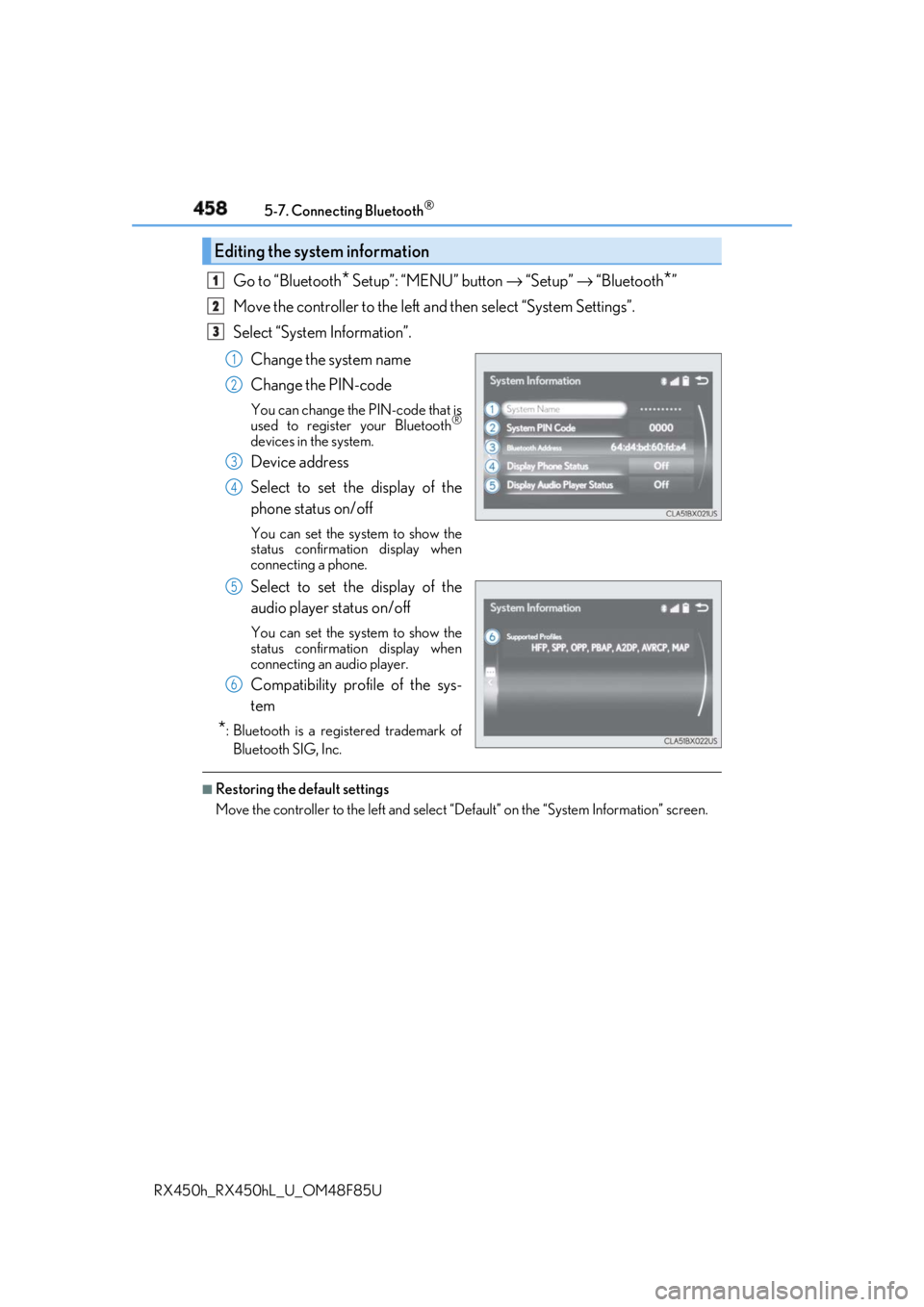
Select “System Information”.
Change the system name
Change the PIN-code You can change the PIN-code that is
used to register your Bluetooth ®
devices in the system.
Device address
Select to set the display of the
phone status on/off You can set the system to show the
status confirmation display when
connecting a phone.
Select to set the display of the
audio player status on/off You can set the system to show the
status confirmation display when
connecting an audio player.
Compatibility profile of the sys-
tem
* : Bluetooth is a registered trademark of
Bluetooth SIG, Inc. ■
Restoring the default settings
Move the controller to the left and select “D efault” on the “System Information” screen.Editing the system information 1
2
3
1
2
3
4
5
6