turn signal LEXUS RX450h 2018 User Guide
[x] Cancel search | Manufacturer: LEXUS, Model Year: 2018, Model line: RX450h, Model: LEXUS RX450h 2018Pages: 792, PDF Size: 12.5 MB
Page 264 of 792

264 4-3. Operating the lights and wipers
RX450h_RX450hL _U_OM48F85U■
Conditions to turn the high beams on/off automatically●
When all of the following conditions are met, the high beams will be turned on automat-
ically (after approximately 1 second):
• The vehicle speed is approximately 21 mph (34 km/h) or more.
• The area ahead of the vehicle is dark.
• There are no vehicles ahead with headlights or tail lights turned on.
• There are few streetlights on the road ahead. ●
If any of the following condit ions is met, the high beams will turn off automatically:
• The vehicle speed is below ap proximately 17 mph (27 km/h).
• The area ahead of the vehicle is not dark.
• Vehicles ahead have th eir headlights or tail lights turned on.
• There are many streetlights on the road ahead. ■
Camera sensor detection information ●
The high beams may not be automatically turned off in the following situations:
• When a vehicle suddenly appears from around a curve
• When the vehicle is cut in front of by another vehicle
• When vehicles ahead cannot be detected du e to repeated curves , road dividers or
roadside trees
• When vehicles ahead appear in a faraway lane on a wide road
• When the lights of vehicles ahead are not on ●
The high beams may be turned off if a vehicl e ahead that is using fog lights without its
headlights turned on is detected. ●
House lights, street lights, traffic signals, and illuminated billboards or signs and other
reflective objects may cause the high beams to change to the low beams, or the low
beams to remain on. ●
The following factors may affect the amount of time taken for the high beams to turn on
or off:
• The brightness of the headlights, fog lights, and tail lights of vehicles ahead
• The movement and direction of vehicles ahead
• When a vehicle ahead only has operational lights on one side
• When a vehicle ahead is a two-wheeled vehicle
• The condition of the road (gradient, cu rve, condition of the road surface, etc.)
• The number of passengers and amount of luggage in the vehicle ●
The high beams may turn on or off unexpectedly. ●
Bicycles or similar vehicles may not be detected.
Page 303 of 792

3034-5. Using the driving support systems
4
Driving
RX450h_RX450hL _U_OM48F85U■
Operation conditions of each function ●
Lane departure alert function
This function operates when all of the following conditions are met.
• LKA is turned on.
• Vehicle speed is approximatel y 32 mph (50 km/h) or more.
• System recognizes white (yellow) lines.
• Width of traffic lane is approx imately 9.8 ft. (3 m) or more.
• Turn signal lever is not operated.
• Vehicle is driven on a stra ight road or around a gentle curve with a radius of more
than approximately 492 ft. (150 m).
• No system malfunctions are detected. ( → P. 660)●
Steering assist function
This function operates when all of the follo wing conditions are met in addition to the
operation conditions for the lane departure alert function.
• Setting for “Steering Assist” in of the multi-information display is set to “On”.
( → P. 108)
• Vehicle is not accelerated or dece lerated by a fixed amount or more.
• Steering wheel is not operated with a steering force level suitable for changing
lanes.
• ABS, VSC, TRAC and PCS are not operating.
• TRAC or VSC is not turned off. ●
Vehicle sway warning
This function operates when all of the following conditions are met.
• Setting for “Sway Warning” in of the multi-information display is set to “On”.
( → P. 108)
• Vehicle speed is approximatel y 32 mph (50 km/h) or more.
• Width of traffic lane is approx imately 9.8 ft. (3 m) or more.
• No system malfunctions are detected. ( → P. 660)●
Lane centering function
This function operates when all of the following conditions are met.
• LKA is turned on.
• Setting for “Lane Center” in of the mu lti-information display are set to “On”.
( → P. 108)
• System recognizes white (yellow) lines.
• Dynamic radar cruise control with full-speed range is operating.
• Width of traffic lane is approximately 8.2 to 13.5 ft. (2.5 to 4.1 m).
• Turn signal lever is not operated.
• Vehicle is driven on a stra ight road or around a gentle curve with a radius of more
than approximately 656 ft. (200 m).
• No system malfunctions are detected. ( → P. 660)
• Vehicle does not accele rate or decelerate by a fixed amount or more.
• Steering wheel is not operated with a steering force level suitable for changing
lanes.
• ABS, VSC, TRAC and PCS are not operating.
• TRAC or VSC is not turned off.
• Steering assist function is not operating.
Page 320 of 792
320 4-5. Using the driving support systems
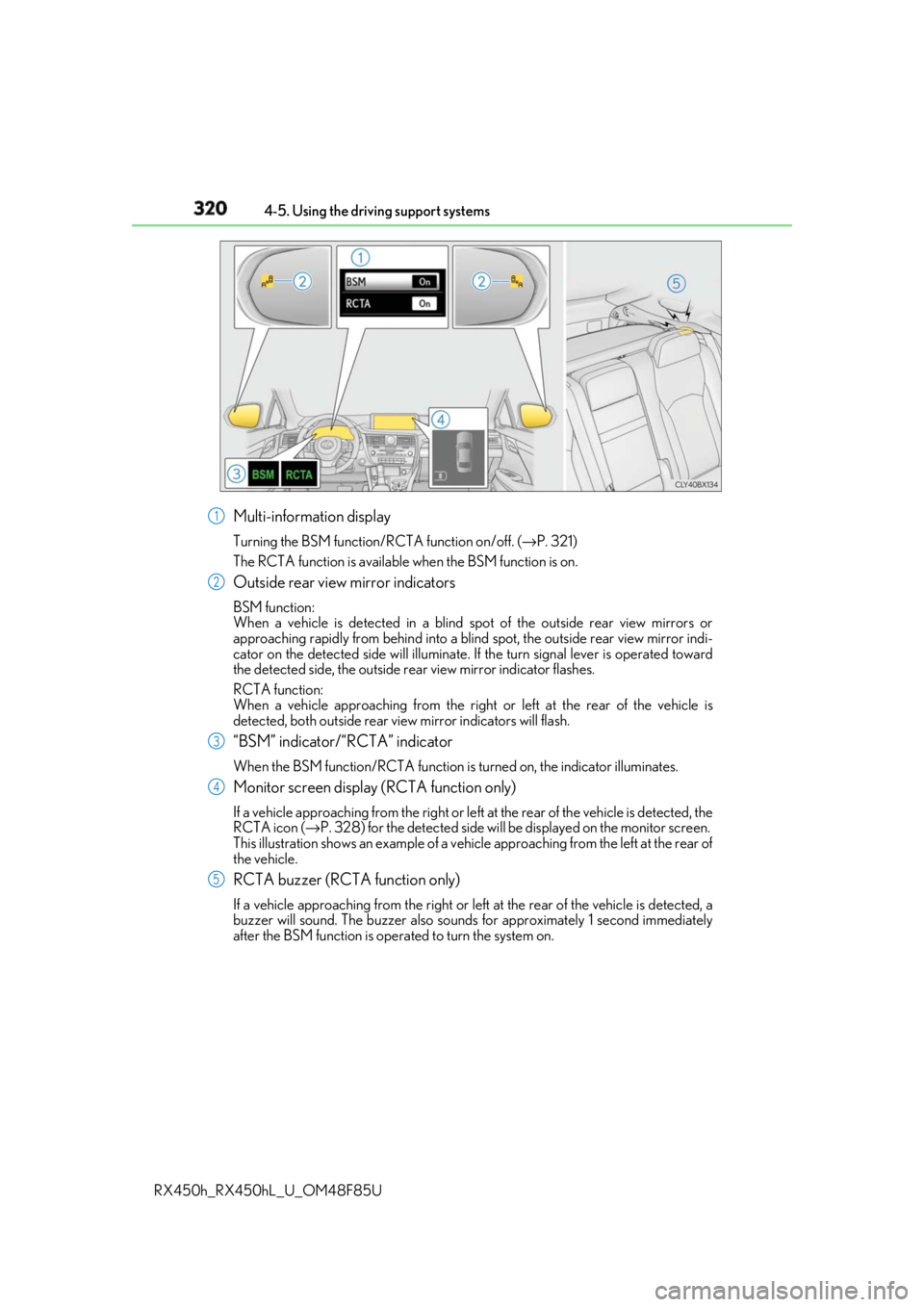
RX450h_RX450hL _U_OM48F85UMulti-information display Turning the BSM function/RCTA function on/off. ( → P. 321)
The RCTA function is available when the BSM function is on.
Outside rear view mirror indicators BSM function:
When a vehicle is detected in a blind spot of the outside rear view mirrors or
approaching rapidly from behind into a blin d spot, the outside rear view mirror indi-
cator on the detected side will illuminate. If the turn signal lever is operated toward
the detected side, the outside rear view mirror indicator flashes.
RCTA function:
When a vehicle approaching from the right or left at the rear of the vehicle is
detected, both outsid e rear view mirror indicators will flash.
“BSM” indicator/“RCTA” indicator When the BSM function/RCTA function is turned on, the indicator illuminates.
Monitor screen display (RCTA function only) If a vehicle approaching from the right or left at the rear of the vehicle is detected, the
RCTA icon ( → P. 328) for the detected side will be displayed on the monitor screen.
This illustration shows an example of a vehi cle approaching from the left at the rear of
the vehicle.
RCTA buzzer (RCTA function only) If a vehicle approaching from the right or left at the rear of the vehicle is detected, a
buzzer will sound. The buzzer also sounds for approximately 1 second immediately
after the BSM function is operated to turn the system on. 1
2
3
4
5
Page 376 of 792
376 4-5. Using the driving support systems
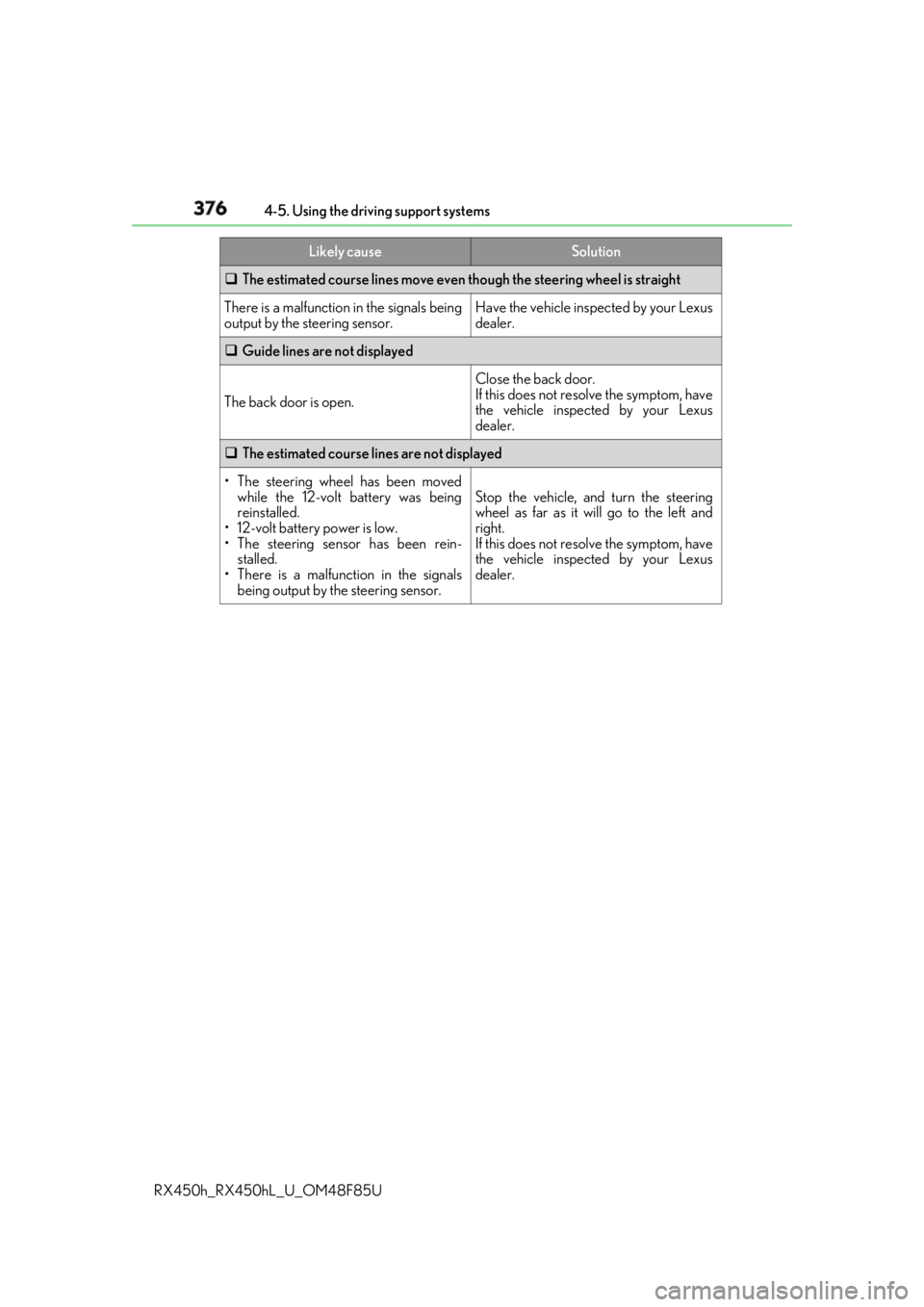
RX450h_RX450hL _U_OM48F85U The estimated course lines move even though the steering wheel is straight
There is a malfunction in the signals being
output by the steering sensor. Have the vehicle inspected by your Lexus
dealer.
Guide lines are not displayed
The back door is open. Close the back door.
If this does not resolve the symptom, have
the vehicle inspected by your Lexus
dealer.
The estimated course lines are not displayed
• The steering wheel has been moved
while the 12-volt battery was being
reinstalled.
• 12-volt battery power is low.
• The steering sensor has been rein-
stalled.
• There is a malfunction in the signals
being output by the steering sensor. Stop the vehicle, and turn the steering
wheel as far as it will go to the left and
right.
If this does not resolve the symptom, have
the vehicle inspected by your Lexus
dealer.Likely cause Solution
Page 429 of 792
4295-4. Using the radio
5
Lexus Display Audio system
RX450h_RX450hL _U_OM48F85U■
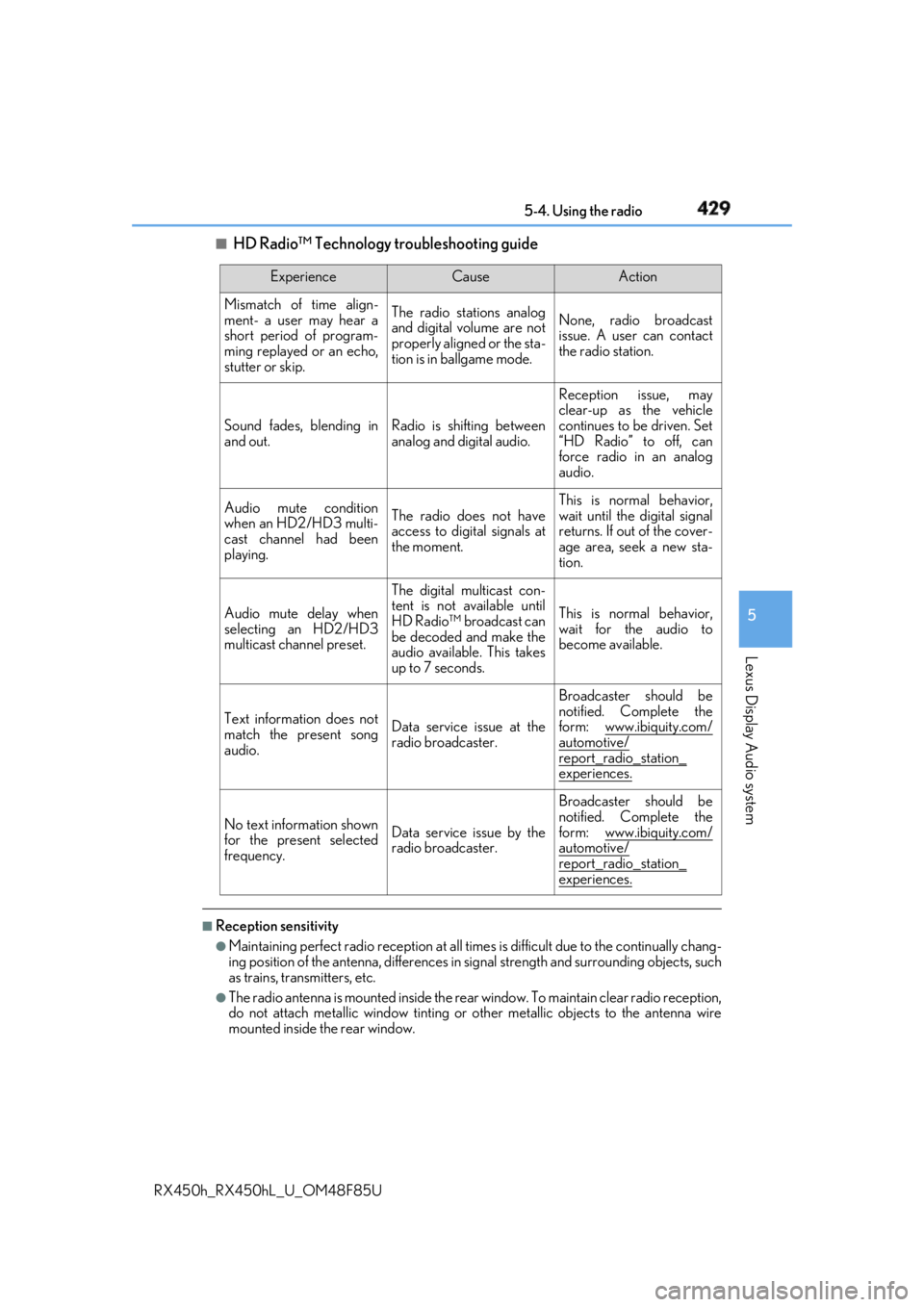
HD Radio™ Technology troubleshooting guide
■
Reception sensitivity ●
Maintaining perfect radio recept ion at all times is difficult due to the continually chang-
ing position of the antenna, differences in si gnal strength and surrounding objects, such
as trains, transmitters, etc. ●
The radio antenna is mounted inside the rear window. To maintain clear radio reception,
do not attach metallic window tinting or other metallic objects to the antenna wire
mounted inside the rear window. Experience Cause Action
Mismatch of time align-
ment- a user may hear a
short period of program-
ming replayed or an echo,
stutter or skip. The radio stations analog
and digital volume are not
properly aligned or the sta-
tion is in ballgame mode. None, radio broadcast
issue. A user can contact
the radio station.
Sound fades, blending in
and out. Radio is shifting between
analog and digital audio. Reception issue, may
clear-up as the vehicle
continues to be driven. Set
“HD Radio” to off, can
force radio in an analog
audio.
Audio mute condition
when an HD2/HD3 multi-
cast channel had been
playing. The radio does not have
access to digital signals at
the moment. This is normal behavior,
wait until the digital signal
returns. If out of the cover-
age area, seek a new sta-
tion.
Audio mute delay when
selecting an HD2/HD3
multicast channel preset. The digital multicast con-
tent is not available until
HD Radio™ broadcast can
be decoded and make the
audio available. This takes
up to 7 seconds. This is normal behavior,
wait for the audio to
become available.
Text information does not
match the present song
audio. Data service issue at the
radio broadcaster. Broadcaster should be
notified. Complete the
form: www.ibiquity.com/
automotive/
report_radio_station_
experiences.
No text information shown
for the present selected
frequency. Data service issue by the
radio broadcaster. Broadcaster should be
notified. Complete the
form: www.ibiquity.com/
automotive/
report_radio_station_
experiences.
Page 432 of 792
432 5-4. Using the radio
RX450h_RX450hL _U_OM48F85U■
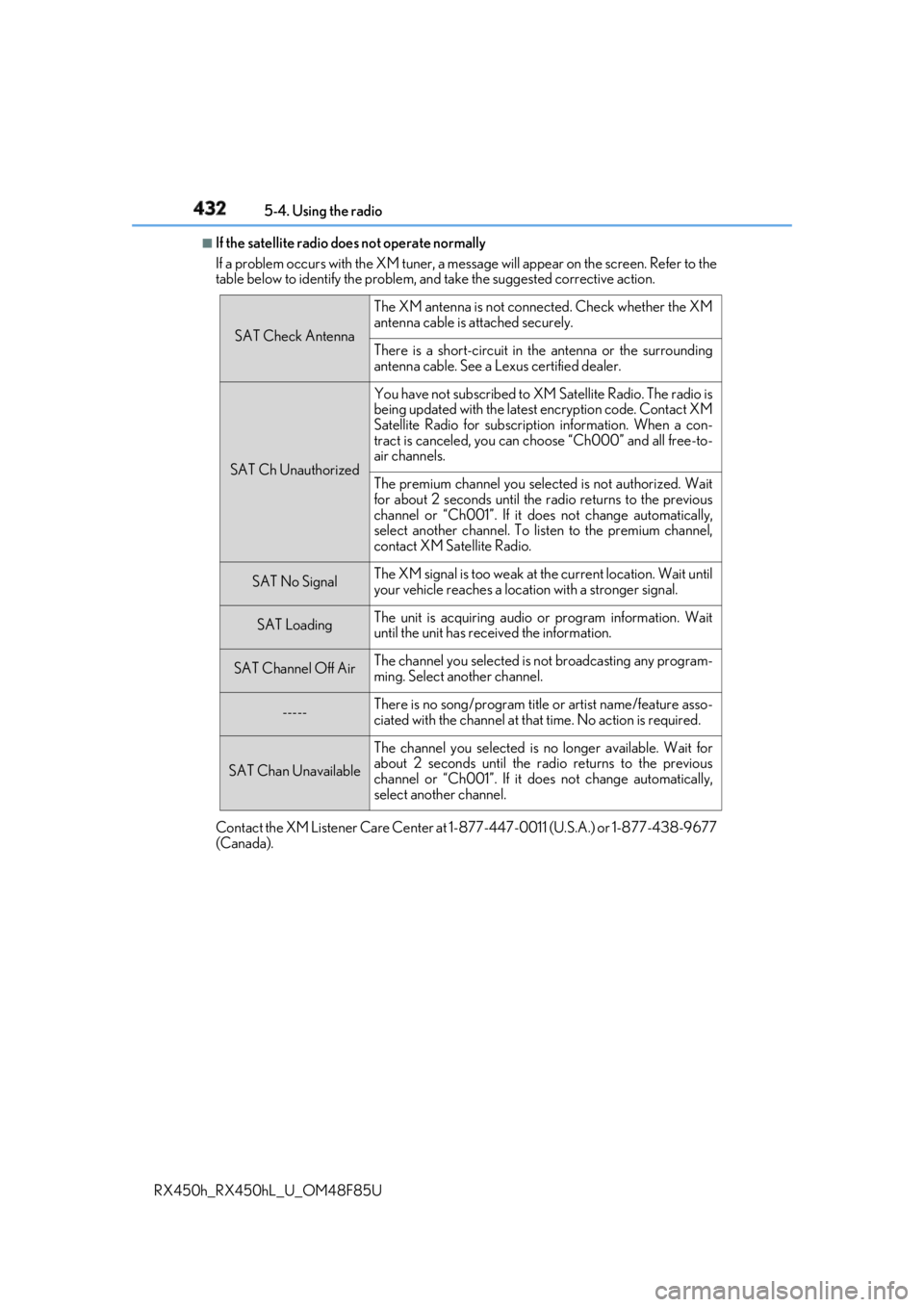
If the satellite radio does not operate normally
If a problem occurs with the XM tuner, a message will appear on the screen. Refer to the
table below to identify the problem, an d take the suggested corrective action.
Contact the XM Listener Care Center at 1-877-447-0011 (U.S.A.) or 1-877-438-9677
(Canada). SAT Check Antenna The XM antenna is not connected. Check whether the XM
antenna cable is attached securely.
There is a short-circuit in the antenna or the surrounding
antenna cable. See a Lexus certified dealer.
SAT Ch Unauthorized You have not subscribed to XM Satellite Radio. The radio is
being updated with the latest encryption code. Contact XM
Satellite Radio for subscripti on information. When a con-
tract is canceled, you can choose “Ch000” and all free-to-
air channels.
The premium channel you selected is not authorized. Wait
for about 2 seconds until the radio returns to the previous
channel or “Ch001”. If it does not change automatically,
select another channel. To listen to the premium channel,
contact XM Satellite Radio.
SAT No Signal The XM signal is too weak at the current location. Wait until
your vehicle reaches a location with a stronger signal.
SAT Loading The unit is acquiring audio or program information. Wait
until the unit has rece ived the information.
SAT Channel Off Air The channel you selected is not broadcasting any program-
ming. Select another channel.
----- There is no song/program title or artist name/feature asso-
ciated with the channel at that time. No action is required.
SAT Chan Unavailable The channel you selected is no longer available. Wait for
about 2 seconds until the radio returns to the previous
channel or “Ch001”. If it does not change automatically,
select another channel.
Page 454 of 792
454 5-7. Connecting Bluetooth ®
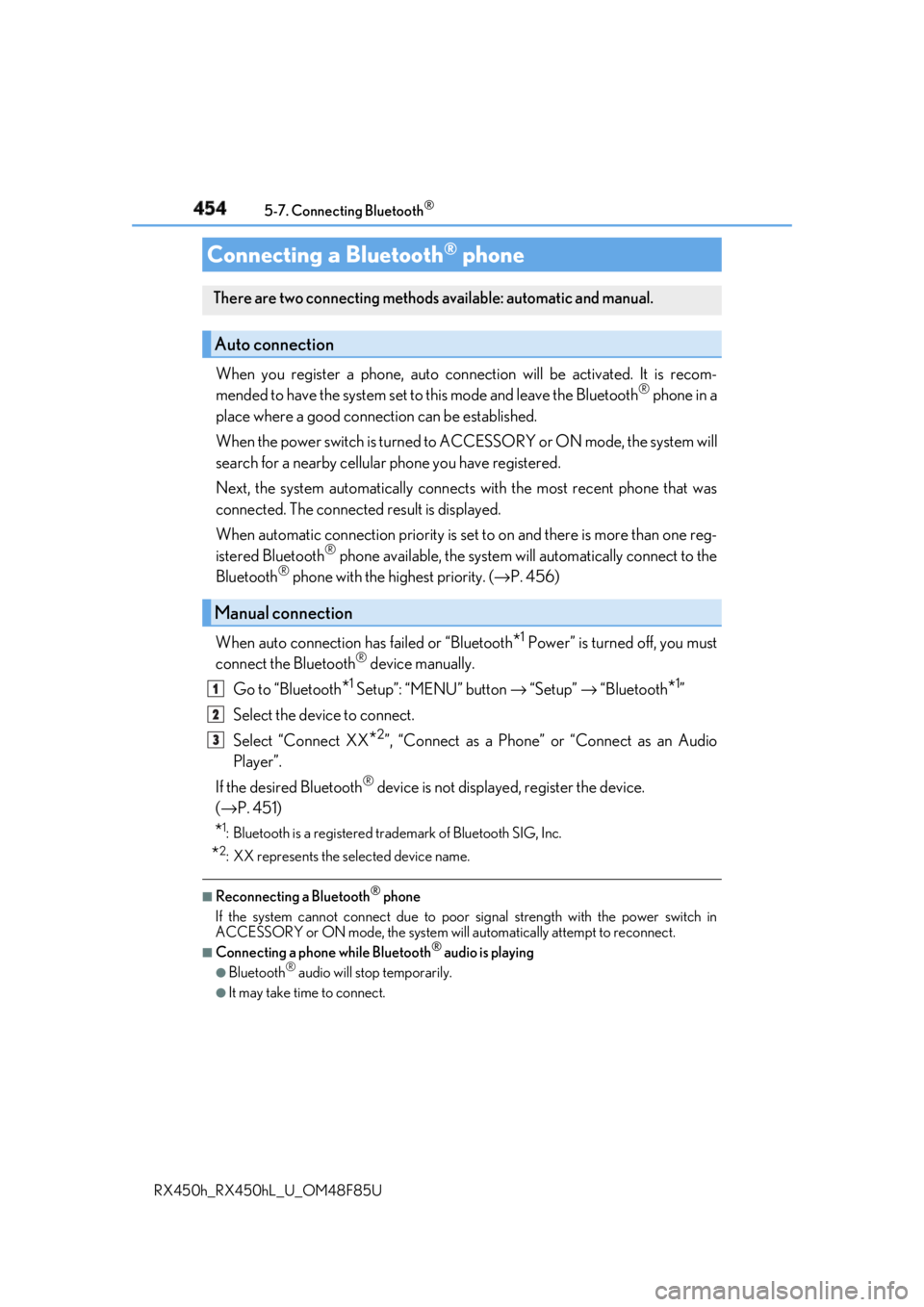
RX450h_RX450hL _U_OM48F85UWhen you register a phone, auto conn ection will be activated. It is recom-
mended to have the system set to this mode and leave the Bluetooth ®
phone in a
place where a good connection can be established.
When the power switch is turned to ACCESSORY or ON mode, the system will
search for a nearby cellular phone you have registered.
Next, the system automatically connects with the most recent phone that was
connected. The connected result is displayed.
When automatic connection priority is se t to on and there is more than one reg-
istered Bluetooth ®
phone available, the system will automatically connect to the
Bluetooth ®
phone with the highest priority. ( → P. 456)
When auto connection has failed or “Bluetooth
* 1
Power” is turned off, you must
connect the Bluetooth ®
device manually.
Go to “Bluetooth
* 1
Setup”: “MENU” button → “Setup” → “Bluetooth
* 1
”
Select the device to connect.
Select “Connect XX
* 2
”, “Connect as a Phone” or “Connect as an Audio
Player”.
If the desired Bluetooth ®
device is not displayed, register the device.
( → P. 451)
* 1
: Bluetooth is a registered trademark of Bluetooth SIG, Inc.
* 2
: XX represents the selected device name. ■
Reconnecting a Bluetooth ®
phone
If the system cannot connect due to poor signal strength with the power switch in
ACCESSORY or ON mode, the system will automatically attempt to reconnect. ■
Connecting a phone while Bluetooth ®
audio is playing●
Bluetooth ®
audio will stop temporarily.●
It may take time to connect.Connecting a Bluetooth ®
phoneThere are two connecting methods available: automatic and manual.
Auto connection
Manual connection 1
2
3
Page 573 of 792
5736-5. Using the other interior features
6
Interior features
RX450h_RX450hL _U_OM48F85U■
Safety Connect Serv ices Information●
Phone calls using the vehicles Bluetooth ®
technology will not be possible during Safety
Connect. ●
Safety Connect is available be ginning Fall 2009 on select Lexus models (in the contig-
uous United States only). Contact with th e Safety Connect respon se center is depen-
dent upon the telematics device being in operative condition, cellular connection
availability, and GPS sa tellite signal receptio n, which can limit the ability to reach the
response center or receive emergency se rvice support. Enro llment and Telematics
Subscription Service Agreement required. A va riety of subscription terms is available;
charges vary by subscription term selected and location. ●
Automatic Collision Notification, Emergenc y Assistance and Stolen Vehicle Location
will function in the United States, includin g Hawaii and Alaska, Puerto Rico and in Can-
ada, and Enhanced Roadside Assistance will function in the United States, Puerto Rico
and in Canada. ●
Automatic Collision Notification, Emergency Assistance, Stolen Vehicle Location and
Enhanced Roadside Assistance will not func tion in the United States Virgin Islands.
No Safety Connect services will function outs ide of the United States in countries other
than Canada.
For vehicles first sold in the USVI, no Safety Connect services will function in and out-
side the United States Virgin Islands. ●
Safety Connect services are not subject to section 255 of the Telecommunications Act
and the device is not TTY compatible. ■
Languages
The Safety Connect response ce nter will offer support in mu ltiple languages. The Safety
Connect system will offer voice prompts in English, Spanish and French. Please indicate
your language of ch oice when enrolling.■
When contacting the response center
You may be unable to contact the resp onse center if the network is busy.
When the power switch is turned to ON mode, the red indicator light comes on
for 2 seconds then turns off. Afterward, the green indi cator light comes on, indi-
cating that the service is active.
The following indicator light patterns indicate specific system usage conditions: ●
Green indicator light on = Active service ●
Green indicator light flashing = Safety Connect call in process●
Red indicator light (except at vehicle start-up) = System malfunction (contact
your Lexus dealer) ●
No indicator light (off) = Safety Connect service not activeSafety Connect LED light Indicators
Page 616 of 792
616 7-3. Do-it-yourself maintenance
RX450h_RX450hL _U_OM48F85U■
Situations in which the tire pressure warning system may not operate properly ●
In the following cases, the tire pressure warning system may not operate properly.
• If non-genuine Lexus wheels are used.
• A tire has been replaced with a tire that is not an OE (Original Equipment) tire.
• A tire has been replaced with a tire that is not of the specified size.
• Tire chains, etc. are equipped.
• If a window tint that affects th e radio wave signals is installed.
• If there is a lot of snow or ice on the vehi cle, particularly around the wheels or wheel
housings.
• If the tire inflation pressure is extr emely higher than the specified level.
• If wheel without the tire pressure warning valve and transmitter is used.
• If the ID code on the tire pressure warning valves and transmitters is not registered
in the tire pressure warning computer. ●
Performance may be affected in the following situations.
• Near a TV tower, electric power plant, gas station, radio station, large display, air-
port or other facility that generates st rong radio waves or electrical noise.
• When carrying a portable radio, cellular phone, cordless phon e or other wireless
communication device.
If tire position information is not correctl y displayed due to the radio wave conditions,
the display may be corrected by driving and changing the radio wave conditions. ●
When the vehicle is parked, the time taken for the warning to start or go off could be
extended. ●
When tire inflation pressure declines rapidly for example when a tire has burst, the
warning may not function. ■
The initialization operation ●
Make sure to carry out initialization afte r adjusting the tire inflation pressure.
Also, make sure the tires are cold before carryi ng out initialization or tire inflation pres-
sure adjustment. ●
If you have accidentally turned the power switch off during in itialization, it is not neces-
sary to press the reset switch again as initialization will re start automatically when the
power switch has been turned to ON mode for the next time. ●
If you accidentally press the re set switch when initialization is not necessary, adjust the
tire inflation pressure to the specified leve l when the tires are co ld, and conduct initial-
ization again. ●
While the position of each tire is being de termined and the inflation pressures are not
being displayed on the multi-info rmation display, if the inflat ion pressure of a tire drops,
the tire pressure warning light will come on.
Page 638 of 792
638 7-3. Do-it-yourself maintenance
RX450h_RX450hL _U_OM48F85U■
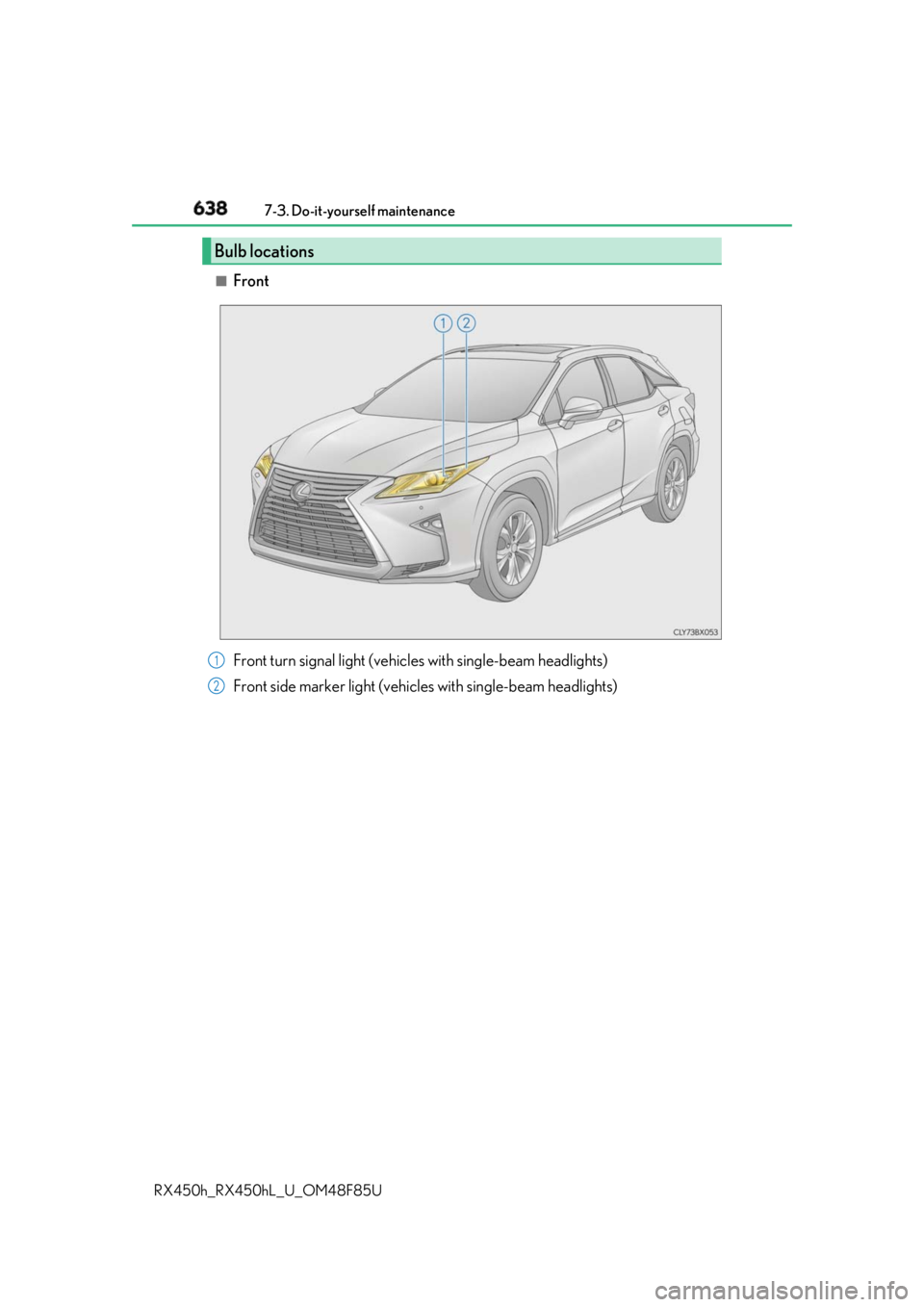
Front
Bulb locations
Front turn signal light (vehic les with single-beam headlights)
Front side marker light (vehic les with single-beam headlights)1
2