ECO mode LEXUS RX450h 2018 Owner's Manual
[x] Cancel search | Manufacturer: LEXUS, Model Year: 2018, Model line: RX450h, Model: LEXUS RX450h 2018Pages: 792, PDF Size: 12.5 MB
Page 184 of 792
184 3-3. Adjusting the seats
RX450h_RX450hL _U_OM48F85UEach electronic key can be registered to recall your preferred driving position.■
Registering procedure
Record your driving position to button “1”, “2” or “3” before performing the
following:
Carry only the key you want to regist er, and then close the driver’s door.
If 2 or more keys are in the vehicle, the driving position cannot be recorded
properly.
Check that the shift lever is in P.
Turn the power switch to ON mode.
Recall the driving position that you want to record.
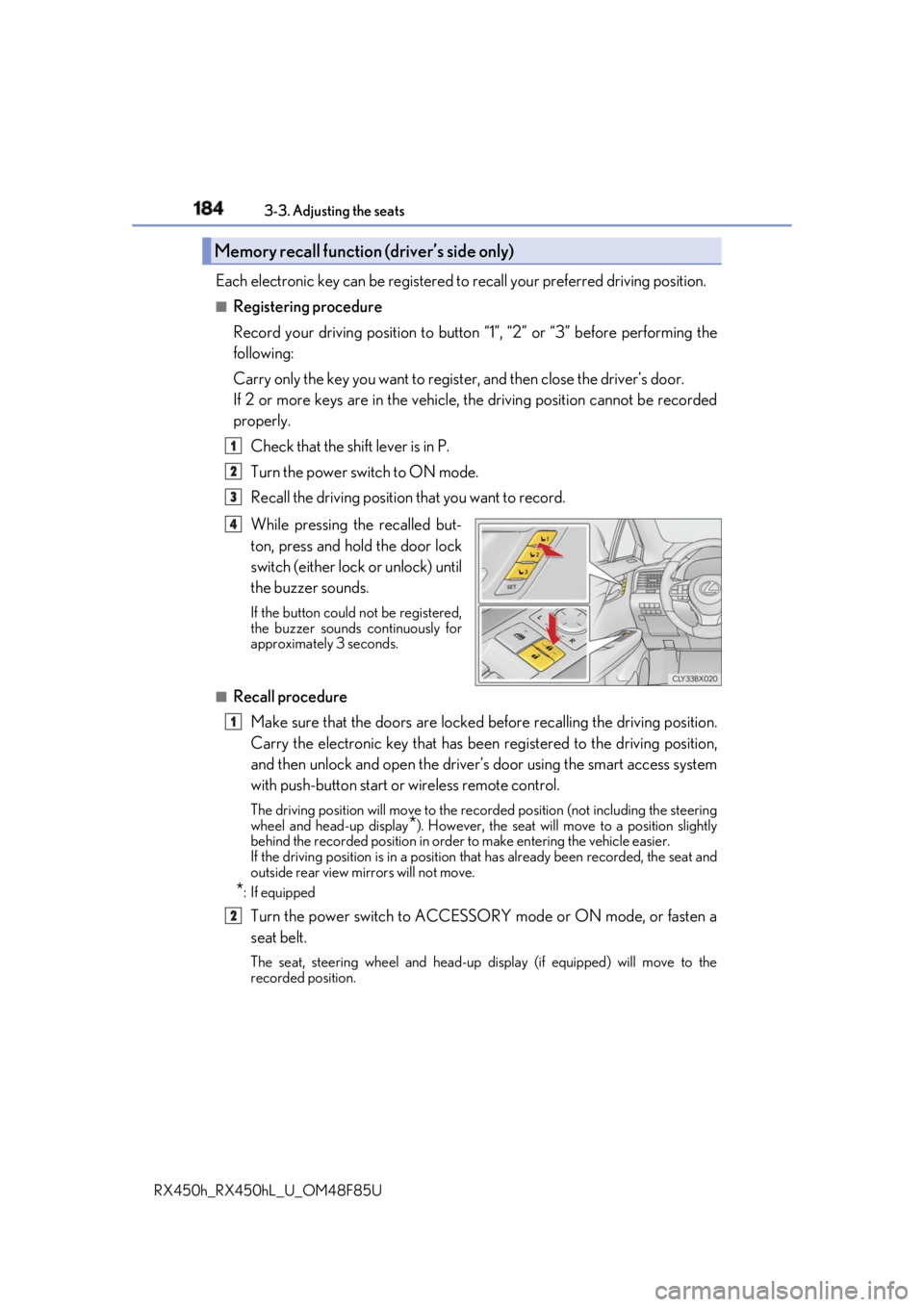
While pressing the recalled but-
ton, press and hold the door lock
switch (either lock or unlock) until
the buzzer sounds. If the button could not be registered,
the buzzer sounds continuously for
approximately 3 seconds.
■
Recall procedure
Make sure that the doors are locked before recalling the driving position.
Carry the electronic key that has been registered to the driving position,
and then unlock and open the driver’s door using the smart access system
with push-button start or wireless remote control. The driving position will move to the recorded position (not including the steering
wheel and head-up display
* ). However, the seat will move to a position slightly
behind the recorded position in order to make entering the vehicle easier.
If the driving position is in a position th at has already been recorded, the seat and
outside rear view mirrors will not move.
* : If equipped
Turn the power switch to ACCESSORY mode or ON mode, or fasten a
seat belt. The seat, steering wheel and head-up display (if equipped) will move to the
recorded position.Memory recall function (driver’s side only) 1
2
3
4
1
2
Page 185 of 792
1853-3. Adjusting the seats
3
Operation of each component
RX450h_RX450hL _U_OM48F85U■
Cancelation procedure
Carry only the key you want to cance l and then close the driver’s door.
If 2 or more keys are in the vehicle, the driving position cannot be canceled
properly.
Turn the power switch to ON mode.
While pressing the “SET” button, pr ess and hold the door lock switch
(either lock or unlock) un til the buzzer sounds twice.If it button could not be canceled, the buzzer sounds continuously for approxi-
mately 3 seconds.■
Recalling the driving position using the memory recall function●
Different driving positions can be registered for each electronic key. Therefore, the
driving position that is recalled may be di fferent depending on the key being carried.●
If a door other than the driver’s door is unlocked with the smart access system with
push-button start, the driving position cannot be recalled. In this case, press the driving
position button which has been set. ■
Customization
Some functions can be customized. ( → P. 736)
WARNING ■
Seat adjustment caution
Take care during seat adjustment so that th e seat does not strike the rear passenger or
squeeze your body against the steering wheel. 1
2
Page 195 of 792
1953-4. Adjusting the steering wheel and mirrors
3
Operation of each component
RX450h_RX450hL _U_OM48F85U■
Mirror angle can be adjusted when
The power switch is in ACCESSORY or ON mode. ■
When disconnecting and reconnecting 12 -volt battery terminals (power type)
The automatic folding/extending mirror function will return to off as default. To turn the
function on, press the switch again to select on. ■
When the mirrors are fogged up
The outside rear view mirrors can be cleare d using the mirror defoggers. Turn on the
rear window defogger to turn on the outside rear view mirror defoggers. ( → P. 516)■
Automatic adjustment of the mirror angle (if equipped)
A desired mirror face angle can be entered to memory and recalled automatically by the
driving position memory. ( → P. 181)■
Auto anti-glare function (if equipped)
When the anti-glare inside re ar view mirror is set to automatic mode, the outside rear
view mirrors will activate in conjunction with the anti-glare inside rear view mirror to
reduce reflected light. ( → P. 191)■
Using automatic mode in cold weather (if equipped)
When automatic mode is used in cold weather, the door mirror could freeze up and
automatic stowing and return may not be possible. In this case, remove any ice and snow
from the door mirror, then either operate th e mirror using manual mode or move the mir-
ror by hand. ■
Customization
Some functions can be customized. ( → P. 736)
WARNING ■
Important points while driving
Observe the following precautions while driving.
Failing to do so may result in loss of control of the vehicle and cause an accident, result-
ing in death or serious injury. ●
Do not adjust the mirrors while driving. ●
Do not drive with the mirrors folded. ●
Both the driver and passenger side mirrors must be extended and properly adjusted
before driving. ■
When a mirror is moving
To avoid personal injury and mirror malfunctio n, be careful not to get your hand caught
by the moving mirror. ■
When the mirror defoggers are operating
Do not touch the rear view mirror surfaces, as they can become very hot and burn you.
Page 197 of 792

1973-5. Opening, closing the windows and moon roof
3
Operation of each component
RX450h_RX450hL _U_OM48F85U■
The power windows can be operated when
The power switch is in ON mode. ■
Operating the power windows after turning the hybrid system off
The power windows can be operated for ap proximately 45 seconds even after the
power switch is turned to ACCESSORY mode or turned off. They cannot, however, be
operated once either front door is opened. ■
Jam protection function
If an object becomes jammed between the window and the window frame while the win-
dow is closing, window movement is stop ped and the window is opened slightly.■
Catch protection function
If an object becomes caught between the door and window while the window is opening,
window movement is stopped. ■
When the window cannot be opened or closed
When the jam protection functi on or catch protection func tion operates unusually and
the door window cannot be opened or closed, perform the following operations with the
power window switch of that door. ●
Stop the vehicle. With the power switch in ON mode, within 4 seconds of the jam pro-
tection function or catch pr otection function activating, continuously operate the
power window switch in the one-touch clos ing direction or one-touch opening direc-
tion so that the door window can be opened and closed. ●
If the door window cannot be opened and closed even when performing the above
operations, perform the following procedure for function initialization.
Turn the power switch to ON mode.
Pull and hold the power window switch in the one-touch closing direction and com-
pletely close the door window.
Release the power window sw itch for a moment, resume pulling the switch in the
one-touch closing direction, and hold it there for approximately 6 seconds or more.
Press and hold the power window switch in the one-touch opening direction. After
the door window is completely opened, cont inue holding the switch for an additional
1 second or more.
Release the power window switch for a mo ment, resume pushing the switch in the
one-touch opening direction, and hold it there for approximately 4 seconds or
more.
Pull and hold the power window switch in the one-touch closing direction again.
After the door window is completely clos ed, continue holding the switch for a fur-
ther 1 second or more.
If you release the switch while the window is moving, start again from the beginning.
If the window reverses and cannot be fully cl osed or opened, have the vehicle inspected
by your Lexus dealer. 1
2
3
4
5
6
Page 201 of 792

2013-5. Opening, closing the windows and moon roof
3
Operation of each component
RX450h_RX450hL _U_OM48F85U■
The moon roof can be operated when
The power switch is in ON mode. ■
Operating the moon roof after turning the hybrid system off
The moon roof can be operated for approximately 45 seconds after the power switch is
turned to ACCESSORY mode or turned off. It cannot, however, be operated once the
driver’s door is opened. ■
Jam protection function
If an object is detected between the moon r oof and the frame while the moon roof is clos-
ing or tilting down, travel is stopped and the moon roof opens slightly. ■
Sunshade
The sunshade can be opened and closed manually. Howe ver, the sunshade will open
automatically when the moon roof is opened. ■
Door lock linked moon roof operation ●
The moon roof can be opened and closed using the mechanical key.
* ( → P. 693)●
The moon roof can be opened us ing the wireless remote control.
* ( → P. 136)
* : These settings must be customized at your Lexus dealer.
Page 205 of 792
2053-5. Opening, closing the windows and moon roof
3
Operation of each component
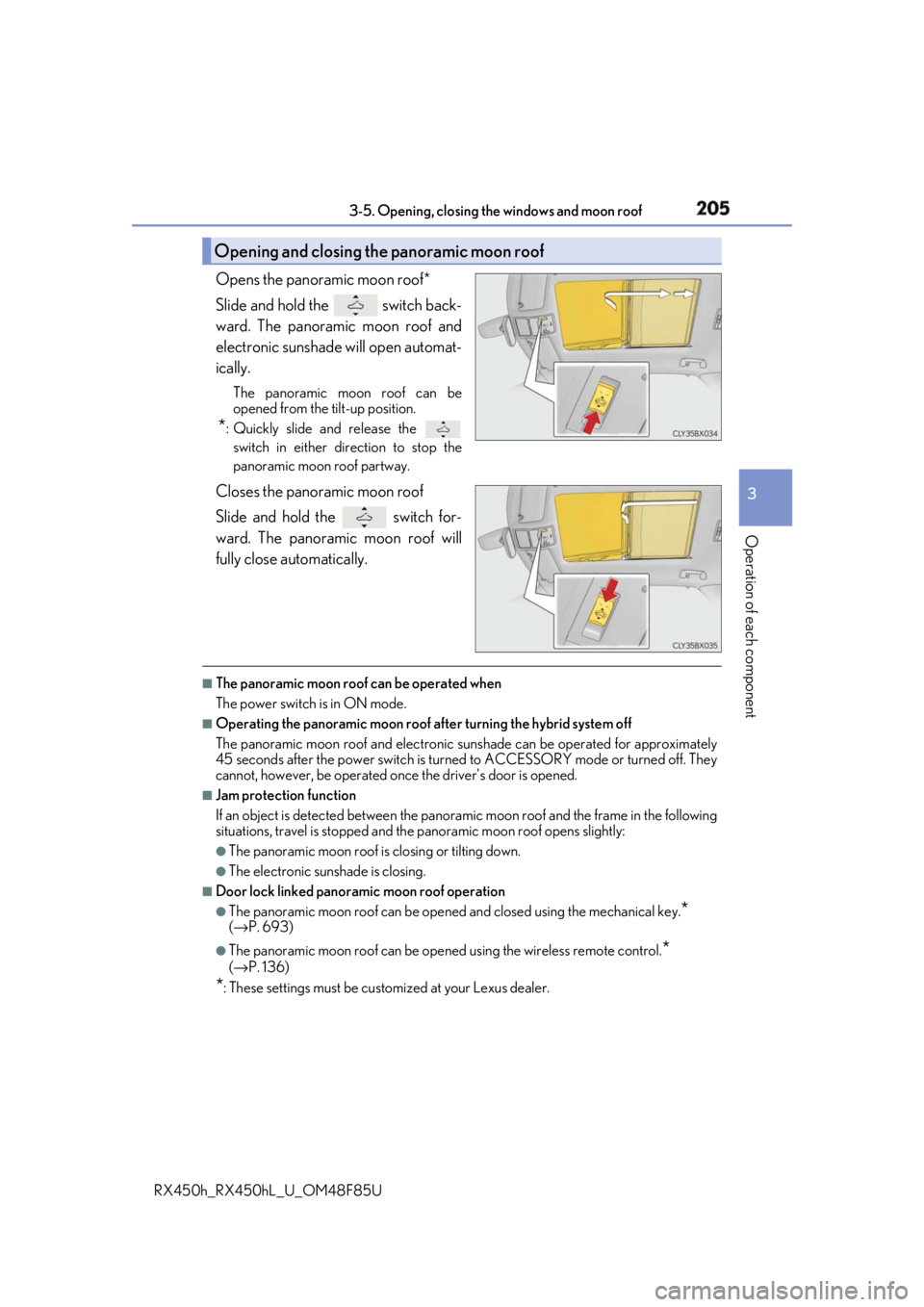
RX450h_RX450hL _U_OM48F85UOpens the panoramic moon roof*
Slide and hold the switch back-
ward. The panoramic moon roof and
electronic sunshade will open automat-
ically. The panoramic moon roof can be
opened from the tilt-up position.
* : Quickly slide and release the
switch in either direction to stop the
panoramic moon roof partway.
Closes the panoramic moon roof
Slide and hold the switch for-
ward. The panoramic moon roof will
fully close automatically. ■
The panoramic moon roof can be operated when
The power switch is in ON mode. ■
Operating the panoramic moon roof af ter turning the hybrid system off
The panoramic moon roof and electronic su nshade can be operated for approximately
45 seconds after the power switch is turned to ACCESSORY mode or turned off. They
cannot, however, be operated once the driver’s door is opened. ■
Jam protection function
If an object is detected be tween the panoramic moon roof and the frame in the following
situations, travel is stopped and the panoramic moon roof opens slightly:●
The panoramic moon roof is closing or tilting down. ●
The electronic sunshade is closing. ■
Door lock linked panoramic moon roof operation●
The panoramic moon roof can be opened and closed using the mechanical key.
* ( → P. 693) ●
The panoramic moon roof can be open ed using the wireless remote control.
* ( → P. 136)
* : These settings must be customized at your Lexus dealer.Opening and closing the panoramic moon roof
Page 206 of 792

206 3-5. Opening, closing the windows and moon roof
RX450h_RX450hL _U_OM48F85U■
Closing both the panoramic moon roof and electronic sunshade
Slide the
switch forward.
The electronic sunshade will close to the half-open position and pause. The panoramic
moon roof will then fully close. Then the electronic sunshade will fully close.■
When the panoramic moon roof or electronic sunshade does not close normally
Perform the following procedure:
Stop the vehicle.
Turn the power switch to ON mode.
Slide and hold the switch or swit ch forward. Continue pressing the
switch for approximately 10 seconds afte r the panoramic moon roof or electronic
sunshade closes and reopens. The panora mic moon roof and electronic sunshade
will start to close.
*Check that the panoramic moon roof and electronic sunshade are fully closed and
release the switch.
* : If the switch is released at the incorrect time, the pr ocedure will have to be per-
formed again from the beginning.
If the panoramic moon roof or electronic sunshade does not fully close even after per-
forming the above procedure correctly, have the vehicle inspected by your Lexus dealer. ■
Alarm
A alarm may be triggered if the alarm is set and the panoramic moon roof is closed using
the door lock linked panoramic m oon roof operation function. ( → P. 87) ■
Panoramic moon roof open warning buzzer
The buzzer sounds and a message is shown on the multi-information display in the instru-
ment cluster when the power switch is turned off and the driver’s door is opened with the
panoramic moon roof open. ■
Customization
Some functions can be customized. ( → P. 736)1
2
3
4
Page 242 of 792
242 4-2. Driving procedures
RX450h_RX450hL _U_OM48F85U■
Steering lock
After turning the power switch off and openin g and closing the doors, the steering wheel
will be locked due to the steering lock func tion. Operating the power switch again auto-
matically cancels the steering lock. ■
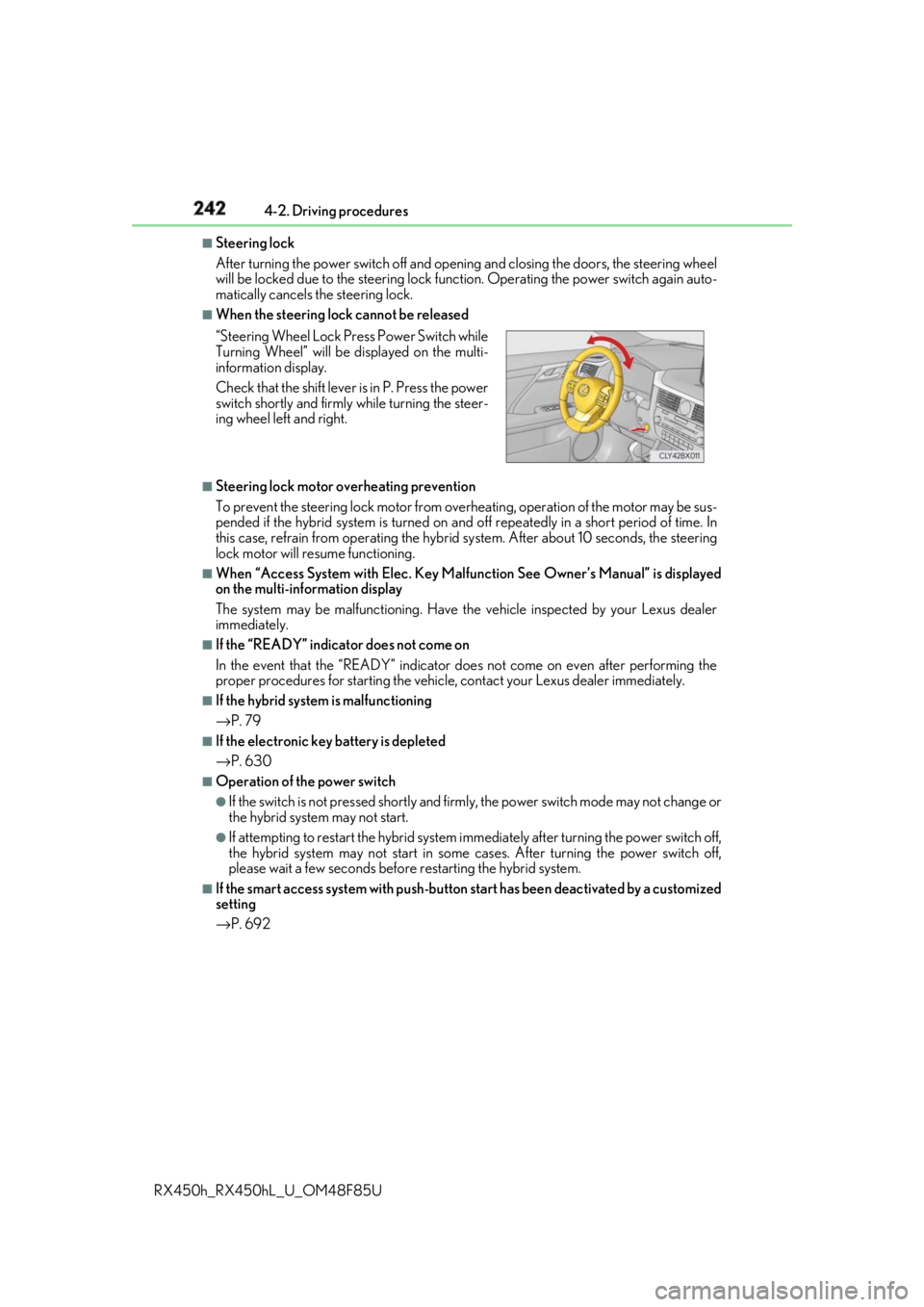
When the steering lock cannot be released
■
Steering lock motor overheating prevention
To prevent the steering lock motor from overheating, operation of the motor may be sus-
pended if the hybrid system is turned on an d off repeatedly in a short period of time. In
this case, refrain from operating the hybrid system. Afte r about 10 seconds, the steering
lock motor will resume functioning. ■
When “Access System with Elec. Key Malf unction See Owner’s Manual” is displayed
on the multi-information display
The system may be malfunctio ning. Have the vehicle inspected by your Lexus dealer
immediately. ■
If the “READY” indicator does not come on
In the event that the “READY” indicator does not come on even after performing the
proper procedures for starting the vehicl e, contact your Lexus dealer immediately.■
If the hybrid system is malfunctioning
→ P. 79 ■
If the electronic key battery is depleted
→ P. 630 ■
Operation of the power switch ●
If the switch is not pressed shortly and firm ly, the power switch mode may not change or
the hybrid system may not start. ●
If attempting to restart the hybrid system immediately after turning the power switch off,
the hybrid system may not start in some cases. After turning the power switch off,
please wait a few seco nds before restarting the hybrid system.■
If the smart access system wi th push-button start has been deactivated by a customized
setting
→ P. 692“Steering Wheel Lock Pr ess Power Switch while
Turning Wheel” will be displayed on the multi-
information display.
Check that the shift lever is in P. Press the power
switch shortly and firmly while turning the steer-
ing wheel left and right.
Page 243 of 792
2434-2. Driving procedures
4
Driving
RX450h_RX450hL _U_OM48F85UWARNING ■
When starting the hybrid system
Always start the hybrid system while sittin g in the driver’s seat. Do not depress the
accelerator pedal while starting the hy brid system under any circumstances.
Doing so may cause an accident resu lting in death or serious injury.■
Caution while driving
If hybrid system failure occurs while the ve hicle is moving, do not lock or open the
doors until the vehicle reaches a safe and complete stop. Activation of the steering lock
in this circumstance may lead to an acci dent, resulting in death or serious injury.■
Stopping the hybrid system in an emergency
If you want to stop the hybrid system in an emergency while driving the vehicle, press
and hold the power switch for more than 2 se conds, or press it briefly 3 times or more
in succession. ( → P. 653)
However, do not touch the power switch while driving except in an emergency. Turning
the hybrid system off while driving will not cause loss of steering or braking control,
however, power assist to the steering will be lost. This will make it more difficult to steer
smoothly, so you should pull over and stop the vehicle as soon as it is safe to do so.
NOTICE ■
To prevent 12-volt battery discharge ●
Do not leave the power swit ch in ACCESSORY or ON mode for long periods of
time without the hybrid system on. ●
If “ACCESSORY” or “IGNITION ON” is di splayed on the meters while the hybrid
system is not operating, the power switch is not off. Exit the vehicle after turning the
power switch off. ●
Do not stop the hybrid system when the shift lever is in a position other than P. If the
hybrid system is stopped in another shift lever position , the power switch will not be
turned off but instead be turned to ACCESSORY mode. If the vehicle is left in
ACCESSORY mode, 12-volt ba ttery discharge may occur.■
When starting the hybrid system
If the hybrid system becomes difficult to star t, have your vehicle checked by your Lexus
dealer immediately. ■
Symptoms indicating a malfun ction with the power switch
If the power switch seems to be operating somewhat differen tly than usual, such as the
switch sticking slightly, ther e may be a malfunction. Contact your Lexus dealer immedi-
ately.
Page 245 of 792

2454-2. Driving procedures
4
Driving
RX450h_RX450hL _U_OM48F85U■
Switching to EV drive mode wh en the gasoline engine is cold
If the hybrid system is started while the gasoline engine is cold, the gasoline engine will
start automatically after a short period of time in order to warm up. In this case, you will
become unable to switch to EV drive mode.
After the hybrid system has started and the “READY” indicator has illuminated, press the
EV drive mode switch before the gasoline engine starts to switch to EV drive mode.■
Automatic cancelation of EV drive mode
When driving in EV drive mode, the gasoline engine may automatically restart in the fol-
lowing situations. When EV drive mode is canceled, a buzzer will sound, the EV drive
mode indicator will go off afte r flashing, and a message is di splayed on the multi-informa-
tion display. ●
The hybrid battery (traction battery) becomes low.
The remaining battery level indicated in the “Energy Monitor” display is low. ( → P. 125)●
Vehicle speed is high. ●
The accelerator pedal is depressed firmly or the vehicle is on a hill, etc. ■
Possible driving distance when driving in EV drive mode
EV drive mode’s possible driving distance ranges from a few hundred meters to approxi-
mately 0.6 mile (1 km). However, dependin g on vehicle conditions, there are situations
when EV drive mode cannot be used. (The distance that is possible depends on the
hybrid battery [traction battery] level and driving conditions.)■
Fuel economy
The hybrid system is designed to achieve th e best possible fuel economy during normal
driving (using the gasoline engine and electr ic motor [traction motor]). Driving in EV
drive mode more than necess ary may lower fuel economy.
WARNING ■
Caution while driving
When driving in EV drive mode no engine noise is made. As such, pedestrians, people
riding bicycles or other people and vehicles in the surrounding area may not be aware
of the vehicle starting off or approaching th em. Therefore, take ex tra care while driving
even if the vehicle proximity notification system is active.