ad blue LEXUS RX450h 2018 Owner's Guide
[x] Cancel search | Manufacturer: LEXUS, Model Year: 2018, Model line: RX450h, Model: LEXUS RX450h 2018Pages: 792, PDF Size: 12.5 MB
Page 467 of 792
4675-9. Bluetooth ®
Phone
5
Lexus Display Audio system
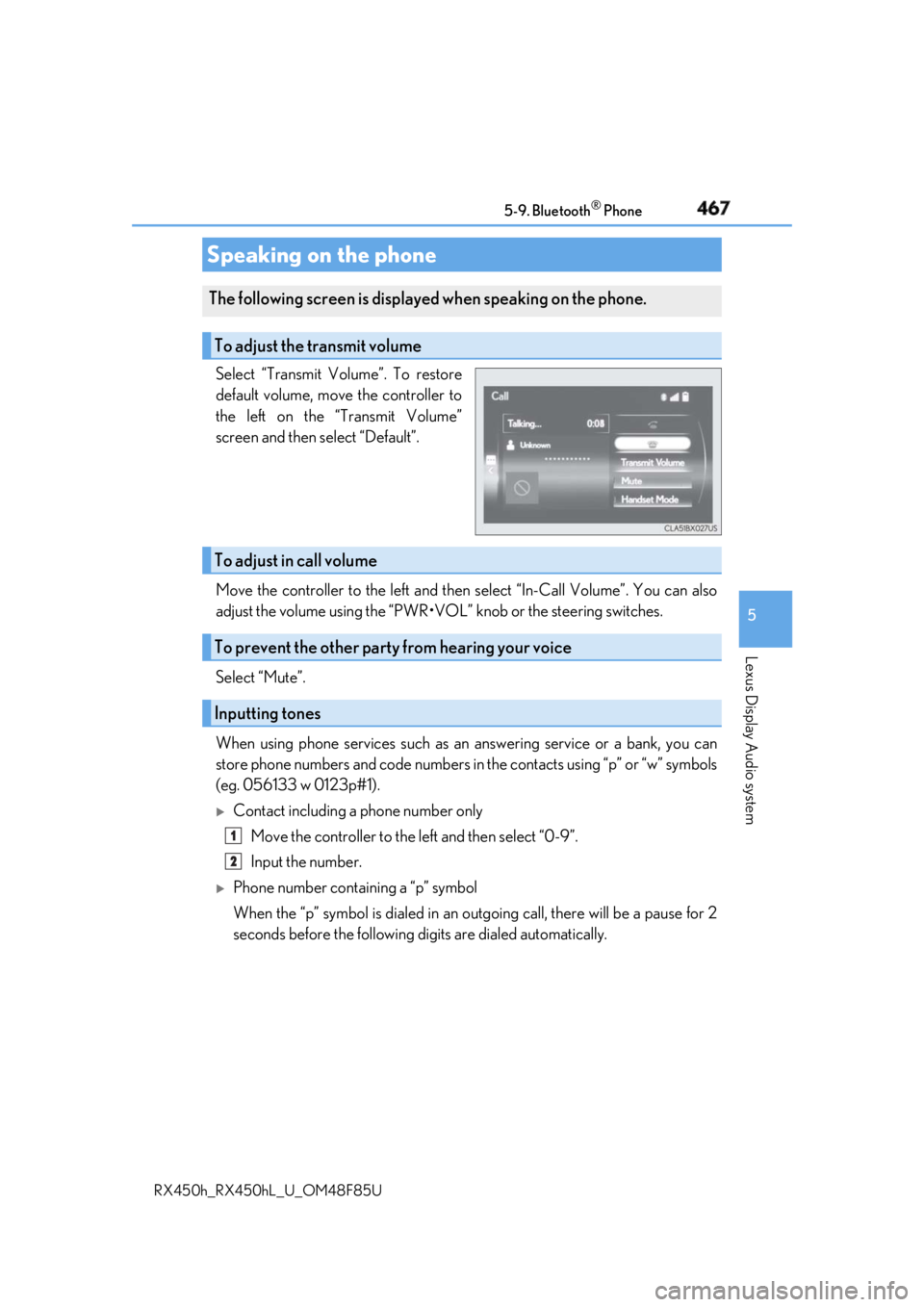
RX450h_RX450hL _U_OM48F85USelect “Transmit Volume”. To restore
default volume, move the controller to
the left on the “Transmit Volume”
screen and then select “Default”.
Move the controller to the left and then select “In-Call Volume”. You can also
adjust the volume using the “PWR•VOL ” knob or the steering switches.
Select “Mute”.
When using phone services such as an answering service or a bank, you can
store phone numbers and code numbers in the contacts using “p” or “w” symbols
(eg. 056133 w 0123p#1).
Contact including a phone number only
Move the controller to the left and then select “0-9”.
Input the number.
Phone number containing a “p” symbol
When the “p” symbol is dialed in an ou tgoing call, there will be a pause for 2
seconds before the following di gits are dialed automatically.Speaking on the phone The following screen is displayed when speaking on the phone.
To adjust the transmit volume
To adjust in call volume
To prevent the other party from hearing your voice
Inputting tones 1
2
Page 468 of 792
468 5-9. Bluetooth ®
Phone
RX450h_RX450hL _U_OM48F85U
Phone number containing a “w” symbol
When the “w” symbol is dialed in an outgoing call, you need to go to the
“Release Tones” screen to dial the following digits. Move the controller to the
left and then select “Release Tones”.
Select “Handset Mode” to change from a hands-free call to a cellular phone call
or vice versa.
Press the on-hook switch on the steering wheel or select .
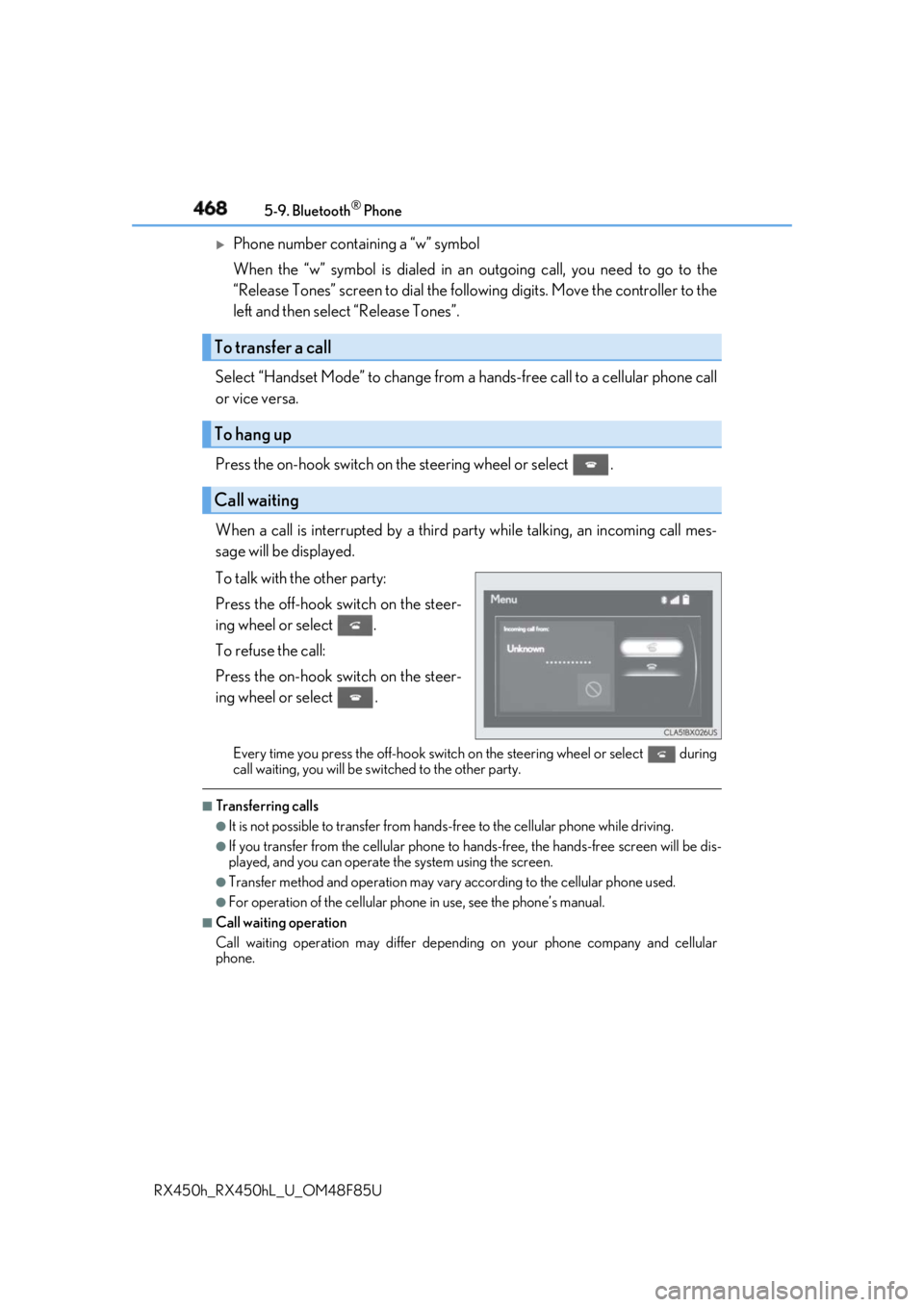
When a call is interrupted by a third pa rty while talking, an incoming call mes-
sage will be displayed.
To talk with the other party:
Press the off-hook sw itch on the steer-
ing wheel or select .
To refuse the call:
Press the on-hook switch on the steer-
ing wheel or select . Every time you press the off-hook switch on the steering wheel or select during
call waiting, you will be sw itched to the other party.■
Transferring calls ●
It is not possible to transfer from hand s-free to the cellular phone while driving.●
If you transfer from the cellular phone to ha nds-free, the hands-free screen will be dis-
played, and you can operate the system using the screen. ●
Transfer method and operation may vary according to the cellular phone used. ●
For operation of the cellular phone in use, see the phone’s manual.■
Call waiting operation
Call waiting operation may di ffer depending on your phone company and cellular
phone.To transfer a call
To hang up
Call waiting
Page 469 of 792
4695-9. Bluetooth ®
Phone
5
Lexus Display Audio system
RX450h_RX450hL _U_OM48F85UGo to message screen: “MENU” button → “Phone” → “Messages”
Select a message. Moving the controller to the left while on the message list screen displays the setting
screen. ( → P. 477)
Move the controller to the right while on the message screen and then select an
account to display a message list for the selected account.
Selecting “Next” or “Previous” disp lays the next or previous message.
If a message is too long, select “R ead More” to display the full text.■
Option menu
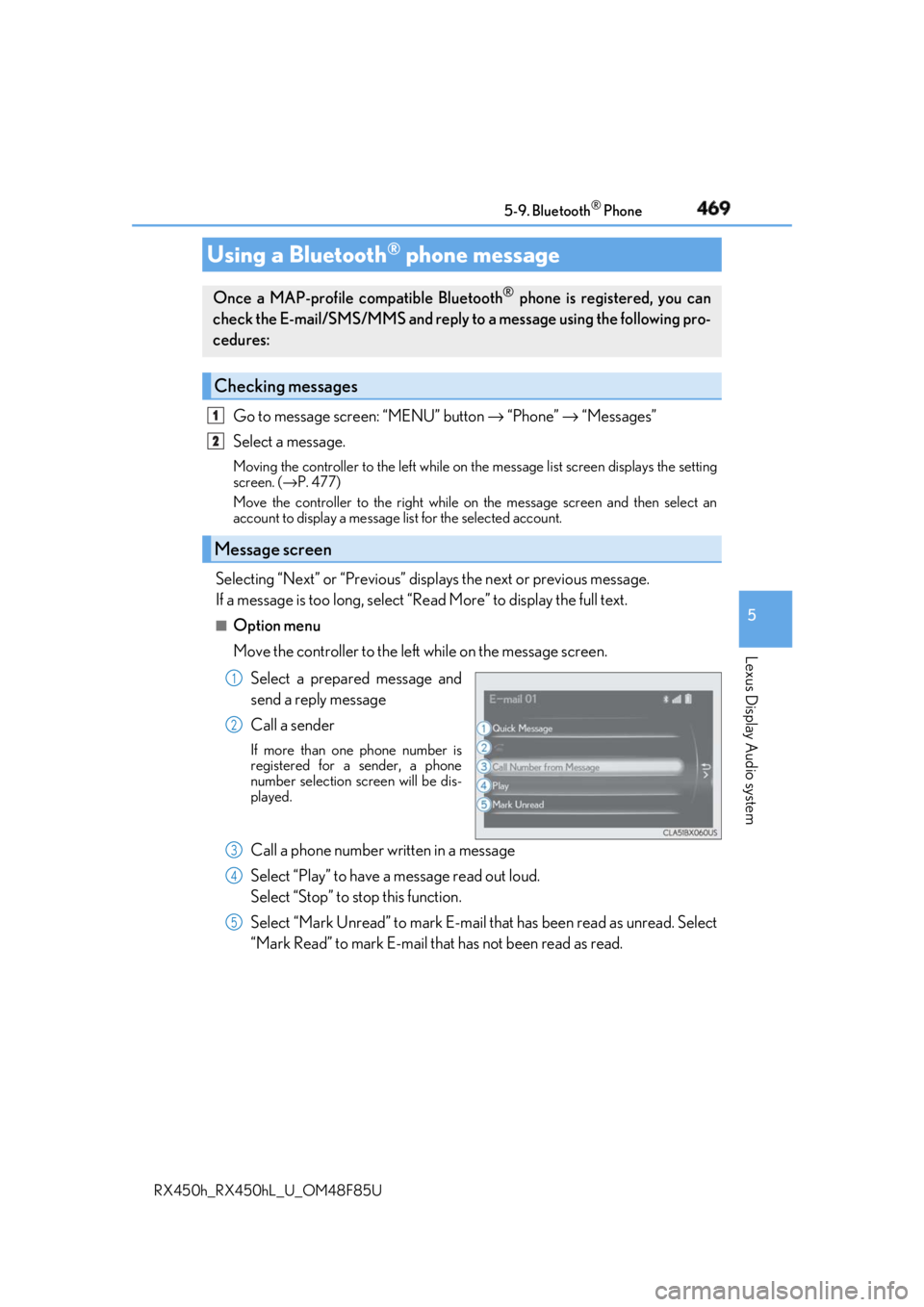
Move the controller to the left while on the message screen.
Select a prepared message and
send a reply message
Call a sender If more than one phone number is
registered for a sender, a phone
number selection screen will be dis-
played.
Call a phone number written in a message
Select “Play” to have a message read out loud.
Select “Stop” to stop this function.
Select “Mark Unread” to mark E-mail th at has been read as unread. Select
“Mark Read” to mark E-mail that has not been read as read.Using a Bluetooth ®
phone messageOnce a MAP-profile compatible Bluetooth ®
phone is registered, you can
check the E-mail/SMS/MMS and reply to a message using the following pro-
cedures:
Checking messages
Message screen 1
2
1
2
3
4
5
Page 470 of 792
470 5-9. Bluetooth ®
Phone
RX450h_RX450hL _U_OM48F85UMove the controller to the left while on the message screen.
Select “Quick Message” to display the “Quick Message” screen.
Select the desired message and then select “Send”. ■
Editing a quick message
Move the controller to the left while on the message screen.
Select “Quick Message” and move th e cursor to the desired message.
Move the controller to the left and select “Edit”. To return to the default message after editing, select “Default”.
This function is available when the “E-mail Notification Popup” or “SMS/MMS
Notification Popup” are set to on. ( → P. 473)
“Incoming E-mail Display” or “Inco ming SMS/MMS Display” are set to
“Drop-Down”
When E-mail/SMS/MMS are received, the incoming message is displayed
on the upper side of the screen with a sound.
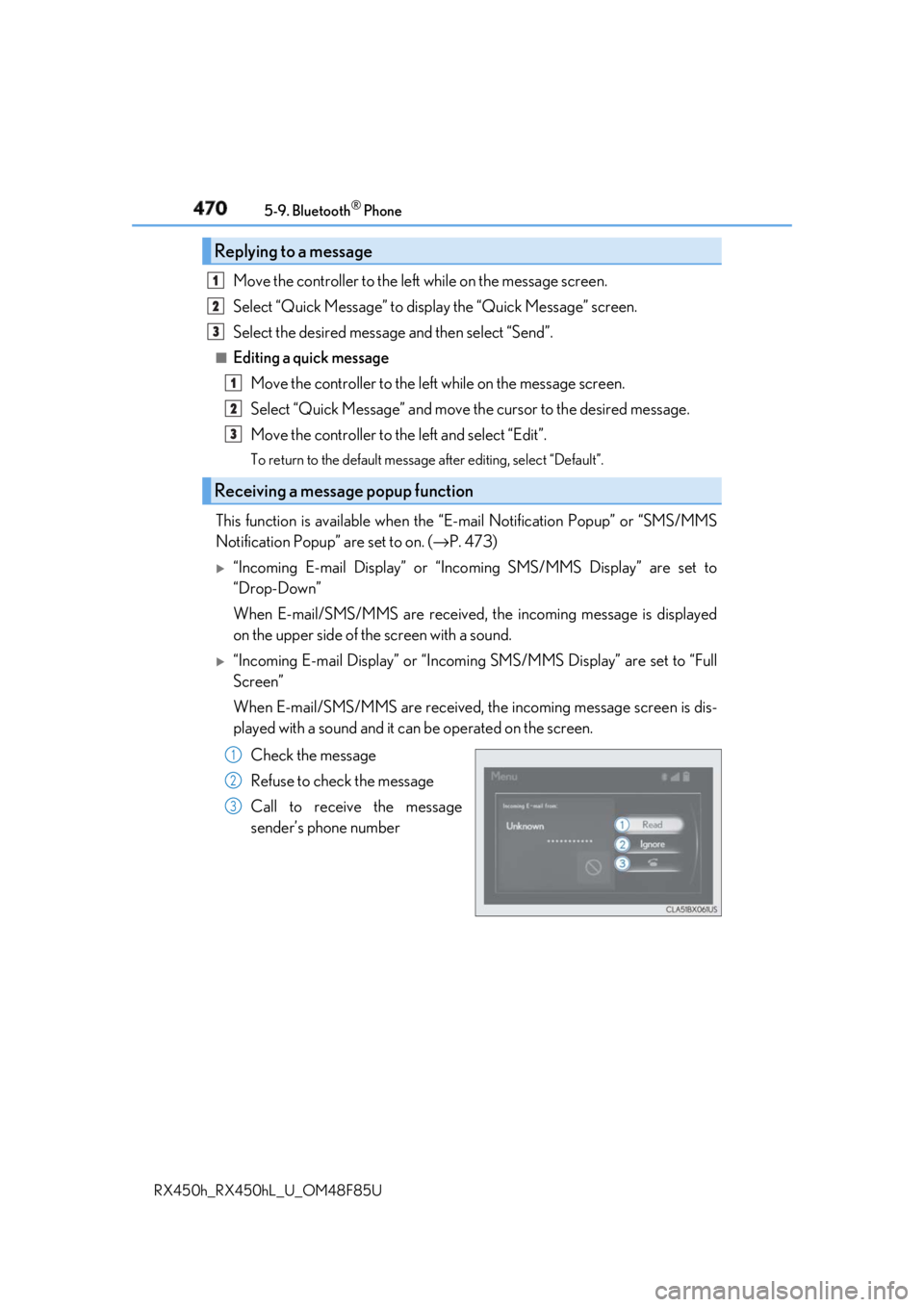
“Incoming E-mail Display” or “Incoming SMS/MMS Display” are set to “Full
Screen”
When E-mail/SMS/MMS are received, th e incoming message screen is dis-
played with a sound and it can be operated on the screen.
Check the message
Refuse to check the message
Call to receive the message
sender’s phone numberReplying to a message
Receiving a message popup function 1
2
3
1
2
3
1
2
3
Page 471 of 792
4715-9. Bluetooth ®
Phone
5
Lexus Display Audio system
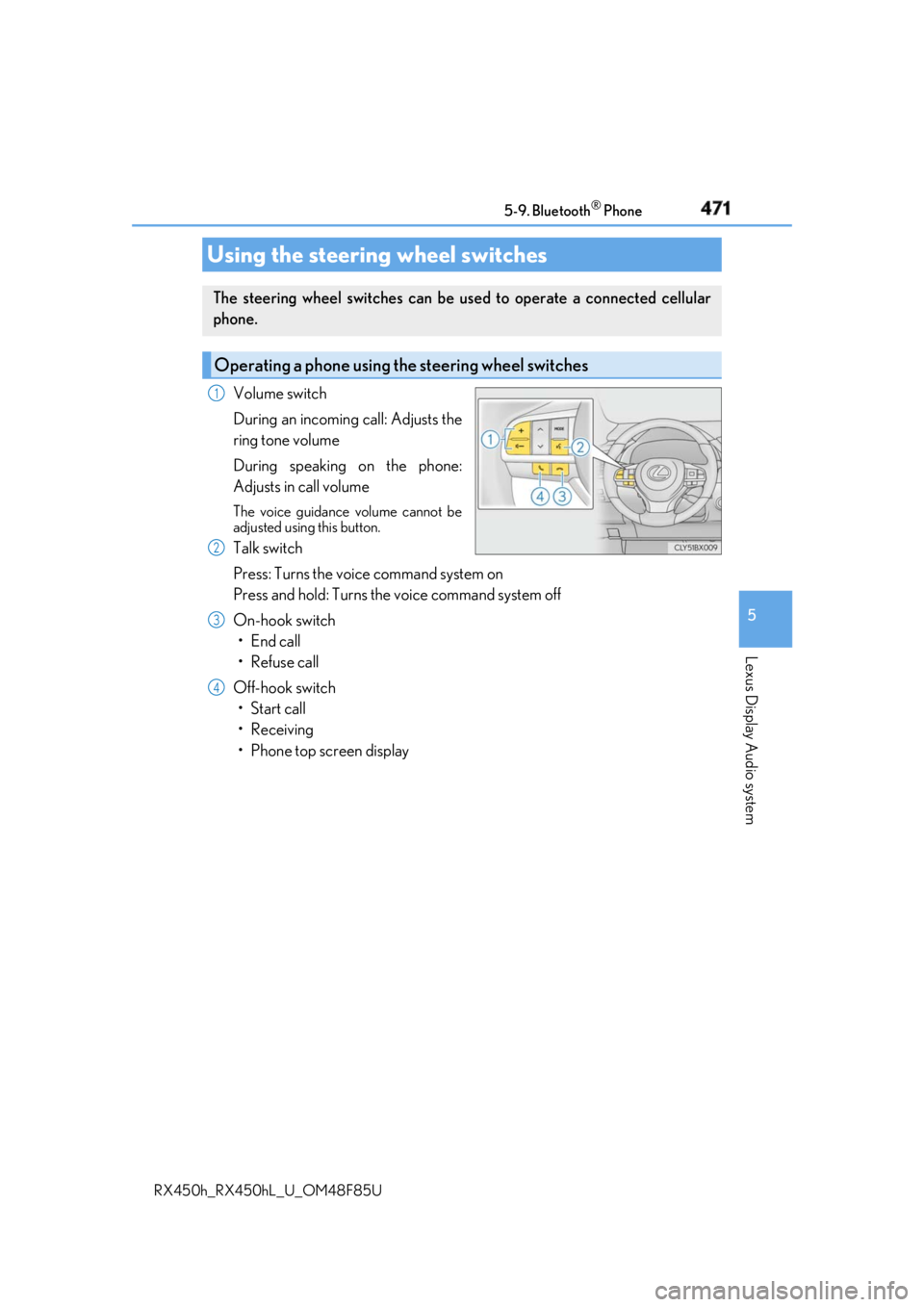
RX450h_RX450hL _U_OM48F85UVolume switch
During an incoming call: Adjusts the
ring tone volume
During speaking on the phone:
Adjusts in call volume The voice guidance volume cannot be
adjusted using this button.
Talk switch
Press: Turns the voice command system on
Press and hold: Turns the voice command system off
On-hook switch
• End call
•Refuse call
Off-hook switch
• Start call
• Receiving
• Phone top screen displayUsing the steering wheel switches The steering wheel switches can be used to operate a connected cellular
phone.
Operating a phone using the steering wheel switches 1
2
3
4
Page 472 of 792
472 5-9. Bluetooth ®
Phone
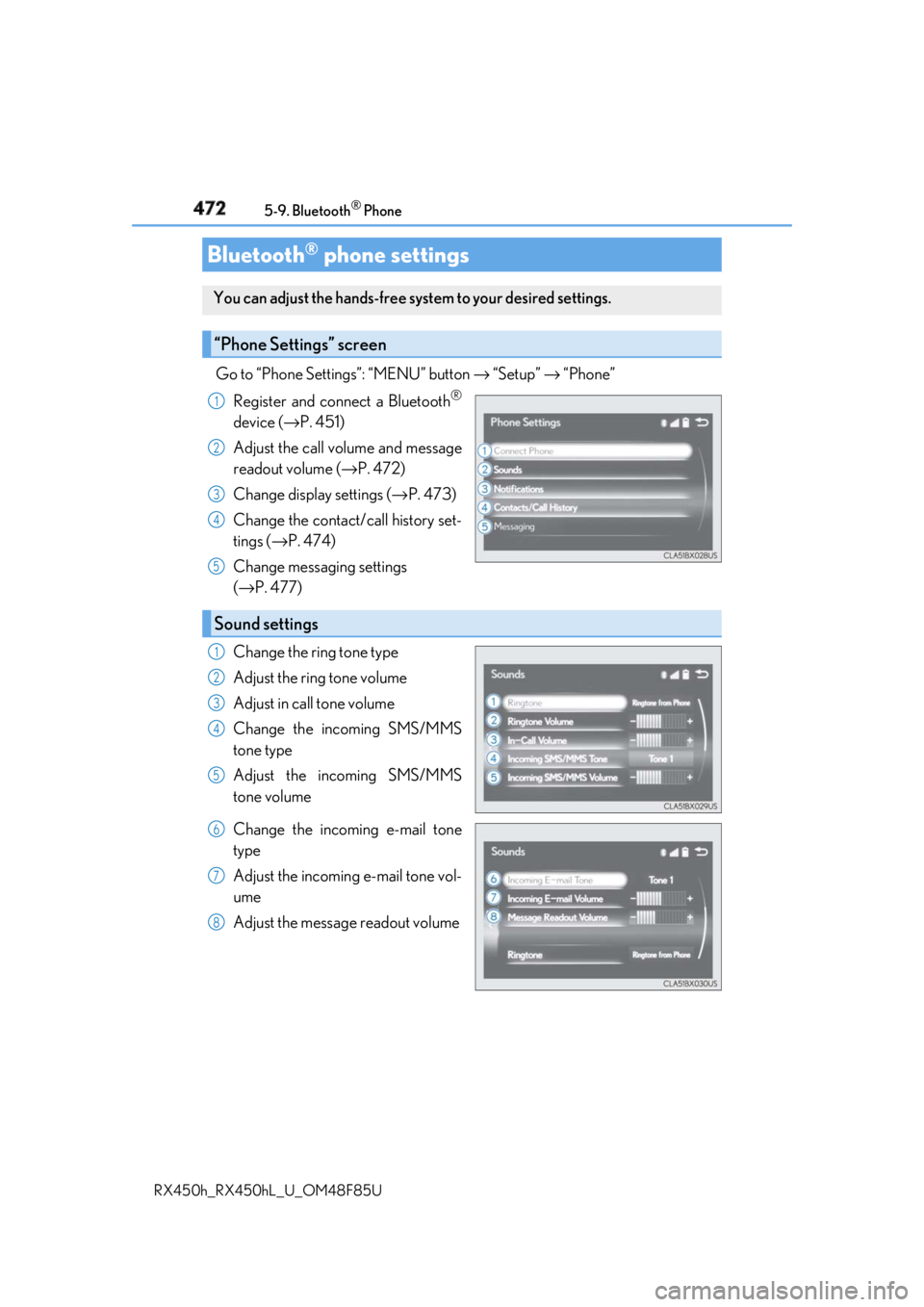
RX450h_RX450hL _U_OM48F85UGo to “Phone Settings”: “MENU” button → “Setup” → “Phone”
Register and connect a Bluetooth ®
device ( → P. 451)
Adjust the call volume and message
readout volume ( → P. 472)
Change display settings ( → P. 473)
Change the contact/call history set-
tings ( → P. 474)
Change messaging settings
( → P. 477)
Change the ring tone type
Adjust the ring tone volume
Adjust in call tone volume
Change the incoming SMS/MMS
tone type
Adjust the incoming SMS/MMS
tone volume
Change the incoming e-mail tone
type
Adjust the incoming e-mail tone vol-
ume
Adjust the message readout volumeBluetooth ®
phone settingsYou can adjust the hands-free sy stem to your desired settings.
“Phone Settings” screen 1
2
3
4
5
Sound settings 1
2
3
4
5
6
7
8
Page 473 of 792
4735-9. Bluetooth ®
Phone
5
Lexus Display Audio system
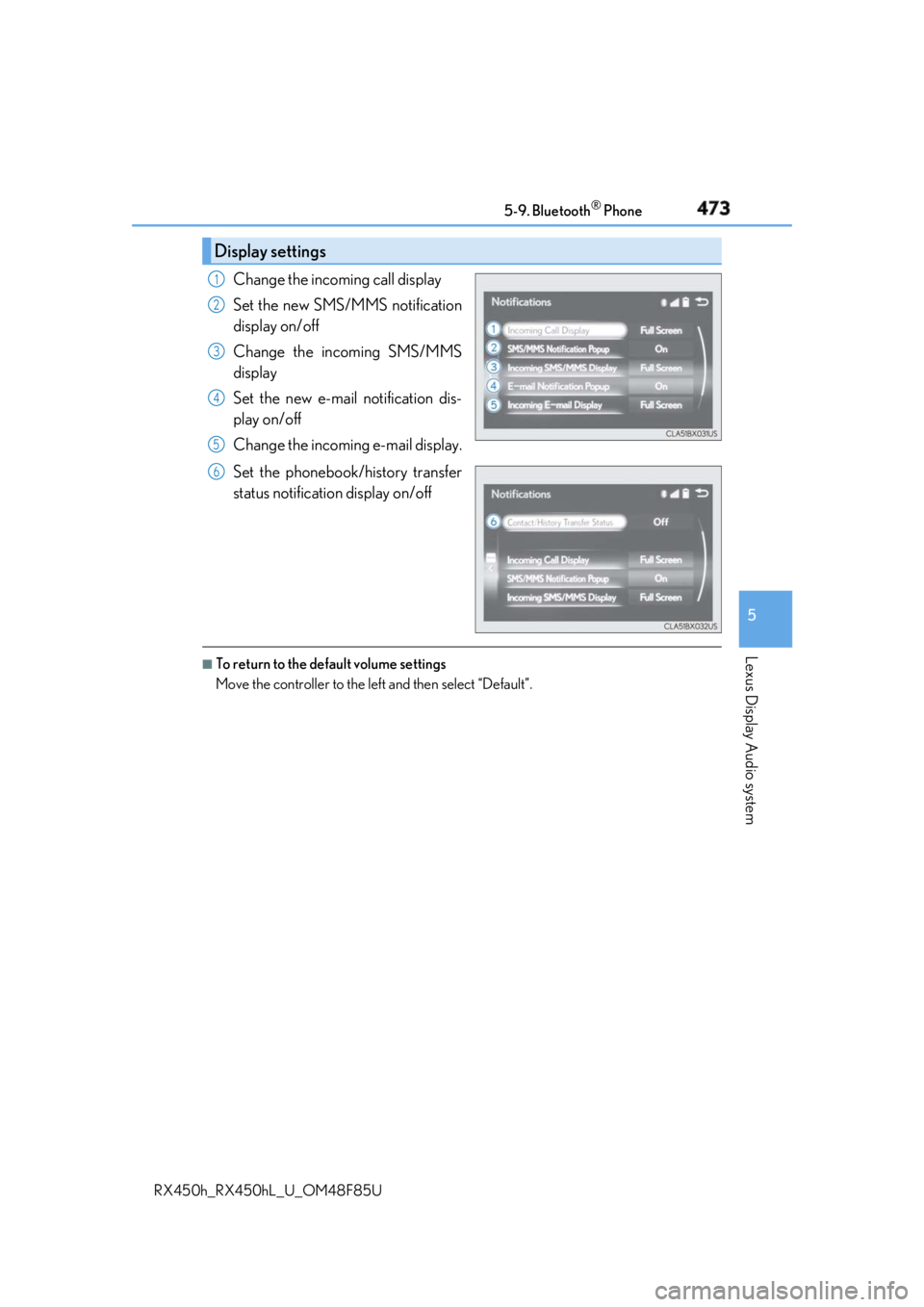
RX450h_RX450hL _U_OM48F85UChange the incoming call display
Set the new SMS/MMS notification
display on/off
Change the incoming SMS/MMS
display
Set the new e-mail notification dis-
play on/off
Change the incoming e-mail display.
Set the phonebook/history transfer
status notification display on/off ■
To return to the default volume settings
Move the controller to the left and then select “Default”.Display settings 1
2
3
4
5
6
Page 474 of 792
474
RX450h_RX450hL _U_OM48F85U5-10. Phonebook
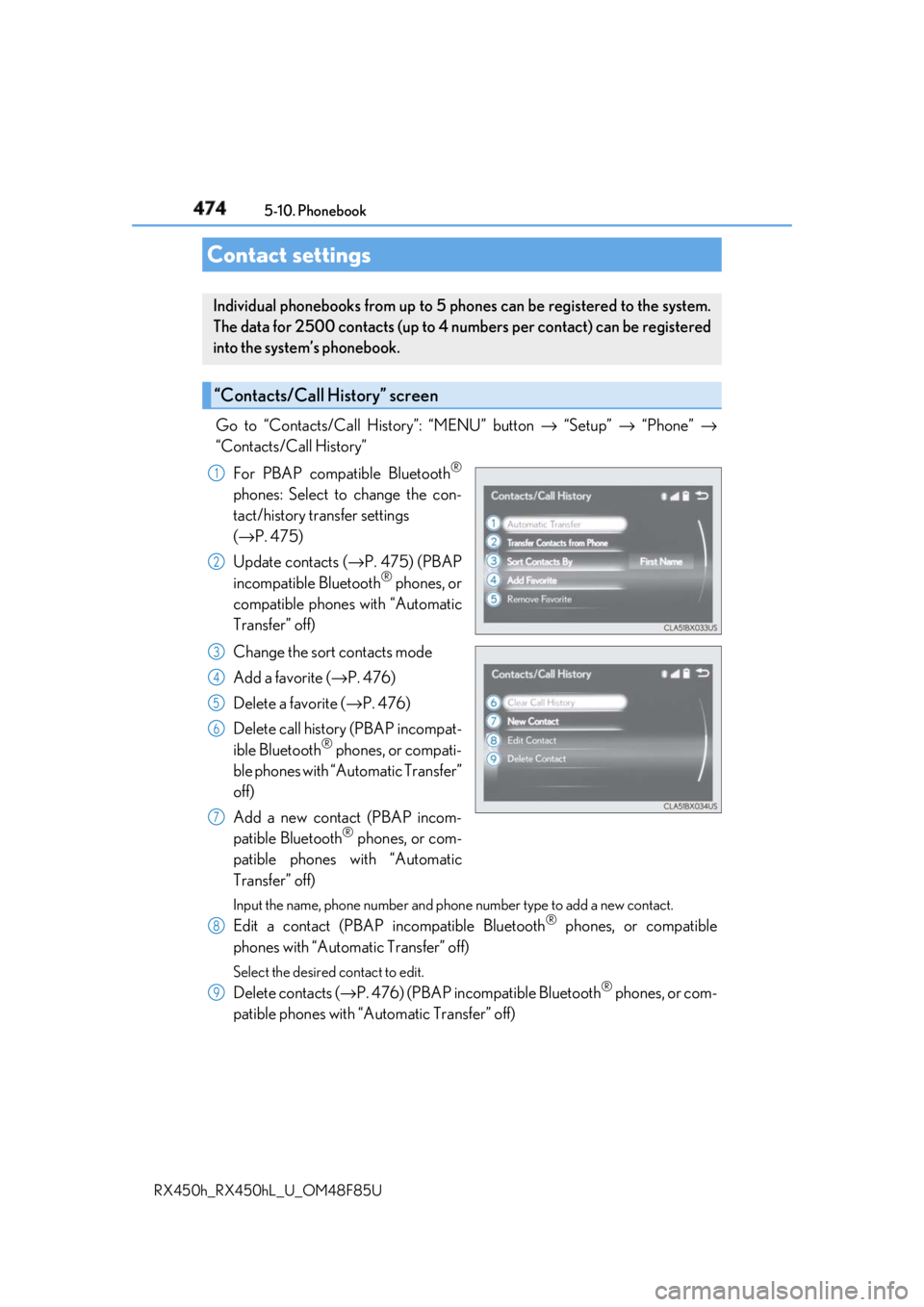
Go to “Contacts/Call History”: “MENU” button → “Setup” → “Phone” →
“Contacts/Call History”
For PBAP compatible Bluetooth ®
phones: Select to change the con-
tact/history transfer settings
( → P. 475)
Update contacts ( → P. 475) (PBAP
incompatible Bluetooth ®
phones, or
compatible phones with “Automatic
Transfer” off)
Change the sort contacts mode
Add a favorite ( → P. 476)
Delete a favorite ( → P. 476)
Delete call history (PBAP incompat-
ible Bluetooth ®
phones, or compati-
ble phones with “Automatic Transfer”
off)
Add a new contact (PBAP incom-
patible Bluetooth ®
phones, or com-
patible phones with “Automatic
Transfer” off) Input the name, phone number and phon e number type to add a new contact.
Edit a contact (PBAP in compatible Bluetooth ®
phones, or compatible
phones with “Automatic Transfer” off) Select the desired contact to edit.
Delete contacts ( → P. 476) (PBAP incompatible Bluetooth ®
phones, or com-
patible phones with “Automatic Transfer” off)Contact settings Individual phonebooks from up to 5 ph ones can be registered to the system.
The data for 2500 contacts (up to 4 numbers per contact) can be registered
into the system’s phonebook.
“Contacts/Call History” screen 1
2
3
4
5
6
7
8
9
Page 475 of 792
4755-10. Phonebook
5
Lexus Display Audio system
RX450h_RX450hL _U_OM48F85U■
Return to the default settings
Move the controller to the left and select “Default”.
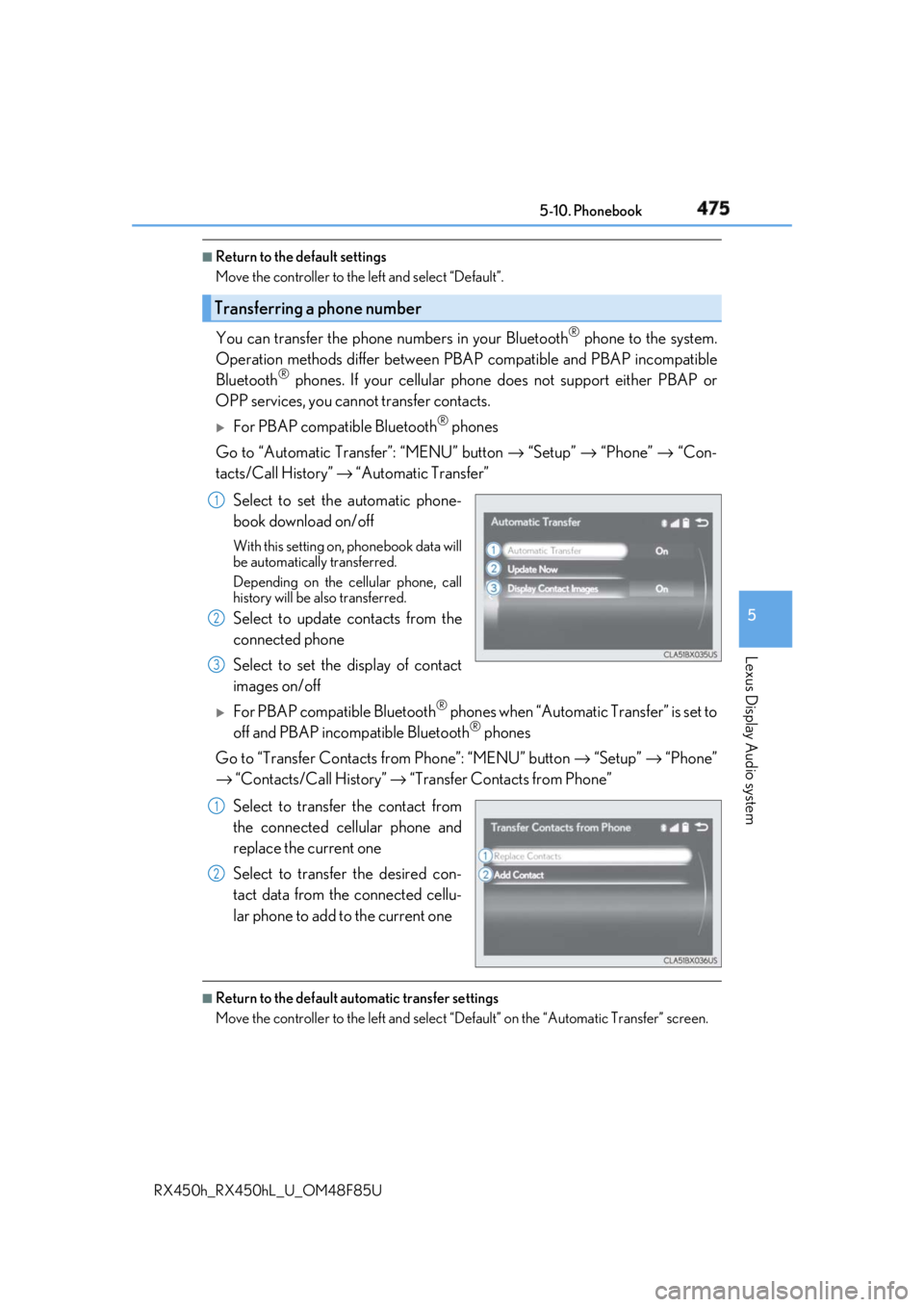
You can transfer the phone numbers in your Bluetooth ®
phone to the system.
Operation methods differ between PBAP compatible and PBAP incompatible
Bluetooth ®
phones. If your cellular phone does not support either PBAP or
OPP services, you canno t transfer contacts.
For PBAP compatible Bluetooth ®
phones
Go to “Automatic Transfer”: “MENU” button → “Setup” → “Phone” → “Con-
tacts/Call History” → “Automatic Transfer”
Select to set the automatic phone-
book download on/off With this setting on, phonebook data will
be automatically transferred.
Depending on the cellular phone, call
history will be also transferred.
Select to update contacts from the
connected phone
Select to set the display of contact
images on/off
For PBAP compatible Bluetooth ®
phones when “Automatic Transfer” is set to
off and PBAP incompatible Bluetooth ®
phones
Go to “Transfer Contacts from Phone”: “MENU” button → “Setup” → “Phone”
→ “Contacts/Call History” → “Transfer Contacts from Phone”
Select to transfer the contact from
the connected cellular phone and
replace the current one
Select to transfer the desired con-
tact data from the connected cellu-
lar phone to add to the current one ■
Return to the default automatic transfer settings
Move the controller to the left and select “D efault” on the “Automatic Transfer” screen.Transferring a phone number 1
2
3
1
2
Page 476 of 792
476 5-10. Phonebook
RX450h_RX450hL _U_OM48F85UYou can register the desired contact from the phonebook. Up to 15 contacts per
phone can be registered.
Go to “Add Favorite”: “MENU” button → “Setup” → “Phone” → “Contacts/
Call History” → “Add Favorite”
Choose the contact to register.
Go to “Remove Favorite”: “MENU” button → “Setup” → “Phone” → “Con-
tacts/Call History” → “Remove Favorite”
Select the desired contacts. You can select all contacts by selecting “Select All”.
Move the controller to the left and select “Remove”.
Go to “Delete Contact ”: “MENU” button → “Setup” → “Phone” → “Con-
tacts/Call History” → “Delete Contact”
Select the desired contacts. You can select all contacts by selecting “Select All”.
Move the controller to the left and select “Delete”.■
Phonebook data
Phonebook data is managed separately for every registered phone. When one phone is
connected, you cannot read the registered data of the other phones. ■
When transferring contacts
Transfer contacts while the engine is running.
If the cellular phone is OPP or PBAP compatible, you may need to input “1234” on the
cellular phone for OB EX certification.■
When you have selected “Replace Contacts” or “Add Contact” to transfer contacts
If the cellular phone does not support OPP service, you cannot use these functions. You
can transfer the phonebook data only by operating your phone. ■
Transferring contacts while Bluetooth ®
audio is playing
Bluetooth ®
audio will disconnect. It will reconnect automatically when data transfer fin-
ishes. It may not reconnect dependin g on the phone which is connected.Registering favorites 1
2
Removing favorites
Deleting the contacts data 1
2
3
1
2
3