ECU LEXUS RX450h 2018 Service Manual
[x] Cancel search | Manufacturer: LEXUS, Model Year: 2018, Model line: RX450h, Model: LEXUS RX450h 2018Pages: 792, PDF Size: 12.5 MB
Page 93 of 792
932. Instrument cluster
2
Instrument cluster
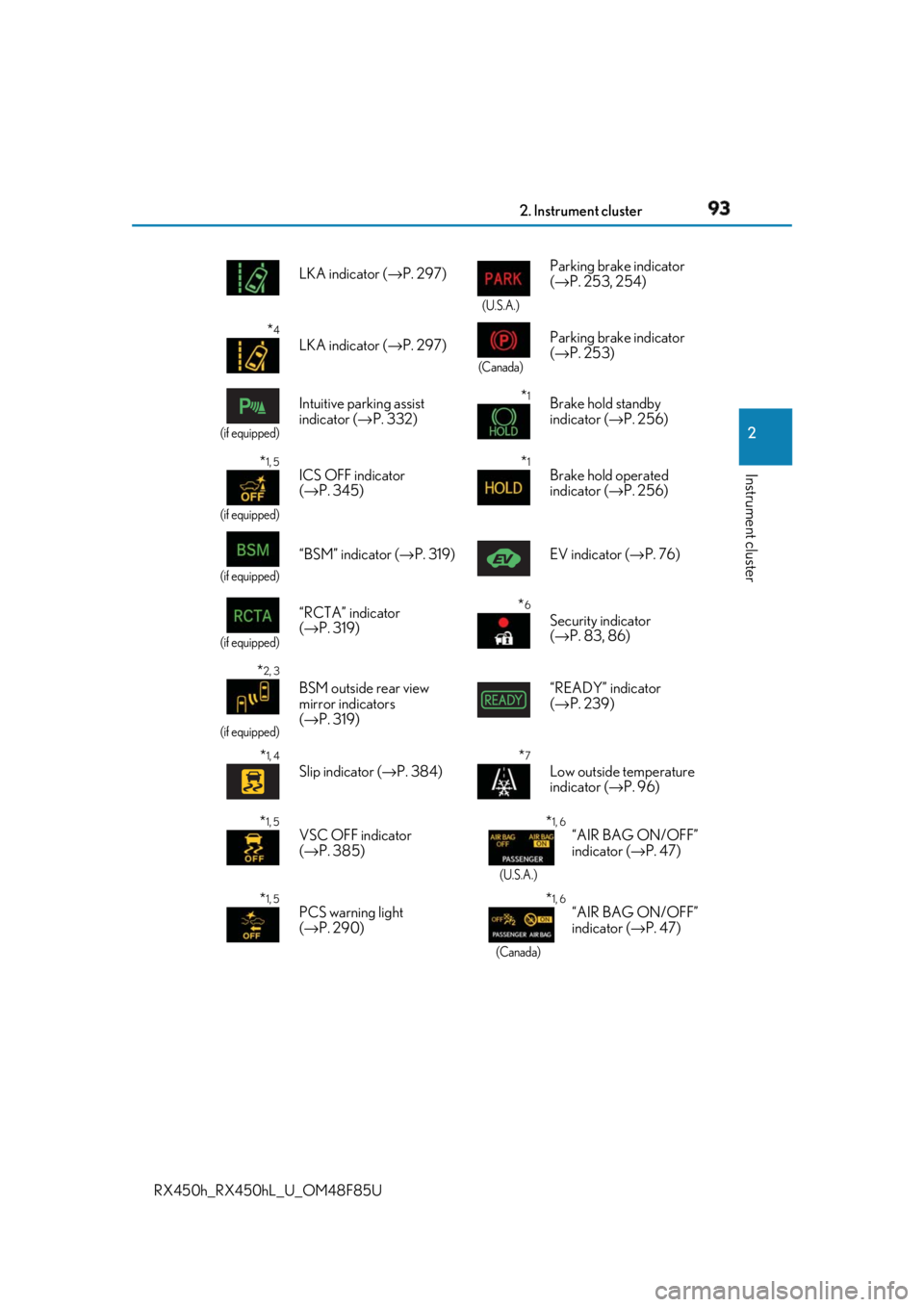
RX450h_RX450hL _U_OM48F85U LKA indicator ( → P. 297) (U.S.A.)
Parking brake indicator
( → P. 253, 254)
* 4
LKA indicator ( → P. 297) (Canada)
Parking brake indicator
( → P. 253)(if equipped)
Intuitive parking assist
indicator ( → P. 332)
* 1
Brake hold standby
indicator ( → P. 256)
* 1, 5
(if equipped)
ICS OFF indicator
( → P. 345)
* 1
Brake hold operated
indicator ( → P. 256)
(if equipped)
“BSM” indicator ( → P. 319) EV indicator ( → P. 76)
(if equipped)
“RCTA” indicator
( → P. 319)
* 6
Security indicator
( → P. 83, 86)
* 2, 3
(if equipped)
BSM outside rear view
mirror indicators
( → P. 319) “READY” indicator
( → P. 239)
* 1, 4
Slip indicator ( → P. 384)
* 7
Low outside temperature
indicator ( → P. 96)
* 1, 5
VSC OFF indicator
( → P. 385) * 1, 6
(U.S.A.)
“AIR BAG ON/OFF”
indicator ( → P. 47)
* 1, 5
PCS warning light
( → P. 290) * 1, 6
(Canada)“AIR BAG ON/OFF”
indicator ( → P. 47)
Page 136 of 792
136
RX450h_RX450hL _U_OM48F85U3-2. Opening, closing and locking the doors
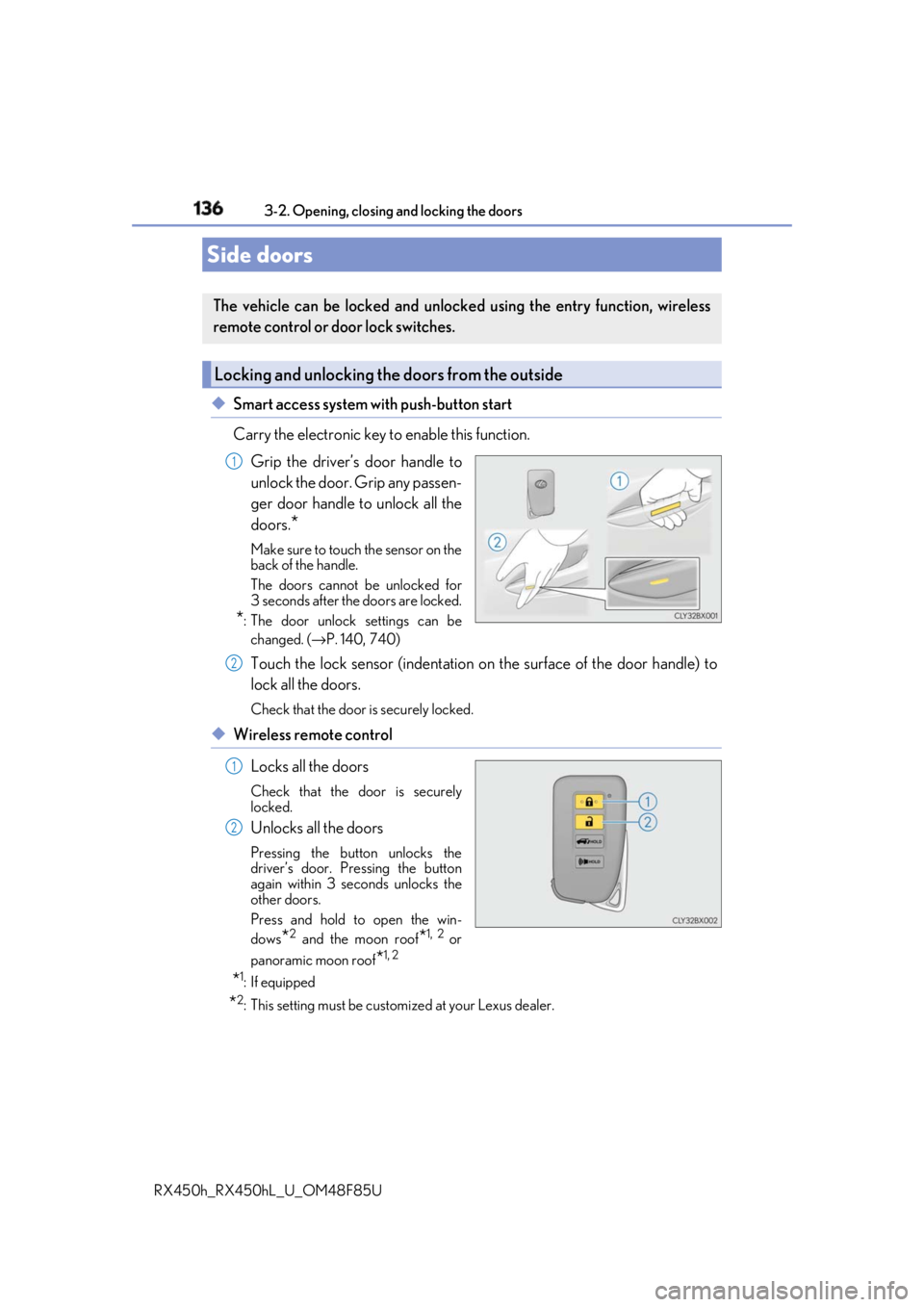
◆ Smart access system with push-button start
Carry the electronic key to enable this function.
Grip the driver’s door handle to
unlock the door. Grip any passen-
ger door handle to unlock all the
doors.
* Make sure to touch the sensor on the
back of the handle.
The doors cannot be unlocked for
3 seconds after the doors are locked.
* : The door unlock settings can be
changed. ( → P. 140, 740)
Touch the lock sensor (indentation on the surface of the door handle) to
lock all the doors. Check that the door is securely locked.
◆ Wireless remote control
Locks all the doors Check that the door is securely
locked.
Unlocks all the doors Pressing the button unlocks the
driver’s door. Pressing the button
again within 3 seconds unlocks the
other doors.
Press and hold to open the win-
dows
* 2
and the moon roof
* 1, 2
or
panoramic moon roof
* 1, 2
* 1
: If equipped
* 2
: This setting must be custom ized at your Lexus dealer.Side doors The vehicle can be locked and unlock ed using the entry function, wireless
remote control or door lock switches.
Locking and unlocking the doors from the outside 1
2
1
2
Page 137 of 792

1373-2. Opening, closing and locking the doors
3
Operation of each component
RX450h_RX450hL _U_OM48F85U■
Operation signals
Doors:
A buzzer sounds and the emergency flashers flash to indicate that the doors have been
locked/unlocked. (Locked: Once; Unlocked: Twice)
Windows and moon roof or panoramic moon roof:
A buzzer sounds. ■
Security feature
If a door is not opened within approximately 60 seconds after the vehicle is unlocked, the
security feature automatically locks the vehicle again. ■
When the door cannot be locked by the lock sensor on the surface of the door handle
■
Door lock buzzer
If an attempt to lock the doors is made when a door is not fully closed, a buzzer sounds
continuously for 5 seconds. Fully close the d oor to stop the buzzer, and lock the vehicle
once more. ■
Setting the alarm
Locking the doors will set the alarm system. ( → P. 86)■
If the smart access system with push-button start or the wireless remote control does
not operate properly ●
Use the mechanical key to lock and unlock the doors. ( → P. 692)●
Replace the key battery with a new one if it is depleted. ( → P. 630)When the door cannot be locked even if the
lock sensor on the surface of the door handle is
touched by a finger, touch the lock sensor with
the palm.
When gloves are being worn, remove the
gloves.
Page 142 of 792

142 3-2. Opening, closing and locking the doors
RX450h_RX450hL _U_OM48F85U◆ Smart access system with push-button start
Carry the electronic key to enable
this function.
Locks all the doors Check that the door is securely
locked.
Unlocks all the doors The doors cannot be unlocked for 3
seconds after the doors are locked.
◆ Wireless remote control
→ P. 136
◆ Door lock switch
→ P. 138
Press and hold the switch for approxi-
mately 1 second. The power back door can be operated
whether it is locked
* or unlocked.
Pressing the switch while the power
back door is opening/closing will stop
the operation.
Pressing and holding the switch again
for approximately 1 second will operate
the power back door in the opposite
direction.
* : Opening of the power back door when it is locked can be disabled by a customized
setting. ( → P. 741)Power back door The power back door can be locked/unlocked and opened/closed by the fol-
lowing procedures.
Locking and unlocking the power back door from the outside 1
2
Locking and unlocking the power back door from the inside
Opening/closing the power back d oor using the wireless remote con-
trol
Page 147 of 792
1473-2. Opening, closing and locking the doors
3
Operation of each component
RX450h_RX450hL _U_OM48F85U■
Power back door op erating conditions
If the following conditions are met with the power back door operation enabled ( → P. 112),
the power back door can be opened and closed automatically. ●
When an electronic key is being carried an d the back door opener switch is pressed
*●
When the wireless remote control is used
*●
When the power switch is in ON mode, the vehicle speed must be lower than 2 mph (3
km/h) and one of the following conditions mu st be met in addition to the above condi-
tions:
• The parking brake is engaged.
• The brake pedal is depressed.
• The shift lever is in P.
* : When the operation of the power back door when it is locked has been disabled by a
customized setting, operate the power back door after it has been unlocked.
( → P. 741)
Touchless sensor (vehicles with a touchless power back door)
The power back door will open automatically when the touchless sensor operation is
enabled ( → P. 112) and the following conditions are met:●
The power back door is fully closed. ●
The electronic key is with in the operational range ( → P. 158)
■
Security feature
If the power back door is not opened within approximately 60 seconds after the vehicle
is unlocked, the security feature will automatically lock the doors again. ●
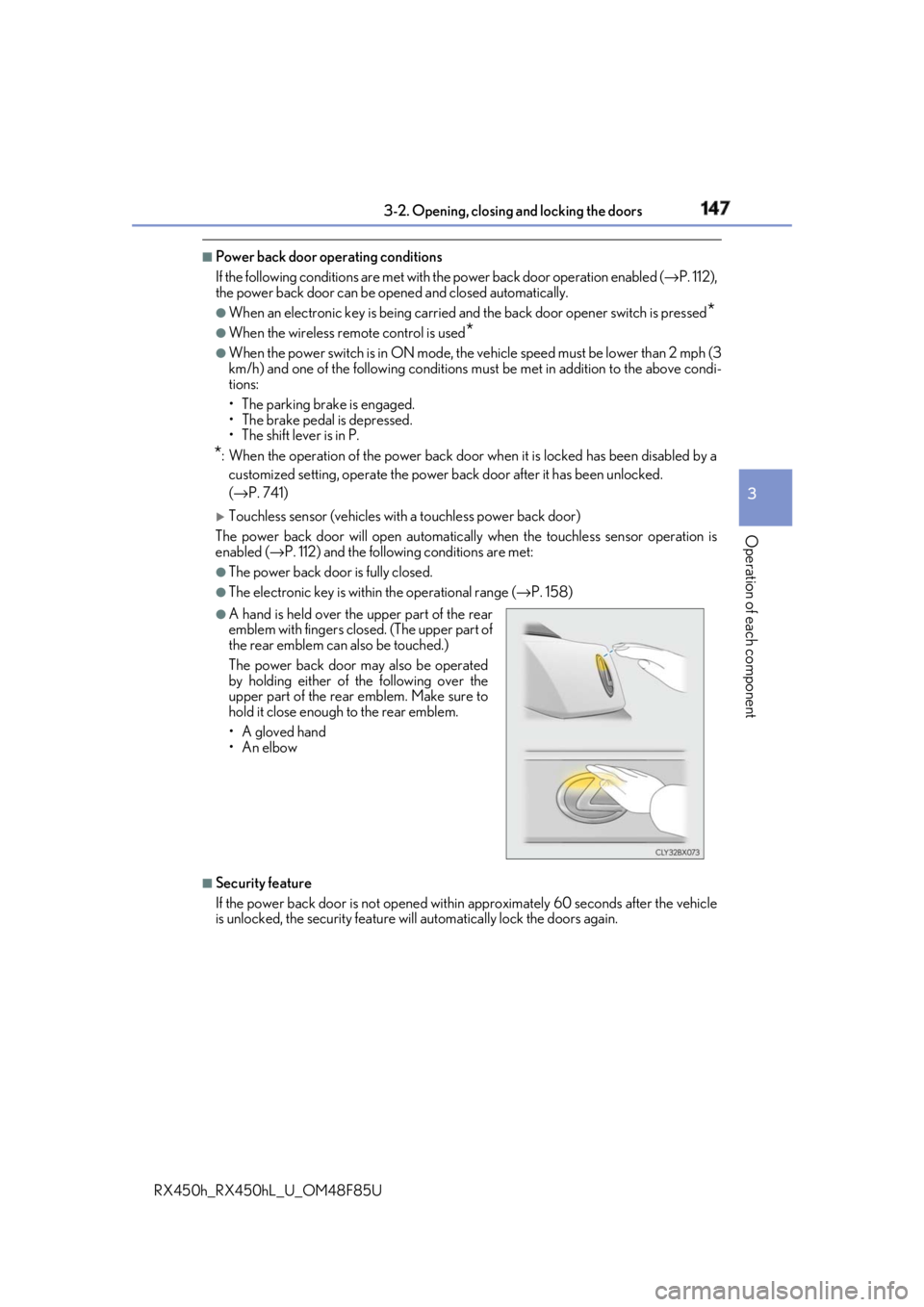
A hand is held over the upper part of the rear
emblem with fingers closed. (The upper part of
the rear emblem can also be touched.)
The power back door may also be operated
by holding either of the following over the
upper part of the rear emblem. Make sure to
hold it close enough to the rear emblem.
•A gloved hand
•An elbow
Page 153 of 792
1533-2. Opening, closing and locking the doors
3
Operation of each component
RX450h_RX450hL _U_OM48F85UWARNING ■
Operating the power back door
Observe the following precautions.
Failure to do so may cause parts of the body to be caught, resultin g in death or serious
injury. ●
Remove any heavy loads, such as snow an d ice, from the power back door before
opening it. Failure to do so may cause the power back door to suddenly shut again
after it is opened. ●
When opening or closing the power back d oor, thoroughly check to make sure the
surrounding area is safe. ●
If anyone is in the vicinity, make sure they are safe and let them know that the power
back door is about to open or close. ●
Use caution when opening or closing the power back door in windy weather as it may
move abruptly in strong wind.
●
Do not pull on the back door spindle ( → P. 156) to close the power back door, and
do not hang on the back door spindle.
Doing so may cause hands to be caught or the back door spindle to break, causing
an accident. ●
If a bicycle carrier or similar heavy object is attached to the power back door, it may
suddenly shut again after being opened, causing someone’s hands, arms, head or
neck to be caught and injured. When inst alling an accessory part to the power back
door, using a genuine Lexus part is recommended. ●
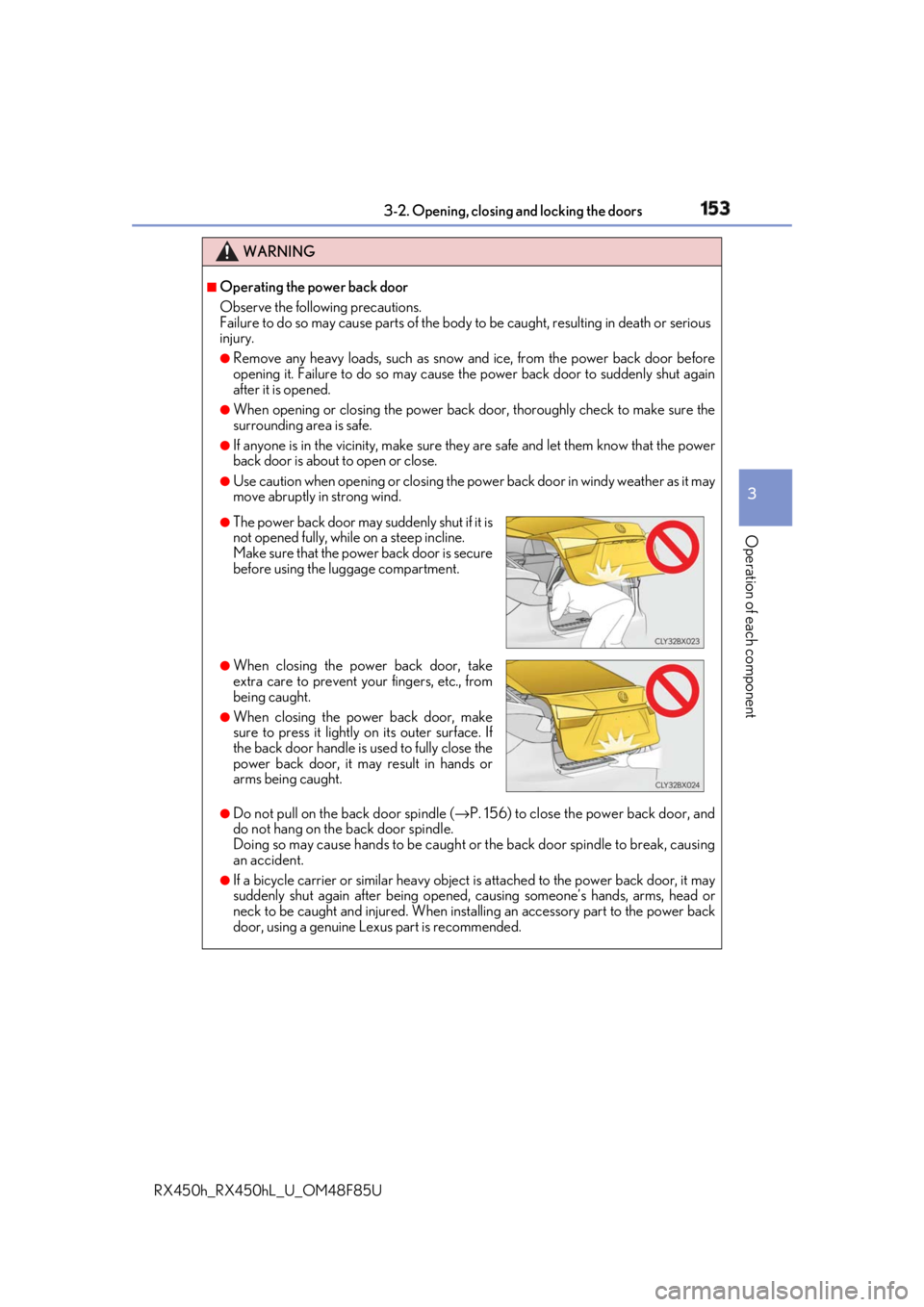
The power back door may suddenly shut if it is
not opened fully, while on a steep incline.
Make sure that the power back door is secure
before using the luggage compartment. ●
When closing the power back door, take
extra care to prevent your fingers, etc., from
being caught. ●
When closing the power back door, make
sure to press it lightly on its outer surface. If
the back door handle is used to fully close the
power back door, it may result in hands or
arms being caught.
Page 154 of 792
154 3-2. Opening, closing and locking the doors
RX450h_RX450hL _U_OM48F85UWARNING ■
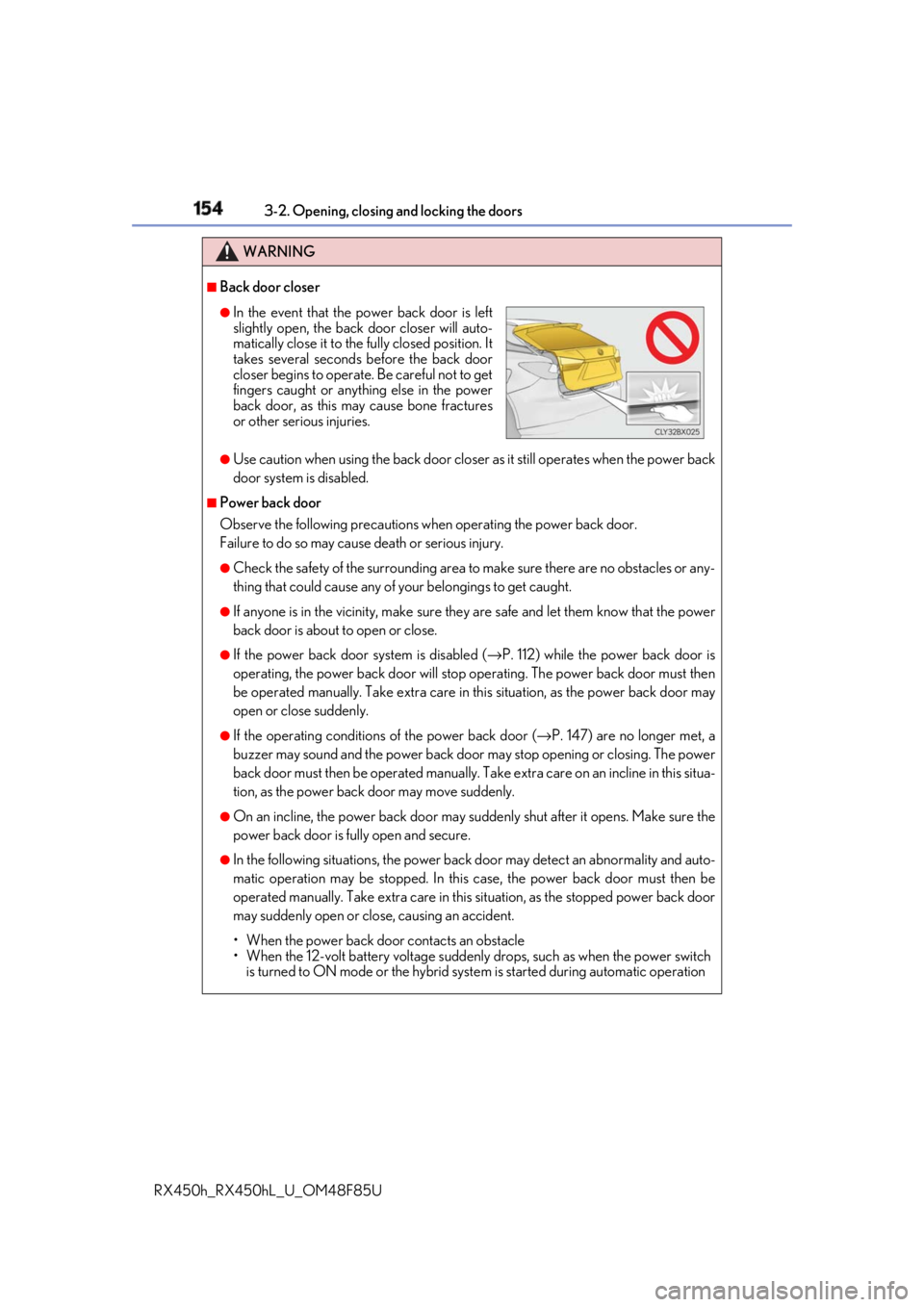
Back door closer
●
Use caution when using the back door closer as it still operates when the power back
door system is disabled. ■
Power back door
Observe the following precautions wh en operating the power back door.
Failure to do so may cause death or serious injury. ●
Check the safety of the surrounding area to make sure there are no obstacles or any-
thing that could cause any of yo ur belongings to get caught.●
If anyone is in the vicinity, make sure they are safe and let them know that the power
back door is about to open or close. ●
If the power back door system is disabled ( → P. 112) while the power back door is
operating, the power back door will stop operating. The power back door must then
be operated manually. Take extra care in th is situation, as the power back door may
open or close suddenly. ●
If the operating conditions of the power back door ( → P. 147) are no longer met, a
buzzer may sound and the power back door may stop opening or closing. The power
back door must then be operated manually. Ta ke extra care on an incline in this situa-
tion, as the power back door may move suddenly. ●
On an incline, the power back door may su ddenly shut after it opens. Make sure the
power back door is fully open and secure. ●
In the following situations, the power back door may detect an abnormality and auto-
matic operation may be stopped. In this case, the power back door must then be
operated manually. Take extra care in this situation, as the stopped power back door
may suddenly open or close, causing an accident.
• When the power back door contacts an obstacle
• When the 12-volt battery voltage suddenly drops, such as when the power switch
is turned to ON mode or the hybrid syst em is started during automatic operation●
In the event that the power back door is left
slightly open, the back door closer will auto-
matically close it to the fully closed position. It
takes several seconds before the back door
closer begins to operate. Be careful not to get
fingers caught or anything else in the power
back door, as this may cause bone fractures
or other serious injuries.
Page 161 of 792
1613-2. Opening, closing and locking the doors
3
Operation of each component
RX450h_RX450hL _U_OM48F85U■
Note for the entry function ●
Even when the electronic key is within the effective range (detection areas), the system
may not operate properly in the following cases:
• The electronic key is too close to the window or outside door handle, near the
ground, or in a high place when the doors are locked or unlocked.
• The electronic key is near the ground or in a high place, or too close to the rear
bumper center when the back door is opened.
• The electronic key is on th e instrument panel, luggage co mpartment, floor, or in the
door pockets or glove box when the hybrid system is started or power switch modes
are changed. ●
Do not leave the electronic key on top of th e instrument panel or near the door pockets
when exiting the vehicle. Depending on the radio wave reception conditions, it may be
detected by the antenna outs ide the cabin and th e door will become lockable from the
outside, possibly trapping the electronic key inside the vehicle. ●
As long as the electronic key is within th e effective range, the doors may be locked or
unlocked by anyone. ●
Even if the electronic key is not inside the vehicle, it may be possible to start the hybrid
system if the electronic key is near the window. ●
The doors may unlock if a large amount of wa ter splashes on the d oor handle, such as in
the rain or in a car wash when the electronic key is within the effective range. (The door
will automatically be locked after approx imately 60 seconds if the doors are not
opened and closed.) ●
If the wireless remote control is used to lo ck the doors when the electronic key is near
the vehicle, there is a possibility that the d oor may not be unlocked by the entry func-
tion. (Use the wireless remote control to unlock the doors.) ●
Touching the door lock sensor while wearin g gloves may delay or prevent lock opera-
tion. Remove the gloves and touch the lock sensor again. ●
When the lock operation is performed using the lock sensor, recognition signals will be
shown up to two consecutive times. After this, no recognition signals will be given.
*●
If the door handle becomes wet while the el ectronic key is within the effective range,
the door may lock and unlock repeatedly. In that case, follow the following correction
procedures to wash the vehicle:
• Place the electronic key in a location 6 ft. (2 m) or more away from the vehicle. (Take
care to ensure that the key is not stolen.)
• Set the electronic key to battery-saving mode to disable the smart access system
with push-button start. ( → P. 160)●
If the electronic key is inside the vehicle and a door handle becomes wet during a car
wash, a message may be shown on the mult i-information display and a buzzer will
sound outside the vehicle. To turn off the alarm, lock all the doors. ●
The lock sensor may not work properly if it comes into contact with ice, snow, mud, etc.
Clean the lock sensor and attempt to operate it again. ●
A sudden approach to the effective range or door handle may prevent the doors from
being unlocked. In this case, return the door handle to the original position and check
that the doors unlock before pulling the door handle again.●
If there is another electronic key in the de tection area, it may take slightly longer to
unlock the doors after the door handle is gripped.
Page 179 of 792
1793-3. Adjusting the seats
3
Operation of each component
RX450h_RX450hL _U_OM48F85UWARNING ■
When a rear seatback is folded
Observe the following precautions.
Failure to do so may result in death or serious injury.●
Do not fold down the rear seatbacks while driving. ●
Stop the vehicle on level grou nd, apply the parking brake and shift the shift lever to P.●
Do not allow anyone to sit on a folded re ar seatback or in th e luggage compartment
while driving. ●
Do not allow children to enter the luggage compartment. ■
When operating the rear seatback
Observe the following precautions.
Failure to do so may result in death or serious injury.●
Make sure that passengers are clear of the rear seatback before operating it.●
To prevent hands and other body parts from being caught, keep them away from the
gaps in the seats and the moving parts of the seats when operating a rear seatback.●
Power seat: Do not let children operate th e rear seatback. Othe r passengers may get
caught in the seat. ●
Power seat: Make sure that a ll passengers are clear of a seat before folding it. Do not
let passengers sit in the seat while it is being folded.■
Seat adjustment ●
Second-row seats: To reduce the risk of s liding under the lap belt during a collision,
do not recline the seat more than necessary.
If the seat is reclined excessively, the la p belt may slide past the hips and apply
restraint forces directly to the abdomen, or your neck may contact the shoulder belt,
increasing the risk of de ath or serious injury in the event of an accident.●
Adjustments should not be made while dr iving as the seat may unexpectedly move
and cause the driver to lose control of the vehicle. ■
After adjusting the rear seats
Observe the following precautions.
Failure to do so may result in death or serious injury.●
Manual seats: Make sure that the rear se atback is securely locked in position by
lightly pushing it back and forth. ●
Check that the seat belts are not twisted or caught between or behind in the rear
seatback.
Page 217 of 792
2174-1. Before driving
4
Driving
RX450h_RX450hL _U_OM48F85UWARNING
Observe the following precautions.
Failure to do so may result in death or serious injury. ■
If you hear a squealing or scraping noise (brake pad wear limit indicators)
Have the brake pads checked and replaced by your Lexus dealer as soon as possible.
Rotor damage may result if the pads are not replaced when needed.
It is dangerous to drive the vehicle when the wear limits of the brake pads and/or those
of the brake discs are exceeded. ■
When the vehicle is stopped ●
Do not depress the accelerator pedal unnecessarily.
If the shift lever is in any position other than P or N, the vehicle may accelerate sud-
denly and unexpectedly, causing an accident. ●
In order to prevent accidents due to the ve hicle rolling away, always keep depressing
the brake pedal while stopped with the “REA DY” indicator is illuminated, and apply
the parking brake as necessary. ●
If the vehicle is stopped on an incline, in order to prevent accidents caused by the
vehicle rolling forward or backward, alwa ys depress the brake pedal and securely
apply the parking brake as needed. ●
Avoid revving or r acing the engine.
Running the engine at high speed while the vehicle is stopped may cause the exhaust
system to overheat, which could result in a fire if combustible material is nearby.■
When the vehicle is parked ●
Do not leave glasses, cigarette lighters, sp ray cans, or soft drink cans in the vehicle
when it is in the sun.
Doing so may result in the following:
• Gas may leak from a cigarette lighter or spray can, and may lead to a fire.
• The temperature inside the vehicle may cau se the plastic lenses and plastic mate-
rial of glasses to deform or crack.
• Soft drink cans may fracture, causing the contents to spray over the interior of the
vehicle, and may also cause a short circui t in the vehicle’s electrical components.●
Do not leave cigarette lighters in the vehicle. If a cigarette lighter is in a place such as
the glove box or on the floor, it may be lit accidentally when luggage is loaded or the
seat is adjusted, causing a fire. ●
Do not attach adhesive discs to the windsh ield or windows. Do not place containers
such as air fresheners on th e instrument panel or dashbo ard. Adhesive discs or con-
tainers may act as lenses, ca using a fire in the vehicle.●
Do not leave a door or window open if th e curved glass is coated with a metallized
film such as a silver-colored one. Reflecte d sunlight may cause the glass to act as a
lens, causing a fire. ●
Always apply the parking brake, shift the shif t lever to P, stop the hybrid system and
lock the vehicle.
Do not leave the vehicle unattended whil e the “READY” indicator is illuminated.
If the vehicle is parked with the shift leve r in P but the parking brake is not set, the
vehicle may start to move, possibly leading to an accident. ●
Do not touch the exhaust pipes while the “R EADY” indicator is illuminated or imme-
diately after turning the hybrid system off.
Doing so may cause burns.