battery LEXUS RX450h 2018 Service Manual
[x] Cancel search | Manufacturer: LEXUS, Model Year: 2018, Model line: RX450h, Model: LEXUS RX450h 2018Pages: 792, PDF Size: 12.5 MB
Page 396 of 792

396 4-6. Driving tips
RX450h_RX450hL _U_OM48F85U [
WARNING ■
Off-road driving precautions
Always observe the following precautions to minimize the risk of death, serious injury
or damage to your vehicle: ●
Drive carefully when off the road. Do not ta ke unnecessary risks by driving in danger-
ous places. ●
Do not grip the steering wheel spokes when driving off-road. A bad bump could jerk
the wheel and injure your hands. Keep both hands and especially your thumbs on the
outside of the rim. ●
Always check your brakes for effectiveness immediately after driving in sand, mud,
water or snow. ●
After driving through tall grass, mud, rock , sand, rivers, etc., check that there is no
grass, bush, paper, rags, stone, sand, etc. adhering or trapped on the underbody.
Clear off any such matter from the underbody. If the vehicle is used with these materi-
als trapped or adhering to the underbody, a breakdown or fire could occur. ●
When driving off-road or in rugged terrain , do not drive at excessive speeds, jump,
make sharp turns, strike obje cts, etc. This may cause loss of control or vehicle rollover
causing death or serious injury. You are also risking expensive damage to your vehi-
cle’s suspension and chassis.
NOTICE ■
To prevent water damage
Take all necessary safety measures to ensure that water damage to the hybrid battery
(traction battery), hybrid system or other components does not occur.●
Water entering the engine compartment may cause severe damage to the hybrid
system. Water entering the interior may cause the hybrid battery (traction battery)
stowed under the rear seats to short circuit.●
Water entering the hybrid transmission and rear electric motor (traction motor) will
cause deterioration in transmission qualit y. The malfunction indicator may come on,
and the vehicle may not be drivable. ●
Water can wash the grease from wheel be arings, causing rusting and premature fail-
ure, and may also enter the hybrid transmissi on case, reducing the gear oil’s lubricat-
ing qualities. ■
When you drive through water
If driving through water, such as when cro ssing shallow streams, first check the depth of
the water and the bottom of the riverbed for firmness. Drive slowly and avoid deep
water. ■
Inspection after off-road driving ●
Sand and mud that has accumulated around brake discs may affect braking efficiency
and may damage brake system components. ●
Always perform a maintenance inspection afte r each day of off-road driving that has
taken you through rough terrain, sand, mud, or water. For scheduled maintenance
information, refer to the “Warranty and Services Guide/Owner’s Manual Supple-
ment/Scheduled Maintenance”.
Page 405 of 792
4055-1. Basic Operations
5
Lexus Display Audio system
RX450h_RX450hL _U_OM48F85U■
When using the screen ●
Under extremely cold conditions, the Lexus Display Audio controller may react slowly.●
If the screen is cold, the display may be da rk, or the system may seem to be operating
slightly slower than normal. ●
The screen may seem dark and hard to see when viewed through sunglasses. Change
your angle of viewing, adjust the display on the “D isplay” screen ( → P. 417) or remove
your sunglasses. ■
Using cellular phones
Interference may be heard through the audi o system’s speakers if a cellular phone is
being used inside or close to the vehicle while the audio system is operating.
WARNING ■
Using the Lexus Display Audio controller
Be careful when touching the Lexus Display Audio controller in extreme temperatures
as it may become very hot or cold due to the temperature inside the vehicle. ■
Laser product ●
CAUTION
USE OF CONTROL OR ADJUSTMENT OR PERFORMANCE OF PROCE-
DURES OTHER THAN THOSE SPECIFIED HEREIN MAY RESULT IN HAZARD-
OUS RADIATION EXPOSURE. ●
CAUTION
THE USE OF OPTICAL INSTRUMENTS WITH THIS PRODUCT WILL
INCREASE EYE HAZARD.
NOTICE ■
To prevent Lexus Display Au dio controller malfunction●
Do not allow the Lexus Display Audio controll er to come into contact with food, liq-
uid, stickers or lit cigarettes as doing so may cause it to change color, emit a strange
odor or stop functioning. ●
Do not subject the Lexus Display Audio cont roller to excessive pressure or strong
impact as the controller may bend or break off.■
To prevent battery discharge
Do not leave the audio system on longer than necessary when the engine is off. ■
To avoid damaging the audio system
Take care not to spill drinks or other fluids on the audio system.
Page 441 of 792

4415-6. Using an external device
5
Lexus Display Audio system
RX450h_RX450hL _U_OM48F85U■
iPod cover art ●
Depending on the iPod and songs in the iPod, iPod cover art may be displayed.●
This function can be changed to on/off. ( → P. 422)●
It may take time to display iPod cover art, and the iPod may not be operated while the
cover art display is in process. ■
iPod functions ●
When an iPod is connected and the audio sour ce is changed to iPod mode, the iPod will
resume play from the same poin t in which it was last used.●
Depending on the iPod that is connected to the system, certain functions may not be
available. If a function is unavailable due to a malfunction (as opposed to a system spec-
ification), disconnecting th e device and reconnecting it may resolve the problem.●
Depending on the iPod, while connected to the system, the iPod cannot be operated
with its own controls. It is necessary to us e the controls of the vehicle’s audio system
instead. ●
When the battery level of an iP od is very low, the iPod may not operate. If so, charge the
iPod before use. ●
Compatible models ( → P. 443)■
iPod problems
To resolve most problems encountered when using your iPod, disconnect your iPod from
the vehicle iPod connection and reset it. For in structions on how to reset your iPod, refer
to your iPod Owner’s Manual.
Page 461 of 792
461
5
Lexus Display Audio system
RX450h_RX450hL _U_OM48F85U 5-9. Bluetooth ®
Phone
Before making a phone call, check the connection status, battery charge, call
area and signal strength. ( →
P. 462)
If a Bluetooth ®
device cannot be connected, chec k the connection status. If the
device is not connected, either register or reconnect it. ( →
P. 451, 454)
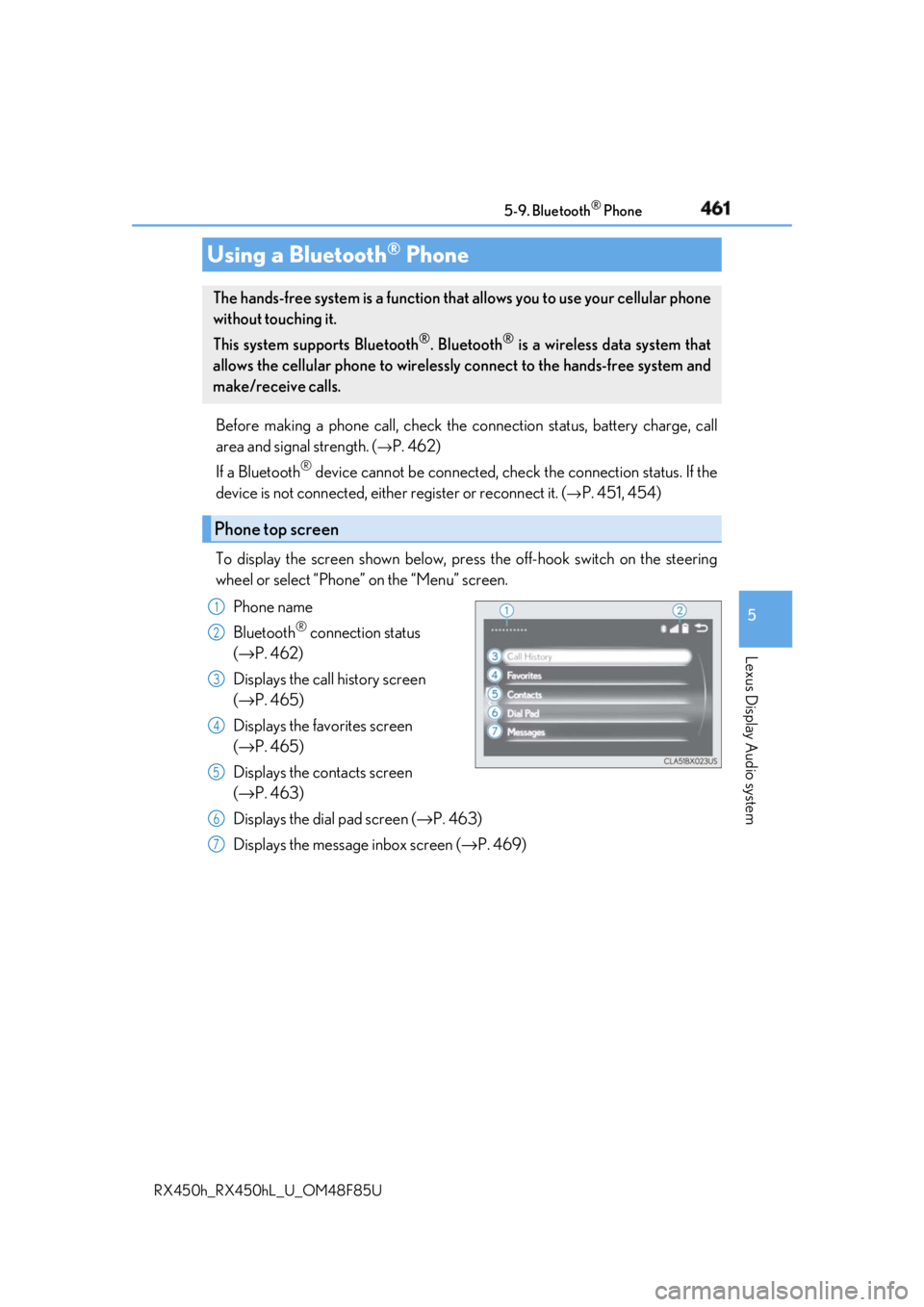
To display the screen shown below, press the off-hook switch on the steering
wheel or select “Phone” on the “Menu” screen.
Phone name
Bluetooth ®
connection status
( → P. 462)
Displays the call history screen
( → P. 465)
Displays the favorites screen
( → P. 465)
Displays the contacts screen
( → P. 463)
Displays the dial pad screen ( → P. 463)
Displays the message inbox screen ( → P. 469)Using a Bluetooth ®
PhoneThe hands-free system is a function that allows you to use your cellular phone
without touching it.
This system supports Bluetooth ®
. Bluetooth ®
is a wireless data system that
allows the cellular phone to wirelessly connect to the hands-free system and
make/receive calls.
Phone top screen 1
2
3
4
5
6
7
Page 462 of 792
462 5-9. Bluetooth ®
Phone
RX450h_RX450hL _U_OM48F85U◆ Phone switch ( → P. 471)
◆ Microphone
The vehicle’s built-in microphone is
used when talking on the phone.
The person to whom you are speak-
ing to can be heard from the front
speakers.
To use the hands-free system, you
must register your Bluetooth ®
phone in the system. ( → P. 451)
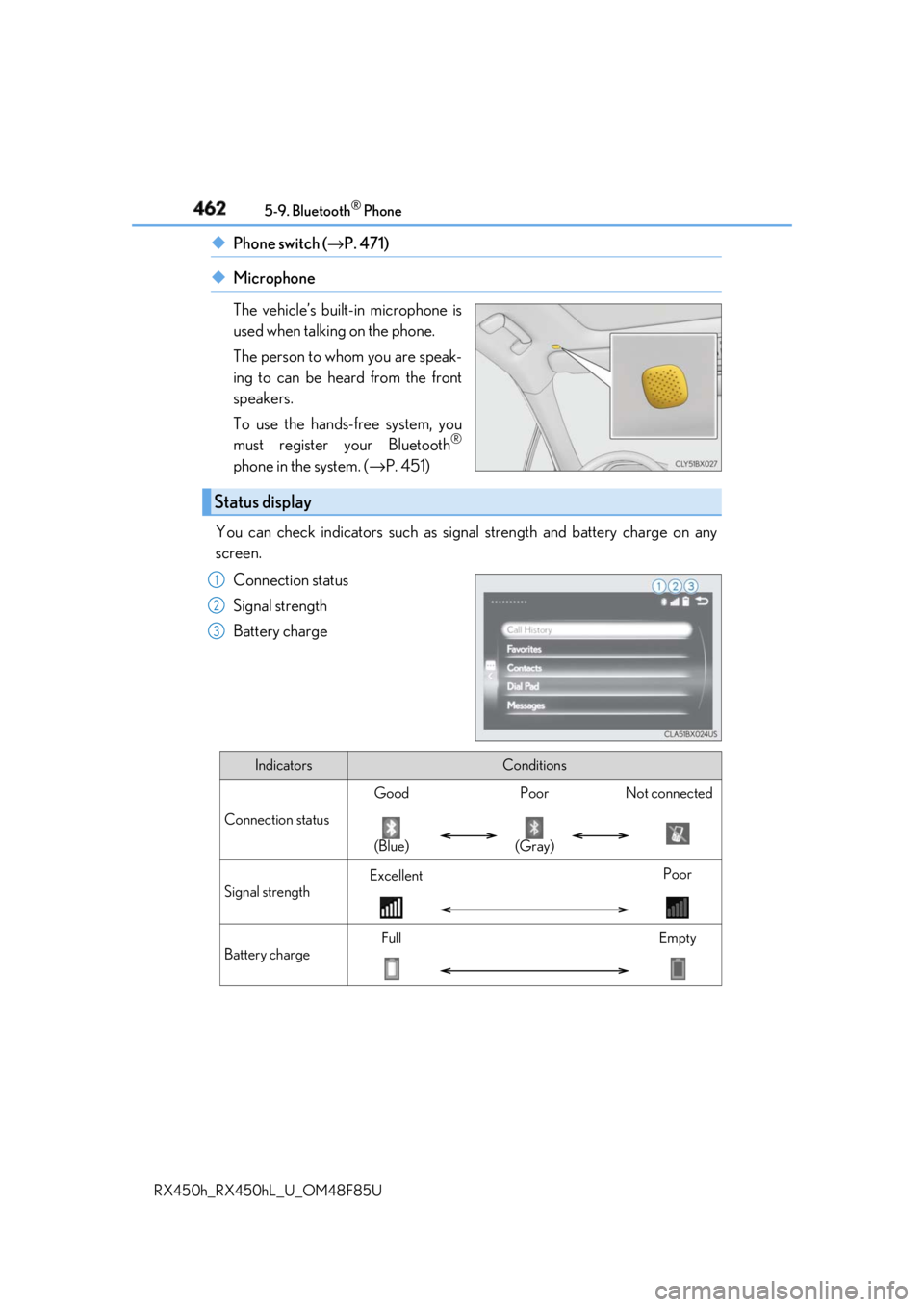
You can check indicators such as signal strength and battery charge on any
screen.
Connection status
Signal strength
Battery chargeStatus display 1
2
3
Indicators Conditions
Connection status Good Poor Not connected
(Blue) (Gray)
Signal strength Excellent Poor
Battery charge Full Empty
Page 481 of 792
4815-11. Bluetooth ®
5
Lexus Display Audio system
RX450h_RX450hL _U_OM48F85U
In other situations Even though all conceivable measures have been taken, the symptom status does not
change.
The cellular phone is not clos e enough to this system.
→ Bring the cellular phone closer to this system.
The cellular phone is the most likely cause of the symptom.
→ Turn the cellular phone off, remove and reinstall the battery pack, and then
restart the cellular phone.
→ Enable the cellular phone’s Bluetooth ®
connection.
→ Stop the cellular phone’s security software and close all applications.
→ Before using an application installed on the cellular phone, carefully check its
source and how its operation might affect this system.
Page 482 of 792

482 5-11. Bluetooth ®
RX450h_RX450hL _U_OM48F85U■
When using the Bluetooth ®
audio system●
In the following situations, the system may not function.
• If the portable audio player is turned off
• If the portable audio player is not connected
• If the portable audio player’s battery is low ●
There may be a delay if a cellular phon e connection is made during Bluetooth ®
audio
play. ●
Depending on the type of portable audio play er that is connected to the system, opera-
tion may differ slight ly and certain functions may not be available.■
When using the hands-free system ●
The audio system is mu ted when making a call.●
If both parties speak at the same time, it may be difficult to hear.●
If the received call volume is over ly loud, an echo may be heard.
If the Bluetooth ®
phone is too close to the system, quality of the sound may deteriorate
and connection status may deteriorate. ●
In the following situations, it may be difficult to hear the other party:
• When driving on unpaved roads
• When driving at high speeds
• If a window is open
• If the air conditioning is blow ing directly on the microphone
• If there is interference from the network of the cellular phone●
Depending on the type phone, certain functions may not be available. ■
Conditions under which th e system will not operate●
If using a cellular phone that does not support Bluetooth ®
●
If the cellular phone is turned off ●
If you are outside of cellular phone service coverage ●
If the cellular phone is not connected ●
If the cellular phone’s battery is low ●
When outgoing calls are controlled, due to heavy traffic on phone lines, etc. ●
When the cellular phone itself cannot be used ●
When transferring phonebook da ta from the cellular phoneBluetooth ®
Page 483 of 792
4835-11. Bluetooth ®
5
Lexus Display Audio system
RX450h_RX450hL _U_OM48F85U■
Bluetooth ®
antenna
The antenna is built into the display.
If the portable audio player is behind the se at or in the glove box or console box, or is
touching or covered by metal objects, the connection status may deteriorate.
If the cellular phone is behind the seat or in the console box, or touching or covered by
metal objects, the connection status may deteriorate. ■
Battery charge/signal status ●
This display may not correspond exactly wi th the portable audio player or cellular
phone itself. ●
This system does not have a charging function. ●
The portable audio player or cellular phone battery will be deplet ed quickly when the
device is connected to Bluetooth ®
.■
When using the Bluetooth ®
audio and hands-free system at the same time
The following problems may occur. ●
The Bluetooth ®
audio connection may be interrupted.●
Noise may be heard during Bluetooth ®
audio playback.■
About the contact in this system
The following data is stored for every registered cellular phone. When another phone is
connecting, you cannot read the registered data. ●
Contact data ●
Call history ●
Favorite ●
Message
When removing a Bluetooth ®
phone from the system, the above-mentioned data is also
deleted. ■
About Bluetooth ®
Page 521 of 792
5216-2. Using the air conditioning system and defogger
RX450h_RX450hL _U_OM48F85U 6
Interior features NOTICE ■
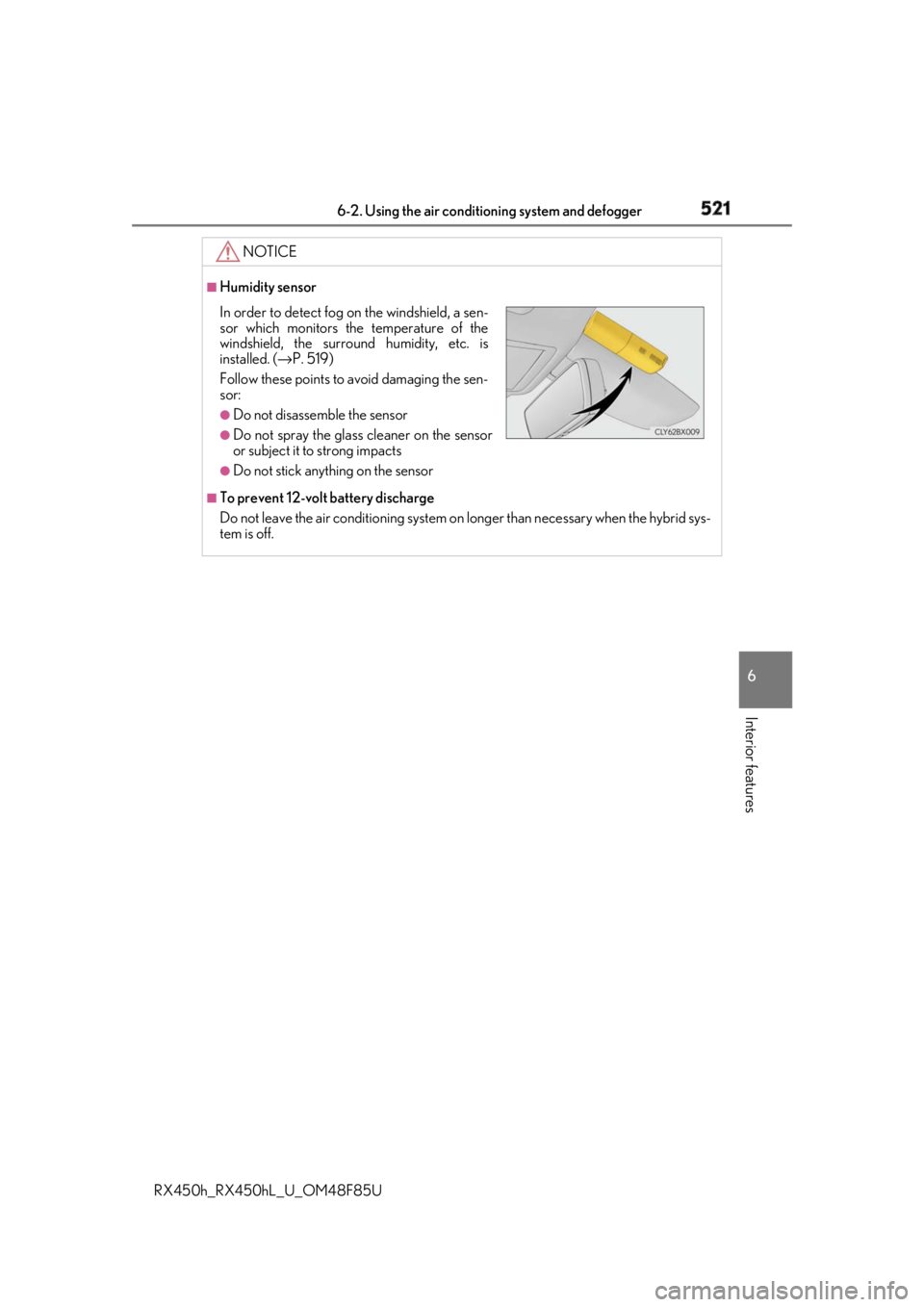
Humidity sensor
■
To prevent 12-volt battery discharge
Do not leave the air conditioning system on longer than necessary when the hybrid sys-
tem is off.In order to detect fog on the windshield, a sen-
sor which monitors the temperature of the
windshield, the surround humidity, etc. is
installed. ( → P. 519)
Follow these points to avoid damaging the sen-
sor: ●
Do not disassemble the sensor ●
Do not spray the glass cleaner on the sensor
or subject it to strong impacts ●
Do not stick anything on the sensor
Page 524 of 792
524 6-2. Using the air conditio ning system and defogger
RX450h_RX450hL _U_OM48F85U■
Using the automatic mode
Press the “AUTO” button
Adjust the temperature setting.
To stop the operation, press the “OFF” button.■
Automatic mode indicator
If the fan speed setting or air flow modes are operated, the automatic mode
indicator goes off. However, automati c mode for functions other than that
operated is maintained. ■
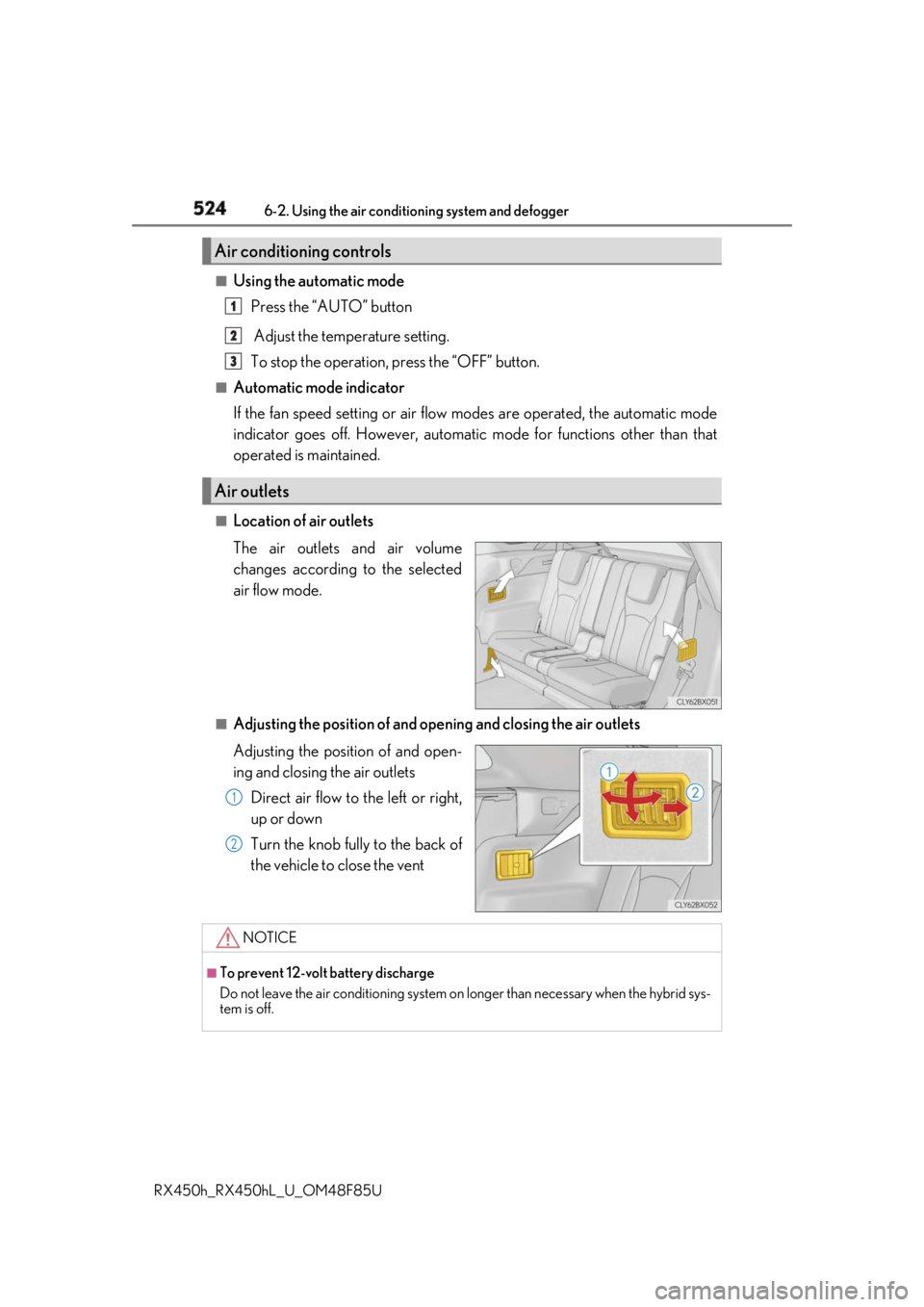
Location of air outlets
The air outlets and air volume
changes according to the selected
air flow mode.
■
Adjusting the position of and opening and closing the air outlets
Adjusting the position of and open-
ing and closing the air outlets
Direct air flow to the left or right,
up or down
Turn the knob fully to the back of
the vehicle to close the ventAir conditioning controls
Air outlets 1
2
3
1
2
NOTICE ■
To prevent 12-volt battery discharge
Do not leave the air conditioning system on longer than necessary when the hybrid sys-
tem is off.