driver seat adjustment LEXUS RX450h 2018 Owners Manual
[x] Cancel search | Manufacturer: LEXUS, Model Year: 2018, Model line: RX450h, Model: LEXUS RX450h 2018Pages: 792, PDF Size: 12.5 MB
Page 31 of 792
311-1. For safe use
1
For safety and security
RX450h_RX450hL _U_OM48F85UWARNING
Observe the following precautions.
Failure to do so may result in death or serious injury.●
Do not adjust the position of the driver’s seat while driving.
Doing so could cause the driver to lose control of the vehicle. ●
Do not place a cushion between the dr iver or passenger and the seatback.
A cushion may prevent correct posture from being achieved, and reduce the effec-
tiveness of the seat be lt and head restraint.●
Do not place anything under the front seats.
Objects placed under the fr ont seats may become jammed in the seat tracks and stop
the seat from locking in plac e. This may lead to an accident and the adjustment mech-
anism may also be damaged. ●
Always observe the legal speed limi t when driving on public roads.●
When driving over long distances, take regular breaks before you start to feel tired.
Also, if you feel tired or sleepy while drivin g, do not force yourself to continue driving
and take a break immediately.
Page 167 of 792
167
3
Operation of each component
RX450h_RX450hL _U_OM48F85U 3-3. Adjusting the seats
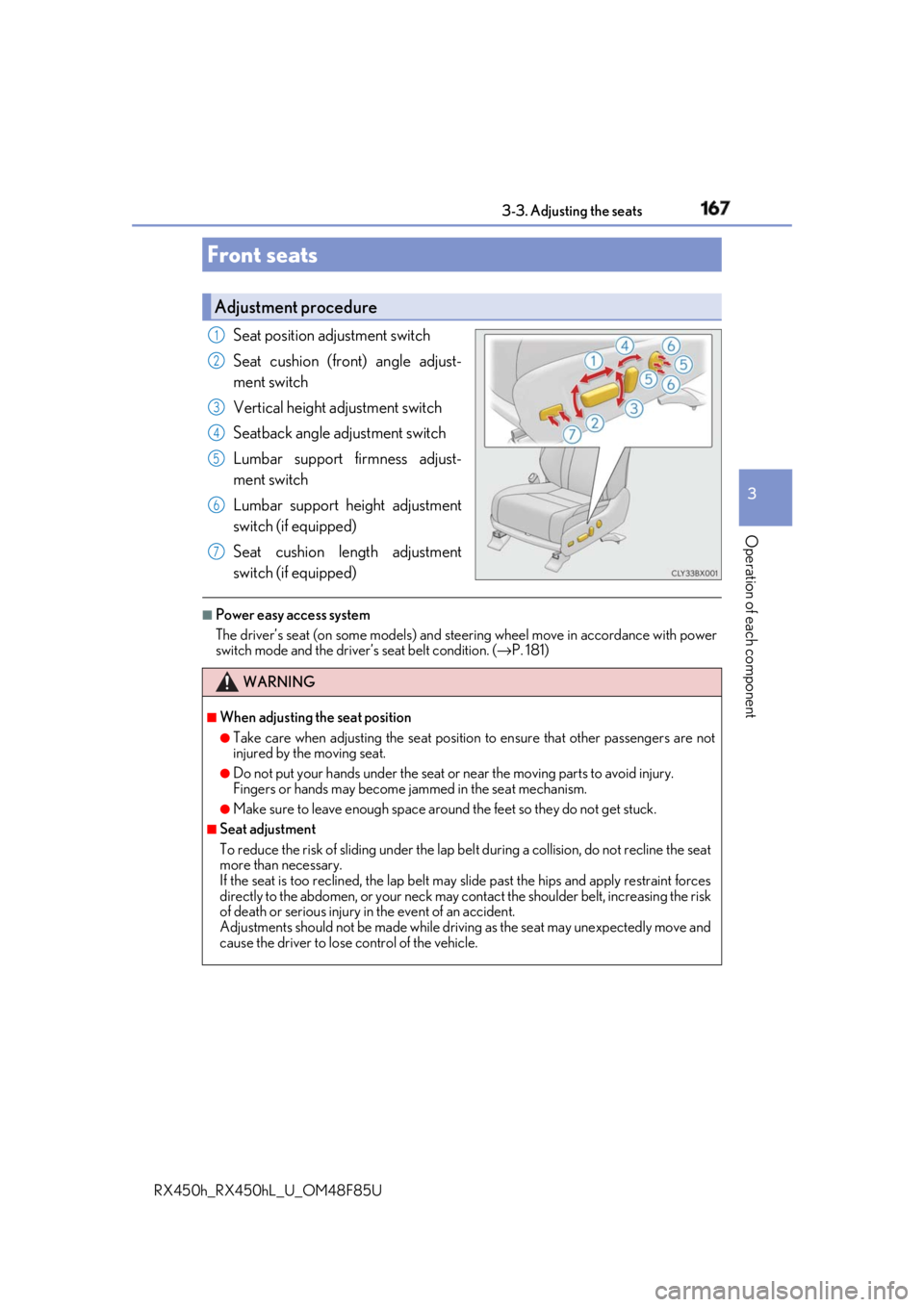
Seat position adjustment switch
Seat cushion (front) angle adjust-
ment switch
Vertical height adjustment switch
Seatback angle adjustment switch
Lumbar support firmness adjust-
ment switch
Lumbar support height adjustment
switch (if equipped)
Seat cushion length adjustment
switch (if equipped) ■
Power easy access system
The driver’s seat (on some models) and stee ring wheel move in accordance with power
switch mode and the driver’s seat belt condition. ( → P. 181)Front seats Adjustment procedure 1
2
3
4
5
6
7
WARNING ■
When adjusting the seat position ●
Take care when adjusting the seat position to ensure that other passengers are not
injured by the moving seat. ●
Do not put your hands under the seat or near the moving parts to avoid injury.
Fingers or hands may become jammed in the se at mechanism.●
Make sure to leave enough space around the feet so they do not get stuck. ■
Seat adjustment
To reduce the risk of sliding under the lap be lt during a collision, do not recline the seat
more than necessary.
If the seat is too reclined, the lap belt may slide past the hips and apply restraint forces
directly to the abdomen, or your neck may contact the shou lder belt, increasing the risk
of death or serious injury in the event of an accident.
Adjustments should not be made while drivin g as the seat may unexpectedly move and
cause the driver to lose control of the vehicle.
Page 179 of 792
1793-3. Adjusting the seats
3
Operation of each component
RX450h_RX450hL _U_OM48F85UWARNING ■
When a rear seatback is folded
Observe the following precautions.
Failure to do so may result in death or serious injury.●
Do not fold down the rear seatbacks while driving. ●
Stop the vehicle on level grou nd, apply the parking brake and shift the shift lever to P.●
Do not allow anyone to sit on a folded re ar seatback or in th e luggage compartment
while driving. ●
Do not allow children to enter the luggage compartment. ■
When operating the rear seatback
Observe the following precautions.
Failure to do so may result in death or serious injury.●
Make sure that passengers are clear of the rear seatback before operating it.●
To prevent hands and other body parts from being caught, keep them away from the
gaps in the seats and the moving parts of the seats when operating a rear seatback.●
Power seat: Do not let children operate th e rear seatback. Othe r passengers may get
caught in the seat. ●
Power seat: Make sure that a ll passengers are clear of a seat before folding it. Do not
let passengers sit in the seat while it is being folded.■
Seat adjustment ●
Second-row seats: To reduce the risk of s liding under the lap belt during a collision,
do not recline the seat more than necessary.
If the seat is reclined excessively, the la p belt may slide past the hips and apply
restraint forces directly to the abdomen, or your neck may contact the shoulder belt,
increasing the risk of de ath or serious injury in the event of an accident.●
Adjustments should not be made while dr iving as the seat may unexpectedly move
and cause the driver to lose control of the vehicle. ■
After adjusting the rear seats
Observe the following precautions.
Failure to do so may result in death or serious injury.●
Manual seats: Make sure that the rear se atback is securely locked in position by
lightly pushing it back and forth. ●
Check that the seat belts are not twisted or caught between or behind in the rear
seatback.
Page 183 of 792
1833-3. Adjusting the seats
3
Operation of each component
RX450h_RX450hL _U_OM48F85U■
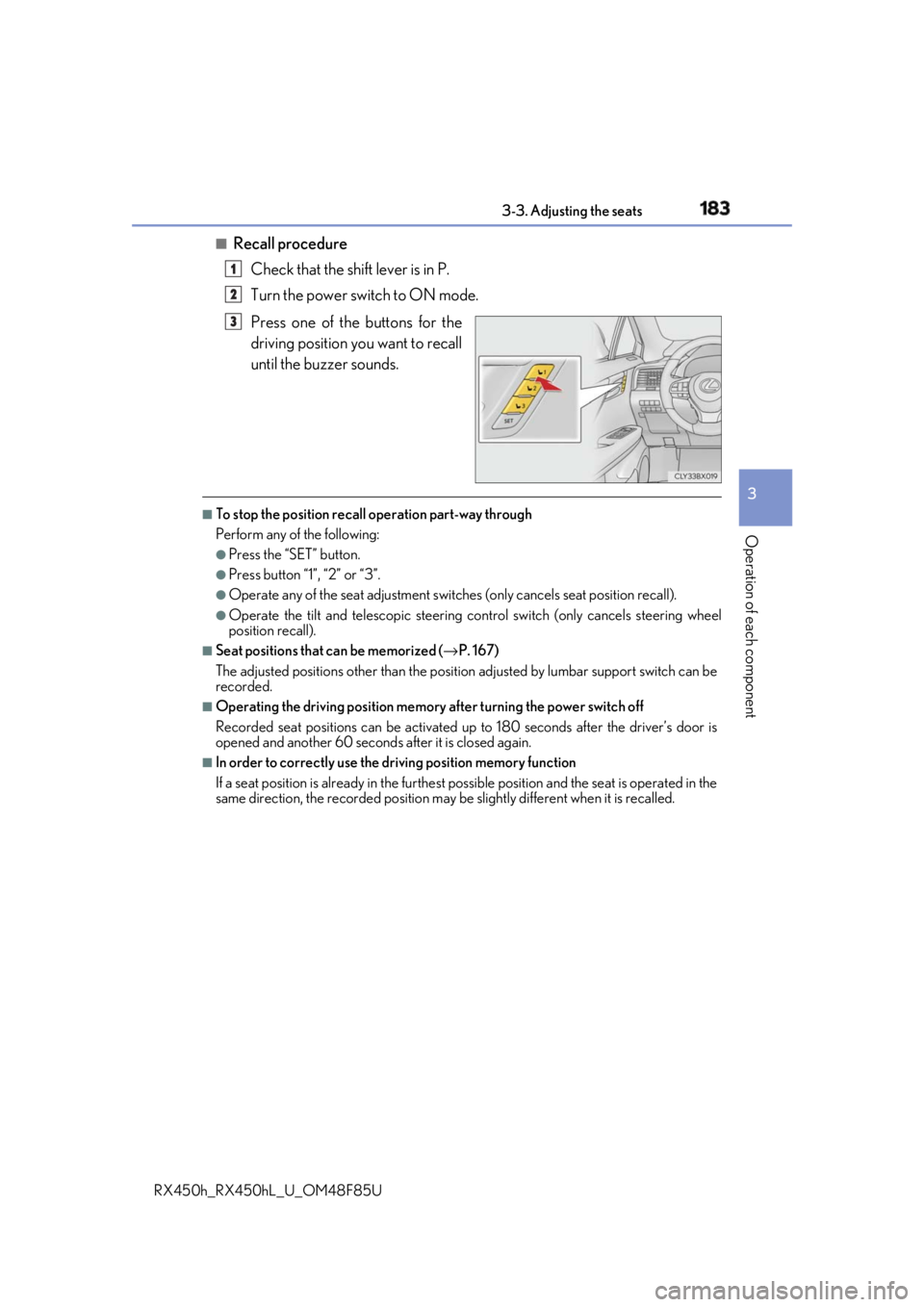
Recall procedure
Check that the shift lever is in P.
Turn the power switch to ON mode.
Press one of the buttons for the
driving position you want to recall
until the buzzer sounds. ■
To stop the position recall operation part-way through
Perform any of the following: ●
Press the “SET” button. ●
Press button “1”, “2” or “3”. ●
Operate any of the seat adjustment switches (only cancels seat position recall). ●
Operate the tilt and telescopic steering control switch (only cancels steering wheel
position recall). ■
Seat positions that can be memorized ( → P. 167)
The adjusted positions other than the position adjusted by lumbar support switch can be
recorded. ■
Operating the driving position memory after turning the power switch off
Recorded seat positions can be activated up to 180 seconds after the driver’s door is
opened and another 60 seconds after it is closed again. ■
In order to correctly use the dr iving position memory function
If a seat position is already in the furthest po ssible position and the seat is operated in the
same direction, the recorded position may be slightly di fferent when it is recalled.1
2
3
Page 185 of 792
1853-3. Adjusting the seats
3
Operation of each component
RX450h_RX450hL _U_OM48F85U■
Cancelation procedure
Carry only the key you want to cance l and then close the driver’s door.
If 2 or more keys are in the vehicle, the driving position cannot be canceled
properly.
Turn the power switch to ON mode.
While pressing the “SET” button, pr ess and hold the door lock switch
(either lock or unlock) un til the buzzer sounds twice.If it button could not be canceled, the buzzer sounds continuously for approxi-
mately 3 seconds.■
Recalling the driving position using the memory recall function●
Different driving positions can be registered for each electronic key. Therefore, the
driving position that is recalled may be di fferent depending on the key being carried.●
If a door other than the driver’s door is unlocked with the smart access system with
push-button start, the driving position cannot be recalled. In this case, press the driving
position button which has been set. ■
Customization
Some functions can be customized. ( → P. 736)
WARNING ■
Seat adjustment caution
Take care during seat adjustment so that th e seat does not strike the rear passenger or
squeeze your body against the steering wheel. 1
2
Page 190 of 792
190 3-4. Adjusting the steering wheel and mirrors
RX450h_RX450hL _U_OM48F85U■
The steering wheel can be adjusted when
The power switch is in ACCESSORY or ON mode
* .
* : If the driver’s seat belt is fastened, the steering wheel can be adjusted regardless of
power switch mode. ■
Automatic adjustment of the steering position (if equipped)
A desired steering position ca n be entered to memory and recalled automatically by the
driving position memory system. ( → P. 181)■
Power easy access system
The steering wheel and driver’s seat (on so me models) move in ac cordance with power
switch mode and the driver’s seat belt condition. ( → P. 181)■
Customization
Some functions can be customized. ( → P. 736)
WARNING
Do not adjust the steeri ng wheel while driving.
Doing so may cause the driver to mishandle the vehicle and cause an accident, result-
ing in death or serious injury.
Page 513 of 792
5136-2. Using the air conditioning system and defogger
RX450h_RX450hL _U_OM48F85U 6
Interior features ■
Using the automatic mode
Press the “AUTO” button or select “A UTO” on the air conditioning control
screen.
Press to switch to automatic air intake mode. (if equipped)
The air conditioning system automati cally switches between outside air
and recirculated air modes.
Adjust the temperature setting.
To stop the operation, press the “OFF” button.■
Automatic mode indicator
If the fan speed setting or air flow modes are operated, the automatic mode
indicator goes off. However, automati c mode for functions other than that
operated is maintained. ■
Adjusting the temperature for driv er and passenger seats separately
(“DUAL” mode) (RX450h)
To turn on the “DUAL” mode, perfor m any of the following procedures:●
Press “DUAL” button. ●
Adjust the temperature setting of th e passenger side with the passenger
side temperature adjustment button. The indicator comes on when the “DUAL” mode is on.■
Adjusting the temperature for driver, passenger and rear seats separately
(“3-ZONE” mode) (RX450hL)
To turn on the “3-ZONE” mode, perf orm any of the following procedures:●
Select “3-ZONE” on the air conditioning control screen.●
Select “3-ZONE” on the side displa y operation screen. (Vehicles with a
navigation system [12.3-inch display]) ●
Adjust the temperature setting of th e passenger side with the passenger
side temperature adjustment button. The indicator comes on when the “3-ZONE” mode is on.Air conditioning controls 1
2
3
4
Page 635 of 792
6357-3. Do-it-yourself maintenance
7
Maintenance and care
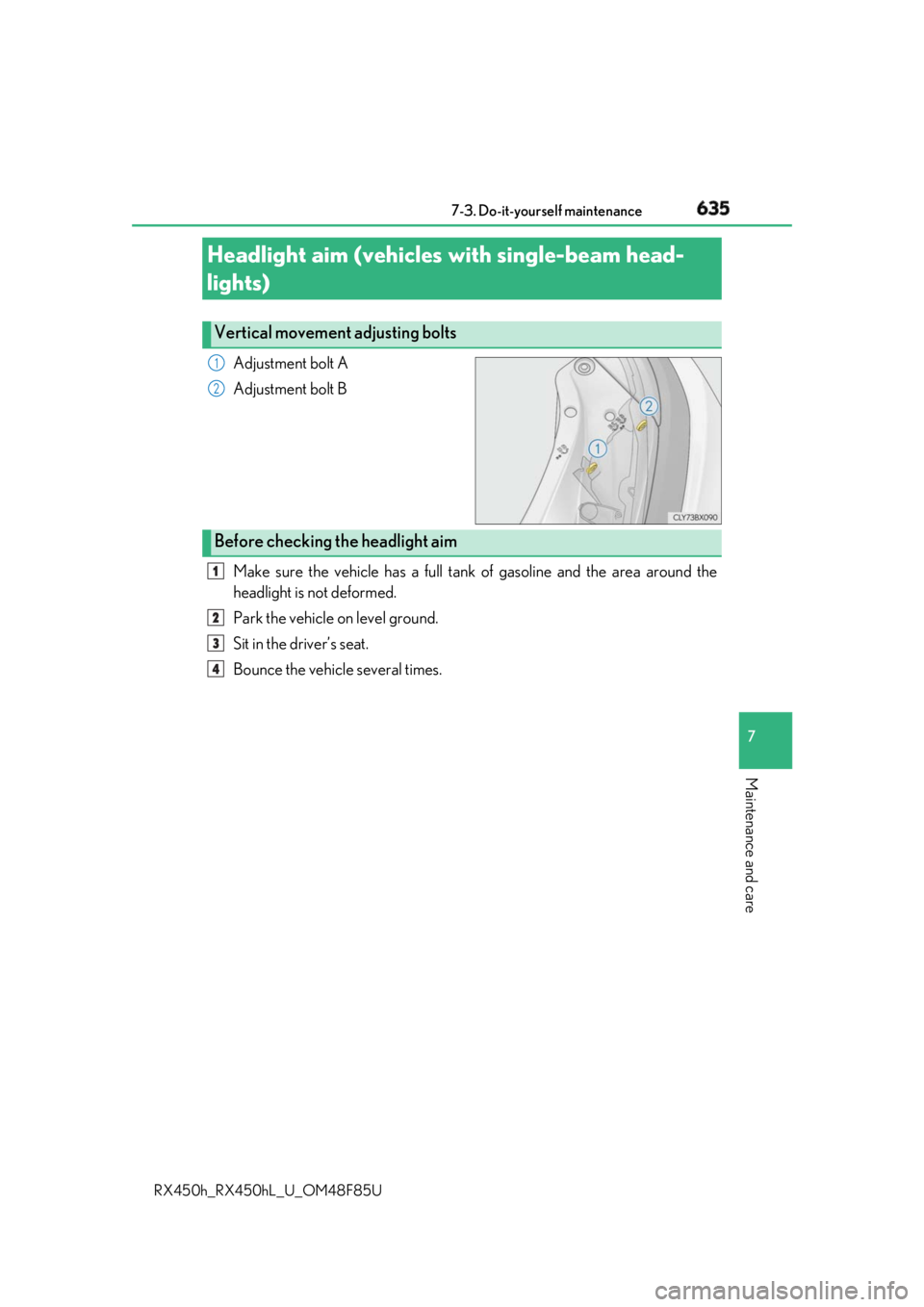
RX450h_RX450hL _U_OM48F85UAdjustment bolt A
Adjustment bolt B
Make sure the vehicle has a full tank of gasoline and the area around the
headlight is not deformed.
Park the vehicle on level ground.
Sit in the driver’s seat.
Bounce the vehicle several times.Headlight aim (vehicles with single-beam head-
lights) Vertical movement adjusting bolts 1
2
Before checking the headlight aim 1
2
3
4