horn LEXUS RX450h 2018 Owners Manual
[x] Cancel search | Manufacturer: LEXUS, Model Year: 2018, Model line: RX450h, Model: LEXUS RX450h 2018Pages: 792, PDF Size: 12.5 MB
Page 189 of 792
189
3
Operation of each component
RX450h_RX450hL _U_OM48F85U 3-4. Adjusting the steering wheel and mirrors
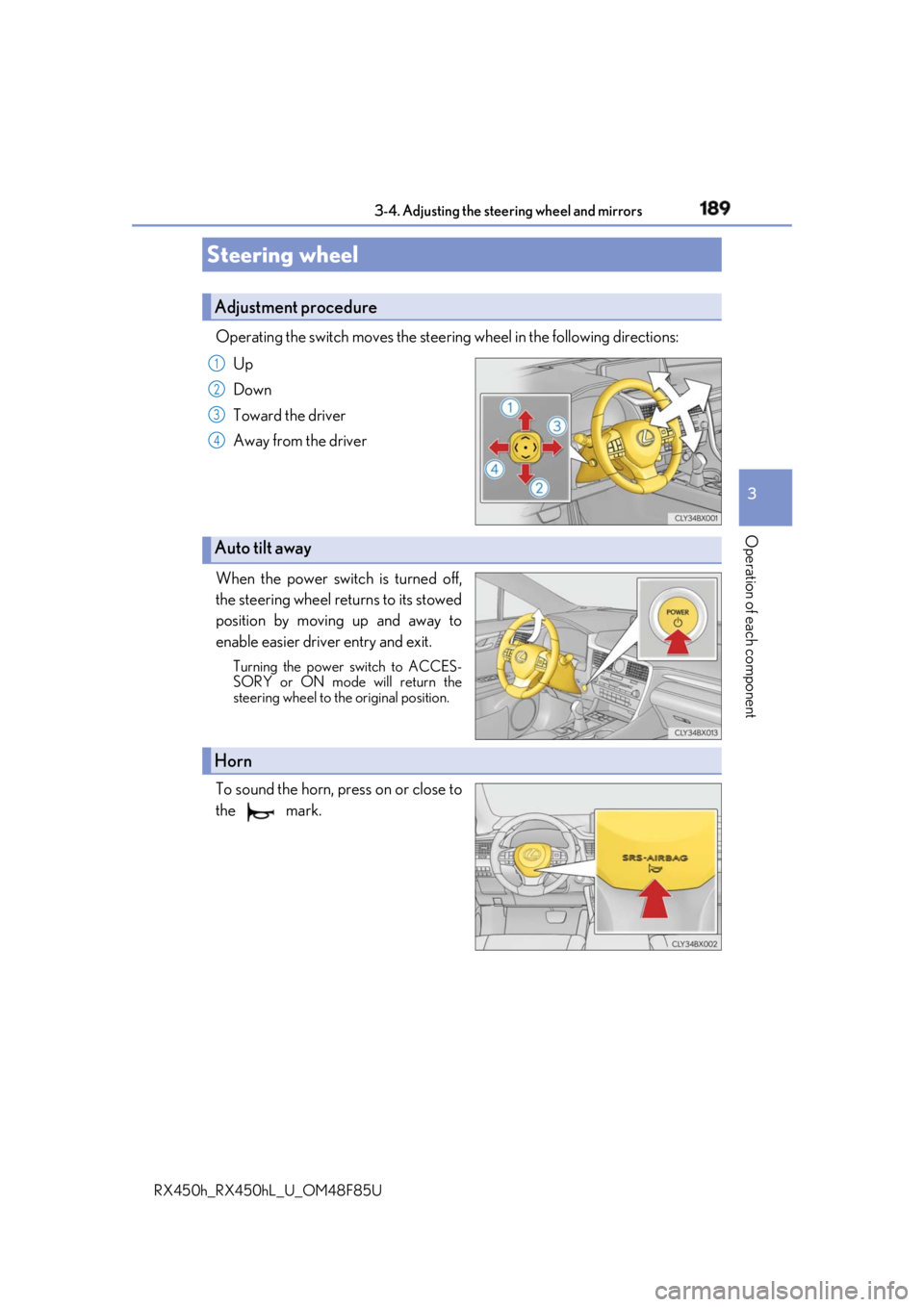
Operating the switch moves the steering wheel in the following directions:
Up
Down
Toward the driver
Away from the driver
When the power switch is turned off,
the steering wheel returns to its stowed
position by moving up and away to
enable easier driv er entry and exit.Turning the power switch to ACCES-
SORY or ON mode will return the
steering wheel to the original position.
To sound the horn, press on or close to
the mark.Steering wheel Adjustment procedure 1
2
3
4
Auto tilt away
Horn
Page 339 of 792

3394-5. Using the driving support systems
4
Driving
RX450h_RX450hL _U_OM48F85U●
Vehicles with a navigation system (12.3-inch display): If the intuit ive parking assist dis-
play is set to on, detected objects will also be displayed on the panoramic view monitor.
For details, refer to “NAVIGATION SYSTEM OWNER’S MANUAL”. ■
Sensor detectio n information●
The sensor’s detection areas are limited to the areas around the vehicle’s bumper. ●
Certain vehicle conditions and the surrounding environment may affect the ability of a
sensor to correctly detect an object. Particular instances where this may occur are
listed below.
• There is dirt, snow or ice on the sensor . (Wiping the sensors will resolve this prob-
lem.)
• The sensor is frozen. (Thawing th e area will resolve this problem.)
In especially cold weather, if a sensor is frozen the screen may show an abnormal
display, or obstacles may not be detected.
• The sensor is covered in any way.
• The vehicle is leaning considerably to one side.
• When a sensor or the area around a sensor is extremely hot or cold.
• On an extremely bumpy road, on an incline, on gravel, or on grass.
• The vicinity of the vehicle is noisy due to vehicle horns, motorcycle engines, air
brakes of large vehicles, or other loud noises producing ultrasonic waves.
• There is another vehicle equipped with parking assist sensors in the vicinity.
• The sensor is coated with a sheet of spray or heavy rain.
• The bumper or sensor re ceives a strong impact.
• If the vehicle is significantly tilted.
• The vehicle is approaching a tall or curved curb.
• In harsh sunlight or intense cold weather.
• The area directly under the bumpers is not detected.
• If objects draw too close to the sensor.
• People may not be detected if they are wearing certain types of clothing.
In addition to the examples above, there ar e instances in which, because of their shape,
signs and other objects may be judged by a sensor to be closer than they are. ●
The shape of the object may prevent a sensor from detecting it. Pay particular attention
to the following objects:
• Wires, fences, ropes, etc.
• Cotton, snow and other materi als that absorb sound waves
• Sharply-angled objects
• Low obstacles
• Tall obstacles with upper sections projecting outwards in the direction of your vehi-
cle ●
The following situations may occur during use.
• Depending on the shape of the object and other factors, the detection distance may
shorten, or detectio n may be impossible.
• Objects may not be detected if they are too close to the sensor.
• There will be a short dela y between object detection and display. Even at slow
speeds, there is a possibility that the obje ct will come within the sensor’s detection
areas before the display is shown and the buzzer sounds.
• Thin posts or objects lower than the sens or may not be detected when approached,
even if they have been detected once.
• It might be difficult to hear beeps due to th e volume of audio system or air flow noise
of the air conditioning system.
Page 351 of 792
3514-5. Using the driving support systems
4
Driving
RX450h_RX450hL _U_OM48F85U■
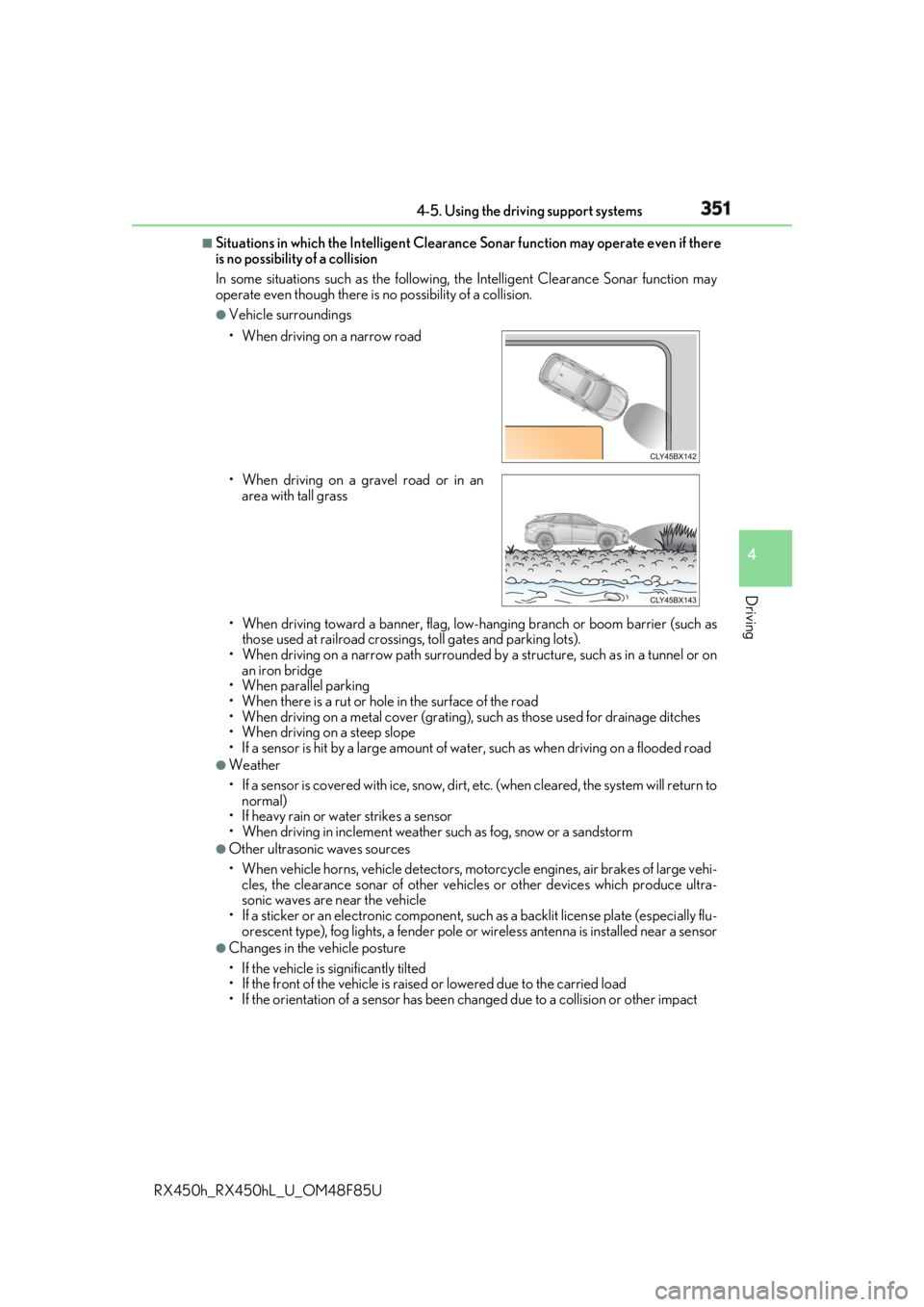
Situations in which the Intelligent Clearance Sonar function may operate even if there
is no possibility of a collision
In some situations such as the following, the Intelligent Clearanc e Sonar function may
operate even though there is no possibility of a collision. ●
Vehicle surroundings
• When driving toward a banner, flag, low- hanging branch or boom barrier (such as
those used at railroad crossing s, toll gates and parking lots).
• When driving on a narrow path surrounded by a structure, such as in a tunnel or on
an iron bridge
• When parallel parking
• When there is a rut or hole in the surface of the road
• When driving on a metal cover (grating), such as those used for drainage ditches
• When driving on a steep slope
• If a sensor is hit by a large amount of wa ter, such as when driving on a flooded road●
Weather
• If a sensor is covered with ice, snow, dirt, etc. (when cleared, the system will return to
normal)
• If heavy rain or water strikes a sensor
• When driving in inclemen t weather such as fog, snow or a sandstorm●
Other ultrasonic waves sources
• When vehicle horns, vehicle detectors, motorcycle engines, air brakes of large vehi-
cles, the clearance sonar of other vehicles or other devices which produce ultra-
sonic waves are near the vehicle
• If a sticker or an electronic component, su ch as a backlit license plate (especially flu-
orescent type), fog lights, a fender pole or wireless antenna is installed near a sensor●
Changes in the vehicle posture
• If the vehicle is significantly tilted
• If the front of the vehicle is raised or lowered due to the carried load
• If the orientation of a sens or has been changed due to a collision or other impact• When driving on a narrow road
• When driving on a gravel road or in an
area with tall grass
Page 352 of 792
352 4-5. Using the driving support systems
RX450h_RX450hL _U_OM48F85U■
If the Intelligent Clearance Sonar function operates unnecessarily such as at a railroad
crossing
Even in the event that the Intelligent Cleara nce Sonar function operates unnecessarily,
such as at a railroad crossing, brake cont rol will be canceled afte r approximately 2 sec-
onds, allowing you to proceed forward and leave the area, Brake control can also be
canceled by depressing the brake pedal. Depressing the accelerator pedal again will
allow you to proceed forward and leave the area. ■
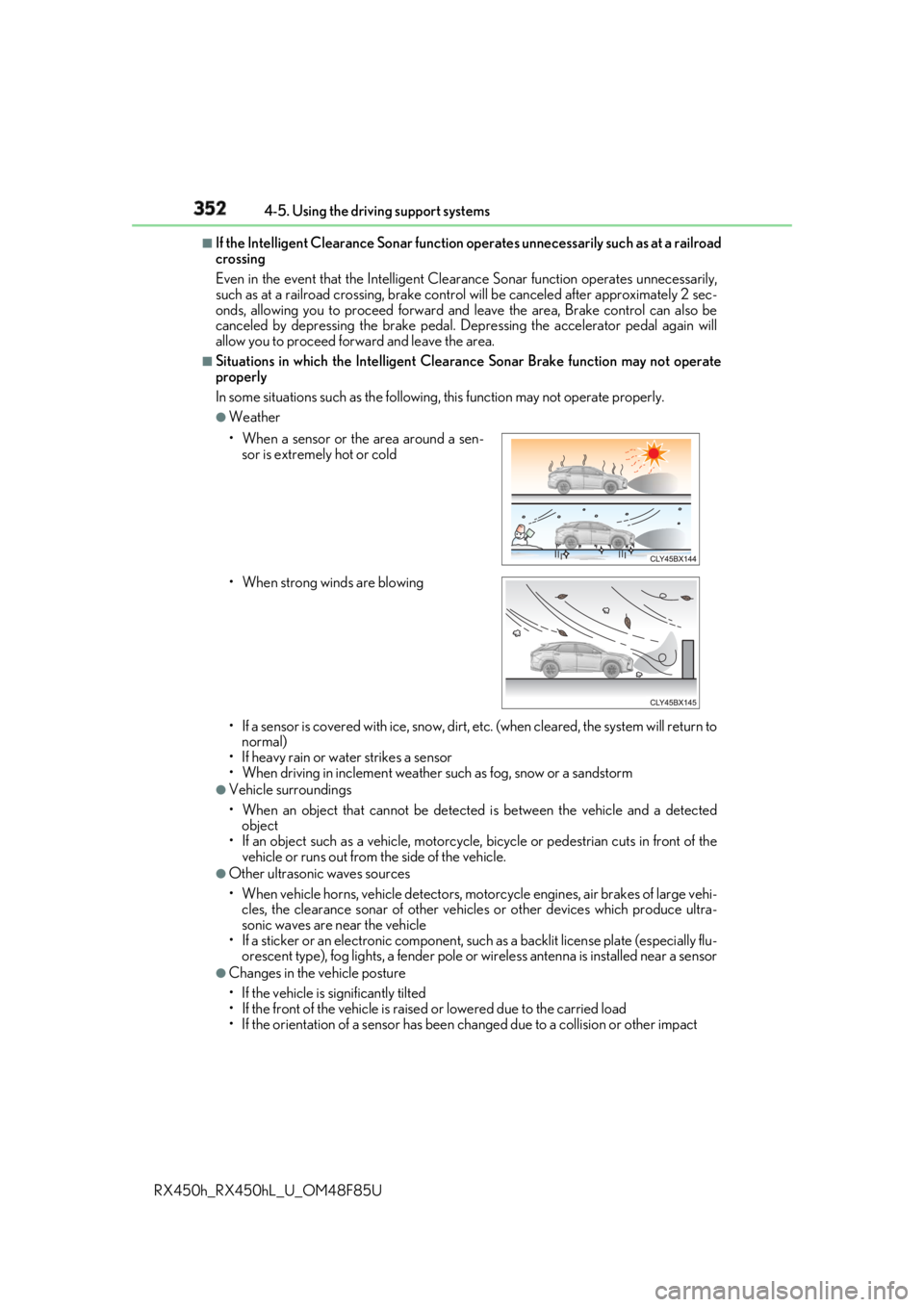
Situations in which the Intelligent Cleara nce Sonar Brake function may not operate
properly
In some situations such as the following , this function may not operate properly.●
Weather
• If a sensor is covered with ice, snow, dirt, etc. (when cleared, the system will return to
normal)
• If heavy rain or water strikes a sensor
• When driving in inclemen t weather such as fog, snow or a sandstorm●
Vehicle surroundings
• When an object that cannot be detected is between the vehicle and a detected
object
• If an object such as a vehicle, motorcycle, bicycle or pedestrian cuts in front of the
vehicle or runs out from the side of the vehicle. ●
Other ultrasonic waves sources
• When vehicle horns, vehicle detectors, motorcycle engines, air brakes of large vehi-
cles, the clearance sonar of other vehicles or other devices which produce ultra-
sonic waves are near the vehicle
• If a sticker or an electronic component, su ch as a backlit license plate (especially flu-
orescent type), fog lights, a fender pole or wireless antenna is installed near a sensor●
Changes in the vehicle posture
• If the vehicle is significantly tilted
• If the front of the vehicle is raised or lowered due to the carried load
• If the orientation of a sens or has been changed due to a collision or other impact• When a sensor or the area around a sen-
sor is extremely hot or cold
• When strong winds are blowing
Page 690 of 792
690 8-2. Steps to take in an emergency
RX450h_RX450hL _U_OM48F85UOne of the following may be the cause of the problem: ●
The electronic key may not be functioning properly.
( → P. 692)●
There may not be sufficient fuel in the vehicle’s tank.
Refuel the vehicle. ●
There may be a malfunction in the immobilizer system. ( → P. 83)●
There may be a malfunction in the steering lock system. ●
The hybrid system may be malfunctioni ng due to an electrical problem such
as electronic key battery depletion or a blown fuse. However, depending on
the type of malfunction, an interim meas ure is available to start the hybrid sys-
tem. ( → P. 691)
One of the following may be the cause of the problem: ●
The 12-volt battery may be discharged. ( → P. 695)●
The 12-volt battery terminal connections may be loose or corroded.
( → P. 691)If the hybrid system will not start Reasons for the hybrid system not star ting vary depending on the situation.
Check the following and perform the appropriate procedure:
The hybrid system will no t start even though the correct starting proce-
dure is being followed. ( → P. 239)
The interior lights and headlights are d im, or the horn does not sound or
sounds at a low volume.
Page 691 of 792
6918-2. Steps to take in an emergency
8
When trouble arises
RX450h_RX450hL _U_OM48F85UOne of the following may be the cause of the problem: ●
The 12-volt battery may be discharged. ( → P. 695)●
One or both of the 12-volt battery terminals may be disconnected. ( → P. 605)Contact your Lexus dealer if the problem cannot be repaired, or if repair procedures
are unknown.
When the hybrid system does not start, the following steps can be used as an
interim measure to start the hybrid system if the power switch is functioning nor-
mally.
Do not use this starting procedur e except in cases of emergency.
Turn the power switch to ON mode an d check that the parking brake is set.
( → P. 240, 253)
Shift the shift lever to P.
Turn the power switch to ACCESSORY mode.
Press and hold the power switch for ab out 15 seconds while depressing the
brake pedal firmly.
Even if the hybrid system can be starte d using the above steps, the system may
be malfunctioning. Have the vehicle inspected by your Lexus dealer.The interior lights and headlights do not turn on, or the horn does not
sound.
Emergency start function 1
2
3
4
Page 768 of 792

768 What to do if... (Troubleshooting)
RX450h_RX450hL _U_OM48F85U●
The seat belt reminder light is flashing
Are the driver and the passengers wearing the seat belts?
( → P. 662, 662)●
The parking brake indicator is on
Is the parking brake released? ( → P. 253)
Depending on the situation, other type s of warning buzzer may also sound.
( → P. 660, 667) ●
Did anyone inside the vehicle open a door during setting the alarm?
The sensor detects it and the alarm sounds. ( → P. 86)
Do one of the following to stop the alarms: • Unlock the doors.
• Turn the power switch to ACCESSORY or ON mode, or start the hybrid system.
●
Is the message displayed on the multi-information display?
Check the message on the multi-information display. ( → P. 667)
●
When a warning light turns on or a wa rning message is displayed, refer to
P. 660, 667. A warning buzzer sounds during driving
An alarm is activated and the horn sounds
A warning buzzer sounds when leaving the vehicle
A warning light turns on or a warning message is displayed
Page 778 of 792

778 Alphabetical index
RX450h_RX450hL _U_OM48F85UHands-free system
(for cellular phone) .............................461
Head restraints ....................................... 186
Head-up display....................................... 118
Headlight cleaner................................. 267
Headlights ............................................... 258
Automatic headlight leveling ...... 260
Automatic High Beam .................... 262
Light switch .......................................... 258
Replacing light bulbs ........................637
Wattage ....................................................719
Windshield wiper linked
headlight illumination..................... 261
Heated steering wheel ....................... 526
Heaters
Automatic air conditioning
system ..................................... 507, 522
Heated steering wheel ....................526
Outside rear view mirrors .............. 516
Seat heaters ..............................526, 527
High mounted stoplight
Replacing ...............................................637
Hill-start assist control ........................ 382
Hood .......................................................... 595
Open ....................................................... 595
Hooks
Cargo hooks ....................................... 540
Cargo net hooks ............................... 540
Front passenger footwell
hooks ....................................................557
Grocery bag hooks........................... 541
Retaining hooks (floor mat) ............. 28 Horn.............................................................189
HUD (Head-up display)....................... 118
Humidity sensor...................................... 521
Hybrid battery air vent ........................... 79
Hybrid battery (traction battery)
Location .................................................... 78
Specification ........................................... 713
Hybrid system............................................ 74
Emergency shut off system ..............79
Energy monitor/
consumption screen....................... 124
EV drive mode ................................... 244
High voltage components ............... 78
Hybrid System Indicator ................... 99
Hybrid system precautions ............. 78
Hybrid vehicle driving tips ........... 388
If the hybrid system will not
start....................................................... 690
Overheating......................................... 702
Power (ignition) switch................... 239
Regenerative braking ..........................76
Starting the hybrid system............. 239
Vehicle proximity notification
system ..................................................... 75
Hybrid System Indicator .......................99
Hybrid transmission .............................246
If the shift lever cannot be
shifted from P ...................................250
Paddle shift switches............ 247, 248
S mode.................................................... 248H