door LEXUS RX450H 2019 Owners Manual
[x] Cancel search | Manufacturer: LEXUS, Model Year: 2019, Model line: RX450H, Model: LEXUS RX450H 2019Pages: 792, PDF Size: 13.48 MB
Page 693 of 792
6938-2. Steps to take in an emergency
8
When trouble arises
RX450h_RX450hL_U
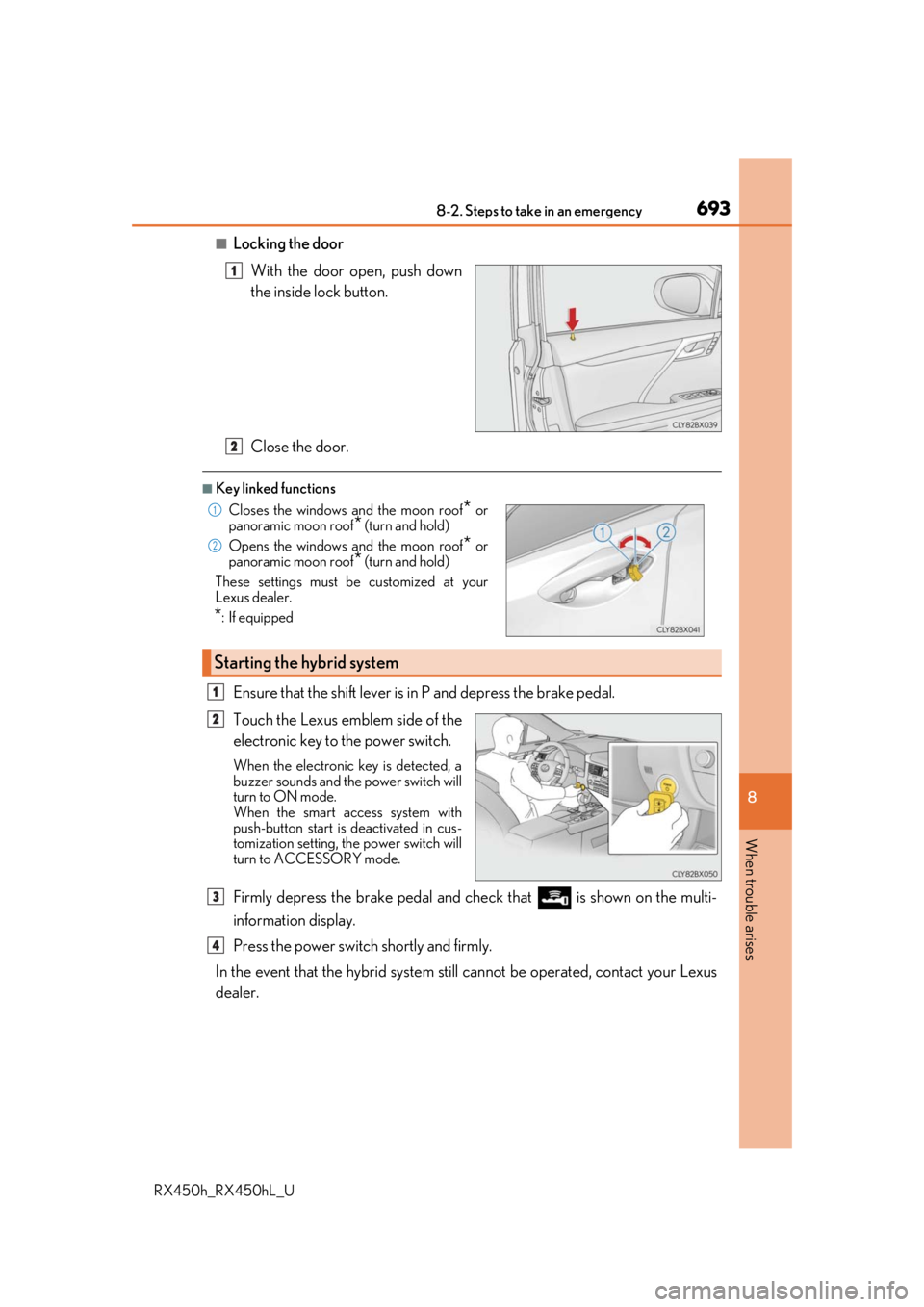
■Locking the doorWith the door open, push down
the inside lock button.
Close the door.
■Key linked functions
Ensure that the shift lever is in P and depress the brake pedal.
Touch the Lexus emblem side of the
electronic key to the power switch.
When the electronic key is detected, a
buzzer sounds and the power switch will
turn to ON mode.
When the smart access system with
push-button start is deactivated in cus-
tomization setting, the power switch will
turn to ACCESSORY mode.
Firmly depress the brake pedal and check that is shown on the multi-
information display.
Press the power switch shortly and firmly.
In the event that the hybrid system still cannot be operated, contact your Lexus
dealer.
1
Closes the windows and the moon roof* or
panoramic moon roof* (turn and hold)
Opens the windows and the moon roof
* or
panoramic moon roof
* (turn and hold)
These settings must be customized at your
Lexus dealer.
*: If equipped
Starting the hybrid system
2
1
2
1
2
3
4
Page 695 of 792
6958-2. Steps to take in an emergency
8
When trouble arises
RX450h_RX450hL_U
If you have a set of jumper (or booster) cables and a second vehicle with a 12-volt
battery, you can jump start your vehicle by following the steps below.
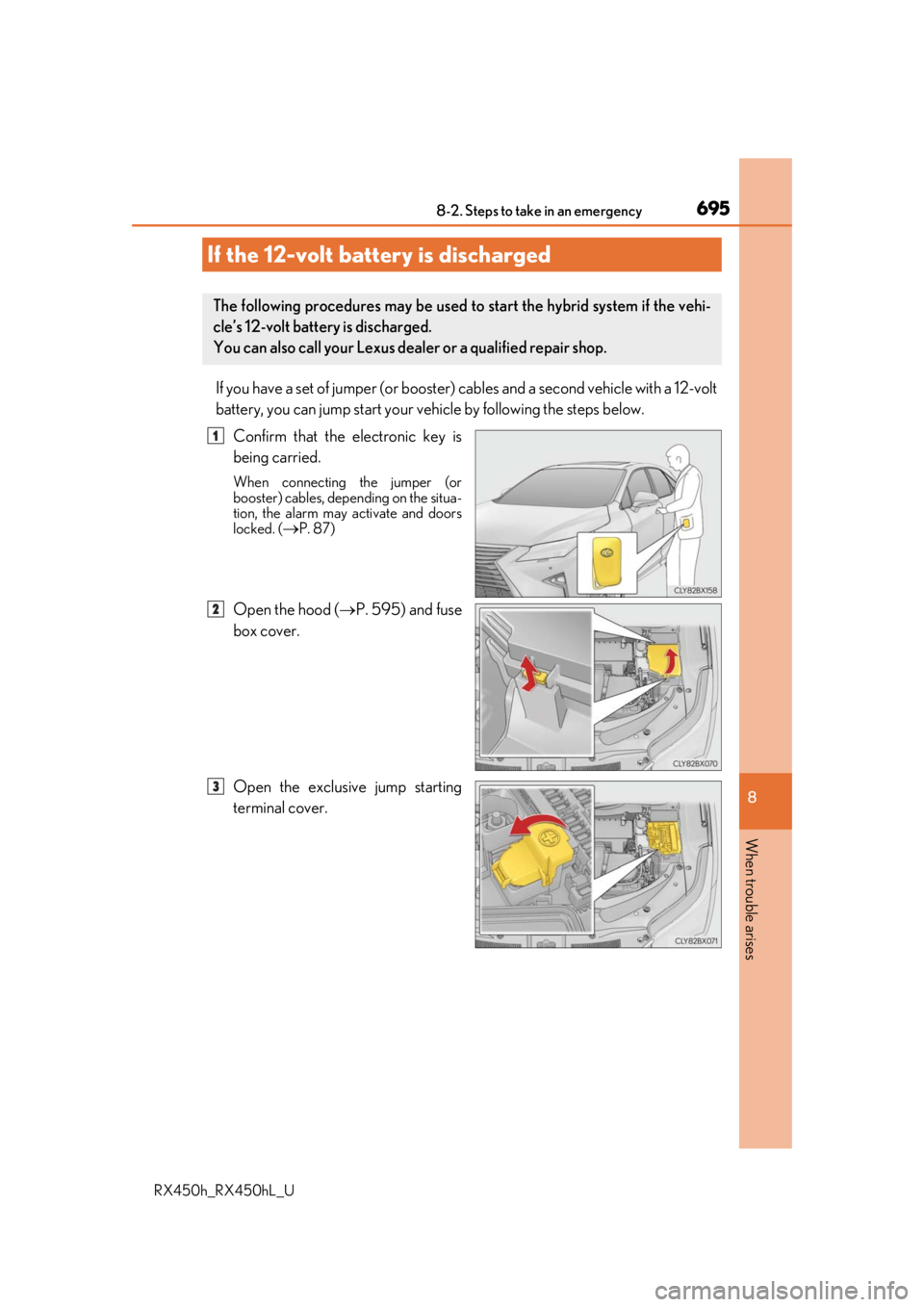
Confirm that the electronic key is
being carried.
When connecting the jumper (or
booster) cables, depe nding on the situa-
tion, the alarm may activate and doors
locked. (
P. 87)
Open the hood ( P. 595) and fuse
box cover.
Open the exclusive jump starting
terminal cover.
If the 12-volt battery is discharged
The following procedures may be used to start the hybrid system if the vehi-
cle’s 12-volt battery is discharged.
You can also call your Lexus deal er or a qualified repair shop.
1
2
3
Page 697 of 792
6978-2. Steps to take in an emergency
8
When trouble arises
RX450h_RX450hL_U
Start the engine of the second vehicle. Increase the engine speed slightly and
maintain at that level for approximatel y 5 minutes to recharge the 12-volt bat-
tery of your vehicle.
Open and close any of the doors of your vehicle with the power switch off.
Maintain the engine speed of the seco nd vehicle and start the hybrid system
of your vehicle by turning th e power switch to ON mode.
Make sure the “READY” indicator comes on. If the indicator light does not
come on, contact your Lexus dealer.
Once the hybrid system has started, remove the jumper cables in the exact
reverse order from which they were connected.
Close the exclusive jump starting termin al cover, and reinstall the fuse box
cover to its original position.
Once the hybrid system starts, have th e vehicle inspected at your Lexus dealer
as soon as possible.
■Starting the hybrid system when the 12-volt battery is discharged
The hybrid system cannot be started by push-starting.
■To prevent 12-volt battery discharge
●Turn off the headlights and the audio system while the hybrid system is off.
●Turn off any unnecessary electrical components when the vehicle is running at a low
speed for an extended period , such as in heavy traffic.
■When removing the battery terminals
When the battery terminals are removed, the information stored in the ECU is cleared.
Before removing the battery termin als, contact your Lexus dealer.
6
7
8
9
10
11
Page 698 of 792

6988-2. Steps to take in an emergency
RX450h_RX450hL_U
■Charging the 12-volt battery
The electricity stored in the 12-volt battery will discharge gradually even when the vehicle
is not in use, due to natural discharge and the draining effects of certain electrical appli-
ances. If the vehicle is left for a long time, the 12-volt battery may discharge, and the
hybrid system may be unable to start. (The 12-volt battery recharges automatically while
the hybrid system is operating.)
■When the 12-volt battery is removed or discharged
●In some cases, it may not be possible to un lock the doors using the smart access system
with push-button start when the 12-volt battery is discharged. Use the wireless remote
control or the mechanical key to lock or unlock the doors.
●The hybrid system may not start on the first attempt after the 12-volt battery has
recharged but will start normally after the second attempt. This is not a malfunction.
●The power switch mode is memorized by the vehicle. When the 12-volt battery is
reconnected, the system will retu rn to the mode it was in before the 12-volt battery was
discharged. Before disconnect ing the 12-volt battery, turn the power switch off.
If you are unsure what mode the power switch was in before the 12-volt battery dis-
charged, be especially careful when reconnecting the 12-volt battery.
●The power back door must be initialized. ( P. 150)
■When replacing the 12-volt battery
●RX450h: Use a Central Degassing type 12 -volt battery (European Regulations).
RX450hL: Use a 12-volt battery designed for this vehicle.
●RX450h: Use a 12-volt battery that the case size is same as the previous one (LN2),
20 hour rate capacity (20HR) is equivalent (60Ah) or greater, and performance rating
(CCA) is equivalent (460A) or greater.
• If the sizes differ, the 12-volt battery cannot be properly secured.
• If the 20 hour rate capacity is low, even if the time period where the vehicle is not used is a short time, the 12-volt battery may discharge and the hybrid system may
not be able to start.
Page 719 of 792
7199-1. Specifications
9
Vehicle specifications
RX450h_RX450hL_U
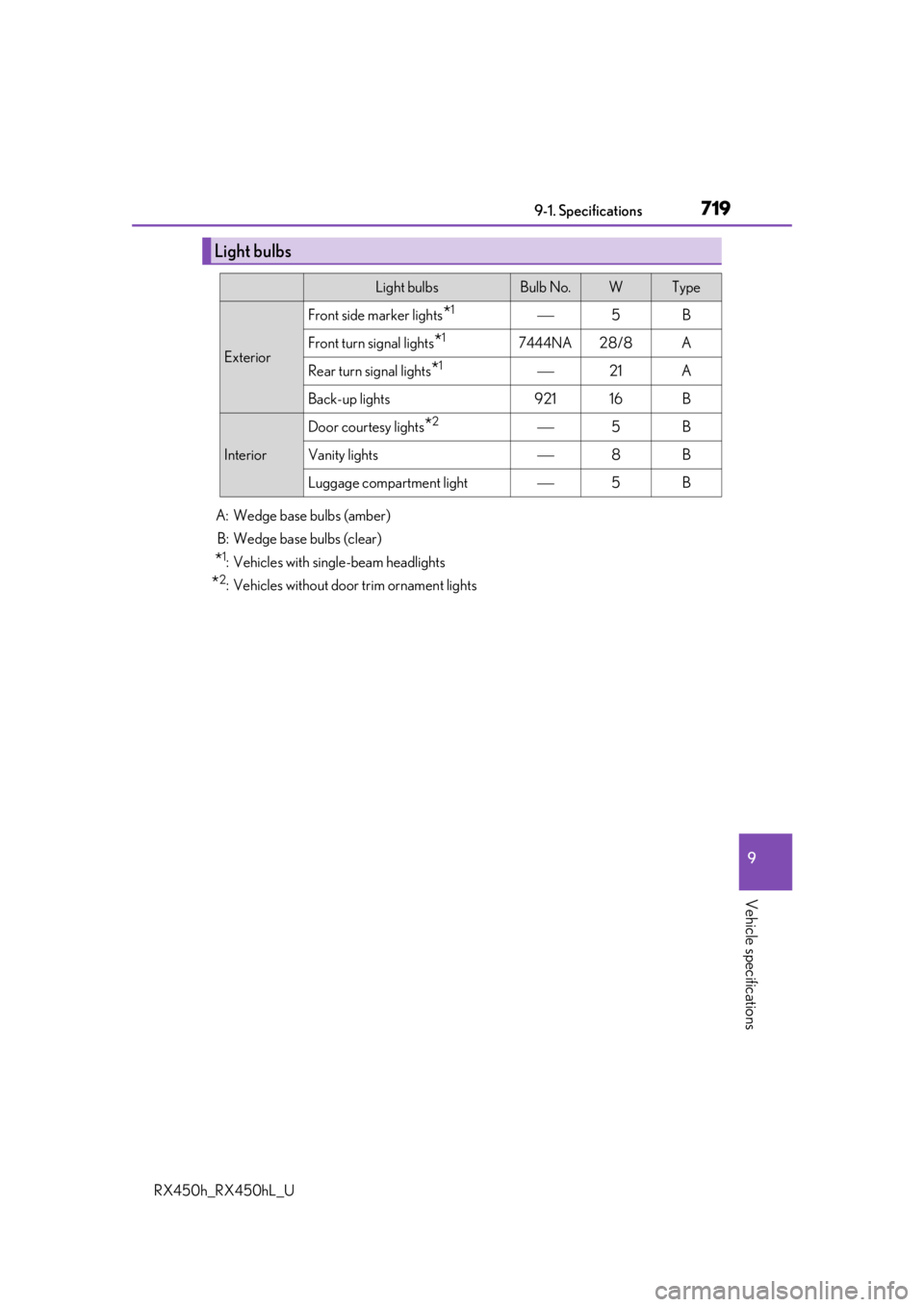
Light bulbs
Light bulbsBulb No.WType
Exterior
Front side marker lights*15B
Front turn signal lights*17444NA28/8A
Rear turn signal lights*121A
Back-up lights92116B
Interior
Door courtesy lights*25B
Vanity lights8B
Luggage compartment light5B
A: Wedge base bulbs (amber)B: Wedge base bulbs (clear)
*1: Vehicles with single-beam headlights
*2: Vehicles without door trim ornament lights
Page 729 of 792

7299-1. Specifications
9
Vehicle specifications
RX450h_RX450hL_U
■Temperature A, B, C
The temperature grades are A (the highest), B, and C, representing the tire’s
resistance to the generation of heat and its ability to dissipate heat when
tested under controlled conditions on a specified indoor laboratory test
wheel.
Sustained high temperature can cause the ma terial of the tire to degenerate and
reduce tire life, and excessive temperature can lead to sudden tire failure.
Grade C corresponds to a level of perfor mance which all passenger car tires must
meet under the Federal Motor Vehicle Safety Standard No. 109.
Grades B and A represent higher levels of performance on the laboratory test
wheel than the minimum required by law.
Warning: The temperature grades of a tire assume that it is properly inflated and
not overloaded.
Excessive speed, underi nflation, or excessive loading, either separately or in com-
bination, can cause heat buildup and possible tire failure.
Page 738 of 792
7389-2. Customization
RX450h_RX450hL_U
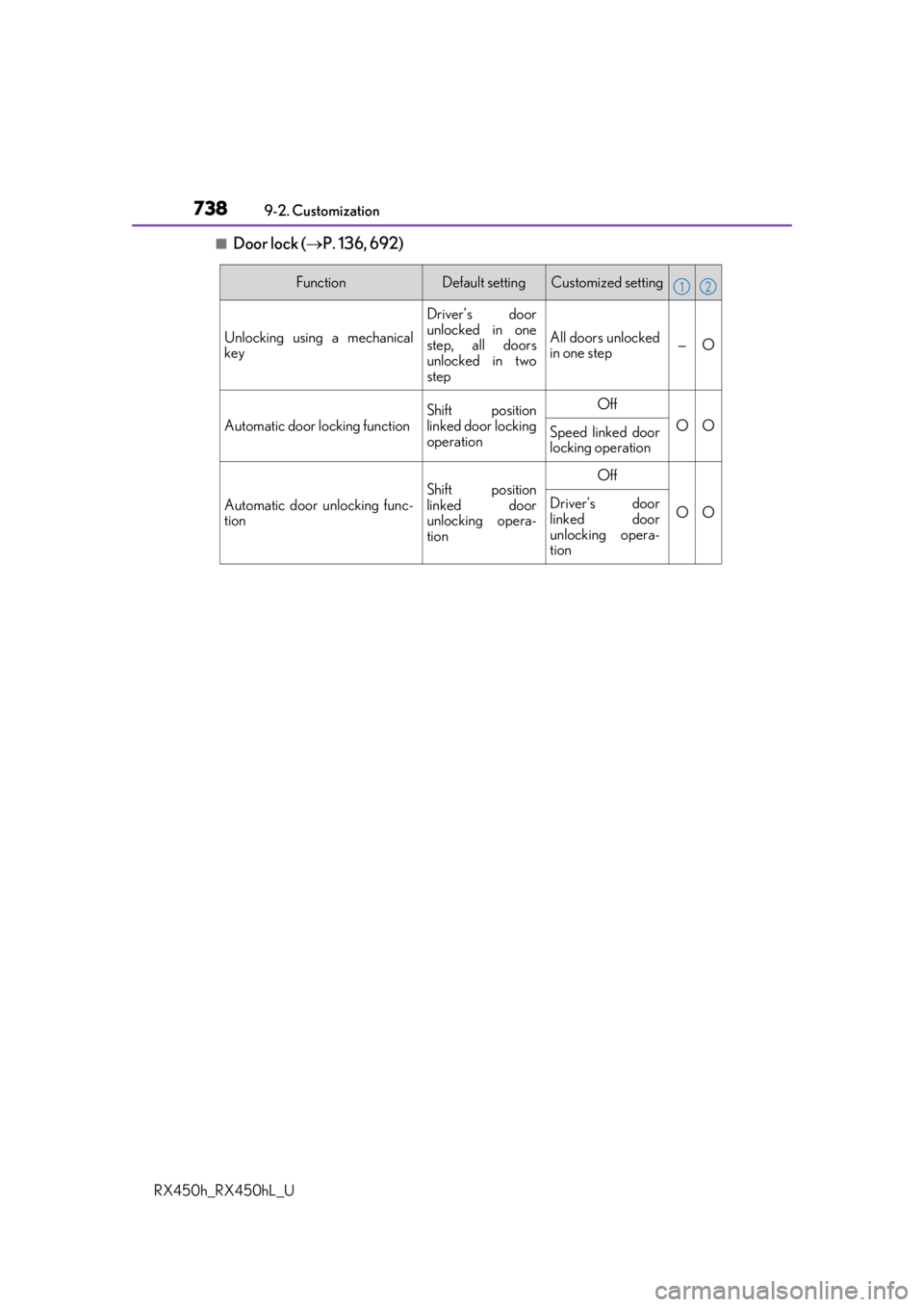
■Door lock ( P. 136, 692)
FunctionDefault settingCustomized setting
Unlocking using a mechanical
key
Driver’s door
unlocked in one
step, all doors
unlocked in two
step
All doors unlocked
in one step—O
Automatic door locking function
Shift position
linked door locking
operationOff
OOSpeed linked door
locking operation
Automatic door unlocking func-
tion
Shift position
linked door
unlocking opera-
tionOff
OODriver’s door
linked door
unlocking opera-
tion
12
Page 739 of 792
7399-2. Customization
9
Vehicle specifications
RX450h_RX450hL_U
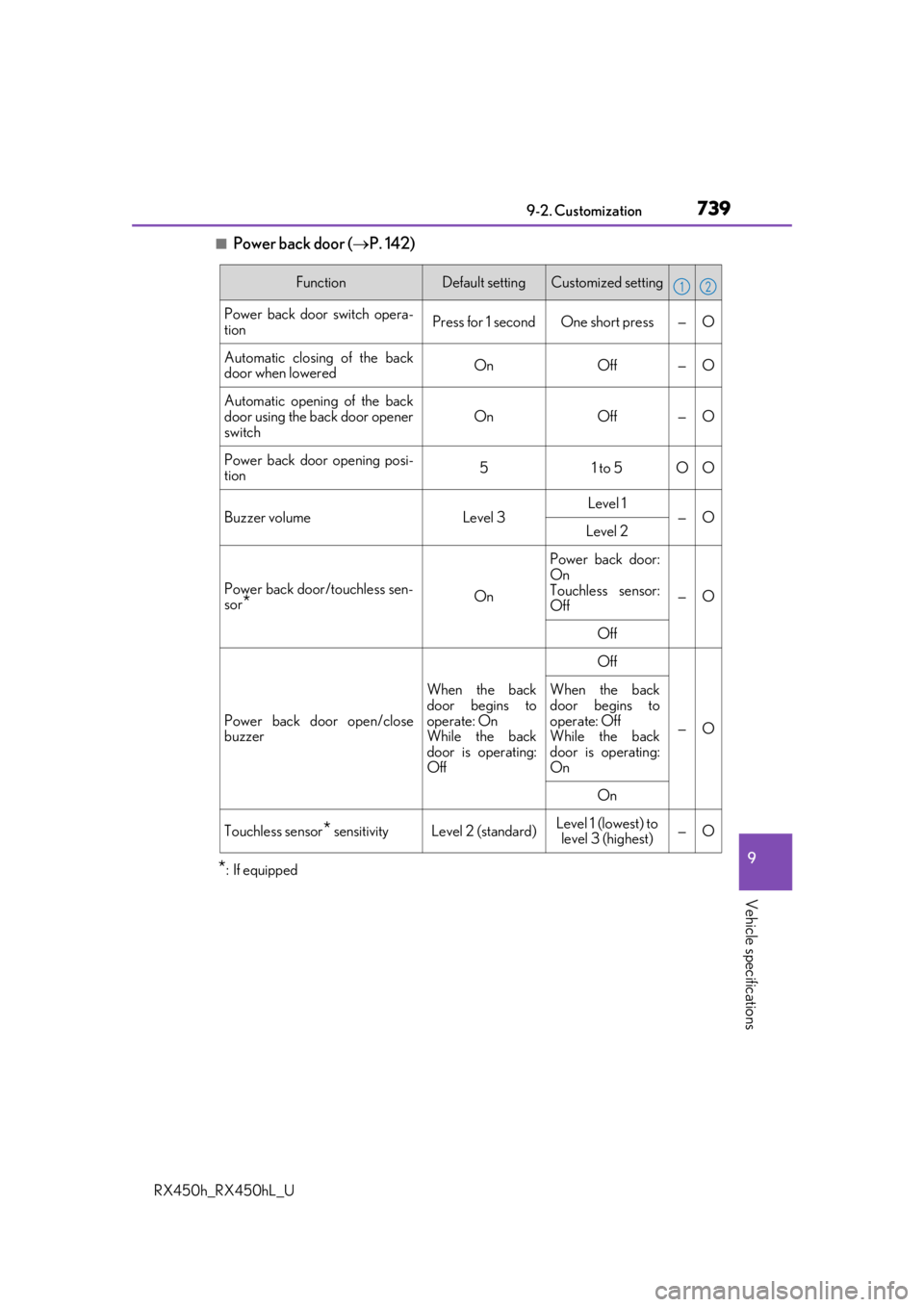
■Power back door (P. 142)
*: If equipped
FunctionDefault settingCustomized setting
Power back door switch opera-
tionPress for 1 secondOne short press—O
Automatic closing of the back
door when loweredOnOff—O
Automatic opening of the back
door using the back door opener
switch
OnOff—O
Power back door opening posi-
tion51 to 5OO
Buzzer volumeLevel 3Level 1—OLevel 2
Power back door/touchless sen-
sor*On
Power back door:
On
Touchless sensor:
Off
—O
Off
Power back door open/close
buzzer
When the back
door begins to
operate: On
While the back
door is operating:
Off
Off
—O
When the back
door begins to
operate: Off
While the back
door is operating:
On
On
Touchless sensor* sensitivityLevel 2 (standard)Level 1 (lowest) to
level 3 (highest)—O
12
Page 740 of 792
7409-2. Customization
RX450h_RX450hL_U
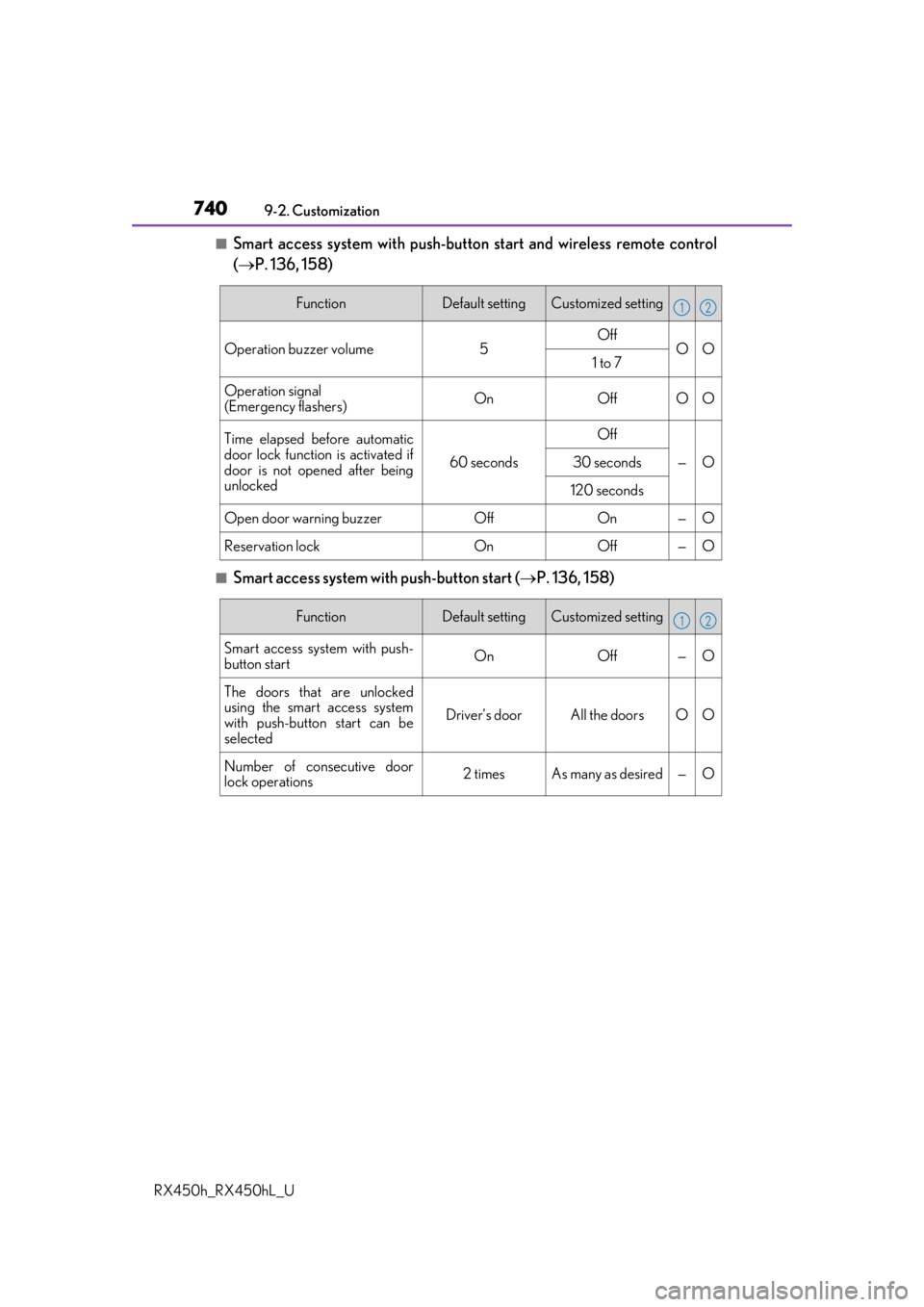
■Smart access system with push-button start and wireless remote control
( P. 136, 158)
■Smart access system with push-button start ( P. 136, 158)
FunctionDefault settingCustomized setting
Operation buzzer volume5OffOO1 to 7
Operation signal
(Emergency flashers)OnOffOO
Time elapsed before automatic
door lock function is activated if
door is not opened after being
unlocked
60 seconds
Off
—O30 seconds
120 seconds
Open door warning buzzerOffOn—O
Reservation lockOnOff—O
12
FunctionDefault settingCustomized setting
Smart access system with push-
button start On Off — O
The doors that are unlocked
using the smart access system
with push-button start can be
selected Driver’s door All the doors O O
Number of consecutive door
lock operations 2 times As many as desired — O
12
Page 741 of 792
7419-2. Customization
9
Vehicle specifications
RX450h_RX450hL_U
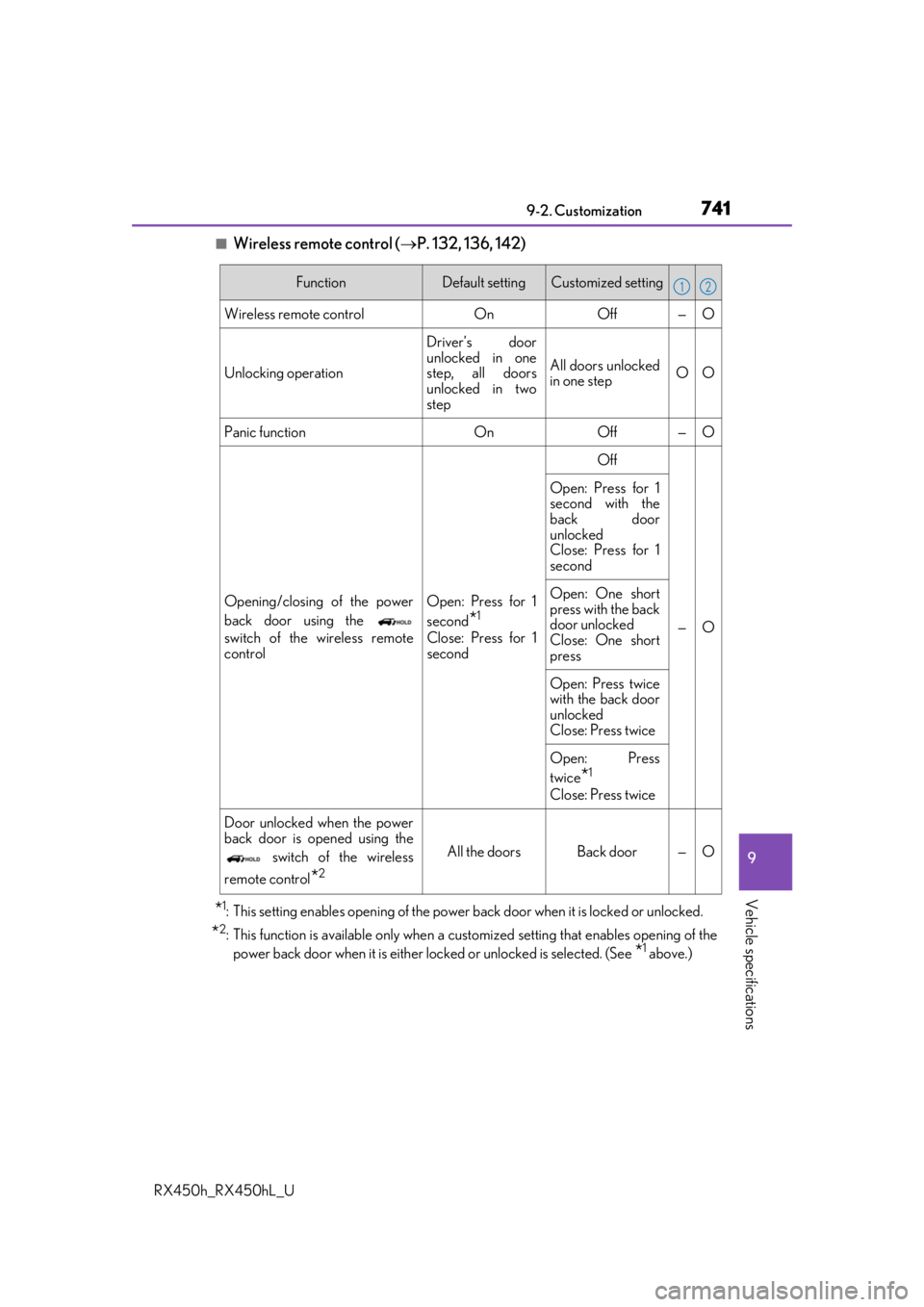
■Wireless remote control (P. 132, 136, 142)
*1: This setting enables opening of the power back door when it is locked or unlocked.
*2: This function is available only when a customized setting that enables opening of the
power back door when it is either locked or unlocked is selected. (See
*1 above.)
FunctionDefault settingCustomized setting
Wireless remote control OnOff — O
Unlocking operation Driver’s door
unlocked in one
step, all doors
unlocked in two
stepAll doors unlocked
in one step
OO
Panic function OnOff — O
Opening/closing of the power
back door using the
switch of the wireless remote
control Open: Press for 1
second
*1
Close: Press for 1
secondOff
—O
Open: Press for 1
second with the
back door
unlocked
Close: Press for 1
second
Open: One short
press with the back
door unlocked
Close: One short
press
Open: Press twice
with the back door
unlocked
Close: Press twice
Open: Press
twice
*1
Close: Press twice
Door unlocked when the power
back door is opened using the switch of the wireless
remote control
*2
All the doors Back door — O
12