lock LEXUS RX450H 2019 Owners Manual
[x] Cancel search | Manufacturer: LEXUS, Model Year: 2019, Model line: RX450H, Model: LEXUS RX450H 2019Pages: 792, PDF Size: 13.48 MB
Page 738 of 792
7389-2. Customization
RX450h_RX450hL_U
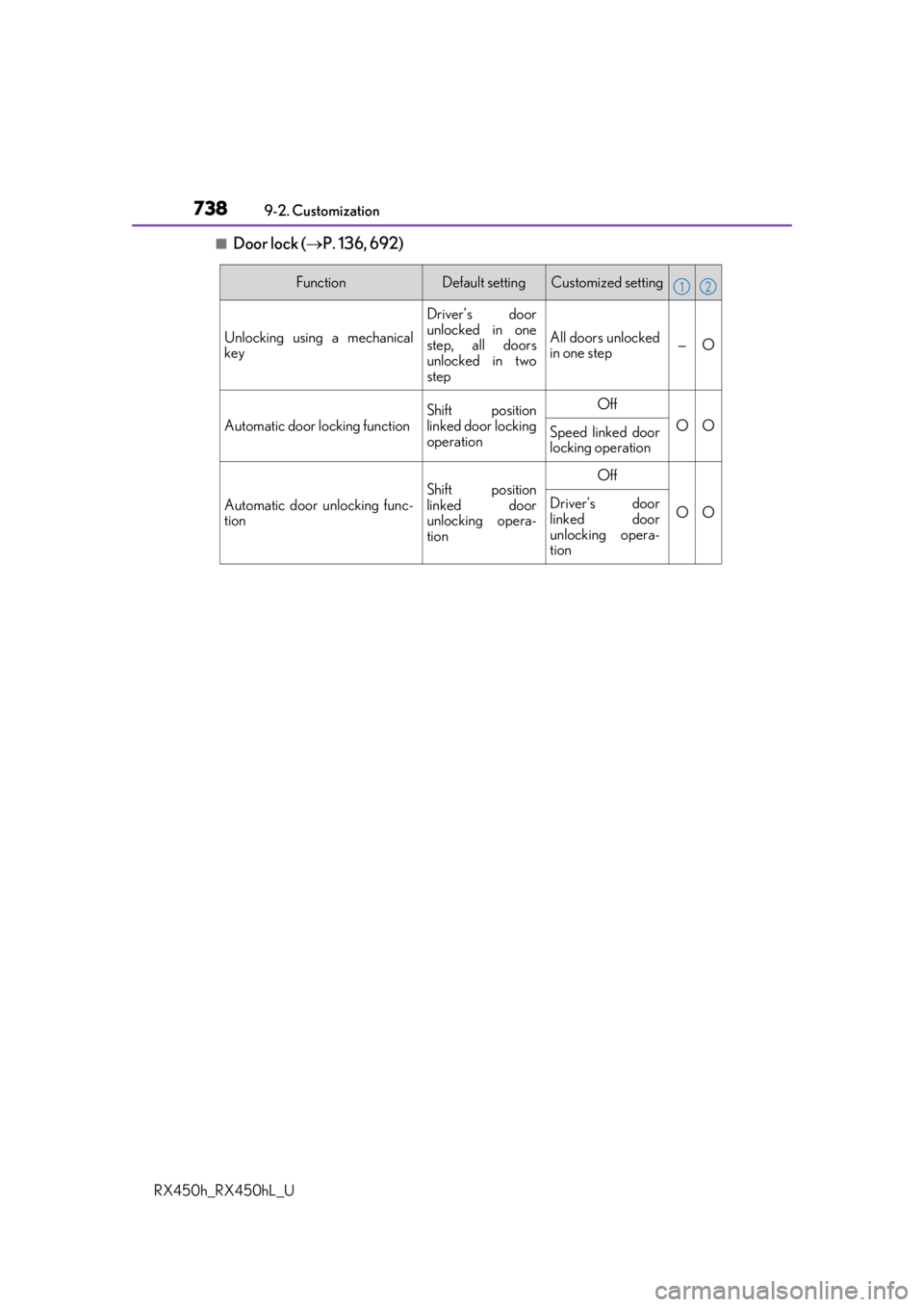
■Door lock ( P. 136, 692)
FunctionDefault settingCustomized setting
Unlocking using a mechanical
key
Driver’s door
unlocked in one
step, all doors
unlocked in two
step
All doors unlocked
in one step—O
Automatic door locking function
Shift position
linked door locking
operationOff
OOSpeed linked door
locking operation
Automatic door unlocking func-
tion
Shift position
linked door
unlocking opera-
tionOff
OODriver’s door
linked door
unlocking opera-
tion
12
Page 740 of 792
7409-2. Customization
RX450h_RX450hL_U
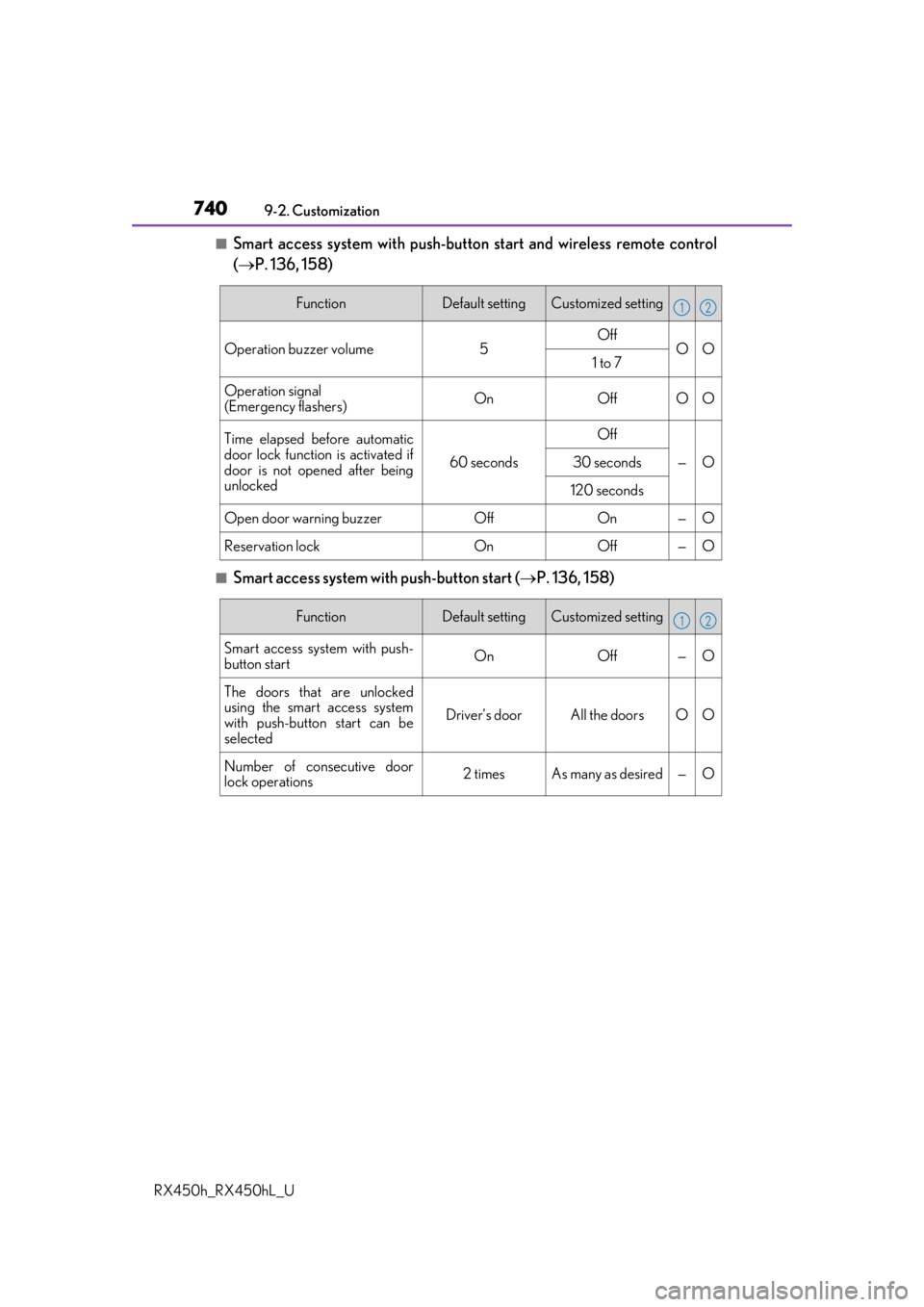
■Smart access system with push-button start and wireless remote control
( P. 136, 158)
■Smart access system with push-button start ( P. 136, 158)
FunctionDefault settingCustomized setting
Operation buzzer volume5OffOO1 to 7
Operation signal
(Emergency flashers)OnOffOO
Time elapsed before automatic
door lock function is activated if
door is not opened after being
unlocked
60 seconds
Off
—O30 seconds
120 seconds
Open door warning buzzerOffOn—O
Reservation lockOnOff—O
12
FunctionDefault settingCustomized setting
Smart access system with push-
button start On Off — O
The doors that are unlocked
using the smart access system
with push-button start can be
selected Driver’s door All the doors O O
Number of consecutive door
lock operations 2 times As many as desired — O
12
Page 741 of 792
7419-2. Customization
9
Vehicle specifications
RX450h_RX450hL_U
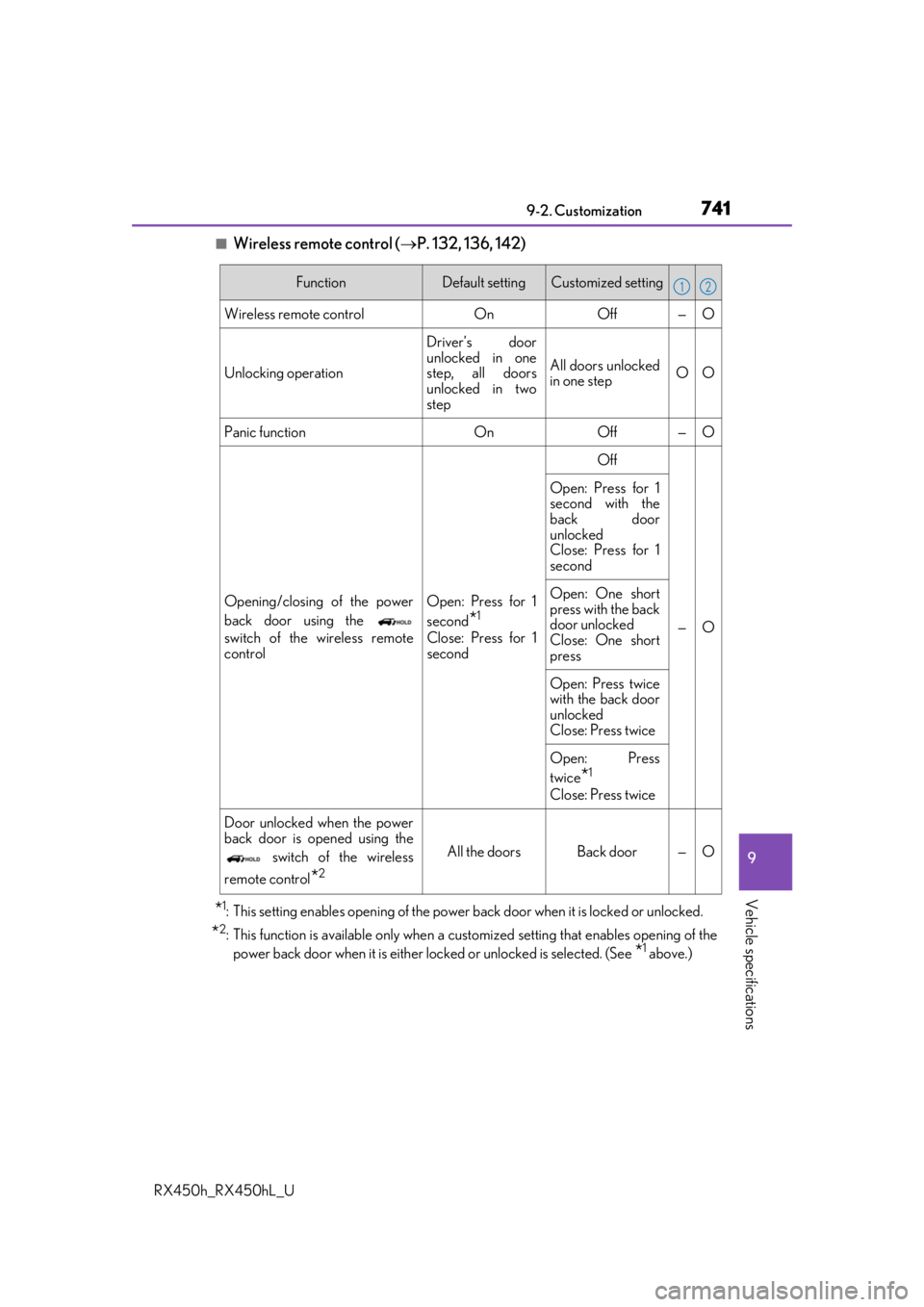
■Wireless remote control (P. 132, 136, 142)
*1: This setting enables opening of the power back door when it is locked or unlocked.
*2: This function is available only when a customized setting that enables opening of the
power back door when it is either locked or unlocked is selected. (See
*1 above.)
FunctionDefault settingCustomized setting
Wireless remote control OnOff — O
Unlocking operation Driver’s door
unlocked in one
step, all doors
unlocked in two
stepAll doors unlocked
in one step
OO
Panic function OnOff — O
Opening/closing of the power
back door using the
switch of the wireless remote
control Open: Press for 1
second
*1
Close: Press for 1
secondOff
—O
Open: Press for 1
second with the
back door
unlocked
Close: Press for 1
second
Open: One short
press with the back
door unlocked
Close: One short
press
Open: Press twice
with the back door
unlocked
Close: Press twice
Open: Press
twice
*1
Close: Press twice
Door unlocked when the power
back door is opened using the switch of the wireless
remote control
*2
All the doors Back door — O
12
Page 742 of 792
7429-2. Customization
RX450h_RX450hL_U
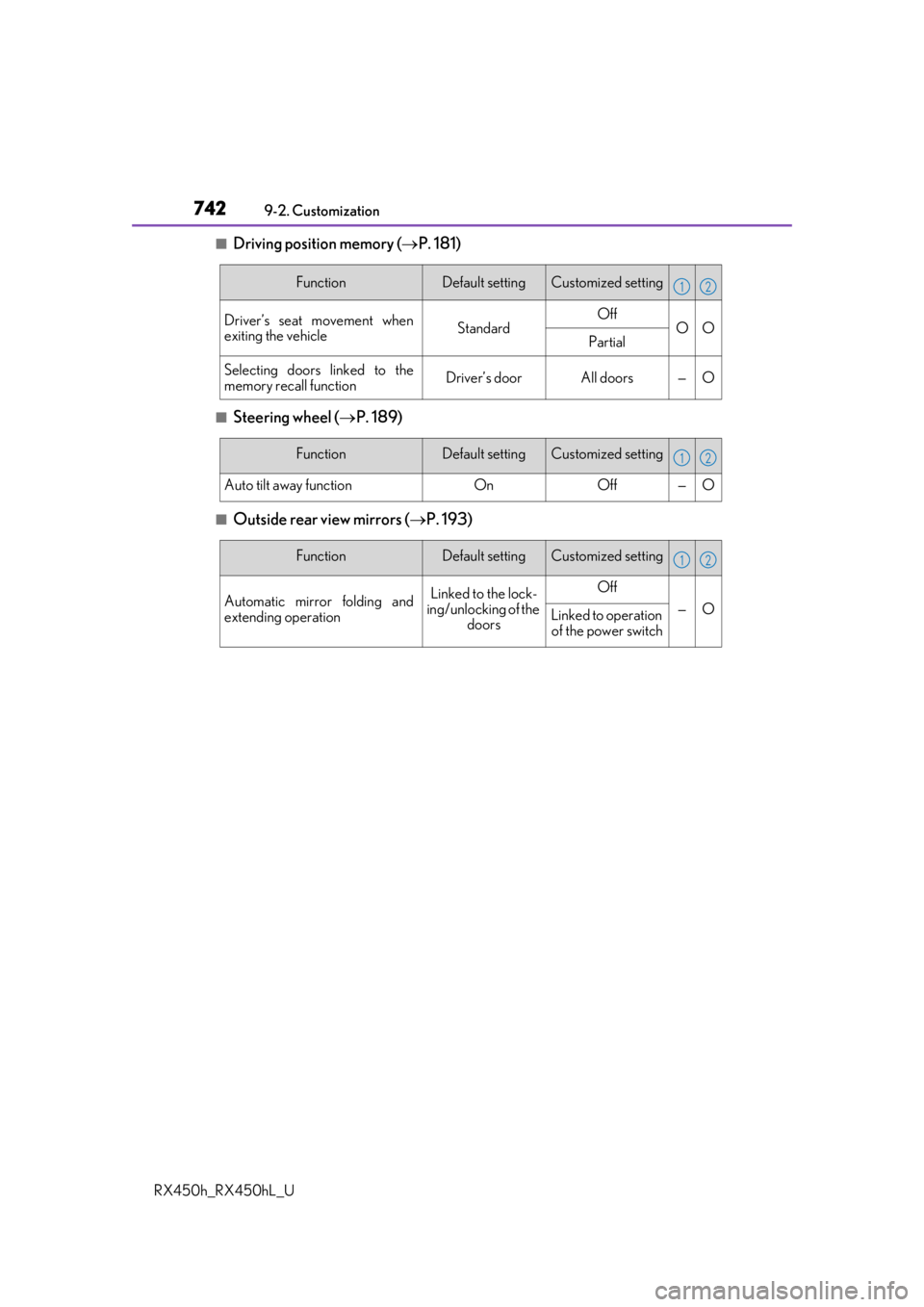
■Driving position memory ( P. 181)
■Steering wheel ( P. 189)
■Outside rear view mirrors ( P. 193)
FunctionDefault settingCustomized setting
Driver’s seat movement when
exiting the vehicleStandardOffOOPartial
Selecting doors linked to the
memory recall functionDriver’s doorAll doors—O
12
FunctionDefault settingCustomized setting
Auto tilt away functionOnOff—O
12
FunctionDefault settingCustomized setting
Automatic mirror folding and
extending operationLinked to the lock-
ing/unlocking of the
doorsOff
—OLinked to operation of the power switch
12
Page 747 of 792
7479-2. Customization
9
Vehicle specifications
RX450h_RX450hL_U
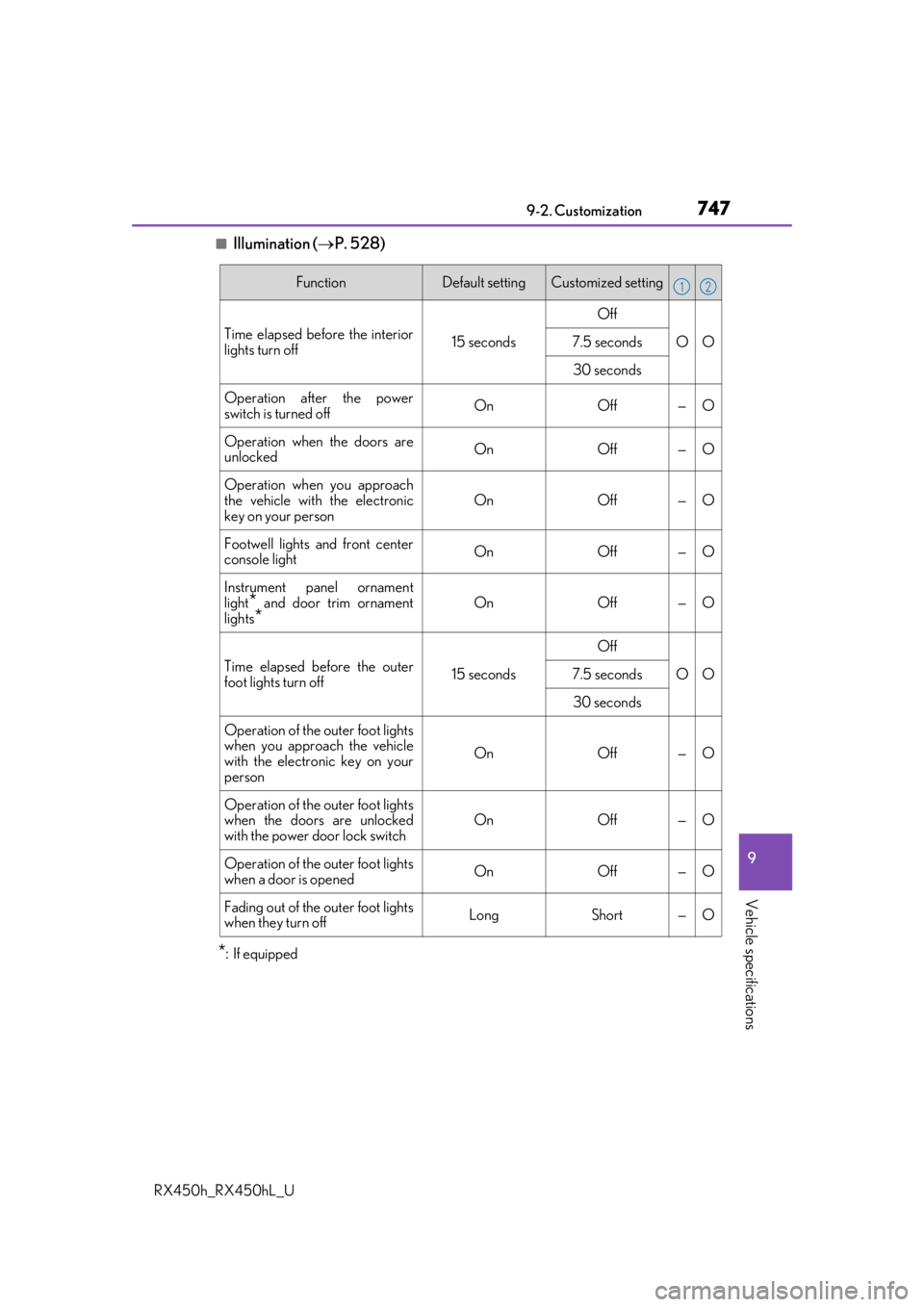
■Illumination (P. 528)
*:If equipped
FunctionDefault settingCustomized setting
Time elapsed before the interior
lights turn off15 seconds
Off
OO7.5 seconds
30 seconds
Operation after the power
switch is turned offOnOff—O
Operation when the doors are
unlockedOnOff—O
Operation when you approach
the vehicle with the electronic
key on your person
OnOff—O
Footwell lights and front center
console lightOnOff—O
Instrument panel ornament
light
* and door trim ornament
lights*OnOff—O
Time elapsed before the outer
foot lights turn off15 seconds
Off
OO7.5 seconds
30 seconds
Operation of the outer foot lights
when you approach the vehicle
with the electronic key on your
person
OnOff—O
Operation of the outer foot lights
when the doors are unlocked
with the power door lock switch
OnOff—O
Operation of the outer foot lights
when a door is openedOnOff—O
Fading out of the outer foot lights
when they turn offLongShort—O
12
Page 748 of 792
7489-2. Customization
RX450h_RX450hL_U
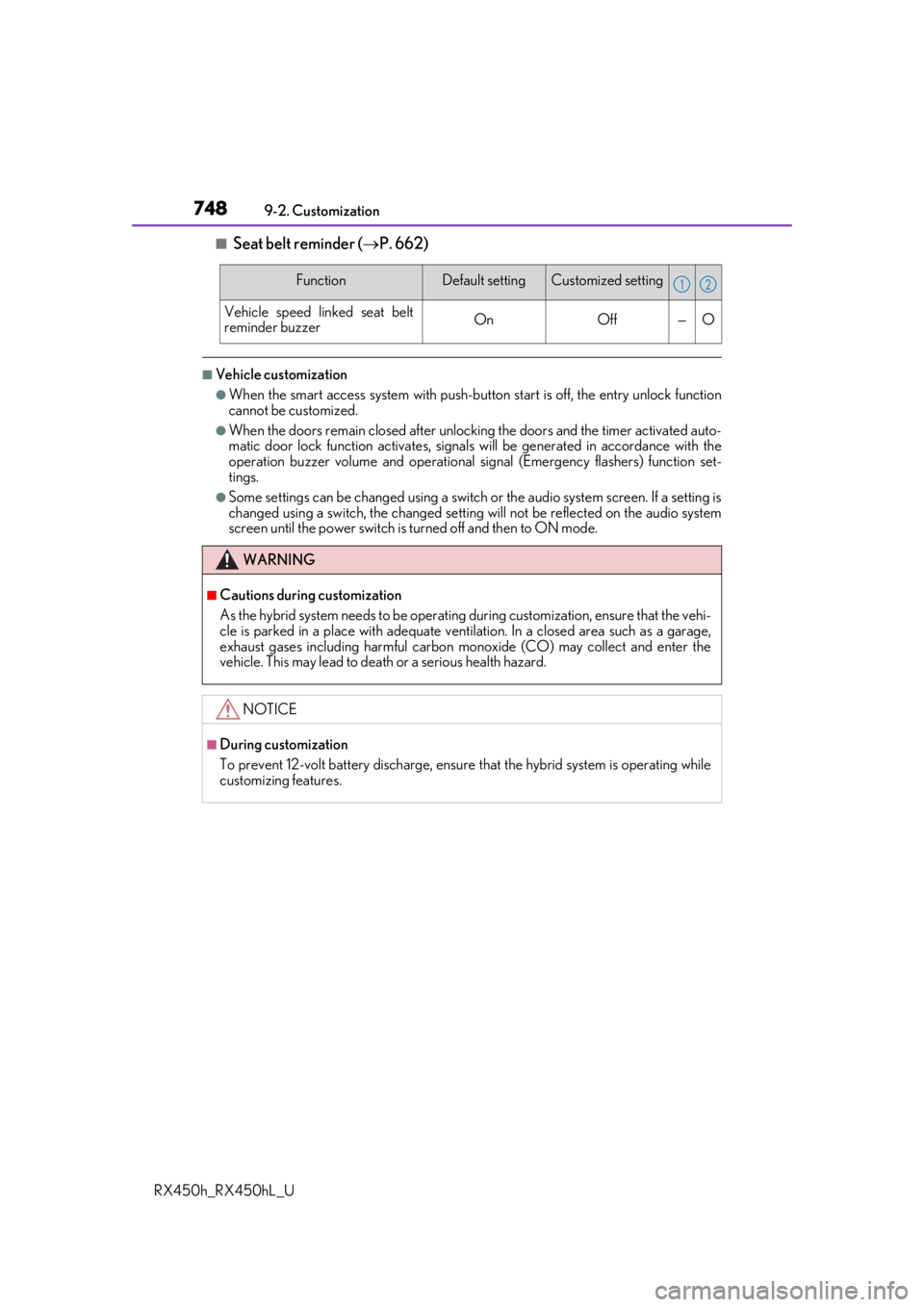
■Seat belt reminder ( P. 662)
■Vehicle customization
●When the smart access system with push-button start is off, the entry unlock function
cannot be customized.
●When the doors remain closed after unlocking the doors and the timer activated auto-
matic door lock function activates, signals will be generated in accordance with the
operation buzzer volume and operational si gnal (Emergency flashers) function set-
tings.
●Some settings can be changed using a switch or the audio system screen. If a setting is
changed using a switch , the changed setting will not be reflected on the audio system
screen until the power switch is turned off and then to ON mode.
FunctionDefault settingCustomized setting
Vehicle speed linked seat belt
reminder buzzerOnOff—O
WARNING
■Cautions during customization
As the hybrid system needs to be operating during customization, ensure that the vehi-
cle is parked in a place with adequate ventil ation. In a closed area such as a garage,
exhaust gases including harmful carbon mo noxide (CO) may collect and enter the
vehicle. This may lead to death or a serious health hazard.
NOTICE
■During customization
To prevent 12-volt battery discharge, ensure that the hybrid system is operating while
customizing features.
12
Page 766 of 792
766
RX450h_RX450hL_UWhat to do if... (Troubleshooting)
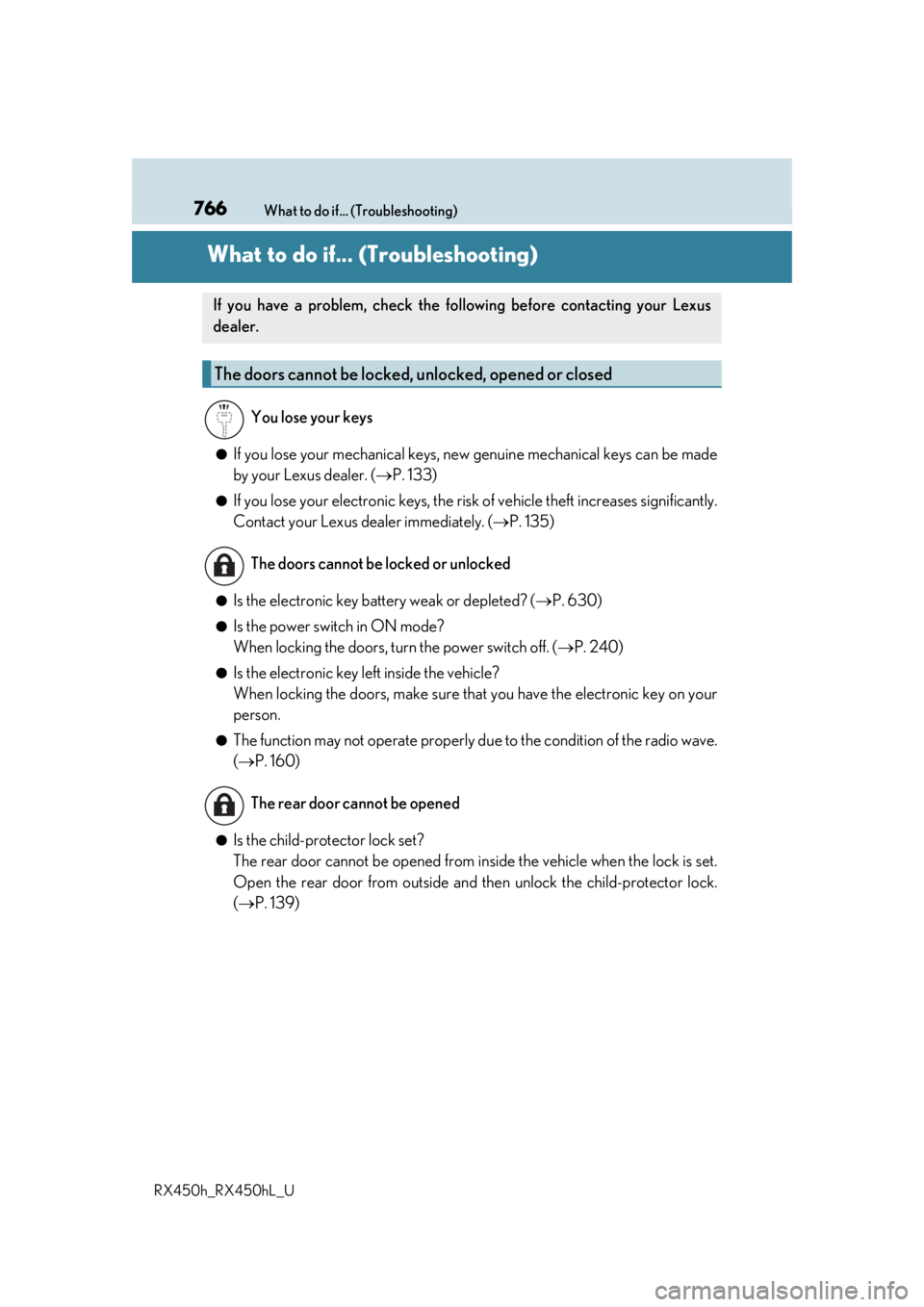
What to do if... (Troubleshooting)
●If you lose your mechanical keys, ne
w genuine mechanical keys can be made
by your Lexus dealer. ( P. 133)
●If you lose your electronic keys, the risk of vehicle theft increases significantly.
Contact your Lexus dealer immediately. ( P. 135)
●Is the electronic key battery weak or depleted? ( P. 630)
●Is the power switch in ON mode?
When locking the doors, turn the power switch off. (P. 240)
●Is the electronic key left inside the vehicle?
When locking the doors, make sure that you have the electronic key on your
person.
●The function may not operate properly du e to the condition of the radio wave.
( P. 160)
●Is the child-protector lock set?
The rear door cannot be opened from in side the vehicle when the lock is set.
Open the rear door from outside and then unlock the child-protector lock.
( P. 139)
If you have a problem, check the foll owing before contacting your Lexus
dealer.
The doors cannot be locked, unlocked, opened or closed
You lose your keys
The doors cannot be locked or unlocked
The rear door cannot be opened
Page 767 of 792

RX450h_RX450hL_U
●Did you press the power switch while firmly depressing the brake pedal? \
(P. 239)
●Is the shift lever in P? ( P. 241)
●Is the elec")
767What to do if... (Troubleshooting)
RX450h_RX450hL_U
●Did you press the power switch while firmly depressing the brake pedal? \
(P. 239)
●Is the shift lever in P? ( P. 241)
●Is the electronic key anywhere detectable inside the vehicle? ( P. 158)
●Is the steering wheel unlocked? ( P. 242)
●Is the electronic key battery weak or depleted?
In this case, the hybrid system can be started in a temporary way. ( P. 693)
●Is the 12-volt battery discharged? ( P. 695)
●Is the power switch in ON mode?
If you cannot release the shift lever by depressing the brake pedal with the
power switch in ON mode ( P. 250)
●It is locked automatically to prevent theft of the vehicle. ( P. 242)
●Is the window lock switch pressed?
The power window except for the one at the driver’s seat cannot be operated
if the window lock switch is pressed. ( P. 196)
●The auto power off function will be operated if the vehicle is left in
ACCESSORY or ON mode (the hybrid sy stem is not operating) for a period
of time. ( P. 241)
If you think something is wrong
The hybrid system does not start
The shift lever cannot be shifted from P even if you depress the brake
pedal
The steering wheel cannot be turned after the hybrid system is stopped
The windows do not open or close by operating the power window
switches
The power switch is turned off automatically
Page 768 of 792

768What to do if... (Troubleshooting)
RX450h_RX450hL_U
●The seat belt reminder light is flashing
Are the driver and the passengers wearing the seat belts?
( P. 662, 662)
●The parking brake indicator is on
Is the parking brake released? ( P. 253)
Depending on the situation, other types of warning buzzer may also sound.
( P. 660, 667)
●Did anyone inside the vehicle open a door during setting the alarm?
The sensor detects it and the alarm sounds. ( P. 86)
Do one of the following to stop the alarms:
• Unlock the doors.
• Turn the power switch to ACCESSORY or ON mode, or start the hybrid system.
●Is the message displayed on the multi-information display?
Check the message on the multi-information display. ( P. 667)
●When a warning light turns on or a warning message is displayed, refer to
P. 660, 667.A warning buzzer sounds during driving
An alarm is activated and the horn sounds
A warning buzzer sounds when leaving the vehicle
A warning light turns on or a warning message is displayed
Page 770 of 792

770
RX450h_RX450hL_UAlphabetical index
Alphabetical index
A/C ............................................................ 507
Air conditioning filter........................625
Automatic air conditioning system ..................................... 507, 522
S-FLOW mode ................................... 514
ABS (Anti-lock Brake System)....... 382 Warning light ........................................ 661
Adaptive Front-lighting System (AFS) ...................................................... 259
Adaptive Variable Suspension System ................................................... 383
AFS (Adaptive Front-lighting System) .................................................. 259
Air conditioning filter .......................... 625
Air conditioning system Air conditioning filter........................625
Automatic air conditioning system ..................................... 507, 522
S-FLOW mode ................................... 514 Airbags .........................................................36
Airbag operating conditions .......... 43
Airbag precautions for your child.......................................................... 39
Airbag warning light ....................... 660
Correct driving posture .................... 30
Curtain shield airbag operating conditions ....................... 43
Curtain shield airbag precautions ............................................ 41
Front passenger occupant classification system..........................47
General airbag precautions ........... 39
Locations of airbags............................ 36
Modification and disposal of airbags .....................................................42
Seat cushion airbag ..............................37
Side airbag operating conditions ............................................. 43
Side airbag precautions .................... 39
Side and curtain shield airbags operating conditions ....................... 43
Side and curtain shield airbags precautions .......................................... 39
SRS airbag instructions for Canadian owners ................... 754
SRS airbags ............................................. 36
A