RCTA LEXUS RX450H 2019 User Guide
[x] Cancel search | Manufacturer: LEXUS, Model Year: 2019, Model line: RX450H, Model: LEXUS RX450H 2019Pages: 792, PDF Size: 13.48 MB
Page 330 of 792
3304-5. Using the driving support systems
RX450h_RX450hL_U
■Conditions under which the RCTA fu nction will not detect a vehicle
The RCTA function is not designed to detect the following types of vehicles and/or
objects:
●Vehicles approaching from directly behind
●Vehicles backing up in a parkin g space next to your vehicle
●Guardrails, walls, signs, parked vehi cles and similar stationary objects*
●Small motorcycles, bicycles, pedestrians, etc.*
●Vehicles moving away from your vehicle
●Vehicles approaching from the parking spaces next to your vehicle*
*
: Depending on the conditions, detection of a vehicle and/or object may occur.
■Conditions under which the RCTA function may not function correctly
●The RCTA function may not detect vehicles correctly in the following situations:
• When the sensor is misaligned due to a stro ng impact to the sensor or its surround-
ing area
• When mud, snow, ice, a sticke r, etc. is covering the sensor or surrounding area on
the rear bumper
• When driving on a road surf ace that is wet with standing water during bad weather,
such as heavy rain, snow, or fog
• When multiple vehicles are approaching wi th only a small gap between each vehicle
• When a vehicle is approaching at high speed
• When towing a trailer (vehicles with towing package)
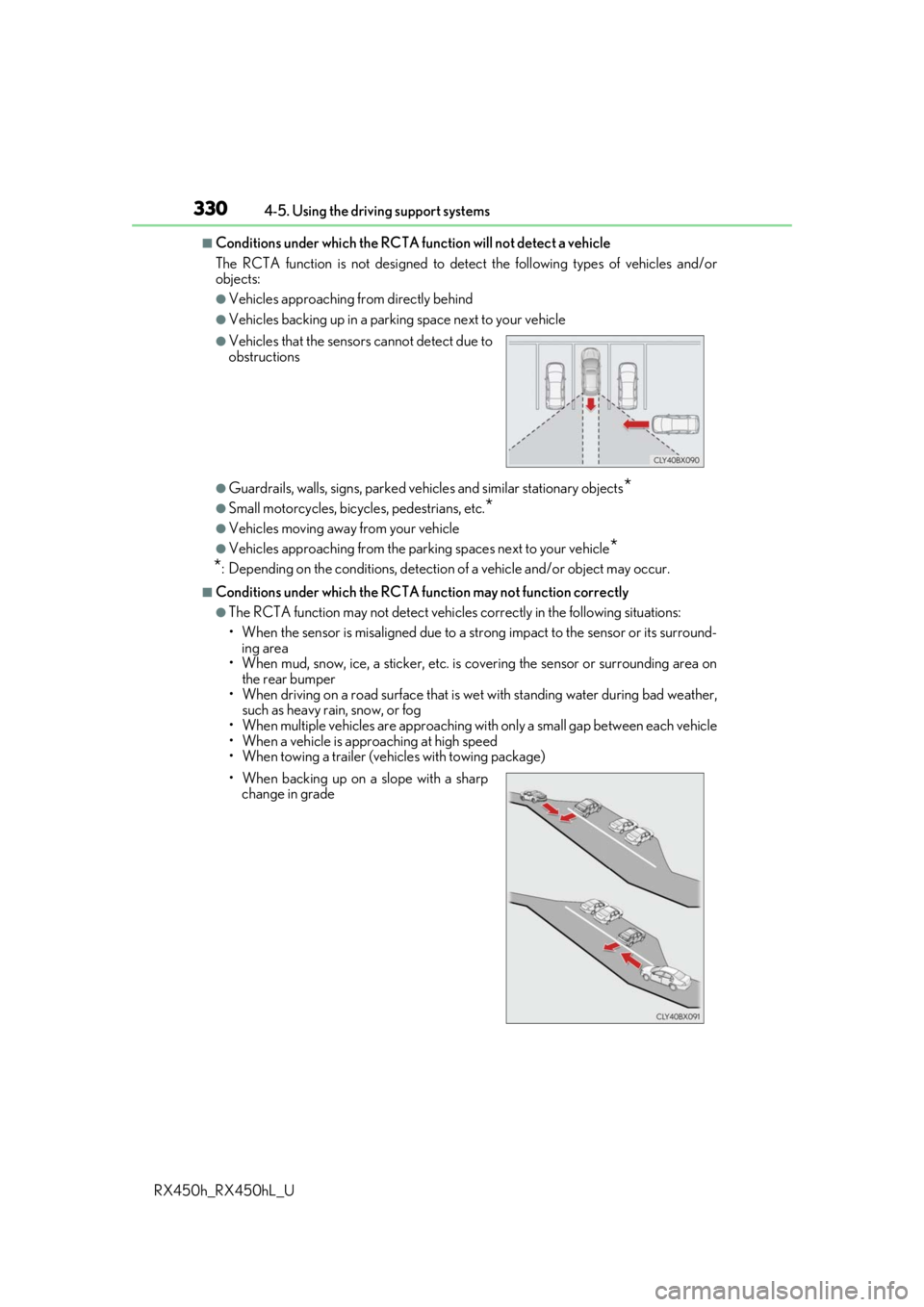
●Vehicles that the sensors cannot detect due to
obstructions
• When backing up on a slope with a sharp change in grade
Page 331 of 792
3314-5. Using the driving support systems
4
Driving
RX450h_RX450hL_U• Immediately after the RCTA function is turned on
• Immediately after the hybrid system is started with the RCTA function on
●Instances of the RCTA function unnecessari
ly detecting a vehicle and/or object may
increase in the following situations:
• When a vehicle passes by th e side of your vehicle
• When the distance between your vehicle and metal objects, such as a guardrail,
wall, sign, or parked vehicle, which may re flect electrical waves toward the rear of
the vehicle, is short
You can change the BSM function/RCTA function settings.
Press the “MENU” button on the Remote Touch, and then select on the
screen.
Select “Vehicle”, and then select “Blind Spot Monito r Settings” on the screen.
Select the desired setting. ( P. 745)
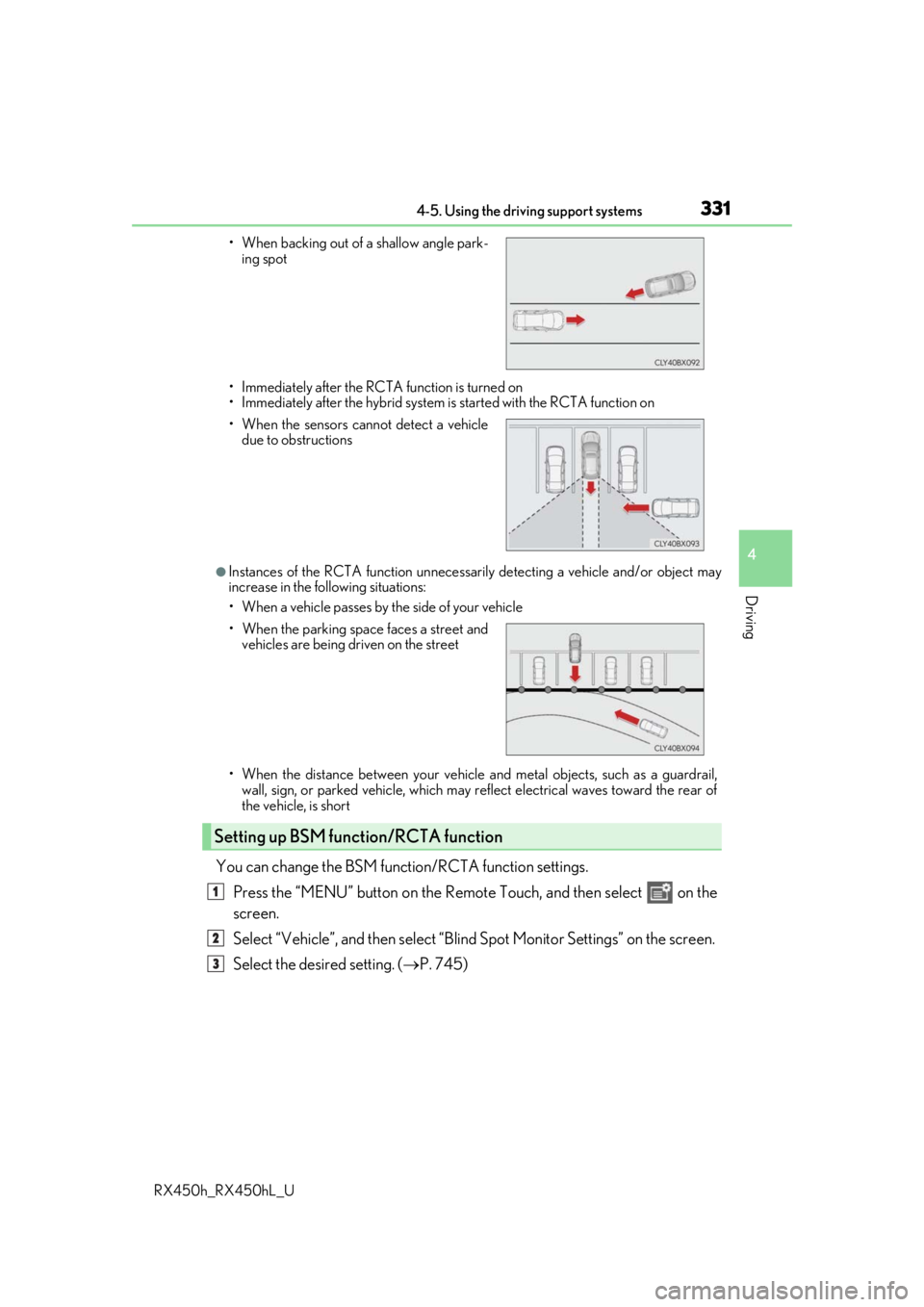
• When backing out of a shallow angle park-
ing spot
• When the sensors cannot detect a vehicle due to obstructions
• When the parking space faces a street and vehicles are being driven on the street
Setting up BSM function/RCTA function
1
2
3
Page 358 of 792
3584-5. Using the driving support systems
RX450h_RX450hL_U
■The Rear Cross Traffic Auto Brake function will operate when
The function will operate when the ICS OFF indicator is not illuminated or flashing ( P.
345, 353) and all of the fo llowing conditions are met:
●Hybrid system output restriction control
• The Intelligent Clearance Son ar with Rear Cross Traffic Auto Brake is enabled.
• The vehicle speed is 10 mph (15 km/h) or less.
• The shift lever is in R.
• The system determines that a stronger than normal brake operation is necessary to
avoid a collision with an approaching vehicle.
●Brake control
• Hybrid system output restri ction control is operating.
• The system determines that an emergenc y brake operation is necessary to avoid a
collision with an approaching vehicle.
■The Rear Cross Traffic Auto Brake function will stop operating when
The function will stop operating if an y of the following conditions are met:
●Hybrid system output restriction control
• The Intelligent Clearance Sonar with Rear Cross Traffic Auto Brake is disabled.
• The collision becomes avoidable with normal brake operation.
• A vehicle is no longer approaching from th e right or left at the rear of the vehicle.
●Brake control
• The Intelligent Clearance Sonar with Rear Cross Traffic Auto Brake is disabled.
• Approximately 2 seconds elapse after the vehicle is stopped by brake control.
• The brake pedal is depressed after the vehicle is stopped by brake control.
• A vehicle is no longer approaching from the right or left at the rear of the vehicle.
■Detection area of the Rear Cross Traffic Auto Brake function
The detection area of the Rear Cross Traffic Auto Brake function differs from the detec-
tion area of the RCTA function. ( P. 329)
Therefore, even if the RCTA function detect s a vehicle and provides an alert, the Rear
Cross Traffic Auto Brake function may not start operating.
■If the Rear Cross Traffic Auto Brake function has operated
If the vehicle is stopped due to operation of the Rear Cross Traffic Auto Brake function,
the Rear Cross Traffic Auto Brake function will be disabled and the ICS OFF indicator
will illuminate.
Page 359 of 792
3594-5. Using the driving support systems
4
Driving
RX450h_RX450hL_U
■Re-enabling the Rear Cross Traffic Auto Brake function
To re-enable the Rear Cross Traffic Auto Brake function when it is disabled during opera-
tion of the Rear Cross Traffic Auto Brake function, either enable the system again (P.
345), or turn the power switch off and then back to ON mode.
Additionally, if there is no longer a vehicle ap proaching from the right or left at the rear of
the vehicle, or if the traveling direction of the vehicle changes (such as changing from
moving forward to backing up or from backin g up to moving forward), the system will be
re-enabled automatically.
■Conditions under which the Rear Cross Traffic Auto Brake function will not detect a
vehicle
The Rear Cross Traffic Auto Brake function is not designed to detect the following types
of vehicles and/or objects:
●Vehicles approaching from directly behind
●Vehicles backing up in a parkin g space next to your vehicle
●Guardrails, walls, signs, parked vehi cles and similar stationary objects*
●Small motorcycles, bicycles, pedestrians, etc.*
●Vehicles moving away from your vehicle
●Vehicles approaching from the parking spaces next to your vehicle*
*: Depending on the conditions, detection of a vehicle and/or object may occur.
■RCTA function buzzer
Regardless of whether the RCTA function is enabled or not ( P. 321), if the Rear Cross
Traffic Auto Brake function is enabled and brake control is performed, a buzzer will
sound to notify the driver.
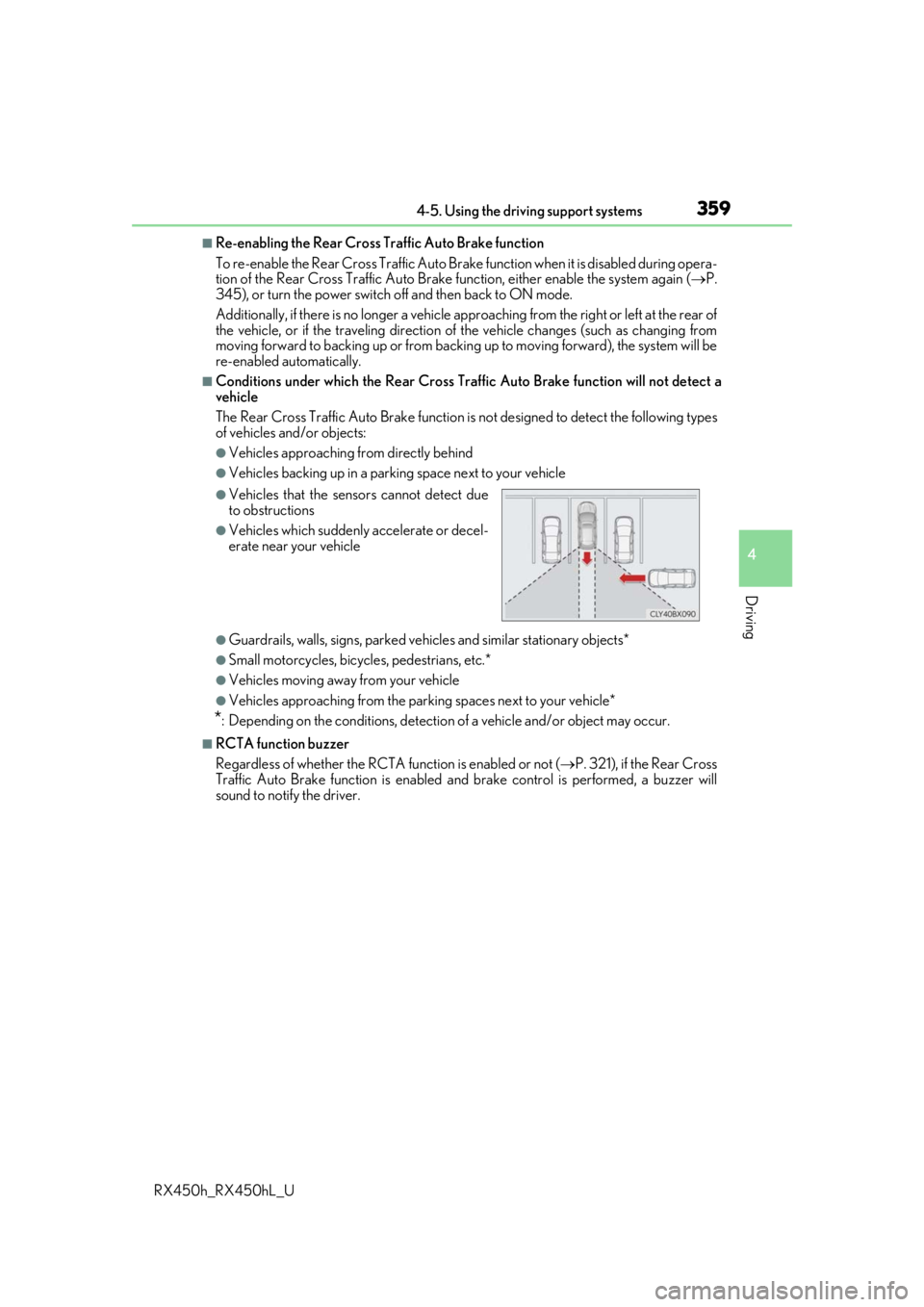
●Vehicles that the sensors cannot detect due
to obstructions
●Vehicles which suddenly accelerate or decel-
erate near your vehicle
Page 745 of 792
7459-2. Customization
9
Vehicle specifications
RX450h_RX450hL_U
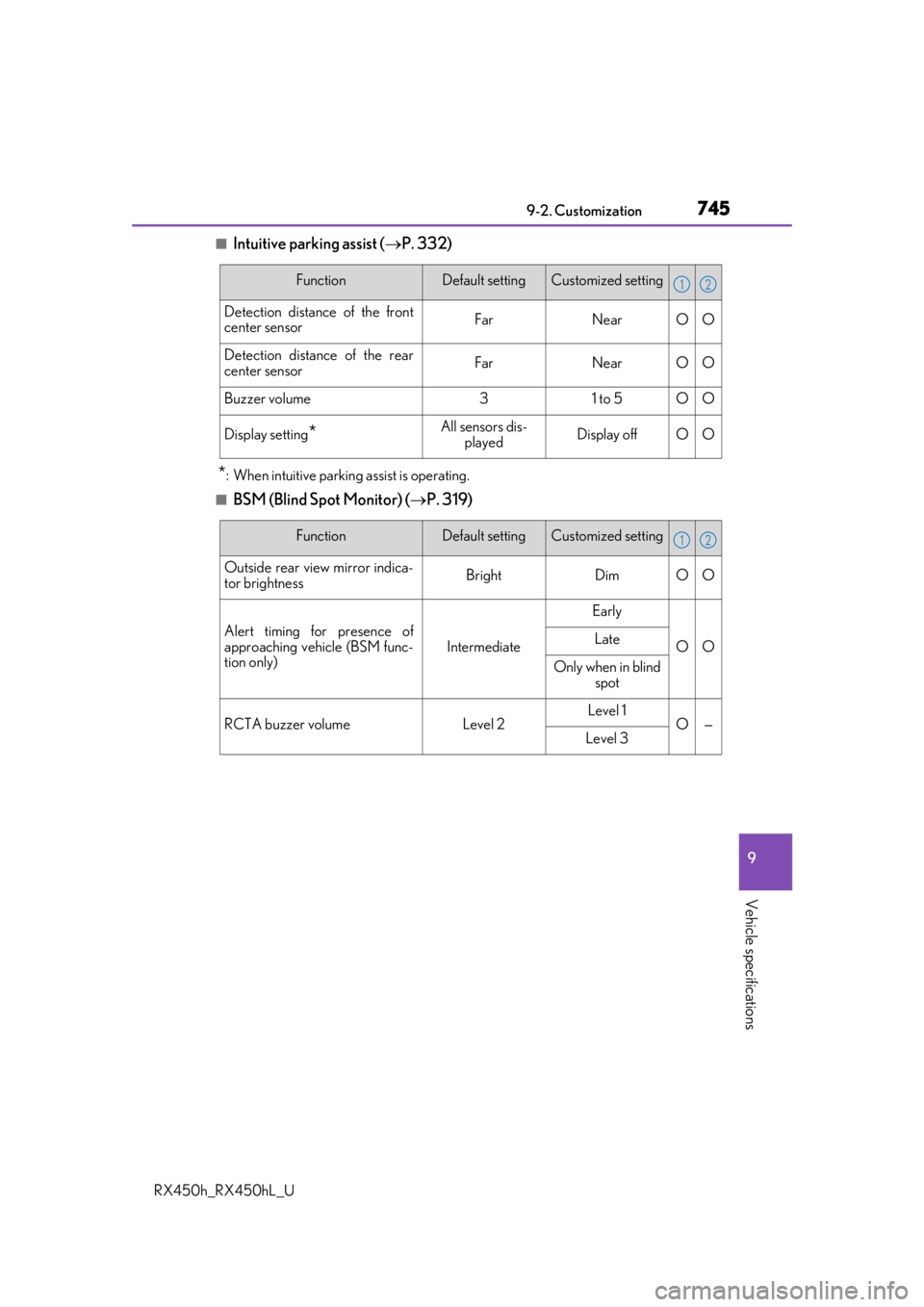
■Intuitive parking assist (P. 332)
*: When intuitive parking assist is operating.
■BSM (Blind Spot Monitor) ( P. 319)
FunctionDefault settingCustomized setting
Detection distance of the front
center sensorFarNearOO
Detection distance of the rear
center sensorFarNearOO
Buzzer volume31 to 5OO
Display setting*All sensors dis-
playedDisplay offOO
12
FunctionDefault settingCustomized setting
Outside rear view mirror indica-
tor brightnessBrightDimOO
Alert timing for presence of
approaching vehicle (BSM func-
tion only)
Intermediate
Early
OOLate
Only when in blind spot
RCTA buzzer volumeLevel 2Level 1O—Level 3
12