alarm LEXUS RX450H 2019 User Guide
[x] Cancel search | Manufacturer: LEXUS, Model Year: 2019, Model line: RX450H, Model: LEXUS RX450H 2019Pages: 792, PDF Size: 13.48 MB
Page 161 of 792
1613-2. Opening, closing and locking the doors
3
Operation of each component
RX450h_RX450hL_U
■Note for the entry function
●Even when the electronic key is within the effective range (detection areas), the system
may not operate properly in the following cases:
• The electronic key is too close to the window or outside door handle, near the ground, or in a high place when the doors are locked or unlocked.
• The electronic key is near the ground or in a high place, or too close to the rear
bumper center when the back door is opened.
• The electronic key is on th e instrument panel, luggage co mpartment, floor, or in the
door pockets or glove box when the hybrid system is started or power switch modes
are changed.
●Do not leave the electronic key on top of th e instrument panel or near the door pockets
when exiting the vehicle. Depending on the radio wave reception conditions, it may be
detected by the antenna outs ide the cabin and the door will become lockable from the
outside, possibly trapping the electronic key inside the vehicle.
●As long as the electronic key is within th e effective range, the doors may be locked or
unlocked by anyone.
●Even if the electronic key is not inside the vehicle, it may be possible to start the hybrid
system if the electronic key is near the window.
●The doors may unlock if a large amount of wa ter splashes on the door handle, such as in
the rain or in a car wash when the electronic key is within the effective range. (The door
will automatically be locked after approx imately 60 seconds if the doors are not
opened and closed.)
●If the wireless remote control is used to lo ck the doors when the electronic key is near
the vehicle, there is a possibility that the d oor may not be unlocked by the entry func-
tion. (Use the wireless remote control to unlock the doors.)
●Touching the door lock sensor while wearin g gloves may delay or prevent lock opera-
tion. Remove the gloves and touch the lock sensor again.
●When the lock operation is performed using the lock sensor, recognition signals will be
shown up to two consecutive times. After this, no recognition signals will be given.*
●If the door handle becomes wet while the el ectronic key is within the effective range,
the door may lock and unlock repeatedly. In that case, follow the following correction
procedures to wash the vehicle:
• Place the electronic key in a location 6 ft. (2 m) or more away from the vehicle. (Take care to ensure that the key is not stolen.)
• Set the electronic key to battery-saving mode to disable the smart access system with push-button start. ( P. 160)
●If the electronic key is inside the vehicle and a door handle becomes wet during a car
wash, a message may be shown on the mult i-information display and a buzzer will
sound outside the vehicle. To turn off the alarm, lock all the doors.
●The lock sensor may not work properly if it comes into contact with ice, snow, mud, etc.
Clean the lock sensor and attempt to operate it again.
●A sudden approach to the effective range or door handle may prevent the doors from
being unlocked. In this case, return the door handle to the original position and check
that the doors unlock before pulling the door handle again.
●If there is another electronic key in the de tection area, it may take slightly longer to
unlock the doors after the door handle is gripped.
Page 162 of 792

1623-2. Opening, closing and locking the doors
RX450h_RX450hL_U
●Fingernails may scrape against the door duri ng operation of the door handle. Be care-
ful not to injure fingernails or damage the surface of the door.
*: This setting can be customiz ed at your Lexus dealer.
■When the vehicle is not driven for extended periods
●To prevent theft of the vehicle, do not leave the electronic key within 6 ft. (2 m) of the
vehicle.
●The smart access system with push-button start can be deactivated in advance.
( P. 736)
●Setting the electronic key to battery-saving mode helps to reduce key battery deple-
tion. ( P. 160)
■To operate the system properly
Make sure to carry the electronic key when operating the system. Do not get the elec-
tronic key too close to the vehicle when operating the system from the outside of the
vehicle.
Depending on the position and holding condition of the electronic key, the key may not
be detected correctly and the system may not operate properly. (The alarm may go off
accidentally, or the door lock prevention may not operate.)
■If the smart access system with push-button start does not operate properly
●Locking and unlocking the doors: Use the mechanical key. (P. 692)
●Starting the hybrid system: P. 693
■Customization
Some functions can be customized. ( P. 736)
■If the smart access system with push-button start has been deactivated in a customized
setting
●Locking and unlocking the doors:
Use the wireless remote cont rol or mechanical key. (P. 136, 142, 692)
●Starting the hybrid system and changing power switch modes: P. 693
●Stopping the hybrid system: P. 240
Page 198 of 792

1983-5. Opening, closing the windows and moon roof
RX450h_RX450hL_U
■Door lock linked window operation
●The power windows can be opened an d closed using the mechanical key.* ( P. 693)
●The power windows can be opened using the wireless remote control.* (P. 136)
*: These settings must be cust omized at your Lexus dealer.
■Alarm
The alarm may be triggered if the alarm is set and a power window is closed using the
door lock linked power window operation function. ( P. 87)
■When the 12-volt battery is disconnected
The window lock switch is disabled. If necessary, press the window lock switch after
reconnecting the 12-volt battery.
■Power windows open warning buzzer
A buzzer sounds and a message is shown on the multi-information display in the instru-
ment cluster when the power switch is turned off and the driver’s door is opened with the
power windows open.
■Customization
Some functions can be customized. ( P. 736)
Page 202 of 792

2023-5. Opening, closing the windows and moon roof
RX450h_RX450hL_U
■When the moon roof does not close normally
Perform the following procedure:
●If the moon roof closes but then re-opens slightly
Stop the vehicle.
Press and hold the “CLOSE” switch.
*1
The moon roof will close, reopen an d pause for approximately 10 seconds.*2 Then it
will close again, tilt up and pause for approx imately 1 second. Finally, it will tilt down,
open and close.
Check to make sure that the moon roof is completely closed and then release the
switch.
●If the moon roof tilts down but then tilts back up
Stop the vehicle.
Press and hold the “UP” switch
*1 until the moon roof moves into the tilt up position
and stops.
Release the “UP” switch once and then press and hold the “UP” switch again.
*1
The moon roof will pause fo r approximately 10 seconds in the tilt up position.*2
Then it will adjust slightly and pause for approximately 1 second. Finally, it will tilt
down, open and close.
Check to make sure that the moon roof is completely closed and then release the
switch.
*1: If the switch is released at the incorrect time, the pr ocedure will have to be per-
formed again from the beginning.
*2: If the switch is released after the above mentioned 10 second pause, automatic operation will be disabled. In that case, press and hold the “CLOSE” or “UP” switch,
and the moon roof will tilt up and pause for approximately 1 second. Then it will tilt
down, open and close. Check to make sure that the moon roof is completely closed
and then release the switch.
If the moon roof does not fully close even after performing the above procedure cor-
rectly, have the vehicle inspected by your Lexus dealer.
■Alarm
The alarm may be triggered if the alarm is se t and the moon roof is closed using the door
lock linked moon roof operation function. ( P. 87)
■Moon roof open warning buzzer
The buzzer sounds and a message is shown on the multi-information display in the instru-
ment cluster when the power switch is turned off and the driver’s door is opened with the
moon roof open.
■Customization
Some functions can be customized. ( P. 736)
1
2
3
1
2
3
4
Page 206 of 792

2063-5. Opening, closing the windows and moon roof
RX450h_RX450hL_U
■Closing both the panoramic moon roof and electronic sunshade
Slide the
switch forward.
The electronic sunshade will close to the half-open position and pause. The panoramic
moon roof will then fully close. Then the electronic sunshade will fully close.
■When the panoramic moon roof or electronic sunshade does not close normally
Perform the following procedure:
Stop the vehicle.
Turn the power switch to ON mode.
Slide and hold the switch or switch forward. Continue pressing the
switch for approximately 10 seconds afte r the panoramic moon roof or electronic
sunshade closes and reopens. The panora mic moon roof and electronic sunshade
will start to close.
*
Check that the panoramic moon roof and electronic sunshade are fully closed and
release the switch.
*: If the switch is released at the incorrect time, the pr ocedure will have to be per-
formed again from the beginning.
If the panoramic moon roof or electronic sunshade does not fully close even after per-
forming the above procedure correctly, have the vehicle inspected by your Lexus dealer.
■Alarm
A alarm may be triggered if the alarm is set and the panoramic moon roof is closed using
the door lock linked panoramic m oon roof operation function. (P. 87)
■Panoramic moon roof open warning buzzer
The buzzer sounds and a message is shown on the multi-information display in the instru-
ment cluster when the power switch is turned off and the driver’s door is opened with the
panoramic moon roof open.
■Customization
Some functions can be customized. ( P. 736)
1
2
3
4
Page 581 of 792

5817-1. Maintenance and care
7
Maintenance and care
RX450h_RX450hL_U
■Note for a smart access system with push-button start
●If the door handle becomes wet while the electronic key is within the effective range,
the door may lock and unlock repeatedly. Place the key in a position 6 ft. (2 m) or more
separate from the vehicle while the vehicle is being washed. (Take care to ensure that
the key is not stolen.)
●If the electronic key is inside the vehicle and a door handle becomes wet during a car
wash, a buzzer will sound outside the vehicle. To turn off the alarm, lock all the doors.
●Set the electronic key to battery-saving mode to disable the sm art access system with
push-button start. ( P. 159)
■Aluminum wheels
●Remove any dirt immediately by using a neutral detergent.
●Wash detergent off with water immediately after use.
●To protect the paint from damage, make sure to observe the following precautions.
• Do not use acidic, alkaline or abrasive detergent
• Do not use hard brushes
• Do not use detergent on the wheels when they are hot, such as after driving or park-
ing in hot weather
■Bumpers
Do not scrub with abrasive cleaners.
■Front side windows water-repellent coating
●The following precautions can extend the effectiveness of the water-repellent coating.
• Remove any dirt, etc. from the front side windows regularly.
• Do not allow dirt and dust to accumulate on the windows for a long period.Clean the windows with a soft, damp cloth as soon as possible.
• Do not use wax or glass cleaners that co ntain abrasives when cleaning the windows.
• Do not use any metallic objects to remove condensation build up.
●When the water-repellent performance has become insufficient, the coating can be
repaired. Contact your Lexus dealer.
Page 695 of 792
6958-2. Steps to take in an emergency
8
When trouble arises
RX450h_RX450hL_U
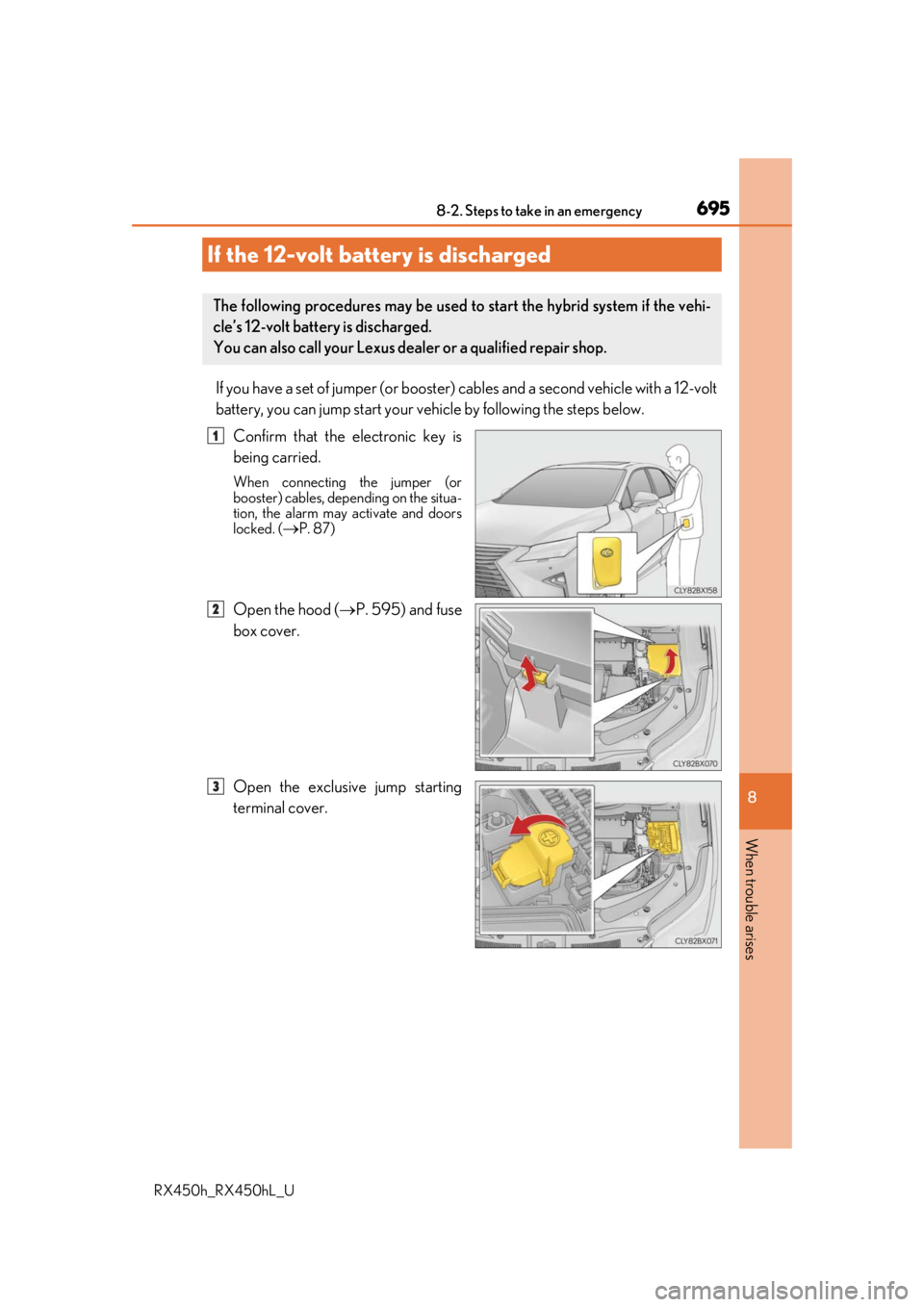
If you have a set of jumper (or booster) cables and a second vehicle with a 12-volt
battery, you can jump start your vehicle by following the steps below.
Confirm that the electronic key is
being carried.
When connecting the jumper (or
booster) cables, depe nding on the situa-
tion, the alarm may activate and doors
locked. (
P. 87)
Open the hood ( P. 595) and fuse
box cover.
Open the exclusive jump starting
terminal cover.
If the 12-volt battery is discharged
The following procedures may be used to start the hybrid system if the vehi-
cle’s 12-volt battery is discharged.
You can also call your Lexus deal er or a qualified repair shop.
1
2
3
Page 768 of 792

768What to do if... (Troubleshooting)
RX450h_RX450hL_U
●The seat belt reminder light is flashing
Are the driver and the passengers wearing the seat belts?
( P. 662, 662)
●The parking brake indicator is on
Is the parking brake released? ( P. 253)
Depending on the situation, other types of warning buzzer may also sound.
( P. 660, 667)
●Did anyone inside the vehicle open a door during setting the alarm?
The sensor detects it and the alarm sounds. ( P. 86)
Do one of the following to stop the alarms:
• Unlock the doors.
• Turn the power switch to ACCESSORY or ON mode, or start the hybrid system.
●Is the message displayed on the multi-information display?
Check the message on the multi-information display. ( P. 667)
●When a warning light turns on or a warning message is displayed, refer to
P. 660, 667.A warning buzzer sounds during driving
An alarm is activated and the horn sounds
A warning buzzer sounds when leaving the vehicle
A warning light turns on or a warning message is displayed
Page 771 of 792
771Alphabetical index
RX450h_RX450hL_U
Alarm ............................................................ 86
Anchor brackets ...................................... 57
AntennaRadio ........................................................429
Smart access system with push-button start ................... 158
Anti-lock Brake System (ABS)....... 382 Warning light ........................................ 661
Approach warning.................................314
Armrest ....................................................558
Assist grips .............................................. 559
Audio system (with Lexus Display Audio System) ...................400 Antenna ..................................................429
Audio input........................................... 409
AUX port.............................................. 409
Bluetooth
® audio ............................. 459
CD player ..............................................433
iPod .......................................................... 440
MP3/WMA disc ...............................433
Optimal use ........................................... 419
Portable music player ..................... 448
Radio ........................................................426
Setup menu .............................................412
Steering wheel audio switches .............................................. 406
USB memory ....................................... 444 Audio system
(with navigation system)
*
Automatic air conditioning system ......................................... 507, 522 Air conditioning filter ....................... 625
Rear automatic air conditioning system .................................................. 522
S-FLOW mode....................................514
Automatic headlight leveling system .................................................... 260
Automatic High Beam ........................262
Automatic light control system ...... 258
AUX port ................................................ 409
Auxiliary boxes .......................... 539, 544
*: Refer to the “NAVIGATION SYSTEM OWNER’S MANUAL”.
Page 788 of 792

788Alphabetical index
RX450h_RX450hL_U
Tachometer ............................................... 96
Tail lightsLight switch .......................................... 258
Replacing light bulbs ........................637
Talk switch ..................................... 471, 493
Telephone switch.................................... 471
Theft deterrent system Alarm...........................................................86
Immobilizer system ..............................83
Tire inflation pressure Maintenance data ................................ 717
Warning light .......................................662
Tire information ..................................... 723 Glossary .................................................730
Size ............................................................ 726
Tire identification number.............. 725
Uniform Tire Quality Grading...............................................728
Tire pressure warning system Initializing................................................. 612
Installing tire pressure warning valves and transmitters ................. 612
Registering ID codes ........................ 613
Warning light .......................................662 Tires .............................................................. 611
Chains .......................................................391
Checking .................................................. 611
Glossary................................................. 730
If you have a flat tire .......................... 673
Inflation pressure...................... 620, 717
Replacing ............................................... 673
Rotating tires ........................................... 611
Size ............................................................. 717
Snow tires .............................................. 392
Spare tire...................................... 673, 717
Tire identification number ............. 725
Tire pressure warning system ....... 612
Uniform Tire Quality Grading.... 728
Warning light ....................................... 662
Tools ........................................................... 674
Top tether strap ........................................70
Total load capacity................................. 710
Touchless power back door .............. 144
Towing Dinghy towing ..................................... 238
Emergency towing ........................... 654
Towing eyelet ......................................656
Trailer Sway Control ....................... 382
Trailer towing............................ 224, 237
T