interior LEXUS RX450H 2019 User Guide
[x] Cancel search | Manufacturer: LEXUS, Model Year: 2019, Model line: RX450H, Model: LEXUS RX450H 2019Pages: 792, PDF Size: 13.48 MB
Page 140 of 792
1403-2. Opening, closing and locking the doors
RX450h_RX450hL_U
■Switching the door unlock function
It is possible to set which doors the entry function unlock s using the wireless remote con-
trol.
Turn the power switch off.
When the indicator light on the key su rface is not on, press and hold , or
for approximately 5 seconds while pressing and holding .
The setting changes each time an operation is performed, as shown below. (When
changing the setting continuously, release the buttons, wait for at least 5 seconds, and
repeat step .)
To prevent unintended triggering of the alarm, unlock the doors using the wireless
remote control and open and close a door once after the settings have been changed. (If
a door is not opened within 60 seconds af ter is pressed, the doors will be locked
again and the alarm will automatically be set.)
In a case that the alarm is triggered, immediately stop the alarm. ( P. 86)
■Impact detection door lock release system
In the event that the vehicle is subject to a strong impact, all the doors are unlocked.
Depending on the force of the impact or the type of accident, however, the system may
not operate.
■Using the mechanical key
The doors can also be locked and unlocked with the mechanical key. ( P. 692)
■Open door warning buzzer
If the vehicle speed reaches 3 mph (5 km/h), the master warning light flashes and a
buzzer sounds to indicate that door (s) or the hood in not fully closed.
The open door(s) or hood is displa yed on the multi-information display.
1
2
2
Multi-information
displayUnlocking functionBeep
Holding the driver’s door handle
unlocks only the driver’s door.
Exterior: Beeps 3 times
Interior: Pings onceHolding any of the passenger
door handles unlocks all the
doors.
Holding a door handle unlocks
all the doors.Exterior: Beeps twice
Interior: Pings once
Page 159 of 792
1593-2. Opening, closing and locking the doors
3
Operation of each component
RX450h_RX450hL_U
■Alarms and warning messages
A combination of exterior and interior alar ms as well as warning messages shown on the
multi-information display are used to prevent theft of the vehicle and accidents resulting
from erroneous operation. Take appropriate measures in response to any warning mes-
sage on the multi-information display. ( P. 667)
When only an alarm sounds, circumstances and correction procedures are as follows.
■If a warning message is displayed indicating that there is a malfunction in the smart
access system with push-button start
P. 667
■Battery-saving function
The battery-saving function w ill be activated in order to prevent the electronic key bat-
tery and the 12-volt battery from being discha rged while the vehicle is not in operation
for a long time.
●In the following situations, the smart acce ss system with push-button start may take
some time to unlock the doors.
• The electronic key has been le ft in an area of approximately 6 ft. (2 m) of the outside
of the vehicle for 10 minutes or longer.
• The smart access system with push-button st art has not been used for 5 days or lon-
ger.
●If the smart access system with push-button start has not been used for 14 days or lon-
ger, the doors cannot be unlocked at any doors except the driver’s door. In this case,
take hold of the driver’s d oor handle, or use the wireless remote control or the mechan-
ical key, to unlock the doors.
AlarmSituationCorrection procedure
Exterior alarm
sounds once for 5
secondsAn attempt was made to lock
the vehicle while a door was
open.Close all of the doors and
lock the doors again.
Interior alarm pings
repeatedly
The power switch was turned to
ACCESSORY mode while the
driver’s door was open (The
driver’s door was opened when
the power switch was in
ACCESSORY mode).
Turn the power switch off
and close the driver’s door.
Page 217 of 792
2174-1. Before driving
4
Driving
RX450h_RX450hL_U
WARNING
Observe the following precautions.
Failure to do so may result in death or serious injury.
■If you hear a squealing or scraping noise (brake pad wear limit indicators)
Have the brake pads checked and replaced by your Lexus dealer as soon as possible.
Rotor damage may result if the pads are not replaced when needed.
It is dangerous to drive the vehicle when the wear limits of the brake pads and/or those
of the brake discs are exceeded.
■When the vehicle is stopped
●Do not depress the accelerator pedal unnecessarily.
If the shift lever is in any position other than P or N, the vehicle may accelerate sud-
denly and unexpectedly, causing an accident.
●In order to prevent accidents due to the ve hicle rolling away, always keep depressing
the brake pedal while stopped with the “REA DY” indicator is illuminated, and apply
the parking brake as necessary.
●If the vehicle is stopped on an incline, in order to prevent accidents caused by the
vehicle rolling forward or backward, alwa ys depress the brake pedal and securely
apply the parking brake as needed.
●Avoid revving or racing the engine.
Running the engine at high speed while the vehicle is stopped may cause the exhaust
system to overheat, which could result in a fire if combustible material is nearby.
■When the vehicle is parked
●Do not leave glasses, cigarette lighters, sp ray cans, or soft drink cans in the vehicle
when it is in the sun.
Doing so may result in the following:
• Gas may leak from a cigarette lighter or spray can, and may lead to a fire.
• The temperature inside the vehicle may cau se the plastic lenses and plastic mate-
rial of glasses to deform or crack.
• Soft drink cans may fracture, causing the contents to spray over the interior of the vehicle, and may also cause a short circui t in the vehicle’s electrical components.
●Do not leave cigarette lighters in the vehicle. If a cigarette lighter is in a place such as
the glove box or on the floor, it may be lit accidentally when luggage is loaded or the
seat is adjusted, causing a fire.
●Do not attach adhesive discs to the windsh ield or windows. Do not place containers
such as air fresheners on th e instrument panel or dashboard. Adhesive discs or con-
tainers may act as lenses, ca using a fire in the vehicle.
●Do not leave a door or window open if th e curved glass is coated with a metallized
film such as a silver-colored one. Reflecte d sunlight may cause the glass to act as a
lens, causing a fire.
●Always apply the parking brake, shift the shif t lever to P, stop the hybrid system and
lock the vehicle.
Do not leave the vehicle unattended whil e the “READY” indicator is illuminated.
If the vehicle is parked with the shift leve r in P but the parking brake is not set, the
vehicle may start to move, possibly leading to an accident.
●Do not touch the exhaust pipes while the “R EADY” indicator is illuminated or imme-
diately after turning the hybrid system off.
Doing so may cause burns.
Page 389 of 792

3894-6. Driving tips
4
Driving
RX450h_RX450hL_U
◆Delays
Repeated acceleration and deceleration, as well as long waits at traffic lights,
will lead to bad fuel economy. Check traffic reports before leaving and avoid
delays as much as possible. When drivin g in a traffic jam, gently release the
brake pedal to allow the vehicle to move forward slightly while avoiding over-
use of the accelerator pedal. Doing so can help control excessive gasoline
consumption.
◆Highway driving
Control and maintain the vehicle at a co nstant speed. Before stopping at a toll
booth or similar, allow plenty of ti me to release the accelerator and gently
apply the brakes. A greater amount of electrical energy can be regenerated
when slowing down.
◆Air conditioning
Use the air conditioning only when necessary. Doing so can help reduce
excessive gasoline consumption.
In summer: When the ambient temperature is high, use the recirculated air
mode. Doing so will help to reduce the burden on the air conditioning system
and reduce fuel consumption as well.
In winter: Because the gasoline engine will not automatically cut out until it
and the interior of the vehicle are warm , it will consume fuel. Also, fuel con-
sumption can be improved by av oiding overuse of the heater.
◆Checking tire inflation pressure
Make sure to check the tire inflation pr essure frequently. Improper tire infla-
tion pressure can cause poor fuel economy.
Also, as snow tires can cause large amou nts of friction, their use on dry roads
can lead to poor fuel economy. Use tires that are appropriate for the season.
◆Luggage
Carrying heavy luggage will lead to poor fuel economy. Avoid carrying
unnecessary luggage. Installing a large roof rack will also cause poor fuel
economy.
◆Warming up before driving
Since the gasoline engine starts up an d cuts out automatically when cold,
warming up the engine is unnecessary. Moreover, frequently driving short dis-
tances will cause the engine to repeated ly warm up, which can lead to excess
fuel consumption.
Page 396 of 792
3964-6. Driving tips
RX450h_RX450hL_U
[
WARNING
■Off-road driving precautions
Always observe the following precautions to minimize the risk of death, serious injury
or damage to your vehicle:
●Drive carefully when off the road. Do not ta ke unnecessary risks by driving in danger-
ous places.
●Do not grip the steering wheel spokes when driving off-road. A bad bump could jerk
the wheel and injure your hands. Keep both hands and especially your thumbs on the
outside of the rim.
●Always check your brakes for effectiveness immediately after driving in sand, mud,
water or snow.
●After driving through tall grass, mud, rock , sand, rivers, etc., check that there is no
grass, bush, paper, rags, stone, sand, etc. adhering or trapped on the underbody.
Clear off any such matter from the underbody. If the vehicle is used with these materi-
als trapped or adhering to the underbody, a breakdown or fire could occur.
●When driving off-road or in rugged terrain , do not drive at excessive speeds, jump,
make sharp turns, strike obje cts, etc. This may cause loss of control or vehicle rollover
causing death or serious injury. You are also risking expensive damage to your vehi-
cle’s suspension and chassis.
NOTICE
■To prevent water damage
Take all necessary safety measures to ensure that water damage to the hybrid battery
(traction battery), hybrid system or other components does not occur.
●Water entering the engine compartment may cause severe damage to the hybrid
system. Water entering the interior may cause the hybrid battery (traction battery)
stowed under the rear seats to short circuit.
●Water entering the hybrid transmission and rear electric motor (traction motor) will
cause deterioration in transmission qualit y. The malfunction indicator may come on,
and the vehicle may not be drivable.
●Water can wash the grease from wheel be arings, causing rusting and premature fail-
ure, and may also enter the hybrid transmissi on case, reducing the gear oil’s lubricat-
ing qualities.
■When you drive through water
If driving through water, such as when cro ssing shallow streams, first check the depth of
the water and the bottom of the riverbed for firmness. Drive slowly and avoid deep
water.
■Inspection after off-road driving
●Sand and mud that has accumulated around brake discs may affect braking efficiency
and may damage brake system components.
●Always perform a maintenance inspection afte r each day of off-road driving that has
taken you through rough terrain, sand, mud, or water. For scheduled maintenance
information, refer to the “Warranty and Services Guide/Owner’s Manual Supple-
ment/Scheduled Maintenance”.
Page 499 of 792
499
6Interior features
RX450h_RX450hL_U
6-1. Basic operation of the Remote Touch screen
Remote Touch ............................ 500
12.3-inch display........................ 504
6-2. Using the air conditioning system and defogger
Lexus Climate Concierge ................................. 506
Front automatic air conditioning system ...............507
Rear automatic air conditioning system ...............522
Heated steering wheel/ seat heaters/
seat ventilators .........................525
6-3. Using the interior lights Interior lights list......................... 528
• Interior lights ..........................529
• Personal lights ...................... 530
6-4. Using the storage features List of storage features.............532
• Glove box ...............................534
• Console box ...........................534
• Cup holders........................... 535
• Door pockets .........................537 • Bottle holders ........................ 537
• Coin box ..................................538
• Auxiliary boxes .....................539
Luggage compartment features .......................................540
6-5. Using the other interior features
Other interior features ............ 547 • Sun visors ................................ 547
• Vanity mirrors ....................... 547
• Clock ........................................548
• Wireless charger .................548
• Power outlets.........................555
• Front passenger footwell hooks ....................... 557
• Rear door sunshades ......... 557
• Armrest ................................... 558
• Assist grips..............................559
• Coat hooks .............................559
Garage door opener ...............560
Compass ....................................... 567
LEXUS Enform Safety Connect ........................................571
LEXUS Enform Remote ......... 576
LEXUS Enform Service Connect ...................................... 577
Page 501 of 792
5016-1. Basic operation of the Remote Touch screen
6
Interior features
RX450h_RX450hL_U
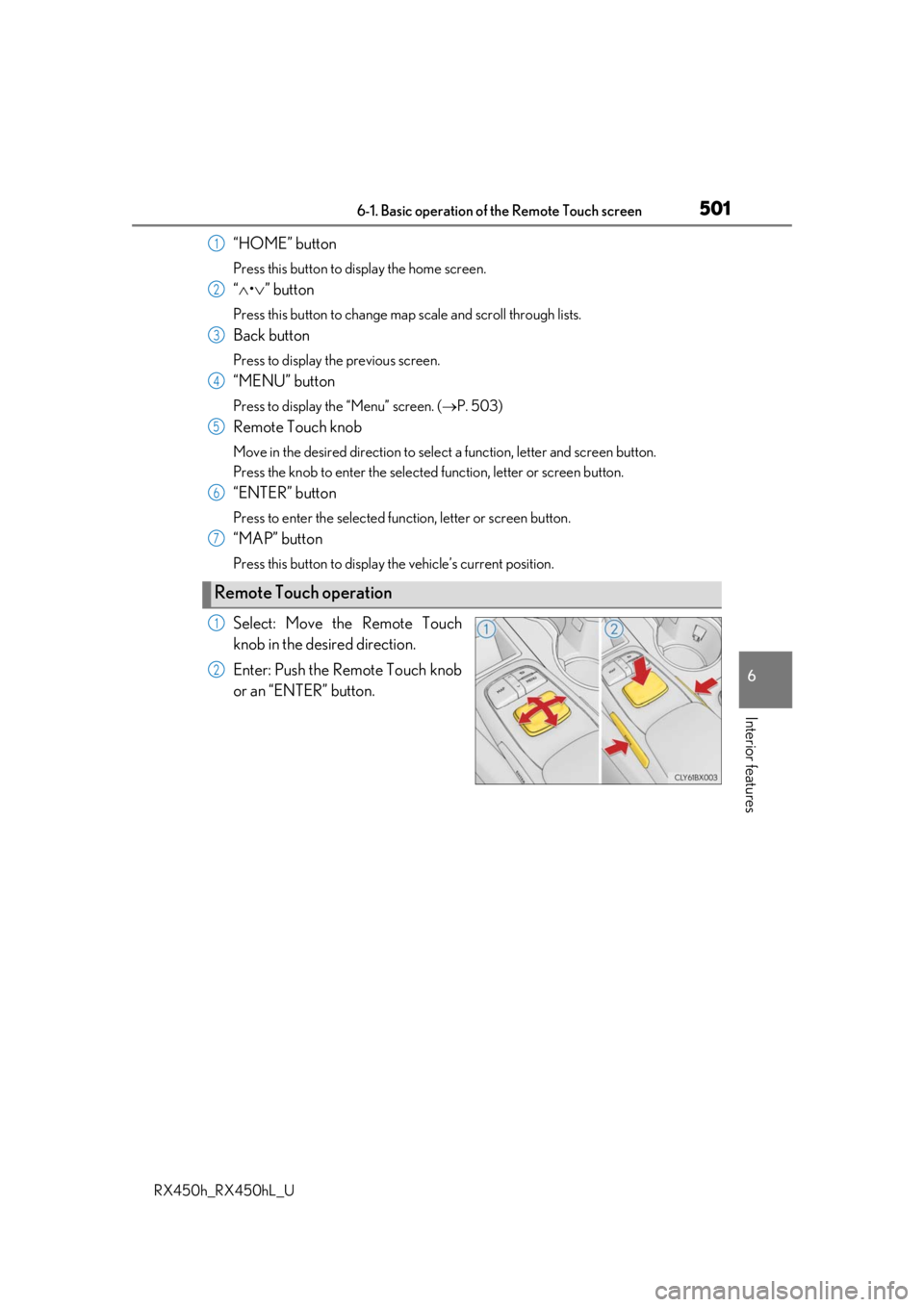
“HOME” button
Press this button to display the home screen.
“ • ” button
Press this button to change map scale and scroll through lists.
Back button
Press to display the previous screen.
“MENU” button
Press to display th e “Menu” screen. ( P. 503)
Remote Touch knob
Move in the desired direction to select a function, letter and screen button.
Press the knob to enter the selected function, letter or screen button.
“ENTER” button
Press to enter the selected function, letter or screen button.
“MAP” button
Press this button to display the vehicle’s current position.
Select: Move the Remote Touch
knob in the desired direction.
Enter: Push the Remote Touch knob
or an “ENTER” button.
Remote Touch operation
1
2
3
4
5
6
7
1
2
Page 503 of 792
5036-1. Basic operation of the Remote Touch screen
6
Interior features
RX450h_RX450hL_U
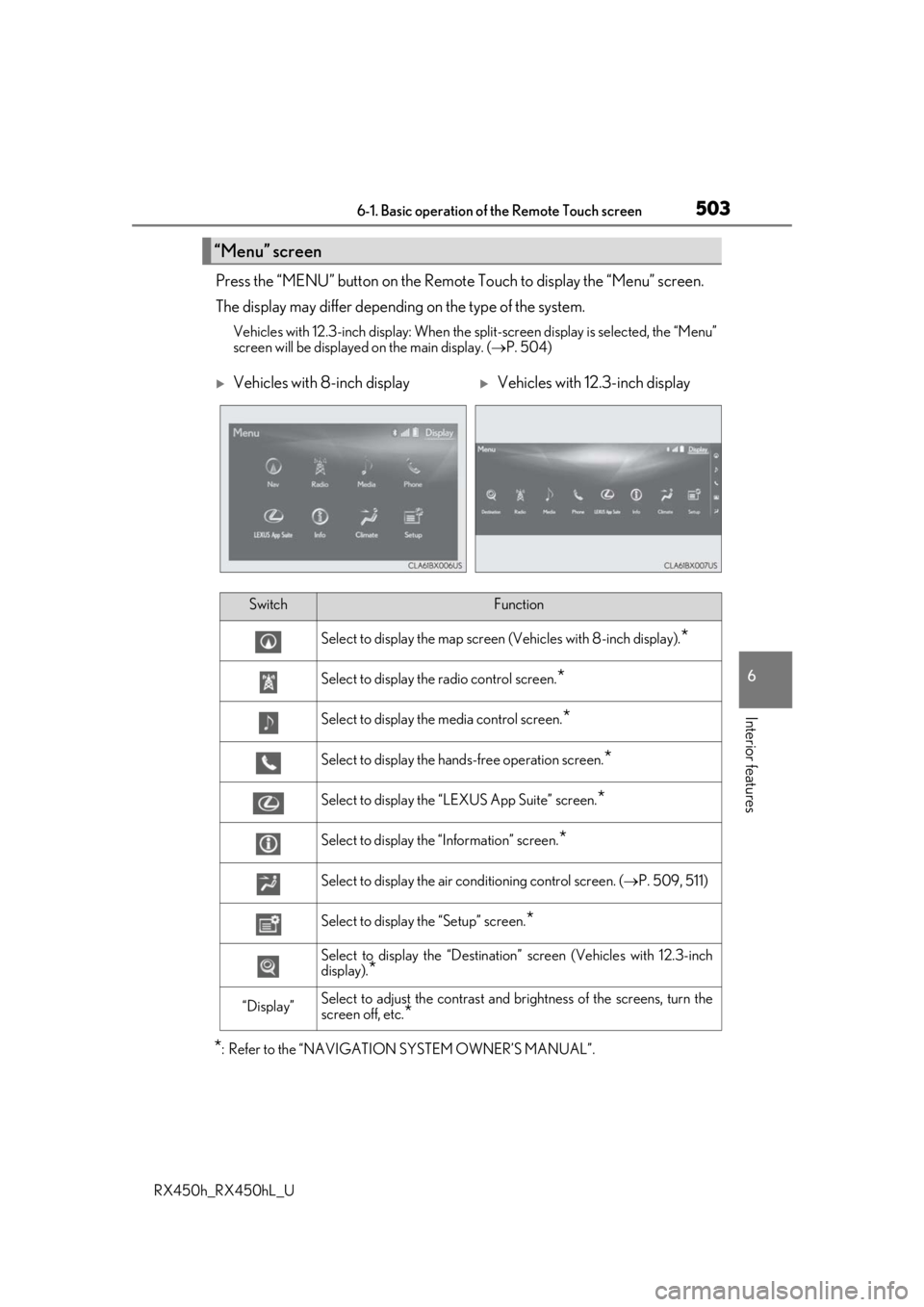
Press the “MENU” button on the Remote Touch to display the “Menu” screen.
The display may differ depending on the type of the system.
Vehicles with 12.3-inch display: When the split-screen display is selected, the “Menu”
screen will be displayed on the main display. ( P. 504)
*: Refer to the “NAVIGATION SYSTEM OWNER’S MANUAL”.
“Menu” screen
Vehicles with 8-inch displayVehicles with 12.3-inch display
SwitchFunction
Select to display the map screen (Vehicles with 8- inch display).*
Select to display the radio control screen.*
Select to display the media control screen.*
Select to display the hands-free operation screen.*
Select to display the “LEXUS App Suite” screen.*
Select to display the “Information” screen.*
Select to display the air conditioning control screen. ( P. 509, 511)
Select to display the “Setup” screen.*
Select to display the “Destination ” screen (Vehicles with 12.3-inch
display).
*
“Display”Select to adjust the contrast and brightness of the screens, turn the
screen off, etc.
*
Page 505 of 792
5056-1. Basic operation of the Remote Touch screen
6
Interior features
RX450h_RX450hL_U
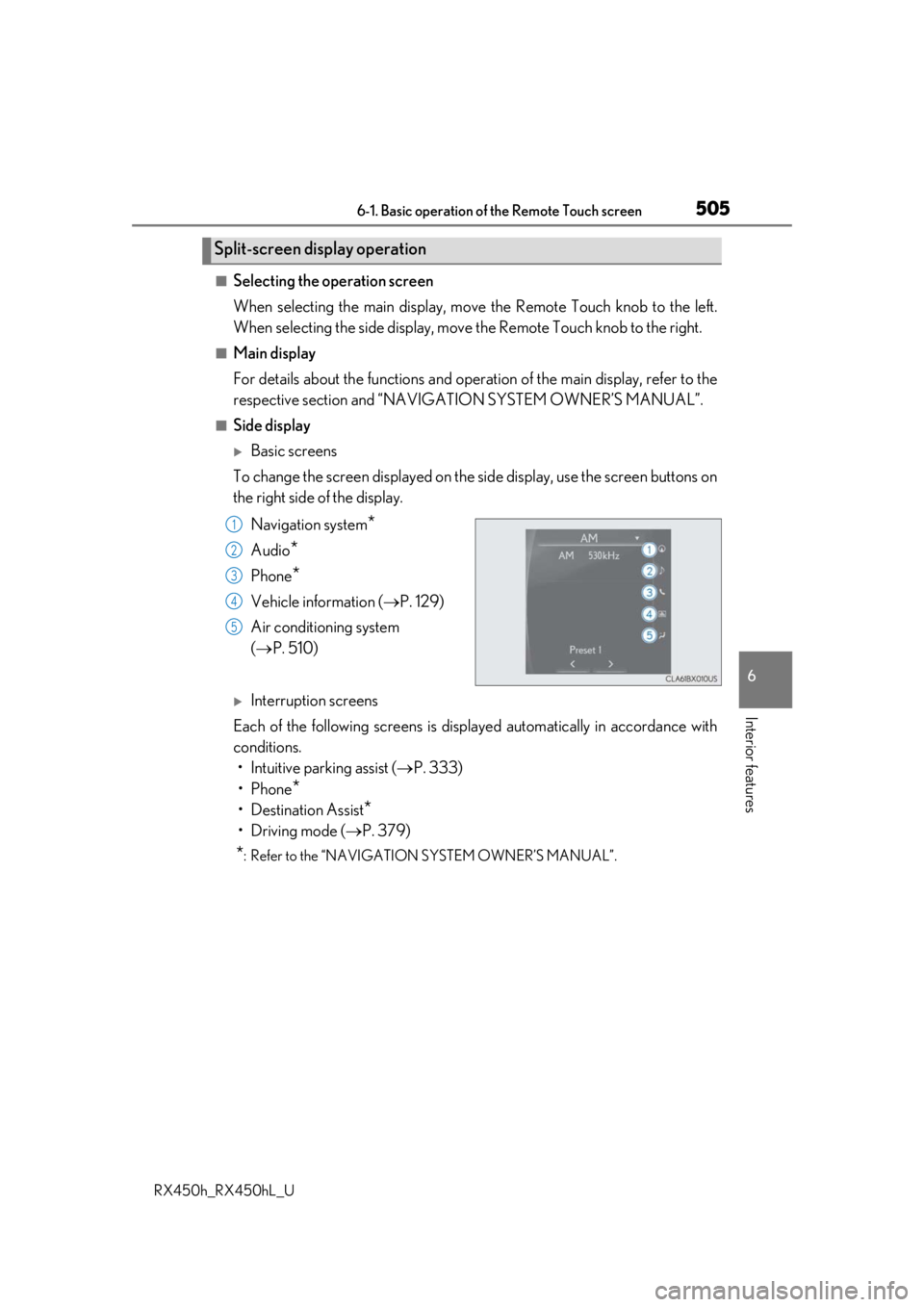
■Selecting the operation screen
When selecting the main display, move the Remote Touch knob to the left.
When selecting the side display, move the Remote Touch knob to the right.
■Main display
For details about the functions and operation of the main display, refer to the
respective section and “NAVIGATION SYSTEM OWNER’S MANUAL”.
■Side display
Basic screens
To change the screen displayed on the side display, use the screen buttons on
the right side of the display.
Navigation system
*
Audio*
Phone*
Vehicle information ( P. 129)
Air conditioning system
( P. 510)
Interruption screens
Each of the following screens is displayed automatically in accordance with
conditions. • Intuitive parking assist ( P. 333)
•Phone
*
• Destination Assist*
•Driving mode ( P. 379)
*: Refer to the “NAVIGATION SYSTEM OWNER’S MANUAL”.
Split-screen display operation
1
2
3
4
5
Page 507 of 792
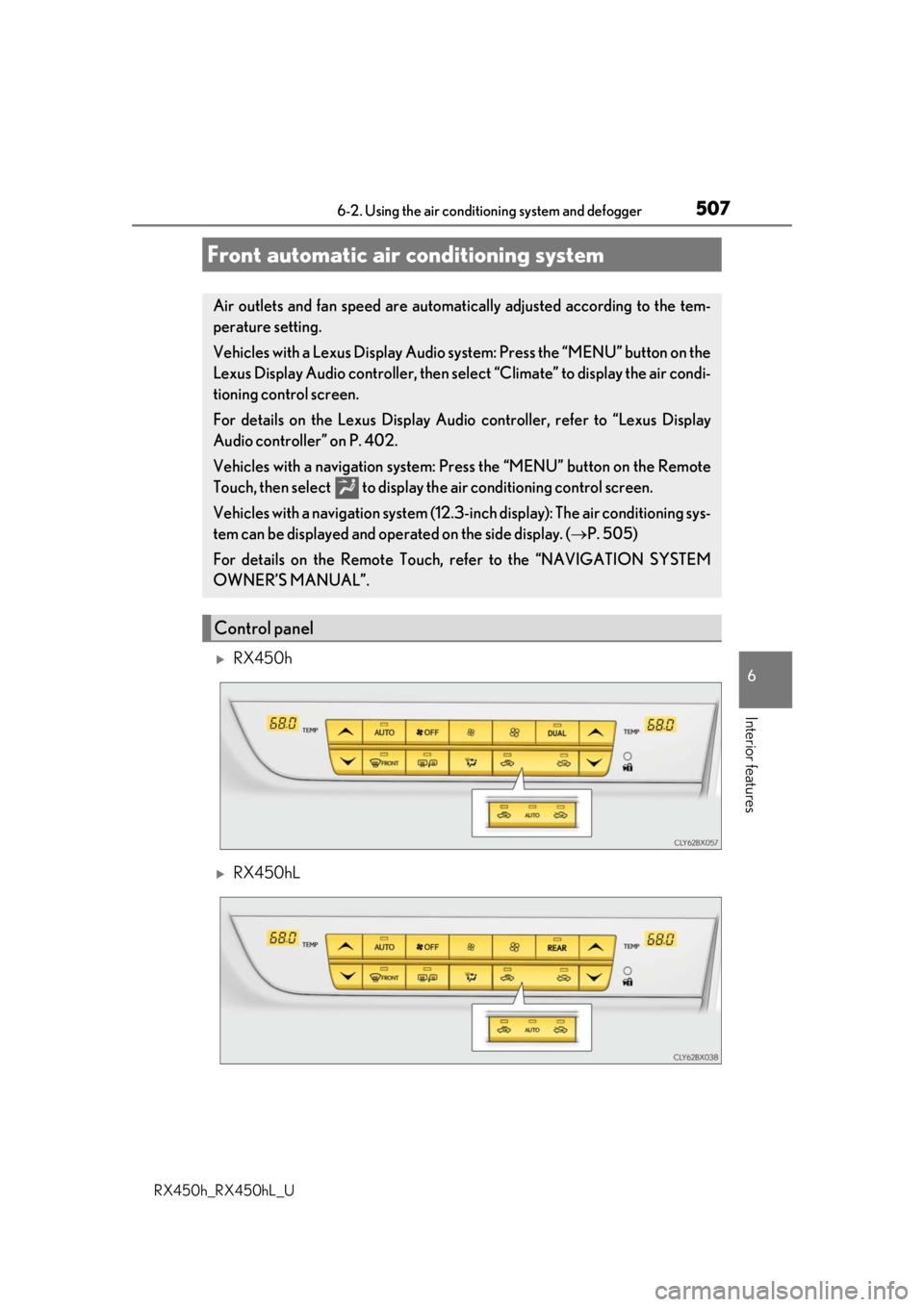
5076-2. Using the air conditioning system and defogger
RX450h_RX450hL_U
6
Interior features
RX450h
RX450hL
Front automatic air conditioning system
Air outlets and fan speed are automati cally adjusted according to the tem-
perature setting.
Vehicles with a Lexus Display Audio sy stem: Press the “MENU” button on the
Lexus Display Audio controller, then sele ct “Climate” to display the air condi-
tioning control screen.
For details on the Lexus Display Audio controller, refer to “Lexus Display
Audio controller” on P. 402.
Vehicles with a navigation system: Press the “MENU” button on the Remote
Touch, then select to display th e air conditioning control screen.
Vehicles with a navigation system (12.3 -inch display): The air conditioning sys-
tem can be displayed and operat ed on the side display. (P. 505)
For details on the Remote Touch, refer to the “NAVIGATION SYSTEM
OWNER’S MANUAL”.
Control panel