lane LEXUS RX450H 2019 Owner's Manual
[x] Cancel search | Manufacturer: LEXUS, Model Year: 2019, Model line: RX450H, Model: LEXUS RX450H 2019Pages: 792, PDF Size: 13.48 MB
Page 304 of 792

3044-5. Using the driving support systems
RX450h_RX450hL_U
■Temporary cancellation of functions
When operation conditions are no longer met, a function may be temporarily canceled.
However, when the operation conditions are met again, operat ion of the function is auto-
matically restored. ( P. 303)
■Steering assist function/lane centering function
Depending on the vehicle speed, lane depart ure situation, road conditions, etc., the
operation of the functions may not be reco gnized or the functions may not operate.
■Lane departure alert function
The warning buzzer may be difficult to hear due to external noise, audio playback, etc.
Also, it may be difficult to f eel steering wheel vibrations due to the road conditions, etc.
■Hands off steering wheel alert
When the system determines that the driver has removed their hands from the steering
wheel while the steering assist function or lane centering function is operating, a warning
message is displayed on the multi-info rmation display and the buzzer sounds.
■White (yellow) lines are only on one side of road
The LKA system will not operate for the side on which white (yellow) lines could not be
recognized.
Page 305 of 792

3054-5. Using the driving support systems
4
Driving
RX450h_RX450hL_U
■Conditions in which functions may not operate properly
In the following situations, the camera sensor may not detect white (yellow) lines and var-
ious functions may not operate normally.
●There are shadows on the road that run parallel with, or cover, the white (yellow) lines.
●The vehicle is driven in an ar ea without white (yellow) lines, such as in front of a tollgate
or checkpoint, or at an intersection, etc.
●The white (yellow) lines are cracked, “Botts ’ dots”, “Raised pavement marker” or stones
are present.
●The white (yellow) lines cannot be seen or are difficult to see due to sand, etc.
●The vehicle is driven on a road surface that is wet due to rain, puddles, etc.
●The traffic lines are yellow (which may be more difficult to recognize than lines that are
white).
●The white (yellow) lines cross over a curb, etc.
●The vehicle is driven on a bright surface, such as concrete.
●The vehicle is driven on a surface that is bright due to reflected light, etc.
●The vehicle is driven in an area where the brightness changes suddenly, such as at the
entrances and exits of tunnels, etc.
●Light from the headlights of an oncoming vehicle, the sun, etc., enters the camera.
●The vehicle is driven where the road diverges, merges, etc.
●The vehicle is driven on a slope.
●The vehicle is driven on a road which tilts left or right, or a winding road.
●The vehicle is driven on an unpaved or rough road.
●The vehicle is driven around a sharp curve.
●The traffic lane is excessively narrow or wide.
●The vehicle is extremely tilted due to carry ing heavy luggage or having improper tire
pressure.
●The distance to the preceding vehicle is extremely short.
●The vehicle is moving up and down a large am ount due to road conditions during driv-
ing (poor roads or road seams).
●The headlight lenses are dirty and emit a faint amount of light at night, or the beam axis
has deviated.
●The vehicle is struck by a crosswind.
●The vehicle has just changed lane s or crossed an intersection.
●Snow tires, etc., are equipped.
■If the LKA indicator is illuminated in ambe r and a warning message is displayed on the
multi-information display
P. 660
■Customization
Some functions can be customized. ( P. 108)
Page 316 of 792

3164-5. Using the driving support systems
RX450h_RX450hL_U
■Dynamic radar cruise control with full-speed range can be set when
●The shift lever is in D or range 4 or higher of S has been selected.
●Range 4 or higher has been selected by using the paddle shift switch.
(vehicles with padd le shift switches)
●Vehicle speed is at or abov e approximately 30 mph (50 km/h). However, when a pre-
ceding vehicle is detected, the dynamic ra dar cruise control with full-speed range can
be set even if the vehicle speed is below approximately 30 mph (50 km/h).
■Accelerating after setting the vehicle speed
The vehicle can accelerate by operating the accelerator pedal. After accelerating, the
set speed resumes. However, during vehicle-to-vehicle distance control mode, the vehi-
cle speed may decrease below the set speed in order to maintain the distance to the pre-
ceding vehicle.
■When the vehicle stops while follow-up cruising
●Pushing the lever up while the vehicle ahead stops will resume follow-up cruising if the
vehicle ahead starts off within approximat ely 3 seconds after the switch is pressed.
●If the vehicle ahead starts off within 3 seco nds after your vehicle stops, follow-up cruis-
ing will be resumed.
■Automatic cancelation of vehicle- to-vehicle distance control mode
Vehicle-to-vehicle distance control mode is automatically canceled in the following situ-
ations.
●Actual vehicle speed falls below approximately 25 mph (40 km/h) when there are no
vehicles ahead.
●The preceding vehicle leaves the lane when yo ur vehicle is following at a vehicle speed
at or below approximately 25 mph (40 km/h ). Otherwise, the sensor cannot properly
detect the vehicle. (“Radar Cruise Contro l Not Available No Preceding Vehicles” is
displayed on the multi-information display)
●VSC is activated.
●TRAC is activated for a period of time.
●When the VSC or TRAC system is turned off.
●The sensor cannot detect correctly because it is covered in some way.
●Pre-collision braking is activated.
●The parking brake is operated.
●The vehicle is stopped by system control on a steep incline.
●The following are detected when the vehicle has been stopped by system control:
• The driver is not wearing a seat belt.
• The driver’s door is opened.
• The vehicle has been stopped for about 3 minutes
If vehicle-to-vehicle distance control mode is automatically canceled for any other rea-
son, there may be a malfunction in th e system. Contact your Lexus dealer.
Page 317 of 792

3174-5. Using the driving support systems
4
Driving
RX450h_RX450hL_U
■Automatic cancelation of constant speed control mode
Constant speed control mode is automatica lly canceled in the following situations:
●Actual vehicle speed is more than approxim ately 10 mph (16 km/h) below the set vehi-
cle speed.
●Actual vehicle speed falls below approximately 25 mph (40 km/h).
●VSC is activated.
●TRAC is activated for a period of time.
●When the VSC or TRAC system is turned off.
●Pre-collision braking is activated.
If constant speed control mode is automati cally canceled for any other reason, there may
be a malfunction in the system . Contact your Lexus dealer.
■Warning messages and buzzers for dynamic radar cruise control with full-speed range
Warning messages and buzzers are used to indicate a system malfunction or to inform
the driver of the need for ca ution while driving. If a warning message is shown on the
multi-information display, read the message and follow the instructions.
■When the sensor may not be correctly detecting the vehicle ahead
In the case of the following and depending on the conditions, operate the brake pedal
when deceleration of the system is insuff icient or operate the accelerator pedal when
acceleration is required.
As the sensor may not be able to correctly detect these types of vehicles, the approach
warning ( P. 314) may not be activated.
●Vehicles that cut in suddenly
●Vehicles traveling at low speeds
●Vehicles that are not moving in the same lane
●Vehicles with small rear ends (traile rs with no load on board, etc.)
Page 318 of 792
3184-5. Using the driving support systems
RX450h_RX450hL_U
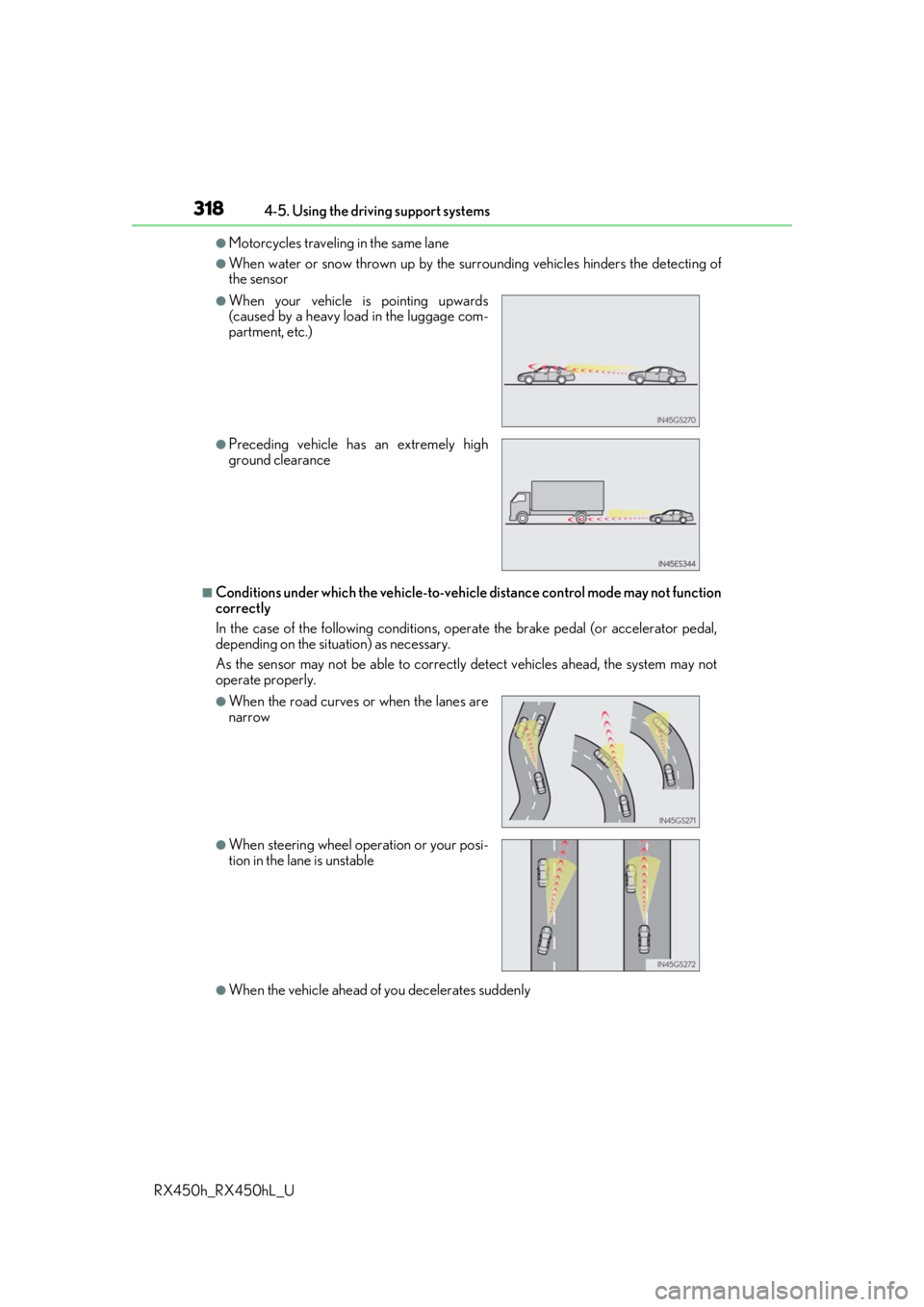
●Motorcycles travelin g in the same lane
●When water or snow thrown up by the surrounding vehicles hinders the detecting of
the sensor
■Conditions under which the ve hicle-to-vehicle distance control mode may not function
correctly
In the case of the following conditions, o perate the brake pedal (or accelerator pedal,
depending on the situ ation) as necessary.
As the sensor may not be able to correctly detect vehicles ahead, the system may not
operate properly.
●When the vehicle ahead of you decelerates suddenly
●When your vehicle is pointing upwards
(caused by a heavy load in the luggage com-
partment, etc.)
●Preceding vehicle has an extremely high
ground clearance
●When the road curves or when the lanes are
narrow
●When steering wheel operation or your posi-
tion in the lane is unstable
Page 319 of 792

3194-5. Using the driving support systems
4
Driving
RX450h_RX450hL_U
The Blind Spot Monitor is a system that has 2 functions:
●The BSM (Blind Spot Monitor) function
Assists the driver in making a decision when changing lanes
●The RCTA (Rear Cross Traffic Alert) function
Assists the driver when backing up
These functions use same sensors.
BSM (Blind Spot Monitor)
: If equipped
Summary of the Blind Spot Monitor
Page 323 of 792
3234-5. Using the driving support systems
4
Driving
RX450h_RX450hL_U
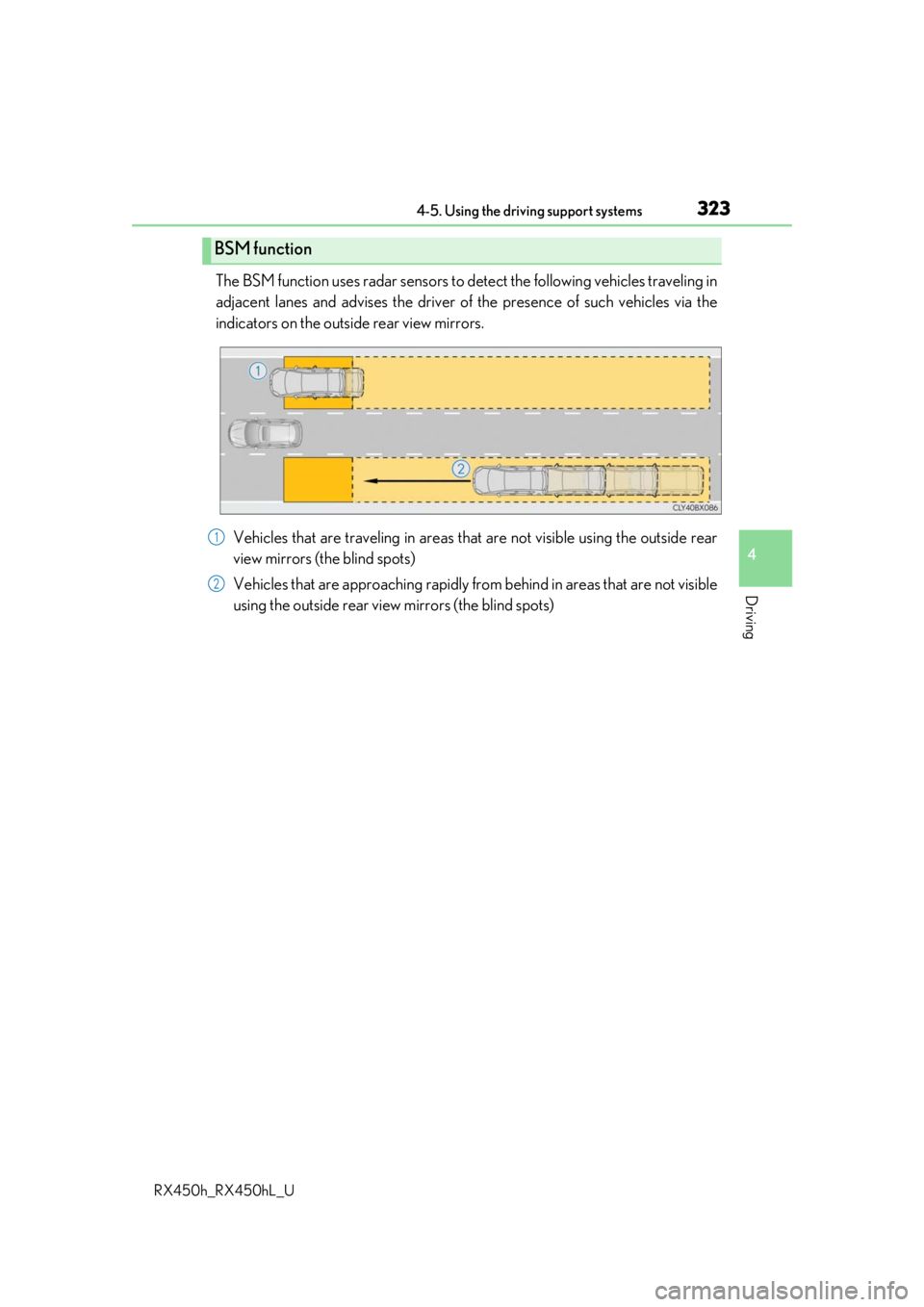
The BSM function uses radar sensors to detect the following vehicles traveling in
adjacent lanes and advises th e driver of the presence of such vehicles via the
indicators on the outside rear view mirrors.
Vehicles that are traveling in areas th at are not visible using the outside rear
view mirrors (the blind spots)
Vehicles that are approaching rapidly from behind in areas that are not visible
using the outside rear view mirrors (the blind spots)
BSM function
1
2
Page 324 of 792
3244-5. Using the driving support systems
RX450h_RX450hL_U
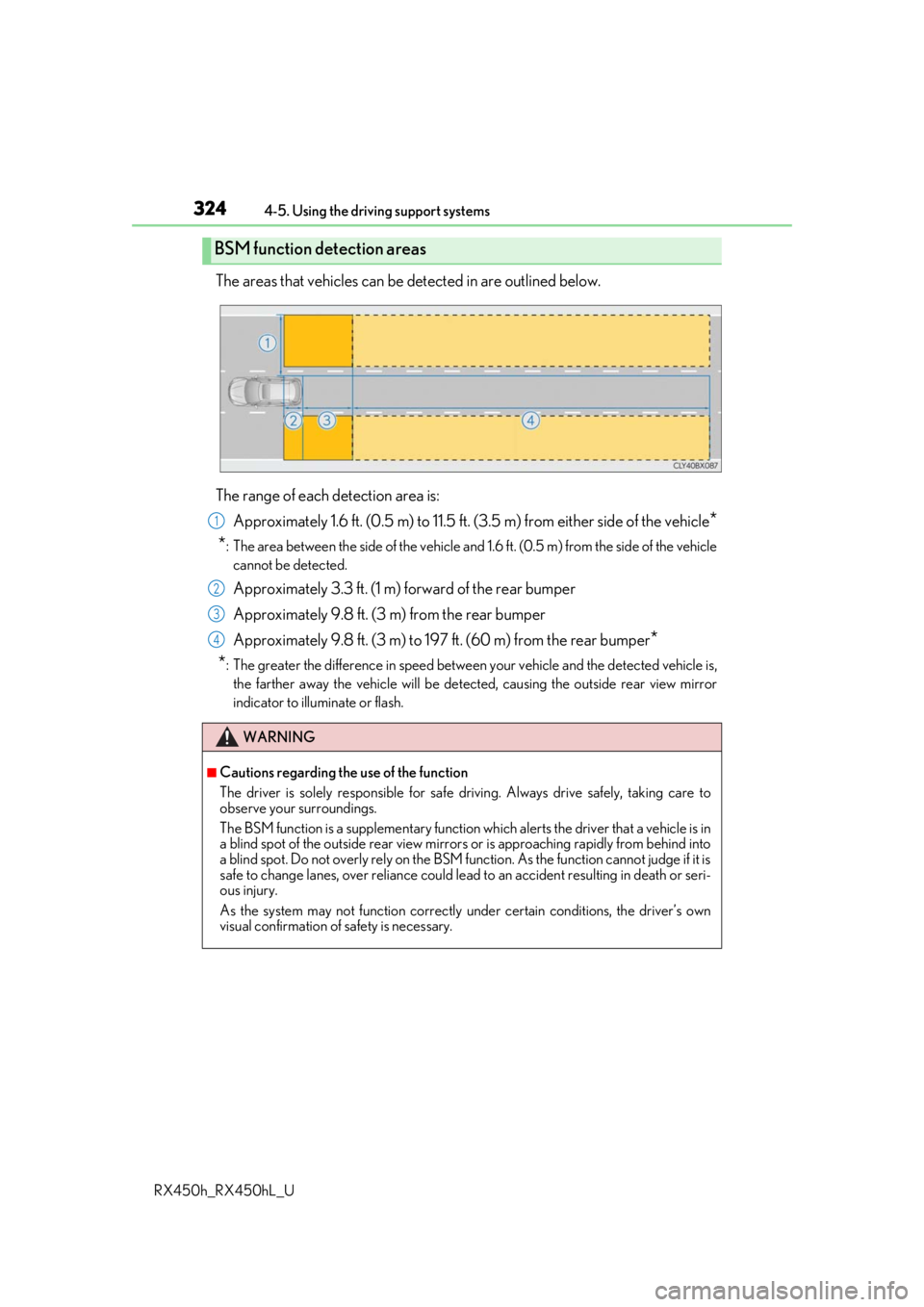
The areas that vehicles can be detected in are outlined below.
The range of each detection area is: Approximately 1.6 ft. (0.5 m) to 11.5 ft. (3 .5 m) from either side of the vehicle
*
*
: The area between the side of the vehicle and 1.6 ft. (0.5 m) from the side of the vehicle
cannot be detected.
Approximately 3.3 ft. (1 m) forward of the rear bumper
Approximately 9.8 ft. (3 m) from the rear bumper
Approximately 9.8 ft. (3 m) to 197 ft. (60 m) from the rear bumper
*
*
: The greater the difference in speed betwee n your vehicle and the detected vehicle is,
the farther away the vehicle will be detect ed, causing the outside rear view mirror
indicator to illuminate or flash.
BSM function detection areas
WARNING
■Cautions regarding the use of the function
The driver is solely responsible for safe driving. Always drive safely, taking care to
observe your surroundings.
The BSM function is a supplementary function which alerts the driver that a vehicle is in
a blind spot of the outside rear view mirrors or is approaching rapidly from behind into
a blind spot. Do not overly rely on the BSM function. As the function cannot judge if it is
safe to change lanes, over reliance could lead to an accident resulting in death or seri-
ous injury.
As the system may not function correctly under certain conditions, the driver’s own
visual confirmation of safety is necessary.
1
2
3
4
Page 325 of 792
3254-5. Using the driving support systems
4
Driving
RX450h_RX450hL_U
■The BSM function is operational when
The BSM function is operational when all of the following conditions are met:
●The BSM function is on.
●The shift lever is in a position other than R.
●The vehicle speed is greater than approximately 10 mph (16 km/h).
■The BSM function will detect a vehicle when
The BSM function will detect a vehicle present in the dete ction area in the following situ-
ations:
●A vehicle in an adjacent la ne overtakes your vehicle.
●Another vehicle enters the detection area when it changes lanes.
■Conditions under which the BSM function will not detect a vehicle
The BSM function is not designed to detect the following types of vehicles and/or
objects:
●Small motorcycles, bicycles, pedestrians, etc.*
●Vehicles traveling in the opposite direction
●Guardrails, walls, signs, parked vehi cles and similar stationary objects*
●Following vehicles that are in the same lane*
●Vehicles traveling 2 lanes away from your vehicle*
*
: Depending on the conditions, detection of a vehicle and/or object may occur.
Page 326 of 792
3264-5. Using the driving support systems
RX450h_RX450hL_U
■Conditions under which the BSM function may not function correctly
●The BSM function may not detect vehicles correctly in the following situations:
• When the sensor is misaligned due to a stro ng impact to the sensor or its surround-
ing area
• When mud, snow, ice, a sticke r, etc. is covering the sensor or surrounding area on
the rear bumper
• When driving on a road surf ace that is wet with standing water during bad weather,
such as heavy rain, snow, or fog
• When multiple vehicles are approaching wi th only a small gap between each vehicle
• When the distance between your vehicle and a following vehicle is short
• When there is a significant difference in speed between your vehicle and the vehicle that enters the detection area
• When the difference in speed between your vehicle and another vehicle is changing
• When a vehicle enters a detection area traveling at about the same speed as your vehicle
• As your vehicle starts from a stop, a vehicle remains in the detection area
• When driving up and down cons ecutive steep inclines, such as hills, dips on the road,
etc.
• When driving on roads with sharp bends, consecutive curves, or uneven surfaces
• When vehicle lanes are wide, or when driving on the edge of a lane, and the vehicle in an adjacent lane is far away from your vehicle
• When towing a trailer (vehicles with towing package)
• When items such as a bicycle carrier are installed on the rear of the vehicle
• When there is a significant difference in height between your vehicle and the vehicle that enters the detection area
• Immediately after the BSM function is turned on
●Instances of the BSM function unnecessarily detecting a vehicle and/or object may
increase in the following situations:
• When the sensor is misaligned due to a stro ng impact to the sensor or its surround-
ing area
• When the distance between your vehicle and a guardrail, wall, etc. that enters the detection area is short
• When driving up and down cons ecutive steep inclines, such as hills, dips on the road,
etc.
• When vehicle lanes are narrow, or when driv ing on the edge of a lane, and a vehicle
traveling in a lane other than the ad jacent lanes enters the detection area
• When driving on roads with sharp bends, consecutive curves, or uneven surfaces
• When the tires are slipping or spinning
• When the distance between your vehicle and a following vehicle is short
• When a bicycle carrier or other accessory is installed to the rear of the vehicle
• When towing a trailer (vehicles with towing package)