ECO LEXUS RX450H 2019 Owner's Guide
[x] Cancel search | Manufacturer: LEXUS, Model Year: 2019, Model line: RX450H, Model: LEXUS RX450H 2019Pages: 792, PDF Size: 13.48 MB
Page 98 of 792
982. Instrument cluster
RX450h_RX450hL_U
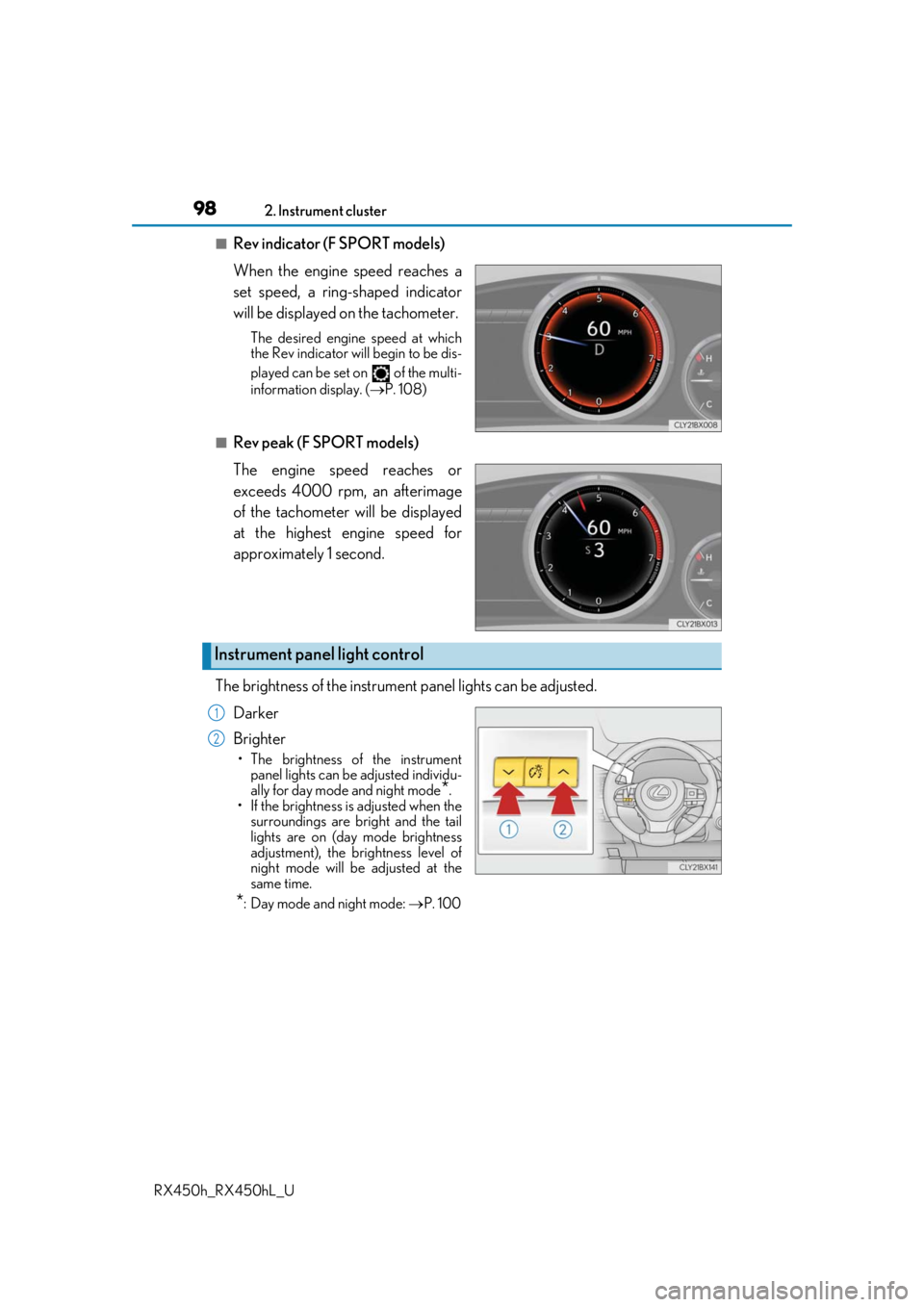
■Rev indicator (F SPORT models)
When the engine speed reaches a
set speed, a ring-shaped indicator
will be displayed on the tachometer.
The desired engine speed at which
the Rev indicator will begin to be dis-
played can be set on of the multi-
information display. ( P. 108)
■Rev peak (F SPORT models)
The engine speed reaches or
exceeds 4000 rpm, an afterimage
of the tachometer will be displayed
at the highest engine speed for
approximately 1 second.
The brightness of the instrument panel lights can be adjusted.
Darker
Brighter
• The brightness of the instrument panel lights can be adjusted individu-
ally for day mode and night mode
*.
• If the brightness is adjusted when the surroundings are bright and the tail
lights are on (day mode brightness
adjustment), the brightness level of
night mode will be adjusted at the
same time.
*: Day mode and night mode: P. 100
Instrument panel light control
1
2
Page 99 of 792
992. Instrument cluster
2
Instrument cluster
RX450h_RX450hL_U
■The meters and display illuminate when
The power switch is in ON mode.
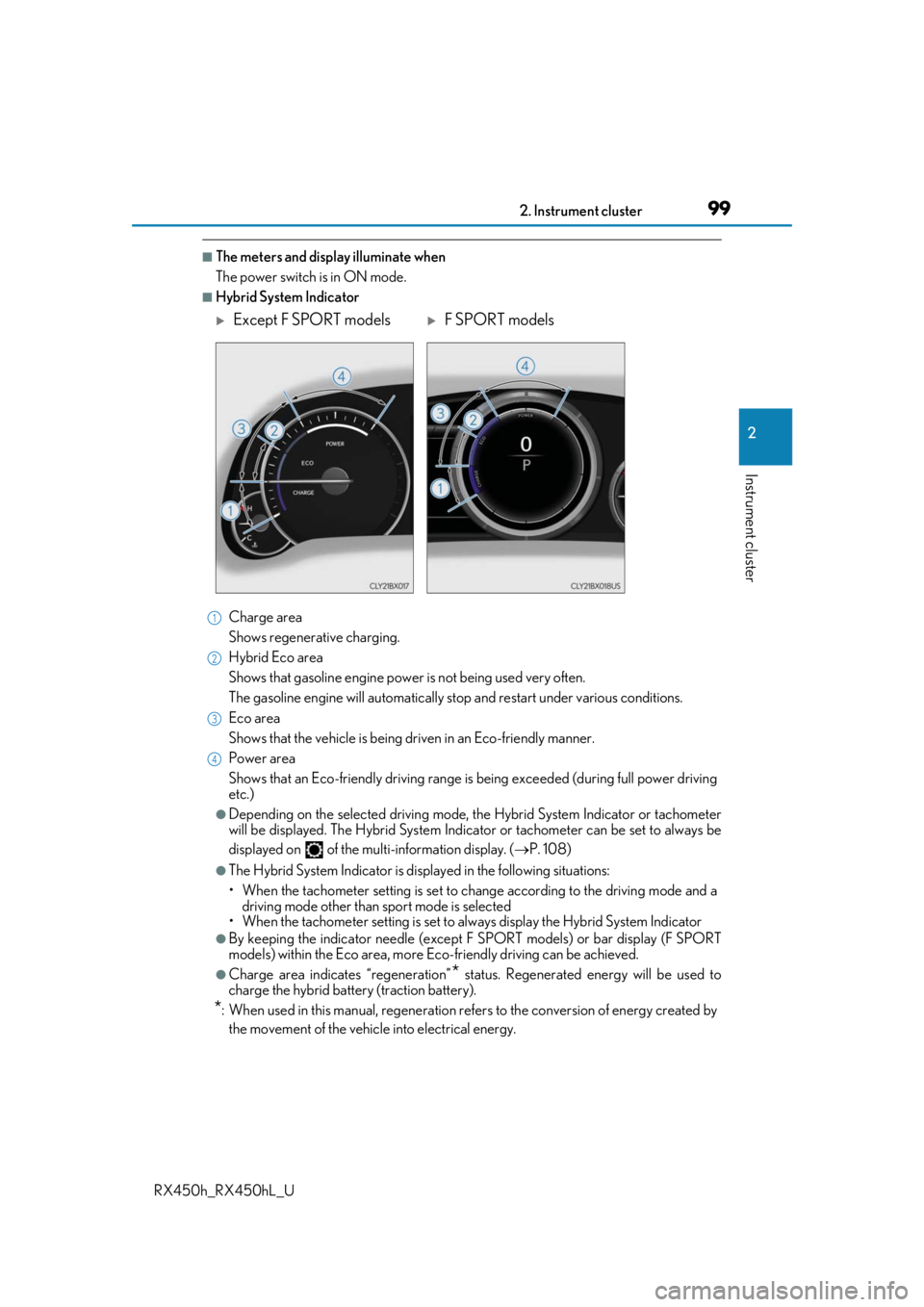
■Hybrid System IndicatorCharge area
Shows regenerative charging.
Hybrid Eco area
Shows that gasoline en gine power is not being used very often.
The gasoline engine will automatically stop and restart under various conditions.
Eco area
Shows that the vehicle is being dr iven in an Eco-friendly manner.
Power area
Shows that an Eco-friendly driving range is being exceeded (during full power driving
etc.)
●Depending on the selected driving mode, th e Hybrid System Indicator or tachometer
will be displayed. The Hybrid System Indica tor or tachometer can be set to always be
displayed on of the mult i-information display. (P. 108)
●The Hybrid System Indicator is disp layed in the following situations:
• When the tachometer setting is set to ch ange according to the driving mode and a
driving mode other than sport mode is selected
• When the tachometer setting is set to al ways display the Hybrid System Indicator
●By keeping the indicator needle (except F SPORT models) or bar display (F SPORT
models) within the Eco area, more Eco-friendly driving can be achieved.
●Charge area indicates “regeneration”* status. Regenerated energy will be used to
charge the hybrid battery (traction battery).
*: When used in this manual, re generation refers to the conversion of energy created by
the movement of the vehicle into electrical energy.
Except F SPORT modelsF SPORT models
1
2
3
4
Page 103 of 792
1032. Instrument cluster
2
Instrument cluster
RX450h_RX450hL_U
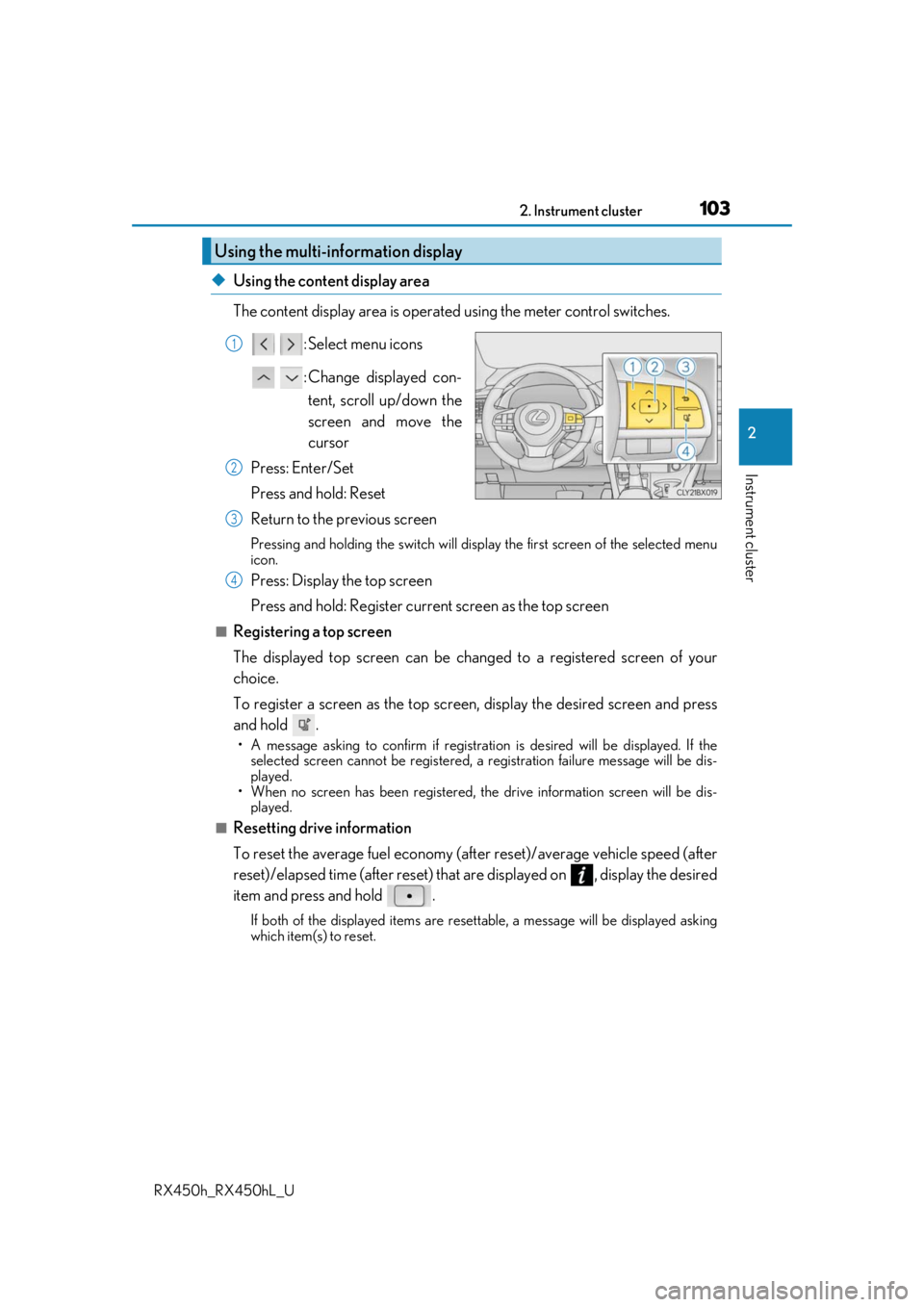
◆Using the content display area
The content display area is operated using the meter control switches. : Select menu icons
: Change displayed con-tent, scroll up/down the
screen and move the
cursor
Press: Enter/Set
Press and hold: Reset
Return to the previous screen
Pressing and holding the swit ch will display the first screen of the selected menu
icon.
Press: Display the top screen
Press and hold: Register current screen as the top screen
■Registering a top screen
The displayed top screen can be chan ged to a registered screen of your
choice.
To register a screen as the top screen, display the desired screen and press
and hold .
• A message asking to confirm if registrati on is desired will be displayed. If the
selected screen canno t be registered, a registration failure message will be dis-
played.
• When no screen has been registered, the drive information screen will be dis- played.
■Resetting drive information
To reset the average fuel economy (aft er reset)/average vehicle speed (after
reset)/elapsed time (after reset) that are displayed on , display the desired
item and press and hold .
If both of the displayed items are resettable, a messa ge will be displayed asking
which item(s) to reset.
Using the multi-information display
1
2
3
4
Page 105 of 792
1052. Instrument cluster
2
Instrument cluster
RX450h_RX450hL_U
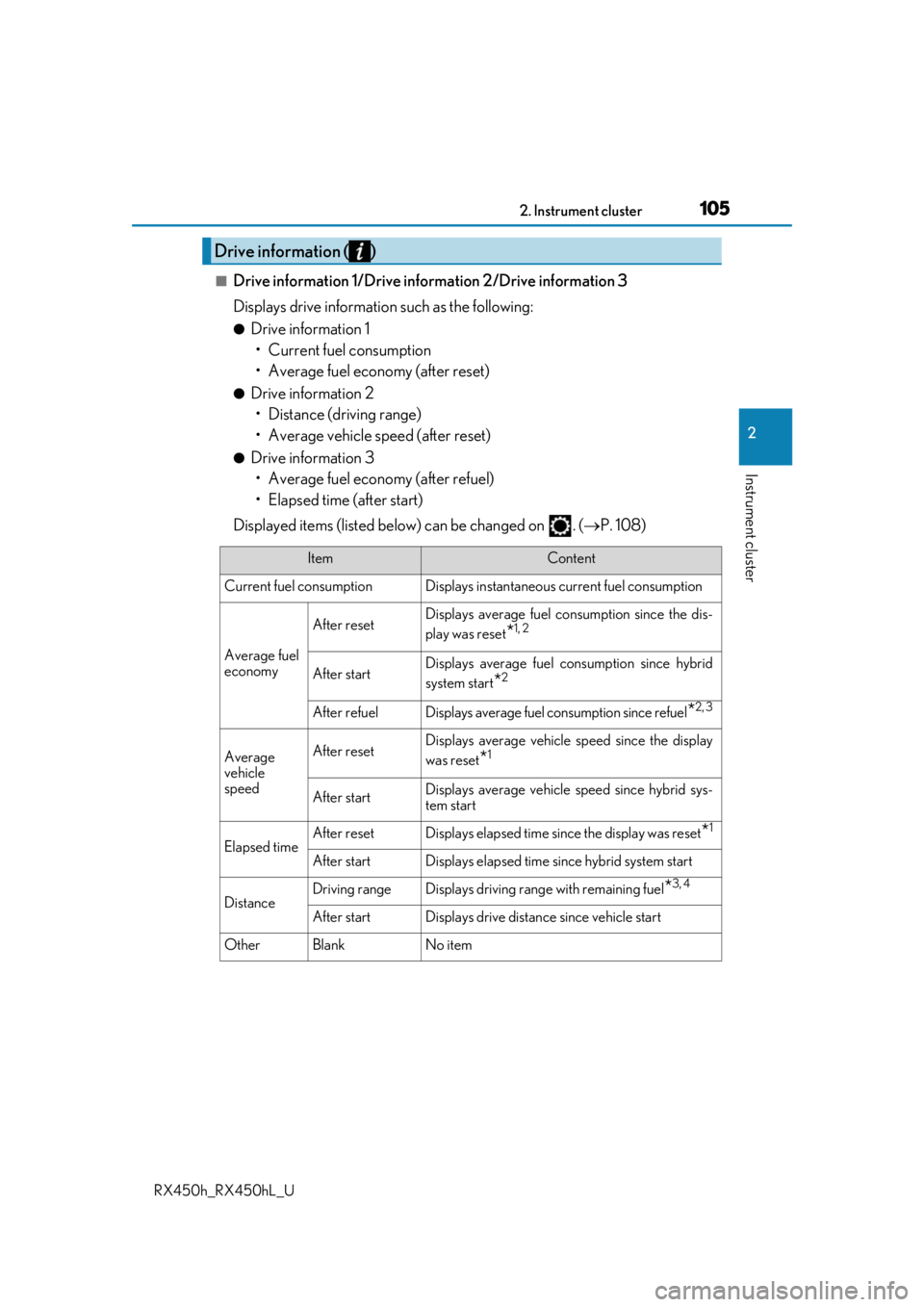
■Drive information 1/Drive information 2/Drive information 3
Displays drive information such as the following:
●Drive information 1
• Current fuel consumption
• Average fuel economy (after reset)
●Drive information 2• Distance (driving range)
• Average vehicle speed (after reset)
●Drive information 3• Average fuel economy (after refuel)
• Elapsed time (after start)
Displayed items (listed below) can be changed on . ( P. 108)
Drive information ( )
ItemContent
Current fuel consumption Displays in stantaneous current fuel consumption
Average fuel
economy
After resetDisplays average fuel consumption since the dis-
play was reset
*1, 2
After startDisplays average fuel consumption since hybrid
system start
*2
After refuelDisplays average fuel consumption since refuel*2, 3
Average
vehicle
speedAfter resetDisplays average vehicle speed since the display
was reset
*1
After startDisplays average vehicle speed since hybrid sys-
tem start
Elapsed timeAfter resetDisplays elapsed time since the display was reset*1
After startDisplays elapsed time since hybrid system start
DistanceDriving rangeDisplays driving range with remaining fuel*3, 4
After startDisplays drive distance since vehicle start
OtherBlankNo item
Page 107 of 792
1072. Instrument cluster
2
Instrument cluster
RX450h_RX450hL_U
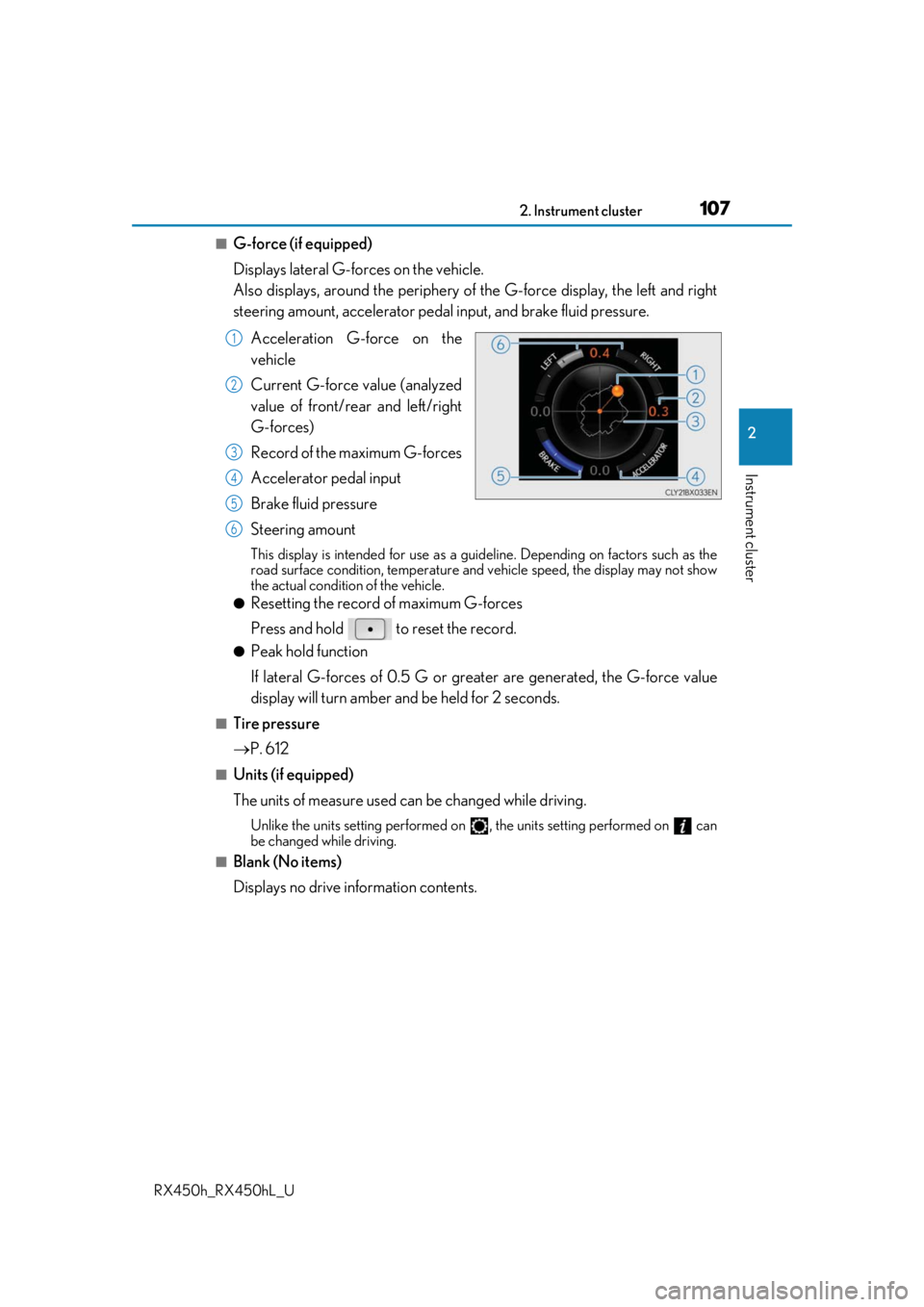
■G-force (if equipped)
Displays lateral G-forces on the vehicle.
Also displays, around the periphery of the G-force display, the left and right
steering amount, accelerator pedal input, and brake fluid pressure.
Acceleration G-force on the
vehicle
Current G-force value (analyzed
value of front/rear and left/right
G-forces)
Record of the maximum G-forces
Accelerator pedal input
Brake fluid pressure
Steering amount
This display is intended for use as a guideline. Depending on factors such as the
road surface condition, temperature and vehicle speed, the display may not show
the actual condition of the vehicle.
●Resetting the record of maximum G-forces
Press and hold to reset the record.
●Peak hold function
If lateral G-forces of 0.5 G or grea ter are generated, the G-force value
display will turn amber and be held for 2 seconds.
■Tire pressure
P. 612
■Units (if equipped)
The units of measure used can be changed while driving.
Unlike the units setting performed on , the units setting performed on can
be changed while driving.
■Blank (No items)
Displays no drive information contents.
1
2
3
4
5
6
Page 115 of 792
1152. Instrument cluster
2
Instrument cluster
RX450h_RX450hL_U
◆Display items
■Odometer
Displays the total distance the vehicle has been driven.
■Trip meter A/trip meter B
Displays the distance the vehicle has been driven since the meter was last
reset. Trip meters A and B can be used to record and display different dis-
tances independently.
To reset, display the desired trip meter and press and hold the “ODO/TRIP”
switch.
■Distance until next engine oil change
Displays the distance the vehicle can be driven until an oil change is neces-
sary.
◆Pop-up display
In some situations the following will be temporarily displayed:
■Distance until next engine oil change
Displays the distance until the next engi ne oil change. This display will be dis-
played in the following situations:
• When the power switch is turned to ON mode.
• When a warning message indicating that oil maintenance should be performed
soon or is required is displayed.
Odometer/trip meter display area
Page 116 of 792
1162. Instrument cluster
RX450h_RX450hL_U
Displays suggestions to the driver in the following situations. To select a response
to a displayed suggestion, use the meter control switches.
The suggestion function can be turned on/off. (Customizable features: P. 737)
■Suggestion to enable the power back door
If the power back door system is disabled (setting on set to off) and the
power back door switch on the instru ment panel is operated, a suggestion
message will be displayed asking if yo u wish to enable the power back door
system. To enable the power back door system, select “Yes”.
After enabling the power back door syst em, press the power back door switch
again to open or close the power back door.
■Suggestion to turn off the headlights
If the headlights are left on for a certai n amount of time after the power switch
has been turned off, a su ggestion message will be displayed asking if you wish
to turn the headlights off. To turn the headlights off, select “Yes”.
If a front door is opened after the power switch is turned off, this suggestion mes-
sage will not be displayed.
■Background color of the indicator/shift posi tion display area (except F SPORT models)
The background color of the indicator/shift position display area is changed according to
the driving mode as follows ( P. 379):
●Eco drive mode: Blue
●Sport mode: Red
■G-force display (if equipped)
●The G-force values may not be zero even when the vehicle is parked, such as when it is
parked on an incline.
●Depending on the vehicle usage conditions, the brake fluid pressure display may not
reach its maximum reading even though the brake pedal is fully depressed.
●If a 12-volt battery terminal is disconnect ed and reconnected, the steering amount dis-
play may be disabled temporarily. After driv ing the vehicle for a while, the display will
be enabled.
■Suspension of the settings display
●Some settings cannot be changed while driv ing. When changing settings, park the
vehicle in a safe place.
●If a warning message is displa yed, operation of the settings display will be suspended.
Suggestion function
Page 121 of 792

1212. Instrument cluster
2
Instrument cluster
RX450h_RX450hL_U
Displays the following items which are linked to the navigation system:
■Street name
The name of the street that the vehicle is currently driving on is displayed on
the bottom of the display area.
When the navigation system is performing route guidance, the name of the
next street will be displayed on the top of the display area.
■Route guidance to destination
Displayed when the navigation system is performing route guidance. When
approaching an intersection, an arrow will be displayed to indicate the sug-
gested direction of travel.
■Compass
Displays the direction of travel.
■Hybrid System Indicator
Charge area
Hybrid Eco area
Eco area
Power area
Displayed content is the same as that
displayed on the meter (Hybrid Sys-
tem Indicator). For details, refer to
P. 99.
■Tachometer
Displays the engine speed in revolutions per minute.
Navigation system-linked display area (if equipped)
Hybrid System Indicator/Tachometer
1
2
3
4
Page 125 of 792
1252. Instrument cluster
2
Instrument cluster
RX450h_RX450hL_U
Lexus Display Audio screen
Press the “MENU” button on the Lexus
Display Audio controller, then select
“Info” on the “Menu” screen, and then
select “Fuel Consumption”.
If the “Energy Monitor” screen does not
appear, move the controller to the right
and select “Energy”.
Navigation system screen
Press the “MENU” button on the
Remote Touch, then select on the
“Menu” screen, and then select “Fuel
Consumption”.
If the “Trip Information” or “Past Record”
screen is displayed, select “Energy”.
Multi-information display
Press the “ ” or “” of the meter control switches and select , and then press
the “ ” or “ ” to select the energy monitor display.
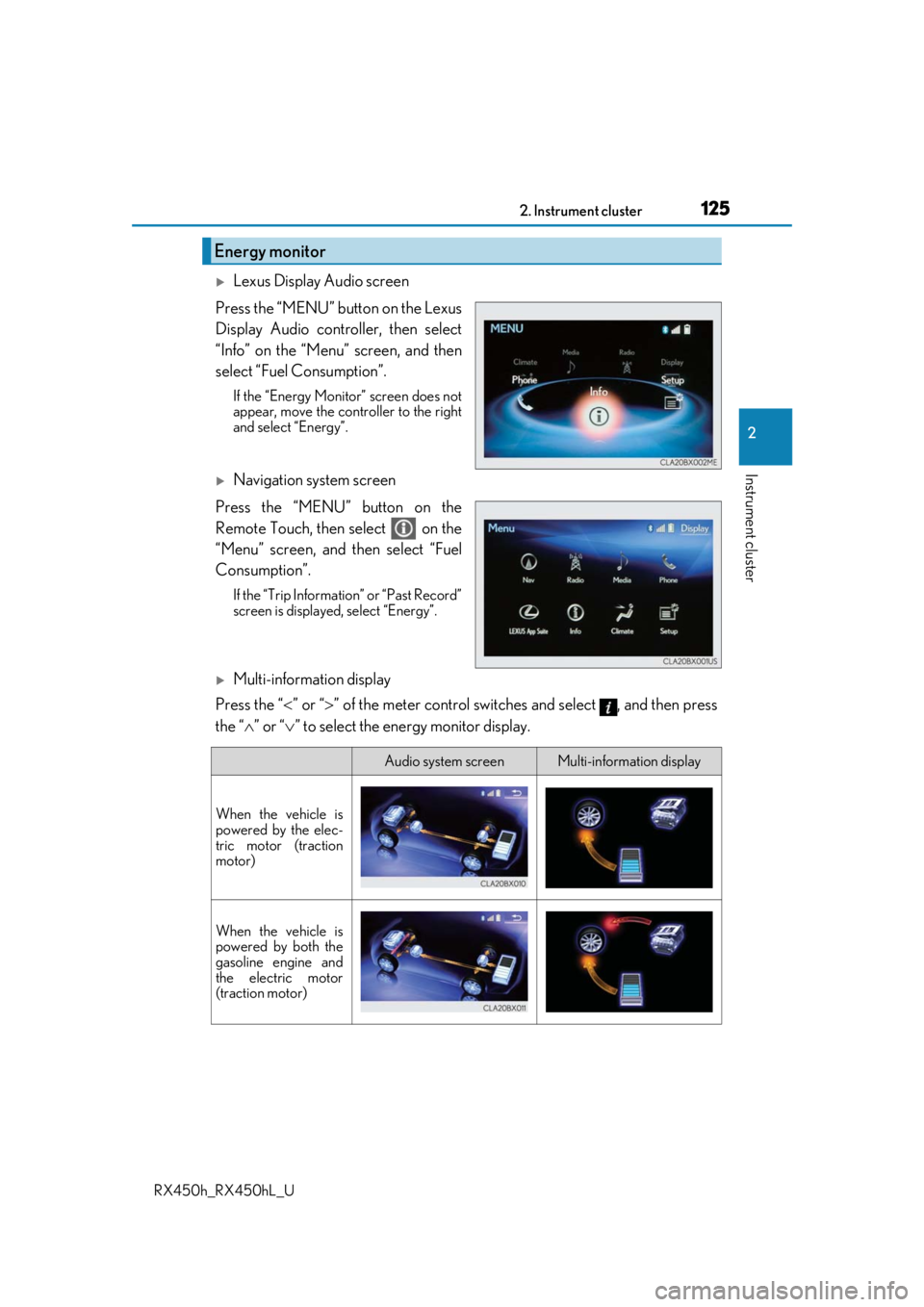
Energy monitor
Audio system screenMulti-information display
When the vehicle is
powered by the elec-
tric motor (traction
motor)
When the vehicle is
powered by both the
gasoline engine and
the electric motor
(traction motor)
Page 127 of 792

1272. Instrument cluster
2
Instrument cluster
RX450h_RX450hL_U
■Trip information
Lexus Display Audio screen
Press the “MENU” button on the Lexus Display Audio controller, then select
“Info” on the “Menu” screen, and then select “Fuel Consumption”.
If the “Trip Information” screen does no t appear, move the controller to the right
and select “Trip Information”.
Fuel consumption in the past 15
minutes
Current fuel consumption
Regenerated energy in the past
15 minutes
One symbol indicates 50 Wh.
Up to 5 symbols are shown.
Average vehicle speed since the hybrid system was started.
Elapsed time since the hybrid system was started.
Cruising range ( P. 129)
Navigation system screen
Press the “MENU” button on the Remo te Touch, then select on the
“Menu” screen, and then select “Fuel Consumption”.
If the “Energy Monitor” or “Past Record” screen is displayed, select “Trip Informa-
tion”.
Resetting the consumption data
Fuel consumption in the past 15
minutes
Current fuel consumption
Regenerated energy in the past
15 minutes
One symbol indicates 50 Wh.
Up to 5 symbols are shown.
Average vehicle speed since the hybrid system was started.
Elapsed time since the hybrid system was started.
Cruising range ( P. 129)
Fuel consumption
1
2
3
4
5
6
1
2
3
4
5
6
7