high LEXUS RX450H 2019 Owner's Guide
[x] Cancel search | Manufacturer: LEXUS, Model Year: 2019, Model line: RX450H, Model: LEXUS RX450H 2019Pages: 792, PDF Size: 13.48 MB
Page 244 of 792
2444-2. Driving procedures
RX450h_RX450hL_U
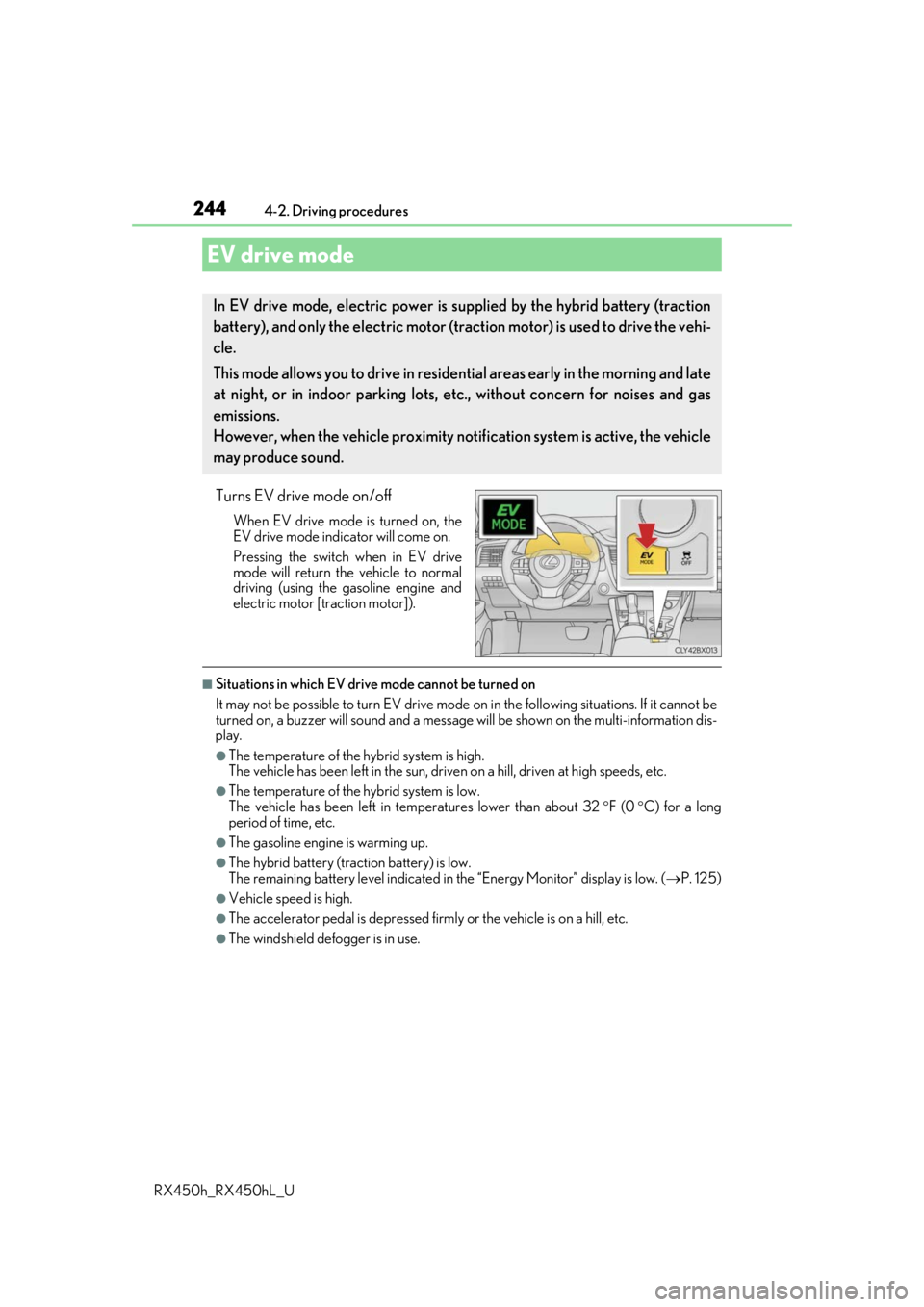
Turns EV drive mode on/off
When EV drive mode is turned on, the
EV drive mode indicator will come on.
Pressing the switch when in EV drive
mode will return the vehicle to normal
driving (using the gasoline engine and
electric motor [traction motor]).
■Situations in which EV drive mode cannot be turned on
It may not be possible to turn EV drive mode on in the following situations. If it cannot be
turned on, a buzzer will sound and a message will be shown on the multi-information dis-
play.
●The temperature of the hybrid system is high.
The vehicle has been left in the sun, driv en on a hill, driven at high speeds, etc.
●The temperature of the hybrid system is low.
The vehicle has been left in temperatures lower than about 32 F (0 C) for a long
period of time, etc.
●The gasoline engine is warming up.
●The hybrid battery (tra ction battery) is low.
The remaining battery level indicated in the “Energy Monitor” display is low. (P. 125)
●Vehicle speed is high.
●The accelerator pedal is depressed firmly or the vehicle is on a hill, etc.
●The windshield defogger is in use.
EV drive mode
In EV drive mode, electric power is su pplied by the hybrid battery (traction
battery), and only the electric motor (traction motor) is used to drive the vehi-
cle.
This mode allows you to drive in reside ntial areas early in the morning and late
at night, or in indoor parking lots, etc., without concern for noises and gas
emissions.
However, when the vehicle proximity noti fication system is active, the vehicle
may produce sound.
Page 245 of 792

2454-2. Driving procedures
4
Driving
RX450h_RX450hL_U
■Switching to EV drive mode when the gasoline engine is cold
If the hybrid system is started while the gasoline engine is cold, the gasoline engine will
start automatically after a short period of time in order to warm up. In this case, you will
become unable to switch to EV drive mode.
After the hybrid system has started and the “READY” indicator has illuminated, press the
EV drive mode switch before the gasoline engine starts to switch to EV drive mode.
■Automatic cancelation of EV drive mode
When driving in EV drive mode, the gasoline engine may automatically restart in the fol-
lowing situations. When EV drive mode is canceled, a buzzer will sound, the EV drive
mode indicator will go off afte r flashing, and a message is displayed on the multi-informa-
tion display.
●The hybrid battery (traction battery) becomes low.
The remaining battery level indicated in the “Energy Monitor” display is low. (P. 125)
●Vehicle speed is high.
●The accelerator pedal is depressed firmly or the vehicle is on a hill, etc.
■Possible driving distance when driving in EV drive mode
EV drive mode’s possible driving distance ranges from a few hundred meters to approxi-
mately 0.6 mile (1 km). However, dependin g on vehicle conditions, there are situations
when EV drive mode cannot be used. (The distance that is possible depends on the
hybrid battery [traction battery] level and driving conditions.)
■Fuel economy
The hybrid system is designed to achieve th e best possible fuel economy during normal
driving (using the gasoline engine and electr ic motor [traction motor]). Driving in EV
drive mode more than necess ary may lower fuel economy.
WARNING
■Caution while driving
When driving in EV drive mode no engine noise is made. As such, pedestrians, people
riding bicycles or other people and vehicles in the surrounding area may not be aware
of the vehicle starting off or approaching th em. Therefore, take extra care while driving
even if the vehicle proximity notification system is active.
Page 247 of 792
2474-2. Driving procedures
4
Driving
RX450h_RX450hL_U
P. 379
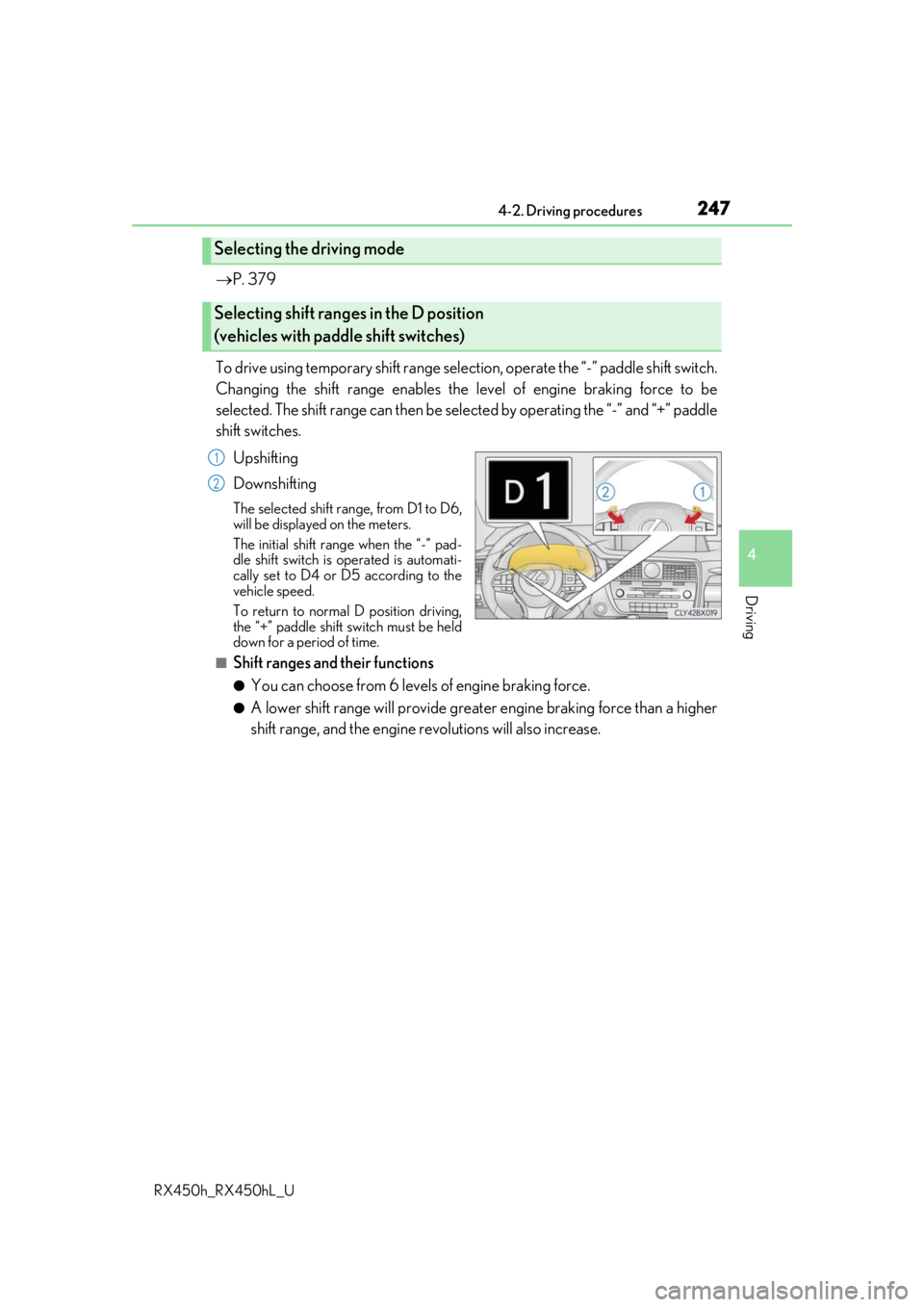
To drive using temporary shift range select ion, operate the “-” paddle shift switch.
Changing the shift range enables the level of engine braking force to be
selected. The shift range can then be sele cted by operating the “-” and “+” paddle
shift switches.
Upshifting
Downshifting
The selected shift range, from D1 to D6,
will be displayed on the meters.
The initial shift rang e when the “-” pad-
dle shift switch is operated is automati-
cally set to D4 or D5 according to the
vehicle speed.
To return to normal D position driving,
the “+” paddle shift switch must be held
down for a period of time.
■Shift ranges and their functions
●You can choose from 6 levels of engine braking force.
●A lower shift range will provide greate r engine braking force than a higher
shift range, and the engine revolutions will also increase.
Selecting the driving mode
Selecting shift ranges in the D position
(vehicles with paddle shift switches)
1
2
Page 248 of 792
2484-2. Driving procedures
RX450h_RX450hL_U
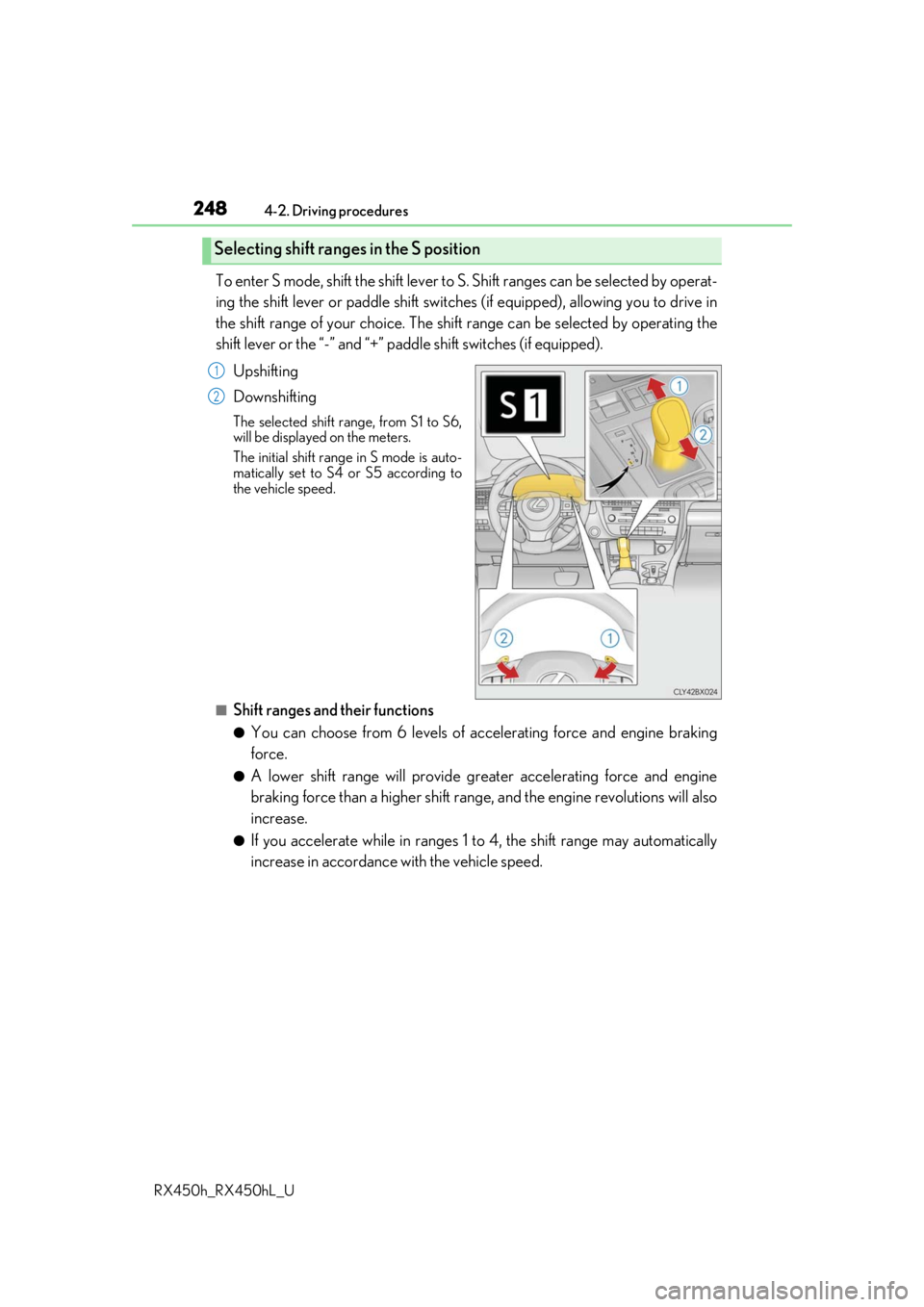
To enter S mode, shift the shift lever to S. Shift ranges can be selected by operat-
ing the shift lever or paddle shift switches (if equipped), allowing you to drive in
the shift range of your choice. The shift range can be selected by operating the
shift lever or the “-” and “+” padd le shift switches (if equipped).
Upshifting
Downshifting
The selected shift range, from S1 to S6,
will be displayed on the meters.
The initial shift range in S mode is auto-
matically set to S4 or S5 according to
the vehicle speed.
■Shift ranges and their functions
●You can choose from 6 levels of acce lerating force and engine braking
force.
●A lower shift range will provide gr eater accelerating force and engine
braking force than a higher shift rang e, and the engine revolutions will also
increase.
●If you accelerate while in ranges 1 to 4, the shift range may automatically
increase in accordance with the vehicle speed.
Selecting shift ranges in the S position
1
2
Page 249 of 792

2494-2. Driving procedures
4
Driving
RX450h_RX450hL_U
■When the “-” paddle shift switch is operated with the shift lever in the D position (vehi-
cles with paddle shift switches)
The shift range is downshifted to a range that enables engine braking force that is suit-
able to driving conditions.
■Automatic deactivation of shif t range selection in the D position (vehicles with paddle
shift switches)
Shift range selection in the D position will be deactivated in the following situations:
●When the vehicle comes to a stop
●If the accelerator pedal is depressed fo r more than a certain period of time
●When the shift lever is shifted to a position other than D
■S mode
●When the shift range is S4 or lower, holding the shift lever toward “+” sets the shift
range to S6.
●Automatically selects a higher shift range before the engine speed becomes too high.
■Downshifting restriction warning buzzer
To help ensure safety and driving performance, downshifti ng operation may sometimes
be restricted. In some circum stances, downshifting may not be possible even when the
shift lever or paddle shift sw itch (if equipped) is operated . (A buzzer will sound twice.)
■When driving with dynamic radar cruise control with full-speed range activated
Even when performing the following actions with the intent of enabling engine braking,
engine braking will not occur because dynamic radar cruise control with full-speed
range will not be canceled.
●Vehicles without paddle shift switches: While driving in S mode, downshifting to 5 or 4.
( P. 306)
●Vehicles with paddle shift sw itches: While driving in D or S mode, downshifting to 5 or
4. ( P. 306)
●When switching the driving mode to spor t mode while driving in the D position
( P. 379)
■Restraining sudden start (Drive-Start Control)
When the following unusual operation is performed, the hybrid system output may be
restrained.
●When the shift lever is shifted from R to D, D to R, N to R, P to D, or P to R (D includes S)
with the accelerator pedal depressed, a wa rning message appears on the multi-infor-
mation display. If a warning message is shown on the multi- information display, read the
message and follow the instructions.
●When the accelerator pedal is depressed too while the vehicle is in reverse.
■Shift lock system
The shift lock system is a system to prevent ac cidental operation of the shift lever in start-
ing.
The shift lever can be shifted from P only wh en the power switch is in ON mode and the
brake pedal is being depressed.
Page 259 of 792
2594-3. Operating the lights and wipers
4
Driving
RX450h_RX450hL_U
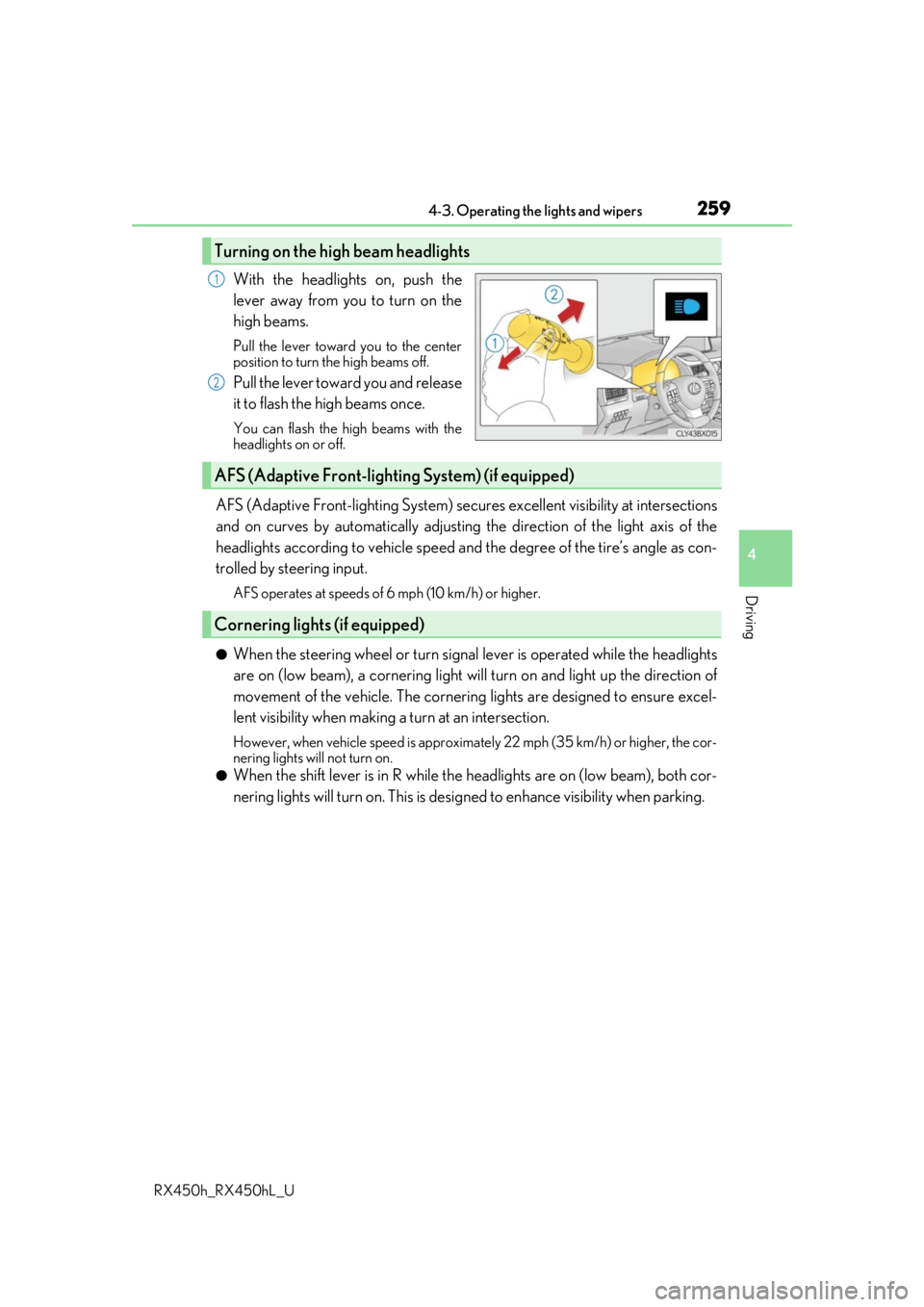
With the headlights on, push the
lever away from you to turn on the
high beams.
Pull the lever toward you to the center
position to turn the high beams off.
Pull the lever toward you and release
it to flash the high beams once.
You can flash the high beams with the
headlights on or off.
AFS (Adaptive Front-lighting System) secures excellent visibility at intersections
and on curves by automatically adjusting the direction of the light axis of the
headlights according to vehicle speed and the degree of the tire’s angle as con-
trolled by steering input.
AFS operates at speeds of 6 mph (10 km/h) or higher.
●When the steering wheel or turn signal lever is operated while the headlights
are on (low beam), a cornering light w ill turn on and light up the direction of
movement of the vehicle. The cornerin g lights are designed to ensure excel-
lent visibility when making a turn at an intersection.
However, when vehicle speed is approximately 22 mph (35 km/h) or higher, the cor-
nering lights will not turn on.
●When the shift lever is in R while the headlights are on (low beam), both cor-
nering lights will turn on. This is desi gned to enhance visibility when parking.
Turning on the high beam headlights
1
2
AFS (Adaptive Front-lighting System) (if equipped)
Cornering lights (if equipped)
Page 262 of 792

2624-3. Operating the lights and wipers
RX450h_RX450hL_U
Push the lever away from you with
the headlight switch in the or position.
Press the Automatic High Beam
switch.
The Automatic High Beam indicator will
come on when the system is operating.
Automatic High Beam
The Automatic High Beam uses a came ra sensor located behind the upper
portion of the windshield to assess the brightness of the lights of vehicles
ahead, streetlights, etc., and automatica lly turns the high beams on or off as
necessary.
WARNING
■Limitations of the Automatic High Beam
Do not overly rely on the Automatic High Beam. Always drive safely, taking care to
observe your surroundings and turning the hi gh beams on or off manually if necessary.
■To prevent incorrect operation of the Automatic High Beam system
Do not overload the vehicle.
Activating the Automatic High Beam
1
2
Page 263 of 792
2634-3. Operating the lights and wipers
4
Driving
RX450h_RX450hL_U
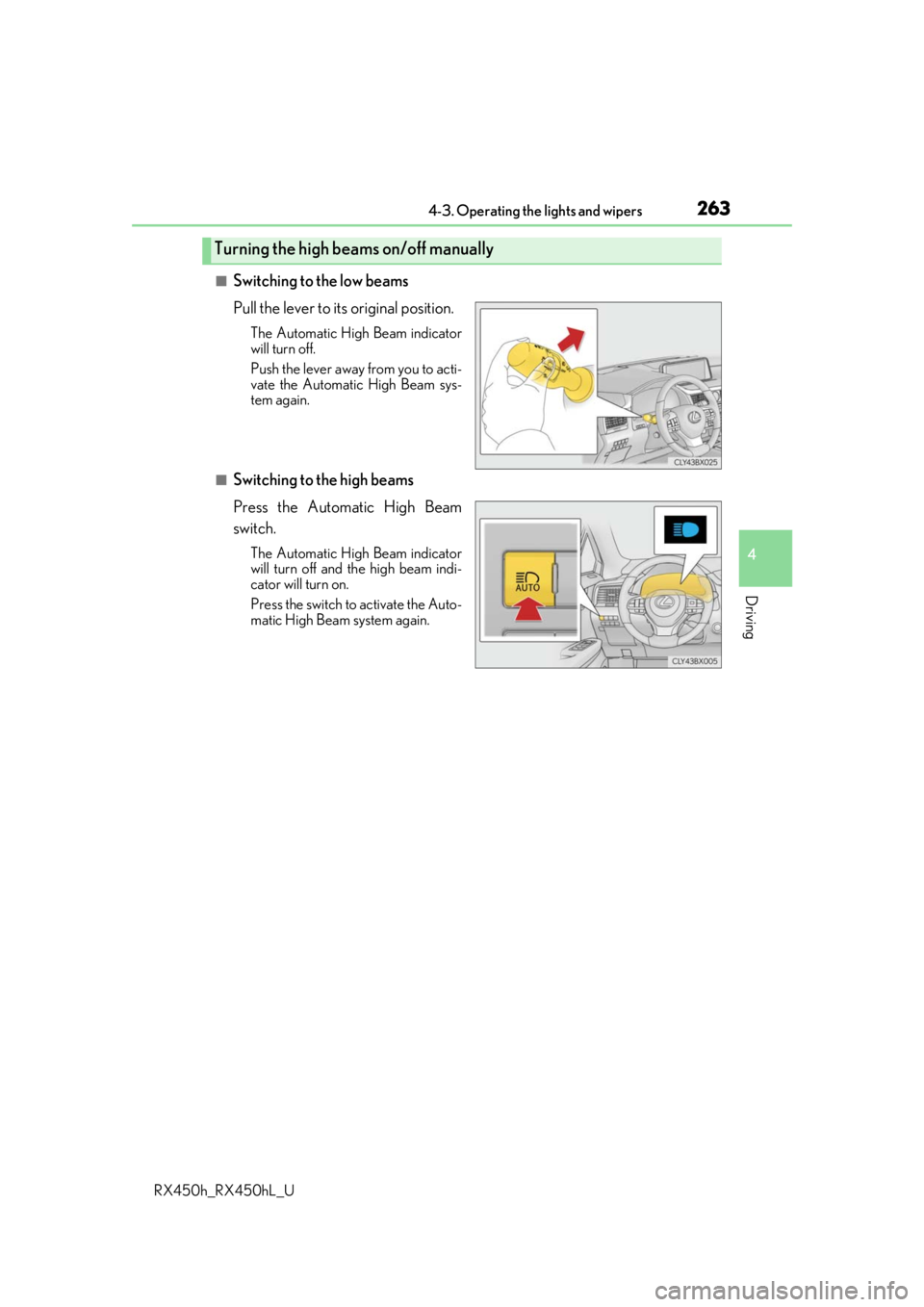
■Switching to the low beams
Pull the lever to its original position.
The Automatic High Beam indicator
will turn off.
Push the lever away from you to acti-
vate the Automatic High Beam sys-
tem again.
■Switching to the high beams
Press the Automatic High Beam
switch.
The Automatic High Beam indicator
will turn off and the high beam indi-
cator will turn on.
Press the switch to activate the Auto-
matic High Beam system again.
Turning the high beams on/off manually
Page 264 of 792

2644-3. Operating the lights and wipers
RX450h_RX450hL_U
■Conditions to turn the high beams on/off automatically
●When all of the following conditions are met, the high beams will be turned on automat-
ically (after approximately 1 second):
• The vehicle speed is approximately 21 mph (34 km/h) or more.
• The area ahead of the vehicle is dark.
• There are no vehicles ahead with headlights or tail lights turned on.
• There are few streetlights on the road ahead.
●If any of the following condit ions is met, the high beams will turn off automatically:
• The vehicle speed is below ap proximately 17 mph (27 km/h).
• The area ahead of the vehicle is not dark.
• Vehicles ahead have th eir headlights or tail lights turned on.
• There are many streetlights on the road ahead.
■Camera sensor detection information
●The high beams may not be automatically turned off in the following situations:
• When a vehicle suddenly appears from around a curve
• When the vehicle is cut in front of by another vehicle
• When vehicles ahead cannot be detected du e to repeated curves, road dividers or
roadside trees
• When vehicles ahead appear in a faraway lane on a wide road
• When the lights of vehicles ahead are not on
●The high beams may be turned off if a vehicl e ahead that is using fog lights without its
headlights turned on is detected.
●House lights, street lights, traffic signals, and illuminated billboards or signs and other
reflective objects may cause the high beams to change to the low beams, or the low
beams to remain on.
●The following factors may affect the amount of time taken for the high beams to turn on
or off:
• The brightness of the headlights, fog lights, and tail lights of vehicles ahead
• The movement and direction of vehicles ahead
• When a vehicle ahead only has operational lights on one side
• When a vehicle ahead is a two-wheeled vehicle
• The condition of the road (gradient, cu rve, condition of the road surface, etc.)
• The number of passengers and amount of luggage in the vehicle
●The high beams may turn on or off unexpectedly.
●Bicycles or similar vehicles may not be detected.
Page 265 of 792

2654-3. Operating the lights and wipers
4
Driving
RX450h_RX450hL_U
●In the following situations the system may not be able to correctly detect the surround-
ing brightness level. This may cause the low beams to remain on or the high beams to
flash or dazzle pedestrians or vehicles ahead. In such a case, it is necessary to manually
switch between the high and low beams.
• When driving in inclement weather (heavy rain, snow, fog, sandstorms, etc.)
• When the windshield is obscured by fog, mist, ice, dirt, etc.
• When the windshield is cracked or damaged
• When the camera sensor is deformed or dirty
• When the temperature of the camera sensor is extremely high
• When the surrounding brightness level is equal to that of headlights, tail lights or fog
lights
• When headlights or tail lights of vehicles ahead are turned off, dirty, changing color,
or not aimed properly
• When the vehicle is hit by water, snow, dust, etc. from a preceding vehicle
• When driving through an area of intermittently changing brightness and darkness
• When frequently and repeated ly driving ascending/descending roads, or roads with
rough, bumpy or uneven surfaces (such as stone-paved roads, gravel roads, etc.)
• When frequently and repeatedly taking curves or driving on a winding road
• When there is a highly reflective object ahea d of the vehicle, such as a sign or mirror
• When the back of a preceding vehicle is highly reflective, such as a container on a truck
• When the vehicle’s headlights are damaged or dirty, or are not aimed properly
• When the vehicle is listing or titling due to a flat tire, a trailer being towed, etc.
• When the headlights are changed between the high beams and low beams repeat-
edly in an abnormal manner
• When the driver believes that the high beams may be flashing or dazzling pedestri- ans or other drivers
■Temporarily lowering sensor sensitivity
The sensitivity of the sensor can be temporarily lowered.
Turn the power switch off while the following conditions are met.
• The headlight switch is in or .
• The headlight switch lever is in high beam position.
• Automatic High Beam switch is on.
Turn the power switch to ON mode.
Within 30 seconds after , repeat pulling th e headlight switch lever to the original
position then pushing it to the high beam position quickly 10 times, then leave the lever
in high beam position.
If the sensitivity is changed, the Automatic High Beam indicator is turn on and off 3
times.
Automatic High Beam (headlights) may turn on even when the vehicle is stopped.
1
2
32
4