air condition LEXUS RX450H 2019 Service Manual
[x] Cancel search | Manufacturer: LEXUS, Model Year: 2019, Model line: RX450H, Model: LEXUS RX450H 2019Pages: 792, PDF Size: 13.48 MB
Page 520 of 792
5206-2. Using the air conditioning system and defogger
RX450h_RX450hL_U
■Ventilation and air conditioning odors
●To let fresh air in, set the air conditioning system to the outside air mode.
●During use, various odors from inside and outside the vehicle may enter into and accu-
mulate in the air conditioning system. This may then cause odor to be emitted from the
vents.
●To reduce potential odors from occurring:
• It is recommended that the air conditioning system be set to outside air mode prior
to turning the vehicle off.
• The start timing of the blower may be dela yed for a short period of time immediately
after the air conditioning system is started in automatic mode.
■Air conditioning filter
P. 625
■Customization
Some functions can be customized ( P. 736)
WARNING
■To prevent the windshield from fogging up
●Do not use during cool air operation in extremely humid weather. The differ-
ence between the temperature of the outside air and that of the windshield can cause
the outer surface of the windshield to fog up, blocking your vision.
■To prevent burns
●Do not touch the rear view mirror surfaces when the outside rear view mirror defog-
gers are on.
●Do not touch the glass at lower part of the windshield or to the side of the front pillars
when the windshield wiper de-icer is on. (if equipped)
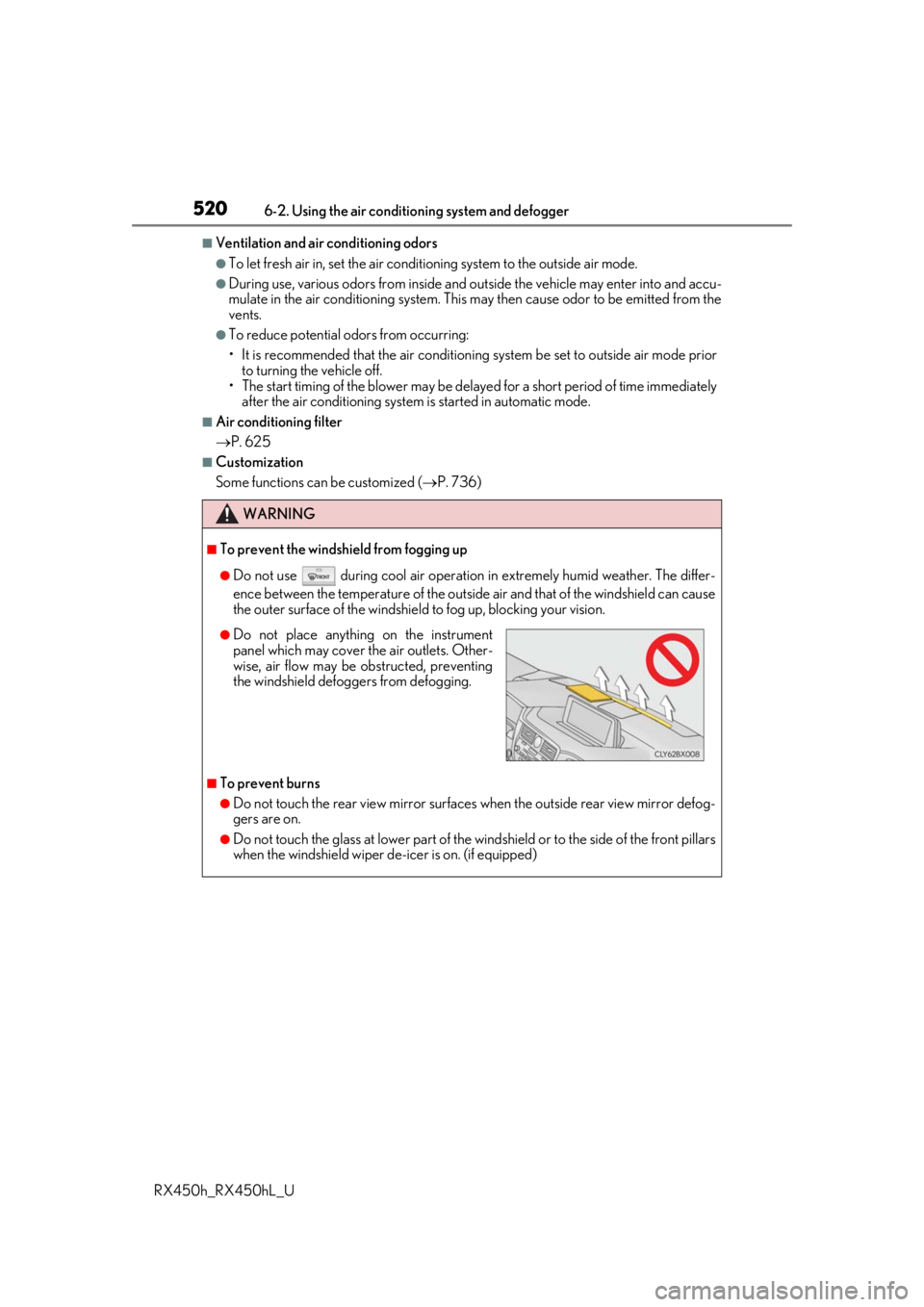
●Do not place anything on the instrument
panel which may cover th e air outlets. Other-
wise, air flow may be obstructed, preventing
the windshield defoggers from defogging.
Page 521 of 792
5216-2. Using the air conditioning system and defogger
RX450h_RX450hL_U
6
Interior features
NOTICE
■Humidity sensor
■To prevent 12-volt battery discharge
Do not leave the air conditioning system on longer than necessary when the hybrid sys-
tem is off.
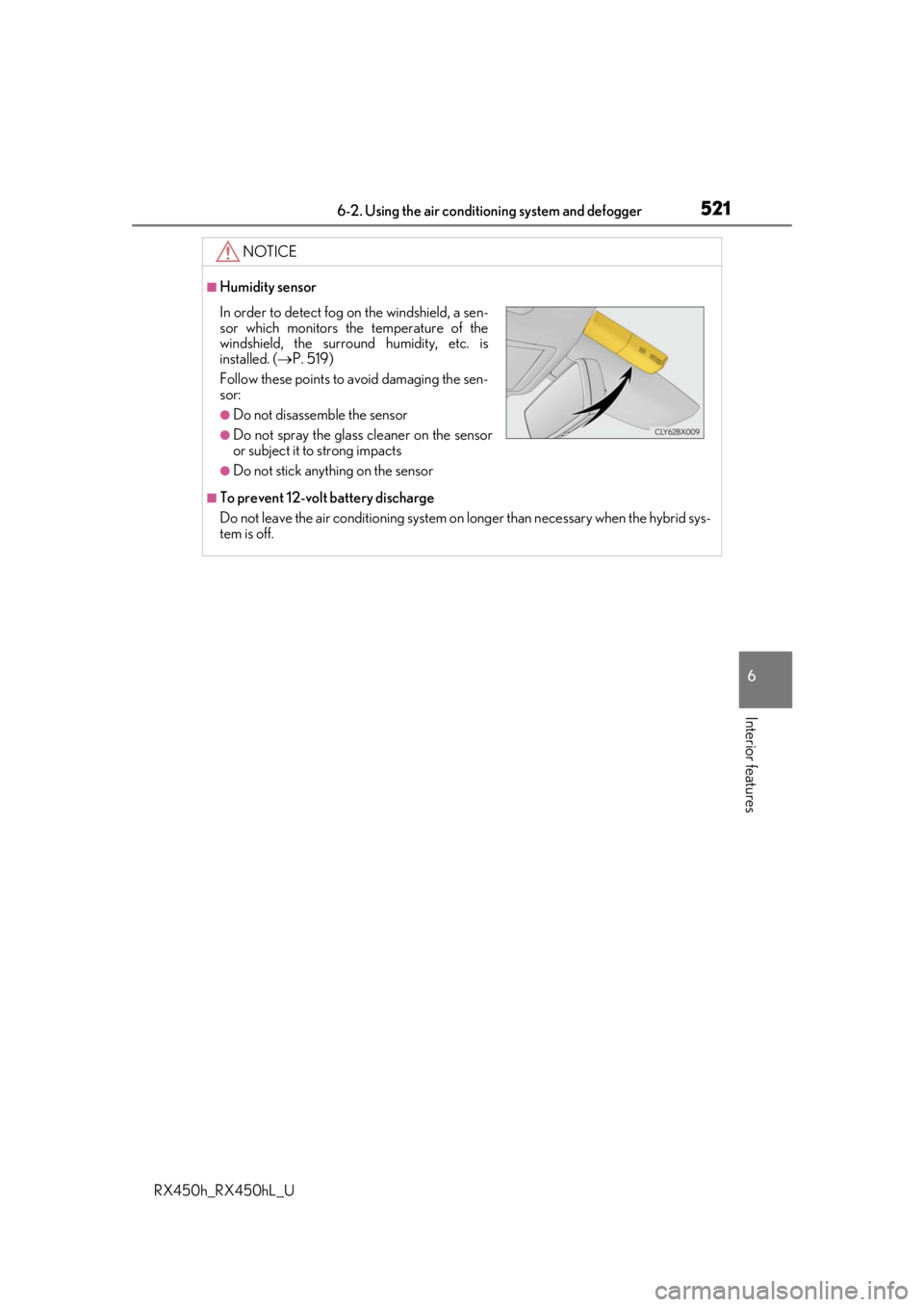
In order to detect fog on the windshield, a sen-
sor which monitors the temperature of the
windshield, the surround humidity, etc. is
installed. ( P. 519)
Follow these points to avoid damaging the sen-
sor:
●Do not disassemble the sensor
●Do not spray the glass cleaner on the sensor
or subject it to strong impacts
●Do not stick anything on the sensor
Page 522 of 792
5226-2. Using the air conditioning system and defogger
RX450h_RX450hL_U
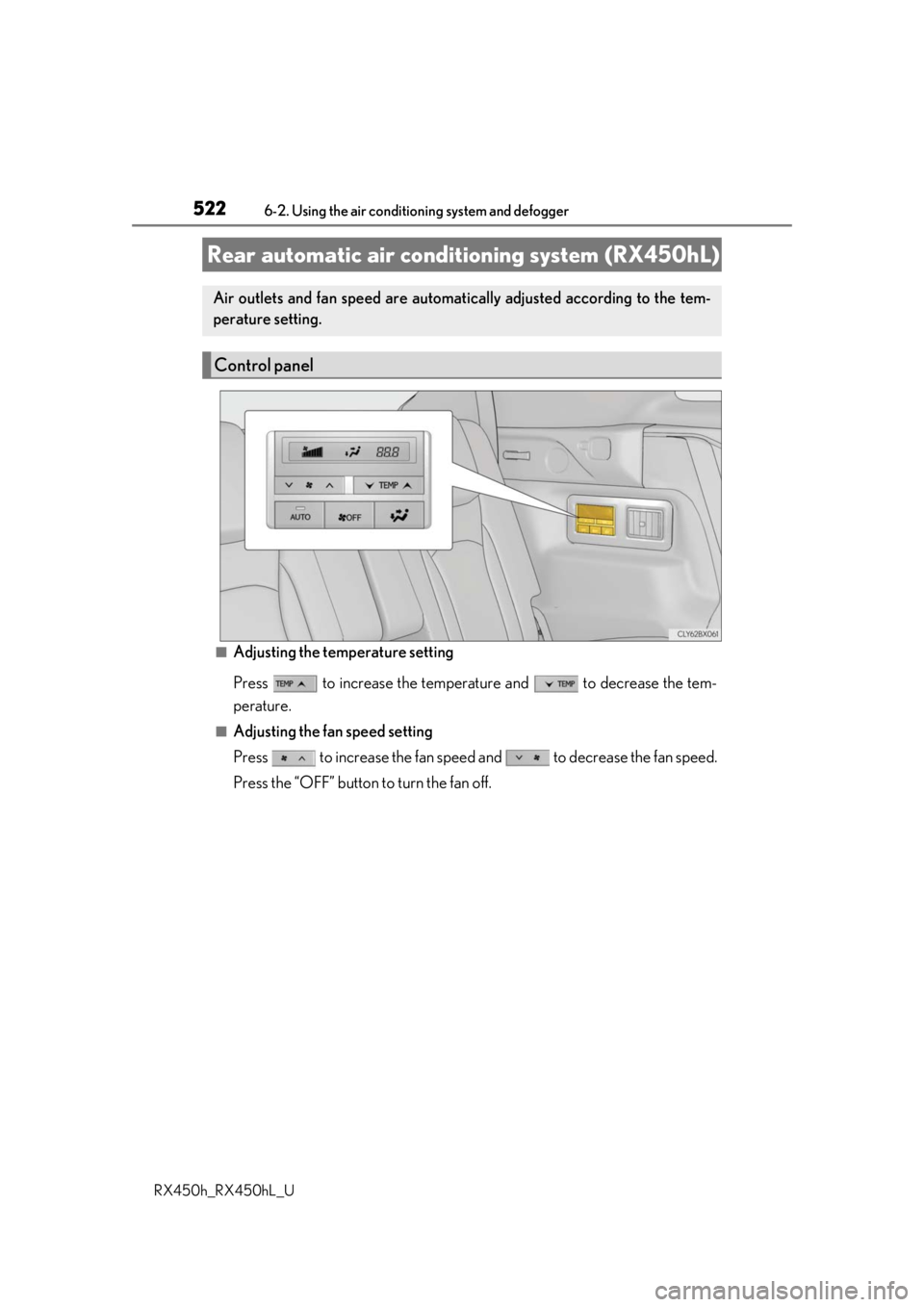
■Adjusting the temperature setting
Press to increase the temperature and to decrease the tem-
perature.
■Adjusting the fan speed setting
Press to increase the fan speed and to decrease the fan speed.
Press the “OFF” button to turn the fan off.
Rear automatic air cond itioning system (RX450hL)
Air outlets and fan speed are automati cally adjusted according to the tem-
perature setting.
Control panel
Page 523 of 792
5236-2. Using the air conditioning system and defogger
RX450h_RX450hL_U
6
Interior features
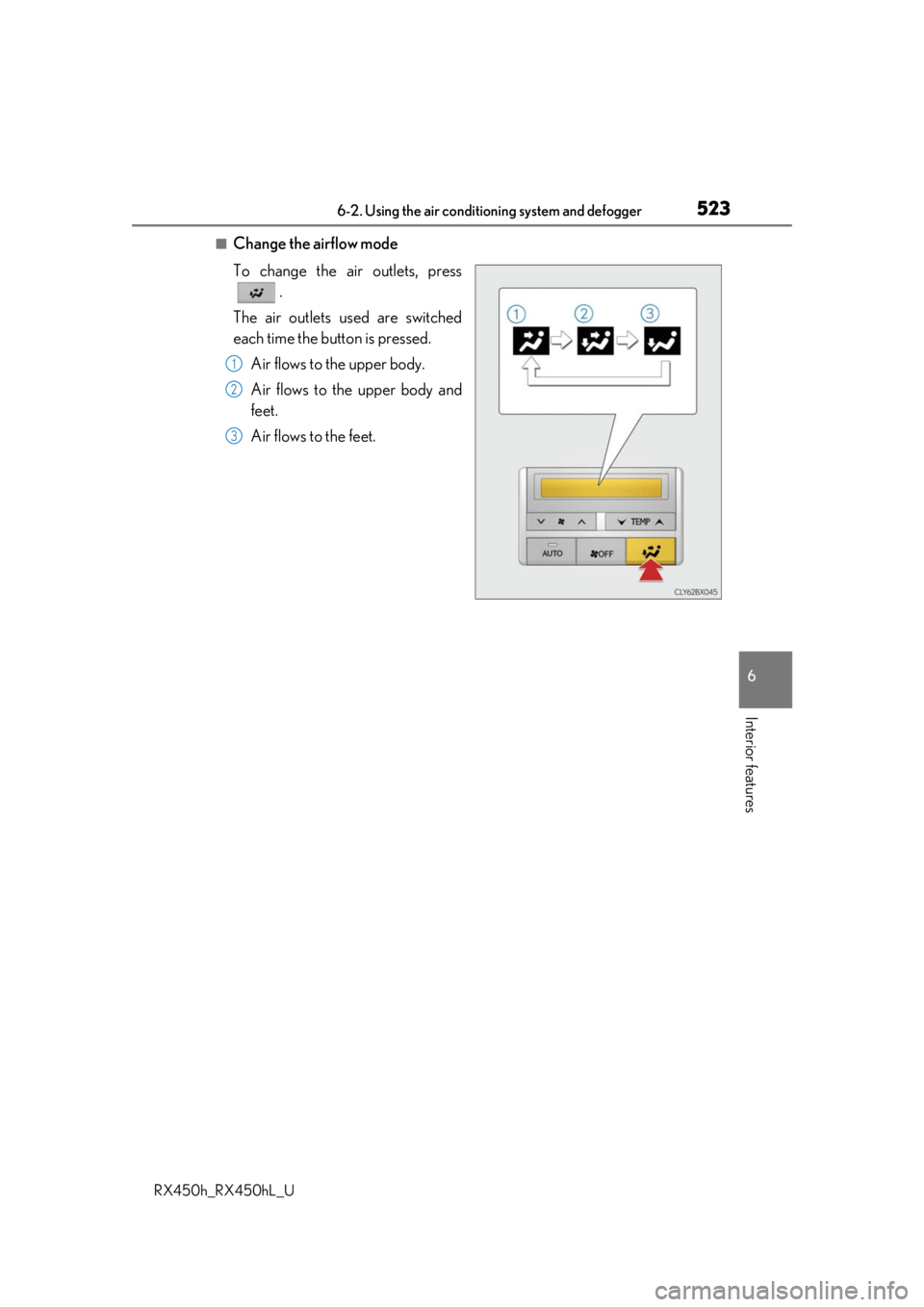
■Change the airflow mode
To change the air outlets, press .
The air outlets used are switched
each time the button is pressed. Air flows to the upper body.
Air flows to the upper body and
feet.
Air flows to the feet.
1
2
3
Page 524 of 792
5246-2. Using the air conditioning system and defogger
RX450h_RX450hL_U
■Using the automatic mode Press the “AUTO” button
Adjust the temperature setting.
To stop the operation, press the “OFF” button.
■Automatic mode indicator
If the fan speed setting or air flow modes are operated, the automatic mode
indicator goes off. However, automati c mode for functions other than that
operated is maintained.
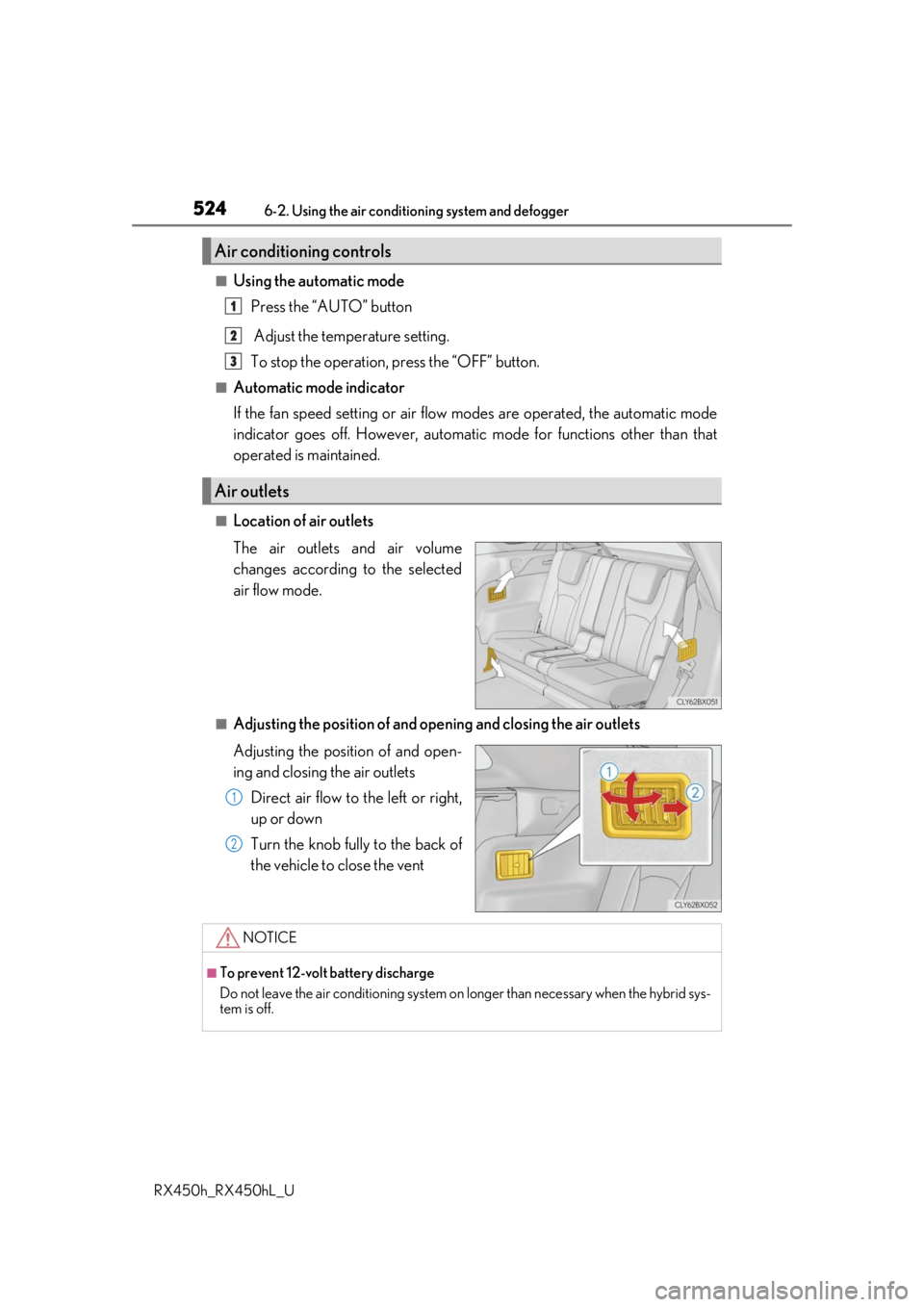
■Location of air outlets
The air outlets and air volume
changes according to the selected
air flow mode.
■Adjusting the position of and opening and closing the air outlets
Adjusting the position of and open-
ing and closing the air outlets
Direct air flow to the left or right,
up or down
Turn the knob fully to the back of
the vehicle to close the vent
Air conditioning controls
Air outlets
1
2
3
1
2
NOTICE
■To prevent 12-volt battery discharge
Do not leave the air conditioning system on longer than necessary when the hybrid sys-
tem is off.
Page 525 of 792
5256-2. Using the air conditioning system and defogger
RX450h_RX450hL_U
6
Interior features
Heated steering wheel/seat heaters/seat ventila-
tors
: If equipped
Heated steering wheel and seat heaters heat the side grips of the steering
wheel and seats, respectively. Seat ventilators maintain good ventilation using
a fan built into the seats.
WARNING
●Care should be taken to prevent injury if anyone in the following categories comes in
contact with the steering wheel and seats when the heater is on:
• Babies, small children, the elderly, the sick and the physically challenged
• Persons with sensitive skin
• Persons who are fatigued
• Persons who have taken alcohol or drugs that induce sleep (sleeping drugs, cold
remedies, etc.)
●Observe the following precautions to prevent minor burns or overheating:
• Do not cover the seat with a blanket or cushion when using the seat heater.
• Do not use seat heater more than necessary.
NOTICE
●Do not put heavy objects that have an unev en surface on the seat and do not stick
sharp objects (needles, nails, etc.) into the seat.
●To prevent 12-volt battery discharge, do not use the functions when the hybrid system
is off.
Page 526 of 792
5266-2. Using the air conditioning system and defogger
RX450h_RX450hL_U
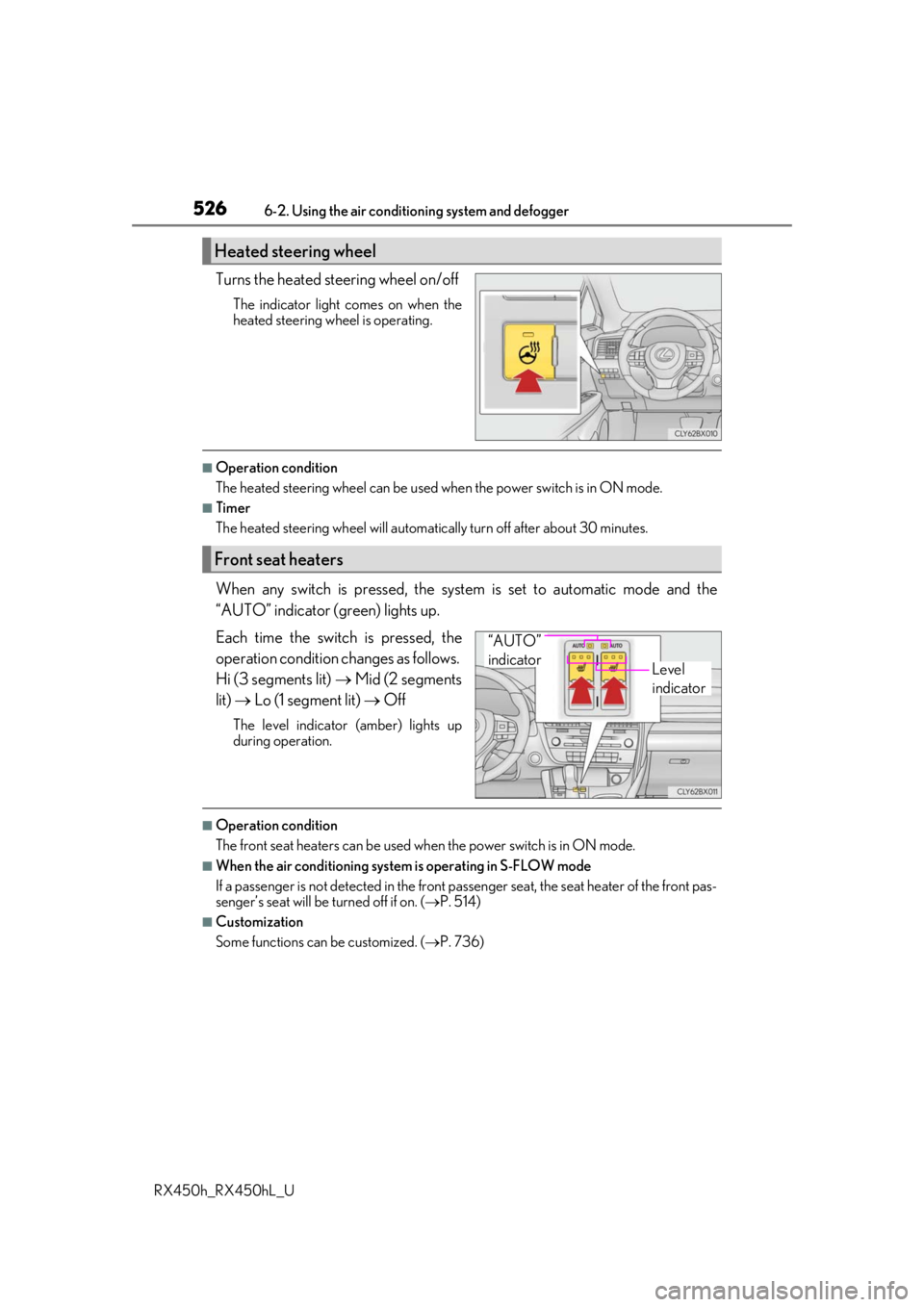
Turns the heated steering wheel on/off
The indicator light comes on when the
heated steering wheel is operating.
■Operation condition
The heated steering wheel can be used when the power switch is in ON mode.
■Timer
The heated steering wheel will automati cally turn off after about 30 minutes.
When any switch is pressed, the system is set to automatic mode and the
“AUTO” indicator (green) lights up.
Each time the switch is pressed, the
operation condition changes as follows.
Hi (3 segments lit) Mid (2 segments
lit) Lo (1 segment lit) Off
The level indicator (amber) lights up
during operation.
■Operation condition
The front seat heaters can be used when the power switch is in ON mode.
■When the air conditioning system is operating in S-FLOW mode
If a passenger is not detected in the front pa ssenger seat, the seat heater of the front pas-
senger’s seat will be turned off if on. ( P. 514)
■Customization
Some functions can be customized. ( P. 736)
Heated steering wheel
Front seat heaters
Level
indicator
“AUTO”
indicator
Page 527 of 792
5276-2. Using the air conditioning system and defogger
RX450h_RX450hL_U
6
Interior features
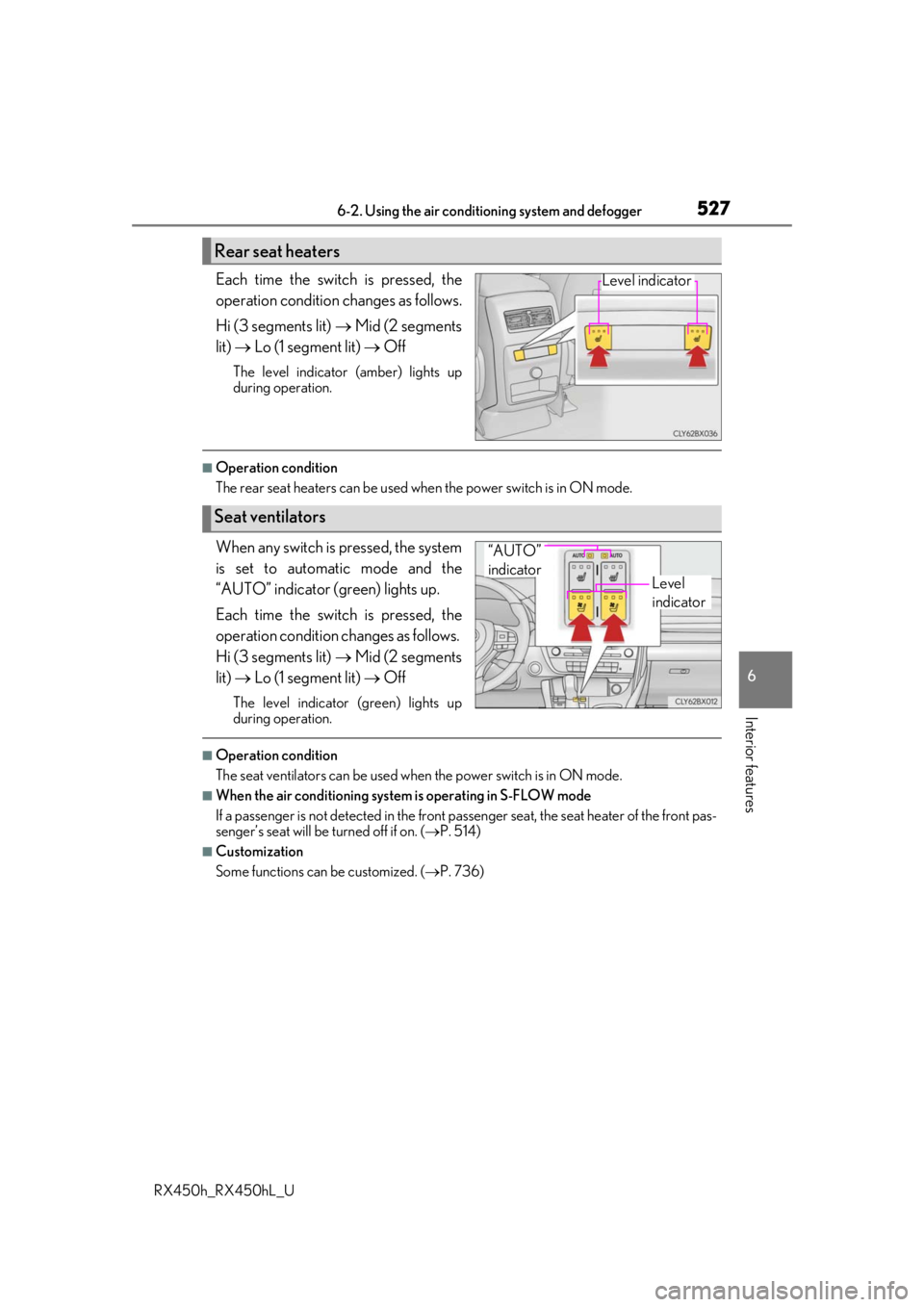
Each time the switch is pressed, the
operation condition changes as follows.
Hi (3 segments lit) Mid (2 segments
lit) Lo (1 segment lit) Off
The level indicator (amber) lights up
during operation.
■Operation condition
The rear seat heaters can be used wh en the power switch is in ON mode.
When any switch is pressed, the system
is set to automatic mode and the
“AUTO” indicator (green) lights up.
Each time the switch is pressed, the
operation condition changes as follows.
Hi (3 segments lit) Mid (2 segments
lit) Lo (1 segment lit) Off
The level indicator (green) lights up
during operation.
■Operation condition
The seat ventilators can be used when the power switch is in ON mode.
■When the air conditioning system is operating in S-FLOW mode
If a passenger is not detected in the front pa ssenger seat, the seat heater of the front pas-
senger’s seat will be turned off if on. ( P. 514)
■Customization
Some functions can be customized. ( P. 736)
Rear seat heaters
Level indicator
Seat ventilators
Level
indicator
“AUTO”
indicator
Page 554 of 792

5546-5. Using the other interior features
RX450h_RX450hL_U
NOTICE
■Conditions in which the wireless charger may not operate correctly
In the following situations, the wire less charger may not operate correctly:
●When a portable device is fully charged
●When there is a foreign object between the charging area and portable device
●When a portable device becomes hot while charging
●When a portable device is placed on the wireless area with its charging surface fac-
ing up
●When a portable device is not centered on the charging area
●When the vehicle is near a TV tower, electric power plant, gas station, radio station,
large display, airport or other facility that generates stro ng radio waves or electrical
noise
●When the portable device is in contact with, or is covered by any of the following
metallic objects:
• Cards to which aluminum foil is attached
• Cigarette boxes that ha ve aluminum foil inside
• Metallic wallets or bags
•Coins
•Metal hand warmers
• Media such as CDs and DVDs
●When wireless keys (that emit radio waves) other than those of your vehicle are being
used nearby.
If in situations other than above the wirele ss charger does not operate properly or the
operation indicator light is blinking, the wireless charge r may be malfunctioning. Con-
tact your Lexus dealer.
■To prevent failure or damage to data
●Do not bring magnetic cards, such as a cr edit card, or magnetic recording media,
close to the wireless charger while charging. Otherwise, data may be erased due to
the influence of magnetism.
Additionally, do not bring pr ecision instruments such as wrist watches, close to the
wireless charger, as such objects may malfunction.
●Do not leave portable devices in the cab in. The temperature inside the cabin may
become high when parked in the sun, and cause damage to the device.
■To prevent 12-volt battery discharge
Do not use the wireless charger for a long pe riod of time with the hybrid system is
stopped.
Page 574 of 792

5746-5. Using the other interior features
RX450h_RX450hL_U
■Automatic Collision Notification
In case of either airbag deployment or severe rear-end collision, the system is
designed to automatically call the re sponse center. The responding agent
receives the vehicle’s location and attempts to speak with the vehicl\
e occu-
pants to assess the level of emergency. If the occupants are unable to commu-
nicate, the agent automatically treats the call as an emergency, contacts the
nearest emergency services provider to describe the situation, and requests
that assistance be sent to the location.
■Stolen Vehicle Location
If your vehicle is stolen, Safety Conn ect can work with local authorities to
assist them in locating and recovering the vehicle. After filing a police report,
call the Safety Connect response center at 1-800-25-LEXUS
(1-800-255-3987) and follow the prompts for Safety Connect to initiate this
service.
In addition to assisting law enforcemen t with recovery of a stolen vehicle,
Safety-Connect-equipped vehicle locatio n data may, under certain circum-
stances, be shared with third parties to locate your vehicle. Further informa-
tion is available at Lexus.com.
■Emergency Assistance Button (“SOS”)
In the event of an emergency on the ro ad, push the “SOS” button to reach the
Safety Connect response center. Th e answering agent will determine your
vehicle’s location, assess the emergency, and dispatch the necessary assis-
tance required.
If you accidentally press the “SOS” button, tell the response-center agent that you
are not experiencing an emergency.
■Enhanced Roadside Assistance
Enhanced Roadside Assistance adds GP S data to the already included war-
ranty-based Lexus roadside service.
Subscribers can press the “SOS” button to reach a Safety Connect response-
center agent, who can help with a wide range of needs, such as: towing, flat
tire, fuel delivery, etc. For a descript ion of the Roadside Assistance services
and their limitations, please see the Safety Connect Terms and Conditions,
which are available at Lexus.com.
Safety Connect services