door lock LEXUS RX450H 2019 Repair Manual
[x] Cancel search | Manufacturer: LEXUS, Model Year: 2019, Model line: RX450H, Model: LEXUS RX450H 2019Pages: 792, PDF Size: 13.48 MB
Page 531 of 792
5316-3. Using the interior lights
6
Interior features
RX450h_RX450hL_U
●Illuminated entry system: The lights automatically turn on/off according to power switch
mode, the presence of the electronic key, whether the doors are locked/unlocked, and
whether the doors are opened/closed.
●If the interior lights remain on when the power switch is turned off, the lights will go off
automatically after 20 minutes.
●In the following cases, the interior lights and front personal lights may not respond as
normal.
• When water, dirt, etc., have adhered to the lens surface
• When operated with a wet hand
• When wearing gloves, etc.
●Some functions can be customized ( P. 736)
NOTICE
●Never remove the lens for the front interior light and front personal lights. Otherwise,
the lights will be damaged. If the lens need to remove, contact your Lexus dealer.
●To prevent 12-volt battery discharge, do not leave the lights on longer than necessary
when the hybrid system is off.
Page 560 of 792
5606-5. Using the other interior features
RX450h_RX450hL_U
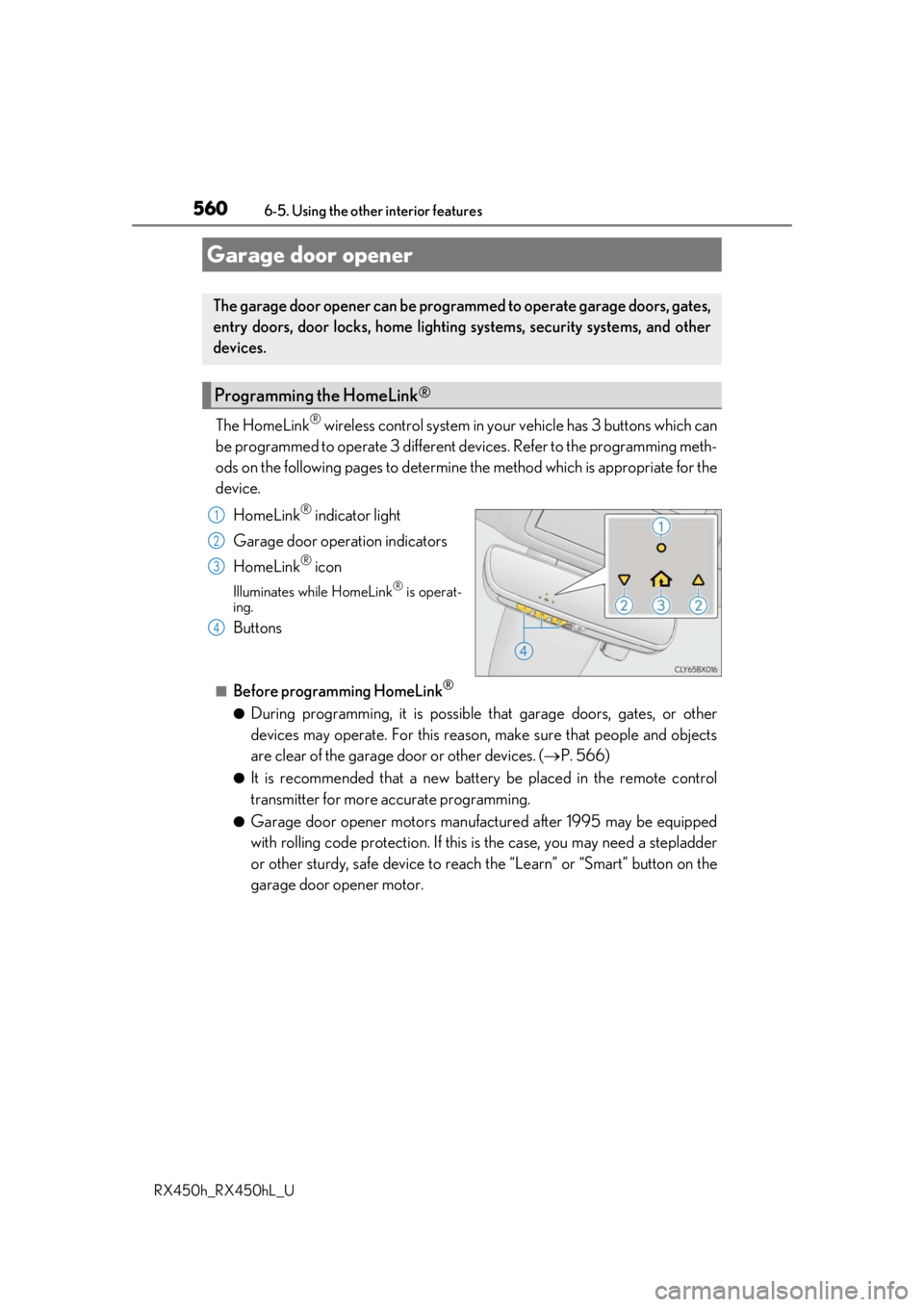
The HomeLink® wireless control system in your vehicle has 3 buttons which can
be programmed to operate 3 different de vices. Refer to the programming meth-
ods on the following pages to determine the method which is appropriate for the
device.
HomeLink
® indicator light
Garage door operation indicators
HomeLink
® icon
Illuminates while HomeLink® is operat-
ing.
Buttons
■Before programming HomeLink®
●During programming, it is possible that garage doors, gates, or other
devices may operate. For this reason, make sure that people and objects
are clear of the garage door or other devices. ( P. 566)
●It is recommended that a new batter y be placed in the remote control
transmitter for more accurate programming.
●Garage door opener motors manufa ctured after 1995 may be equipped
with rolling code protection. If this is the case, you may need a stepladder
or other sturdy, safe device to reach the “Learn” or “Smart” button on the
garage door opener motor.
Garage door opener
The garage door opener can be programmed to operate garage doors, gates,
entry doors, door locks, home lightin g systems, security systems, and other
devices.
Programming the HomeLink®
1
2
3
4
Page 569 of 792
5696-5. Using the other interior features
6
Interior features
RX450h_RX450hL_U
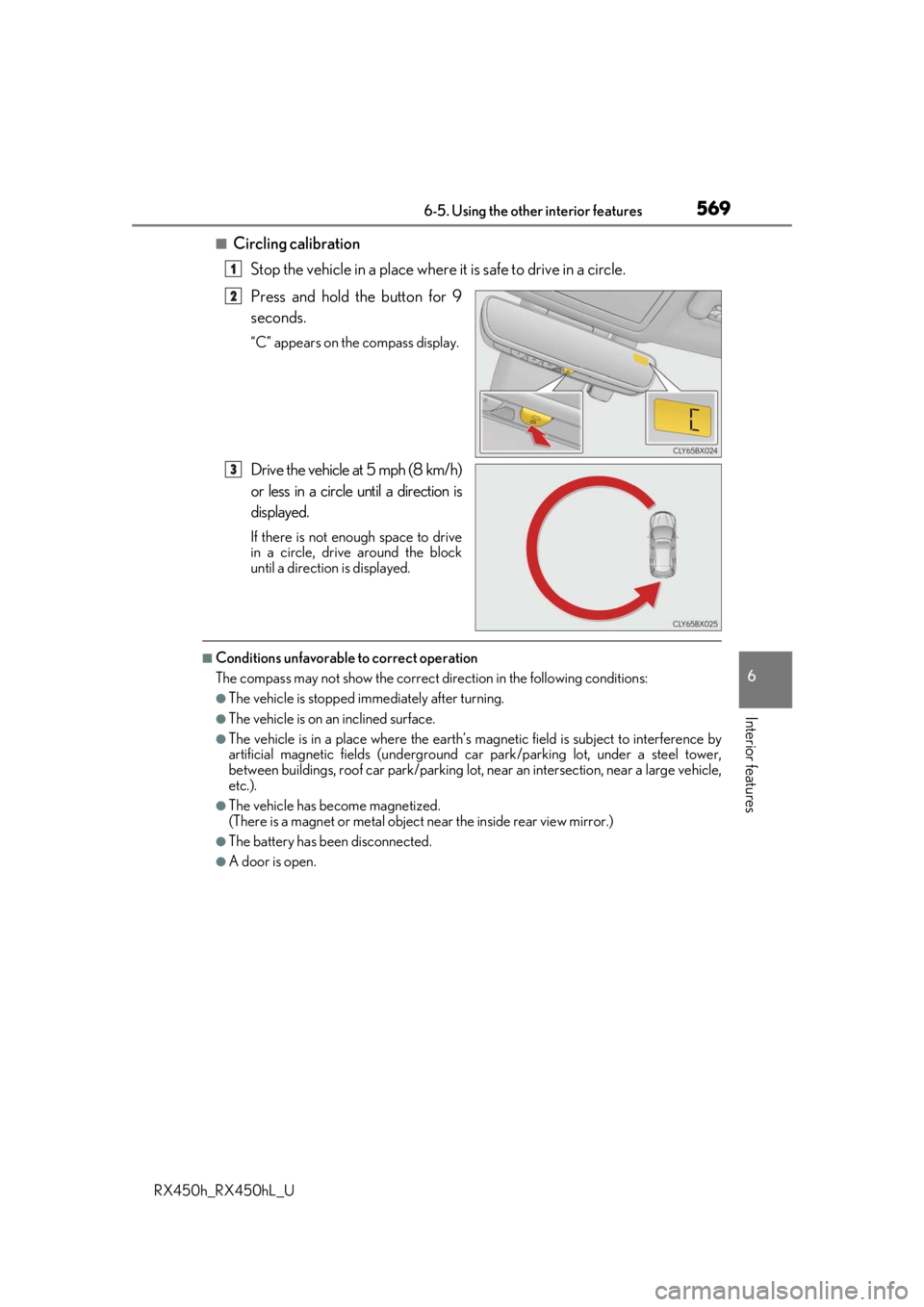
■Circling calibrationStop the vehicle in a place where it is safe to drive in a circle.
Press and hold the button for 9
seconds.
“C” appears on the compass display.
Drive the vehicle at 5 mph (8 km/h)
or less in a circle until a direction is
displayed.
If there is not enough space to drive
in a circle, drive around the block
until a direction is displayed.
■Conditions unfavorable to correct operation
The compass may not show the correct di rection in the following conditions:
●The vehicle is stopped immediately after turning.
●The vehicle is on an inclined surface.
●The vehicle is in a place where the earth’s magnetic field is subject to interference by
artificial magnetic fields (underground car park/parking lot, under a steel tower,
between buildings, roof car park/parking lot, near an intersection, near a large vehicle,
etc.).
●The vehicle has become magnetized.
(There is a magnet or metal object near the inside rear view mirror.)
●The battery has been disconnected.
●A door is open.
1
2
3
Page 581 of 792

5817-1. Maintenance and care
7
Maintenance and care
RX450h_RX450hL_U
■Note for a smart access system with push-button start
●If the door handle becomes wet while the electronic key is within the effective range,
the door may lock and unlock repeatedly. Place the key in a position 6 ft. (2 m) or more
separate from the vehicle while the vehicle is being washed. (Take care to ensure that
the key is not stolen.)
●If the electronic key is inside the vehicle and a door handle becomes wet during a car
wash, a buzzer will sound outside the vehicle. To turn off the alarm, lock all the doors.
●Set the electronic key to battery-saving mode to disable the sm art access system with
push-button start. ( P. 159)
■Aluminum wheels
●Remove any dirt immediately by using a neutral detergent.
●Wash detergent off with water immediately after use.
●To protect the paint from damage, make sure to observe the following precautions.
• Do not use acidic, alkaline or abrasive detergent
• Do not use hard brushes
• Do not use detergent on the wheels when they are hot, such as after driving or park-
ing in hot weather
■Bumpers
Do not scrub with abrasive cleaners.
■Front side windows water-repellent coating
●The following precautions can extend the effectiveness of the water-repellent coating.
• Remove any dirt, etc. from the front side windows regularly.
• Do not allow dirt and dust to accumulate on the windows for a long period.Clean the windows with a soft, damp cloth as soon as possible.
• Do not use wax or glass cleaners that co ntain abrasives when cleaning the windows.
• Do not use any metallic objects to remove condensation build up.
●When the water-repellent performance has become insufficient, the coating can be
repaired. Contact your Lexus dealer.
Page 591 of 792
5917-2. Maintenance
7
Maintenance and care
RX450h_RX450hL_U
Vehicle exterior
ItemsCheck points
Doors• Do the doors operate smoothly?
Engine hood• Does the engine hood lock system work properly?
Fluid leaks• There should not be any signs of fluid leakage after
the vehicle has been parked.
Tires
• Is the tire inflation pressure correct?
• The tires should not be damaged or excessively worn.
• Have the tires been rotated according to the mainte- nance schedule?
• The wheel nuts should not be loose.
Windshield wipers/
rear window wiper
•The wiper blades should no t show any signs of crack-
ing, splitting, wear, contamination or deformation.
• The wiper blades should clear the windshield/rear
window without streaking or skipping.
WARNING
■If the hybrid system is operating
Turn the hybrid system off and ensure that there is adequate ventilation before per-
forming maintenance checks.
Page 609 of 792
6097-3. Do-it-yourself maintenance
7
Maintenance and care
RX450h_RX450hL_U
■Before recharging
When recharging, the 12-volt battery produces hydrogen gas which is flammable and
explosive. Therefore, observe the following precautions before recharging:
●If recharging with the 12-volt battery installed on the vehicle, be sure to disconnect the
ground cable.
●Make sure the power switch on the charger is off when connecting and disconnecting
the charger cables to the 12-volt battery.
■After recharging/reconnecting the 12-volt battery
●The hybrid system may not start. Follow the procedure below to initialize the system.
Shift the shift lever to P.
Open and close any of the doors.
Restart the hybrid system.
●Unlocking the doors using the smart access system with push-button start may not be
possible immediately after reconnecting the 12-volt battery. If this happens, use the
wireless remote control or the mechan ical key to lock/unlock the doors.
●Start the hybrid system with the power sw itch in ACCESSORY mode. The hybrid sys-
tem may not start with the power switch turned off. However, the hybrid system will
operate normally from the second attempt.
●The power switch mode is recorded by the vehicle. If the 12-volt battery is reconnected,
the vehicle will return the power switch mode to the status it was in before the 12-volt
battery was disconnected. Make sure to turn off the power before disconnect the 12-
volt battery. Take extra care when connec ting the 12-volt battery if the power switch
mode prior to discharge is unknown.
If the system will not start even after multip le attempts at all methods above, contact your
Lexus dealer.
WARNING
■Chemicals in the 12-volt battery
The 12-volt battery contains poisonous and corrosive sulfuric acid and may produce
hydrogen gas which is flammable and explosive. To reduce the risk of death or serious
injury, take the following precautions while working on or near the 12-volt battery:
●Do not cause sparks by touching the 12-volt battery terminals with tools.
●Do not smoke or light a match near the 12-volt battery.
●Avoid contact with eyes, skin and clothes.
●Never inhale or swallow electrolyte.
●Wear protective safety glasses when working near the 12-volt battery.
●Keep children away from the 12-volt battery.
■Where to safely charge the 12-volt battery
Always charge the 12-volt battery in an open area. Do not charge the 12-volt battery in
a garage or closed room where th ere is insufficient ventilation.
■How to recharge the 12-volt battery
Only perform a slow charge (5 A or less). The 12-volt battery may explode if charged
at a quicker rate.
1
2
3
Page 647 of 792
6477-3. Do-it-yourself maintenance
7
Maintenance and care
RX450h_RX450hL_U
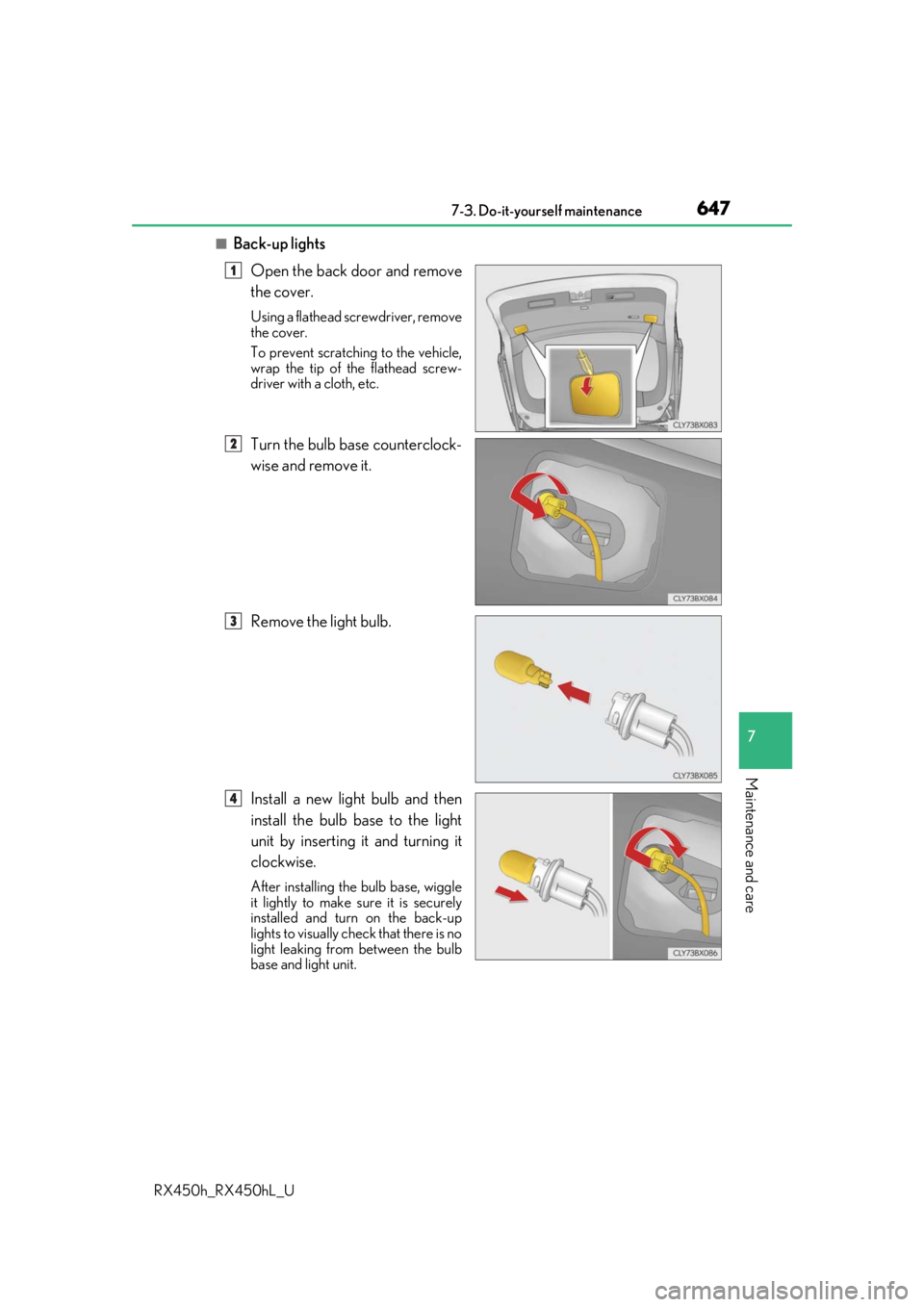
■Back-up lightsOpen the back door and remove
the cover.
Using a flathead screwdriver, remove
the cover.
To prevent scratching to the vehicle,
wrap the tip of the flathead screw-
driver with a cloth, etc.
Turn the bulb base counterclock-
wise and remove it.
Remove the light bulb.
Install a new light bulb and then
install the bulb base to the light
unit by inserting it and turning it
clockwise.
After installing th e bulb base, wiggle
it lightly to make sure it is securely
installed and turn on the back-up
lights to visually check that there is no
light leaking from between the bulb
base and light unit.
1
2
3
4
Page 670 of 792

6708-2. Steps to take in an emergency
RX450h_RX450hL_U
■If “Shift Is in N Release Accelerator Before Shifting” is shown
Message is displayed when the accelerator pedal has been depressed and
the shift lever is in N. Release the accelerator pedal and shift the shift lever to
D or R.
■If “Depress Brake when Vehicle Is Stopped Hybrid System May Overheat”
is shown
Message is displayed when the accelerato r pedal is depressed to maintain the
vehicle position when stopped on a upward slope, etc.
If this continues, the hybrid system may overheat.
Release the accelerator pedal and depress the brake pedal.
■If “Power Turned Off to Save Battery” is displayed
This message is displayed when the power was cut off due to the automatic
power off function.
The next time the hybrid system is star ted, increase the engine speed slightly
and maintain it at that speed for approximately 5 minutes to recharge the 12-
volt battery.
■If “A New Key has been Registered Contact Your Dealer for Details” is dis-
played
This message will be displayed each time the driver's door is opened when the
doors are unlocked from the outside fo r approximately one week after a new
electronic key has been registered.
If this message is displayed but you ha ve not had a new electronic key regis-
tered, ask your Lexus dealer to check if an unknown electronic key (other than
those in your possession) has been registered.
■When “Headlight System Malfunction Visit Your Dealer” is displayed
The following systems may be malfunct ioning. Have the vehicle inspected by
your Lexus dealer immediately.
●The LED headlight system
●The automatic headlight leveling system
●Automatic High Beam
●AFS (Adaptive Front-lighting System) (if equipped)
Page 692 of 792
6928-2. Steps to take in an emergency
RX450h_RX450hL_U
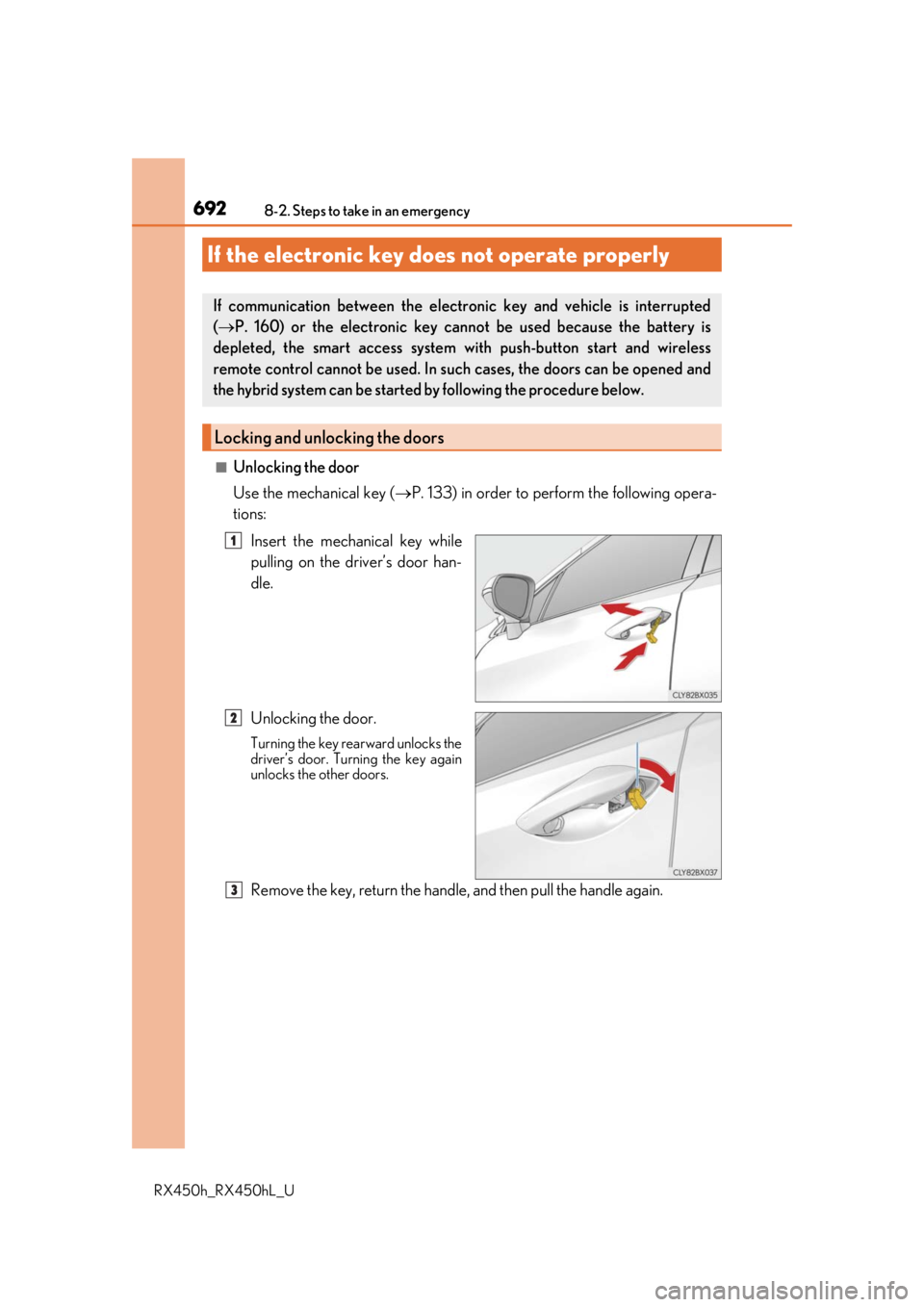
■Unlocking the door
Use the mechanical key (P. 133) in order to perform the following opera-
tions:
Insert the mechanical key while
pulling on the driver’s door han-
dle.
Unlocking the door.
Turning the key rearward unlocks the
driver’s door. Turning the key again
unlocks the other doors.
Remove the key, return the handle, and then pull the handle again.
If the electronic key does not operate properly
If communication between the electronic key and vehicle is interrupted
( P. 160) or the electronic key ca nnot be used because the battery is
depleted, the smart access system wi th push-button start and wireless
remote control cannot be used. In such cases, the doors can be opened and
the hybrid system can be started by following the procedure below.
Locking and unlocking the doors
1
2
3
Page 693 of 792
6938-2. Steps to take in an emergency
8
When trouble arises
RX450h_RX450hL_U
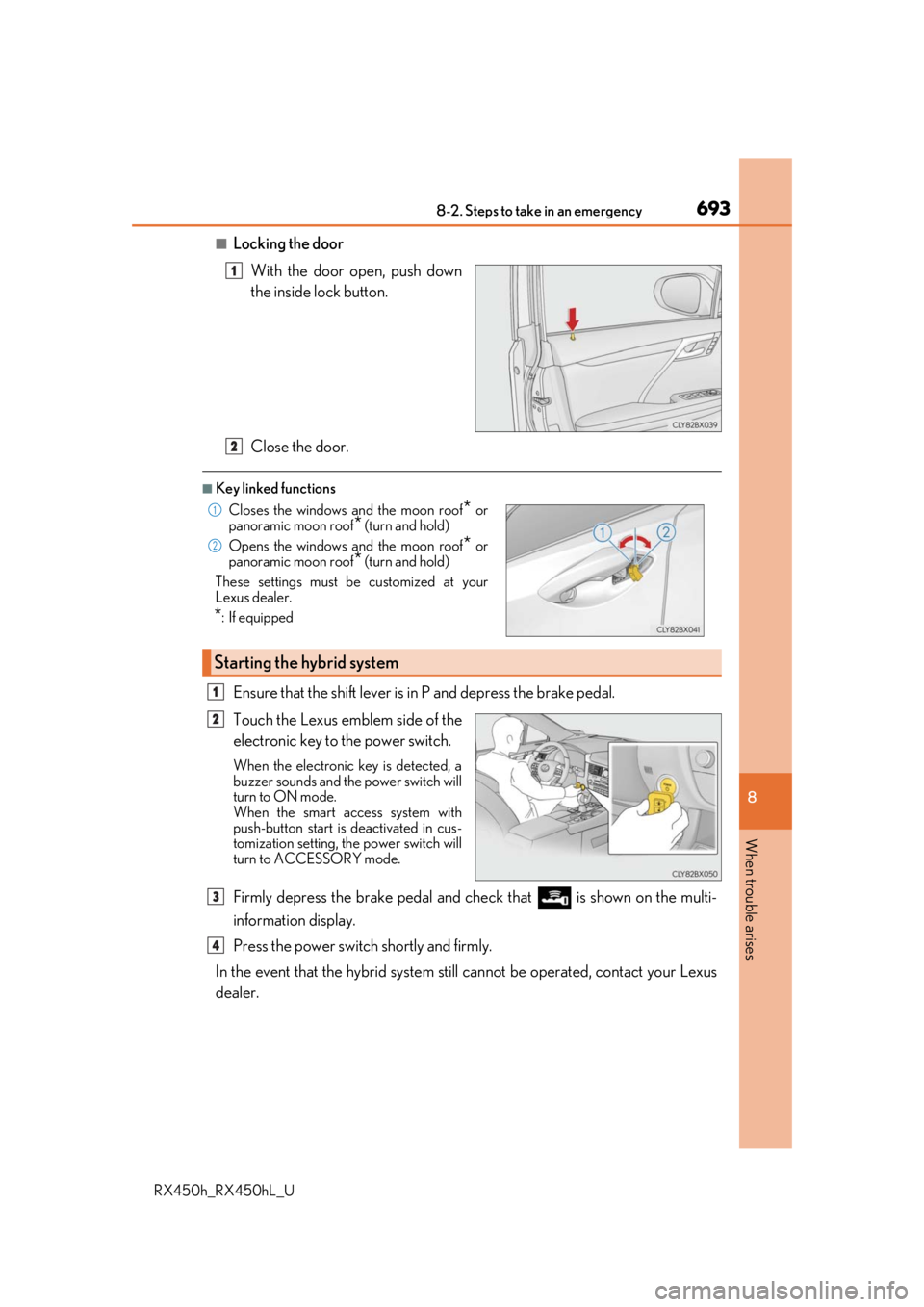
■Locking the doorWith the door open, push down
the inside lock button.
Close the door.
■Key linked functions
Ensure that the shift lever is in P and depress the brake pedal.
Touch the Lexus emblem side of the
electronic key to the power switch.
When the electronic key is detected, a
buzzer sounds and the power switch will
turn to ON mode.
When the smart access system with
push-button start is deactivated in cus-
tomization setting, the power switch will
turn to ACCESSORY mode.
Firmly depress the brake pedal and check that is shown on the multi-
information display.
Press the power switch shortly and firmly.
In the event that the hybrid system still cannot be operated, contact your Lexus
dealer.
1
Closes the windows and the moon roof* or
panoramic moon roof* (turn and hold)
Opens the windows and the moon roof
* or
panoramic moon roof
* (turn and hold)
These settings must be customized at your
Lexus dealer.
*: If equipped
Starting the hybrid system
2
1
2
1
2
3
4