door LEXUS RX450H 2019 Manual PDF
[x] Cancel search | Manufacturer: LEXUS, Model Year: 2019, Model line: RX450H, Model: LEXUS RX450H 2019Pages: 792, PDF Size: 13.48 MB
Page 242 of 792
2424-2. Driving procedures
RX450h_RX450hL_U
■Steering lock
After turning the power switch off and openin g and closing the doors, the steering wheel
will be locked due to the steering lock func tion. Operating the power switch again auto-
matically cancels the steering lock.
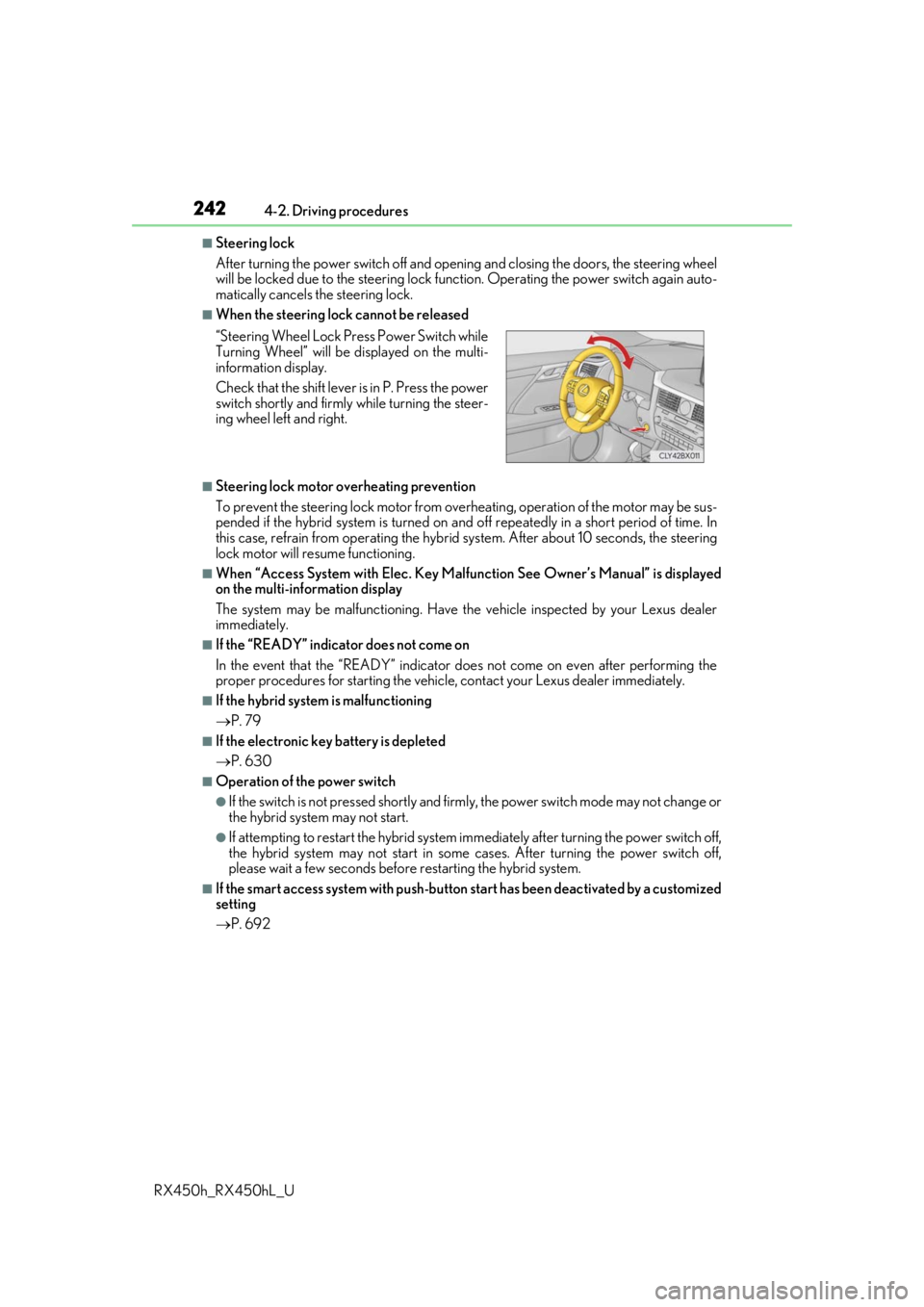
■When the steering lock cannot be released
■Steering lock motor overheating prevention
To prevent the steering lock motor from overheating, operation of the motor may be sus-
pended if the hybrid system is turned on an d off repeatedly in a short period of time. In
this case, refrain from operating the hybrid system. Afte r about 10 seconds, the steering
lock motor will resume functioning.
■When “Access System with Elec. Key Malf unction See Owner’s Manual” is displayed
on the multi-information display
The system may be malfunctio ning. Have the vehicle inspected by your Lexus dealer
immediately.
■If the “READY” indicator does not come on
In the event that the “READY” indicator does not come on even after performing the
proper procedures for starting the vehicl e, contact your Lexus dealer immediately.
■If the hybrid system is malfunctioning
P. 79
■If the electronic key battery is depleted
P. 630
■Operation of the power switch
●If the switch is not pressed shortly and firmly, the power switch mode may not change or
the hybrid system may not start.
●If attempting to restart the hybrid system immediately after turning the power switch off,
the hybrid system may not start in some cases. After turning the power switch off,
please wait a few seco nds before restarting the hybrid system.
■If the smart access system wi th push-button start has been deactivated by a customized
setting
P. 692
“Steering Wheel Lock Pr
ess Power Switch while
Turning Wheel” will be displayed on the multi-
information display.
Check that the shift lever is in P. Press the power
switch shortly and firmly while turning the steer-
ing wheel left and right.
Page 243 of 792
2434-2. Driving procedures
4
Driving
RX450h_RX450hL_U
WARNING
■When starting the hybrid system
Always start the hybrid system while sitting in the driver’s seat. Do not depress the
accelerator pedal while starting the hybrid system under any circumstances.
Doing so may cause an accident resu lting in death or serious injury.
■Caution while driving
If hybrid system failure occurs while the ve hicle is moving, do not lock or open the
doors until the vehicle reaches a safe and complete stop. Activation of the steering lock
in this circumstance may lead to an acci dent, resulting in death or serious injury.
■Stopping the hybrid system in an emergency
If you want to stop the hybrid system in an emergency while driving the vehicle, press
and hold the power switch for more than 2 se conds, or press it briefly 3 times or more
in succession. ( P. 653)
However, do not touch the power switch while driving except in an emergency. Turning
the hybrid system off while driving will not cause loss of steering or braking control,
however, power assist to the steering will be lost. This will make it more difficult to steer
smoothly, so you should pull over and stop the vehicle as soon as it is safe to do so.
NOTICE
■To prevent 12-volt battery discharge
●Do not leave the power switch in ACCESSORY or ON mode for long periods of
time without the hybrid system on.
●If “ACCESSORY” or “IGNITION ON” is displayed on the meters while the hybrid
system is not operating, the power switch is not off. Exit the vehicle after turning the
power switch off.
●Do not stop the hybrid system when the shift lever is in a position other than P. If the
hybrid system is stopped in another shift lever position , the power switch will not be
turned off but instead be turned to ACCESSORY mode. If the vehicle is left in
ACCESSORY mode, 12-volt ba ttery discharge may occur.
■When starting the hybrid system
If the hybrid system becomes difficult to star t, have your vehicle checked by your Lexus
dealer immediately.
■Symptoms indicating a malfun ction with the power switch
If the power switch seems to be operating somewhat differen tly than usual, such as the
switch sticking slightly, ther e may be a malfunction. Contact your Lexus dealer immedi-
ately.
Page 244 of 792
2444-2. Driving procedures
RX450h_RX450hL_U
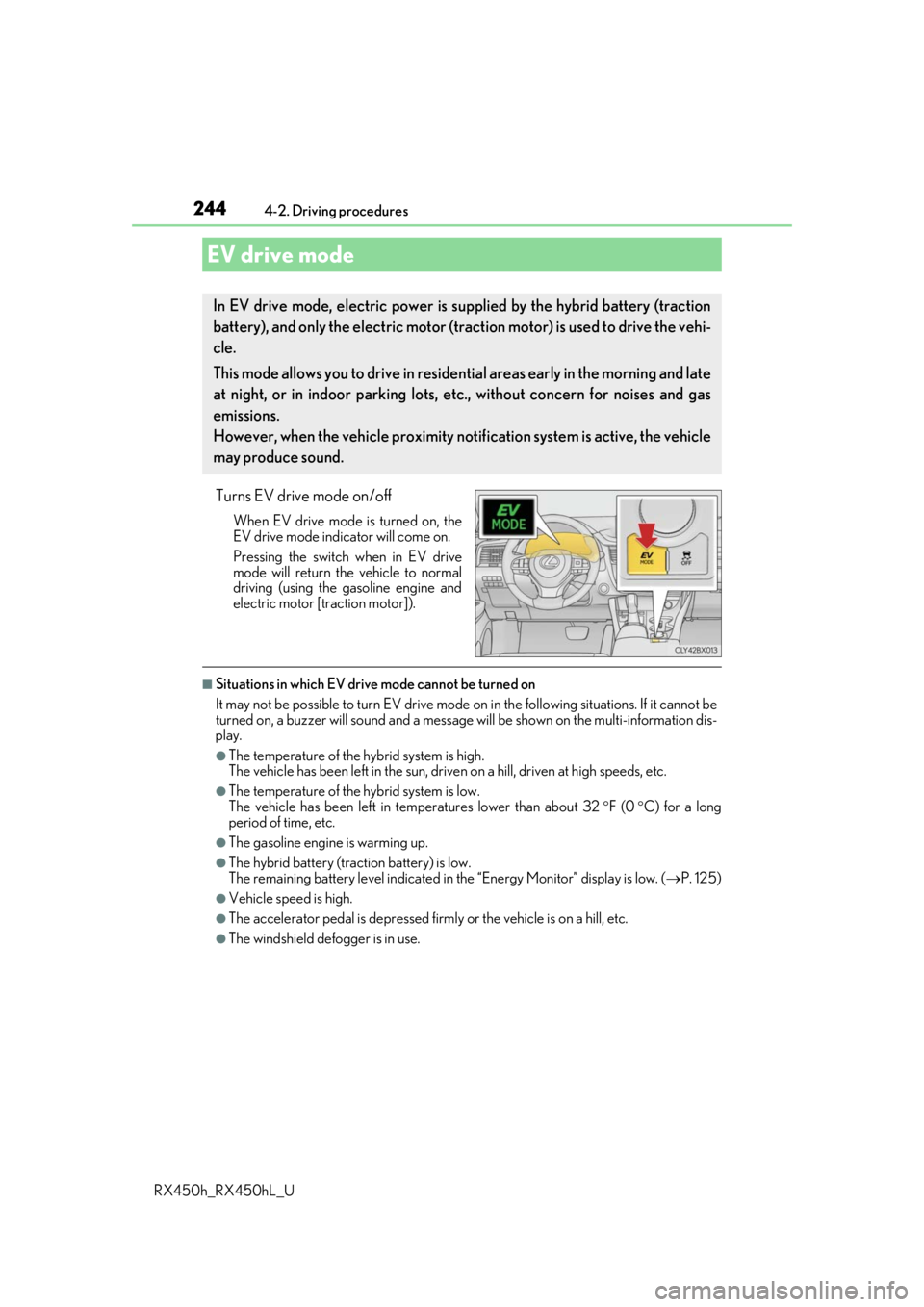
Turns EV drive mode on/off
When EV drive mode is turned on, the
EV drive mode indicator will come on.
Pressing the switch when in EV drive
mode will return the vehicle to normal
driving (using the gasoline engine and
electric motor [traction motor]).
■Situations in which EV drive mode cannot be turned on
It may not be possible to turn EV drive mode on in the following situations. If it cannot be
turned on, a buzzer will sound and a message will be shown on the multi-information dis-
play.
●The temperature of the hybrid system is high.
The vehicle has been left in the sun, driv en on a hill, driven at high speeds, etc.
●The temperature of the hybrid system is low.
The vehicle has been left in temperatures lower than about 32 F (0 C) for a long
period of time, etc.
●The gasoline engine is warming up.
●The hybrid battery (tra ction battery) is low.
The remaining battery level indicated in the “Energy Monitor” display is low. (P. 125)
●Vehicle speed is high.
●The accelerator pedal is depressed firmly or the vehicle is on a hill, etc.
●The windshield defogger is in use.
EV drive mode
In EV drive mode, electric power is su pplied by the hybrid battery (traction
battery), and only the electric motor (traction motor) is used to drive the vehi-
cle.
This mode allows you to drive in reside ntial areas early in the morning and late
at night, or in indoor parking lots, etc., without concern for noises and gas
emissions.
However, when the vehicle proximity noti fication system is active, the vehicle
may produce sound.
Page 256 of 792
2564-2. Driving procedures
RX450h_RX450hL_U
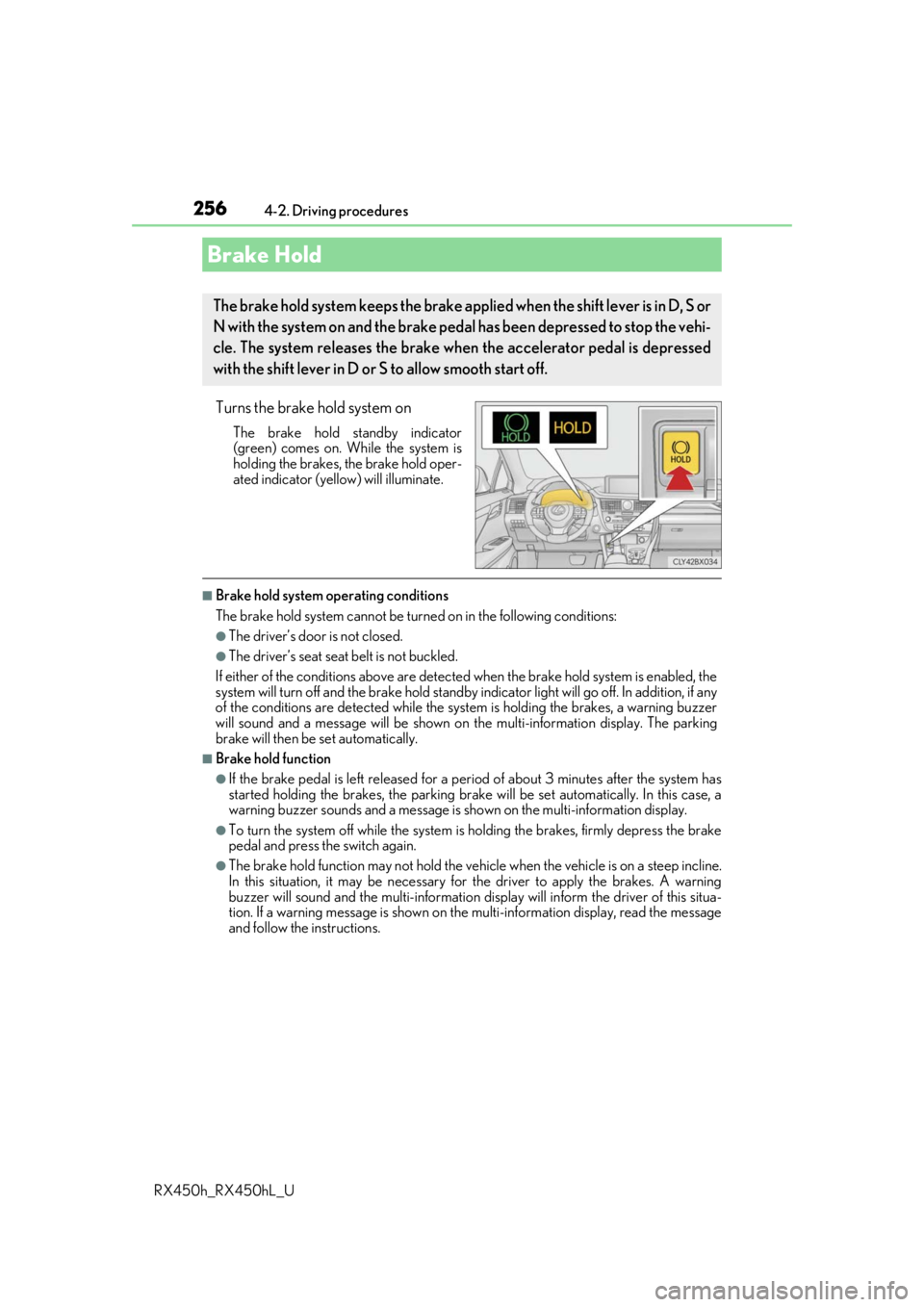
Turns the brake hold system on
The brake hold standby indicator
(green) comes on. Wh ile the system is
holding the brakes, the brake hold oper-
ated indicator (yellow) will illuminate.
■Brake hold system operating conditions
The brake hold system cannot be turn ed on in the following conditions:
●The driver’s door is not closed.
●The driver’s seat seat belt is not buckled.
If either of the conditions above are detected when the brake hold system is enabled, the
system will turn off and the brake hold standby in dicator light will go off. In addition, if any
of the conditions are detected while the sy stem is holding the brakes, a warning buzzer
will sound and a message will be shown on th e multi-information display. The parking
brake will then be set automatically.
■Brake hold function
●If the brake pedal is left released for a pe riod of about 3 minutes after the system has
started holding the brakes, the parking brake will be set automatically. In this case, a
warning buzzer sounds and a message is shown on the multi-information display.
●To turn the system off while the system is holding the brakes, firmly depress the brake
pedal and press the switch again.
●The brake hold function may not hold the vehicle when the vehicle is on a steep incline.
In this situation, it may be necessary for the driver to apply the brakes. A warning
buzzer will sound and the mult i-information display will inform the driver of this situa-
tion. If a warning message is shown on the multi-information display, read the message
and follow the instructions.
Brake Hold
The brake hold system keeps the brake appl ied when the shift lever is in D, S or
N with the system on and the brake peda l has been depressed to stop the vehi-
cle. The system releases the brake wh en the accelerator pedal is depressed
with the shift lever in D or S to allow smooth start off.
Page 260 of 792

2604-3. Operating the lights and wipers
RX450h_RX450hL_U
■Daytime running light system
●The daytime running lights illuminate using th e same lights as the parking lights and illu-
minate brighter than the parking lights.
●To make your vehicle more visible to other drivers during daytime driving, the daytime
running lights turn on automatically when a ll of the following conditions are met. (The
daytime running lights are not designed for use at night.)
• The hybrid system is started
• The parking brake is released
• The headlight switch is in the (Canada only), or
* position
*: When the surroundings are bright
The daytime running lights remain on after they illuminate, even if the parking brake is set
again.
●For the U.S.A.: Daytime running lights can be turned off by operating the switch.
●Compared to turning on the headlights, the daytime running light system offers greater
durability and consumes less electricity, so it can help improve fuel economy.
■Cornering lights (if equipped)
When the cornering lights are on for more than 30 minutes, they will turn off automati-
cally.
■Headlight control sensor
■Automatic light off system
●When the headlights come on: The headlights and tail lights turn off 30 seconds after a
door is opened and closed if the power switch is turned to ACCESSORY mode or
turned off. (The lights turn off immediately if on the key is pre ssed after all the doors
are locked.)
●When only the tail lights come on: The tail lights turn off automatically if the power
switch is turned to ACCESSORY mode or tu rned off and the driver’s door is opened.
To turn the lights on again, turn the power switch to ON mode, or turn the light switch off
once and then back to or .
■Automatic headlight leve ling system (if equipped)
The level of the headlights is automatically adjusted accordi ng to the number of passen-
gers and the loading condition of the vehicle to ensure that the headlights do not inter-
fere with other road users.
■Light reminder buzzer
A buzzer sounds when the power switch is turned off or turned to ACCESSORY mode
and the driver’s door is opened while the lights are turned on. The sensor may not function properly if an
object is placed on the sensor, or anything that
blocks the sensor is affixed to the windshield.
Doing so interferes with the sensor detecting
the level of ambient light and may cause the
automatic headlight system to malfunction.
Page 261 of 792
2614-3. Operating the lights and wipers
4
Driving
RX450h_RX450hL_U
■Welcome lighting
If the headlight switch is turned to and the surrounding area is dark, unlocking the
doors using the smart access system with pu sh-button start or wireless remote control
will turn the parking lights and tail lights on automatically.
■Windshield wiper linked headlight illumination
When driving during daytime with the headlight switch turned to , if the windshield
wipers are used, the headlights will turn on automatically after several seconds to help
enhance the visibility of your vehicle.
■12-volt battery-saving function
In order to prevent the 12-volt battery of the vehicle from discharging, if the headlights
and/or tail lights are on when the power switch is turned off the 12-volt battery saving
function will operate and automatically turn off all the lights after approximately 20 min-
utes. When the power switch is turned to ON mode, the 12-volt battery-saving function
will be disabled.
When any of the following are performed, the 12-volt battery-saving function is canceled
once and then reactivated. All the lights will turn off automa tically 20 minutes after the
12-volt battery-saving function has been reactivated:
●When the headlight switch is operated
●When a door is opened or closed
■Customization
Some functions can be customized. ( P. 736)
NOTICE
■To prevent 12-volt battery discharge
Do not leave the lights on longer than ne cessary when the hybrid system is off.
Page 269 of 792

2694-3. Operating the lights and wipers
4
Driving
RX450h_RX450hL_U
■Front door opening linked windshield wiper stop function
When “AUTO” is selected and the windshield wipers are operating, if a front door is
opened, the operation of the windshield wipers will be stopped to prevent anyone near
the vehicle from being sprayed by water from the wipers, provided the vehicle is stopped
with the parking brake applied or the shift lever in P. When the front door is closed, wiper
operation will resume.
■Customization
Some functions can be customized. ( P. 736)
WARNING
■Caution regarding the use of windshield wipers in AUTO mode
The windshield wipers may operate unexpectedly if the sensor is touched or the wind-
shield is subject to vibration in AUTO mode. Take care that your fingers, etc. do not
become caught in the windshield wipers.
■Caution regarding the use of washer fluid
When it is cold, do not use the washer fl uid until the windshield becomes warm. The
fluid may freeze on the windshield and cause lo w visibility. This may lead to an accident,
resulting in death or serious injury.
NOTICE
■When the windshield is dry
Do not use the wipers, as they may damage the windshield.
■When the washer fluid tank is empty
Do not operate the switch continually as the washer fluid pump may overheat.
■When a nozzle becomes blocked
In this case, contact your Lexus dealer.
Do not try to clear it with a pin or other object. The nozzle will be damaged.
Page 274 of 792
274
RX450h_RX450hL_U4-4. Refueling
●Close all the doors and windows,
and turn the power switch off.
●Confirm the type of fuel.
■Fuel types
P. 720
■Fuel tank opening for unleaded gasoline
To help prevent incorrect fueling, your vehi cle has a fuel tank opening that only accom-
modates the specia l nozzle on unleaded fuel pumps.
Opening the fuel tank cap
The fuel tank of your vehicle has a special structure, which requires a reduc-
tion in fuel tank pressure before refu eling. After the opener switch has been
pressed, it will take several seconds un til the vehicle is ready for refueling.
Before refueling the vehicle
Page 275 of 792
2754-4. Refueling
4
Driving
RX450h_RX450hL_U
WARNING
■When refueling the vehicle
Observe the following precautions while refueling the vehicle. Failure to do so may
result in death or serious injury.
●After exiting the vehicle and before opening the fuel door, touch an unpainted metal
surface to discharge any static electricity. It is important to discharge static electricity
before refueling because sparks resulting fr om static electricity can cause fuel vapors
to ignite while refueling.
●Always hold the grips on the fuel tank cap and turn it slowly to remove it.
A whooshing sound may be heard when the fu el tank cap is loosened. Wait until the
sound cannot be heard before fully removing the cap. In hot weather, pressurized fuel
may spray out of the filler neck and cause injury.
●Do not allow anyone that has not discharged static electricity from their body to come
close to an open fuel tank.
●Do not inhale vaporized fuel.
Fuel contains substances th at are harmful if inhaled.
●Do not smoke while refueling the vehicle.
Doing so may cause the fuel to ignite and cause a fire.
●Do not return to the vehicle or touch any pe rson or object that is statically charged.
This may cause static electricity to build up, resulting in a possible ignition hazard.
■When refueling
Observe the following precautions to prevent fuel overflowing from the fuel tank:
●Securely insert the fuel nozzle into the fuel filler neck.
●Stop filling the tank after the fuel nozzle automatically clicks off.
●Do not top off the fuel tank.
NOTICE
■Refueling
●Finish refueling within 30 minutes. If more than 30 minutes passes, the internal valve
closes. In this condition, fuel may overflow during the refueling process. Press the fuel
filler door opener switch again.
●Do not spill fuel during refueling.
Doing so may damage the vehicle, such as causing the emission control system to
operate abnormally or damaging fuel system components or the vehicle’s painted
surface.
Page 276 of 792
2764-4. Refueling
RX450h_RX450hL_U
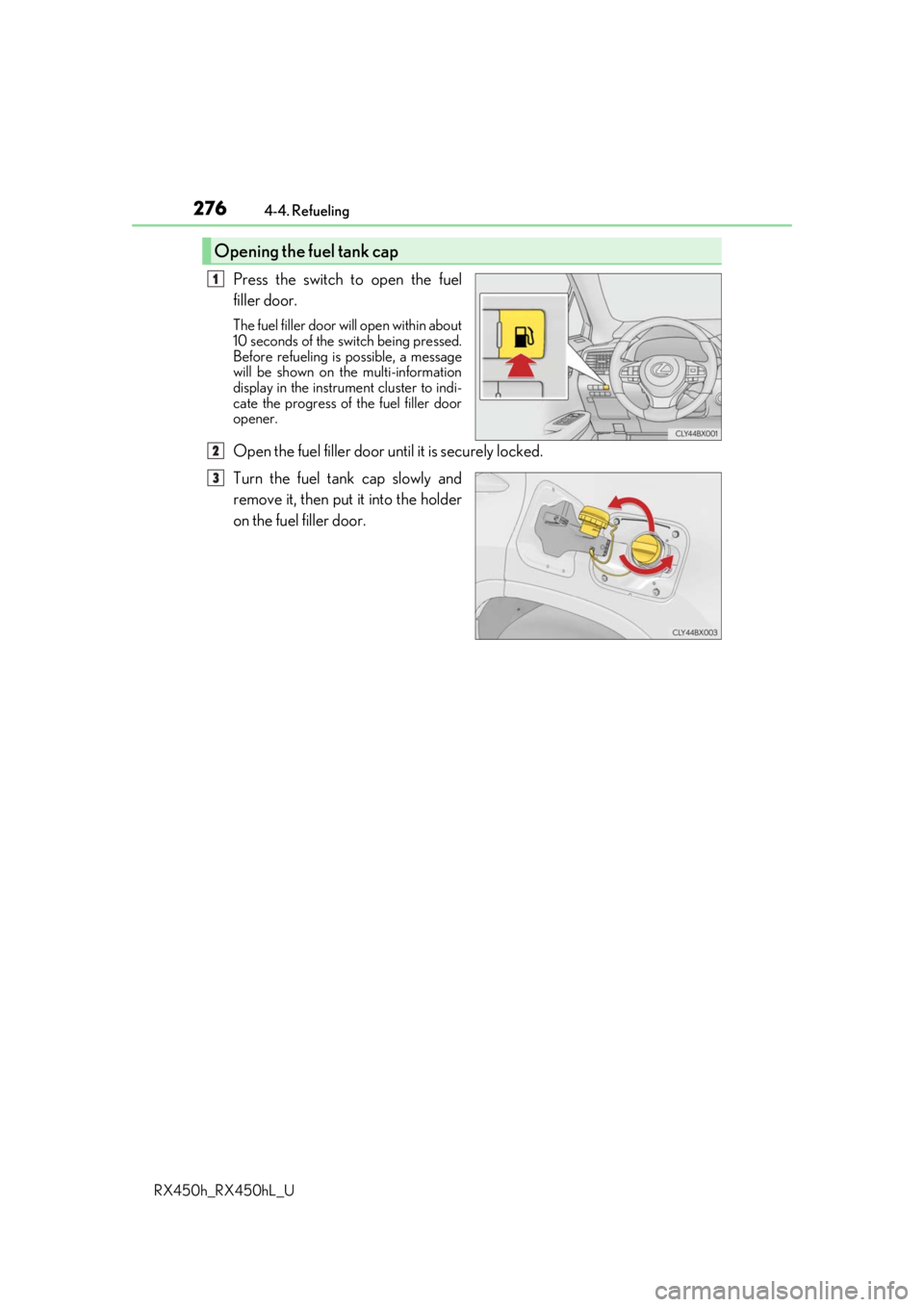
Press the switch to open the fuel
filler door.
The fuel filler door wi ll open within about
10 seconds of the sw itch being pressed.
Before refueling is possible, a message
will be shown on the multi-information
display in the instrument cluster to indi-
cate the progress of the fuel filler door
opener.
Open the fuel filler door until it is securely locked.
Turn the fuel tank cap slowly and
remove it, then put it into the holder
on the fuel filler door.
Opening the fuel tank cap
1
2
3