ipod LEXUS RX450H 2019 Owners Manual
[x] Cancel search | Manufacturer: LEXUS, Model Year: 2019, Model line: RX450H, Model: LEXUS RX450H 2019Pages: 792, PDF Size: 13.48 MB
Page 4 of 792

TABLE OF CONTENTS4
RX450h_RX450hL_U
5-1. Basic OperationsLexus Display Audio system..........................................400
Steering wheel audio switches ...................................... 406
Mobile Assistant ........................ 407
USB/AUX ports ........................ 409
5-2. Setup Setup menu ....................................412
General settings...........................413
Voice settings................................416
Display settings ............................. 417
5-3. Using the audio system Selecting the audio source ........................................... 418
Optimal use of the audio system............................................419
Audio settings ............................. 420
Audio menu screen operation .................................... 423
5-4. Using the radio Radio operation.......................... 426
5-5. Playing an audio CD and MP3/WMA/AAC discs
CD player operation ................ 433
5-6. Using an external device Listening to an iPod .................. 440
Using USB memory device .......................................... 444
Using the AUX port ................. 448 5-7. Connecting Bluetooth
®
Steps for using Bluetooth®
devices ........................................ 449
Registering a Bluetooth
®
device ............................................451
Selecting a Bluetooth
®
device .......................................... 452
Connecting a Bluetooth
®
audio player .............................. 453
Connecting a Bluetooth
®
phone ........................................... 454
Displaying a Bluetooth
®
device details ............................ 455
Detailed Bluetooth
®
settings ........................................ 456
5-8. Bluetooth
® Audio
Listening to Bluetooth
®
Audio ........................................... 459
5-9. Bluetooth
® Phone
Using a Bluetooth
®
Phone.............................................461
Making a call................................ 463
Receiving a call ........................... 466
Speaking on the phone ........... 467
Using a Bluetooth
® phone
message...................................... 469
Using the steering wheel switches ........................................ 471
Bluetooth
® phone
settings .........................................472
5-10. Phonebook Contact settings ..........................474
Messaging settin g ......................477
5Lexus Display Audio system
Page 399 of 792

399
5
Lexus DisplayAudio system
RX450h_RX450hL_U
5-6. Using an external device
Listening to an iPod .................. 440
Using USB memory device...........................................444
Using the AUX port ................ 448
5-7. Connecting Bluetooth
®
Steps for using Bluetooth®
devices .........................................449
Registering a Bluetooth
®
device............................................ 451
Selecting a Bluetooth
®
device ...........................................452
Connecting a Bluetooth
®
audio player ...............................453
Connecting a Bluetooth
®
phone ...........................................454
Displaying a Bluetooth
®
device details ........................... 455
Detailed Bluetooth
®
settings.........................................456
5-8. Bluetooth
® Audio
Listening to Bluetooth
®
Audio............................................459 5-9. Bluetooth
® Phone
Using a Bluetooth
®
Phone ............................................ 461
Making a call ................................ 463
Receiving a call ........................... 466
Speaking on the phone............ 467
Using a Bluetooth
® phone
message ...................................... 469
Using the steering wheel switches.........................................471
Bluetooth
® phone
settings ........................................ 472
5-10. Phonebook Contact settings ......................... 474
Messaging setting...................... 477
5-11. Bluetooth
®
What to do if... (Troubleshooting)................... 478
Bluetooth
®................................... 482
5-12. Other function “Information” screen................ 488
USB photo ....................................490
Weather information................ 492
Voice command system ......... 493
Page 406 of 792
4065-1. Basic Operations
RX450h_RX450hL_U
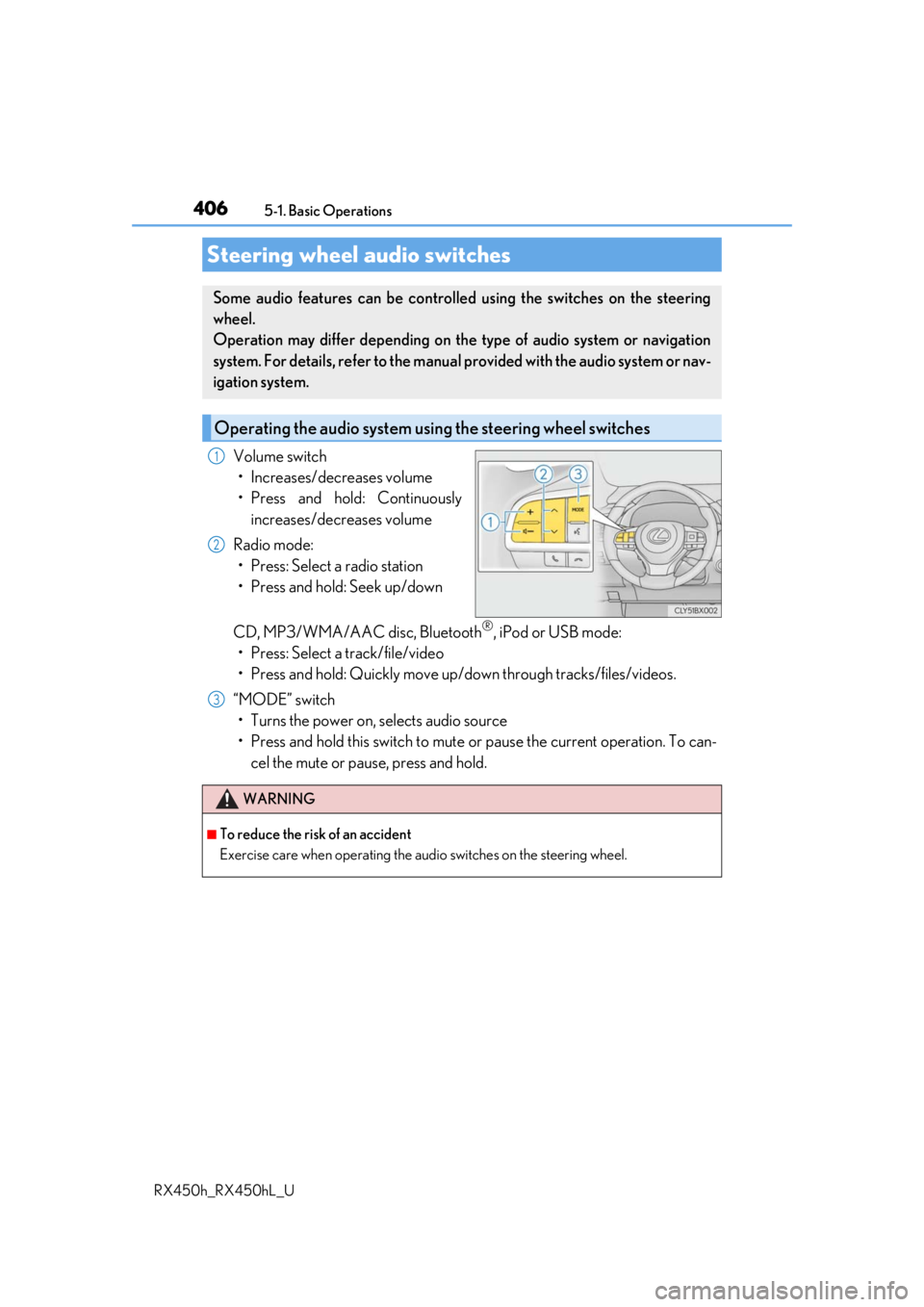
Volume switch • Increases/decreases volume
• Press and hold: Continuously increases/decreases volume
Radio mode: • Press: Select a radio station
• Press and hold: Seek up/down
CD, MP3/WMA/AAC disc, Bluetooth
®, iPod or USB mode:
• Press: Select a track/file/video
• Press and hold: Quickly move up/d own through tracks/files/videos.
“MODE” switch • Turns the power on, selects audio source
• Press and hold this switch to mute or pause the current operation. To can- cel the mute or pause, press and hold.
Steering wheel audio switches
Some audio features can be controlled using the switches on the steering
wheel.
Operation may differ depending on th e type of audio system or navigation
system. For details, refer to the manual provided with the audio system or nav-
igation system.
Operating the audio system us ing the steering wheel switches
1
2
WARNING
■To reduce the risk of an accident
Exercise care when operating the audio switches on the steering wheel.
3
Page 408 of 792

4085-1. Basic Operations
RX450h_RX450hL_U
■Adjusting the volume
The volume of the Mobile Assist ant can be adjusted using the
“PWR·VOL” knob or
steering wheel volume switch es. The Mobile Assistant and phone call volumes are syn-
chronized.
■Microphone
It is not necessary to speak directly into the microphone when using the Mobile Assis-
tant.
●Wait for the listening beeps before using the Mobile Assistant.
●The Mobile Assistant may not recognize commands in the following situations:
• When spoken too quickly.
• When spoken at a low or high volume.
• When the roof or windows are open.
• When passengers are talking while th e Mobile Assistant is being used.
• When the air conditioning syst em’s fan speed is set high.
• When the air conditioning vents are turned toward the microphone.
■Mobile Assistant precautions
●The available features and functions may vary based on the iOS version installed on the
connected device.
●Some Siri features are limited in Eyes Free mode. If you attempt to use an unavailable
function, Siri will inform you that the function is not available.
●If Siri is not enabled on the ce llular phone connected via Bluetooth, an error message
will be displayed on the screen.
●While a phone call is active, the Mobile Assistant cannot be used.
●If using the navigation feature of the cellular phone, ensure the active audio source is
Bluetooth audio or iPod in order to hear turn by turn direction prompts.
Page 409 of 792
4095-1. Basic Operations
5
Lexus Display Audio system
RX450h_RX450hL_U
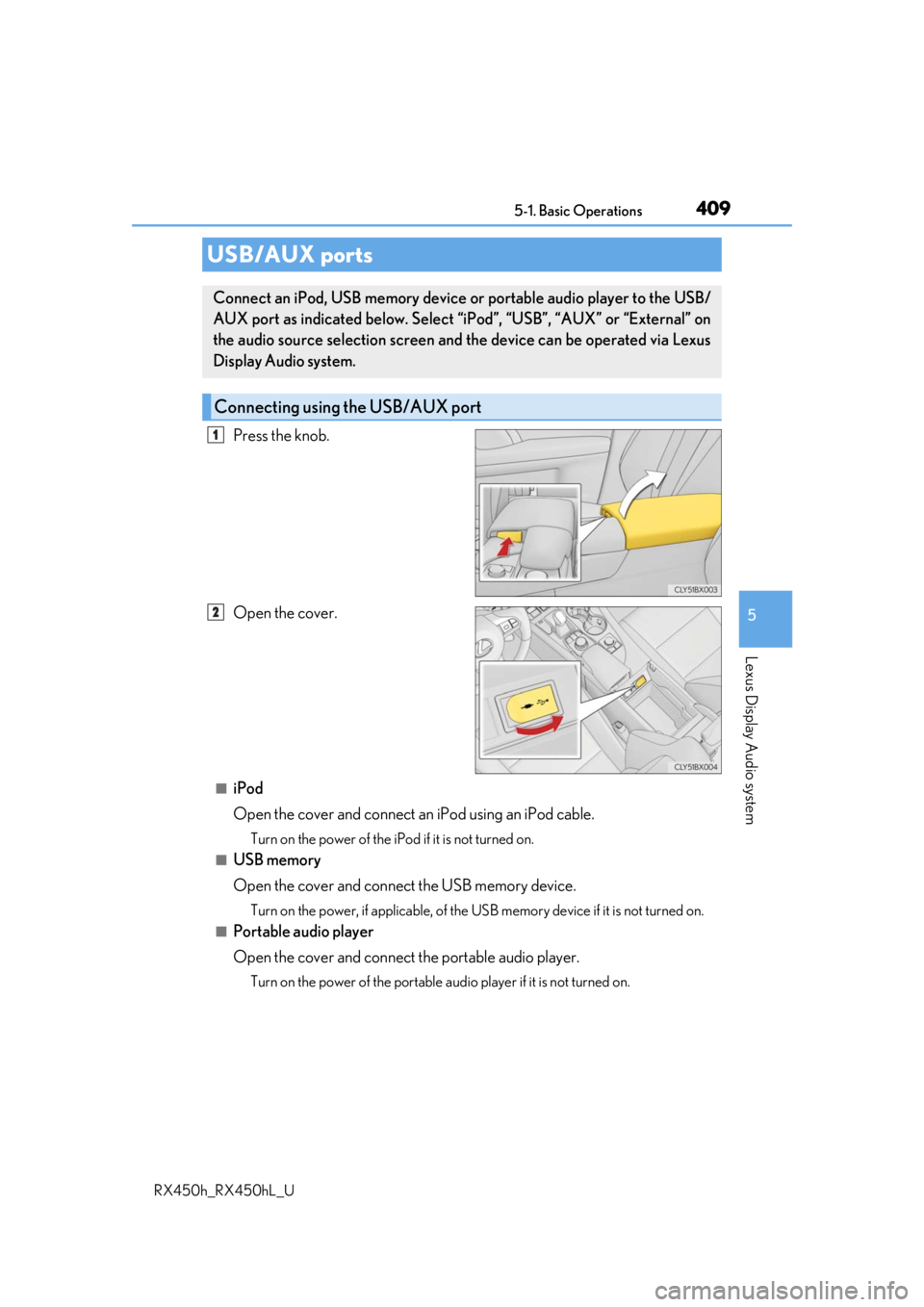
Press the knob.
Open the cover.
■iPod
Open the cover and connect an iPod using an iPod cable.
Turn on the power of the iPod if it is not turned on.
■USB memory
Open the cover and connect the USB memory device.
Turn on the power, if applicable, of the US B memory device if it is not turned on.
■Portable audio player
Open the cover and connect the portable audio player.
Turn on the power of the portable audio player if it is not turned on.
USB/AUX ports
Connect an iPod, USB memory device or portable audio player to the USB/
AUX port as indicated below. Select “iPod”, “USB”, “AUX” or “External” on
the audio source selection screen and the device can be operated via Lexus
Display Audio system.
Connecting using the USB/AUX port
1
2
Page 410 of 792
4105-1. Basic Operations
RX450h_RX450hL_U
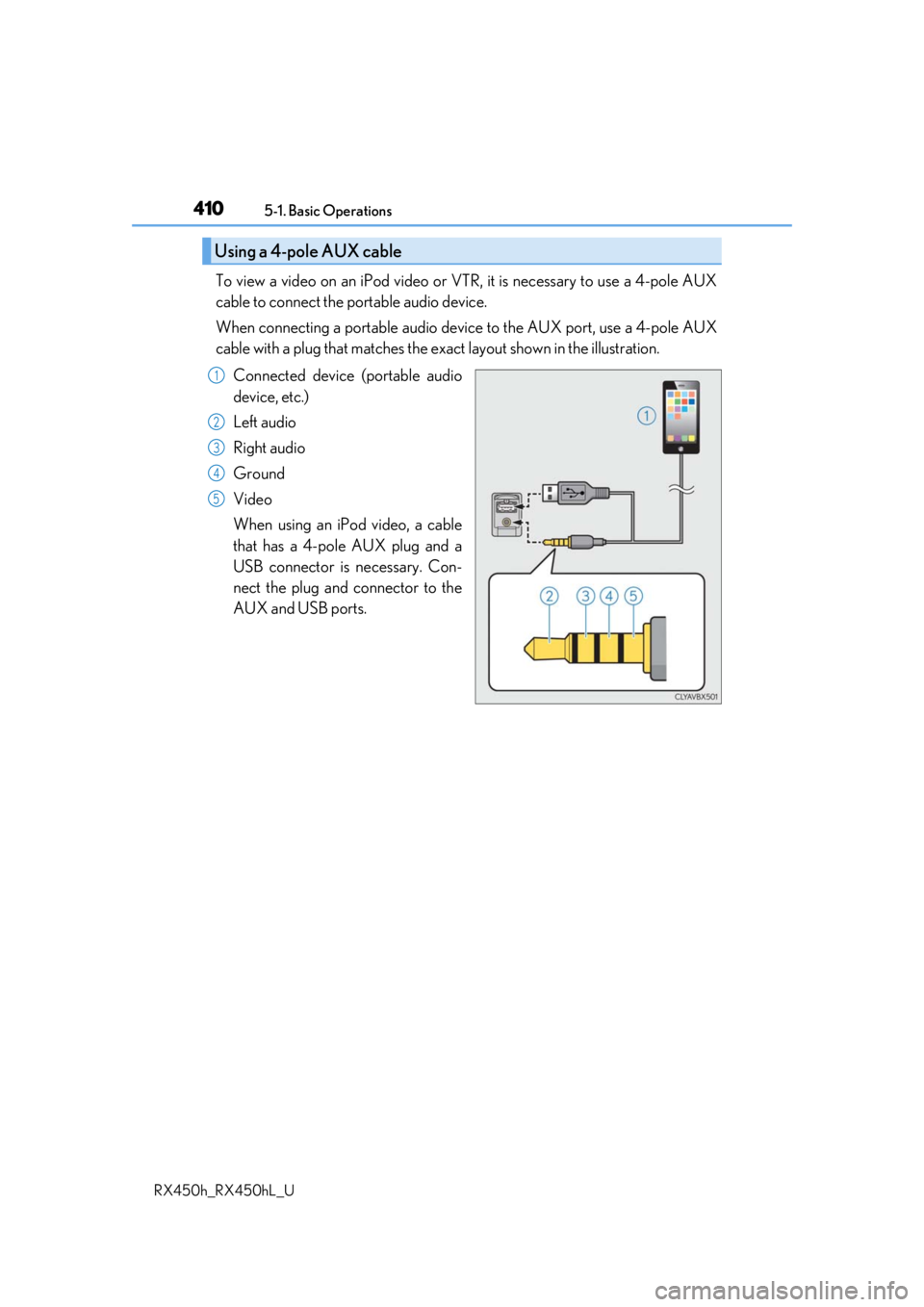
To view a video on an iPod video or VTR, it is necessary to use a 4-pole AUX
cable to connect the portable audio device.
When connecting a portable audio devi ce to the AUX port, use a 4-pole AUX
cable with a plug that matches the ex act layout shown in the illustration.
Connected device (portable audio
device, etc.)
Left audio
Right audio
Ground
Video
When using an iPod video, a cable
that has a 4-pole AUX plug and a
USB connector is necessary. Con-
nect the plug and connector to the
AUX and USB ports.
Using a 4-pole AUX cable
1
2
3
4
5
Page 412 of 792
412
RX450h_RX450hL_U5-2. Setup
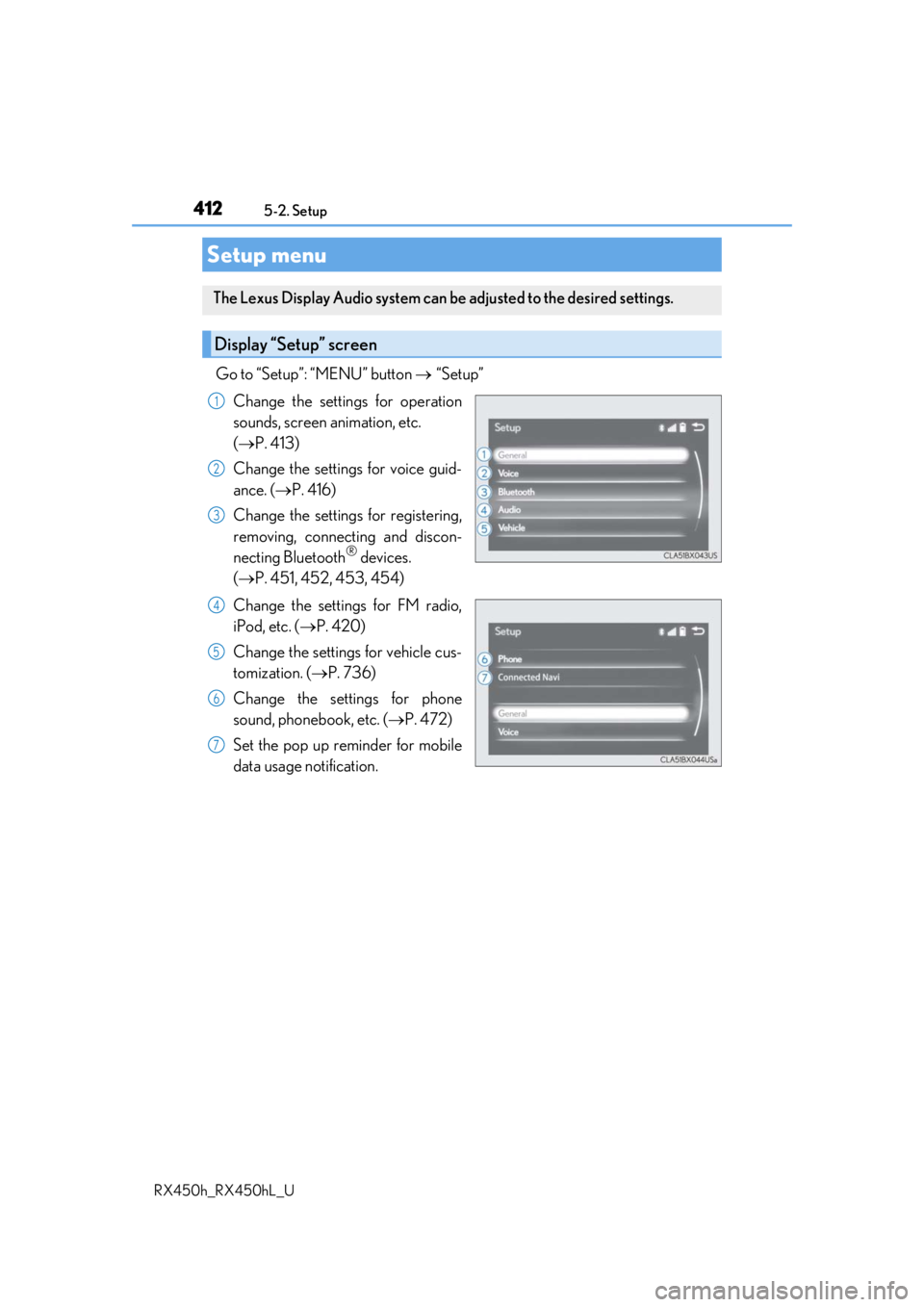
Go to “Setup”: “MENU” button
“Setup”
Change the settings for operation
sounds, screen animation, etc.
( P. 413)
Change the settings for voice guid-
ance. ( P. 416)
Change the settings for registering,
removing, connecting and discon-
necting Bluetooth
® devices.
( P. 451, 452, 453, 454)
Change the settings for FM radio,
iPod, etc. ( P. 420)
Change the settings for vehicle cus-
tomization. ( P. 736)
Change the settings for phone
sound, phonebook, etc. ( P. 472)
Set the pop up reminder for mobile
data usage notification.
Setup menu
The Lexus Display Audio system can be adjusted to the desired settings.
Display “Setup” screen
1
2
3
4
5
6
7
Page 415 of 792
4155-2. Setup
5
Lexus Display Audio system
RX450h_RX450hL_U
Go to “Delete Personal Data”: “MENU” button “Setup” “General”
“Delete Personal Data”
Select “Delete”.
Check carefully beforeha nd, as data cannot be retrieved once deleted.
The following personal data will be dele ted or changed to its default settings.
• Phonebook data
• Call history data
•Favorite data
•Bluetooth
® devices data
• Phone sound settings
• Detailed Bluetooth
® settings
• Audio/video setting
• Customized image data
•FM info setting
• iPod tagging information
• Software update history
• Software update detail information
• Phone display setting
• Contact/call history setting
• Messaging setting
• Traffic information map
• Weather information
• Phonebook data for voice recognition
• Music data for voice recognition
NOTICE
■To prevent damage to the USB me mory device or its terminals
P. 447
Deleting personal data
1
2
Page 420 of 792
4205-3. Using the audio system
RX450h_RX450hL_U
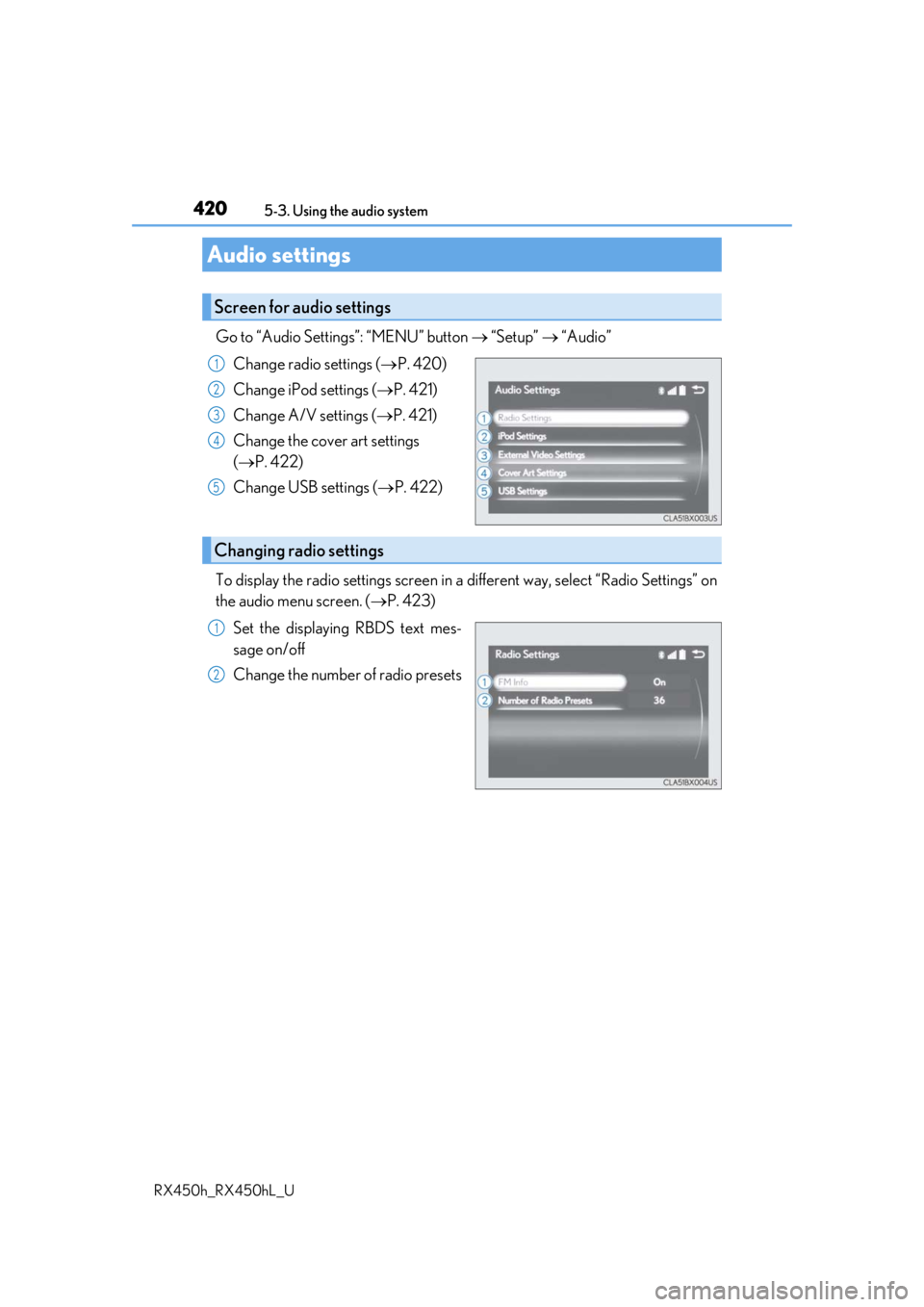
Go to “Audio Settings”: “MENU” button “Setup” “Audio”
Change radio settings ( P. 420)
Change iPod settings ( P. 421)
Change A/V settings ( P. 421)
Change the cover art settings
( P. 422)
Change USB settings ( P. 422)
To display the radio settings screen in a different way, select “Radio Settings” on
the audio menu screen. ( P. 423)
Set the displaying RBDS text mes-
sage on/off
Change the number of radio presets
Audio settings
Screen for audio settings
1
2
3
4
5
Changing radio settings
1
2
Page 421 of 792
4215-3. Using the audio system
5
Lexus Display Audio system
RX450h_RX450hL_U
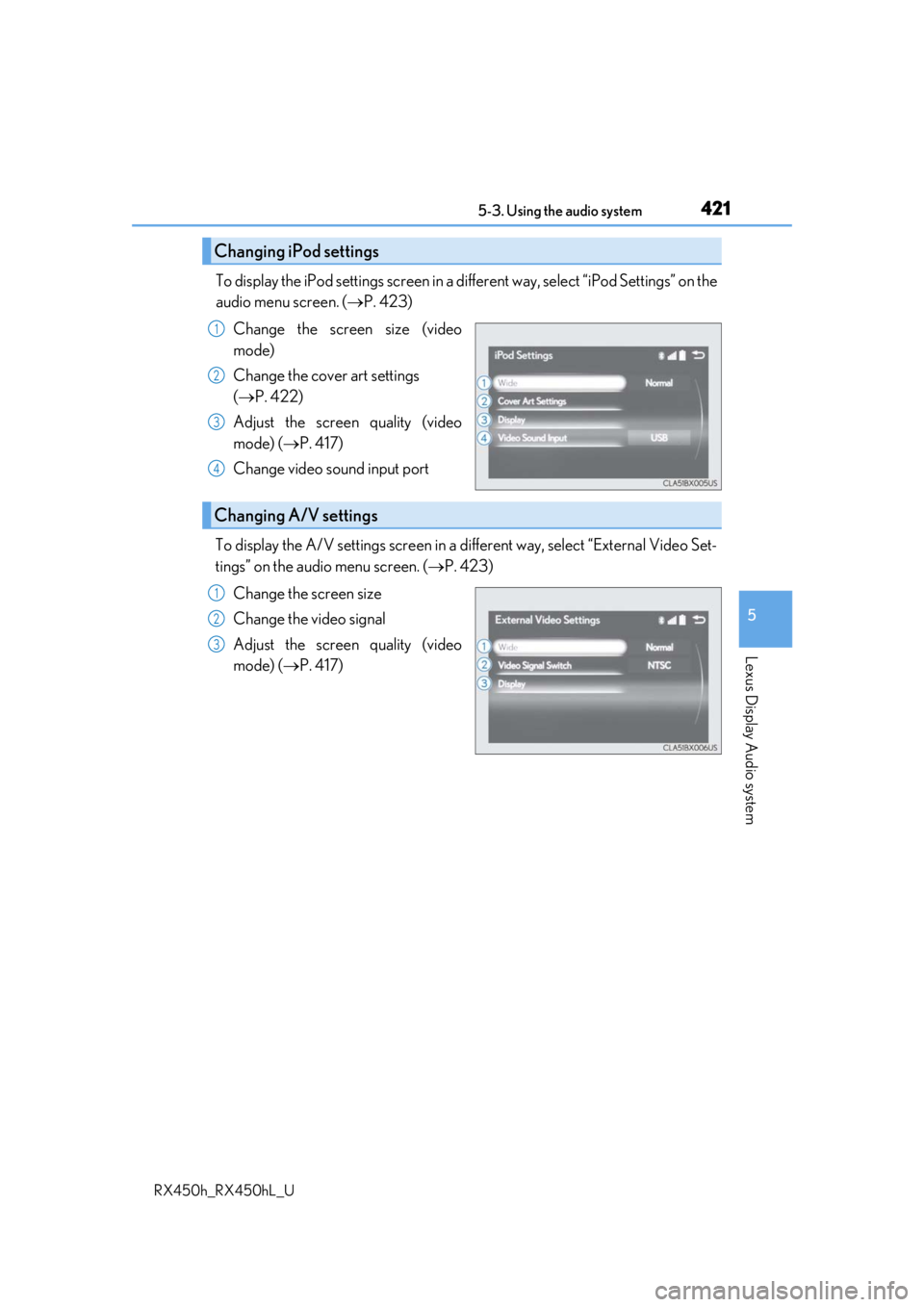
To display the iPod settings screen in a different way, select “iPod Settings” on the
audio menu screen. ( P. 423)
Change the screen size (video
mode)
Change the cover art settings
( P. 422)
Adjust the screen quality (video
mode) ( P. 417)
Change video sound input port
To display the A/V settings screen in a different way, select “External Video Set-
tings” on the audio menu screen. ( P. 423)
Change the screen size
Change the video signal
Adjust the screen quality (video
mode) ( P. 417)
Changing iPod settings
1
2
3
4
Changing A/V settings
1
2
3