manual radio set LEXUS RX450H 2019 Owners Manual
[x] Cancel search | Manufacturer: LEXUS, Model Year: 2019, Model line: RX450H, Model: LEXUS RX450H 2019Pages: 792, PDF Size: 13.48 MB
Page 426 of 792
426
RX450h_RX450hL_U5-4. Using the radio
Pressing the “RADIO” button displays the radio top screen from any screen of
the selected source.
■Menu screen
P. 423
Tune in to the desired station using one of the following methods.
■Seek tuning
Press and hold then release the “ PRST” or “TRACK ” button.
Seek tuning can also be operated on the menu screen. ( P. 423)
The radio will begin seeking up or down for a station of the nearest frequency
and will stop when a station is found.
■Manual tuning
Turn the “TUNE•SCROLL” knob.
■Preset stations
Select the desired preset station by pressing the “ PRST” or “TRACK ” but-
ton, or turning and pressing the controller.
■Station list
Move the controller to the right and selecting “Station List”.
AM radio: Selectin g a desired station.
FM radio: Selecting a desired type of station and selecting a desired st\
a-
tion.
To refreshing the station list, select “Refresh”. Select “Source” on the refresh
screen, can be change to the othe r audio source while refreshing.
Radio operation
Select “AM”, “FM” or “SAT” on the audi o source selection screen to begin lis-
tening to the radio.
Radio top screen
Selecting a station (AM or FM radio)
1
2
Page 503 of 792
5036-1. Basic operation of the Remote Touch screen
6
Interior features
RX450h_RX450hL_U
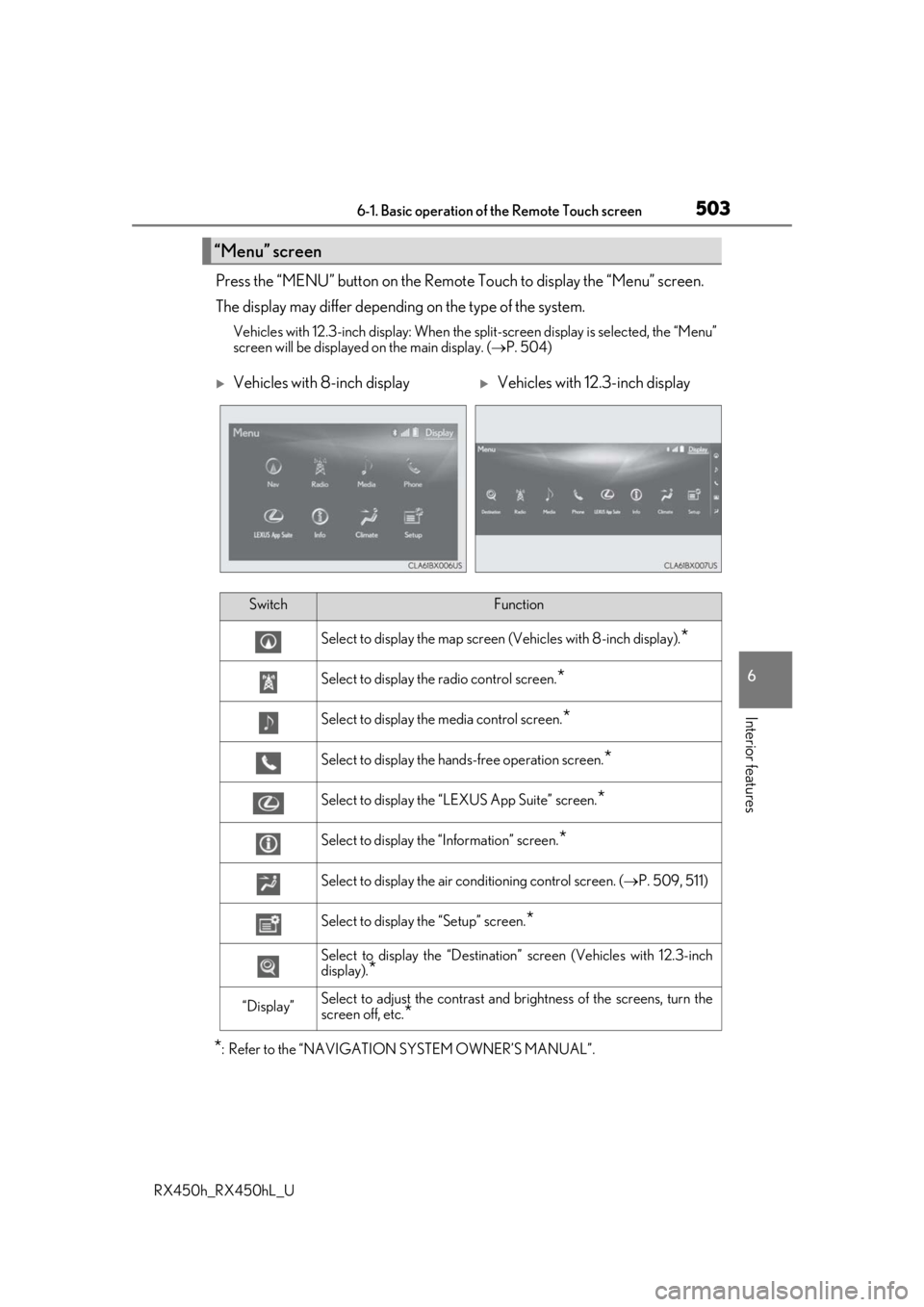
Press the “MENU” button on the Remote Touch to display the “Menu” screen.
The display may differ depending on the type of the system.
Vehicles with 12.3-inch display: When the split-screen display is selected, the “Menu”
screen will be displayed on the main display. ( P. 504)
*: Refer to the “NAVIGATION SYSTEM OWNER’S MANUAL”.
“Menu” screen
Vehicles with 8-inch displayVehicles with 12.3-inch display
SwitchFunction
Select to display the map screen (Vehicles with 8- inch display).*
Select to display the radio control screen.*
Select to display the media control screen.*
Select to display the hands-free operation screen.*
Select to display the “LEXUS App Suite” screen.*
Select to display the “Information” screen.*
Select to display the air conditioning control screen. ( P. 509, 511)
Select to display the “Setup” screen.*
Select to display the “Destination ” screen (Vehicles with 12.3-inch
display).
*
“Display”Select to adjust the contrast and brightness of the screens, turn the
screen off, etc.
*
Page 771 of 792
771Alphabetical index
RX450h_RX450hL_U
Alarm ............................................................ 86
Anchor brackets ...................................... 57
AntennaRadio ........................................................429
Smart access system with push-button start ................... 158
Anti-lock Brake System (ABS)....... 382 Warning light ........................................ 661
Approach warning.................................314
Armrest ....................................................558
Assist grips .............................................. 559
Audio system (with Lexus Display Audio System) ...................400 Antenna ..................................................429
Audio input........................................... 409
AUX port.............................................. 409
Bluetooth
® audio ............................. 459
CD player ..............................................433
iPod .......................................................... 440
MP3/WMA disc ...............................433
Optimal use ........................................... 419
Portable music player ..................... 448
Radio ........................................................426
Setup menu .............................................412
Steering wheel audio switches .............................................. 406
USB memory ....................................... 444 Audio system
(with navigation system)
*
Automatic air conditioning system ......................................... 507, 522 Air conditioning filter ....................... 625
Rear automatic air conditioning system .................................................. 522
S-FLOW mode....................................514
Automatic headlight leveling system .................................................... 260
Automatic High Beam ........................262
Automatic light control system ...... 258
AUX port ................................................ 409
Auxiliary boxes .......................... 539, 544
*: Refer to the “NAVIGATION SYSTEM OWNER’S MANUAL”.