power steering LEXUS RX450H 2019 Owners Manual
[x] Cancel search | Manufacturer: LEXUS, Model Year: 2019, Model line: RX450H, Model: LEXUS RX450H 2019Pages: 792, PDF Size: 13.48 MB
Page 2 of 792
TABLE OF CONTENTS2
RX450h_RX450hL_U
For your information................................... 8
Reading this manual................................... 14
How to search ..............................................15
Pictorial index............................................... 16
1-1. For safe useBefore driving ................................ 28
For safe driving .............................. 30
Seat belts .......................................... 32
SRS airbags ..................................... 36
Front passenger occupant classification system ..................47
Exhaust gas precautions............ 53
1-2. Child safety Riding with children ..................... 54
Child restraint systems ............... 55
1-3. Hybrid system Hybrid system features ...............74
Hybrid system precautions....... 78
1-4. Theft deterrent system Immobilizer system ...................... 83
Alarm ................................................. 86
2. Instrument cluster Warning lights and indicators....................................... 90
Gauges and meters ..................... 96
Multi-information display .......... 101
Head-up display ............................ 118
Energy monitor/ consumption screen ................124 3-1. Key information
Keys ...................................................132
3-2. Opening, closing and locking the doors
Side doors.......................................136
Power back door ......................... 142
Smart access system with push-button start...................... 158
3-3. Adjusting the seats Front seats ...................................... 167
Rear seats ...................................... 168
Driving position memory........... 181
Head restraints ............................ 186
3-4. Adjusting the steering wheel and mirrors
Steering wheel ............................. 189
Inside rear view mirror ............... 191
Outside rear view mirrors .......193
3-5. Opening, closing the windows and moon roof
Power windows ............................196
Moon roof..................................... 200
Panoramic moon roof.............. 204
1For safety and security
2Instrument cluster
3Operation of each
component
Page 5 of 792
5
1
9 8
7 4 3
2
10
RX450h_RX450hL_U
6
5
5-11. Bluetooth®
What to do if... (Troubleshooti ng)................... 478
Bluetooth
®................................... 482
5-12. Other function “Information” screen ................488
USB photo .................................... 490
Weather information................ 492
Voice command system ......... 493
6-1. Basic operation of the Remote Touch screen
Remote Touch ............................500
12.3-inch display ........................ 504
6-2. Using the air conditioning system and defogger
Lexus Climate Concierge ..... 506
Front automatic air conditioning system ............... 507
Rear automatic air conditioning system ............... 522
Heated steering wheel/ seat heaters/
seat ventilators ......................... 525
6-3. Using the interior lights Interior lights list ......................... 528
• Interior lights .......................... 529
• Personal lights.......................530 6-4. Using the storage features
List of storage features ............ 532
• Glove box ............................... 534
• Console box .......................... 534
• Cup holders ........................... 535
• Door pockets ........................ 537
• Bottle holders ........................ 537
• Coin box..................................538
• Auxiliary boxes ..................... 539
Luggage compartment features ....................................... 540
6-5. Using the other interior features
Other interior features ............ 547
• Sun visors ................................ 547
• Vanity mirrors ....................... 547
• Clock ........................................ 548
• Wireless charger ................. 548
• Power outlets ........................ 555
•Front passenger footwell hooks ....................... 557
• Rear door sunshades ......... 557
• Armrest....................................558
• Assist grips ............................. 559
• Coat hooks............................. 559
Garage door opener ............... 560
Compass ....................................... 567
LEXUS Enform Safety Connect........................................ 571
LEXUS Enform Remote ......... 576
LEXUS Enform Service Connect.......................................577
6Interior features
Page 20 of 792
20Pictorial index
RX450h_RX450hL_U
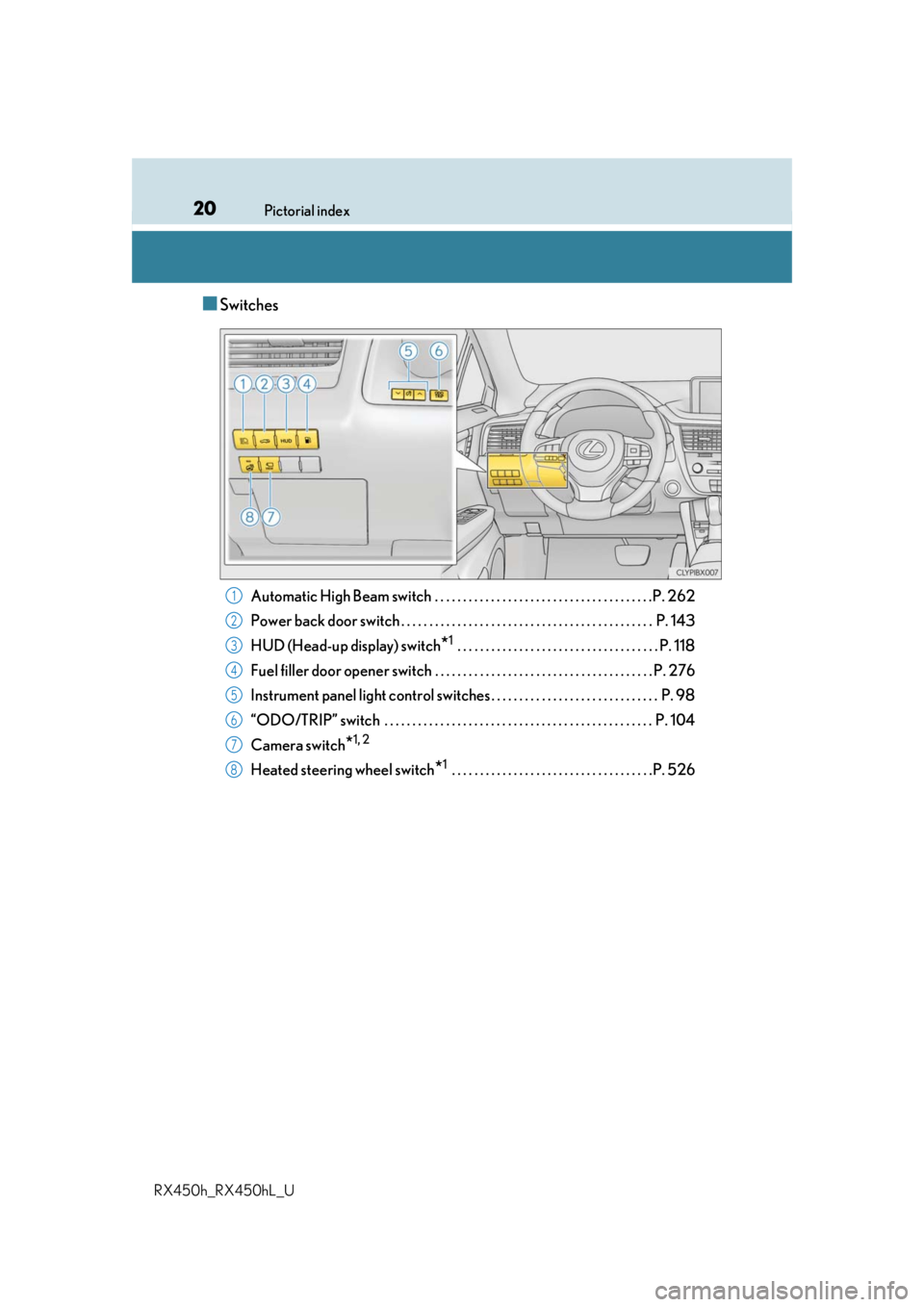
■Switches
Automatic High Beam switch . . . . . . . . . . . . . . . . . . . . . . . . . . . . . . . . . . . . . . .P. 262
Power back door switch . . . . . . . . . . . . . . . . . . . . . . . . . . . . . . . . . . . . . . . . . . . . . P. 143
HUD (Head-up display) switch
*1 . . . . . . . . . . . . . . . . . . . . . . . . . . . . . . . . . . . . P. 118
Fuel filler door opener switch . . . . . . . . . . . . . . . . . . . . . . . . . . . . . . . . . . . . . . . P. 276
Instrument panel light control swit ches . . . . . . . . . . . . . . . . . . . . . . . . . . . . . . P. 98
“ODO/TRIP” switch . . . . . . . . . . . . . . . . . . . . . . . . . . . . . . . . . . . . . . . . . . . . . . . . P. 104
Camera switch
*1, 2
Heated steering wheel switch*1 . . . . . . . . . . . . . . . . . . . . . . . . . . . . . . . . . . . .P. 526
1
2
3
4
5
6
7
8
Page 91 of 792
912. Instrument cluster
2
Instrument cluster
RX450h_RX450hL_U
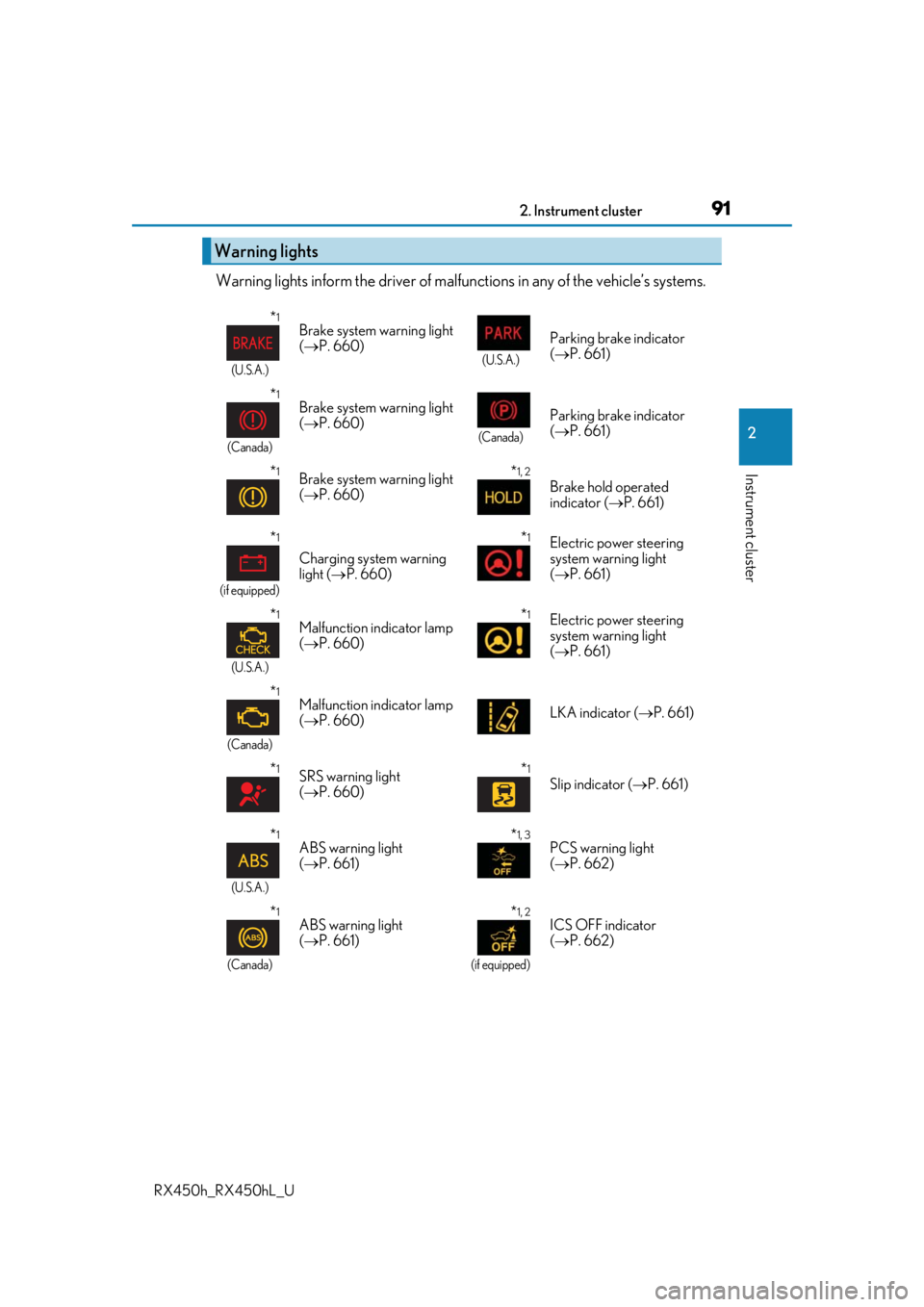
Warning lights inform the driver of malfunctions in any of the vehicle’s systems.
Warning lights
*1
(U.S.A.)
Brake system warning light
( P. 660)
(U.S.A.)
Parking brake indicator
( P. 661)
*1
(Canada)
Brake system warning light
( P. 660)
(Canada)
Parking brake indicator
( P. 661)
*1Brake system warning light
( P. 660)*1, 2
Brake hold operated
indicator ( P. 661)
*1
(if equipped)
Charging system warning
light ( P. 660)
*1Electric power steering
system warning light
( P. 661)
*1
(U.S.A.)
Malfunction indicator lamp
( P. 660)*1Electric power steering
system warning light
( P. 661)
*1
(Canada)
Malfunction indicator lamp
( P. 660) LKA indicator (
P. 661)
*1SRS warning light
( P. 660)*1
Slip indicator ( P. 661)
*1
(U.S.A.)
ABS warning light
( P. 661)*1, 3PCS warning light
( P. 662)
*1
(Canada)
ABS warning light
( P. 661)*1, 2
(if equipped)
ICS OFF indicator
( P. 662)
Page 116 of 792
1162. Instrument cluster
RX450h_RX450hL_U
Displays suggestions to the driver in the following situations. To select a response
to a displayed suggestion, use the meter control switches.
The suggestion function can be turned on/off. (Customizable features: P. 737)
■Suggestion to enable the power back door
If the power back door system is disabled (setting on set to off) and the
power back door switch on the instru ment panel is operated, a suggestion
message will be displayed asking if yo u wish to enable the power back door
system. To enable the power back door system, select “Yes”.
After enabling the power back door syst em, press the power back door switch
again to open or close the power back door.
■Suggestion to turn off the headlights
If the headlights are left on for a certai n amount of time after the power switch
has been turned off, a su ggestion message will be displayed asking if you wish
to turn the headlights off. To turn the headlights off, select “Yes”.
If a front door is opened after the power switch is turned off, this suggestion mes-
sage will not be displayed.
■Background color of the indicator/shift posi tion display area (except F SPORT models)
The background color of the indicator/shift position display area is changed according to
the driving mode as follows ( P. 379):
●Eco drive mode: Blue
●Sport mode: Red
■G-force display (if equipped)
●The G-force values may not be zero even when the vehicle is parked, such as when it is
parked on an incline.
●Depending on the vehicle usage conditions, the brake fluid pressure display may not
reach its maximum reading even though the brake pedal is fully depressed.
●If a 12-volt battery terminal is disconnect ed and reconnected, the steering amount dis-
play may be disabled temporarily. After driv ing the vehicle for a while, the display will
be enabled.
■Suspension of the settings display
●Some settings cannot be changed while driv ing. When changing settings, park the
vehicle in a safe place.
●If a warning message is displa yed, operation of the settings display will be suspended.
Suggestion function
Page 131 of 792
131
3
Operation of
each component
RX450h_RX450hL_U
3-1. Key information
Keys .................................................. 132
3-2. Opening, closing and locking the doors
Side doors ...................................... 136
Power back door .........................142
Smart access system with push-button start ...................... 158
3-3. Adjusting the seats Front seats.......................................167
Rear seats....................................... 168
Driving position memory ...........181
Head restraints ............................ 186
3-4. Adjusting the steering wheel and mirrors
Steering wheel ............................. 189
Inside rear view mirror ............... 191
Outside rear view mirrors....... 193
3-5. Opening, closing the windows and moon roof
Power windows ........................... 196
Moon roof .....................................200
Panoramic moon roof .............. 204
Page 181 of 792
1813-3. Adjusting the seats
3
Operation of each component
RX450h_RX450hL_U
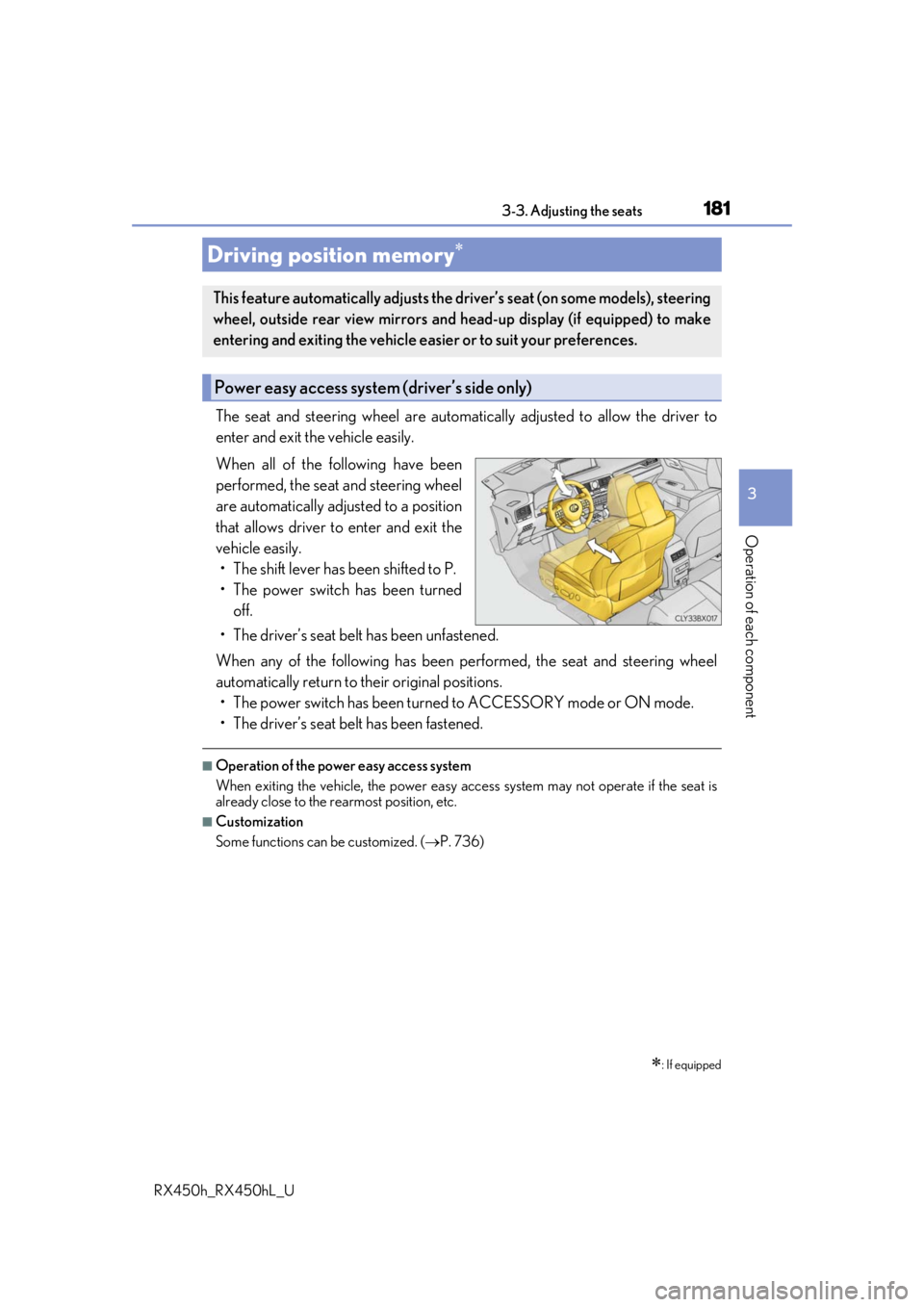
The seat and steering wheel are automatically adjusted to allow the driver to
enter and exit the vehicle easily.
When all of the following have been
performed, the seat and steering wheel
are automatically adjusted to a position
that allows driver to enter and exit the
vehicle easily. • The shift lever has been shifted to P.
• The power switch has been turned off.
• The driver’s seat belt has been unfastened.
When any of the following has been performed, the seat and steering wheel
automatically return to their original positions. • The power switch has been turned to ACCESSORY mode or ON mode.
• The driver’s seat belt has been fastened.
■Operation of the power easy access system
When exiting the vehicle, the power easy ac cess system may not operate if the seat is
already close to the rearmost position, etc.
■Customization
Some functions can be customized. ( P. 736)
Driving position memory
: If equipped
This feature automatically adjusts the driver’s seat (on some models), steering
wheel, outside rear view mirrors and head-up display (if equipped) to make
entering and exiting the vehicle easi er or to suit your preferences.
Power easy access system (driver’s side only)
Page 182 of 792
1823-3. Adjusting the seats
RX450h_RX450hL_U
Your preferred driving position (the positi on of the driver’s seat, steering wheel,
outside rear view mirrors and head-up display
*) can be recorded and recalled
by pressing a button.
Three different driving positions can be recorded into memory.
*: If equipped
■Recording procedure
Check that the shift lever is in P.
Turn the power switch to ON mode.
Adjust the driver’s seat, steering wh eel, outside rear view mirrors and
head-up display (if equipped) to the desired positions.
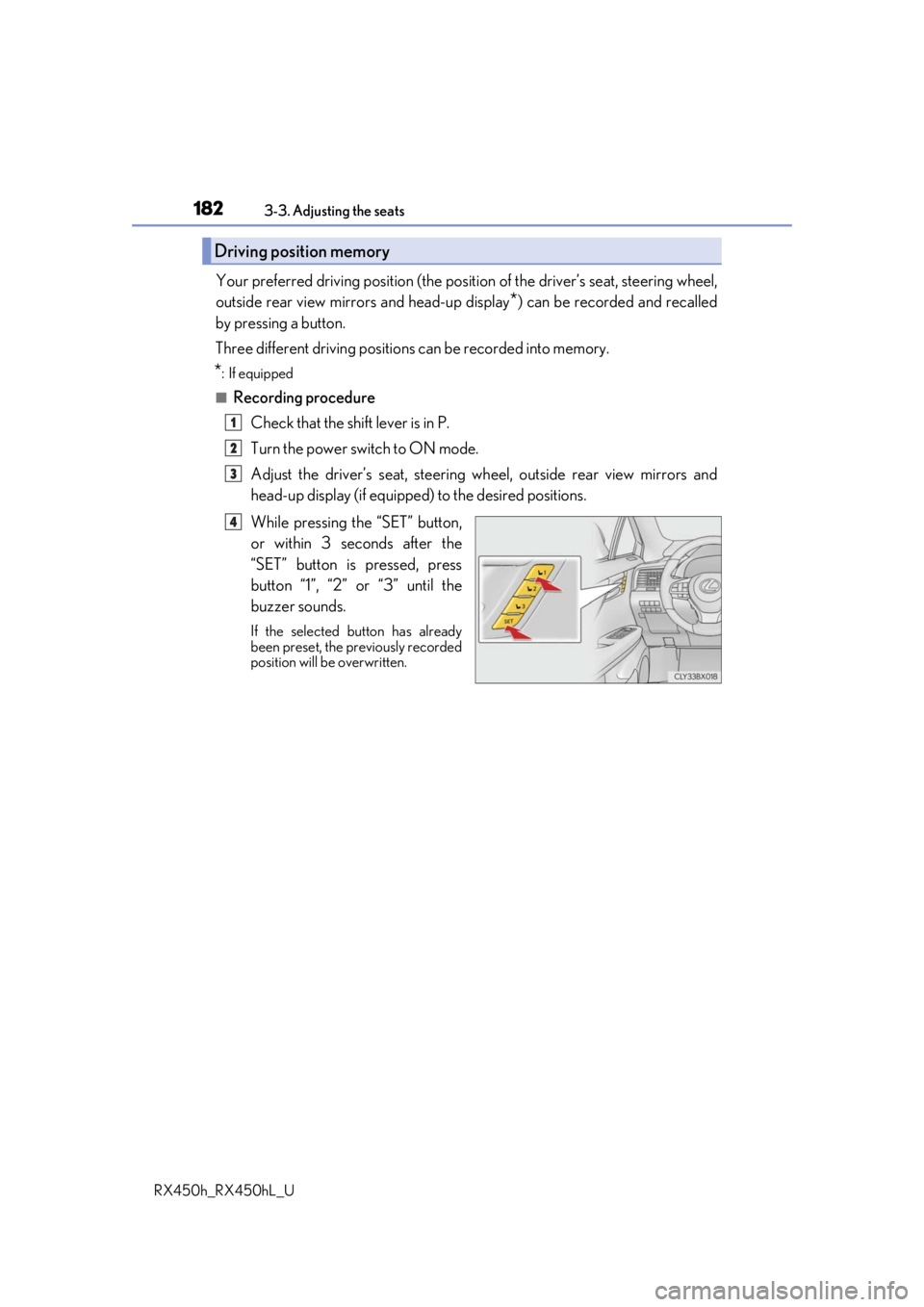
While pressing the “SET” button,
or within 3 seconds after the
“SET” button is pressed, press
button “1”, “2” or “3” until the
buzzer sounds.
If the selected button has already
been preset, the previously recorded
position will be overwritten.
Driving position memory
1
2
3
4
Page 183 of 792
1833-3. Adjusting the seats
3
Operation of each component
RX450h_RX450hL_U
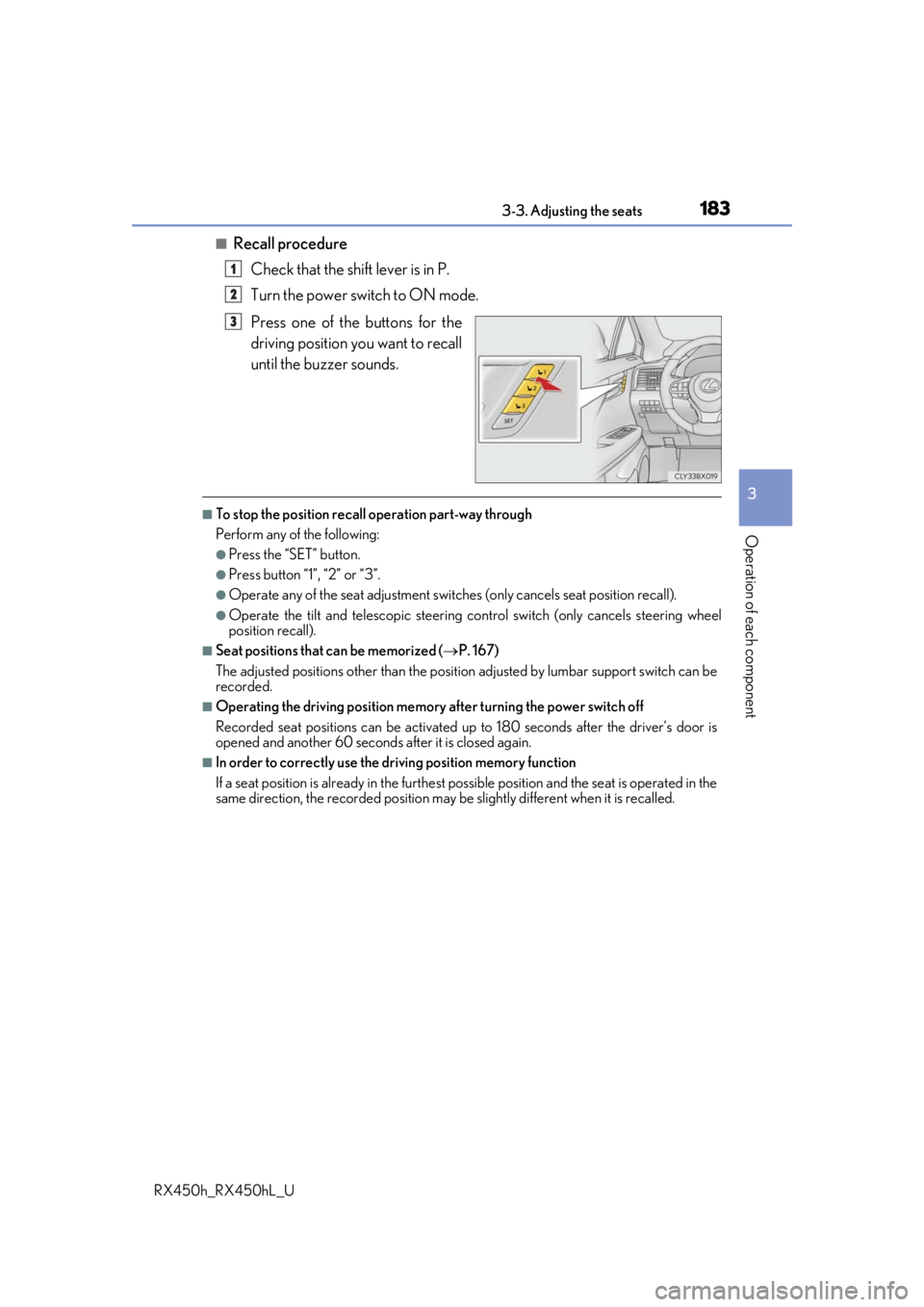
■Recall procedureCheck that the shift lever is in P.
Turn the power switch to ON mode.
Press one of the buttons for the
driving position you want to recall
until the buzzer sounds.
■To stop the position recall operation part-way through
Perform any of the following:
●Press the “SET” button.
●Press button “1”, “2” or “3”.
●Operate any of the seat adjustment switches (only cancels seat position recall).
●Operate the tilt and telescopic steering control switch (only cancels steering wheel
position recall).
■Seat positions that can be memorized ( P. 167)
The adjusted positions other than the position adjusted by lumbar support switch can be
recorded.
■Operating the driving position memory after turning the power switch off
Recorded seat positions can be activated up to 180 seconds after the driver’s door is
opened and another 60 seconds after it is closed again.
■In order to correctly use the driving position memory function
If a seat position is already in the furthest po ssible position and the seat is operated in the
same direction, the recorded position may be slightly different when it is recalled.
1
2
3
Page 184 of 792
1843-3. Adjusting the seats
RX450h_RX450hL_U
Each electronic key can be registered to recall your preferred driving position.
■Registering procedure
Record your driving position to button “1”, “2” or “3” before performing the
following:
Carry only the key you want to regist er, and then close the driver’s door.
If 2 or more keys are in the vehicle, the driving position cannot be recorded
properly.
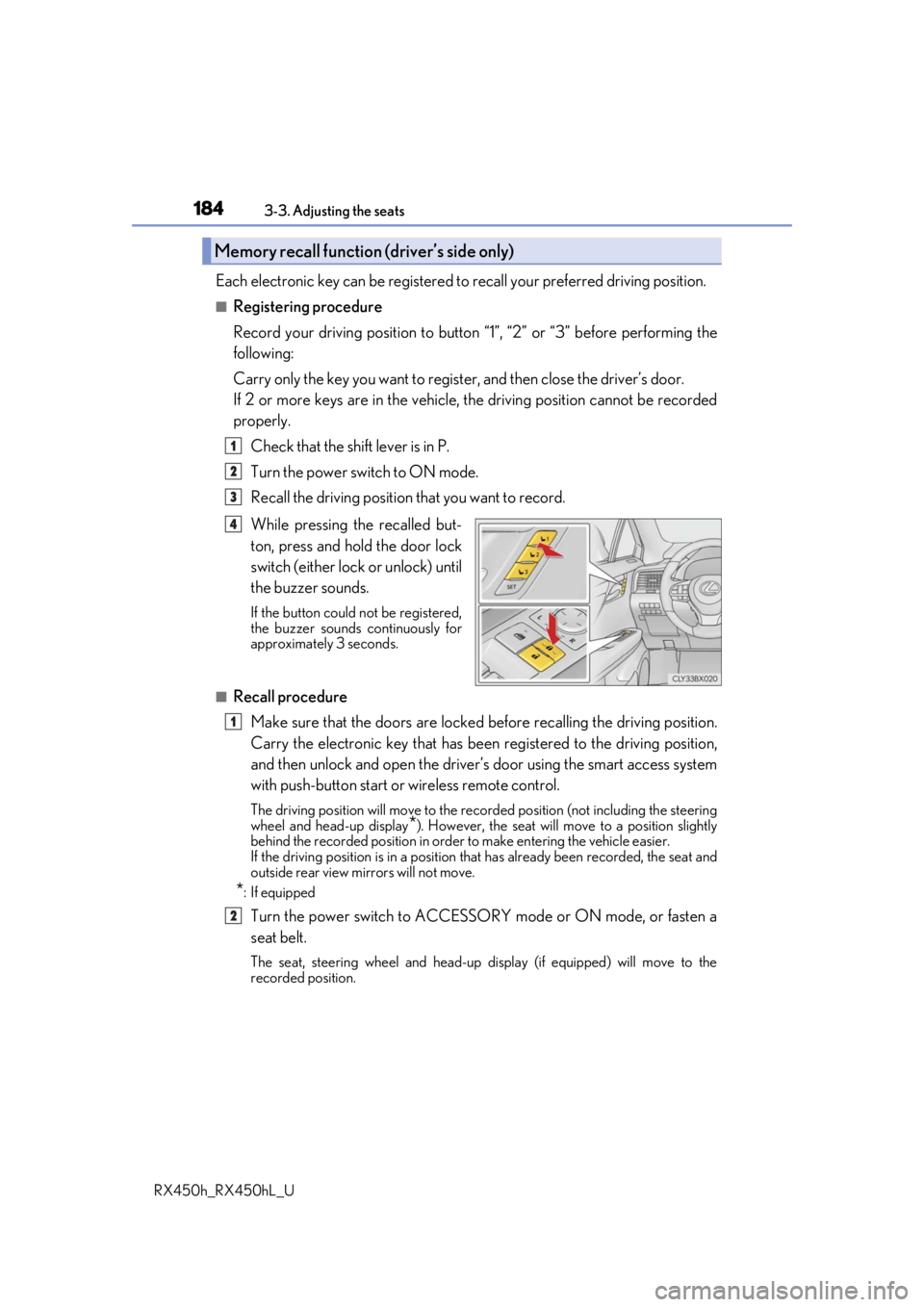
Check that the shift lever is in P.
Turn the power switch to ON mode.
Recall the driving position that you want to record.
While pressing the recalled but-
ton, press and hold the door lock
switch (either lock or unlock) until
the buzzer sounds.
If the button could not be registered,
the buzzer sounds continuously for
approximately 3 seconds.
■Recall procedureMake sure that the doors are locked before recalling the driving position.
Carry the electronic key that has been registered to the driving position,
and then unlock and open the driver’s door using the smart access system
with push-button start or wireless remote control.
The driving position will move to the recorded position (not including the steering
wheel and head-up display
*). However, the seat will move to a position slightly
behind the recorded position in order to make entering the vehicle easier.
If the driving position is in a position th at has already been recorded, the seat and
outside rear view mirrors will not move.
*: If equipped
Turn the power switch to ACCESSORY mode or ON mode, or fasten a
seat belt.
The seat, steering wheel and head-up display (if equipped) will move to the
recorded position.
Memory recall function (driver’s side only)
1
2
3
4
1
2