phone LEXUS RX450H 2020 User Guide
[x] Cancel search | Manufacturer: LEXUS, Model Year: 2020, Model line: RX450H, Model: LEXUS RX450H 2020Pages: 777, PDF Size: 13.14 MB
Page 407 of 777
406
RX350/RX350L_U5-2. Setup
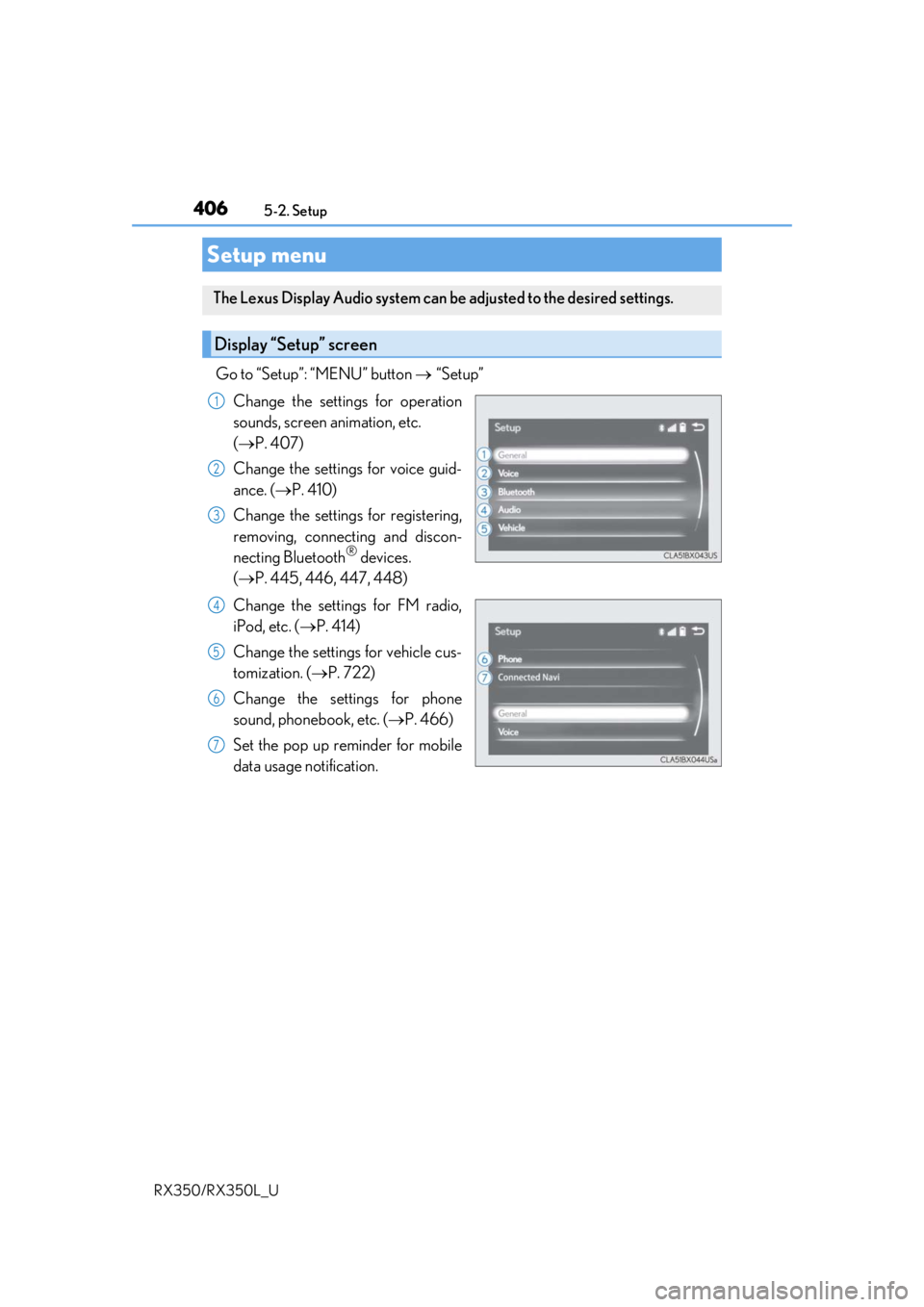
Go to “Setup”: “MENU” button
“Setup”
Change the settings for operation
sounds, screen animation, etc.
( P. 407)
Change the settings for voice guid-
ance. ( P. 410)
Change the settings for registering,
removing, connecting and discon-
necting Bluetooth
® devices.
( P. 445, 446, 447, 448)
Change the settings for FM radio,
iPod, etc. ( P. 414)
Change the settings for vehicle cus-
tomization. ( P. 722)
Change the settings for phone
sound, phonebook, etc. ( P. 466)
Set the pop up reminder for mobile
data usage notification.
Setup menu
The Lexus Display Audio system can be adjusted to the desired settings.
Display “Setup” screen
1
2
3
4
5
6
7
Page 408 of 777
4075-2. Setup
5
Lexus Display Audio system
RX350/RX350L_U
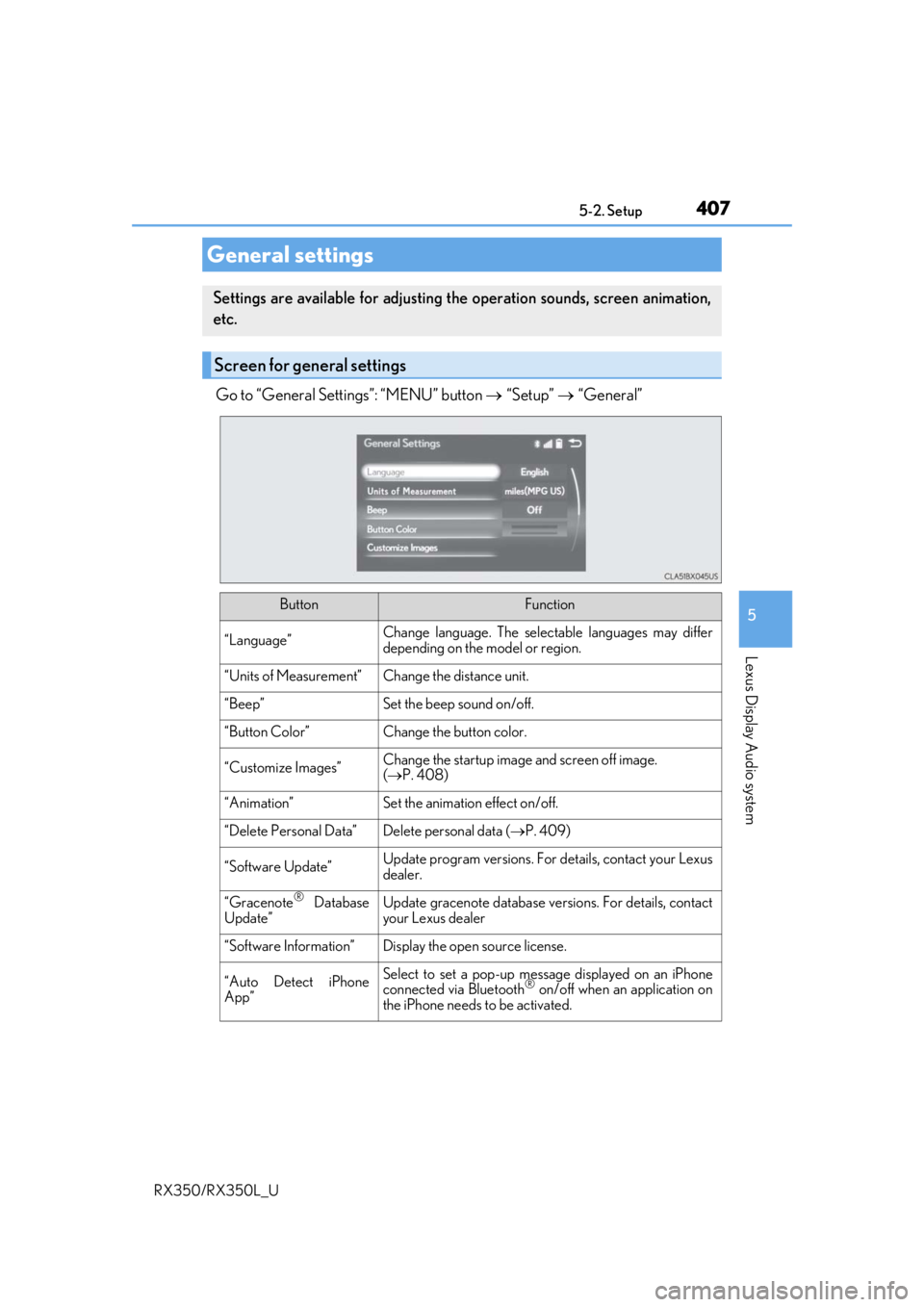
Go to “General Settings”: “MENU” button “Setup” “General”
General settings
Settings are available for adjusting th e operation sounds, screen animation,
etc.
Screen for general settings
ButtonFunction
“Language”Change language. The select able languages may differ
depending on the model or region.
“Units of Measurement”Change the distance unit.
“Beep”Set the beep sound on/off.
“Button Color”Change the button color.
“Customize Images”Change the startup image and screen off image.
( P. 408)
“Animation”Set the animation effect on/off.
“Delete Personal Data”Delete personal data ( P. 409)
“Software Update”Update program versions. For details, contact your Lexus
dealer.
“Gracenote® Database
Update”Update gracenote database versions. For details, contact
your Lexus dealer
“Software Information”Display the open source license.
“Auto Detect iPhone
App”Select to set a pop-up message displayed on an iPhone
connected via Bluetooth® on/off when an application on
the iPhone needs to be activated.
Page 410 of 777
4095-2. Setup
5
Lexus Display Audio system
RX350/RX350L_U
Go to “Delete Personal Data”: “MENU” button “Setup” “General”
“Delete Personal Data”
Select “Delete”.
Check carefully beforeha nd, as data cannot be retrieved once deleted.
The following personal data will be dele ted or changed to its default settings.
• Phonebook data
• Call history data
•Favorite data
•Bluetooth
® devices data
• Phone sound settings
• Detailed Bluetooth
® settings
• Audio/video setting
• Customized image data
•FM info setting
• iPod tagging information
• Software update history
• Software update detail information
• Phone display setting
• Contact/call history setting
• Messaging setting
• Traffic information map
• Weather information
• Phonebook data for voice recognition
• Music data for voice recognition
NOTICE
■To prevent damage to the USB me mory device or its terminals
P. 441
Deleting personal data
1
2
Page 444 of 777
443
5
Lexus Display Audio system
RX350/RX350L_U5-7. Connecting Bluetooth
®
Steps for using Bluetooth® devices
The following can be performed using Bluetooth® wireless communication:
■A portable audio player can be operated and listened to via the Lexus
Display Audio system
■Hands-free phone calls can be made via a cellular phone
In order to use wireless communication, register and connect a Bluetooth
®
device by performing the following procedures.
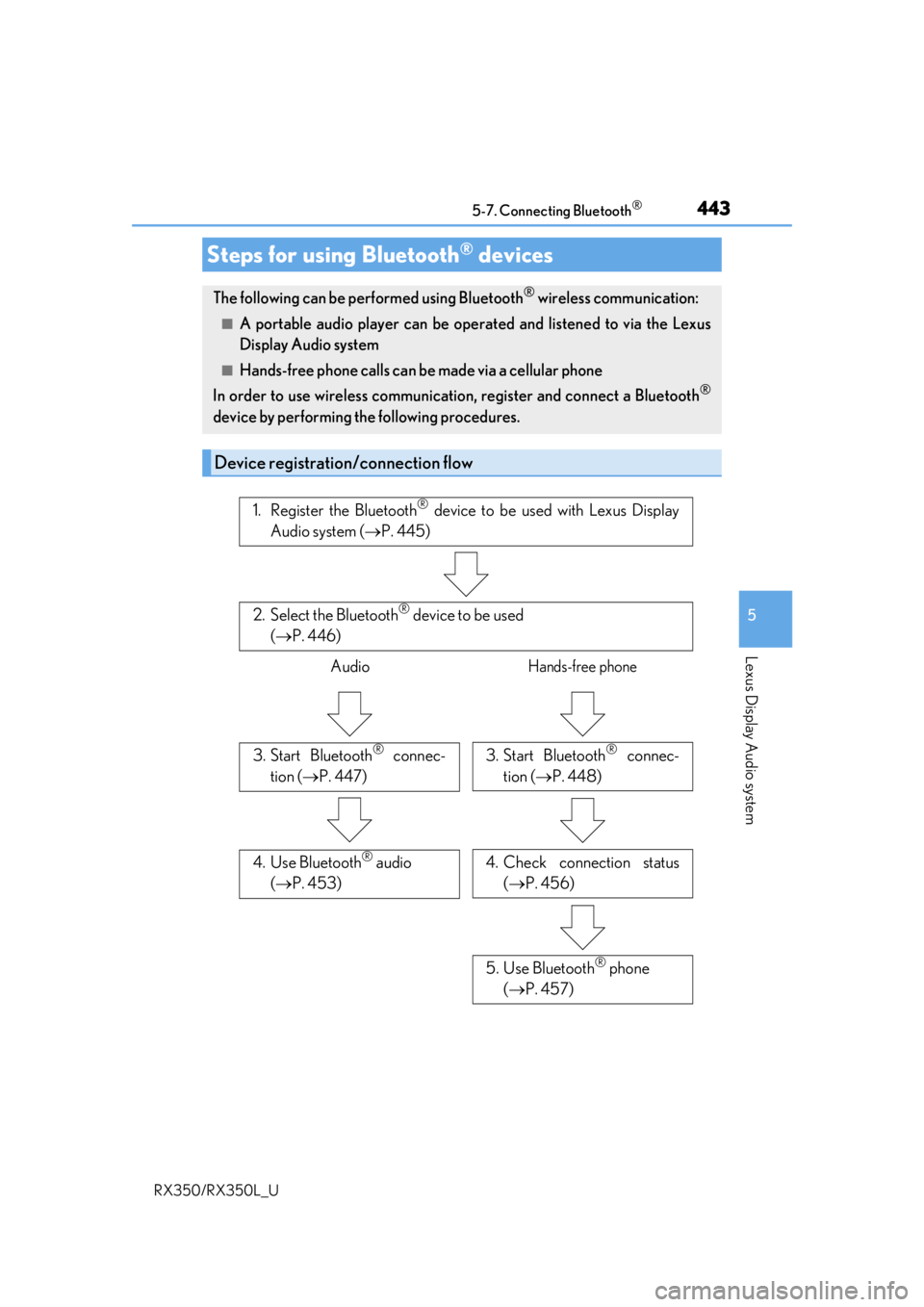
Device registration/connection flow
1. Register the Bluetooth® device to be used with Lexus Display
Audio system ( P. 445)
2. Select the Bluetooth® device to be used
( P. 446)
AudioHands-free phone
3. Start Bluetooth® connec-
tion ( P. 447)3. Start Bluetooth® connec-
tion ( P. 448)
4. Check connection status
( P. 456)4. Use Bluetooth® audio
( P. 453)
5. Use Bluetooth® phone
( P. 457)
Page 445 of 777

4445-7. Connecting Bluetooth®
RX350/RX350L_U
Go to “Bluetooth* Setup”: “MENU” button “Setup” “Bluetooth*”
*: Bluetooth is a registered tr ademark of Bluetooth SIG, Inc.
■When displaying “Bluetooth* Setup” screen from the “Bluetooth* Audio” screen
Display the “Bluetooth
* Audio” screen. ( P. 453)
Move the controller to the left and select “Connect”.
■When displaying “Bluetooth* Setup” screen from the phone top screen
Display the phone top screen. ( P. 455)
Move the controller to the left and select “Connect Phone”.
*: Bluetooth is a registered trad emark of Bluetooth SIG, Inc.
“Bluetooth* Setup” screen
1
2
1
2
Page 446 of 777
4455-7. Connecting Bluetooth®
5
Lexus Display Audio system
RX350/RX350L_U
Turn the Bluetooth® connection setting of your device set to on.
Go to “Bluetooth
* Setup”: “MENU” button “Setup” “Bluetooth*”
Move the controller to the left and then select “Add Device”.
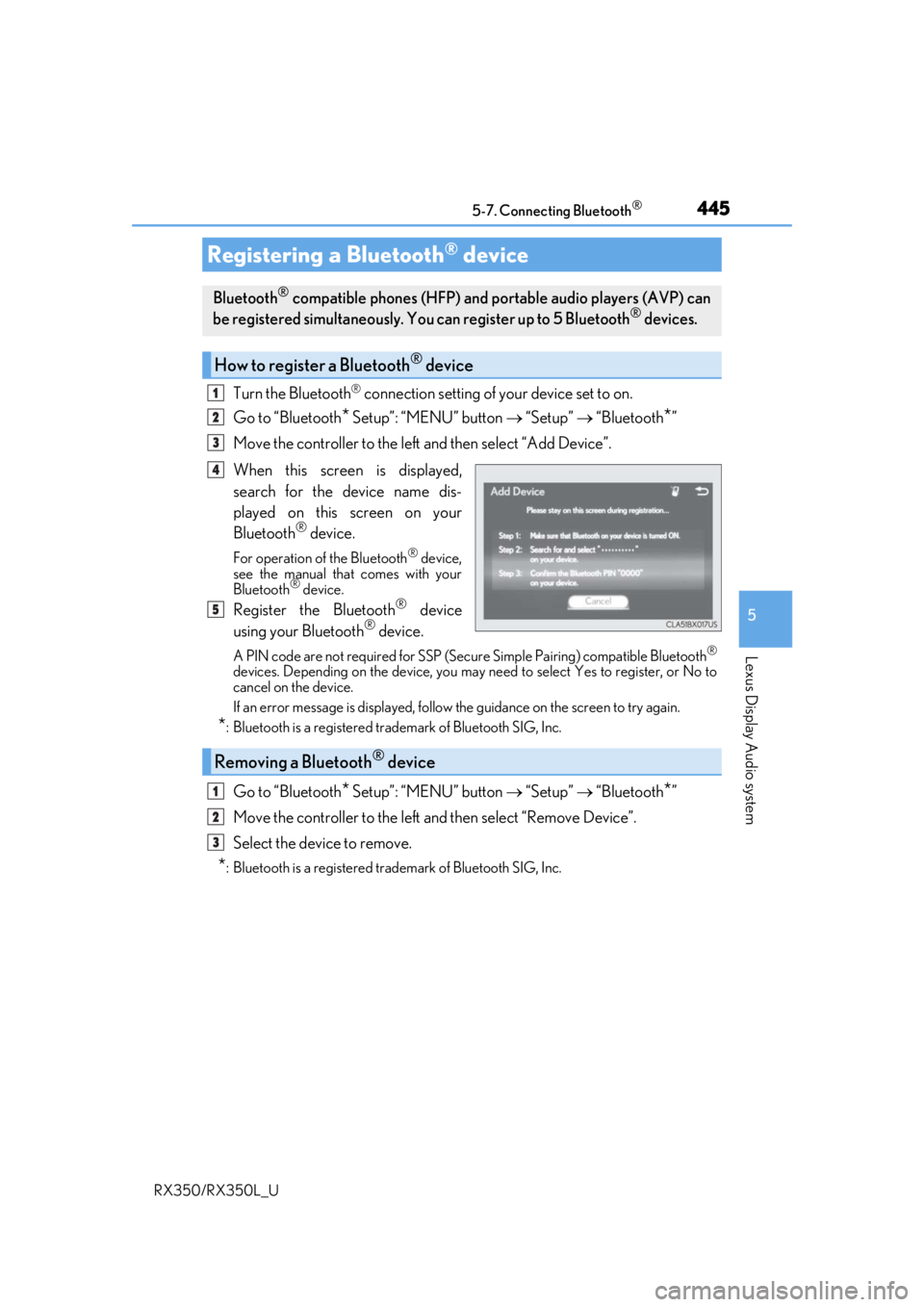
When this screen is displayed,
search for the device name dis-
played on this screen on your
Bluetooth
® device.
For operation of the Bluetooth® device,
see the manual that comes with your
Bluetooth
® device.
Register the Bluetooth® device
using your Bluetooth® device.
A PIN code are not required for SSP (Secur e Simple Pairing) compatible Bluetooth®
devices. Depending on the device, you may need to select Yes to register, or No to
cancel on the device.
If an error message is displayed, follow the guidance on the screen to try again.
*: Bluetooth is a registered trademark of Bluetooth SIG, Inc.
Go to “Bluetooth* Setup”: “MENU” button “Setup” “Bluetooth*”
Move the controller to the left and then select “Remove Device”.
Select the device to remove.
*: Bluetooth is a registered trademark of Bluetooth SIG, Inc.
Registering a Bluetooth® device
Bluetooth® compatible phones (HFP) and portable audio players (AVP) can
be registered simultaneously. You can register up to 5 Bluetooth® devices.
How to register a Bluetooth® device
1
2
3
4
5
Removing a Bluetooth® device
1
2
3
Page 447 of 777
4465-7. Connecting Bluetooth®
RX350/RX350L_U
Go to “Bluetooth*1 Setup”: “MENU” button “Setup” “Bluetooth*1”
Select the device to connect.
Select “Connect XX
*2”, “Connect as a Phone” or “Connect as an Audio
Player”.
“Connect XX
*2” means connect both the phon e and audio functions of one
device.
If the desired Bluetooth
® device is not displayed, register the device.
( P. 445)
*1: Bluetooth is a registered trademark of Bluetooth SIG, Inc.
*2: XX represents the selected device name.
Selecting a Bluetooth® device
If multiple Bluetooth® devices are registered, follow the procedure below to
select the Bluetooth® device to be used. You ma y only use one device at a
time.
How to select a Bluetooth® device
1
2
3
Page 449 of 777
4485-7. Connecting Bluetooth®
RX350/RX350L_U
When you register a phone, auto connection will be activated. It is recom-
mended to have the system set to this mode and leave the Bluetooth® phone in a
place where a good connection can be established.
When the engine switch is turned to ACCESSORY or IGNITION ON mode,
the system will search for a nearby cellular phone you have registered.
Next, the system automatically connects with the most recent phone that was
connected. The connected result is displayed.
When automatic connection priority is set to on and there is more than one reg-
istered Bluetooth
® phone available, the system will automatically connect to the
Bluetooth® phone with the highest priority. ( P. 450)
When auto connection has failed or “Bluetooth
*1 Power” is turned off, you must
connect the Bluetooth® device manually.
Go to “Bluetooth
*1 Setup”: “MENU” button “Setup” “Bluetooth*1”
Select the device to connect.
Select “Connect XX
*2”, “Connect as a Phone” or “Connect as an Audio
Player”.
If the desired Bluetooth
® device is not displayed, register the device.
( P. 445)
*1: Bluetooth is a registered trademark of Bluetooth SIG, Inc.
*2: XX represents the selected device name.
■Reconnecting a Bluetooth® phone
If the system cannot connect due to poor signal strength with the engine switch in
ACCESSORY or IGNITION ON mode, the syst em will automatically attempt to recon-
nect.
■Connecting a phone while Bluetooth® audio is playing
●Bluetooth® audio will stop temporarily.
●It may take time to connect.
Connecting a Bluetooth® phone
There are two connecting methods available: automatic and manual.
Auto connection
Manual connection
1
2
3
Page 450 of 777
4495-7. Connecting Bluetooth®
5
Lexus Display Audio system
RX350/RX350L_U
Go to “Bluetooth* Setup”: “MENU” button “Setup” “Bluetooth*”
Select the desired device and then select “Device Info”.
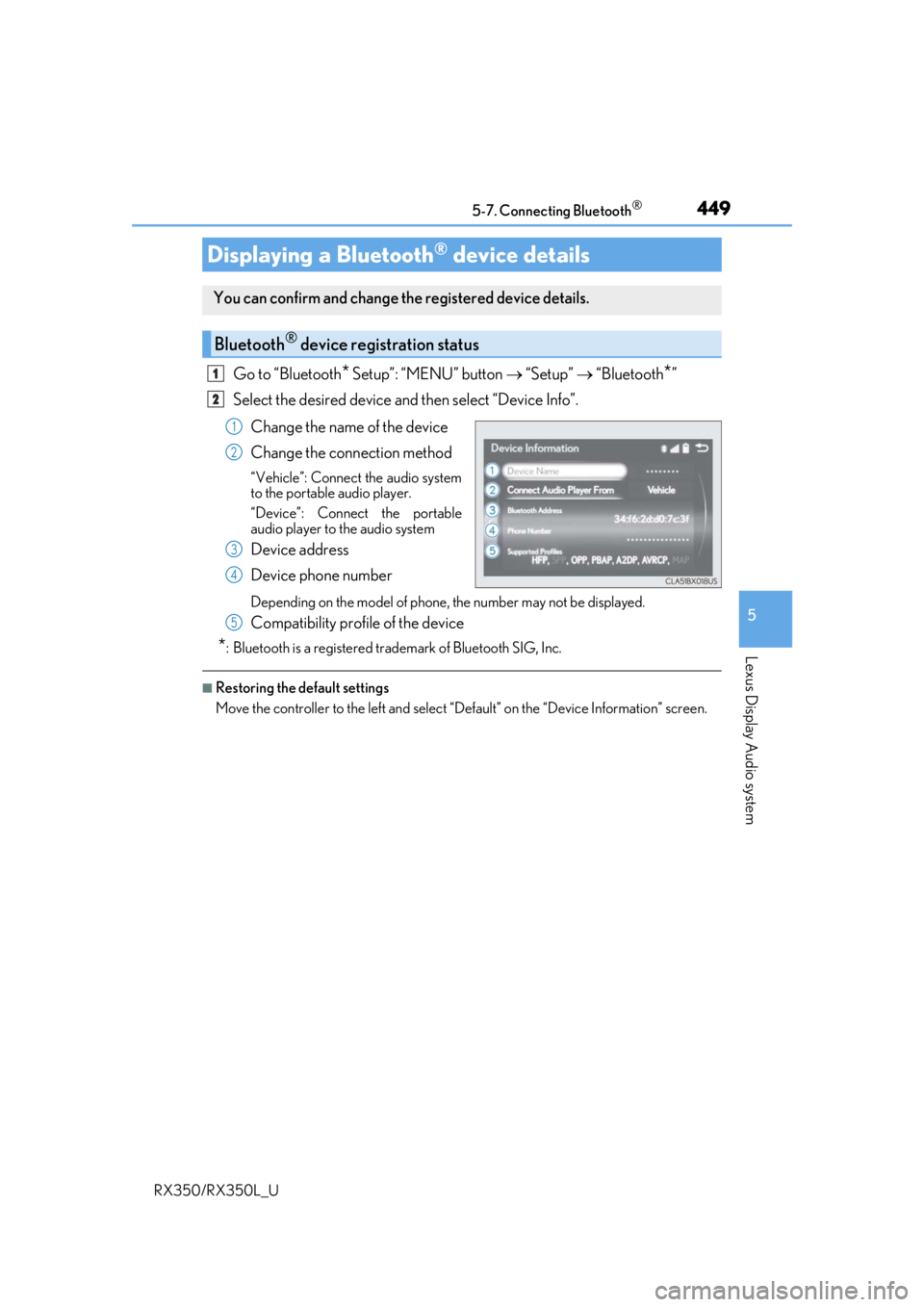
Change the name of the device
Change the connection method
“Vehicle”: Connect the audio system
to the portable audio player.
“Device”: Connect the portable
audio player to the audio system
Device address
Device phone number
Depending on the model of phone, the number may not be displayed.
Compatibility profile of the device
*: Bluetooth is a registered trademark of Bluetooth SIG, Inc.
■Restoring the default settings
Move the controller to the left and select “D efault” on the “Device Information” screen.
Displaying a Bluetooth® device details
You can confirm and change the registered device details.
Bluetooth® device registration status
1
2
1
2
3
4
5
Page 451 of 777
4505-7. Connecting Bluetooth®
RX350/RX350L_U
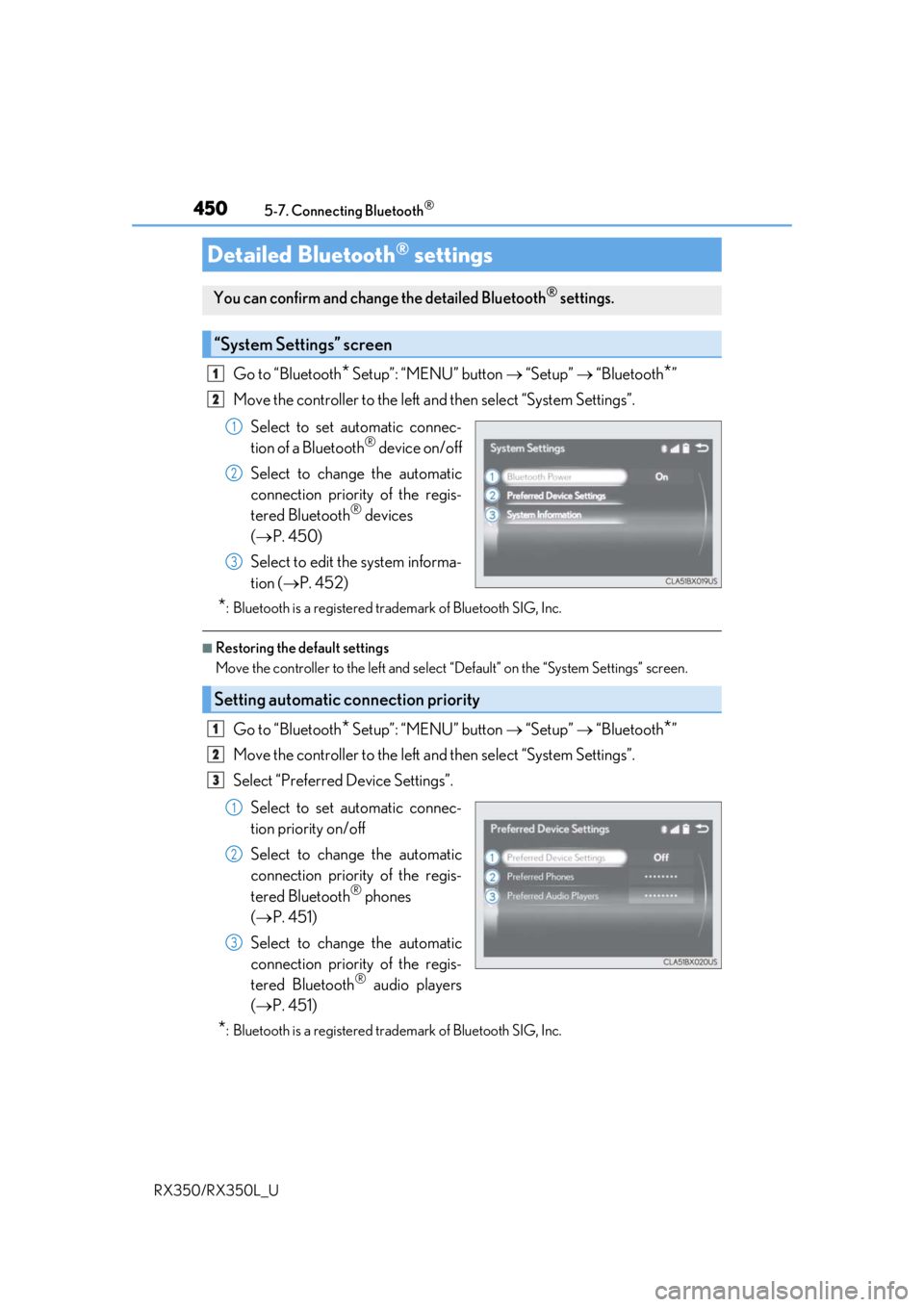
Go to “Bluetooth* Setup”: “MENU” button “Setup” “Bluetooth*”
Move the controller to the left an d then select “System Settings”.
Select to set automatic connec-
tion of a Bluetooth
® device on/off
Select to change the automatic
connection priority of the regis-
tered Bluetooth
® devices
( P. 450)
Select to edit the system informa-
tion ( P. 452)
*: Bluetooth is a registered trademark of Bluetooth SIG, Inc.
■Restoring the default settings
Move the controller to the left and select “Default” on the “System Settings” screen.
Go to “Bluetooth* Setup”: “MENU” button “Setup” “Bluetooth*”
Move the controller to the left an d then select “System Settings”.
Select “Preferred Device Settings”.
Select to set automatic connec-
tion priority on/off
Select to change the automatic
connection priority of the regis-
tered Bluetooth
® phones
( P. 451)
Select to change the automatic
connection priority of the regis-
tered Bluetooth
® audio players
( P. 451)
*: Bluetooth is a registered trademark of Bluetooth SIG, Inc.
Detailed Bluetooth® settings
You can confirm and change the detailed Bluetooth® settings.
“System Settings” screen
1
2
1
2
3
Setting automatic connection priority
1
2
3
1
2
3