remove LEXUS RX450H 2020 User Guide
[x] Cancel search | Manufacturer: LEXUS, Model Year: 2020, Model line: RX450H, Model: LEXUS RX450H 2020Pages: 777, PDF Size: 13.14 MB
Page 72 of 777
711-2. Child safety
1
For safety and security
RX350/RX350L_U
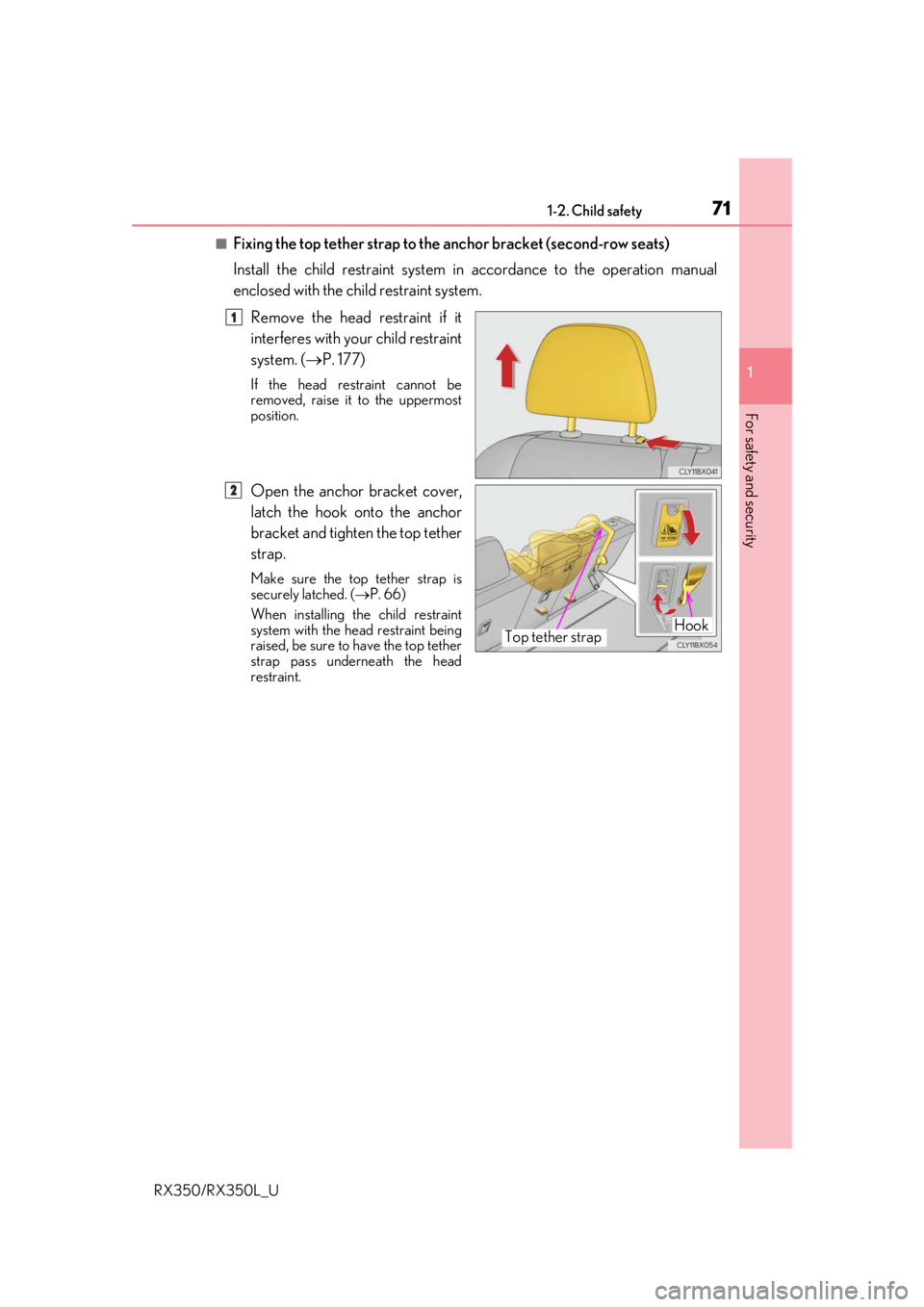
■Fixing the top tether strap to the anchor bracket (second-row seats)
Install the child restraint system in accordance to the operation manual
enclosed with the child restraint system.
Remove the head restraint if it
interferes with your child restraint
system. ( P. 177)
If the head restraint cannot be
removed, raise it to the uppermost
position.
Open the anchor bracket cover,
latch the hook onto the anchor
bracket and tighten the top tether
strap.
Make sure the top tether strap is
securely latched. ( P. 66)
When installing th e child restraint
system with the he ad restraint being
raised, be sure to have the top tether
strap pass underneath the head
restraint.
1
HookTop tether strap
2
Page 73 of 777
721-2. Child safety
RX350/RX350L_U
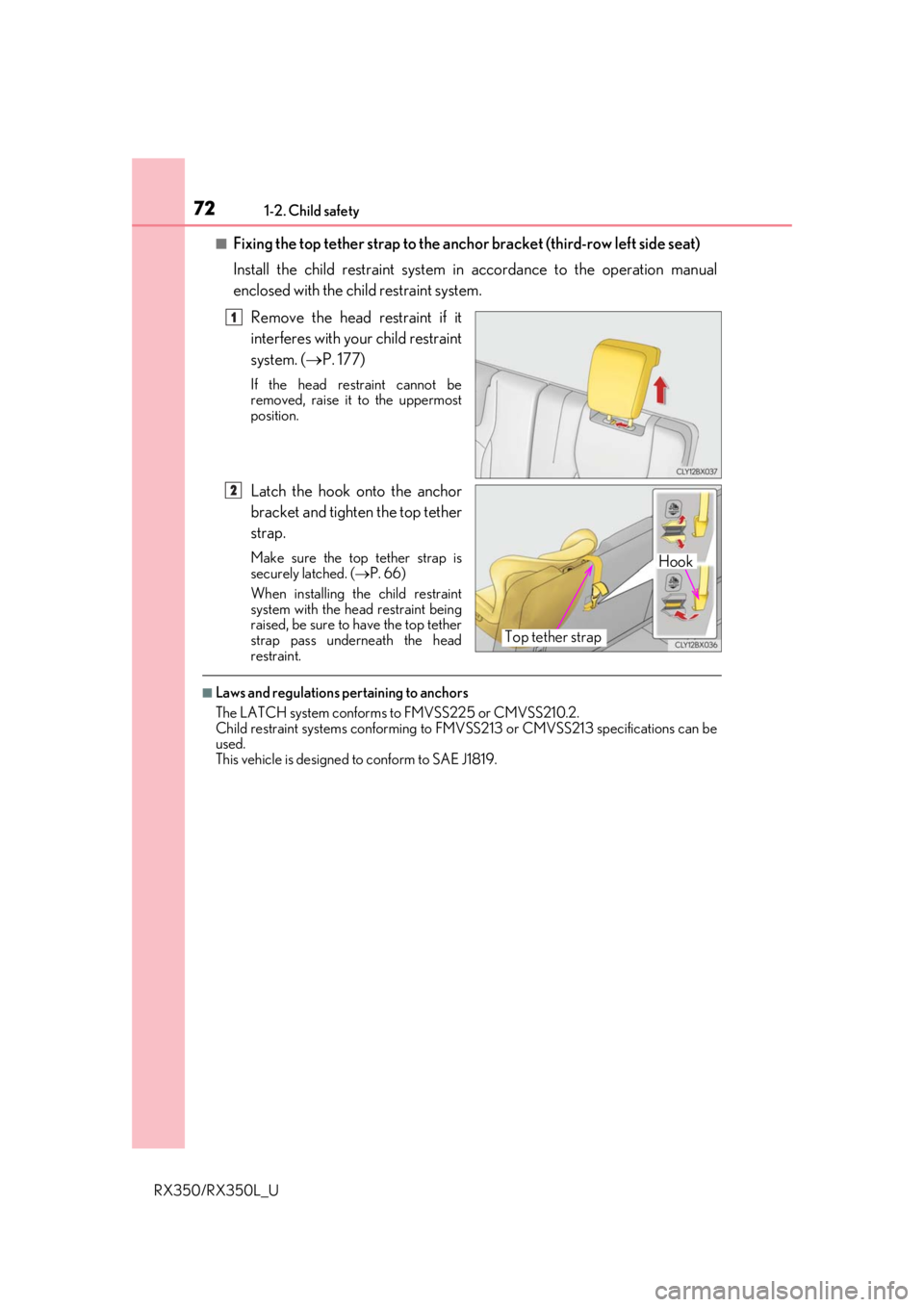
■Fixing the top tether strap to the anchor bracket (third-row left side seat)
Install the child restraint system in accordance to the operation manual
enclosed with the child restraint system.
Remove the head restraint if it
interferes with your child restraint
system. ( P. 177)
If the head restraint cannot be
removed, raise it to the uppermost
position.
Latch the hook onto the anchor
bracket and tighten the top tether
strap.
Make sure the top tether strap is
securely latched. ( P. 66)
When installing th e child restraint
system with the he ad restraint being
raised, be sure to have the top tether
strap pass underneath the head
restraint.
■Laws and regulations pertaining to anchors
The LATCH system conforms to FMVSS225 or CMVSS210.2.
Child restraint systems conforming to FMV SS213 or CMVSS213 specifications can be
used.
This vehicle is designed to conform to SAE J1819.
1
Hook
Top tether strap
2
Page 77 of 777
761-3. Theft deterrent system
RX350/RX350L_U
For vehicles sold in Canada
WARNING
■Certifications for the engine immobilizer system
Changes or modifications not expressly appr oved by the party responsible for compli-
ance could void the user’s authority to operate the equipment.
NOTICE
■To ensure the system operates correctly
Do not modify or remove the system. If mo dified or removed, the proper operation of
the system cannot be guaranteed.
Page 79 of 777
781-3. Theft deterrent system
RX350/RX350L_U
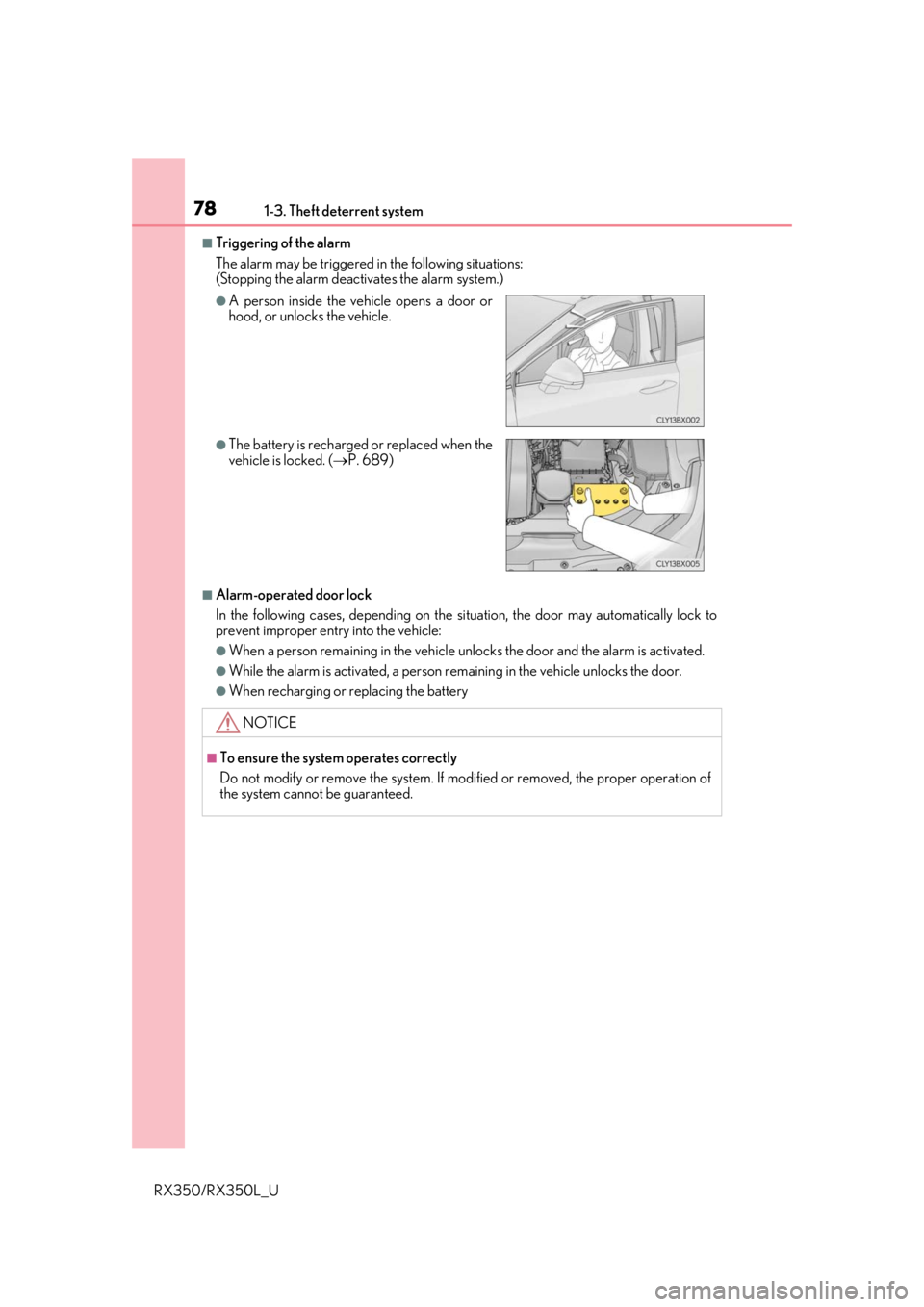
■Triggering of the alarm
The alarm may be triggered in the following situations:
(Stopping the alarm deactivates the alarm system.)
■Alarm-operated door lock
In the following cases, depending on the si tuation, the door may automatically lock to
prevent improper entry into the vehicle:
●When a person remaining in the vehicle un locks the door and the alarm is activated.
●While the alarm is activated, a person remaining in the vehicle unlocks the door.
●When recharging or replacing the battery
●A person inside the vehicle opens a door or
hood, or unlocks the vehicle.
●The battery is recharged or replaced when the
vehicle is locked. (P. 689)
NOTICE
■To ensure the system operates correctly
Do not modify or remove the system. If mo dified or removed, the proper operation of
the system cannot be guaranteed.
Page 113 of 777

1122. Instrument cluster
RX350/RX350L_U
■Head-up display
The head-up display may seem dark or hard to see when viewed through sunglasses,
especially pola rized sunglasses.
Adjust the brightness of the head-up display or remove your sunglasses.
■When the battery is disconnected
The customize settings of the head-up display will be reset.
■Display brightness
The brightness of the head-up display can be adjusted on of the multi-information
display. Also, it is automatically adju sted according to the ambient brightness.
■Enabling/disabling of the head-up display
If the head-up display is disabled, it will rema in disabled when the engine switch is turned
off then back to IGNITION ON mode.
■Automatic adjustment of the head-up display position
A desired head-up display position can be entered to memory and recalled automati-
cally by the driving position memory system. ( P. 172)
■Street name display (vehicle s with a navigation system)
Only street names which are included in the map data will be displayed.
WARNING
■Before using the head-up display
●Check that the position and brightness of the head-up display image does not inter-
fere with safe driving. Inco rrect adjustment of the image’s position or brightness may
obstruct the driver’s view and lead to an acc ident, resulting in death or serious injury.
●Do not continuously look at the head-up di splay while driving as you may fail to see
pedestrians, objects on the road, etc. ahead of the vehicle.
■Caution for changing settings of the head-up display
As the engine needs to be running while changing the settings of the head-up display,
ensure that the vehicle is parked in a place with adequate ventilation. In a closed area
such as a garage, exhaust gases including harmful carbon monoxide (CO) may collect
and enter the vehicle. This may lead to death or a serious health hazard.
Page 122 of 777
1213-1. Key information
3
Operation of each component
RX350/RX350L_U
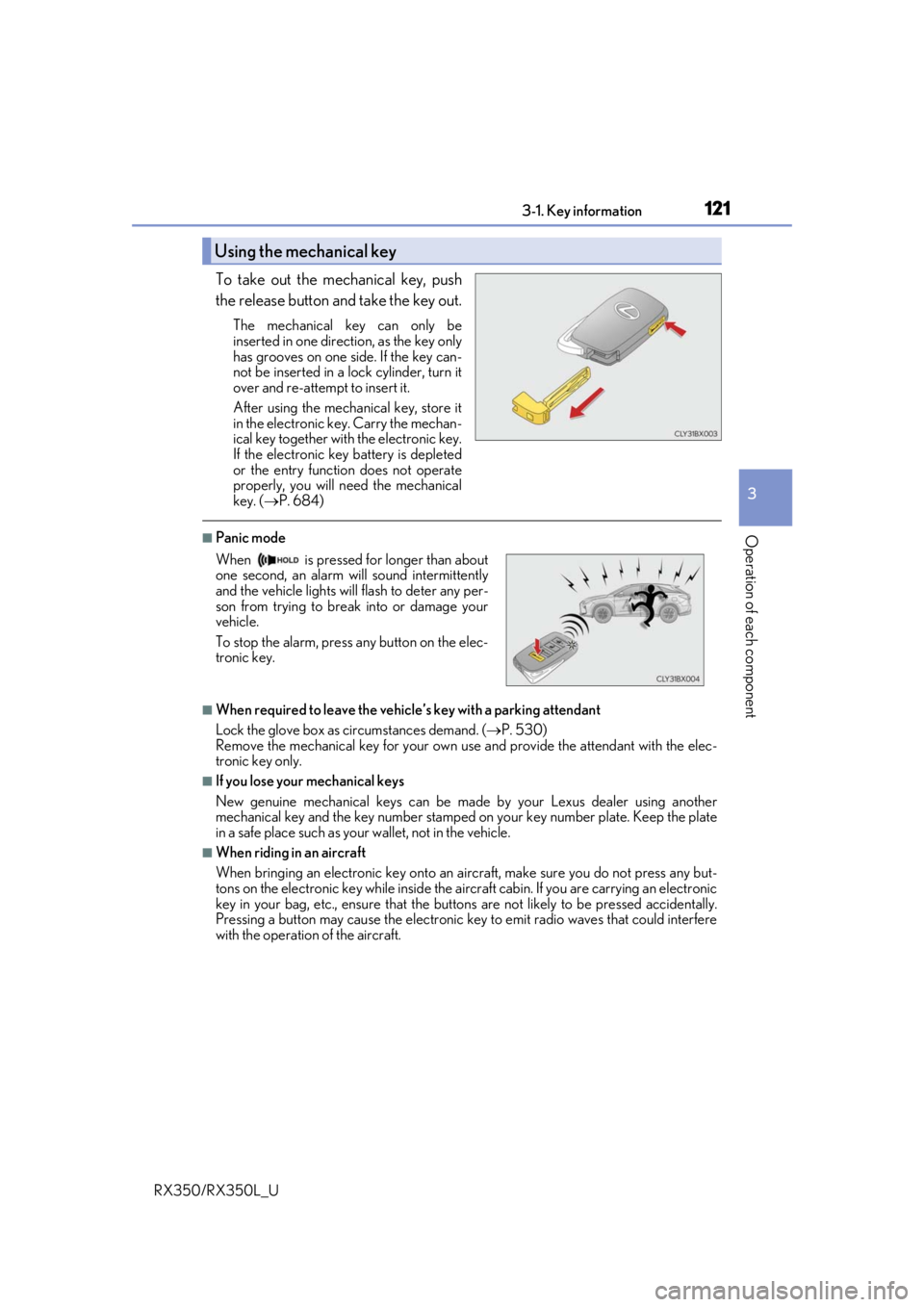
To take out the mechanical key, push
the release button and take the key out.
The mechanical key can only be
inserted in one direction, as the key only
has grooves on one side. If the key can-
not be inserted in a lock cylinder, turn it
over and re-attempt to insert it.
After using the mechanical key, store it
in the electronic key. Carry the mechan-
ical key together with the electronic key.
If the electronic key battery is depleted
or the entry function does not operate
properly, you will need the mechanical
key. ( P. 684)
■Panic mode
■When required to leave the vehicle’s key with a parking attendant
Lock the glove box as circumstances demand. ( P. 530)
Remove the mechanical key for your own use and provide the attendant with the elec-
tronic key only.
■If you lose your mechanical keys
New genuine mechanical keys can be made by your Lexus dealer using another
mechanical key and the key number stamped on your key number plate. Keep the plate
in a safe place such as your wallet, not in the vehicle.
■When riding in an aircraft
When bringing an electronic key onto an aircraft, make sure you do not press any but-
tons on the electronic key while inside the airc raft cabin. If you are carrying an electronic
key in your bag, etc., ensure that the butt ons are not likely to be pressed accidentally.
Pressing a button may cause the electronic key to emit radio waves that could interfere
with the operation of the aircraft.
Using the mechanical key
When is pressed for longer than about
one second, an alarm will sound intermittently
and the vehicle lights will flash to deter any per-
son from trying to break into or damage your
vehicle.
To stop the alarm, press any button on the elec-
tronic key.
Page 126 of 777

1253-2. Opening, closing and locking the doors
3
Operation of each component
RX350/RX350L_U
■Operation signals
Doors:
A buzzer sounds and the emergency flashers flash to indicate that the doors have been
locked/unlocked. (Locked: Once; Unlocked: Twice)
Windows and moon roof or panoramic moon roof:
A buzzer sounds.
■Security feature
If a door is not opened within approximately 60 seconds after the vehicle is unlocked, the
security feature automatically locks the vehicle again.
■When the door cannot be locked by the lock sensor on the surface of the door handle
■Door lock buzzer
If an attempt to lock the doors is made when a door is not fully closed, a buzzer sounds
continuously for 5 seconds. Fully close the d oor to stop the buzzer, and lock the vehicle
once more.
■Setting the alarm
Locking the doors will set the alarm system. ( P. 77)
■If the smart access system with push-button start or the wireless remote control does
not operate properly
●Use the mechanical key to lock and unlock the doors. ( P. 684)
●Replace the key battery with a new one if it is depleted. ( P. 623)
When the door cannot be locked even if the
lock sensor on the surface of the door handle is
touched by a finger, touch the lock sensor with
the palm.
When gloves are being worn, remove the
gloves.
Page 137 of 777

1363-2. Opening, closing and locking the doors
RX350/RX350L_U
■Luggage compartment lights
●RX350L: The luggage compartment lights turn on when the back door is opened.
●When the engine switch is turned off, the lights will go off automatically after 20 min-
utes.
■If the power back door opener is inoperative
The power back door can be unlocked from the inside.
●RX350: The luggage compartment lights turn
on when the power back door is opened with
the respective luggage compartment light
switch on.
Remove the cover.
To protect the cover, place a rag between the
flathead screwdriver and cover as shown in
the illustration.
Move the lever.
1
2
Page 140 of 777
1393-2. Opening, closing and locking the doors
3
Operation of each component
RX350/RX350L_U
■Situations in which the close & lock function may not operate properly
In the following situations, the close & lock function may not operate properly:
●If the switch on the lower part of the power back door ( P. 133) is pressed by a
hand which is holding an electronic key
●If the switch on the lower part of the power back door ( P. 133) is pressed
when the electronic key is in a bag, etc. that is placed on the ground
●If the switch on the lower part of the power back door ( P. 133) is pressed with
the electronic key not near the vehicle.
■Situations in which the touchless sensor may malfunction (vehicles with a touchless
power back door)
In the following situations, the touchless sensor may operate unintentionally.
To prevent unintentional operat ion, keep the electronic key out of the operational range
or disable the touchless sensor operation. ( P. 101)
●When a large amount of water is applied to the rear emblem, such as in heavy rain
●When the vehicle is being washed and water is applied to the rear emblem
●When dirt is wiped off the rear emblem
●If someone leans toward or against the rear emblem
●When a metal object is brought near the rear emblem
●When a vehicle cover is installed or removed near the rear emblem
■Situations in which the touchless sensor may not operate properly (vehicles with a
touchless power back door)
If the touchless sensor does not operate in the following situations, use the back door
opener switch to open the power back door. (P. 133)
●In the following situations, the sensitivity of the touchless sensor may be temporarily
reduced and the touchless sensor may not operate:
• When a large amount of water is applied to the rear emblem, such as in heavy rain
• When the vehicle is being washed and water is applied to the rear emblem
• For several seconds after dirt is wiped off the rear emblem
• When the rear emblem is covered with mud, snow, ice, etc.
• When the vehicle has been parked for a wh ile near objects that may move and con-
tact the rear emblem, such as tall grass or trees
• When an external radio wave source is near the touchless sensor
●The touchless sensor may not operate in the following situations:
• When an electronic ke y is not being carried
• When an electronic key is not within the operational range
• When an external radio wave source in terferes with the communication between
the vehicle and electronic key ( P. 148)
• When the power back door is not fully closed
• When a hand is held pa rallel to the rear emblem
*
*
: The detection settings can be changed by your Lexus dealer. ( P. 725)
■Customization
Some functions can be customized. ( P. 97, 722)
Page 142 of 777
1413-2. Opening, closing and locking the doors
3
Operation of each component
RX350/RX350L_U
WARNING
■Operating the power back door
Observe the following precautions.
Failure to do so may cause parts of the body to be caught, resulting in death or serious
injury.
●Remove any heavy loads, such as snow an d ice, from the power back door before
opening it. Failure to do so may cause the power back door to suddenly shut again
after it is opened.
●When opening or closing the power back d oor, thoroughly check to make sure the
surrounding area is safe.
●If anyone is in the vicinity, make sure they are safe and let them know that the power
back door is about to open or close.
●Use caution when opening or closing the power back door in windy weather as it may
move abruptly in strong wind.
●Do not pull on the back door spindle ( P. 144) to close the power back door, and
do not hang on the back door spindle.
Doing so may cause hands to be caught or the back door spindle to break, causing
an accident.
●If a bicycle carrier or similar heavy object is attached to the power back door, it may
suddenly shut again after being opened, causing someone’s hands, arms, head or
neck to be caught and injured. When inst alling an accessory part to the power back
door, using a genuine Lexus part is recommended.
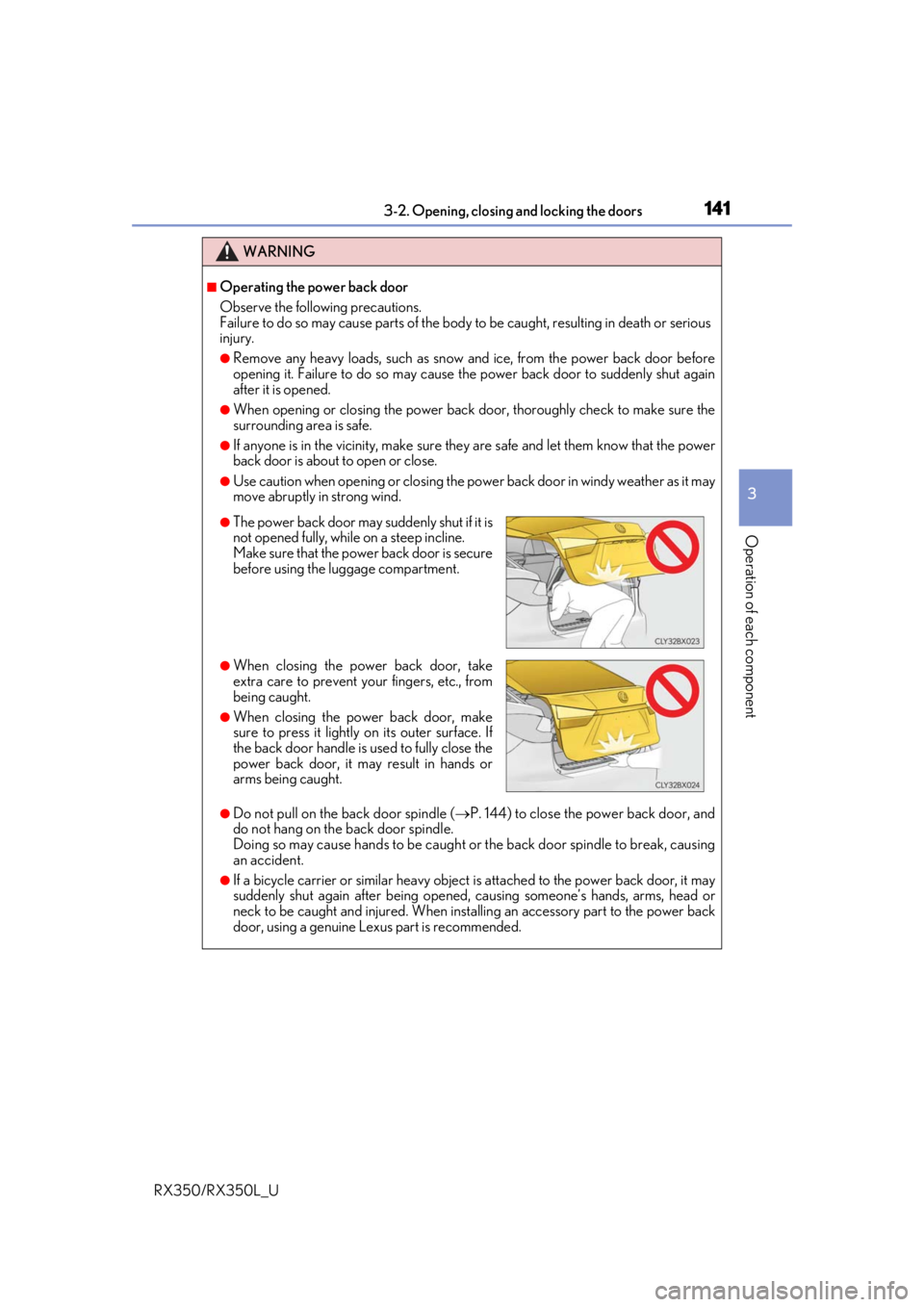
●The power back door may suddenly shut if it is
not opened fully, while on a steep incline.
Make sure that the power back door is secure
before using the luggage compartment.
●When closing the power back door, take
extra care to prevent your fingers, etc., from
being caught.
●When closing the power back door, make
sure to press it lightly on its outer surface. If
the back door handle is used to fully close the
power back door, it may result in hands or
arms being caught.