change LEXUS RX450H 2020 Owner's Manual
[x] Cancel search | Manufacturer: LEXUS, Model Year: 2020, Model line: RX450H, Model: LEXUS RX450H 2020Pages: 777, PDF Size: 13.14 MB
Page 108 of 777
1072. Instrument cluster
2
Instrument cluster
RX350/RX350L_U
WARNING
■Caution for use while driving
●When operating the multi-information display while driving, pay extra attention to the
safety of the area around the vehicle.
●Do not look continuously at the multi-information display while driving as you may fail
to see pedestrians, objects on the road, etc. ahead of the vehicle.
■The information display at low temperatures
Allow the interior of the vehicle to warm up before using the liquid crystal information
display. At extremely low temperatures, th e information display monitor may respond
slowly, and display changes may be delayed.
For example, there is a lag between the dr iver’s shifting and the new gear number
appearing on the display. This lag could ca use the driver to downshift again, causing
rapid and excessive engine braking and possibly an accident resulting in death or
injury.
■Cautions during setting up the display
As the engine needs to be running during sett ing up the display, ensure that the vehicle
is parked in a place with adequate ventilation. In a closed area such as a garage,
exhaust gases including harmful carbon mo noxide (CO) may collect and enter the
vehicle. This may lead to death or a serious health hazard.
NOTICE
■While setting up the display
To prevent battery discharge, ensure that the engine is running while setting up the dis-
play features.
Page 110 of 777
1092. Instrument cluster
2
Instrument cluster
RX350/RX350L_U
Vehicle speed display area
Displays the following items:• Vehicle speed
• Speed limit (vehicles with a na vigation system) (U.S.A. only)
Eco Driving Indicator/Tachometer ( P. 111)
Shift position display ( P. 236, 240)
HUD (Head-up display) switch ( P. 109)
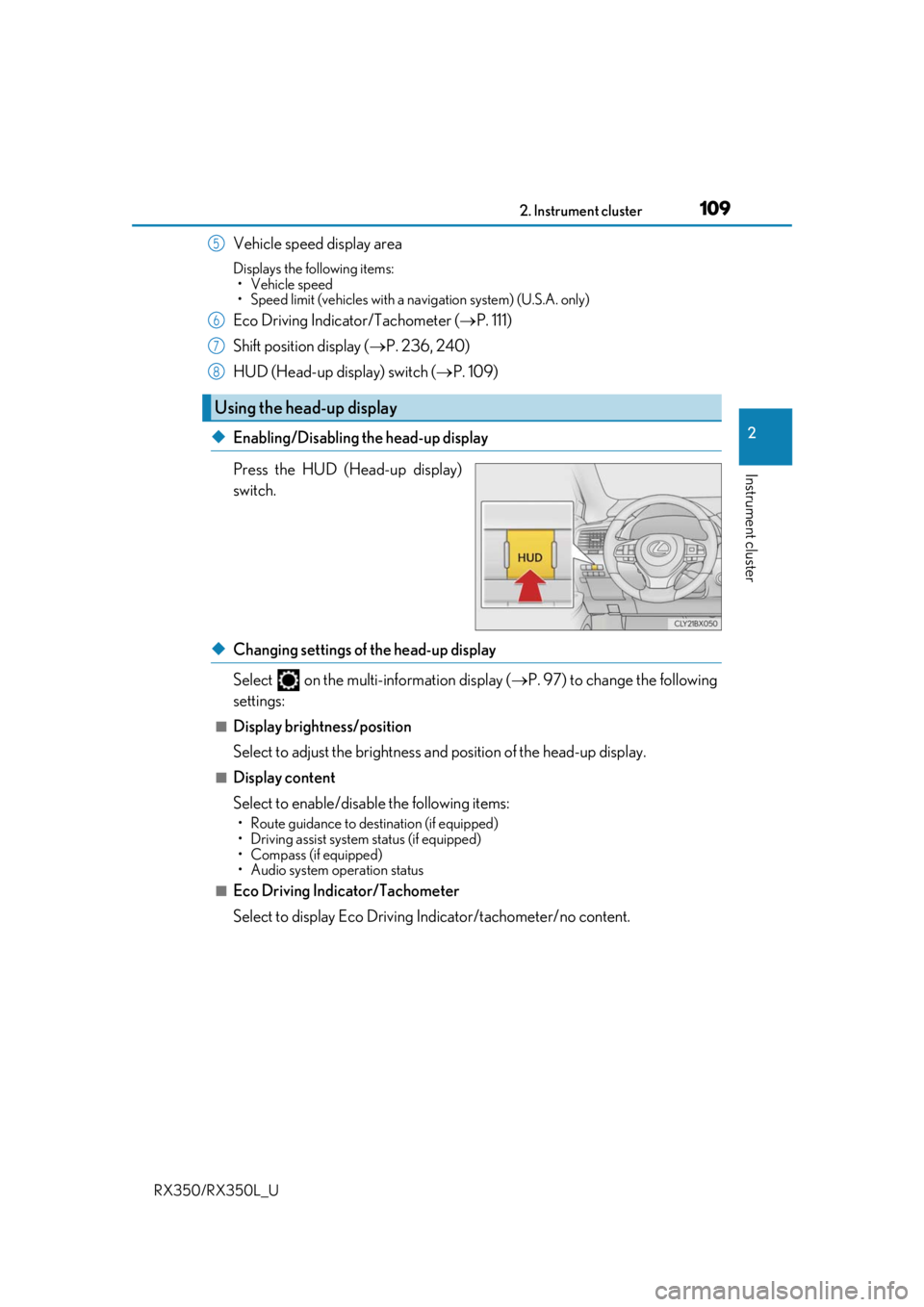
◆Enabling/Disabling the head-up display
Press the HUD (Head-up display)
switch.
◆Changing settings of the head-up display
Select on the multi-information display ( P. 97) to change the following
settings:
■Display brightness/position
Select to adjust the brightness and position of the head-up display.
■Display content
Select to enable/disable the following items:
• Route guidance to destination (if equipped)
• Driving assist system status (if equipped)
• Compass (if equipped)
• Audio system operation status
■Eco Driving Indicator/Tachometer
Select to display Eco Driving Indicator/tachometer/no content.
Using the head-up display
5
6
7
8
Page 125 of 777
124
RX350/RX350L_U3-2. Opening, closing and locking the doors
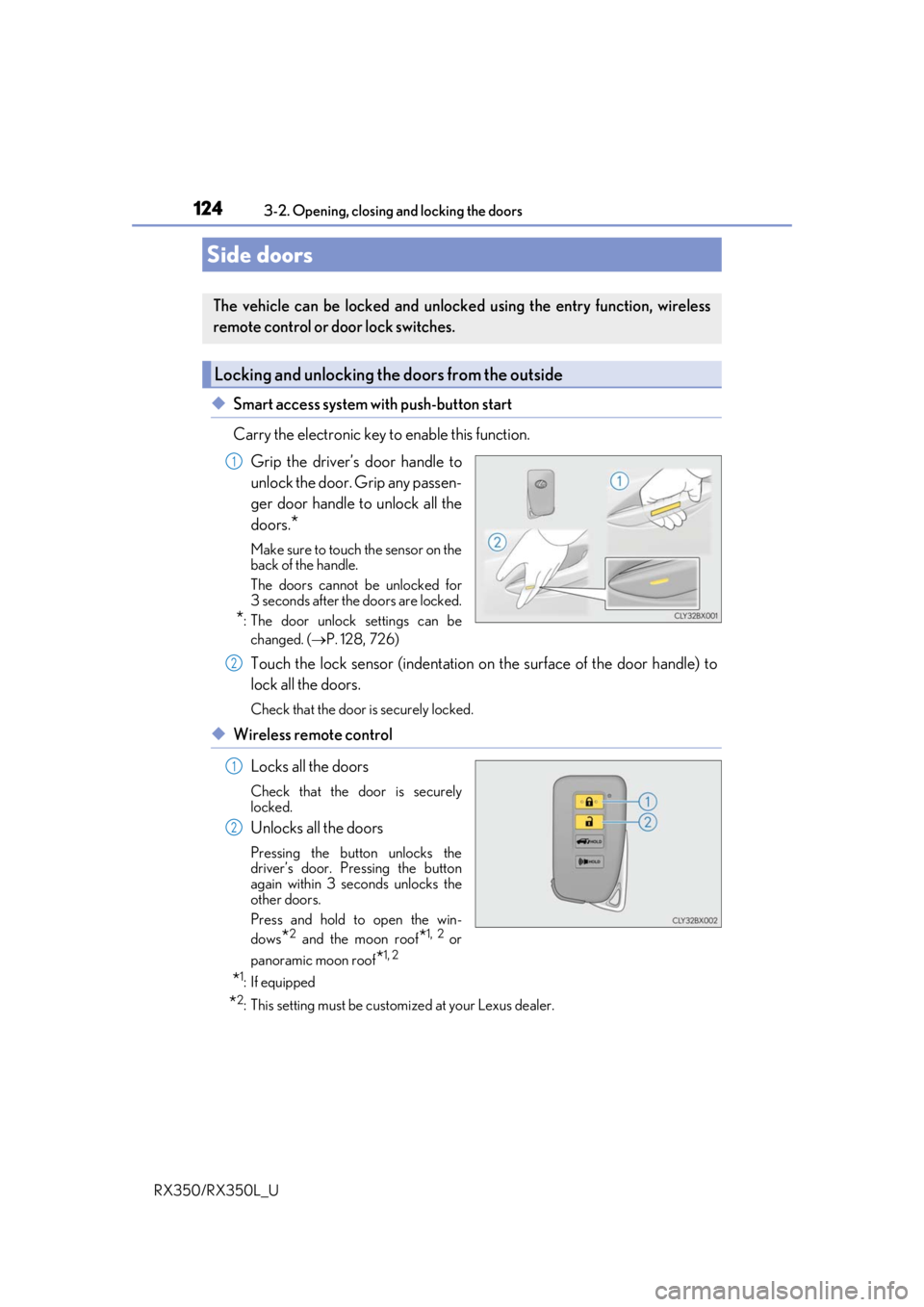
◆Smart access system with push-button start
Carry the electronic key to enable this function.
Grip the driver’s door handle to
unlock the door. Grip any passen-
ger door handle to unlock all the
doors.
*
Make sure to touch the sensor on the
back of the handle.
The doors cannot be unlocked for
3 seconds after the doors are locked.
*: The door unlock settings can bechanged. ( P. 128, 726)
Touch the lock sensor (indentation on the surface of the door handle) to
lock all the doors.
Check that the door is securely locked.
◆Wireless remote control
Locks all the doors
Check that the door is securely
locked.
Unlocks all the doors
Pressing the button unlocks the
driver’s door. Pressing the button
again within 3 seconds unlocks the
other doors.
Press and hold to open the win-
dows
*2 and the moon roof*1, 2 or
panoramic moon roof
*1, 2
*1: If equipped
*2: This setting must be custom ized at your Lexus dealer.
Side doors
The vehicle can be locked and unlock ed using the entry function, wireless
remote control or door lock switches.
Locking and unlocking the doors from the outside
1
2
1
2
Page 129 of 777
1283-2. Opening, closing and locking the doors
RX350/RX350L_U
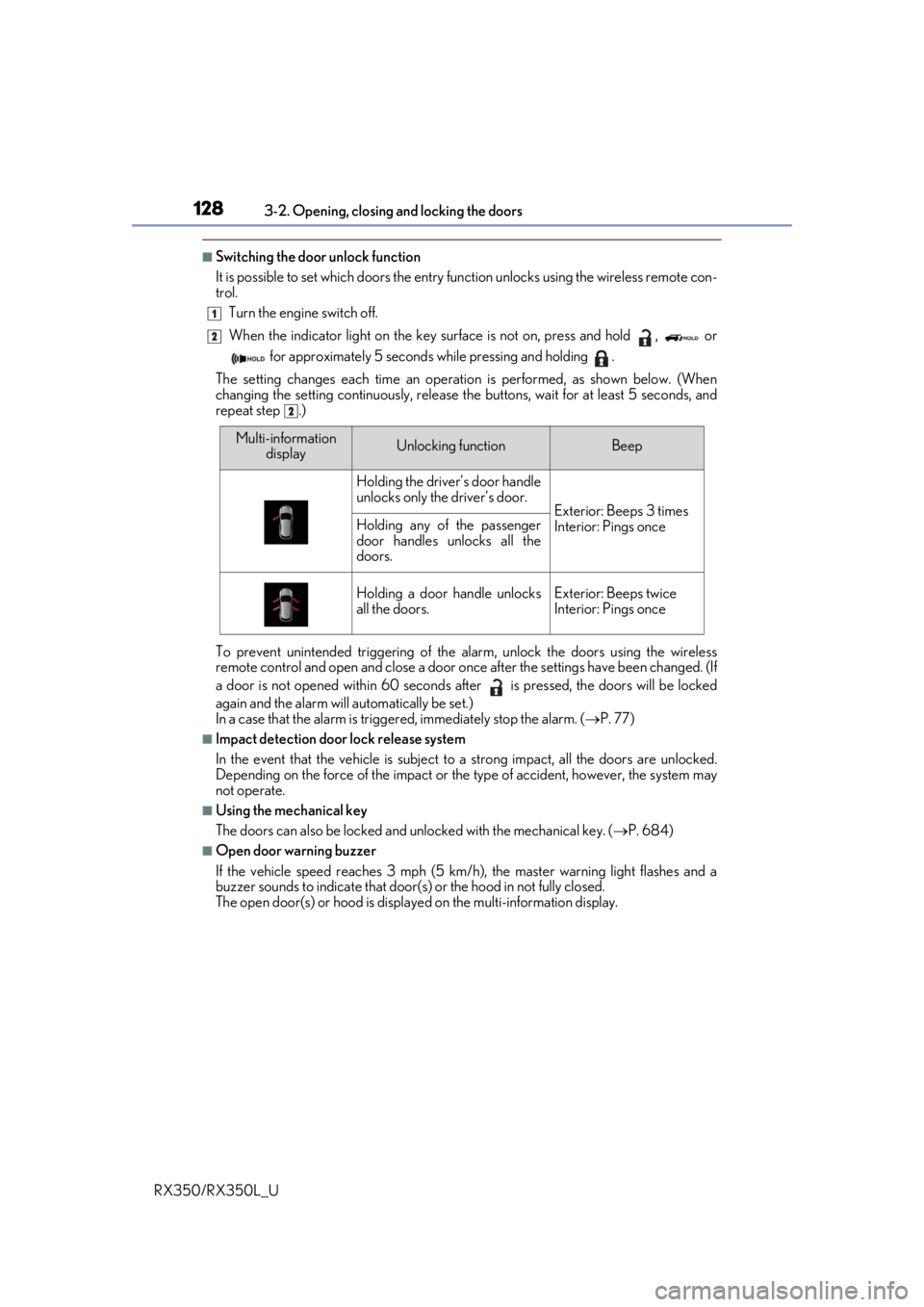
■Switching the door unlock function
It is possible to set which doors the entry function unlock s using the wireless remote con-
trol.
Turn the engine switch off.
When the indicator light on the key su rface is not on, press and hold , or
for approximately 5 seconds while pressing and holding .
The setting changes each time an operation is performed, as shown below. (When
changing the setting continuously, release the buttons, wait for at least 5 seconds, and
repeat step .)
To prevent unintended triggering of the alarm, unlock the doors using the wireless
remote control and open and close a door once after the settings have been changed. (If
a door is not opened within 60 seconds af ter is pressed, the doors will be locked
again and the alarm will automatically be set.)
In a case that the alarm is triggered, immediately stop the alarm. ( P. 77)
■Impact detection door lock release system
In the event that the vehicle is subject to a strong impact, all the doors are unlocked.
Depending on the force of the impact or the type of accident, however, the system may
not operate.
■Using the mechanical key
The doors can also be locked and unlocked with the mechanical key. ( P. 684)
■Open door warning buzzer
If the vehicle speed reaches 3 mph (5 km/h), the master warning light flashes and a
buzzer sounds to indicate that door (s) or the hood in not fully closed.
The open door(s) or hood is displa yed on the multi-information display.
1
2
2
Multi-information
displayUnlocking functionBeep
Holding the driver’s door handle
unlocks only the driver’s door.
Exterior: Beeps 3 times
Interior: Pings onceHolding any of the passenger
door handles unlocks all the
doors.
Holding a door handle unlocks
all the doors.Exterior: Beeps twice
Interior: Pings once
Page 135 of 777
1343-2. Opening, closing and locking the doors
RX350/RX350L_U
The power back door settings can be ch anged on the multi-information display.
( P. 97)
The position at which the power back door will stop when opened automatically
can be changed.
When setting using the switch
Stop the power back door at the desired position. ( P. 131, 133)
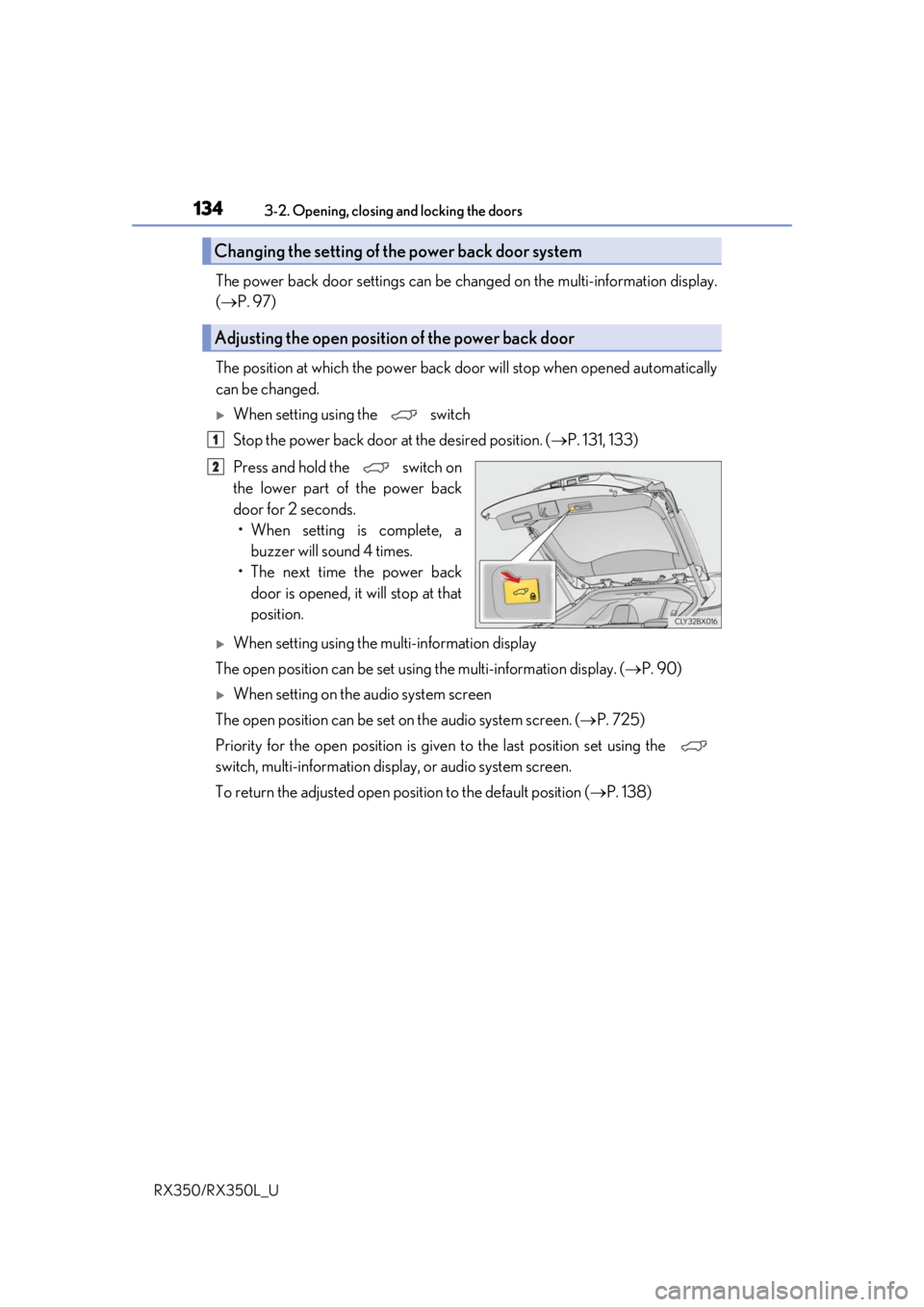
Press and hold the switch on
the lower part of the power back
door for 2 seconds. • When setting is complete, a buzzer will sound 4 times.
• The next time the power back door is opened, it will stop at that
position.
When setting using the multi-information display
The open position can be set usin g the multi-information display. (P. 90)
When setting on the audio system screen
The open position can be set on the audio system screen. ( P. 725)
Priority for the open position is give n to the last position set using the
switch, multi-information displa y, or audio system screen.
To return the adjusted open posi tion to the default position (P. 138)
Changing the setting of the power back door system
Adjusting the open position of the power back door
1
2
Page 140 of 777
1393-2. Opening, closing and locking the doors
3
Operation of each component
RX350/RX350L_U
■Situations in which the close & lock function may not operate properly
In the following situations, the close & lock function may not operate properly:
●If the switch on the lower part of the power back door ( P. 133) is pressed by a
hand which is holding an electronic key
●If the switch on the lower part of the power back door ( P. 133) is pressed
when the electronic key is in a bag, etc. that is placed on the ground
●If the switch on the lower part of the power back door ( P. 133) is pressed with
the electronic key not near the vehicle.
■Situations in which the touchless sensor may malfunction (vehicles with a touchless
power back door)
In the following situations, the touchless sensor may operate unintentionally.
To prevent unintentional operat ion, keep the electronic key out of the operational range
or disable the touchless sensor operation. ( P. 101)
●When a large amount of water is applied to the rear emblem, such as in heavy rain
●When the vehicle is being washed and water is applied to the rear emblem
●When dirt is wiped off the rear emblem
●If someone leans toward or against the rear emblem
●When a metal object is brought near the rear emblem
●When a vehicle cover is installed or removed near the rear emblem
■Situations in which the touchless sensor may not operate properly (vehicles with a
touchless power back door)
If the touchless sensor does not operate in the following situations, use the back door
opener switch to open the power back door. (P. 133)
●In the following situations, the sensitivity of the touchless sensor may be temporarily
reduced and the touchless sensor may not operate:
• When a large amount of water is applied to the rear emblem, such as in heavy rain
• When the vehicle is being washed and water is applied to the rear emblem
• For several seconds after dirt is wiped off the rear emblem
• When the rear emblem is covered with mud, snow, ice, etc.
• When the vehicle has been parked for a wh ile near objects that may move and con-
tact the rear emblem, such as tall grass or trees
• When an external radio wave source is near the touchless sensor
●The touchless sensor may not operate in the following situations:
• When an electronic ke y is not being carried
• When an electronic key is not within the operational range
• When an external radio wave source in terferes with the communication between
the vehicle and electronic key ( P. 148)
• When the power back door is not fully closed
• When a hand is held pa rallel to the rear emblem
*
*
: The detection settings can be changed by your Lexus dealer. ( P. 725)
■Customization
Some functions can be customized. ( P. 97, 722)
Page 150 of 777

1493-2. Opening, closing and locking the doors
3
Operation of each component
RX350/RX350L_U
■Note for the entry function
●Even when the electronic key is within the effective range (detection areas), the system
may not operate properly in the following cases:
• The electronic key is too close to the window or outside door handle, near the ground, or in a high place when the doors are locked or unlocked.
• The electronic key is near the ground or in a high place, or too close to the rear
bumper center when the back door is opened.
• The electronic key is on th e instrument panel, luggage co mpartment, floor, or in the
door pockets or glove box when the engine is started or engine switch modes are
changed.
●Do not leave the electronic key on top of th e instrument panel or near the door pockets
when exiting the vehicle. Depending on the radio wave reception conditions, it may be
detected by the antenna outs ide the cabin and the door will become lockable from the
outside, possibly trapping the electronic key inside the vehicle.
●As long as the electronic key is within th e effective range, the doors may be locked or
unlocked by anyone.
●Even if the electronic key is not inside the vehicle, it may be possible to start the engine
if the electronic key is near the window.
●The doors may unlock if a large amount of wa ter splashes on the door handle, such as in
the rain or in a car wash when the electronic key is within the effective range. (The door
will automatically be locked after approx imately 60 seconds if the doors are not
opened and closed.)
●If the wireless remote control is used to lo ck the doors when the electronic key is near
the vehicle, there is a possibility that the d oor may not be unlocked by the entry func-
tion. (Use the wireless remote control to unlock the doors.)
●Touching the door lock sensor while wearin g gloves may delay or prevent lock opera-
tion. Remove the gloves and touch the lock sensor again.
●When the lock operation is performed using the lock sensor, recognition signals will be
shown up to two consecutive times. After this, no recognition signals will be given.
*
●If the door handle becomes wet while the el ectronic key is within the effective range,
the door may lock and unlock repeatedly. In that case, follow the following correction
procedures to wash the vehicle:
• Place the electronic key in a location 6 ft. (2 m) or more away from the vehicle. (Take care to ensure that the key is not stolen.)
• Set the electronic key to battery-saving mode to disable the smart access system with push-button start. ( P. 148)
●If the electronic key is inside the vehicle and a door handle becomes wet during a car
wash, a message may be shown on the mult i-information display and a buzzer will
sound outside the vehicle. To turn off the alarm, lock all the doors.
●The lock sensor may not work properly if it comes into contact with ice, snow, mud, etc.
Clean the lock sensor and attempt to operate it again.
●A sudden approach to the effective range or door handle may prevent the doors from
being unlocked. In this case, return the door handle to the original position and check
that the doors unlock before pulling the door handle again.
●If there is another electronic key in the de tection area, it may take slightly longer to
unlock the doors after the door handle is gripped.
Page 179 of 777
1783-3. Adjusting the seats
RX350/RX350L_U
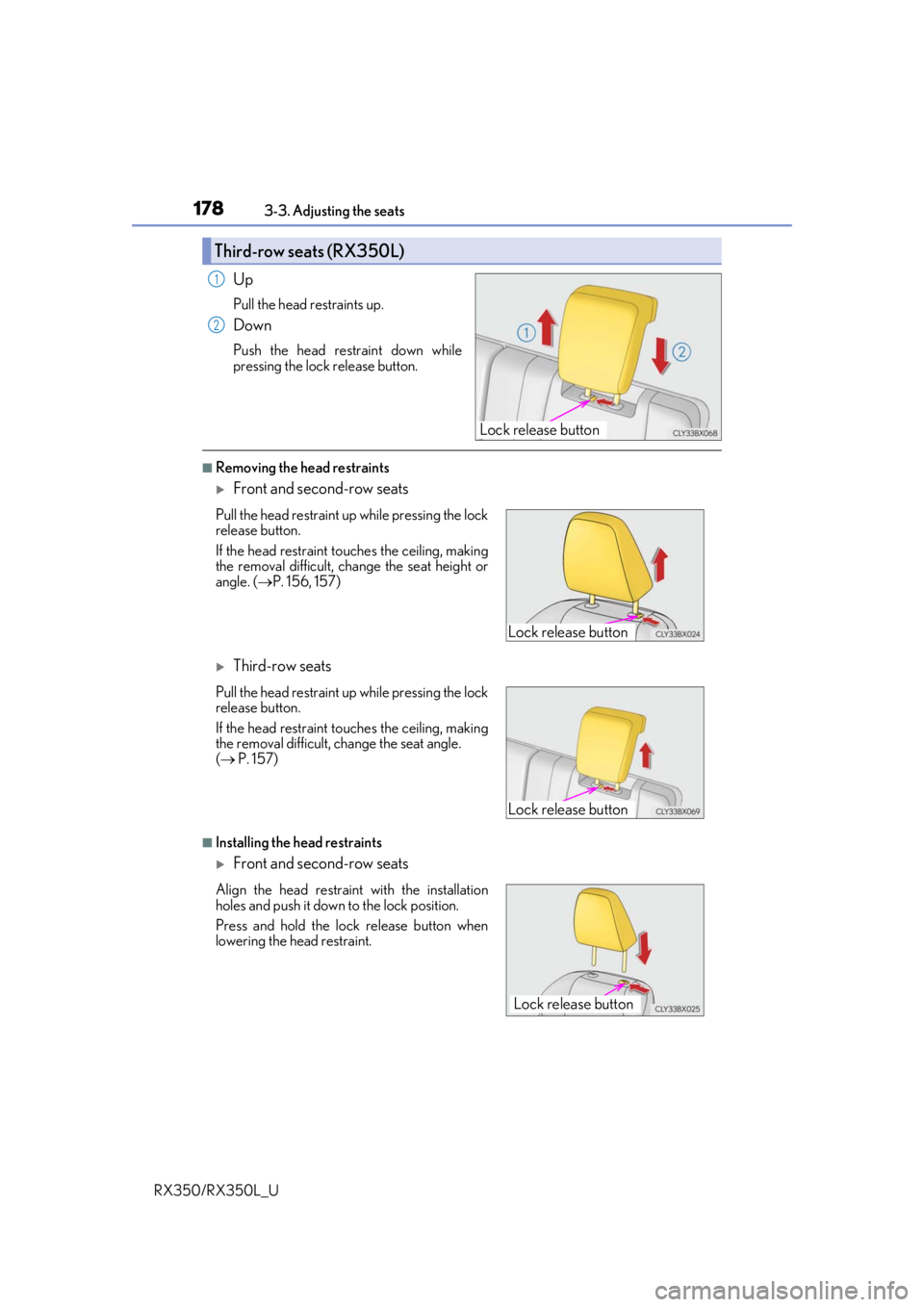
Up
Pull the head restraints up.
Down
Push the head restraint down while
pressing the lock release button.
■Removing the head restraints
Front and second-row seats
Third-row seats
■Installing the head restraints
Front and second-row seats
Third-row seats (RX350L)
Lock release button
1
2
Pull the head restraint up while pressing the lock
release button.
If the head restraint to uches the ceiling, making
the removal difficult, change the seat height or
angle. ( P. 156, 157)
Pull the head restraint up while pressing the lock
release button.
If the head restraint to uches the ceiling, making
the removal difficult, change the seat angle.
( P. 157)
Align the head restraint with the installation
holes and push it down to the lock position.
Press and hold the lock release button when
lowering the head restraint.
Lock release button
Lock release button
Lock release button
Page 186 of 777
1853-4. Adjusting the steering wheel and mirrors
3
Operation of each component
RX350/RX350L_U
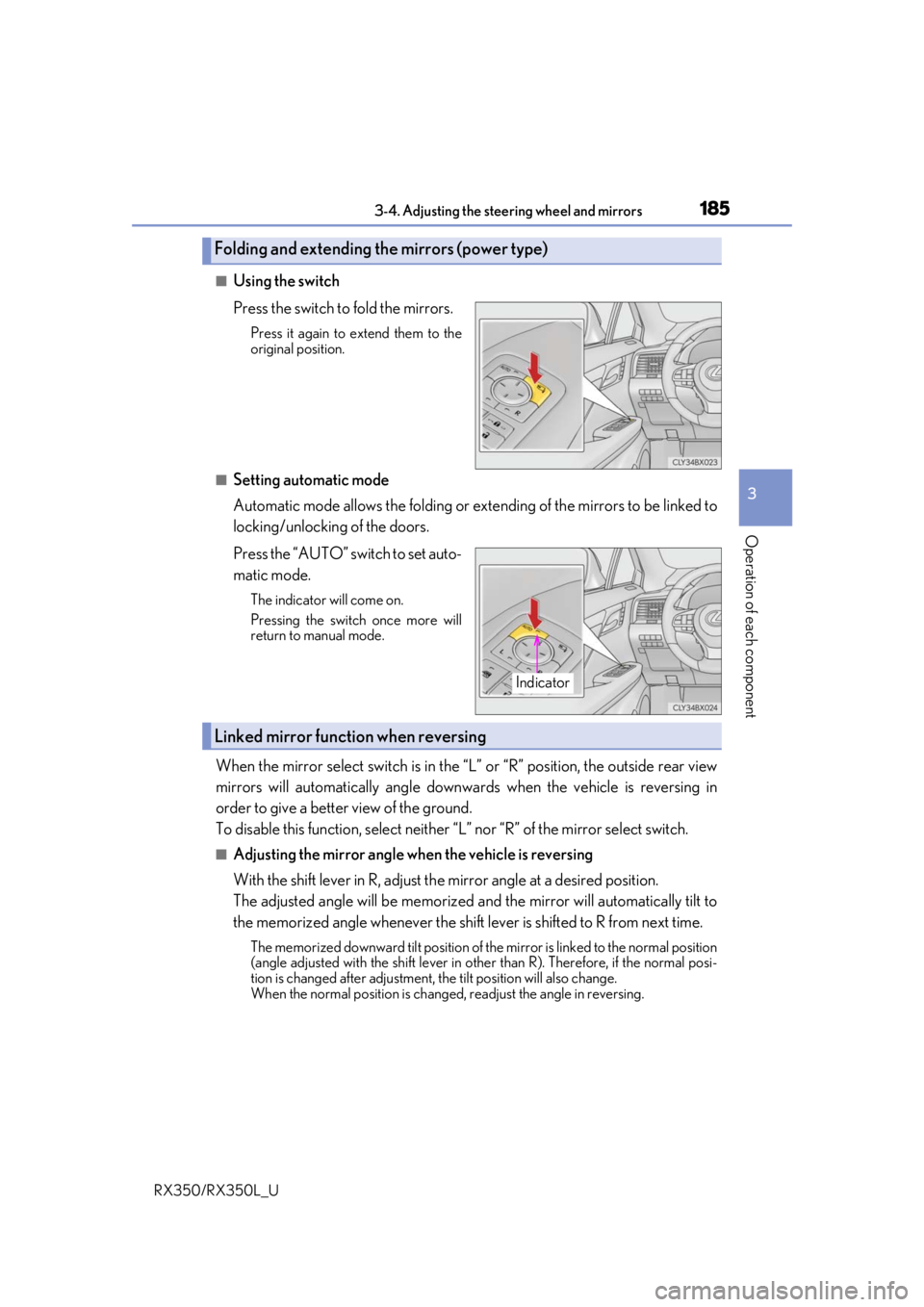
■Using the switch
Press the switch to fold the mirrors.
Press it again to extend them to the
original position.
■Setting automatic mode
Automatic mode allows the folding or extending of the mirrors to be linked to
locking/unlocking of the doors.
Press the “AUTO” switch to set auto-
matic mode.
The indicator will come on.
Pressing the switch once more will
return to manual mode.
When the mirror select switch is in the “L” or “R” position, the outside rear view
mirrors will automatically angle downwa rds when the vehicle is reversing in
order to give a better view of the ground.
To disable this function, select neither “L” nor “R” of the mirror select switch.
■Adjusting the mirror angle when the vehicle is reversing
With the shift lever in R, adjust the mirror angle at a desired position.
The adjusted angle will be memorized and the mirror will automatically tilt to
the memorized angle whenever the shift lever is shifted to R from next t\
ime.
The memorized downward tilt position of th e mirror is linked to the normal position
(angle adjusted with the shif t lever in other than R). Ther efore, if the normal posi-
tion is changed after adjustment, the tilt position will also change.
When the normal position is chang ed, readjust the angle in reversing.
Folding and extending the mirrors (power type)
Indicator
Linked mirror function when reversing
Page 207 of 777
2064-1. Before driving
RX350/RX350L_U
WARNING
Observe the following precautions.
Failure to do so may result in death or serious injury.
■When driving on slippery road surfaces
●Sudden braking, acceleration and steering may cause tire slippage and reduce your
ability to control the vehicle.
●Sudden acceleration, engine braking due to shifting, or changes in engine speed
could cause the vehicle to skid.
●After driving through a puddle , lightly depress the brake pedal to make sure that the
brakes are functioning properly. Wet brake pads may prevent the brakes from func-
tioning properly. If the brakes on only on e side are wet and not functioning properly,
steering control may be affected.
■When shifting the shift lever
●Do not let the vehicle roll backward while the shift lever is in a driving position, or roll
forward while the shift lever is in R.
Doing so may cause the engine to stall or lead to poor brake and steering perfor-
mance, resulting in an accide nt or damage to the vehicle.
●Do not shift the shift lever to P while the vehicle is moving.
Doing so can damage the transmission and may result in a loss of vehicle control.
●Do not shift the shift lever to R while the vehicle is moving forward.
Doing so can damage the transmission and may result in a loss of vehicle control.
●Do not shift the shift lever to a driving position while the vehicle is moving backward.
Doing so can damage the transmission and may result in a loss of vehicle control.
●Shifting the shift lever to N while the vehicle is moving will disengage the engine.
Engine braking is not avai lable when N is selected.
●Be careful not to shift the shift lever with the accelerator pedal depressed.
Shifting the shift lever to any position other than P or N may lead to unexpected rapid
acceleration of the vehicle that may cause an accident and result in death or serious
injury.
■If you hear a squealing or scraping noise (brake pad wear limit indicators)
Have the brake pads checked and replaced by your Lexus dealer as soon as possible.
Rotor damage may result if the pads are not replaced when needed.
It is dangerous to drive the vehicle when the wear limits of the brake pads and/or those
of the brake discs are exceeded.