tire LEXUS RX450H 2020 Owner's Manual
[x] Cancel search | Manufacturer: LEXUS, Model Year: 2020, Model line: RX450H, Model: LEXUS RX450H 2020Pages: 777, PDF Size: 13.14 MB
Page 254 of 777
2534-3. Operating the lights and wipers
4
Driving
RX350/RX350L_U
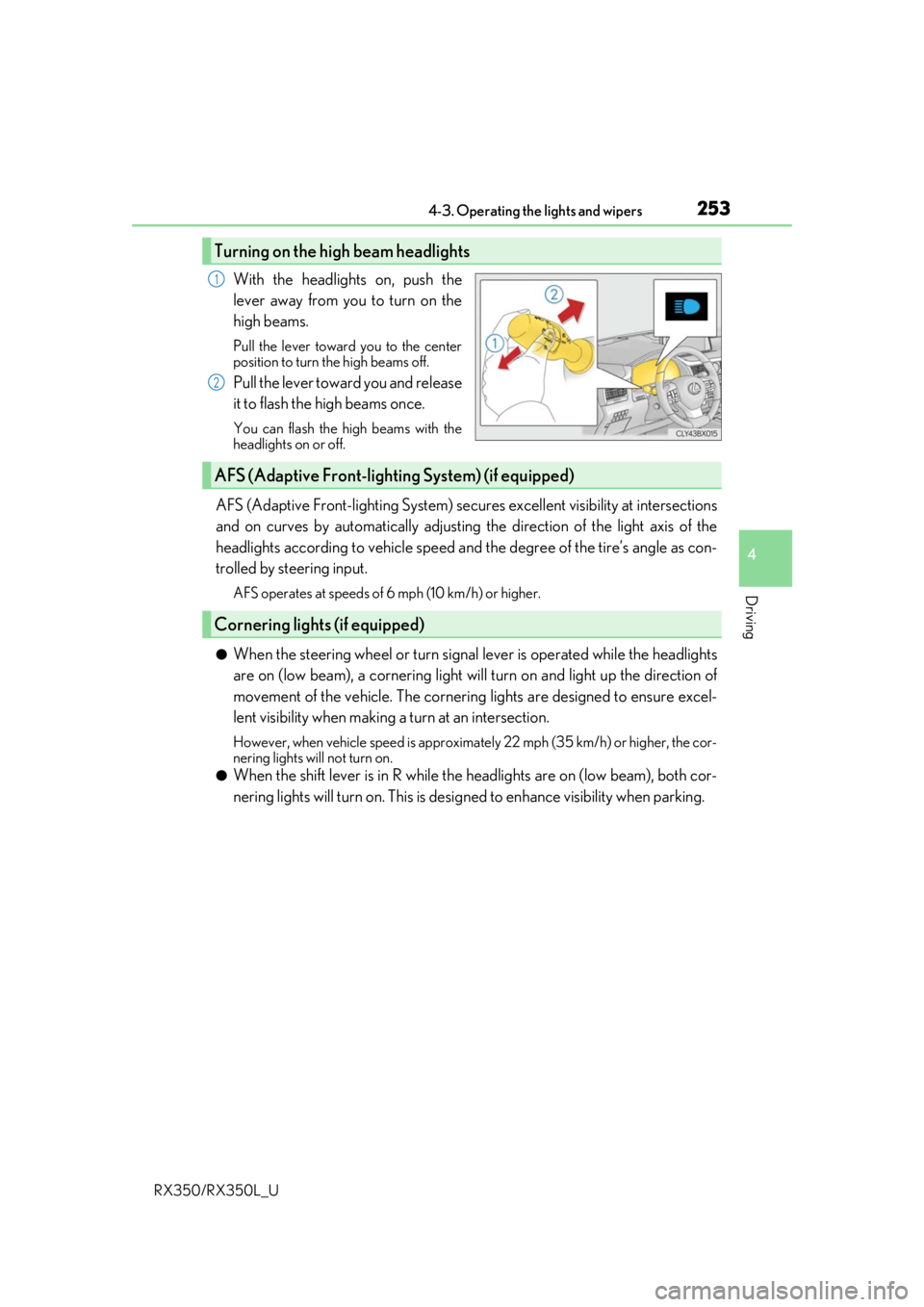
With the headlights on, push the
lever away from you to turn on the
high beams.
Pull the lever toward you to the center
position to turn the high beams off.
Pull the lever toward you and release
it to flash the high beams once.
You can flash the high beams with the
headlights on or off.
AFS (Adaptive Front-lighting System) secures excellent visibility at intersections
and on curves by automatically adjusting the direction of the light axis of the
headlights according to vehicle speed and the degree of the tire’s angle as con-
trolled by steering input.
AFS operates at speeds of 6 mph (10 km/h) or higher.
●When the steering wheel or turn signal lever is operated while the headlights
are on (low beam), a cornering light w ill turn on and light up the direction of
movement of the vehicle. The cornerin g lights are designed to ensure excel-
lent visibility when making a turn at an intersection.
However, when vehicle speed is approximately 22 mph (35 km/h) or higher, the cor-
nering lights will not turn on.
●When the shift lever is in R while the headlights are on (low beam), both cor-
nering lights will turn on. This is desi gned to enhance visibility when parking.
Turning on the high beam headlights
1
2
AFS (Adaptive Front-lighting System) (if equipped)
Cornering lights (if equipped)
Page 260 of 777

2594-3. Operating the lights and wipers
4
Driving
RX350/RX350L_U
●In the following situations the system may not be able to correctly detect the surround-
ing brightness level. This may cause the low beams to remain on or the high beams to
flash or dazzle pedestrians or vehicles ahead. In such a case, it is necessary to manually
switch between the high and low beams.
• When driving in inclement weather (heavy rain, snow, fog, sandstorms, etc.)
• When the windshield is obscured by fog, mist, ice, dirt, etc.
• When the windshield is cracked or damaged
• When the camera sensor is deformed or dirty
• When the temperature of the camera sensor is extremely high
• When the surrounding brightness level is equal to that of headlights, tail lights or fog
lights
• When headlights or tail lights of vehicles ahead are turned off, dirty, changing color,
or not aimed properly
• When the vehicle is hit by water, snow, dust, etc. from a preceding vehicle
• When driving through an area of intermittently changing brightness and darkness
• When frequently and repeated ly driving ascending/descending roads, or roads with
rough, bumpy or uneven surfaces (such as stone-paved roads, gravel roads, etc.)
• When frequently and repeatedly taking curves or driving on a winding road
• When there is a highly reflective object ahea d of the vehicle, such as a sign or mirror
• When the back of a preceding vehicle is highly reflective, such as a container on a truck
• When the vehicle's headlights are damaged or dirty, or are not aimed properly
• When the vehicle is listing or titling due to a flat tire, a trailer being towed, etc.
• When the headlights are changed between the high beams and low beams repeat-
edly in an abnormal manner
• When the driver believes that the high beams may be flashing or dazzling pedestri- ans or other drivers
■Temporarily lowering sensor sensitivity
The sensitivity of the sensor can be temporarily lowered.
Turn the engine switch off while the following conditions are met.
• The headlight switch is in or .
• The headlight switch lever is in high beam position.
• Automatic High Beam switch is on.
Turn the engine switch to IGNITION ON mode.
Within 30 seconds after , repeat pulling th e headlight switch lever to the original
position then pushing it to the high beam position quickly 10 times, then leave the lever
in high beam position.
If the sensitivity is changed, the Automatic High Beam indicator is turn on and off 3
times.
Automatic High Beam (headlights) may turn on even when the vehicle is stopped.
1
2
32
4
Page 284 of 777
2834-5. Using the driving support systems
4
Driving
RX350/RX350L_U
WARNING
■When to disable the pre-collision system
In the following situations, disable the system, as it may not operate properly, possibly
leading to an accident resultin g in death or serious injury:
●When the vehicle is being towed
●When your vehicle is towing another vehicle
●When transporting the vehicle via truck, bo at, train or similar means of transportation
●When the vehicle is raised on a lift with the engine running and the tires are allowed to
rotate freely
●When inspecting the vehicle using a drum tester such as a chassis dynamometer or
speedometer tester, or when using an on vehicle wheel balancer
●When a strong impact is applied to the fron t bumper or front grille, due to an accident
or other reasons
●If the vehicle cannot be driven in a stable manner, such as when the vehicle has been
in an accident or is malfunctioning
●When the vehicle is driven in a sporty manner or off-road
●When the tires are not properly inflated
●When the tires are very worn
●When tires of a size other than specified are installed
●When tire chains are installed
●When a compact spare tire or an emergency tire puncture repair kit is used
●If equipment (snow plow, etc.) that may obstruct the radar sensor or camera sensor is
temporarily installed to the vehicle
Page 290 of 777
2894-5. Using the driving support systems
4
Driving
RX350/RX350L_U• After the engine has started the vehicle has not been driven for a certain amount of
time
• While making a left/right turn and for a few seconds after making a left/right turn
• While driving on a curve and for a few seconds after driving on a curve
• If your vehicle is skidding
• If the wheels are misaligned
• If a wiper blade is blocking the camera sensor
• The vehicle is wobbling.
• The vehicle is being driven at extremely high speeds.
• When driving on a hill
• If the radar sensor or ca mera sensor is misaligned
●In some situations such as the following, sufficient braking forc e may not be obtained,
preventing the system from performing properly:
• If the braking functions cannot operate to their full extent, such as when the brake parts are extremely cold, extremely hot, or wet
• If the vehicle is not properly maintained (brakes or tires are excessively worn,
improper tire inflation pressure, etc.)
• When the vehicle is being driven on a gravel road or other slippery surface
●Some pedestrians such as the following may not be detected by the radar sensor and
camera sensor, preventing the system from operating properly:
• Pedestrians shorter than approximately 3.2 ft. (1 m) or taller than approximately 6.5
ft. (2 m)
• Pedestrians wearing oversized clothing (a ra in coat, long skirt, etc.), making their sil-
houette obscure
• Pedestrians who are carrying large baggage, holding an umbrella, etc., hiding part
of their body
• Pedestrians who are bending forward or squatting
• Pedestrians who are pushing a stroller , wheelchair, bicycle or other vehicle
• Groups of pedestrians which are close together
• Pedestrians who are wearing white and look extremely bright
• Pedestrians in the dark, such as at night or while in a tunnel
• Pedestrians whose clothing appears to be nearly the same color or brightness as
their surroundings
• Pedestrians near walls, fences , guardrails, or large objects
• Pedestrians who are on a metal object (manhole cover, steel plate, etc.) on the road
• Pedestrians who are walking fast
• Pedestrians who are changing speed abruptly
• Pedestrians running out from be hind a vehicle or a large object
• Pedestrians who are extremely close to the side of the vehicle (outside rear view mirror, etc.)
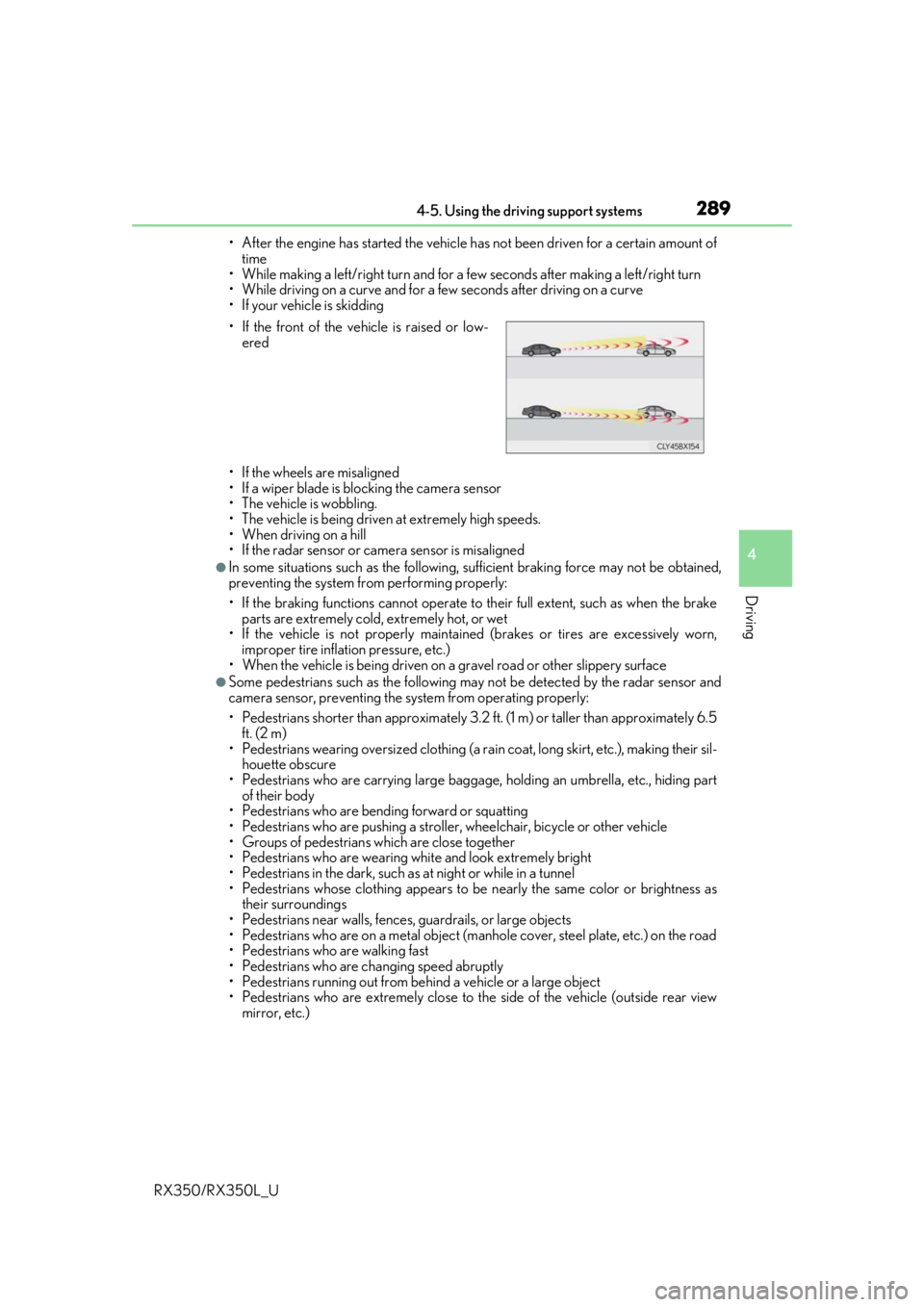
• If the front of the vehicle is raised or low-
ered
Page 295 of 777
2944-5. Using the driving support systems
RX350/RX350L_U
WARNING
■Before using LKA system
Do not rely solely upon the LKA system. LKA is not a system which automatically
drives the vehicle or reduces the amount of attention that must be paid to the area in
front of the vehicle. The driver must always assume full responsibility for driving safely
by always paying careful attention to the surrounding conditions and operate the steer-
ing wheel to correct the path of the vehicle. Also, make sure to take adequate breaks
when fatigued, such as from driv ing for a long period of time.
Failure to perform appropriate driving operat ions and pay careful attention may lead to
an accident, resulting in death or serious injury.
■To avoid operating LKA by mistake
When not using the LKA system, use the LKA switch to turn the system off.
■Situations unsuitable for LKA
Do not use the LKA system in the following situations.
The system may not operate properly and lead to an accident, resulting in death or
serious injury.
●A spare tire, tire chains, etc., are equipped.
●When the tires have been excessively worn, or when the tire inflation pressure is low.
●Tires which differ by structure, manufacturer, brand or tread pattern are used.
●Objects or patterns that could be mistaken for white (yellow) lines are present on the
side of the road (guardrails, cu rbs, reflective poles, etc.).
●Vehicle is driven on a snow-covered road.
●White (yellow) lines are difficult to see due to rain, snow, fog, dust, etc.
●Asphalt repair marks, white (yellow) line marks, etc., are present due to road repair.
●Vehicle is driven in a temporary lane or restricted lane due to construction work.
●Vehicle is driven on a road surface which is slippery due to rainy weather, fallen snow,
freezing, etc.
●Vehicle is driven in traffic lanes ot her than on highways and freeways.
●Vehicle is driven in a construction zone.
●When your vehicle is towing a trailer or during emergency towing
■Preventing LKA system malfunctions and operations perf ormed by mistake
●Do not modify the headlights or place stickers, etc., on the surface of the lights.
●Do not modify the suspension etc. If the suspension etc. needs to be replaced, con-
tact your Lexus dealer.
●Do not install or place anything on the hood or grille. Also, do not install a grille guard
(bull bars, kangaroo bar, etc.).
●If your windshield needs repair s, contact your Lexus dealer.
Page 300 of 777
2994-5. Using the driving support systems
4
Driving
RX350/RX350L_U
■Conditions in which functions may not operate properly
In the following situations, the camera sensor may not detect white (yellow) lines and var-
ious functions may not operate normally.
●There are shadows on the road that run parallel with, or cover, the white (yellow) lines.
●The vehicle is driven in an ar ea without white (yellow) lines, such as in front of a tollgate
or checkpoint, or at an intersection, etc.
●The white (yellow) lines are cracked, “Botts ’ dots”, “Raised pavement marker” or stones
are present.
●The white (yellow) lines cannot be seen or are difficult to see due to sand, etc.
●The vehicle is driven on a road surface that is wet due to rain, puddles, etc.
●The traffic lines are yellow (which may be more difficult to recognize than lines that are
white).
●The white (yellow) lines cross over a curb, etc.
●The vehicle is driven on a bright surface, such as concrete.
●The vehicle is driven on a surface that is bright due to reflected light, etc.
●The vehicle is driven in an area where the brightness changes suddenly, such as at the
entrances and exits of tunnels, etc.
●Light from the headlights of an oncoming vehicle, the sun, etc., enters the camera.
●The vehicle is driven where the road diverges, merges, etc.
●The vehicle is driven on a slope.
●The vehicle is driven on a road which tilts left or right, or a winding road.
●The vehicle is driven on an unpaved or rough road.
●The vehicle is driven around a sharp curve.
●The traffic lane is excessively narrow or wide.
●The vehicle is extremely tilted due to carry ing heavy luggage or having improper tire
pressure.
●The distance to the preceding vehicle is extremely short.
●The vehicle is moving up and down a large am ount due to road conditions during driv-
ing (poor roads or road seams).
●The headlight lenses are dirty and emit a faint amount of light at night, or the beam axis
has deviated.
●The vehicle is struck by a crosswind.
●The vehicle has just changed lane s or crossed an intersection.
●Snow tires, etc., are equipped.
■If the LKA indicator is illuminated in ambe r and a warning message is displayed on the
multi-information display
P. 654
■Customization
Some functions can be customized. ( P. 97)
Page 321 of 777

3204-5. Using the driving support systems
RX350/RX350L_U
■Conditions under which the BSM function may not function correctly
●The BSM function may not detect vehicles correctly in the following situations:
• When the sensor is misaligned due to a stro ng impact to the sensor or its surround-
ing area
• When mud, snow, ice, a sticke r, etc. is covering the sensor or surrounding area on
the rear bumper
• When driving on a road surf ace that is wet with standing water during bad weather,
such as heavy rain, snow, or fog
• When multiple vehicles are approaching wi th only a small gap between each vehicle
• When the distance between your vehicle and a following vehicle is short
• When there is a significant difference in speed between your vehicle and the vehicle that enters the detection area
• When the difference in speed between your vehicle and another vehicle is changing
• When a vehicle enters a detection area traveling at about the same speed as your vehicle
• As your vehicle starts from a stop, a vehicle remains in the detection area
• When driving up and down cons ecutive steep inclines, such as hills, dips on the road,
etc.
• When driving on roads with sharp bends, consecutive curves, or uneven surfaces
• When vehicle lanes are wide, or when driving on the edge of a lane, and the vehicle in an adjacent lane is far away from your vehicle
• When towing a trailer (vehicles with towing package)
• When items such as a bicycle carrier are installed on the rear of the vehicle
• When there is a significant difference in height between your vehicle and the vehicle that enters the detection area
• Immediately after the BSM function is turned on
●Instances of the BSM function unnecessarily detecting a vehicle and/or object may
increase in the following situations:
• When the sensor is misaligned due to a stro ng impact to the sensor or its surround-
ing area
• When the distance between your vehicle and a guardrail, wall, etc. that enters the detection area is short
• When driving up and down cons ecutive steep inclines, such as hills, dips on the road,
etc.
• When vehicle lanes are narrow, or when driv ing on the edge of a lane, and a vehicle
traveling in a lane other than the ad jacent lanes enters the detection area
• When driving on roads with sharp bends, consecutive curves, or uneven surfaces
• When the tires are slipping or spinning
• When the distance between your vehicle and a following vehicle is short
• When a bicycle carrier or other accessory is installed to the rear of the vehicle
• When towing a trailer (vehicles with towing package)
Page 350 of 777
3494-5. Using the driving support systems
4
Driving
RX350/RX350L_U
NOTICE
■To prevent the system from malfunctioning
●If the area around a sensor is subjected to an impact, the system may not operate
properly due to the sensor being misaligned. Have the vehicle inspected by your
Lexus dealer.
●When using a high pressure washer to wa sh the vehicle, do not spray the sensors
directly, as doing so may cause a sensor to malfunction.
●When using steam to clean the vehicle, do not direct steam too close to the sensors
as doing so may cause a sensor to malfunction.
■To prevent a radar sensor from malfunctioning
●If the area around a radar sensor is subjected to an impact, the system may not oper-
ate properly due to a sensor malfunction. Have the vehicle inspected by your Lexus
dealer.
●Observe the radar sensor handling precautions. (P. 316)
■To prevent unnecessary operation of the Intelligent Clearance Sonar system
In the following situations, disable the Inte lligent Clearance Sonar system as the system
may operate even though there is no possibility of a collision.
●When inspecting the vehicle using a chassi s roller, chassis dynamo or free roller
●When loading the vehicle onto a boat, truck or other transport vessel
●If the suspension has been modified or tires of a size other than specified are installed
●If the front of the vehicle is raised or lowered due to the carried load
●If towing eyelets are installed
Page 356 of 777
3554-5. Using the driving support systems
4
Driving
RX350/RX350L_U
■Situations in which the Rear Cross Traffic Auto Brake function may not operate prop-
erly
In some situations such as the following , this function may not operate properly.
●Objects and vehicles which the radar sensors are not designed to detect
• Stationary objects
• Vehicles which are moving away from your vehicle
• Pedestrians, motorcycles, bicycles, etc.
*
• Objects which are extremely close to a radar sensor
• Vehicles which are approaching from the right or left at the rear of the vehicle at a
traveling speed of less than approximately 5 mph (8 km/h)
• Vehicles which are approaching from the right or left at the rear of the vehicle at a
traveling speed of more than approximately 15 mph (24 km/h)
*: Depending on conditions, detection of a vehicle and/or object may occur.
●Situations in which the radar sensors may not be able to detect an object
• When a sensor or the area around a sensor is extremely hot or cold
• If the rear bumper is covere d with ice, snow, dirt, etc.
• If heavy rain or water strikes the vehicle
• When the detection area of a radar sensor is obstructed by an adjacent vehicle
• If the vehicle is significantly tilted
• If towing eyelets are installed
• If the suspension has been modified or tires of a size othe r than specified are
installed
• If the front of the vehicle is raised or lowered due to the carried load
• If a sticker or an electronic component, su ch as a backlit license plate (especially flu-
orescent type), fog lights, a fender pole or wireless antenna is installed near a radar
sensor
• If the orientation of a rada r sensor has been changed due to a collision or other
impact or removal and installation
• When multiple vehicles are approaching wi th only a small gap between each vehicle
• When a vehicle is approaching at high speed
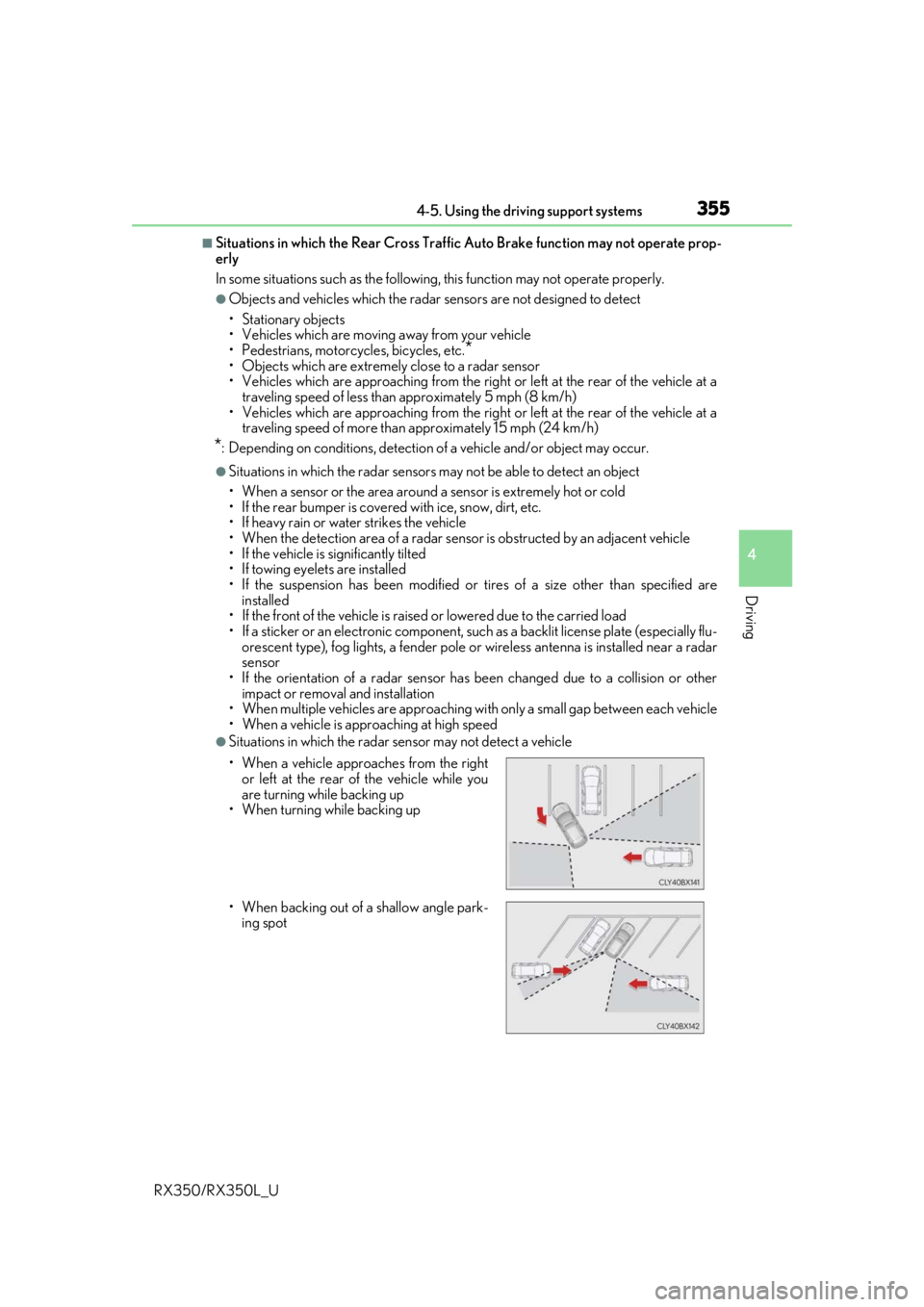
●Situations in which the radar sensor may not detect a vehicle
• When a vehicle approaches from the right or left at the rear of the vehicle while you
are turning while backing up
• When turning while backing up
• When backing out of a shallow angle park-
ing spot
Page 370 of 777

3694-5. Using the driving support systems
4
Driving
RX350/RX350L_U
■If you notice any symptoms
If you notice any of the following symptoms, refer to the likely cause and the
solution, and re-check.
If the symptom is not resolved by the solution, have the vehicle inspected by
your Lexus dealer.
Things you should know
Likely causeSolution
The image is difficult to see
• The vehicle is in a dark area
• The temperature around the lens is
either high or low
• The outside temperature is low
• There are water droplets on the cam- era
• It is raining or humid
• Foreign matter (mud, etc.) is adhering to the camera
• There are scratches on the camera
• Sunlight or headlights are shining directly into the camera
•The vehicle is unde r fluorescent lights,
sodium lights, mercury lights etc.
If this happens due to these causes, it
does not indicate a malfunction.
Back up while visually checking the vehi-
cle’s surroundings. (Use the monitor
again once conditions have been
improved.)
The image on the Lexus parking assist
monitor system screen can be adjusted.
(Vehicles with a Lexus Display Audio sys-
tem: P. 411) (Vehicles with a navigation
system: “NAVIGATION SYSTEM
OWNER’S MANUAL”.)
The image is blurry
Dirt or foreign matter (such as water
droplets, snow, mud, etc.) is adhering to
the camera.Flush the camera with a large quantity of
water and wipe the camera lens clean
with a soft and wet cloth.
The image is out of alignment
The camera or surrounding area has
received a strong impact.Have the vehicle inspected by your Lexus
dealer.
The guide lines are very far out of alignment
The camera position is out of alignment.Have the vehicle inspected by your Lexus
dealer.
• The vehicle is tilted (there is a heavy
load on the vehicle, tire pressure is low
due to a tire puncture, etc.)
• The vehicle is used on an incline.If this happens due to these causes, it
does not indicate a malfunction.
Back up while visually checking the vehi-
cle’s surroundings.