door lock LEXUS RX450H 2020 Repair Manual
[x] Cancel search | Manufacturer: LEXUS, Model Year: 2020, Model line: RX450H, Model: LEXUS RX450H 2020Pages: 777, PDF Size: 13.14 MB
Page 496 of 777
495
6Interior features
RX350/RX350L_U
6-4. Using the storage featuresList of storage features............ 528• Glove box .............................. 530
• Console box .......................... 530
• Cup holders............................. 531
• Door pockets ........................ 533
• Bottle holders ....................... 533
• Coin box ..................................534
• Auxiliary boxes..................... 535
Luggage compartment features........................................536 6-5. Using the other interior
features
Other interior features ............ 543
• Sun visors ................................ 543
• Vanity mirrors ....................... 543
• Clock ........................................ 544
• Wireless charger ................. 544
• Power outlets.......................... 551
• USB charging ports ............553
• Front passenger footwell hooks .......................554
• Rear door sunshades .........554
• Armrest ....................................555
• Assist grips..............................556
• Coat hooks .............................556
Garage door opener ............... 557
Compass ....................................... 564
LEXUS Enform Safety Connect ......................................568
LEXUS Enform Remote ......... 573
LEXUS Enform Service Connect ...................................... 574
Page 516 of 777

5156-2. Using the air conditioning system and defogger
6
Interior features
RX350/RX350L_U
■Registering air conditioning settings to electronic keys (vehicles with driving position
memory)
●Unlocking the vehicle using an electronic ke y and turning the engine switch to IGNI-
TION ON mode will recall that key’s re gistered air conditioning settings.
●When the engine switch is turned off, the current air conditioning settings will automat-
ically be registered to the electronic key that was used to unlock the vehicle.
●The system may not operate correctly if more th an one electronic key is in the vicinity or
if the smart access system with push-button start is used to unlock a passenger door.
●The doors that can recall the air conditioning setting when unlocked using the smart
access system with push-button start can be changed.* For details, contact your Lexus
dealer.
*: The doors that can recall the driving positi on memory are changed at the same time.
■Using automatic mode
Fan speed is adjusted automatically according to the temperature setting and the ambi-
ent conditions.
Therefore, the fan may stop for a while until wa rm or cool air is ready to flow immediately
after the “AUTO” button is pressed or “AUTO” is selected.
■How the system judges if a passenger is in the vehicle when in S-FLOW mode
In S-FLOW mode, the system judges if a passenger is in the vehicle as follows:
• Front passenger seat: A passeng er is judged to be in the front passenger seat when the
system detects an object on the front passenger seat, fastening of the front passenger
seat belt, changing of the set temperature for the front passenger seat or the opening
and closing of the front passenger door. (However, when only opening and closing of
the front passenger door is detected, the sy stem will judge that a passenger is not in
the front passenger seat after the vehicl e speed reaches approximately 12 mph (20
km/h) or more.)
• Rear seats (automatic S-FLOW mode only): A passenger is judged to be in a rear seat when the system detects the opening and closin g of a rear door or the operation of the
rear air conditioning system (RX350L).
If a passenger is judged to be in the vehicl e, the system will retain the judgement for a
certain amount of time after th e engine switch is turned off.
■Operation of automatic S-FLOW mode
When the system is operating in automati c S-FLOW mode, if the system detects the
opening and closing of a rear door or the op eration of the rear air conditioning system
(RX350L), S-FLOW mode will be disabled . To enable S-FLOW mode, select on
the option control screen. (I n this case, the system will operate in manual S-FLOW
mode.)
■Changing from manual S-FLOW mode to automatic S-FLOW mode
Select on the option control screen to disable S-FLOW mode.
Turn the engine switch off.
Wait for 60 minutes or more and change the engine switch to IGNITION ON mode.
■Using the voice command system (vehicles with a navigation system)
Air conditioning system can be operated using voice commands. For details, refer to the
“NAVIGATION SYSTEM OWNER’S MANUAL”.
1
2
3
Page 528 of 777
5276-3. Using the interior lights
6
Interior features
RX350/RX350L_U
●Illuminated entry system: The lights automatically turn on/off according to engine
switch mode, the presence of the electronic key, whether the doors are locked/
unlocked, and whether the doors are opened/closed.
●If the interior lights remain on when the engine switch is turned off, the lights will go off
automatically after 20 minutes.
●In the following cases, the interior lights and front personal lights may not respond as
normal.
• When water, dirt, etc., have adhered to the lens surface
• When operated with a wet hand
• When wearing gloves, etc.
●Some functions can be customized. ( P. 722)
NOTICE
●Never remove the lens for the front interior light and front personal lights. Otherwise,
the lights will be damaged. If the lens need to remove, contact your Lexus dealer.
●To prevent battery discharge, do not leave the lights on longer than necessary when
the engine is off.
Page 556 of 777
5556-5. Using the other interior features
6
Interior features
RX350/RX350L_U
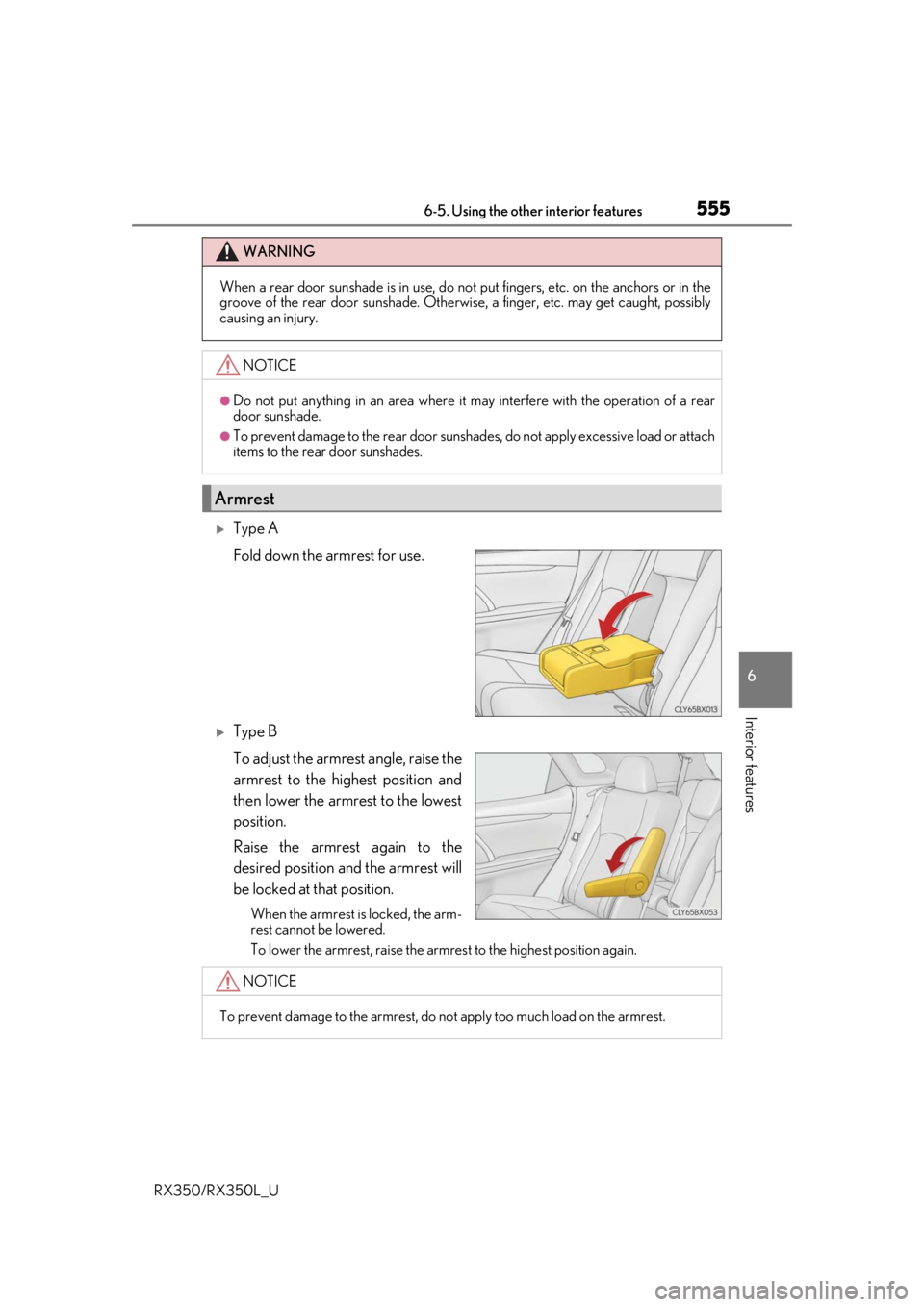
Type A
Fold down the armrest for use.
Type B
To adjust the armrest angle, raise the
armrest to the highest position and
then lower the armrest to the lowest
position.
Raise the armrest again to the
desired position and the armrest will
be locked at that position.
When the armrest is locked, the arm-
rest cannot be lowered.
To lower the armrest, raise the armrest to the highest position again.
WARNING
When a rear door sunshade is in use, do not put fingers, etc. on the anchors or in the
groove of the rear door sunshade. Otherwise, a finger, etc. may get caught, possibly
causing an injury.
NOTICE
●Do not put anything in an area where it may interfere with the operation of a rear
door sunshade.
●To prevent damage to the rear door sunshades, do not apply excessive load or attach
items to the rear door sunshades.
Armrest
NOTICE
To prevent damage to the armrest, do not apply too much load on the armrest.
Page 558 of 777
5576-5. Using the other interior features
6
Interior features
RX350/RX350L_U
The HomeLink® wireless control system in your vehicle has 3 buttons which can
be programmed to operate 3 different de vices. Refer to the programming meth-
ods on the following pages to determine the method which is appropriate for the
device.
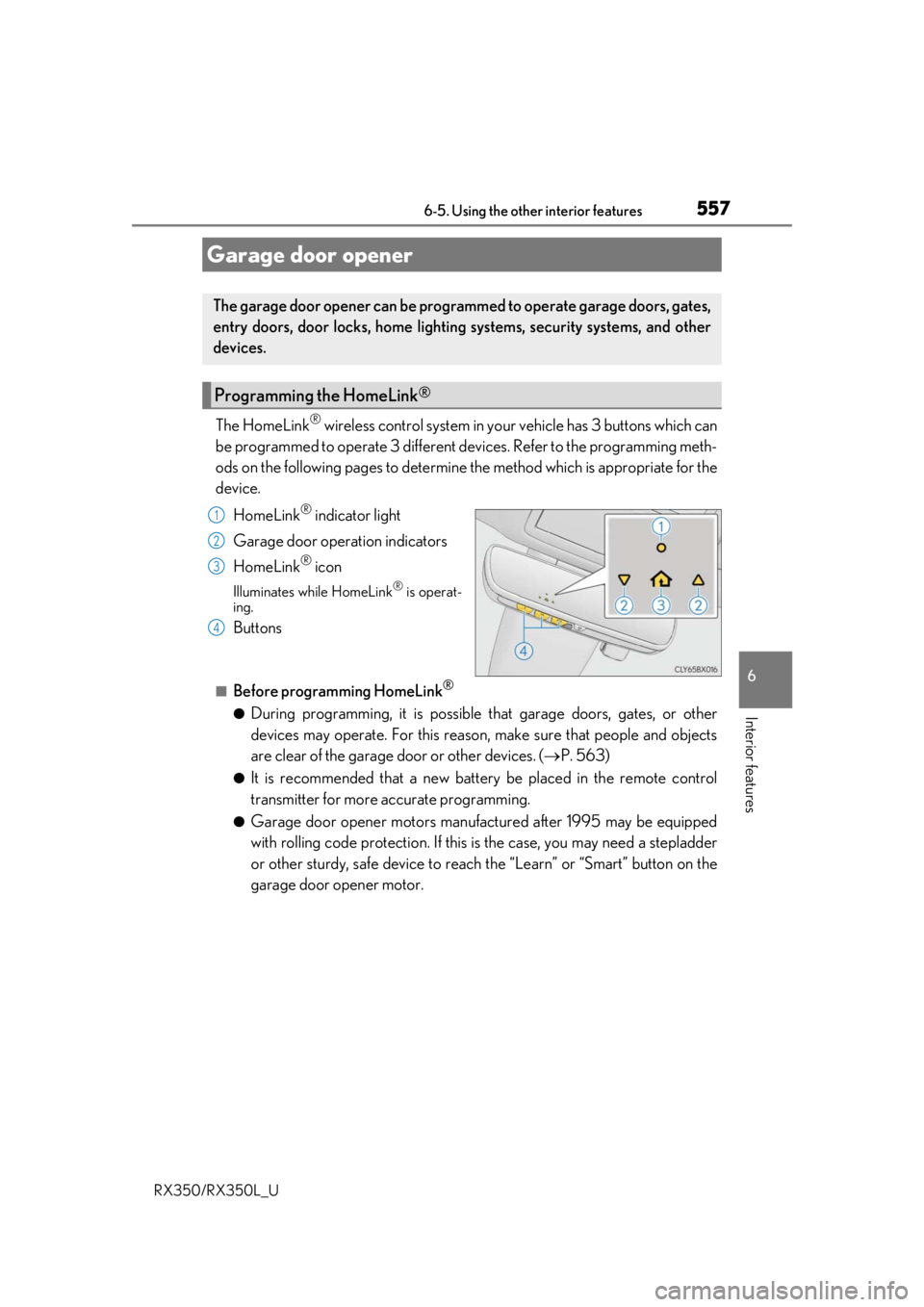
HomeLink
® indicator light
Garage door operation indicators
HomeLink
® icon
Illuminates while HomeLink® is operat-
ing.
Buttons
■Before programming HomeLink®
●During programming, it is possible that garage doors, gates, or other
devices may operate. For this reason, make sure that people and objects
are clear of the garage door or other devices. ( P. 563)
●It is recommended that a new batter y be placed in the remote control
transmitter for more accurate programming.
●Garage door opener motors manufa ctured after 1995 may be equipped
with rolling code protection. If this is the case, you may need a stepladder
or other sturdy, safe device to reach the “Learn” or “Smart” button on the
garage door opener motor.
Garage door opener
The garage door opener can be programmed to operate garage doors, gates,
entry doors, door locks, home lightin g systems, security systems, and other
devices.
Programming the HomeLink®
1
2
3
4
Page 567 of 777
5666-5. Using the other interior features
RX350/RX350L_U
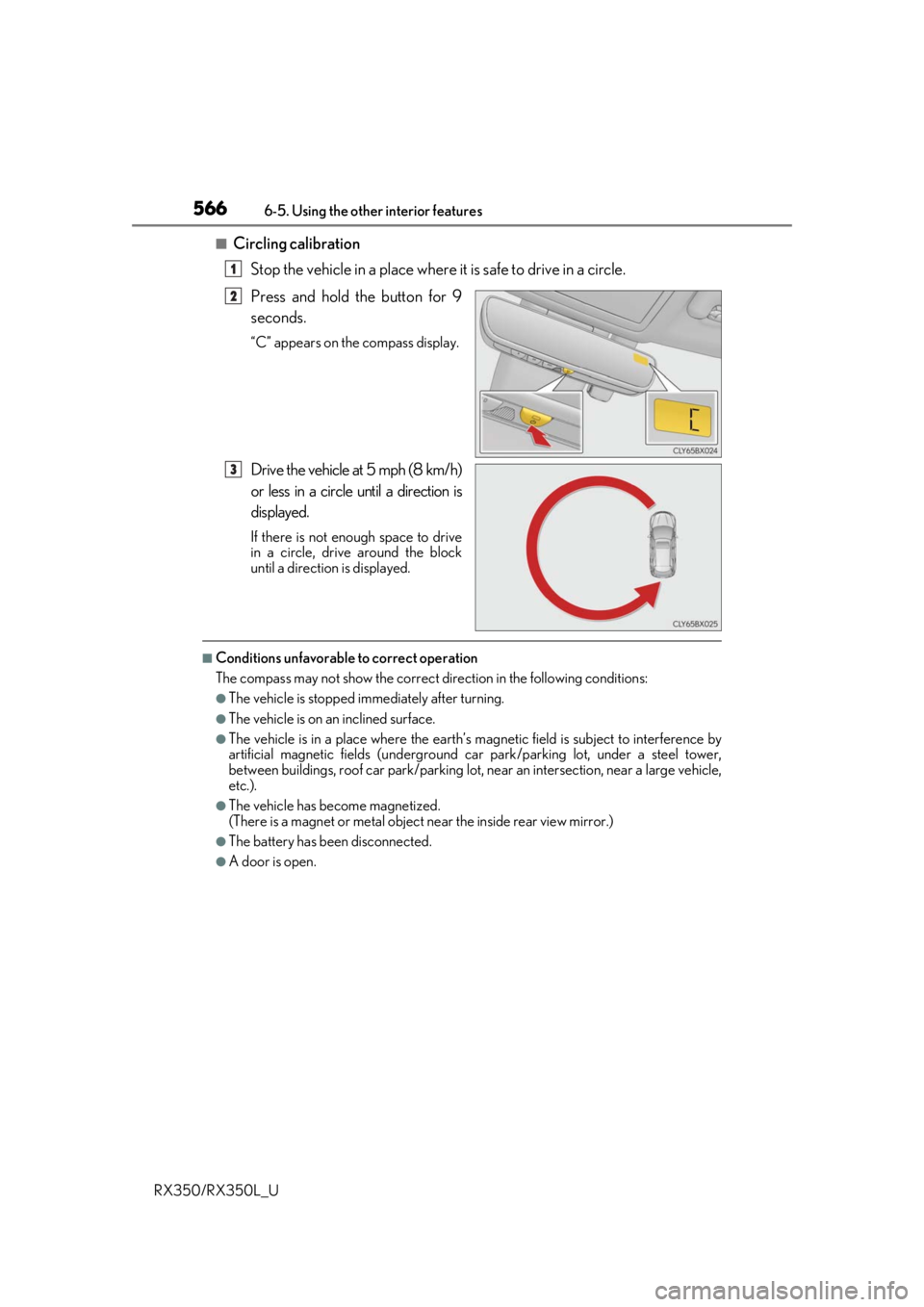
■Circling calibration Stop the vehicle in a place where it is safe to drive in a circle.
Press and hold the button for 9
seconds.
“C” appears on the compass display.
Drive the vehicle at 5 mph (8 km/h)
or less in a circle until a direction is
displayed.
If there is not enough space to drive
in a circle, drive around the block
until a direction is displayed.
■Conditions unfavorable to correct operation
The compass may not show the correct di rection in the following conditions:
●The vehicle is stopped immediately after turning.
●The vehicle is on an inclined surface.
●The vehicle is in a place where the earth’s magnetic field is subject to interference by
artificial magnetic fields (underground car park/parking lot, under a steel tower,
between buildings, roof car park/parking lot, near an intersection, near a large vehicle,
etc.).
●The vehicle has become magnetized.
(There is a magnet or metal object near the inside rear view mirror.)
●The battery has been disconnected.
●A door is open.
1
2
3
Page 578 of 777
5777-1. Maintenance and care
7
Maintenance and care
RX350/RX350L_U
■Note for a smart access system with push-button start
●If the door handle becomes wet while the electronic key is within the effective range,
the door may lock and unlock repeatedly. Place the key in a position 6 ft. (2 m) or more
separate from the vehicle while the vehicle is being washed. (Take care to ensure that
the key is not stolen.)
●If the electronic key is inside the vehicle and a door handle becomes wet during a car
wash, a buzzer will sound outside the vehicle. To turn off the alarm, lock all the doors.
●Set the electronic key to battery-saving mode to disable the sm art access system with
push-button start. ( P. 147)
■Aluminum wheels
●Remove any dirt immediately by using a neutral detergent.
●Wash detergent off with water immediately after use.
●To protect the paint from damage, make sure to observe the following precautions.
• Do not use acidic, alkaline or abrasive detergent
• Do not use hard brushes
• Do not use detergent on the wheels when they are hot, such as after driving or park-
ing in hot weather
■Bumpers
Do not scrub with abrasive cleaners.
■Front side windows water-repellent coating
●The following precautions can extend the effectiveness of the water-repellent coating.
• Remove any dirt, etc. from the front side windows regularly.
• Do not allow dirt and dust to accumulate on the windows for a long period.Clean the windows with a soft, damp cloth as soon as possible.
• Do not use wax or glass cleaners that co ntain abrasives when cleaning the windows.
• Do not use any metallic objects to remove condensation build up.
●When the water-repellent performance has become insufficient, the coating can be
repaired. Contact your Lexus dealer.
Page 589 of 777
5887-2. Maintenance
RX350/RX350L_U
Vehicle exterior
ItemsCheck points
Doors• Do the doors operate smoothly?
Engine hood• Does the engine hood lock system work properly?
Fluid leaks• There should not be any si gns of fluid leakage after
the vehicle has been parked.
Tires
• Is the tire inflation pressure correct?
• The tires should not be damaged or excessively worn.
• Have the tires been rotated according to the mainte- nance schedule?
• The wheel nuts should not be loose.
Windshield wipers/
rear window wiper
•The wiper blades should no t show any signs of crack-
ing, splitting, wear, contamination or deformation.
• The wiper blades should clear the windshield/rear
window without streaking or skipping.
WARNING
■If the engine is running
Turn the engine off and ensure that there is adequate ventilation before performing
maintenance checks.
Page 602 of 777
6017-3. Do-it-yourself maintenance
7
Maintenance and care
RX350/RX350L_U
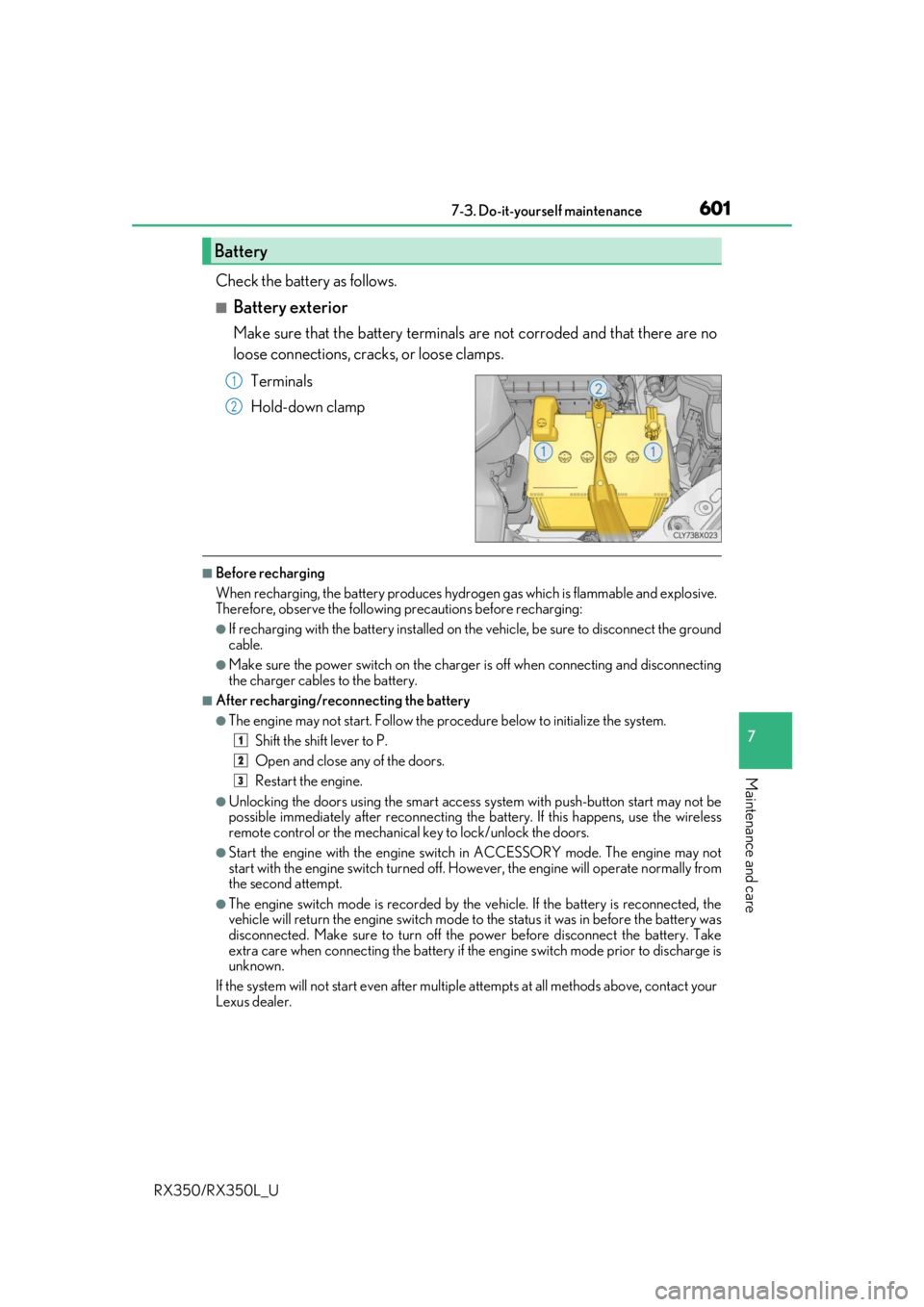
Check the battery as follows.
■Battery exterior
Make sure that the battery terminals are not corroded and that there are no
loose connections, cracks, or loose clamps.
Terminals
Hold-down clamp
■Before recharging
When recharging, the battery produces hydrogen gas which is flammable and explosive.
Therefore, observe the following precautions before recharging:
●If recharging with the battery installed on the vehicle, be sure to disconnect the ground
cable.
●Make sure the power switch on the charge r is off when connecting and disconnecting
the charger cables to the battery.
■After recharging/reconnecting the battery
●The engine may not start. Follow the pr ocedure below to initialize the system.
Shift the shift lever to P.
Open and close any of the doors.
Restart the engine.
●Unlocking the doors using the smart access system with push-button start may not be
possible immediately after reconnecting the battery. If this happens, use the wireless
remote control or the mechanical key to lock/unlock the doors.
●Start the engine with the engine switch in ACCESSORY mode. The engine may not
start with the engine switch turned off. However, the engine will operate normally from
the second attempt.
●The engine switch mode is recorded by the vehicle. If the battery is reconnected, the
vehicle will return the engine switch mode to the status it was in before the battery was
disconnected. Make sure to turn off the power before disconnect the battery. Take
extra care when connecting the battery if the engine switch mode prior to discharge is
unknown.
If the system will not start even after multip le attempts at all methods above, contact your
Lexus dealer.
Battery
1
2
1
2
3
Page 641 of 777
6407-3. Do-it-yourself maintenance
RX350/RX350L_U
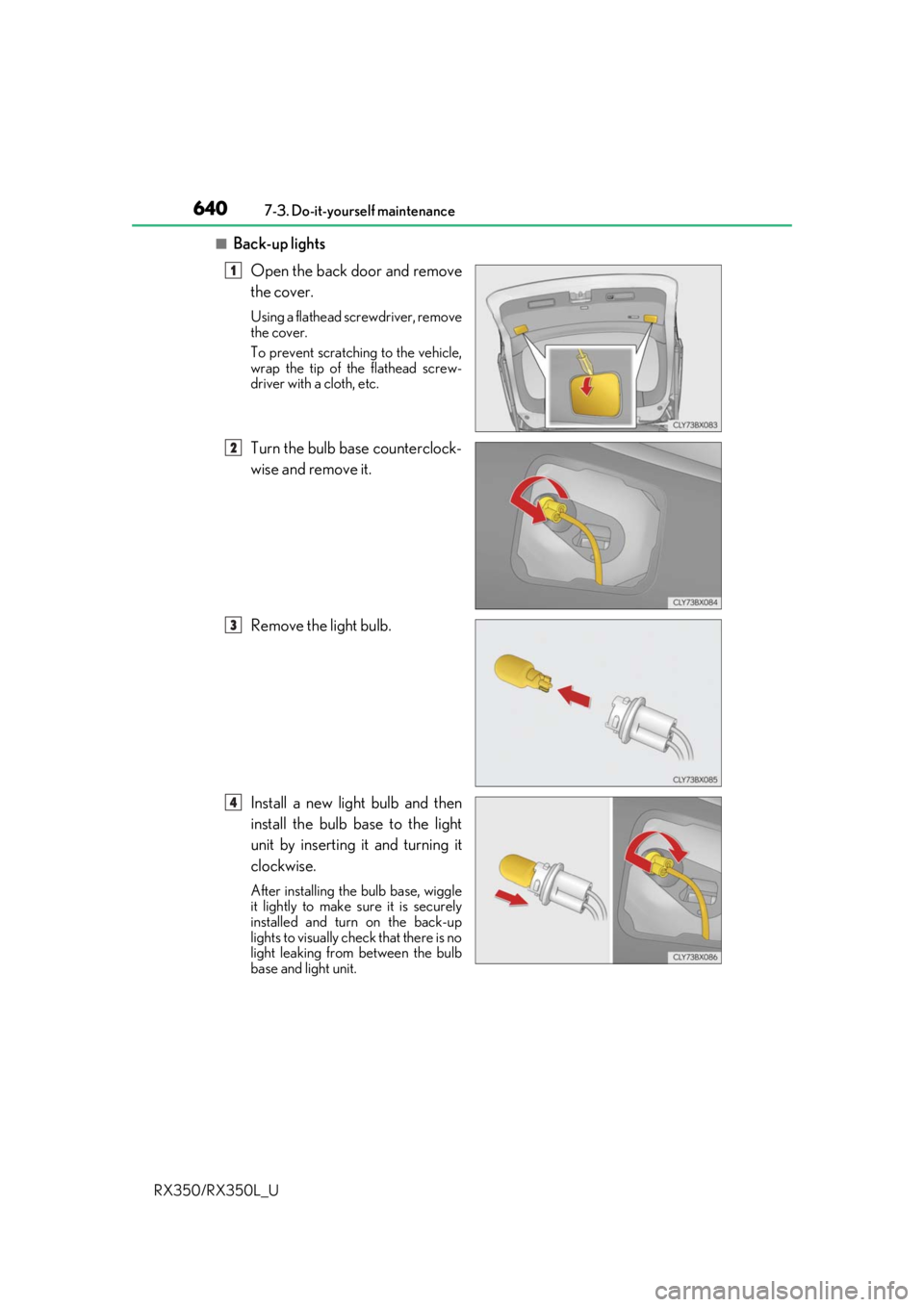
■Back-up lights Open the back door and remove
the cover.
Using a flathead screwdriver, remove
the cover.
To prevent scratching to the vehicle,
wrap the tip of the flathead screw-
driver with a cloth, etc.
Turn the bulb base counterclock-
wise and remove it.
Remove the light bulb.
Install a new light bulb and then
install the bulb base to the light
unit by inserting it and turning it
clockwise.
After installing th e bulb base, wiggle
it lightly to make sure it is securely
installed and turn on the back-up
lights to visually check that there is no
light leaking from between the bulb
base and light unit.
1
2
3
4