park LEXUS RX450H 2020 Manual Online
[x] Cancel search | Manufacturer: LEXUS, Model Year: 2020, Model line: RX450H, Model: LEXUS RX450H 2020Pages: 777, PDF Size: 13.14 MB
Page 384 of 777

3834-5. Using the driving support systems
4
Driving
RX350/RX350L_U
WARNING
■Hill-start assist control does not operate effectively when
●Do not overly rely on hill-start assist control. Hill-start assist control may not operate
effectively on steep inclines and roads covered with ice.
●Unlike the parking brake, hill-start assist control is not intended to hold the vehicle
stationary for an exte nded period of time. Do not atte mpt to use hill-start assist con-
trol to hold the vehicle on an incline, as doing so may lead to an accident.
■When the TRAC/VSC/Trailer Sway Control is activated
The slip indicator light flashes. Always drive carefully. Reckless driving may cause an
accident. Exercise particular care when the indicator light flashes.
■When the TRAC/VSC/Trailer Sway Control systems are turned off
Be especially careful and drive at a speed appropriate to the road conditions. As these
are the systems to help ensure vehicle stab ility and driving force, do not turn the
TRAC/VSC/Trailer Sway Contro l systems off unless necessary.
Trailer Sway Control is part of the VSC syst em and will not operate if VSC is turned off
or experiences a malfunction.
■Replacing tires
Make sure that all tires are of the specified size, brand, tread pattern and total load
capacity. In addition, make sure that the tire s are inflated to the recommended tire infla-
tion pressure level.
The ABS, TRAC, Trailer Sway Control and VS C systems will not function correctly if
different tires are installed on the vehicle.
Contact your Lexus dealer for further in formation when replacing tires or wheels.
■Handling of tires and the suspension
Using tires with any kind of problem or modi fying the suspension will affect the driving
assist systems, and may cause a system to malfunction.
■Trailer Sway Control precaution
The Trailer Sway Control system is not able to reduce trailer sway in all situations.
Depending on many factors such as the condit ions of the vehicle, trailer, road surface,
and driving environment, the Trailer Sway Control system may not be effective. Refer to
your trailer owner’s manual for information on how to tow your trailer properly.
■If trailer sway occurs
Observe the following precautions.
Failing to do so may cause death or serious injury.
●Firmly grip the steering wh eel. Steer straight ahead.
Do not try to control trailer sway by turning the steering wheel.
●Begin releasing the accelerator pedal immediately but very gradually to reduce
speed.
Do not increase speed. Do not apply vehicle brakes.
If you make no extreme correction with the steering or brakes, your vehicle and trailer
should stabilize. ( P. 226)
Page 386 of 777
3854-6. Driving tips
4
Driving
RX350/RX350L_U
Accelerate the vehicle slowly, keep a safe distance between you and the vehicle
ahead, and drive at a reduced spee d suitable to road conditions.
●Park the vehicle and move the shift lever to P without setting the parking
brake. The parking brake may freeze up, preventing it from being released. If
the vehicle is parked without setting the parking brake, make sure to block the
wheels.
Failure to do so may be dangerous because it may cause the vehicle to move
unexpectedly, possibly leading to an accident.
When the parking brake is in automatic mo de, release the parking brake after shifting
the shift lever to P. ( P. 247)
●If the vehicle is parked without setting the parking brake, confirm that the shift
lever cannot be moved out of P
*.
*: The shift lever will be locked if it is atte mpted to be shifted from P to any other posi-
tion without depressing the brake pedal. If the shift lever can be shifted from P, there
may be a problem with the shift lock sy stem. Have the vehicle inspected by your
Lexus dealer immediately.
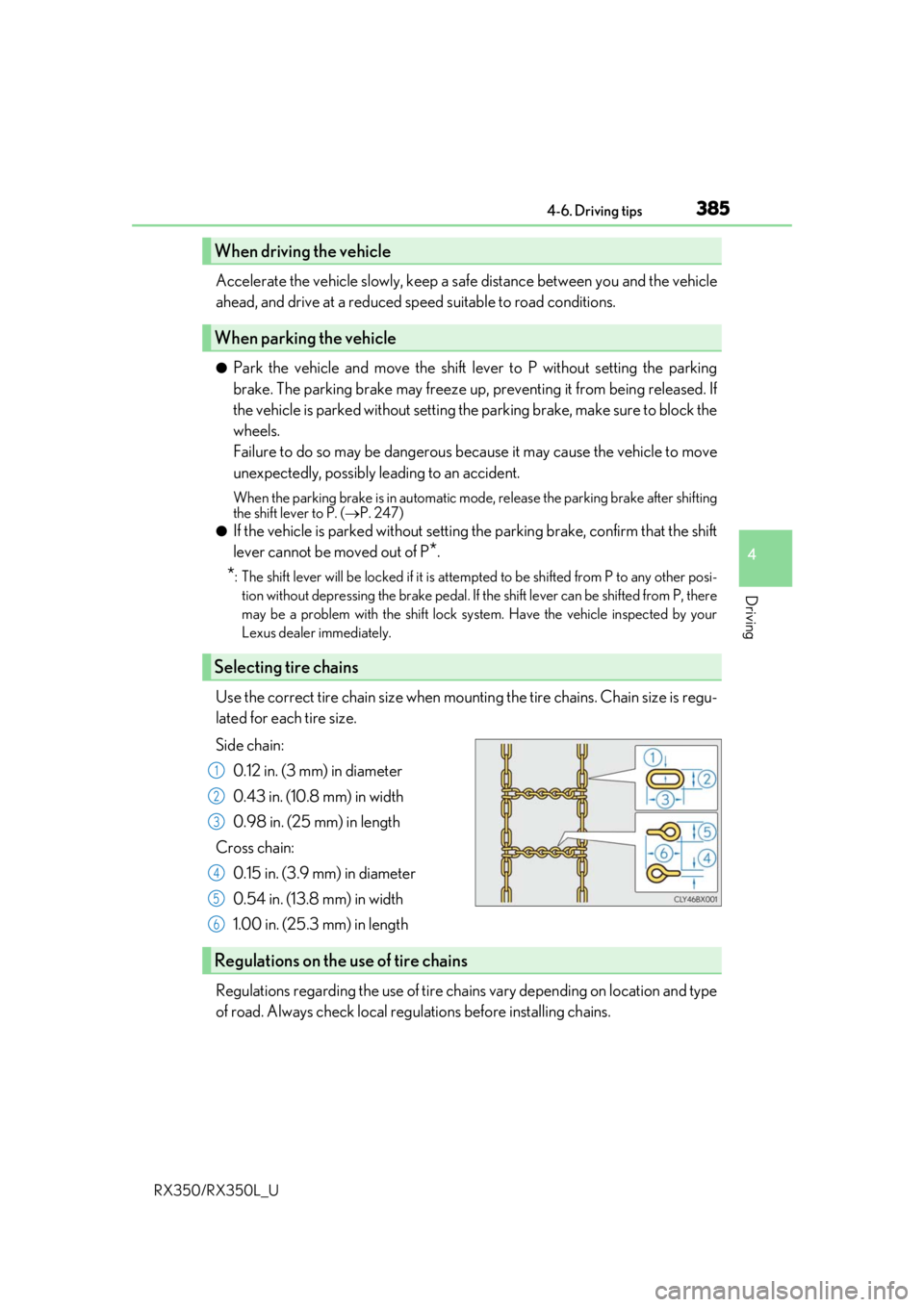
Use the correct tire chain size when mounti ng the tire chains. Chain size is regu-
lated for each tire size.
Side chain:
0.12 in. (3 mm) in diameter
0.43 in. (10.8 mm) in width
0.98 in. (25 mm) in length
Cross chain: 0.15 in. (3.9 mm) in diameter
0.54 in. (13.8 mm) in width
1.00 in. (25.3 mm) in length
Regulations regarding the use of tire chains vary depending on location and type
of road. Always check local regu lations before installing chains.
When driving the vehicle
When parking the vehicle
Selecting tire chains
1
2
3
4
5
6
Regulations on the use of tire chains
Page 390 of 777

3894-6. Driving tips
4
Driving
RX350/RX350L_U
Your vehicle is not designed to be driven off-road. However, in the event that
off-road driving cannot be avoided, please observe the following precautions to
help avoid the areas prohibited to vehicles.
●Drive your vehicle only in areas wher e off-road vehicles are permitted to
travel.
●Respect private property. Get owner’s permission before entering private
property.
●Do not enter areas that are closed. Honor gates, barriers and signs that
restrict travel.
●Stay on established road s. When conditions are wet, driving techniques
should be changed or travel dela yed to prevent damage to roads.
■Additional information for off-road driving
For owners in U.S. mainland, Hawaii and Puerto Rico:
To obtain additional information pertaining to driving your vehicle off-road, consult the
following organizations.
●State and Local Parks and Recreation Departments
●State Motor Vehicle Bureau
●Recreational Vehicle Clubs
●U.S. Forest Service and Bu reau of Land Management
Off-road driving
Page 502 of 777

5016-1. Basic operation of the Remote Touch screen
6
Interior features
RX350/RX350L_U
■ Selecting the operation screen
When selecting the main display, move the Remote Touch knob to the left.
When selecting the side display, move the Remote Touch knob to the right.
■Main display
For details about the functions and operation of the main display, refer to the
respective section and “NAVIGATION SYSTEM OWNER’S MANUAL”.
■Side display
Basic screens
To change the screen displayed on the side display, use the screen buttons on
the right side of the display.
Navigation system
*
Audio*
Phone*
Vehicle information ( P. 118)
Air conditioning system
( P. 509)
Interruption screens
Each of the following screens is displayed automatically in accordance with
conditions. • Intuitive parking assist (if equipped) ( P. 327)
•Phone
*
• Destination Assist*
•Driving mode ( P. 373)
*: Refer to the “NAVIGATION SYSTEM OWNER’S MANUAL”.
Split-screen display operation
1
2
3
4
5
Page 551 of 777
5506-5. Using the other interior features
RX350/RX350L_U
NOTICE
■Conditions in which the wireless charger may not operate correctly
In the following situations, the wire less charger may not operate correctly:
●When a portable device is fully charged
●When there is a foreign object between the charging area and portable device
●When a portable device becomes hot while charging
●When a portable device is placed on the wireless area with its charging surface fac-
ing up
●When a portable device is not centered on the charging area
●When the vehicle is near a TV tower, electric power plant, gas station, radio station,
large display, airport or other facility that generates stro ng radio waves or electrical
noise
●When the portable device is in contact with, or is covered by any of the following
metallic objects:
• Cards to which aluminum foil is attached
• Cigarette boxes that ha ve aluminum foil inside
• Metallic wallets or bags
•Coins
•Metal hand warmers
• Media such as CDs and DVDs
●When wireless keys (that emit radio waves) other than those of your vehicle are being
used nearby.
If in situations other than above the wirele ss charger does not operate properly or the
operation indicator light is blinking, the wireless charge r may be malfunctioning. Con-
tact your Lexus dealer.
■To prevent failure or damage to data
●Do not bring magnetic cards, such as a cr edit card, or magnetic recording media,
close to the wireless charger while charging. Otherwise, data may be erased due to
the influence of magnetism.
Additionally, do not bring pr ecision instruments such as wrist watches, close to the
wireless charger, as such objects may malfunction.
●Do not leave portable devices in the cab in. The temperature inside the cabin may
become high when parked in the sun, and cause damage to the device.
■To prevent battery discharge
Do not use the wireless charger for a long pe riod of time with the engine is stopped.
Page 554 of 777
5536-5. Using the other interior features
6
Interior features
RX350/RX350L_U
The USB charging ports are used to supply 2.1 A of electricity at 5 V to external
devices. The USB charging ports are for charging only. They are not designed for
data transfer or other purposes. Depending on the external device, it may not
charge properly. Refer to the manual in cluded with the device before using a
USB charging port.
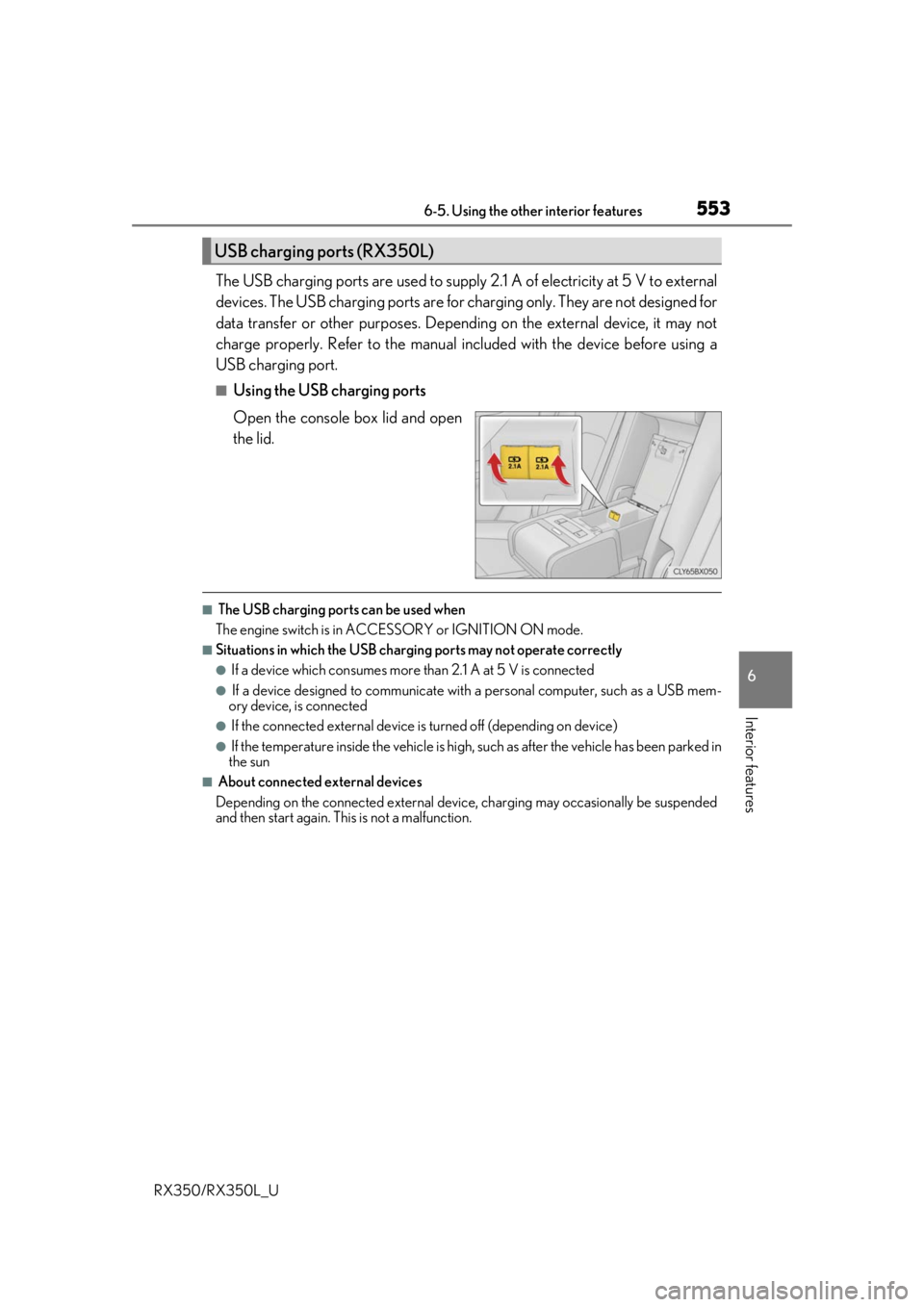
■Using the USB charging ports
Open the console box lid and open
the lid.
■ The USB charging ports can be used when
The engine switch is in ACCESSORY or IGNITION ON mode.
■Situations in which the USB charging ports may not operate correctly
● If a device which consumes more than 2.1 A at 5 V is connected
● If a device designed to communicate with a personal computer, such as a USB mem-
ory device, is connected
● If the connected external device is turned off (depending on device)
● If the temperature inside the vehicle is high, such as after the vehicle has been parked in
the sun
■ About connected external devices
Depending on the connected external device , charging may occasionally be suspended
and then start again. This is not a malfunction.
USB charging ports (RX350L)
Page 567 of 777
5666-5. Using the other interior features
RX350/RX350L_U
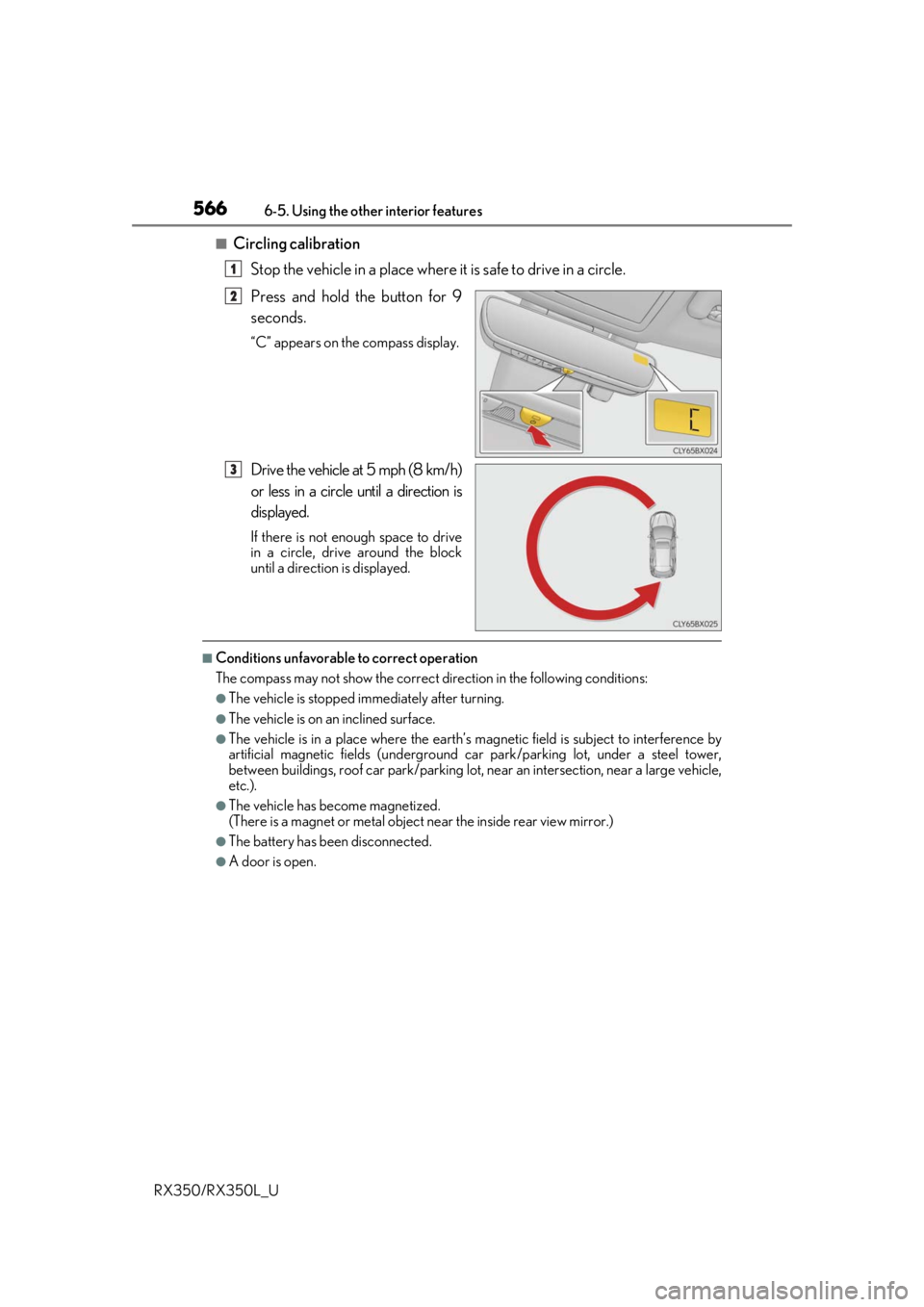
■Circling calibration Stop the vehicle in a place where it is safe to drive in a circle.
Press and hold the button for 9
seconds.
“C” appears on the compass display.
Drive the vehicle at 5 mph (8 km/h)
or less in a circle until a direction is
displayed.
If there is not enough space to drive
in a circle, drive around the block
until a direction is displayed.
■Conditions unfavorable to correct operation
The compass may not show the correct di rection in the following conditions:
●The vehicle is stopped immediately after turning.
●The vehicle is on an inclined surface.
●The vehicle is in a place where the earth’s magnetic field is subject to interference by
artificial magnetic fields (underground car park/parking lot, under a steel tower,
between buildings, roof car park/parking lot, near an intersection, near a large vehicle,
etc.).
●The vehicle has become magnetized.
(There is a magnet or metal object near the inside rear view mirror.)
●The battery has been disconnected.
●A door is open.
1
2
3
Page 578 of 777

5777-1. Maintenance and care
7
Maintenance and care
RX350/RX350L_U
■Note for a smart access system with push-button start
●If the door handle becomes wet while the electronic key is within the effective range,
the door may lock and unlock repeatedly. Place the key in a position 6 ft. (2 m) or more
separate from the vehicle while the vehicle is being washed. (Take care to ensure that
the key is not stolen.)
●If the electronic key is inside the vehicle and a door handle becomes wet during a car
wash, a buzzer will sound outside the vehicle. To turn off the alarm, lock all the doors.
●Set the electronic key to battery-saving mode to disable the sm art access system with
push-button start. ( P. 147)
■Aluminum wheels
●Remove any dirt immediately by using a neutral detergent.
●Wash detergent off with water immediately after use.
●To protect the paint from damage, make sure to observe the following precautions.
• Do not use acidic, alkaline or abrasive detergent
• Do not use hard brushes
• Do not use detergent on the wheels when they are hot, such as after driving or park-
ing in hot weather
■Bumpers
Do not scrub with abrasive cleaners.
■Front side windows water-repellent coating
●The following precautions can extend the effectiveness of the water-repellent coating.
• Remove any dirt, etc. from the front side windows regularly.
• Do not allow dirt and dust to accumulate on the windows for a long period.Clean the windows with a soft, damp cloth as soon as possible.
• Do not use wax or glass cleaners that co ntain abrasives when cleaning the windows.
• Do not use any metallic objects to remove condensation build up.
●When the water-repellent performance has become insufficient, the coating can be
repaired. Contact your Lexus dealer.
Page 584 of 777
5837-1. Maintenance and care
7
Maintenance and care
RX350/RX350L_U
NOTICE
■Cleaning detergents
●Do not use the following types of detergent, as they may discolor the vehicle interior
or cause streaks or damage to painted surfaces:
• Non-seat portions: Organic substances su ch as benzene or gasoline, alkaline or
acidic solutions, dye, and bleach
• Seats: Alkaline or ac idic solutions, such as thinner, benzene, and alcohol
●Do not use polish wax or polis h cleaner. The instrument pane l’s or other interior part’s
painted surface may be damaged.
■Preventing damage to leather surfaces
Observe the following precautions to avoid damage to and deterioration of leather
surfaces:
●Remove any dust or dirt from leather surfaces immediately.
●Do not expose the vehicle to direct sunlight for extended periods of time. Park the
vehicle in the shade, especially during summer.
●Do not place items made of vinyl, plastic, or containing wax on the upholstery, as they
may stick to the leather su rface if the vehicle interior heats up significantly.
■Water on the floor
Do not wash the vehicle floor with water.
Vehicle systems such as the audio system ma y be damaged if water comes into contact
with electrical components such as the au dio system above or under the floor of the
vehicle. Water may also cause the body to rust.
■When cleaning the inside of the windshield
Do not allow glass cleaner to contact the lens. Also, do not touch the lens.
( P. 276)
■Cleaning the inside of the rear window
●Do not use glass cleaner to clean the rear window, as this may cause damage to the
rear window defogger heater wires or antenna. Use a cloth dampened with luke-
warm water to gently wipe the window clean. Wipe th e window in strokes running
parallel to the heater wires or antenna.
●Be careful not to scratch or damage the heater wires or antenna.
Page 588 of 777
5877-2. Maintenance
7
Maintenance and care
RX350/RX350L_U
*: Vehicles with single-beam headlights
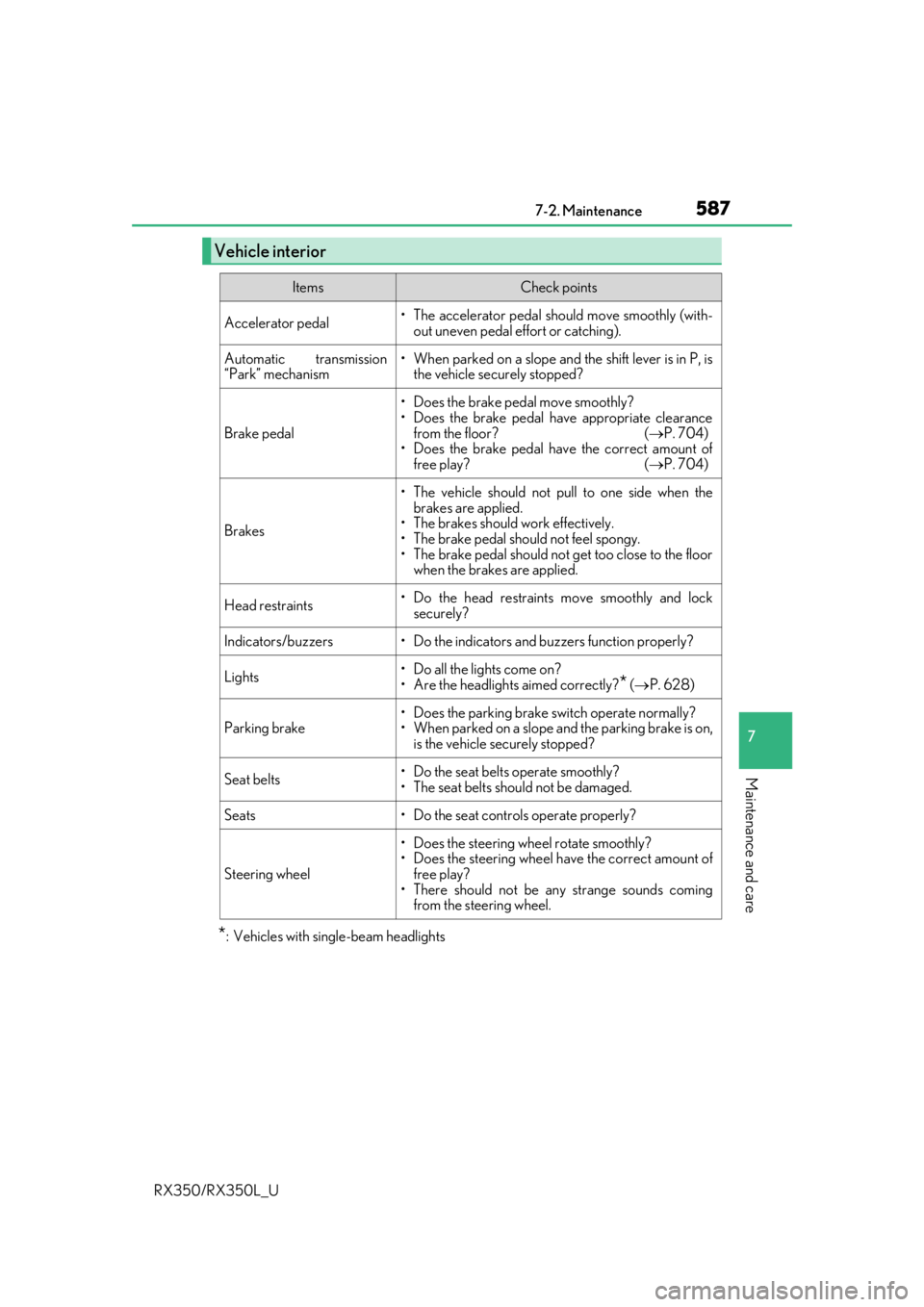
Vehicle interior
ItemsCheck points
Accelerator pedal• The accelerator pedal should move smoothly (with-
out uneven pedal effort or catching).
Automatic transmission
“Park” mechanism• When parked on a slope and the shift lever is in P, is the vehicle securely stopped?
Brake pedal
• Does the brake pedal move smoothly?
• Does the brake pedal have appropriate clearance
from the floor? ( P. 704)
• Does the brake pedal have the correct amount of
free play? ( P. 704)
Brakes
• The vehicle should not pull to one side when the
brakes are applied.
• The brakes should work effectively.
• The brake pedal should not feel spongy.
• The brake pedal should no t get too close to the floor
when the brakes are applied.
Head restraints• Do the head restraints move smoothly and lock
securely?
Indicators/buzzers• Do the indicators and buzzers function properly?
Lights• Do all the lights come on?
• Are the headlights aimed correctly?
* ( P. 628)
Parking brake• Does the parking brake switch operate normally?
• When parked on a slope and the parking brake is on,
is the vehicle securely stopped?
Seat belts• Do the seat belts operate smoothly?
• The seat belts should not be damaged.
Seats• Do the seat controls operate properly?
Steering wheel
• Does the steering wheel rotate smoothly?
• Does the steering wheel have the correct amount offree play?
• There should not be any strange sounds coming from the steering wheel.