alarm LEXUS RX450H 2020 Owners Manual
[x] Cancel search | Manufacturer: LEXUS, Model Year: 2020, Model line: RX450H, Model: LEXUS RX450H 2020Pages: 777, PDF Size: 13.14 MB
Page 2 of 777
TABLE OF CONTENTS2
RX350/RX350L_U
For your information................................... 8
Reading this manual................................... 12
How to search ..............................................13
Pictorial index............................................... 14
1-1. For safe useBefore driving ................................ 28
For safe driving .............................. 30
Seat belts .......................................... 32
SRS airbags ..................................... 36
Front passenger occupant classification system ..................47
Exhaust gas precautions............ 53
1-2. Child safety Riding with children ..................... 54
Child restraint systems ............... 55
1-3. Theft deterrent system Engine immobilizer system........74
Alarm .................................................. 77
2. Instrument cluster Warning lights and indicators.......................................80
Gauges and meters ..................... 86
Multi-information display .......... 90
Head-up display .......................... 108
Fuel consumption information ................................... 114 3-1. Key information
Keys ...................................................120
3-2. Opening, closing and locking the doors
Side doors....................................... 124
Power back door ........................ 130
Smart access system with push-button start.......................146
3-3. Adjusting the seats Front seats ......................................156
Rear seats ....................................... 157
Driving position memory.......... 172
Head restraints ............................. 177
3-4. Adjusting the steering wheel and mirrors
Steering wheel ............................. 180
Inside rear view mirror ............. 182
Outside rear view mirrors ...... 184
3-5. Opening, closing the windows and moon roof
Power windows ............................187
Moon roof........................................ 191
Panoramic moon roof................195
1For safety and security
2Instrument cluster
3Operation of each
component
Page 27 of 777
27
For safety and security1
RX350/RX350L_U
1-1. For safe useBefore driving................................. 28
For safe driving .............................. 30
Seat belts .......................................... 32
SRS airbags ..................................... 36
Front passenger occupant classification system.................. 47
Exhaust gas precautions ............ 53
1-2. Child safety Riding with children ..................... 54
Child restraint systems ............... 55
1-3. Theft deterrent system Engine immobilizer system ............................................. 74
Alarm ..................................................77
Page 78 of 777

771-3. Theft deterrent system
1
For safety and security
RX350/RX350L_U
The alarm uses light and sound to give an alert when an intrusion is detected.
The alarm is triggered in the following situations when the alarm is set:
●A locked door is unlocked or opened in any way other than using the entry
function, wireless remote control or mech anical key. (The doors will lock again
automatically.)
●The hood is opened.
Close the doors and hood, and lock all
the doors. The system will be set auto-
matically after 30 seconds.
The indicator light changes from being
on to flashing when the system is set.
Do one of the following to de activate or stop the alarms:
●Unlock the doors.
●Turn the engine switch to ACCESSOR Y or IGNITION ON mode, or start
the engine. (The alarm will be deactivat ed or stopped after a few seconds.)
■System maintenance
The vehicle has a maintenance-free type alarm system.
■Items to check before locking the vehicle
To prevent unexpected triggering of the alarm and vehicle theft, make sure of the follow-
ing:
●Nobody is in the vehicle.
●The windows and moon roof or panoramic mo on roof are closed before the alarm is
set.
●No valuables or other personal items are left in the vehicle.
Alarm
The alarm
Setting the alarm system
Deactivating or stopping the alarm
Page 79 of 777
781-3. Theft deterrent system
RX350/RX350L_U
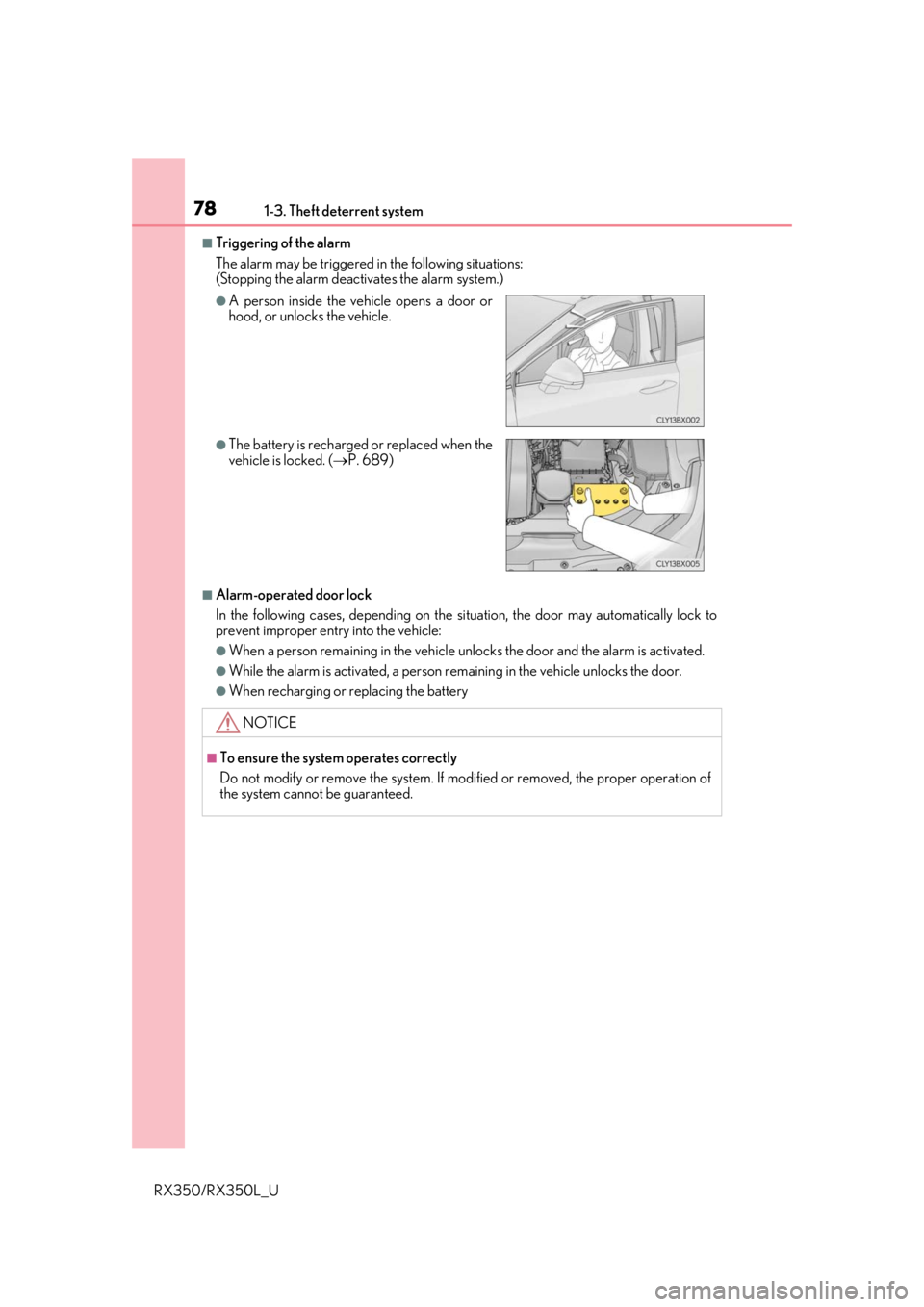
■Triggering of the alarm
The alarm may be triggered in the following situations:
(Stopping the alarm deactivates the alarm system.)
■Alarm-operated door lock
In the following cases, depending on the si tuation, the door may automatically lock to
prevent improper entry into the vehicle:
●When a person remaining in the vehicle un locks the door and the alarm is activated.
●While the alarm is activated, a person remaining in the vehicle unlocks the door.
●When recharging or replacing the battery
●A person inside the vehicle opens a door or
hood, or unlocks the vehicle.
●The battery is recharged or replaced when the
vehicle is locked. (P. 689)
NOTICE
■To ensure the system operates correctly
Do not modify or remove the system. If mo dified or removed, the proper operation of
the system cannot be guaranteed.
Page 121 of 777
120
RX350/RX350L_U3-1. Key information
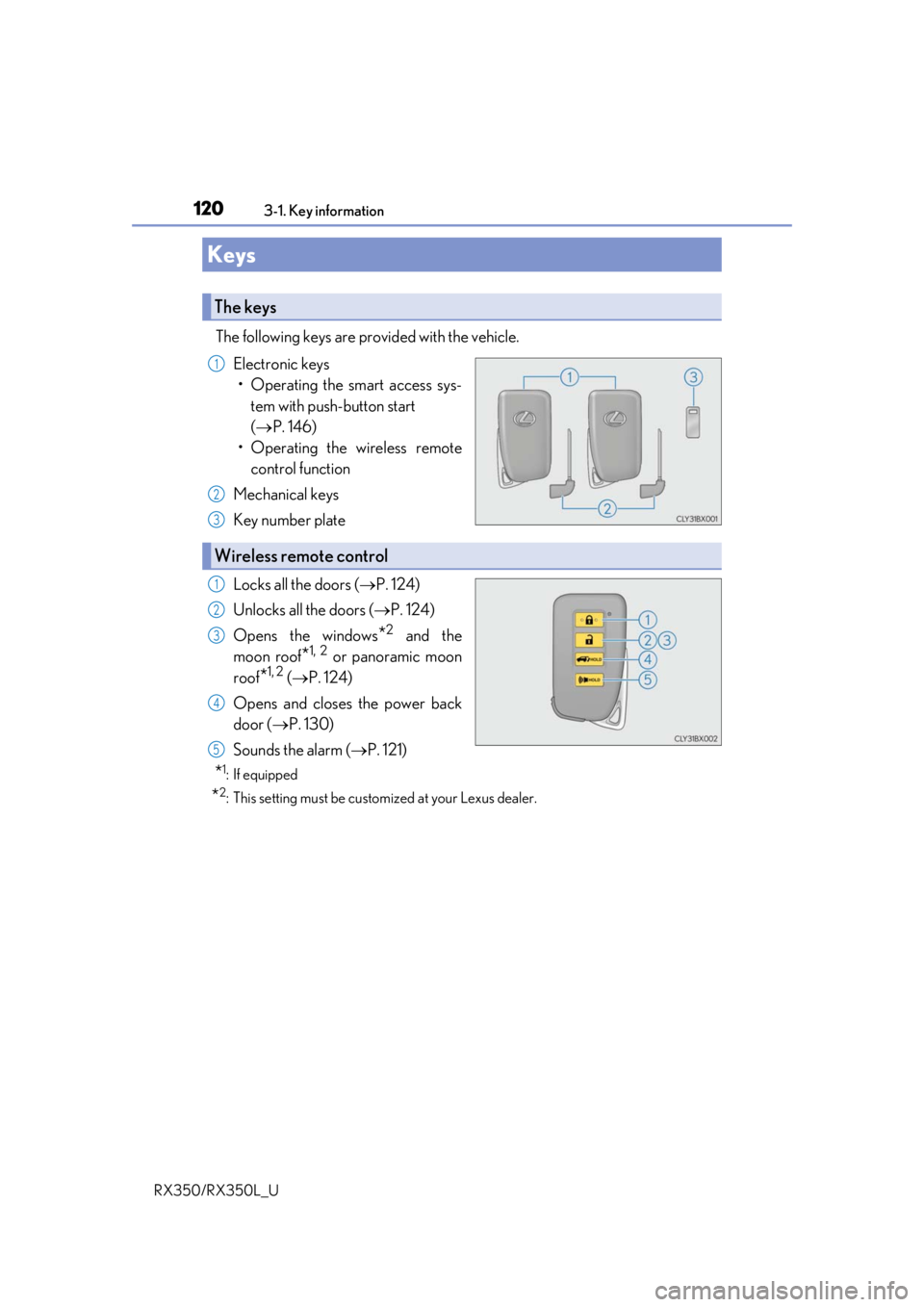
The following keys are provided with the vehicle.
Electronic keys• Operating the smart access sys- tem with push-button start
( P. 146)
• Operating the wireless remote control function
Mechanical keys
Key number plate
Locks all the doors ( P. 124)
Unlocks all the doors ( P. 124)
Opens the windows
*2 and the
moon roof
*1, 2 or panoramic moon
roof
*1, 2 ( P. 124)
Opens and closes the power back
door ( P. 130)
Sounds the alarm ( P. 121)
*1: If equipped
*2: This setting must be custom ized at your Lexus dealer.
Keys
The keys
1
2
3
Wireless remote control
1
2
3
4
5
Page 122 of 777
1213-1. Key information
3
Operation of each component
RX350/RX350L_U
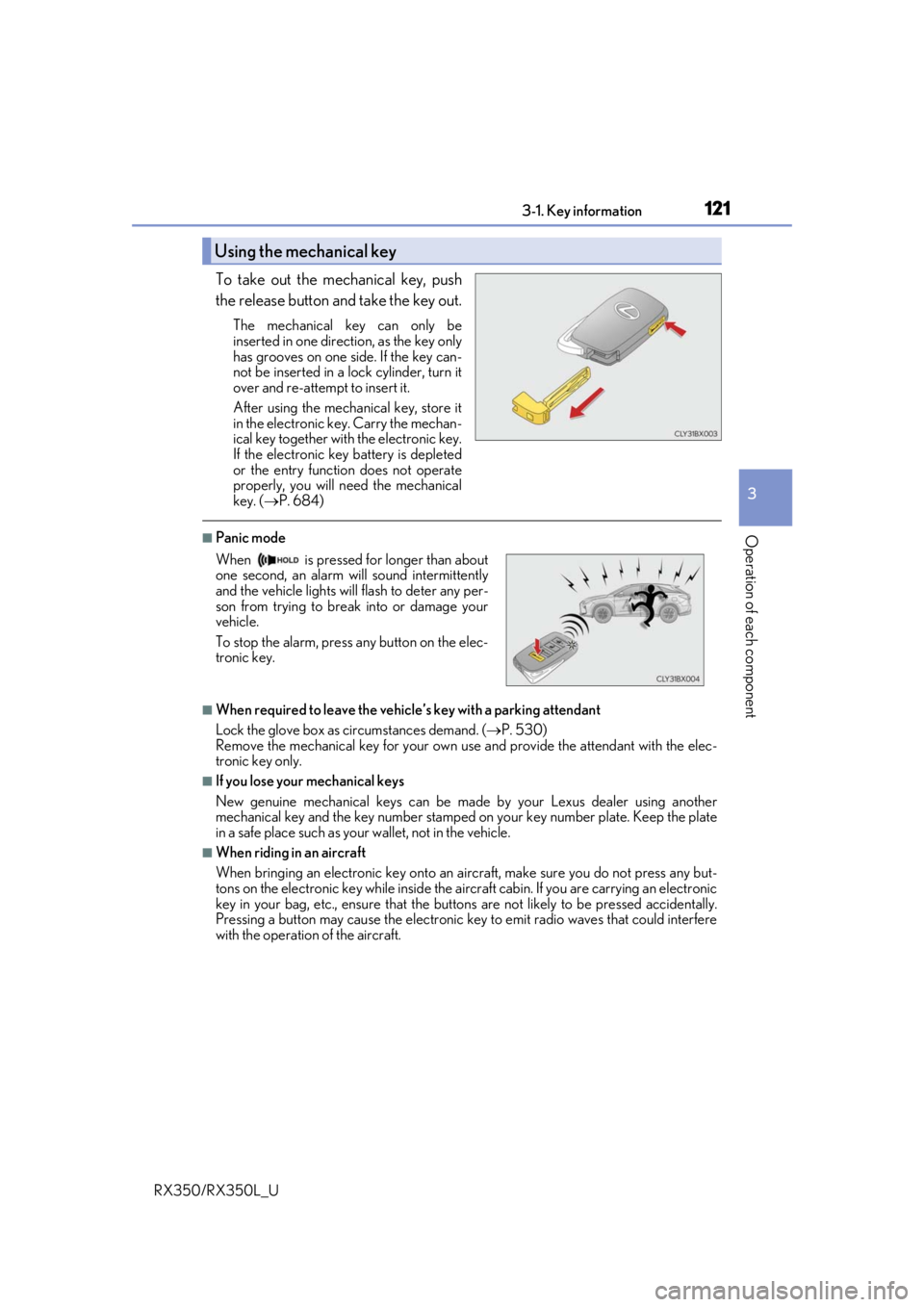
To take out the mechanical key, push
the release button and take the key out.
The mechanical key can only be
inserted in one direction, as the key only
has grooves on one side. If the key can-
not be inserted in a lock cylinder, turn it
over and re-attempt to insert it.
After using the mechanical key, store it
in the electronic key. Carry the mechan-
ical key together with the electronic key.
If the electronic key battery is depleted
or the entry function does not operate
properly, you will need the mechanical
key. ( P. 684)
■Panic mode
■When required to leave the vehicle’s key with a parking attendant
Lock the glove box as circumstances demand. ( P. 530)
Remove the mechanical key for your own use and provide the attendant with the elec-
tronic key only.
■If you lose your mechanical keys
New genuine mechanical keys can be made by your Lexus dealer using another
mechanical key and the key number stamped on your key number plate. Keep the plate
in a safe place such as your wallet, not in the vehicle.
■When riding in an aircraft
When bringing an electronic key onto an aircraft, make sure you do not press any but-
tons on the electronic key while inside the airc raft cabin. If you are carrying an electronic
key in your bag, etc., ensure that the butt ons are not likely to be pressed accidentally.
Pressing a button may cause the electronic key to emit radio waves that could interfere
with the operation of the aircraft.
Using the mechanical key
When is pressed for longer than about
one second, an alarm will sound intermittently
and the vehicle lights will flash to deter any per-
son from trying to break into or damage your
vehicle.
To stop the alarm, press any button on the elec-
tronic key.
Page 123 of 777

1223-1. Key information
RX350/RX350L_U
■Electronic key battery depletion
●The standard battery life is 1 to 2 years.
●If the battery becomes low, an alarm will soun d in the cabin when the engine is stopped.
( P. 623)
●As the electronic key always receives ra dio waves, the battery will become depleted
even if the electronic key is not used. The following symptoms indicate that the elec-
tronic key battery may be depleted. Replace the battery when necessary. ( P. 623)
• The smart access system with push-button start or the wireless remote control does
not operate.
• The detection area becomes smaller.
• The LED indicator on the key surface does not turn on.
●To reduce key battery depletion when the electronic key is to not be used for long peri-
ods of time, set the electronic key to the battery-saving mode.
( P. 148)
●To avoid serious deterioration, do not leave the electronic key within 3 ft. (1 m) of the
following electrical appliances that produce a magnetic field:
•TVs
• Personal computers
• Cellular phones, cordless phones and battery chargers
• Recharging cellular phones or cordless phones
• Induction cookers
•Table lamps
■Replacing the battery
P. 623
■Confirmation of the registered key number
The number of keys already registered to the vehicle can be confirmed. Ask your Lexus
dealer for details.
■If a wrong key is used
The key cylinder rotates freely, isol ated from the internal mechanism.
Page 126 of 777

1253-2. Opening, closing and locking the doors
3
Operation of each component
RX350/RX350L_U
■Operation signals
Doors:
A buzzer sounds and the emergency flashers flash to indicate that the doors have been
locked/unlocked. (Locked: Once; Unlocked: Twice)
Windows and moon roof or panoramic moon roof:
A buzzer sounds.
■Security feature
If a door is not opened within approximately 60 seconds after the vehicle is unlocked, the
security feature automatically locks the vehicle again.
■When the door cannot be locked by the lock sensor on the surface of the door handle
■Door lock buzzer
If an attempt to lock the doors is made when a door is not fully closed, a buzzer sounds
continuously for 5 seconds. Fully close the d oor to stop the buzzer, and lock the vehicle
once more.
■Setting the alarm
Locking the doors will set the alarm system. ( P. 77)
■If the smart access system with push-button start or the wireless remote control does
not operate properly
●Use the mechanical key to lock and unlock the doors. ( P. 684)
●Replace the key battery with a new one if it is depleted. ( P. 623)
When the door cannot be locked even if the
lock sensor on the surface of the door handle is
touched by a finger, touch the lock sensor with
the palm.
When gloves are being worn, remove the
gloves.
Page 129 of 777
1283-2. Opening, closing and locking the doors
RX350/RX350L_U
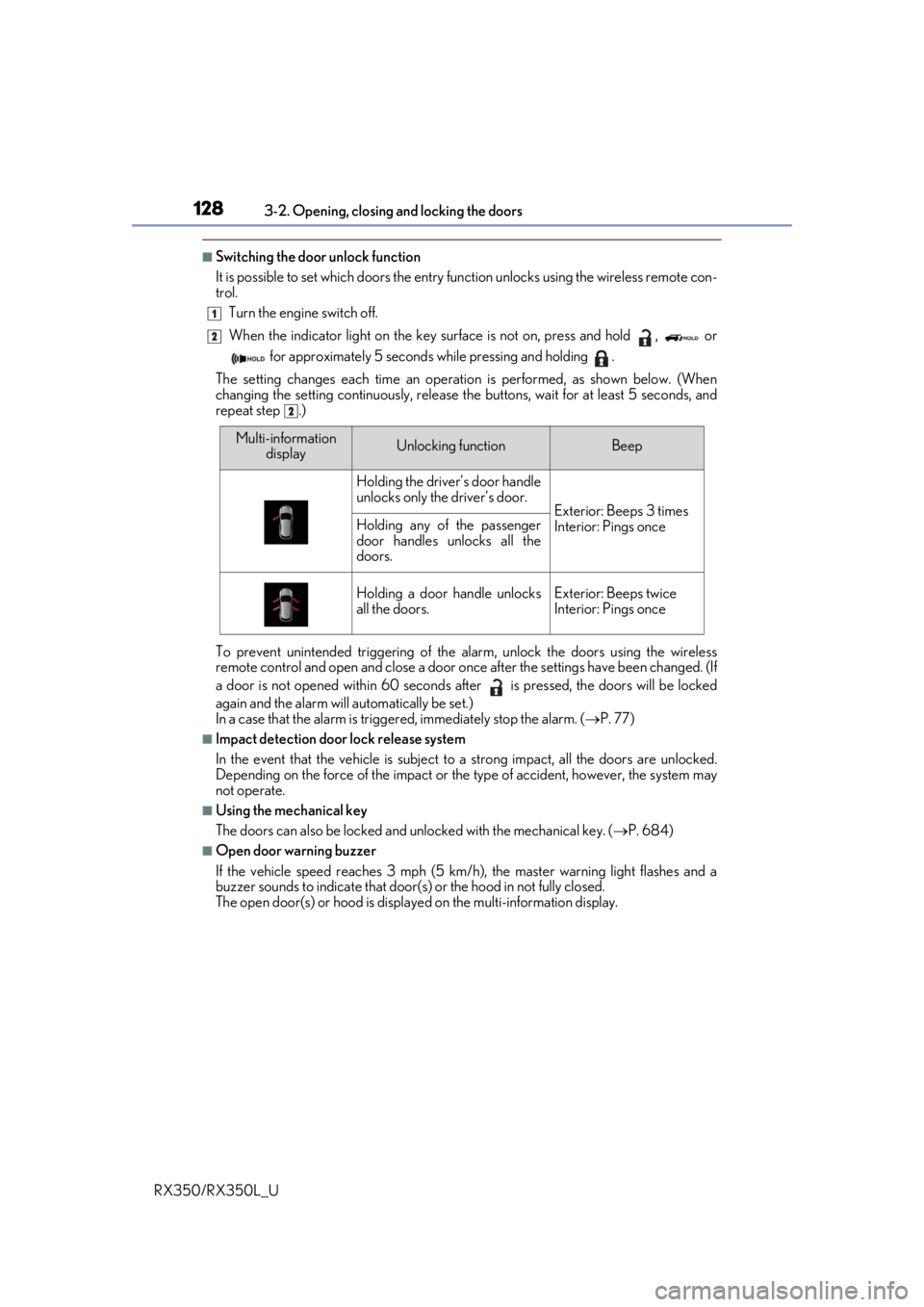
■Switching the door unlock function
It is possible to set which doors the entry function unlock s using the wireless remote con-
trol.
Turn the engine switch off.
When the indicator light on the key su rface is not on, press and hold , or
for approximately 5 seconds while pressing and holding .
The setting changes each time an operation is performed, as shown below. (When
changing the setting continuously, release the buttons, wait for at least 5 seconds, and
repeat step .)
To prevent unintended triggering of the alarm, unlock the doors using the wireless
remote control and open and close a door once after the settings have been changed. (If
a door is not opened within 60 seconds af ter is pressed, the doors will be locked
again and the alarm will automatically be set.)
In a case that the alarm is triggered, immediately stop the alarm. ( P. 77)
■Impact detection door lock release system
In the event that the vehicle is subject to a strong impact, all the doors are unlocked.
Depending on the force of the impact or the type of accident, however, the system may
not operate.
■Using the mechanical key
The doors can also be locked and unlocked with the mechanical key. ( P. 684)
■Open door warning buzzer
If the vehicle speed reaches 3 mph (5 km/h), the master warning light flashes and a
buzzer sounds to indicate that door (s) or the hood in not fully closed.
The open door(s) or hood is displa yed on the multi-information display.
1
2
2
Multi-information
displayUnlocking functionBeep
Holding the driver’s door handle
unlocks only the driver’s door.
Exterior: Beeps 3 times
Interior: Pings onceHolding any of the passenger
door handles unlocks all the
doors.
Holding a door handle unlocks
all the doors.Exterior: Beeps twice
Interior: Pings once
Page 148 of 777
1473-2. Opening, closing and locking the doors
3
Operation of each component
RX350/RX350L_U
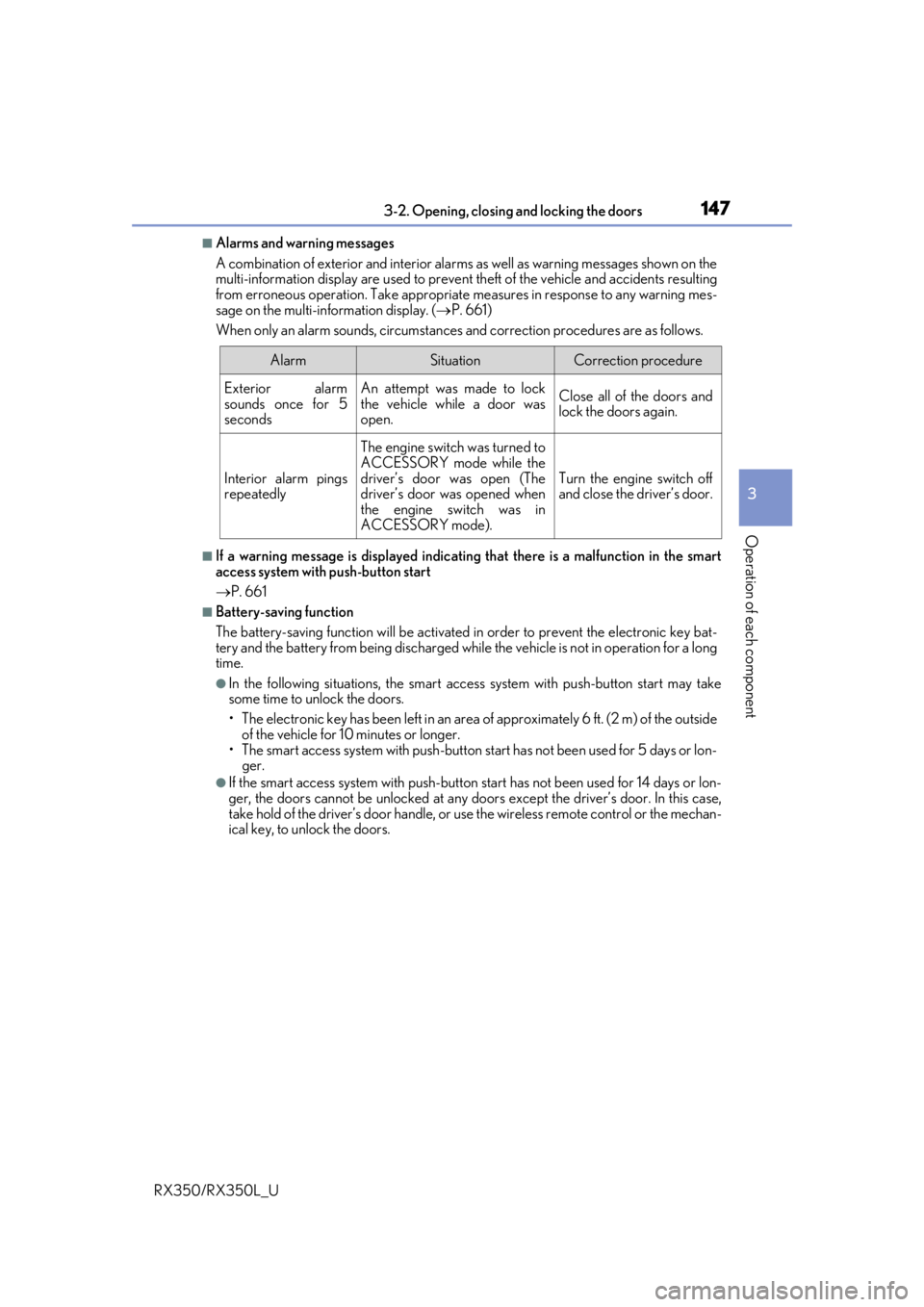
■Alarms and warning messages
A combination of exterior and interior alar ms as well as warning messages shown on the
multi-information display are used to prevent theft of the vehicle and accidents resulting
from erroneous operation. Take appropriate measures in response to any warning mes-
sage on the multi-information display. ( P. 661)
When only an alarm sounds, circumstances and correction procedures are as follows.
■If a warning message is displayed indicating that there is a malfunction in the smart
access system with push-button start
P. 661
■Battery-saving function
The battery-saving function w ill be activated in order to prevent the electronic key bat-
tery and the battery from being discharged while the vehicle is not in operation for a long
time.
●In the following situations, the smart acce ss system with push-button start may take
some time to unlock the doors.
• The electronic key has been le ft in an area of approximately 6 ft. (2 m) of the outside
of the vehicle for 10 minutes or longer.
• The smart access system with push-button st art has not been used for 5 days or lon-
ger.
●If the smart access system with push-button start has not been used for 14 days or lon-
ger, the doors cannot be unlocked at any doors except the driver’s door. In this case,
take hold of the driver’s d oor handle, or use the wireless remote control or the mechan-
ical key, to unlock the doors.
AlarmSituationCorrection procedure
Exterior alarm
sounds once for 5
secondsAn attempt was made to lock
the vehicle while a door was
open.Close all of the doors and
lock the doors again.
Interior alarm pings
repeatedly
The engine switch was turned to
ACCESSORY mode while the
driver’s door was open (The
driver’s door was opened when
the engine switch was in
ACCESSORY mode).
Turn the engine switch off
and close the driver’s door.