charging LEXUS RX450H 2020 Owners Manual
[x] Cancel search | Manufacturer: LEXUS, Model Year: 2020, Model line: RX450H, Model: LEXUS RX450H 2020Pages: 777, PDF Size: 13.14 MB
Page 5 of 777
5
1
9 8
7 5 4
3
2
10
RX350/RX350L_U
6
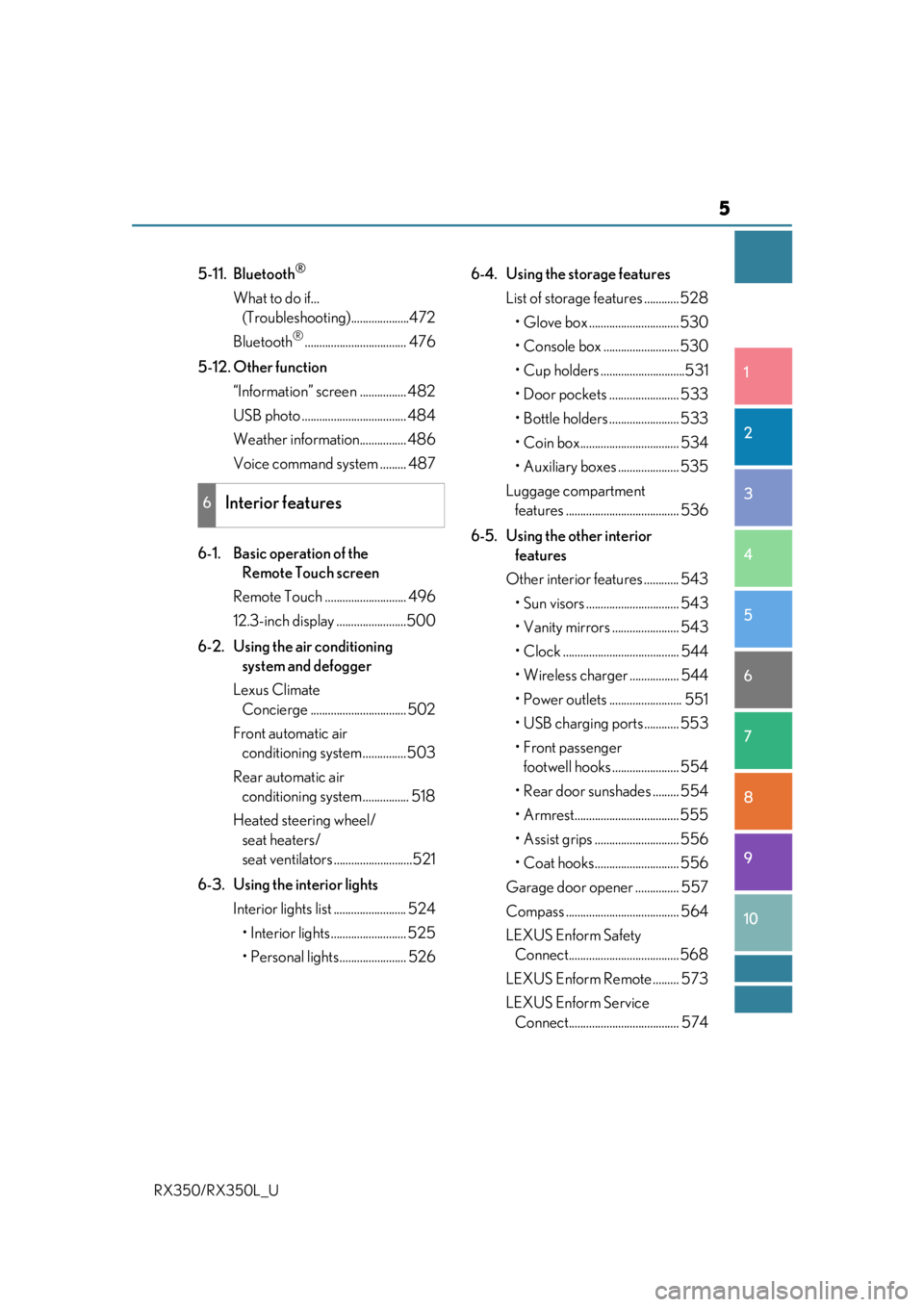
5-11. Bluetooth®
What to do if... (Troubleshooti ng)....................472
Bluetooth
®................................... 476
5-12. Other function “Information” screen ................ 482
USB photo .................................... 484
Weather information................ 486
Voice command system ......... 487
6-1. Basic operation of the Remote Touch screen
Remote Touch ............................ 496
12.3-inch display ........................500
6-2. Using the air conditioning system and defogger
Lexus Climate Concierge ................................. 502
Front automatic air conditioning system ...............503
Rear automatic air conditioning system ................ 518
Heated steering wheel/ seat heaters/
seat ventilators ...........................521
6-3. Using the interior lights Interior lights list ......................... 524• Interior lights .......................... 525
• Personal lights....................... 526 6-4. Using the storage features
List of storage features ............ 528
• Glove box ............................... 530
• Console box .......................... 530
• Cup holders .............................531
• Door pockets ........................ 533
• Bottle holders ........................ 533
• Coin box.................................. 534
• Auxiliary boxes ..................... 535
Luggage compartment features ....................................... 536
6-5. Using the other interior features
Other interior features ............ 543
• Sun visors ................................ 543
• Vanity mirrors ....................... 543
• Clock ........................................ 544
• Wireless charger ................. 544
• Power outlets ......................... 551
• USB charging ports ............ 553
•Front passenger footwell hooks ....................... 554
• Rear door sunshades ......... 554
• Armrest.................................... 555
• Assist grips ............................. 556
• Coat hooks............................. 556
Garage door opener ............... 557
Compass ....................................... 564
LEXUS Enform Safety Connect...................................... 568
LEXUS Enform Remote ......... 573
LEXUS Enform Service Connect...................................... 574
6Interior features
Page 79 of 777
781-3. Theft deterrent system
RX350/RX350L_U
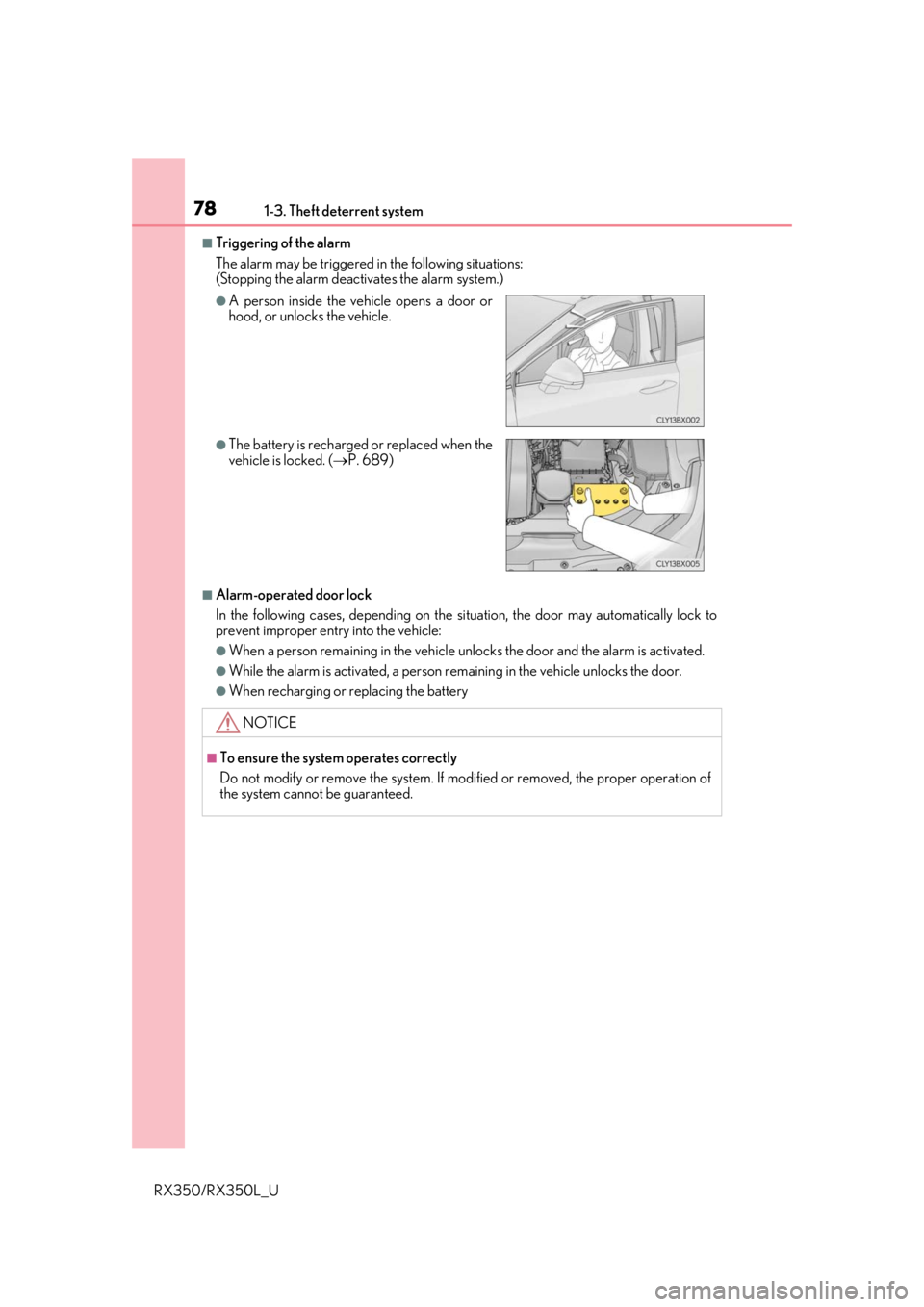
■Triggering of the alarm
The alarm may be triggered in the following situations:
(Stopping the alarm deactivates the alarm system.)
■Alarm-operated door lock
In the following cases, depending on the si tuation, the door may automatically lock to
prevent improper entry into the vehicle:
●When a person remaining in the vehicle un locks the door and the alarm is activated.
●While the alarm is activated, a person remaining in the vehicle unlocks the door.
●When recharging or replacing the battery
●A person inside the vehicle opens a door or
hood, or unlocks the vehicle.
●The battery is recharged or replaced when the
vehicle is locked. (P. 689)
NOTICE
■To ensure the system operates correctly
Do not modify or remove the system. If mo dified or removed, the proper operation of
the system cannot be guaranteed.
Page 82 of 777
812. Instrument cluster
2
Instrument cluster
RX350/RX350L_U
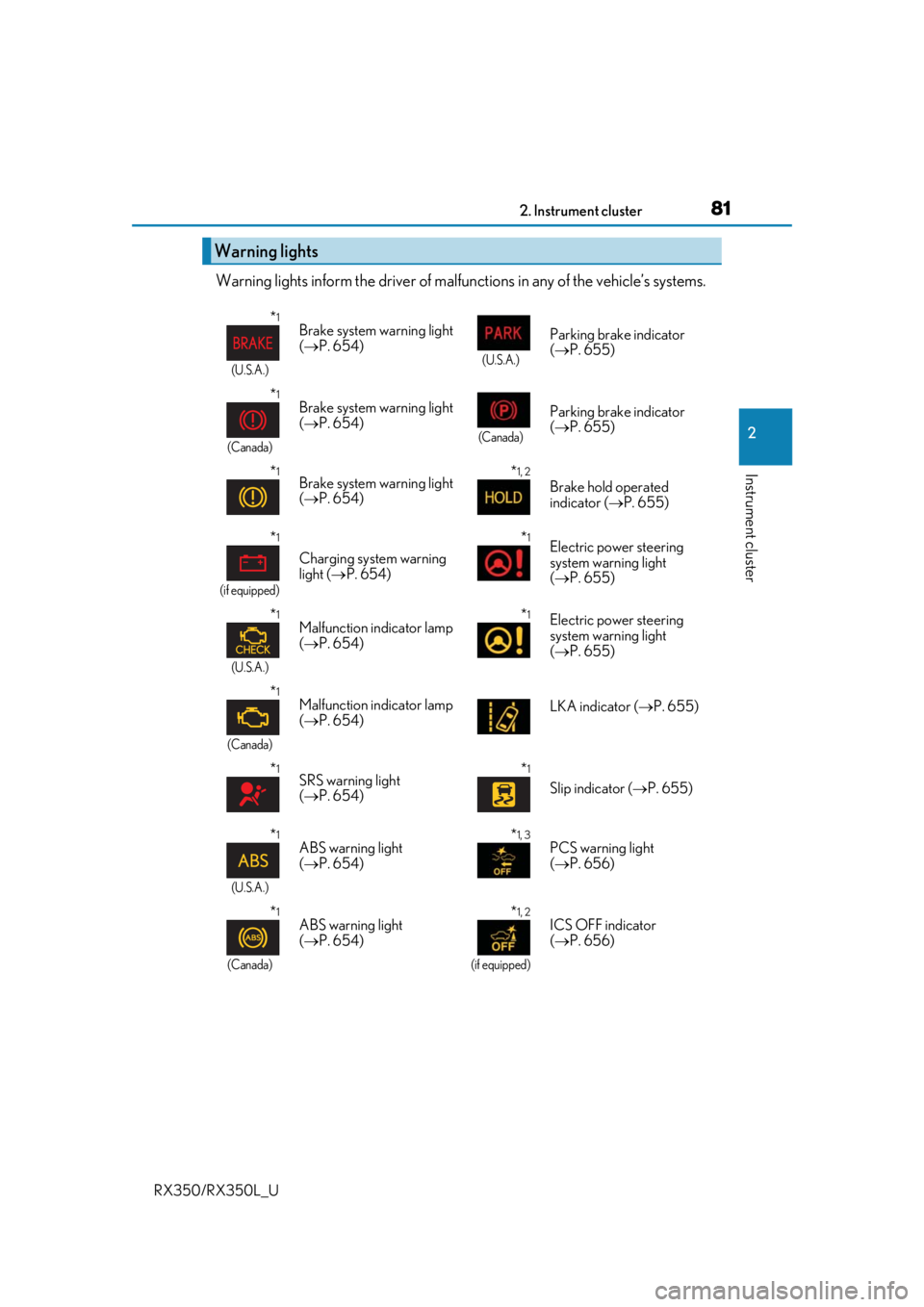
Warning lights inform the driver of malfunctions in any of the vehicle’s systems.
Warning lights
*1
(U.S.A.)
Brake system warning light
( P. 654)
(U.S.A.)
Parking brake indicator
( P. 655)
*1
(Canada)
Brake system warning light
( P. 654)
(Canada)
Parking brake indicator
( P. 655)
*1Brake system warning light
( P. 654)*1, 2
Brake hold operated
indicator ( P. 655)
*1
(if equipped)
Charging system warning
light ( P. 654)
*1Electric power steering
system warning light
( P. 655)
*1
(U.S.A.)
Malfunction indicator lamp
( P. 654)*1Electric power steering
system warning light
( P. 655)
*1
(Canada)
Malfunction indicator lamp
( P. 654) LKA indicator (
P. 655)
*1SRS warning light
( P. 654)*1
Slip indicator ( P. 655)
*1
(U.S.A.)
ABS warning light
( P. 654)*1, 3PCS warning light
( P. 656)
*1
(Canada)
ABS warning light
( P. 654)*1, 2
(if equipped)
ICS OFF indicator
( P. 656)
Page 123 of 777

1223-1. Key information
RX350/RX350L_U
■Electronic key battery depletion
●The standard battery life is 1 to 2 years.
●If the battery becomes low, an alarm will soun d in the cabin when the engine is stopped.
( P. 623)
●As the electronic key always receives ra dio waves, the battery will become depleted
even if the electronic key is not used. The following symptoms indicate that the elec-
tronic key battery may be depleted. Replace the battery when necessary. ( P. 623)
• The smart access system with push-button start or the wireless remote control does
not operate.
• The detection area becomes smaller.
• The LED indicator on the key surface does not turn on.
●To reduce key battery depletion when the electronic key is to not be used for long peri-
ods of time, set the electronic key to the battery-saving mode.
( P. 148)
●To avoid serious deterioration, do not leave the electronic key within 3 ft. (1 m) of the
following electrical appliances that produce a magnetic field:
•TVs
• Personal computers
• Cellular phones, cordless phones and battery chargers
• Recharging cellular phones or cordless phones
• Induction cookers
•Table lamps
■Replacing the battery
P. 623
■Confirmation of the registered key number
The number of keys already registered to the vehicle can be confirmed. Ask your Lexus
dealer for details.
■If a wrong key is used
The key cylinder rotates freely, isol ated from the internal mechanism.
Page 225 of 777

2244-1. Before driving
RX350/RX350L_U
●To maintain engine braking efficien cy and charging system performance
when using engine braking, do not put th e transmission in D. If in the M or S
mode, the transmission shift range po sition must be in 6 or lower. (P. 240)
●Instability happens more fr equently when descending steep or long downhill
grades. Before descending, slow down and downshift. Do not make sudden
downshifts while descending st eep or long downhill grades.
●Avoid holding the brake pedal down too long or applying the brakes too fre-
quently. This could cause the brakes to overheat and result in reduced braking
efficiency.
●Due to the added load of the trailer, yo ur vehicle’s engine may overheat on hot
days (at temperatures over 85 F [30 C]) when driving up a long or steep
grade. If the engine coolant temperat ure gauge indicates overheating, imme-
diately turn off the air conditioning (if in use), pull your vehicle off the road and
stop in a safe spot. ( P. 692)
●Always place wheel blocks under both the vehicle’s and the trailer’s wheels
when parking. Put the transmission in P and apply the parking brake. Avoid
parking on a slope, but if unavoidable, do so only after performing the follow-
ing:
Apply the brakes and keep them applied.
Have someone place wheel blocks under both the vehicle’s and trailer’s
wheels.
When the wheel blocks are in place, release the brakes slowly until the
blocks absorb the load.
Shift into P and apply the parking brake.
Turn off the engine.
●When restarting afte r parking on a slope:
With the transmission in P, start the en gine. Be sure to keep the brake pedal
depressed.
Shift into a forward gear. If reversing, shift into R.
If the parking brake is in manual mode, release the parking brake.
( P. 248)
Release the brake pedal, and slowly pull or back away from the wheel
blocks. Stop and apply the brakes.
Have someone retrieve the blocks.
1
2
3
4
5
1
2
3
4
5
Page 256 of 777
2554-3. Operating the lights and wipers
4
Driving
RX350/RX350L_U
■Welcome lighting
If the headlight switch is turned to and the surrounding area is dark, unlocking the
doors using the smart access system with pu sh-button start or wireless remote control
will turn the parking lights and tail lights on automatically.
■Windshield wiper linked headlight illumination
When driving during daytime with the headlight switch turned to , if the windshield
wipers are used, the headlights will turn on automatically after several seconds to help
enhance the visibility of your vehicle.
■Battery-saving function
In order to prevent the battery of the vehicle from discharging, if the headlights and/or tail
lights are on when the engine switch is turned off the battery saving function will operate
and automatically turn off all the lights after approximately 20 minutes. When the engine
switch is turned to IGNITION ON mode, the battery-saving function will be disabled.
When any of the following are performed, th e battery-saving function is canceled once
and then reactivated. All the lights will turn off automatically 20 minutes after the bat-
tery-saving function has been reactivated:
●When the headlight switch is operated
●When a door is opened or closed
■Customization
Some functions can be customized. ( P. 722)
NOTICE
■To prevent battery discharge
Do not leave the lights on longer than necessary when the engine is off.
Page 478 of 777
4775-11. Bluetooth®
5
Lexus Display Audio system
RX350/RX350L_U
■Bluetooth® antenna
The antenna is built into the display.
If the portable audio player is behind the se at or in the glove box or console box, or is
touching or covered by metal objects, the connection status may deteriorate.
If the cellular phone is behind the seat or in the console box, or touching or covered by
metal objects, the connection status may deteriorate.
■Battery charge/signal status
●This display may not correspond exactly wi th the portable audio player or cellular
phone itself.
●This system does not have a charging function.
●The portable audio player or cellular phone battery will be depleted quickly when the
device is connected to Bluetooth®.
■When using the Bluetooth® audio and hands-free system at the same time
The following problems may occur.
●The Bluetooth® audio connection may be interrupted.
●Noise may be heard during Bluetooth® audio playback.
■About the contact in this system
The following data is stored for every registered cellular phone. When another phone is
connecting, you cannot read the registered data.
●Contact data
●Call history
●Favorite
●Message
When removing a Bluetooth® phone from the system, the above-mentioned data is also
deleted.
■About Bluetooth®
Page 496 of 777
495
6Interior features
RX350/RX350L_U
6-4. Using the storage featuresList of storage features............ 528• Glove box .............................. 530
• Console box .......................... 530
• Cup holders............................. 531
• Door pockets ........................ 533
• Bottle holders ....................... 533
• Coin box ..................................534
• Auxiliary boxes..................... 535
Luggage compartment features........................................536 6-5. Using the other interior
features
Other interior features ............ 543
• Sun visors ................................ 543
• Vanity mirrors ....................... 543
• Clock ........................................ 544
• Wireless charger ................. 544
• Power outlets.......................... 551
• USB charging ports ............553
• Front passenger footwell hooks .......................554
• Rear door sunshades .........554
• Armrest ....................................555
• Assist grips..............................556
• Coat hooks .............................556
Garage door opener ............... 557
Compass ....................................... 564
LEXUS Enform Safety Connect ......................................568
LEXUS Enform Remote ......... 573
LEXUS Enform Service Connect ...................................... 574
Page 545 of 777

5446-5. Using the other interior features
RX350/RX350L_U
Vehicles with a Lexus Display Audio system
The clock can be adjusted by pressing
the buttons. Pressing and holding will move the
clock hands backward.
Pressing and holding will move the
clock hands forward.
Vehicles with a navigation system
The GPS clock's time is automatically
adjusted by utilizing GPS time informa-
tion.
For details, refer to “NAVIGATION
SYSTEM OWNER’S MANUAL”.
A portable device, such as a smartphone or mobile battery, can be charged by
just placing it on the charging area, prov ided the device is compatible with the Qi
wireless charging standard created by the Wireless Power Consortium.
The wireless charger cannot be used with a portable device that is larger than
the charging area. Additionally, dependin g on the portable device, the wireless
charger may not operate properly. Refer to the operation manual of the portable
device.
■The “Qi” symbol
The “Qi” symbol is a trademark of the Wireless Power Consortium.
Clock
1
2
Wireless charger (if equipped)
Page 546 of 777

5456-5. Using the other interior features
6
Interior features
RX350/RX350L_U
■Name for all partsPower supply switch
Operation indicator light
Charge area
■Using the wireless chargerPress the power supply switch of
the wireless charger.
Pressing the switch again turns the
wireless charger off.
When turned on, the operation indi-
cator light (green) comes on.
When the engine switch is turned off,
the on/off state of the wireless char-
ger will be memorized.
Place a portable device on the
charging area with its charging
surface facing down.
While charging, the operation indi-
cator light (orange) will be illumi-
nated.
If charging does not begin, move the
portable device as close to the cen-
ter of the charging area as possible.
When charging is complete, the operatio n indicator light (green) will illuminate.
●Recharging function
• If a certain amount of time has elapsed since charging completed and the portable device has not been moved, the wireless charger will
restart charging.
• If the portable device is moved with in the charging area, charging will
stop temporarily then restart.
1
2
3
1
2