window LEXUS RX450h 2021 User Guide
[x] Cancel search | Manufacturer: LEXUS, Model Year: 2021, Model line: RX450h, Model: LEXUS RX450h 2021Pages: 528, PDF Size: 10.73 MB
Page 75 of 528
751-5. Theft deterrent system
1
For safety and security
■Items to check before locking the
vehicle
To prevent unexpected triggering of
the alarm and vehicle theft, make sure
of the following:
Nobody is in the vehicle.
The windows, moon roof (if
equipped) and panoramic moon
roof (if equipped) are closed before
the alarm is set.
No valuables or other personal
items are left in the vehicle.
■Setting
Close the doors and hood, and lock all
the doors. The system will be set auto-
matically after 30 seconds.
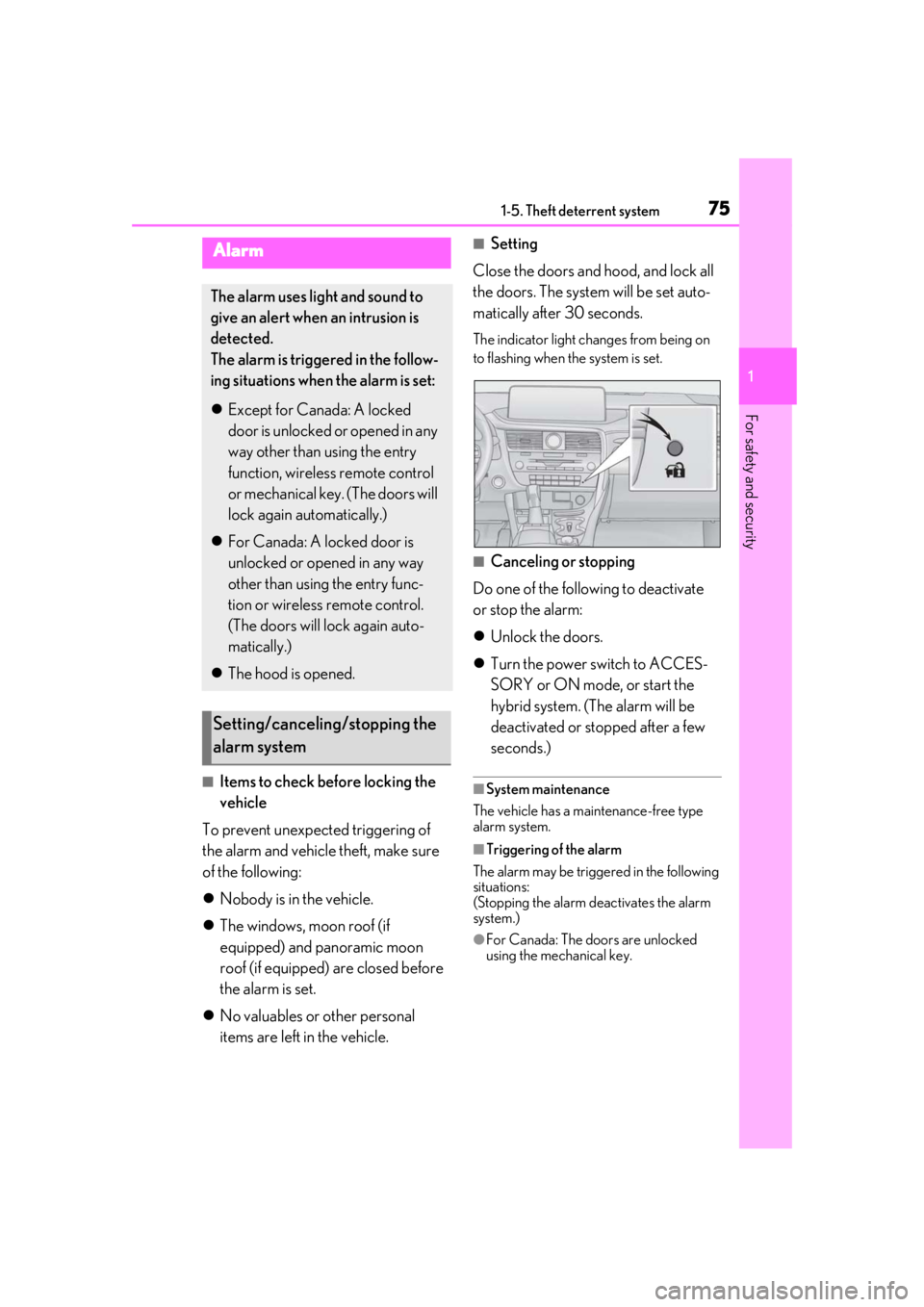
The indicator light changes from being on
to flashing when the system is set.
■Canceling or stopping
Do one of the following to deactivate
or stop the alarm:
Unlock the doors.
Turn the power switch to ACCES-
SORY or ON mode, or start the
hybrid system. (The alarm will be
deactivated or stopped after a few
seconds.)
■System maintenance
The vehicle has a maintenance-free type
alarm system.
■Triggering of the alarm
The alarm may be triggered in the following
situations:
(Stopping the alarm deactivates the alarm
system.)
●For Canada: The doors are unlocked
using the mechanical key.
Alarm
The alarm uses light and sound to
give an alert when an intrusion is
detected.
The alarm is triggered in the follow-
ing situations when the alarm is set:
Except for Canada: A locked
door is unlocked or opened in any
way other than using the entry
function, wireless remote control
or mechanical key. (The doors will
lock again automatically.)
For Canada: A locked door is
unlocked or opened in any way
other than using the entry func-
tion or wireless remote control.
(The doors will lock again auto-
matically.)
The hood is opened.
Setting/canceling/stopping the
alarm system
Page 105 of 528
105
3
3
Before driving
Before driving
.3-1. Key informationKeys ................................................. 106
3-2. Opening, closing and locking the doors
Side doors ..................................... 109
Power back door......................... 113
Smart access system with push-button start ..................... 125
3-3. Adjusting the seats Front seats ...................................... 131
Rear seats ...................................... 132
Driving position memory ........ 142
Head restraints............................ 145
3-4. Adjusting the steering wheel and mirrors
Steering wheel............................. 148
Inside rear view mirror............. 149
Outside rear view mirrors ...... 150
3-5. Opening, closing the windows and moon roof
Power windows........................... 153
Moon roof ..................................... 155
Panoramic moon roof .............. 158
Page 107 of 528
1073-1. Key information
3
Before driving
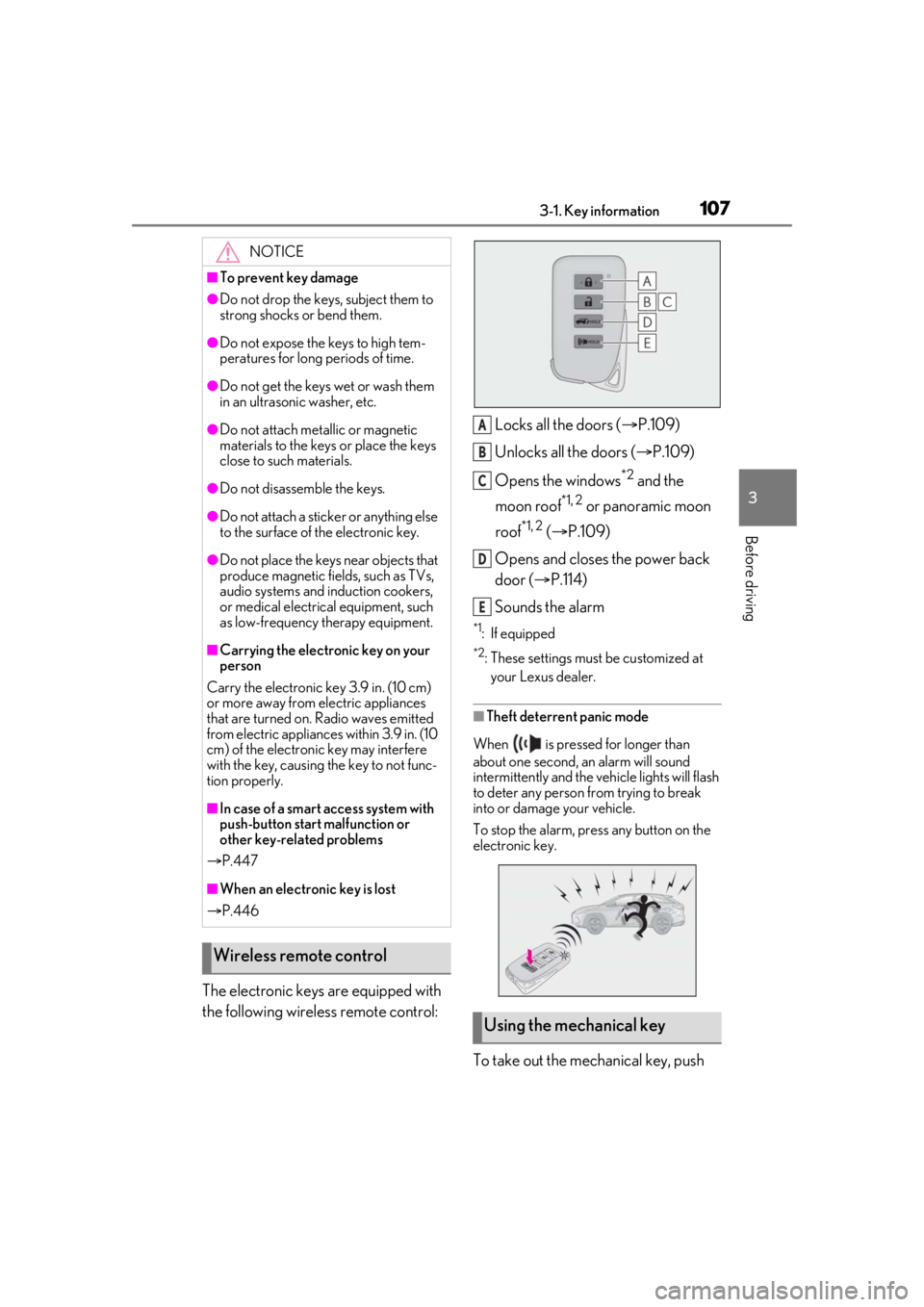
The electronic keys are equipped with
the following wireless remote control:Locks all the doors (
P.109)
Unlocks all the doors ( P.109)
Opens the windows
*2 and the
moon roof
*1, 2 or panoramic moon
roof
*1, 2 ( P.109)
Opens and closes the power back
door ( P.114)
Sounds the alarm
*1: If equipped
*2: These settings must be customized at
your Lexus dealer.
■Theft deterrent panic mode
When is pressed for longer than
about one second, an alarm will sound
intermittently and the vehicle lights will flash
to deter any person from trying to break
into or damage your vehicle.
To stop the alarm, press any button on the
electronic key.
To take out the mechanical key, push
NOTICE
■To prevent key damage
●Do not drop the keys, subject them to
strong shocks or bend them.
●Do not expose the keys to high tem-
peratures for long periods of time.
●Do not get the keys wet or wash them
in an ultrasonic washer, etc.
●Do not attach metallic or magnetic
materials to the keys or place the keys
close to such materials.
●Do not disassemb le the keys.
●Do not attach a sticker or anything else
to the surface of the electronic key.
●Do not place the keys near objects that
produce magnetic fields, such as TVs,
audio systems and induction cookers,
or medical electrical equipment, such
as low-frequency therapy equipment.
■Carrying the electronic key on your
person
Carry the electronic key 3.9 in. (10 cm)
or more away from electric appliances
that are turned on. Radio waves emitted
from electric applianc es within 3.9 in. (10
cm) of the electronic key may interfere
with the key, causing the key to not func-
tion properly.
■In case of a smart access system with
push-button start malfunction or
other key-related problems
P.447
■When an electronic key is lost
P.446
Wireless remote control
Using the mechanical key
A
B
C
D
E
Page 109 of 528
1093-2. Opening, closing and locking the doors
3
Before driving
3-2.Opening, closing and locking the doors
■Smart access system with
push-button start
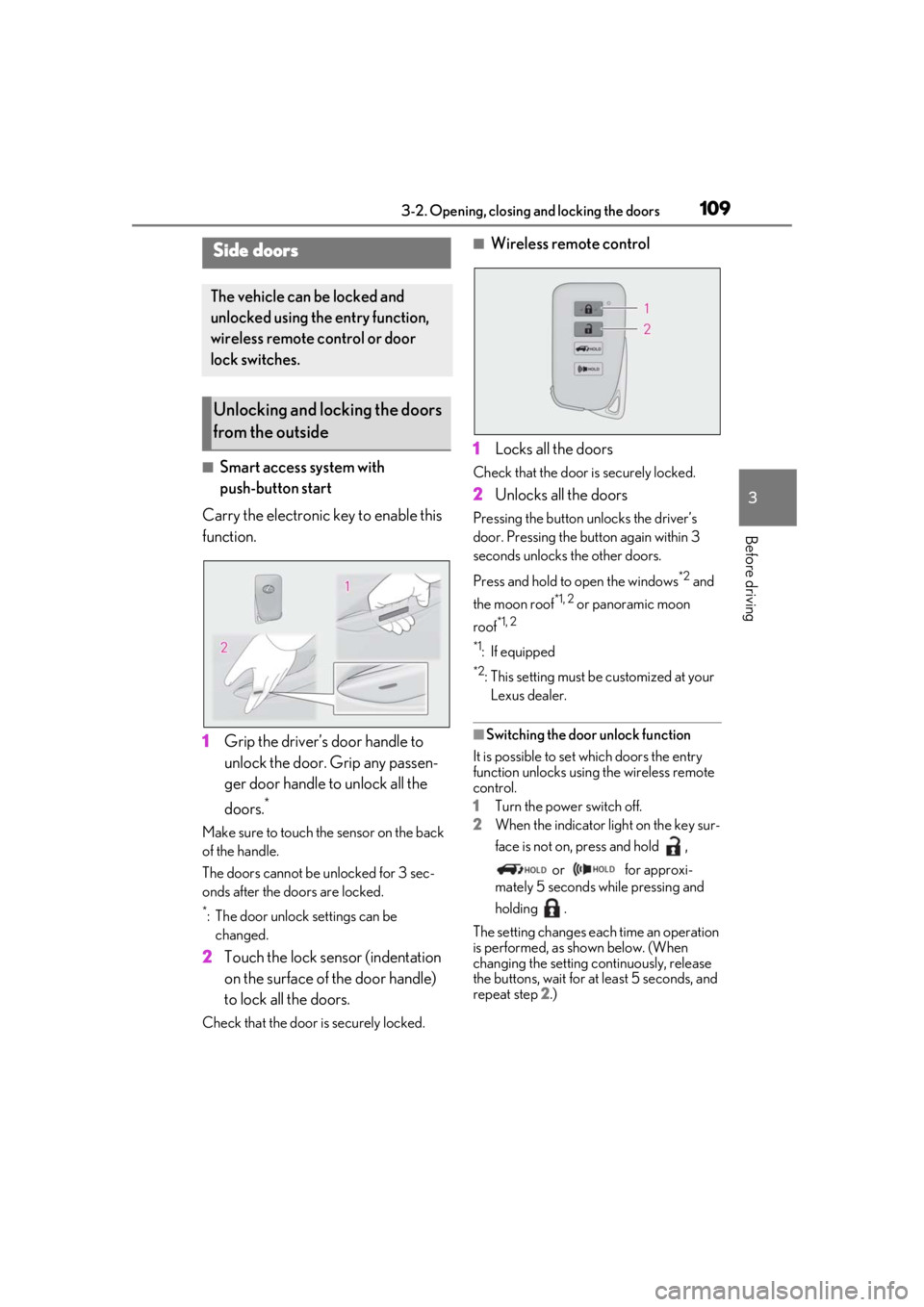
Carry the electronic key to enable this
function.
1 Grip the driver’s door handle to
unlock the door. Grip any passen-
ger door handle to unlock all the
doors.
*
Make sure to touch the sensor on the back
of the handle.
The doors cannot be unlocked for 3 sec-
onds after the doors are locked.
*: The door unlock settings can be
changed.
2 Touch the lock sensor (indentation
on the surface of the door handle)
to lock all the doors.
Check that the door is securely locked.
■Wireless remote control
1 Locks all the doors
Check that the door is securely locked.
2Unlocks all the doors
Pressing the button unlocks the driver’s
door. Pressing the button again within 3
seconds unlocks the other doors.
Press and hold to open the windows
*2 and
the moon roof
*1, 2 or panoramic moon
roof
*1, 2
*1
: If equipped
*2: This setting must be customized at your
Lexus dealer.
■Switching the door unlock function
It is possible to set which doors the entry
function unlocks using the wireless remote
control.
1 Turn the power switch off.
2 When the indicator light on the key sur-
face is not on, press and hold ,
or for approxi-
mately 5 seconds while pressing and
holding .
The setting changes each time an operation
is performed, as shown below. (When
changing the setting continuously, release
the buttons, wait for at least 5 seconds, and
repeat step 2 .)
Side doors
The vehicle can be locked and
unlocked using the entry function,
wireless remote control or door
lock switches.
Unlocking and locking the doors
from the outside
Page 110 of 528
1103-2. Opening, closing and locking the doors
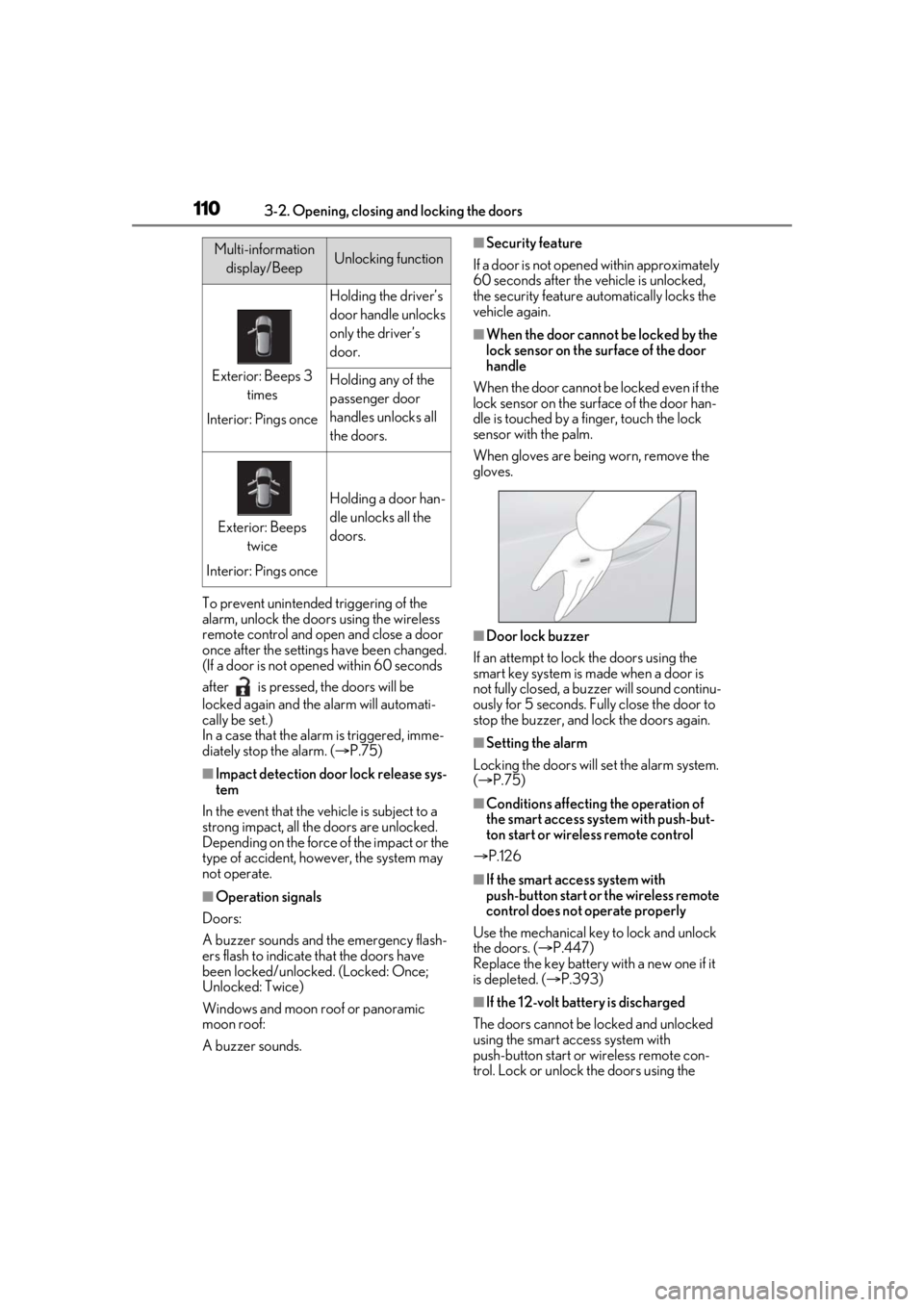
To prevent unintended triggering of the
alarm, unlock the doors using the wireless
remote control and open and close a door
once after the settings have been changed.
(If a door is not opened within 60 seconds
after is pressed, the doors will be
locked again and the alarm will automati-
cally be set.)
In a case that the alarm is triggered, imme-
diately stop the alarm. (P.75)
■Impact detection door lock release sys-
tem
In the event that the vehicle is subject to a
strong impact, all the doors are unlocked.
Depending on the force of the impact or the
type of accident, however, the system may
not operate.
■Operation signals
Doors:
A buzzer sounds and the emergency flash-
ers flash to indicate that the doors have
been locked/unlocked. (Locked: Once;
Unlocked: Twice)
Windows and moon roof or panoramic
moon roof:
A buzzer sounds.
■Security feature
If a door is not opened within approximately
60 seconds after the vehicle is unlocked,
the security feature automatically locks the
vehicle again.
■When the door cannot be locked by the
lock sensor on the surface of the door
handle
When the door cannot be locked even if the
lock sensor on the surface of the door han-
dle is touched by a finger, touch the lock
sensor with the palm.
When gloves are being worn, remove the
gloves.
■Door lock buzzer
If an attempt to lock the doors using the
smart key system is made when a door is
not fully closed, a buzzer will sound continu-
ously for 5 seconds. Fully close the door to
stop the buzzer, and lock the doors again.
■Setting the alarm
Locking the doors will set the alarm system.
( P.75)
■Conditions affecting the operation of
the smart access system with push-but-
ton start or wireless remote control
P.126
■If the smart access system with
push-button start or the wireless remote
control does not operate properly
Use the mechanical key to lock and unlock
the doors. ( P.447)
Replace the key battery with a new one if it
is depleted. ( P.393)
■If the 12-volt batte ry is discharged
The doors cannot be locked and unlocked
using the smart access system with
push-button start or wireless remote con-
trol. Lock or unlock the doors using the
Multi-information display/BeepUnlocking function
Exterior: Beeps 3 times
Interior: Pings once
Holding the driver’s
door handle unlocks
only the driver’s
door.
Holding any of the
passenger door
handles unlocks all
the doors.
Exterior: Beeps twice
Interior: Pings once
Holding a door han-
dle unlocks all the
doors.
Page 127 of 528

1273-2. Opening, closing and locking the doors
3
Before driving
devices
• Another vehicle’s electronic key, another electronic key of your vehicle, or a wire-
less key that emits radio waves
• Personal computers or personal digital assistants (PDAs)
• Digital audio players
• Portable game systems
●If window tint with a metallic content or
metallic objects are attached to the rear
window
●When the electronic key is placed near a
battery charger or electronic devices
●When the vehicle is parked in a pay park-
ing spot where radio waves are emitted
■Note for the entry function
●Even when the electronic key is within the
effective range (detection areas), the sys-
tem may not operate properly in the fol-
lowing cases:
• The electronic key is too close to the win-
dow or outside door handle, near the
ground, or in a high place when the doors
are locked or unlocked.
• The electronic key is near the ground or in a high place, or too close to the rear
bumper center when the back door is
opened.
• The electronic key is on the instrument panel, luggage compar tment, floor, or in
the door pockets or glove box when the
hybrid system is star ted or power switch
modes are changed.
●Do not leave the electronic key on top of
the instrument panel or near the door
pockets when exiting the vehicle.
Depending on the radio wave reception
conditions, it may be detected by the
antenna outside the cabin and the door
will become lockable from the outside,
possibly trapping the electronic key
inside the vehicle.
●As long as the electron ic key is within the
effective range, the doors may be locked
or unlocked by anyone.
●Even if the electronic key is not inside the
vehicle, it may be possible to start the
hybrid system if the electronic key is near
the window.
●The doors may unlock if a large amount of water splashes on the door handle,
such as in the rain or in a car wash when
the electronic key is
within the effective
range. (The door will automatically be
locked after approximately 60 seconds if
the doors are not opened and closed.)
●If the wireless remote control is used to
lock the doors when the electronic key is
near the vehicle, there is a possibility that
the door may not be unlocked by the
entry function. (Use the wireless remote
control to unlock the doors.)
●Touching the door lock sensor while
wearing gloves may delay or prevent lock
operation. Remove the gloves and touch
the lock sensor again.
●When the lock operation is performed
using the lock sensor, recognition signals
will be shown up to two consecutive
times. After this, no recognition signals
will be given.
●If the door handle becomes wet while the
electronic key is within the effective
range, the door may lock and unlock
repeatedly. In that case, follow the follow-
ing correction procedures to wash the
vehicle:
• Place the electronic key in a location 6 ft. (2 m) or more away from the vehicle.
(Take care to ensure that the key is not
stolen.)
• Set the electronic key to battery-saving
mode to disable the smart access system
with push-button start. ( P.126)
●If the electronic key is inside the vehicle
and a door handle becomes wet during a
car wash, a message may be shown on
the multi-information display and a
buzzer will sound outside the vehicle. To
turn off the alarm, lock all the doors.
●The lock sensor may not work properly if
it comes into contact with ice, snow, mud,
etc. Clean the lock sensor and attempt to
operate it again.
●A sudden approach to the effective
range or door handle may prevent the
doors from being unlocked. In this case,
return the door handle to the original
position and check that the doors unlock
before pulling the door handle again.
●If there is another electronic key in the
Page 150 of 528
1503-4. Adjusting the steering wheel and mirrors
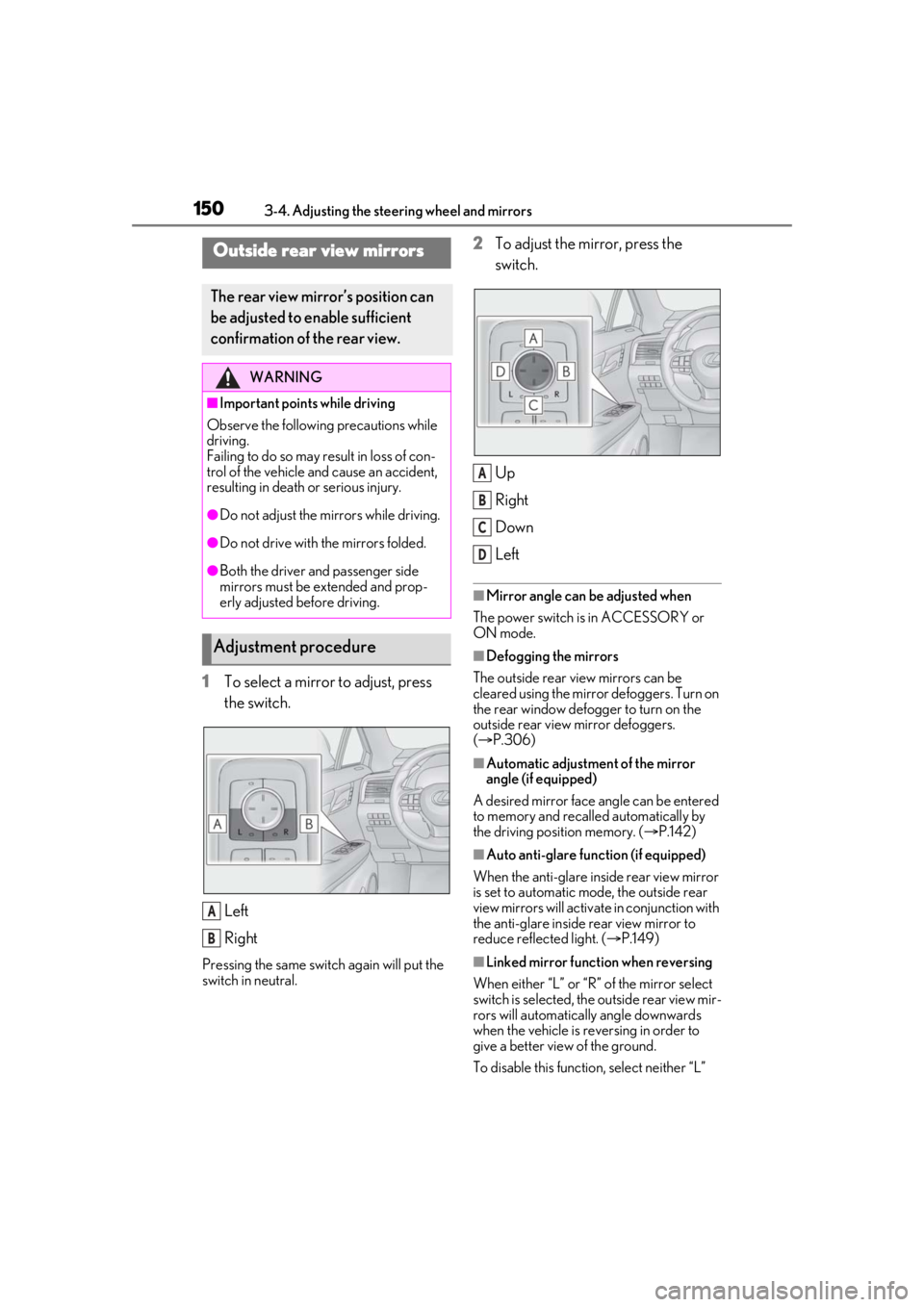
1To select a mirror to adjust, press
the switch.
Left
Right
Pressing the same switch again will put the
switch in neutral.
2To adjust the mirror, press the
switch.
Up
Right
Down
Left
■Mirror angle can be adjusted when
The power switch is in ACCESSORY or
ON mode.
■Defogging the mirrors
The outside rear view mirrors can be
cleared using the mirror defoggers. Turn on
the rear window defogger to turn on the
outside rear view mirror defoggers.
( P.306)
■Automatic adjustment of the mirror
angle (if equipped)
A desired mirror face angle can be entered
to memory and recalled automatically by
the driving position memory. ( P.142)
■Auto anti-glare function (if equipped)
When the anti-glare inside rear view mirror
is set to automatic mode, the outside rear
view mirrors will activate in conjunction with
the anti-glare inside rear view mirror to
reduce reflec ted light. (P.149)
■Linked mirror function when reversing
When either “L” or “R” of the mirror select
switch is selected, the outside rear view mir-
rors will automatically angle downwards
when the vehicle is re versing in order to
give a better view of the ground.
To disable this function, select neither “L”
Outside rear view mirrors
The rear view mirror’s position can
be adjusted to enable sufficient
confirmation of the rear view.
WARNING
■Important points while driving
Observe the following precautions while
driving.
Failing to do so may result in loss of con-
trol of the vehicle and cause an accident,
resulting in death or serious injury.
●Do not adjust the mirrors while driving.
●Do not drive with the mirrors folded.
●Both the driver and passenger side
mirrors must be extended and prop-
erly adjusted before driving.
Adjustment procedure
A
B
A
B
C
D
Page 153 of 528
1533-5. Opening, closing the windows and moon roof
3
Before driving
3-5.Opening, closing the windows and moon roof
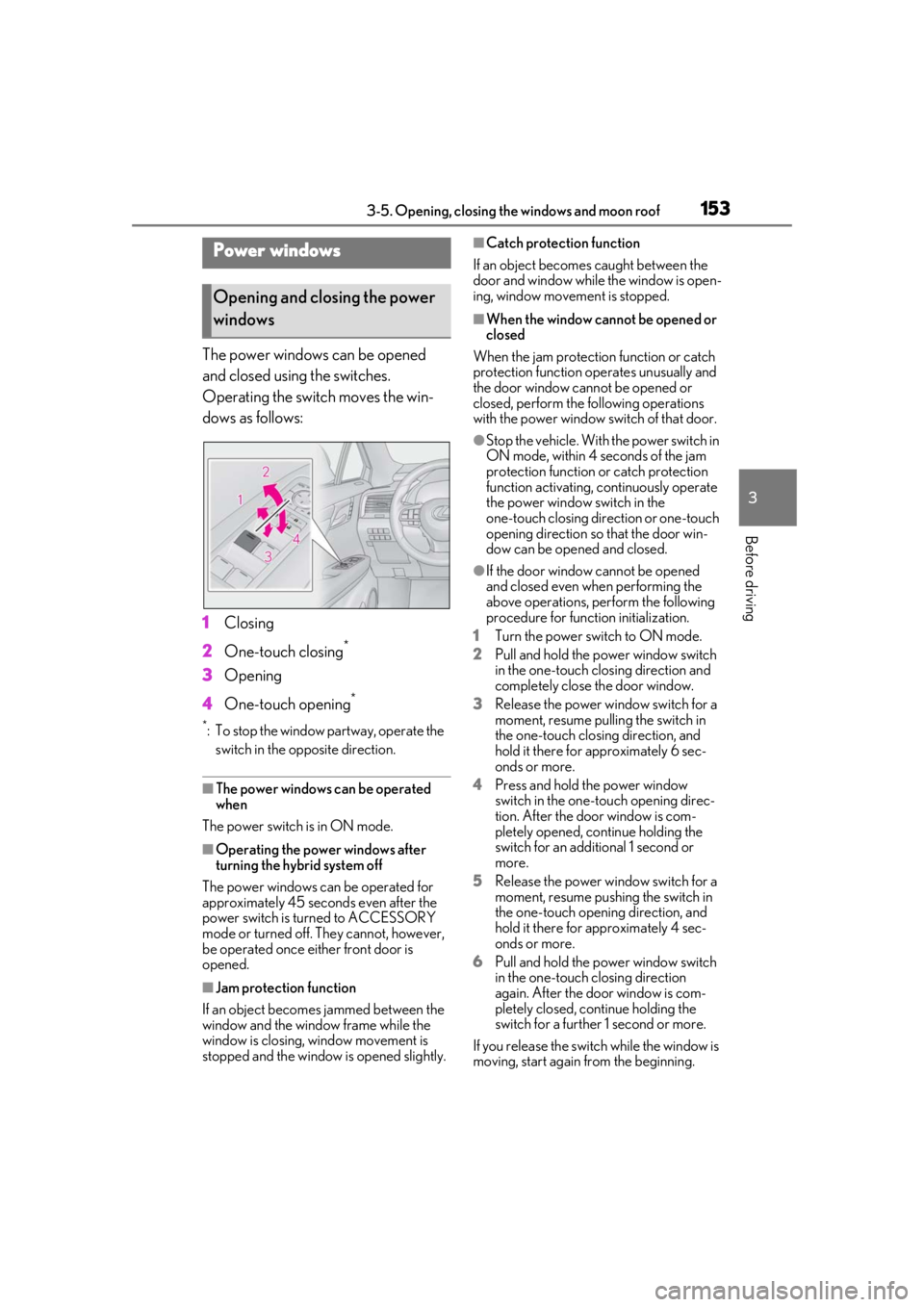
The power windows can be opened
and closed using the switches.
Operating the switch moves the win-
dows as follows:
1Closing
2 One-touch closing
*
3Opening
4 One-touch opening
*
*: To stop the window partway, operate the
switch in the op posite direction.
■The power windows can be operated
when
The power switch is in ON mode.
■Operating the power windows after
turning the hybrid system off
The power windows can be operated for
approximately 45 seconds even after the
power switch is turned to ACCESSORY
mode or turned off. They cannot, however,
be operated once either front door is
opened.
■Jam protection function
If an object becomes jammed between the
window and the window frame while the
window is closing, window movement is
stopped and the window is opened slightly.
■Catch protection function
If an object becomes caught between the
door and window while the window is open-
ing, window movement is stopped.
■When the window cannot be opened or
closed
When the jam protection function or catch
protection function operates unusually and
the door window cannot be opened or
closed, perform the following operations
with the power window switch of that door.
●Stop the vehicle. With the power switch in
ON mode, within 4 seconds of the jam
protection function or catch protection
function activating, continuously operate
the power window switch in the
one-touch closing direction or one-touch
opening direction so that the door win-
dow can be opened and closed.
●If the door window cannot be opened
and closed even when performing the
above operations, perform the following
procedure for function initialization.
1 Turn the power switch to ON mode.
2 Pull and hold the power window switch
in the one-touch closing direction and
completely close the door window.
3 Release the power window switch for a
moment, resume pulling the switch in
the one-touch closing direction, and
hold it there for approximately 6 sec-
onds or more.
4 Press and hold the power window
switch in the one-touch opening direc-
tion. After the door window is com-
pletely opened, continue holding the
switch for an additional 1 second or
more.
5 Release the power window switch for a
moment, resume pushing the switch in
the one-touch opening direction, and
hold it there for approximately 4 sec-
onds or more.
6 Pull and hold the power window switch
in the one-touch closing direction
again. After the door window is com-
pletely closed, continue holding the
switch for a further 1 second or more.
If you release the switch while the window is
moving, start again from the beginning.
Power windows
Opening and closing the power
windows
Page 154 of 528
1543-5. Opening, closing the windows and moon roof
If the window reverses and cannot be fully
closed or opened, have the vehicle
inspected by your Lexus dealer.
■Door lock linked window operation
●The power windows can be opened and
closed using the mechanical key.*
( P.448)
●The power windows can be opened using
the wireless remote control.* ( P.109)*: These settings must be customized at
your Lexus dealer.
■Alarm
The alarm may be triggered if the alarm is
set and a power window is closed using the
door lock linked power window operation
function. ( P.75)
■Power windows open warning buzzer
A buzzer sounds and a message is shown
on the multi-information display in the
instrument cluster when the power switch is
turned off and the driver’s door is opened
with the power windows open.
■Customization
Some functions can be customized.
( P.480)
WARNING
Observe the following precautions.
Failing to do so may result in death or
serious injury.
■Closing the windows
●The driver is responsible for all the
power window operations, including
the operation for the passengers. In
order to prevent accidental operation,
especially by a child, do not let a child
operate the power windows. It is possi-
ble for children an d other passengers
to have body parts caught in the power
window. Also, when riding with a child,
it is recommended to use the window
lock switch. (
P.155)
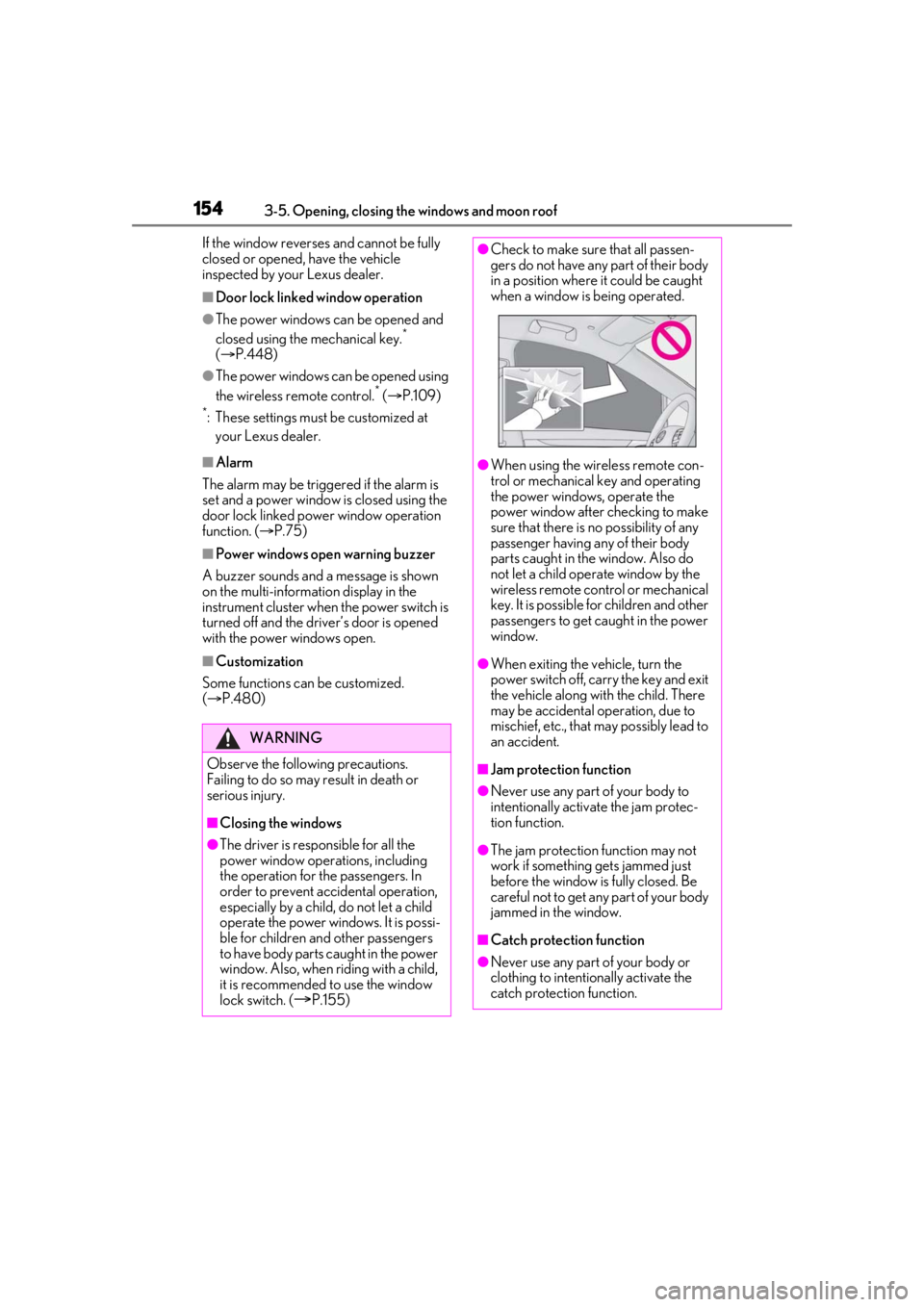
●Check to make sure that all passen-
gers do not have any part of their body
in a position where it could be caught
when a window is being operated.
●When using the wireless remote con-
trol or mechanical key and operating
the power windows, operate the
power window after checking to make
sure that there is no possibility of any
passenger having any of their body
parts caught in the window. Also do
not let a child operate window by the
wireless remote control or mechanical
key. It is possible for children and other
passengers to get caught in the power
window.
●When exiting the vehicle, turn the
power switch off, carry the key and exit
the vehicle along with the child. There
may be accidental operation, due to
mischief, etc., that may possibly lead to
an accident.
■Jam protection function
●Never use any part of your body to
intentionally activa te the jam protec-
tion function.
●The jam protection function may not
work if something gets jammed just
before the window is fully closed. Be
careful not to get any part of your body
jammed in the window.
■Catch protection function
●Never use any part of your body or
clothing to intentionally activate the
catch protection function.
Page 155 of 528
1553-5. Opening, closing the windows and moon roof
3
Before driving
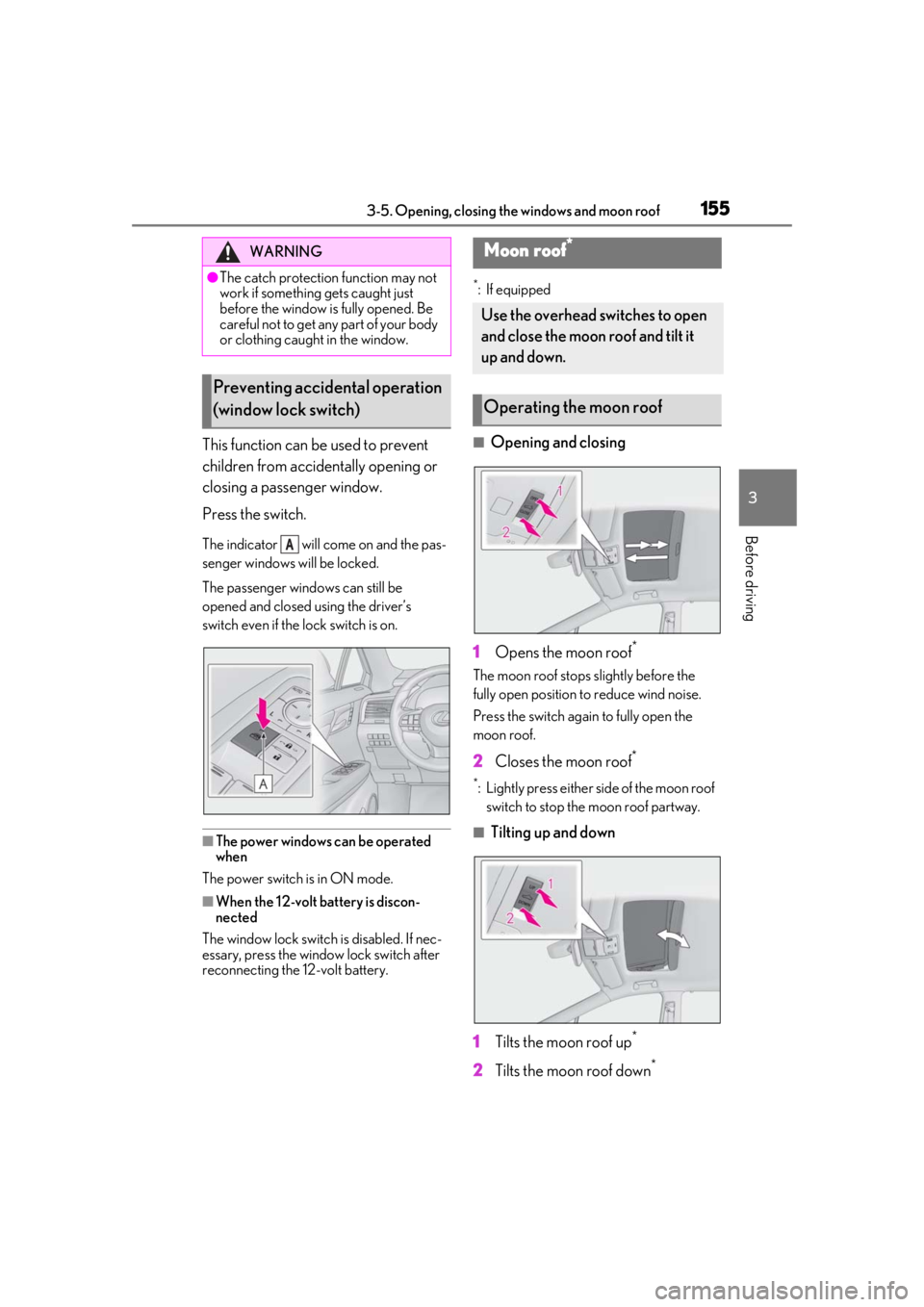
This function can be used to prevent
children from accidentally opening or
closing a passenger window.
Press the switch.
The indicator will come on and the pas-
senger windows will be locked.
The passenger windows can still be
opened and closed using the driver’s
switch even if the lock switch is on.
■The power windows can be operated
when
The power switch is in ON mode.
■When the 12-volt battery is discon-
nected
The window lock switch is disabled. If nec-
essary, press the window lock switch after
reconnecting the 12-volt battery.
*: If equipped
■Opening and closing
1 Opens the moon roof
*
The moon roof stops slightly before the
fully open position to reduce wind noise.
Press the switch again to fully open the
moon roof.
2 Closes the moon roof*
*: Lightly press either side of the moon roof
switch to stop the moon roof partway.
■Tilting up and down
1 Tilts the moon roof up
*
2Tilts the moon roof down*
WARNING
●The catch protection function may not
work if something gets caught just
before the window is fully opened. Be
careful not to get any part of your body
or clothing caught in the window.
Preventing accidental operation
(window lock switch)
A
Moon roof*
Use the overhead switches to open
and close the moon roof and tilt it
up and down.
Operating the moon roof