remote control LEXUS RX450h 2021 Owner's Manual
[x] Cancel search | Manufacturer: LEXUS, Model Year: 2021, Model line: RX450h, Model: LEXUS RX450h 2021Pages: 528, PDF Size: 10.73 MB
Page 157 of 528
1573-5. Opening, closing the windows and moon roof
3
Before driving
( P.480)
WARNING
Observe the following precautions.
Failing to do so may cause death or seri-
ous injury.
■Opening the moon roof
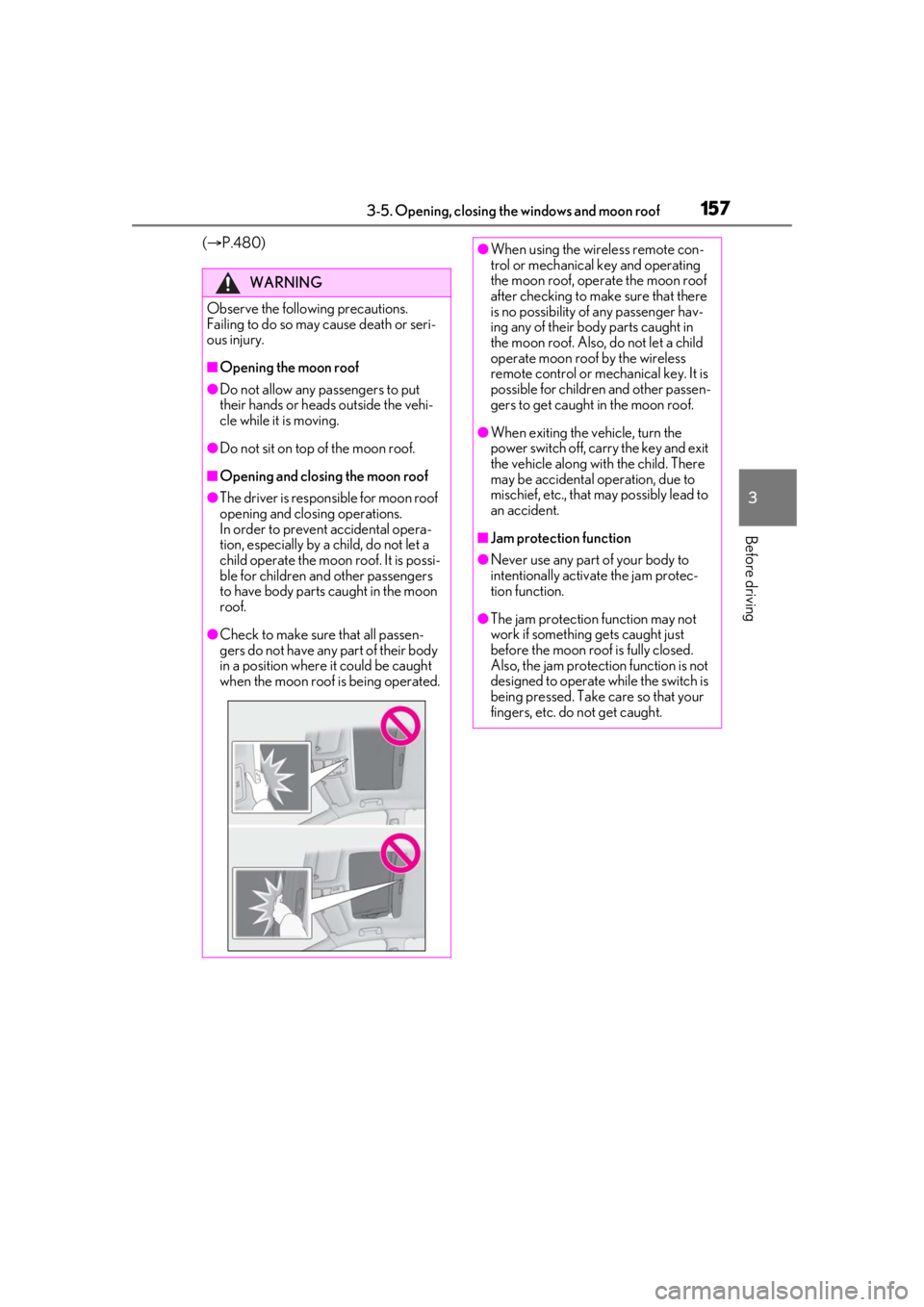
●Do not allow any passengers to put
their hands or heads outside the vehi-
cle while it is moving.
●Do not sit on top of the moon roof.
■Opening and closing the moon roof
●The driver is responsible for moon roof
opening and closing operations.
In order to prevent accidental opera-
tion, especially by a child, do not let a
child operate the moon roof. It is possi-
ble for children an d other passengers
to have body parts caught in the moon
roof.
●Check to make sure that all passen-
gers do not have any part of their body
in a position where it could be caught
when the moon roof is being operated.
●When using the wireless remote con-
trol or mechanical key and operating
the moon roof, oper ate the moon roof
after checking to make sure that there
is no possibility of any passenger hav-
ing any of their body parts caught in
the moon roof. Also, do not let a child
operate moon roof by the wireless
remote control or mech anical key. It is
possible for children and other passen-
gers to get caught in the moon roof.
●When exiting the vehicle, turn the
power switch off, carry the key and exit
the vehicle along with the child. There
may be accidental operation, due to
mischief, etc., that may possibly lead to
an accident.
■Jam protection function
●Never use any part of your body to
intentionally activa te the jam protec-
tion function.
●The jam protection function may not
work if something gets caught just
before the moon roof is fully closed.
Also, the jam protection function is not
designed to operate while the switch is
being pressed. Take care so that your
fingers, etc. do not get caught.
Page 160 of 528
1603-5. Opening, closing the windows and moon roof
WARNING
Observe the following precautions.
Failing to do so may cause death or seri-
ous injury.
■Opening and closing the electronic
sunshade
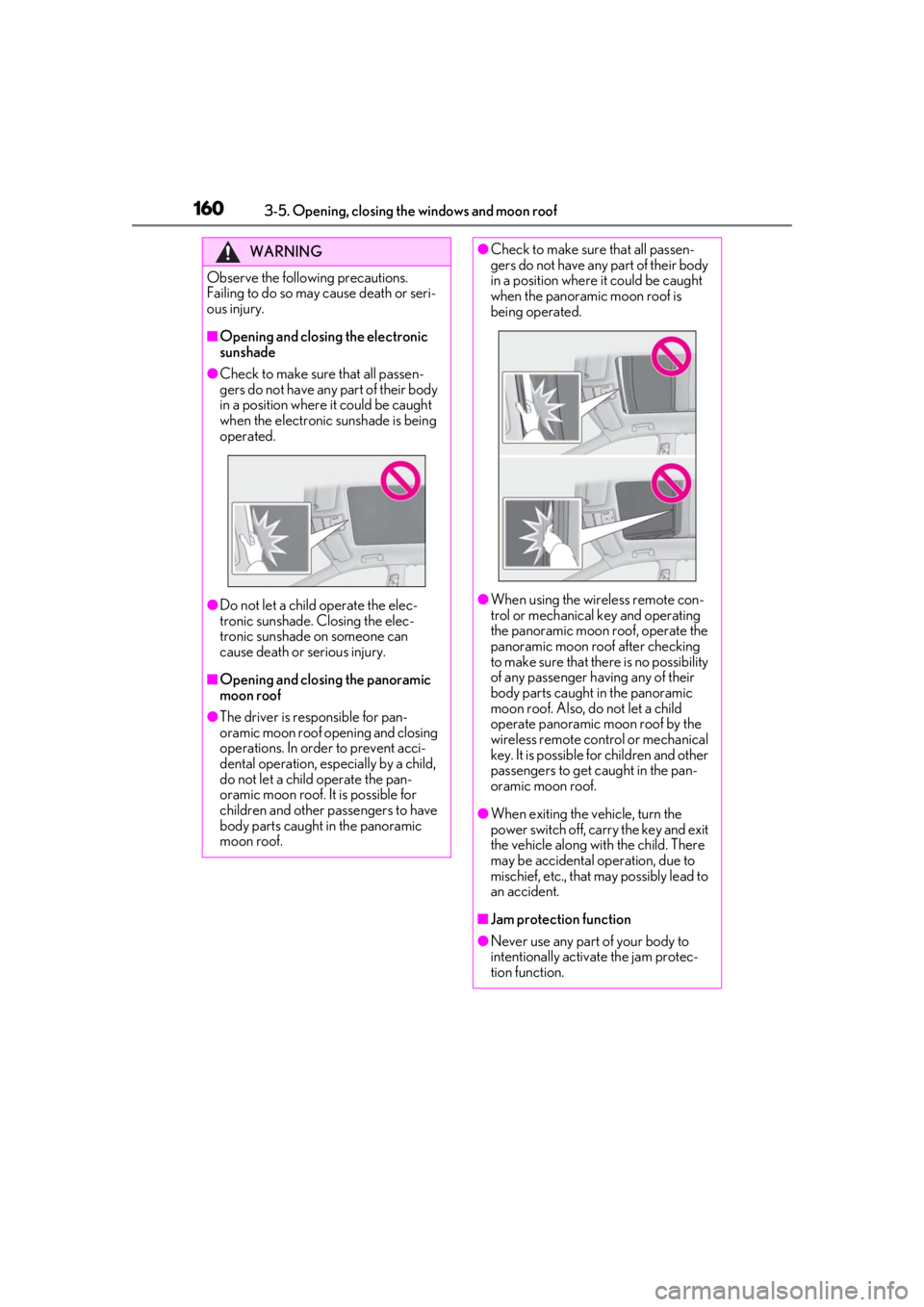
●Check to make sure that all passen-
gers do not have any part of their body
in a position where it could be caught
when the electronic sunshade is being
operated.
●Do not let a child operate the elec-
tronic sunshade. Closing the elec-
tronic sunshade on someone can
cause death or serious injury.
■Opening and closing the panoramic
moon roof
●The driver is responsible for pan-
oramic moon roof opening and closing
operations. In order to prevent acci-
dental operation, especially by a child,
do not let a child operate the pan-
oramic moon roof. It is possible for
children and other passengers to have
body parts caught in the panoramic
moon roof.
●Check to make sure that all passen-
gers do not have any part of their body
in a position where it could be caught
when the panoramic moon roof is
being operated.
●When using the wireless remote con-
trol or mechanical key and operating
the panoramic moon roof, operate the
panoramic moon roof after checking
to make sure that there is no possibility
of any passenger ha ving any of their
body parts caught in the panoramic
moon roof. Also, do not let a child
operate panoramic moon roof by the
wireless remote control or mechanical
key. It is possible for children and other
passengers to get caught in the pan-
oramic moon roof.
●When exiting the vehicle, turn the
power switch off, carry the key and exit
the vehicle along with the child. There
may be accidental operation, due to
mischief, etc., that may possibly lead to
an accident.
■Jam protection function
●Never use any part of your body to
intentionally activa te the jam protec-
tion function.
Page 300 of 528
3005-1. Remote Touch/Display
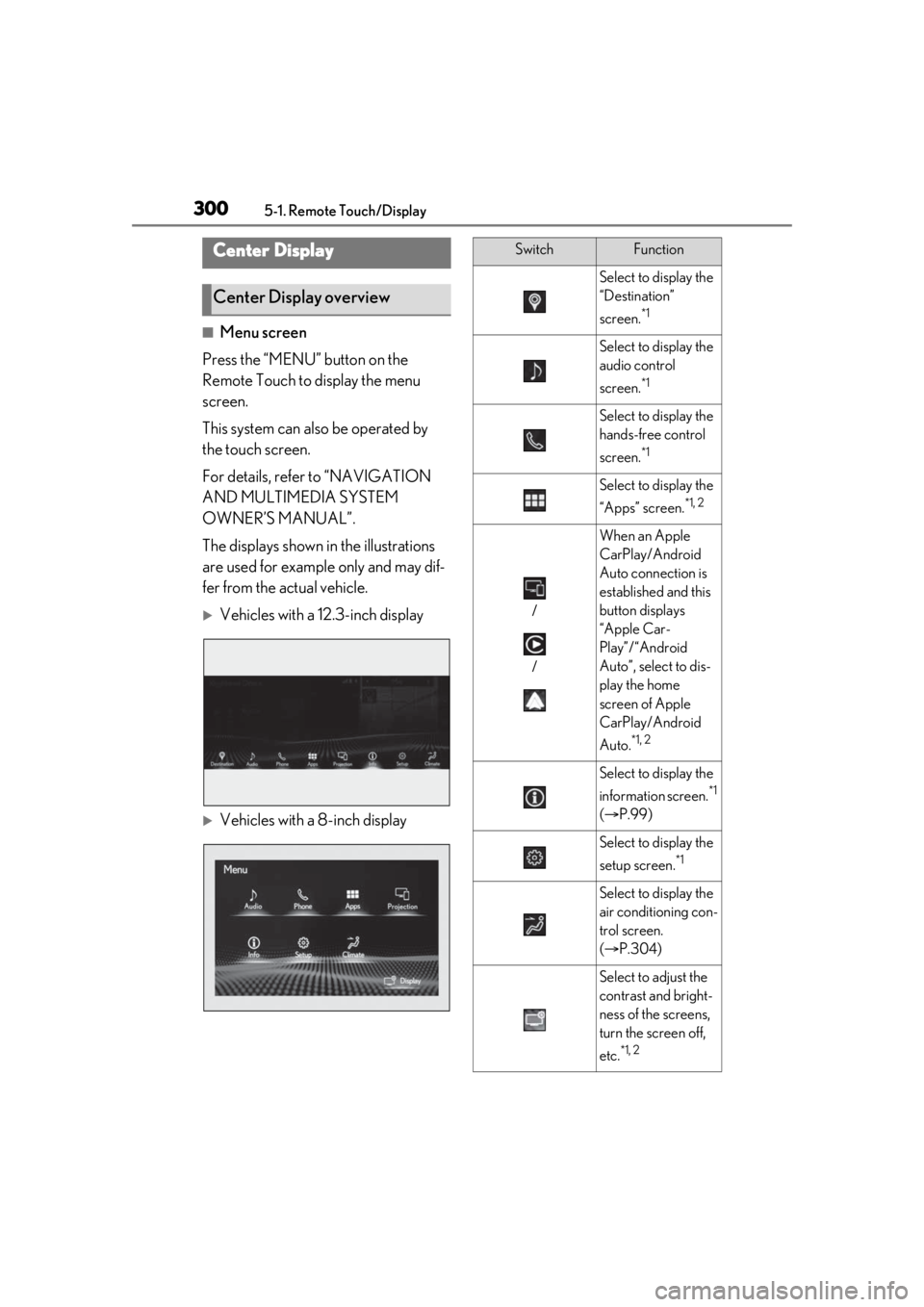
■Menu screen
Press the “MENU” button on the
Remote Touch to display the menu
screen.
This system can also be operated by
the touch screen.
For details, refer to “NAVIGATION
AND MULTIMEDIA SYSTEM
OWNER’S MANUAL”.
The displays shown in the illustrations
are used for example only and may dif-
fer from the actual vehicle.
Vehicles with a 12.3-inch display
Vehicles with a 8-inch display
Center Display
Center Display overview
SwitchFunction
Select to display the
“Destination”
screen.
*1
Select to display the
audio control
screen.
*1
Select to display the
hands-free control
screen.
*1
Select to display the
“Apps” screen.
*1, 2
/
/
When an Apple
CarPlay/Android
Auto connection is
established and this
button displays
“Apple Car-
Play”/“Android
Auto”, select to dis-
play the home
screen of Apple
CarPlay/Android
Auto.
*1, 2
Select to display the
information screen.
*1
( P.99)
Select to display the
setup screen.
*1
Select to display the
air conditioning con-
trol screen.
( P.304)
Select to adjust the
contrast and bright-
ness of the screens,
turn the screen off,
etc.
*1, 2
Page 304 of 528
3045-3. Using the air conditioning system and defogger
5-3.Using the air conditioning system and defogger
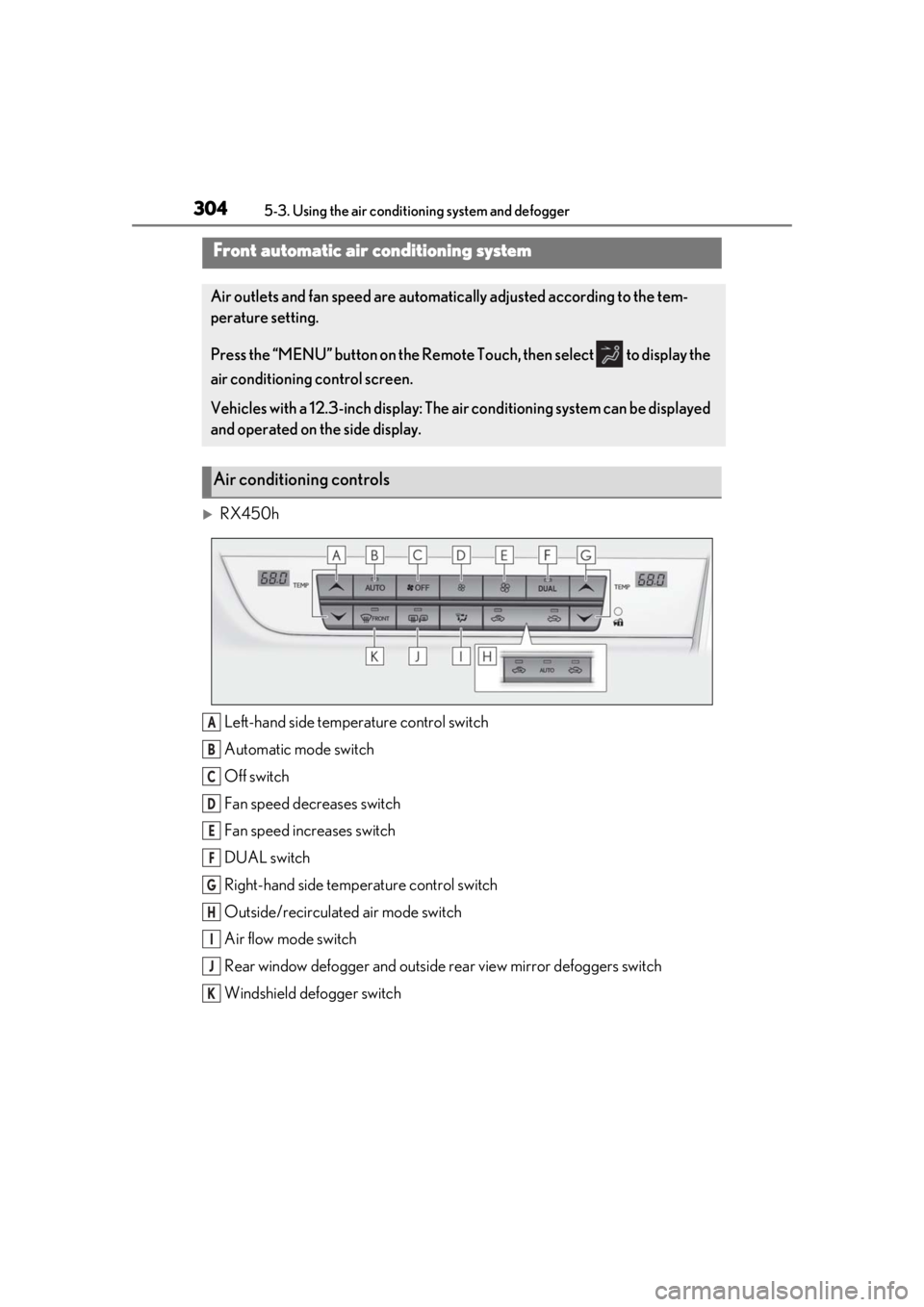
RX450hLeft-hand side temperature control switch
Automatic mode switch
Off switch
Fan speed decreases switch
Fan speed increases switch
DUAL switch
Right-hand side temp erature control switch
Outside/recirculated air mode switch
Air flow mode switch
Rear window defogger and outside rear view mirror defoggers switch
Windshield defogger switch
Front automatic air conditioning system
Air outlets and fan speed are automati cally adjusted according to the tem-
perature setting.
Press the “MENU” button on the Remote Touch, then select to display the
air conditioning control screen.
Vehicles with a 12.3-inch display: The air conditioning system can be displayed
and operated on the side display.
Air conditioning controls
A
B
C
D
E
F
G
H
I
J
K
Page 308 of 528
3085-3. Using the air conditioning system and defogger
■Main control screen
Using the touchpad of the Remote
Touch, select the button on the screen.
This system can also be operated by
the touch screen.
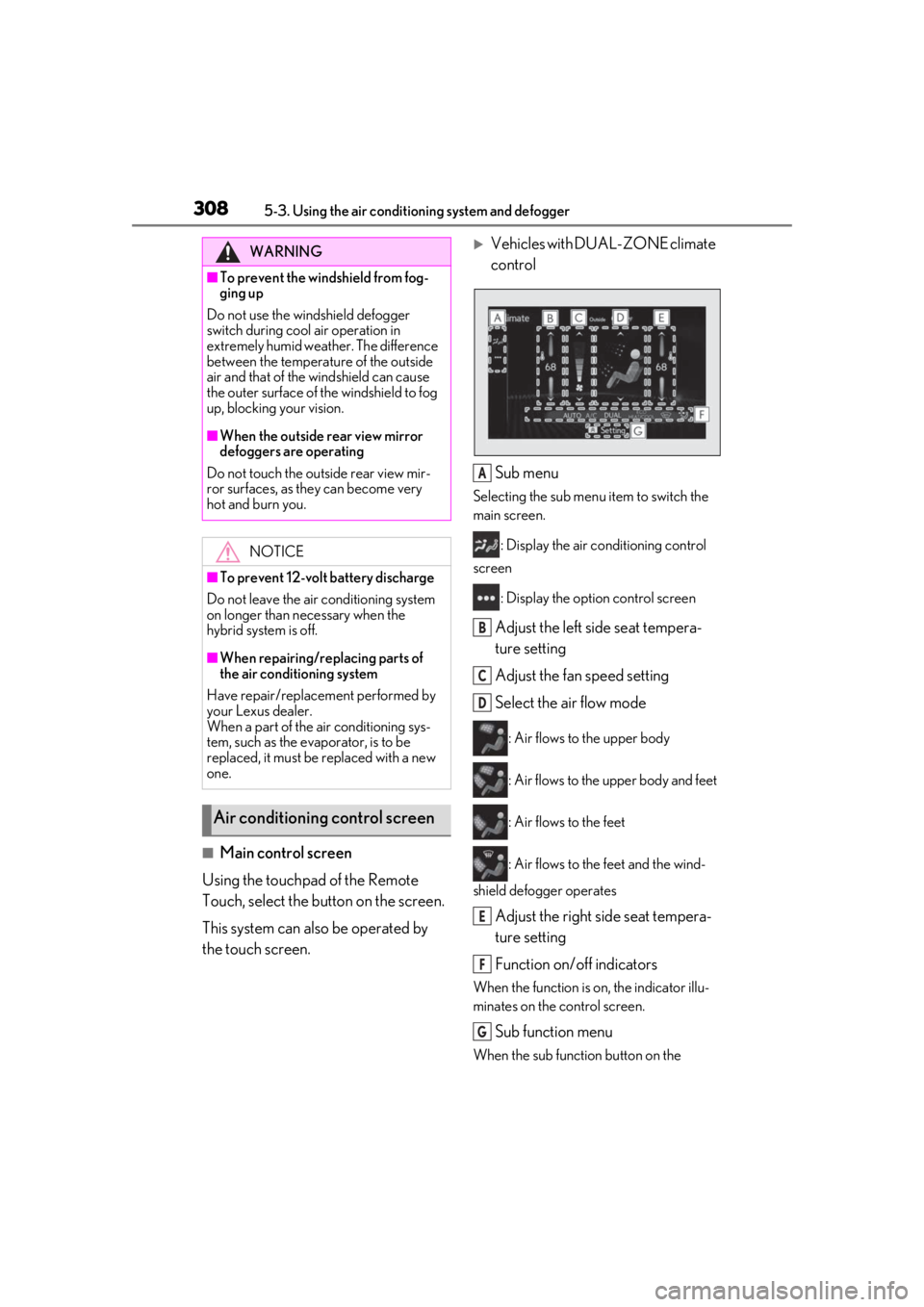
Vehicles with DUAL-ZONE climate
control
Sub menu
Selecting the sub menu item to switch the
main screen. : Display the air co nditioning control
screen
: Display the option control screen
Adjust the left side seat tempera-
ture setting
Adjust the fan speed setting
Select the air flow mode
: Air flows to the upper body
: Air flows to the upper body and feet
: Air flows to the feet
: Air flows to the feet and the wind-
shield defogger operates
Adjust the right side seat tempera-
ture setting
Function on/off indicators
When the function is on, the indicator illu-
minates on the control screen.
Sub function menu
When the sub function button on the
WARNING
■To prevent the windshield from fog-
ging up
Do not use the windshield defogger
switch during cool air operation in
extremely humid weather. The difference
between the temperature of the outside
air and that of the windshield can cause
the outer surface of the windshield to fog
up, blocking your vision.
■When the outside rear view mirror
defoggers are operating
Do not touch the outside rear view mir-
ror surfaces, as they can become very
hot and burn you.
NOTICE
■To prevent 12-volt battery discharge
Do not leave the air conditioning system
on longer than necessary when the
hybrid system is off.
■When repairing/replacing parts of
the air conditioning system
Have repair/replace ment performed by
your Lexus dealer.
When a part of the air conditioning sys-
tem, such as the evaporator, is to be
replaced, it must be replaced with a new
one.
Air conditioning control screen
A
B
C
D
E
F
G
Page 309 of 528
3095-3. Using the air conditioning system and defogger
5
Interior features
Remote Touch is pressed, the following
functions can be switched on and off.
“AUTO”: Set automatic mode on/off
( P.312)
“OFF”: Turn the fan off
“A/C”: Set cooling and dehumidification
function
If the “A/C” display is turned off, the system
will blow ambient temperature air or
heated air.
“DUAL”: Adjust the temperature for driver
and passenger seats separately (“DUAL”
mode) ( P.313)
: Set eco air conditioning mode
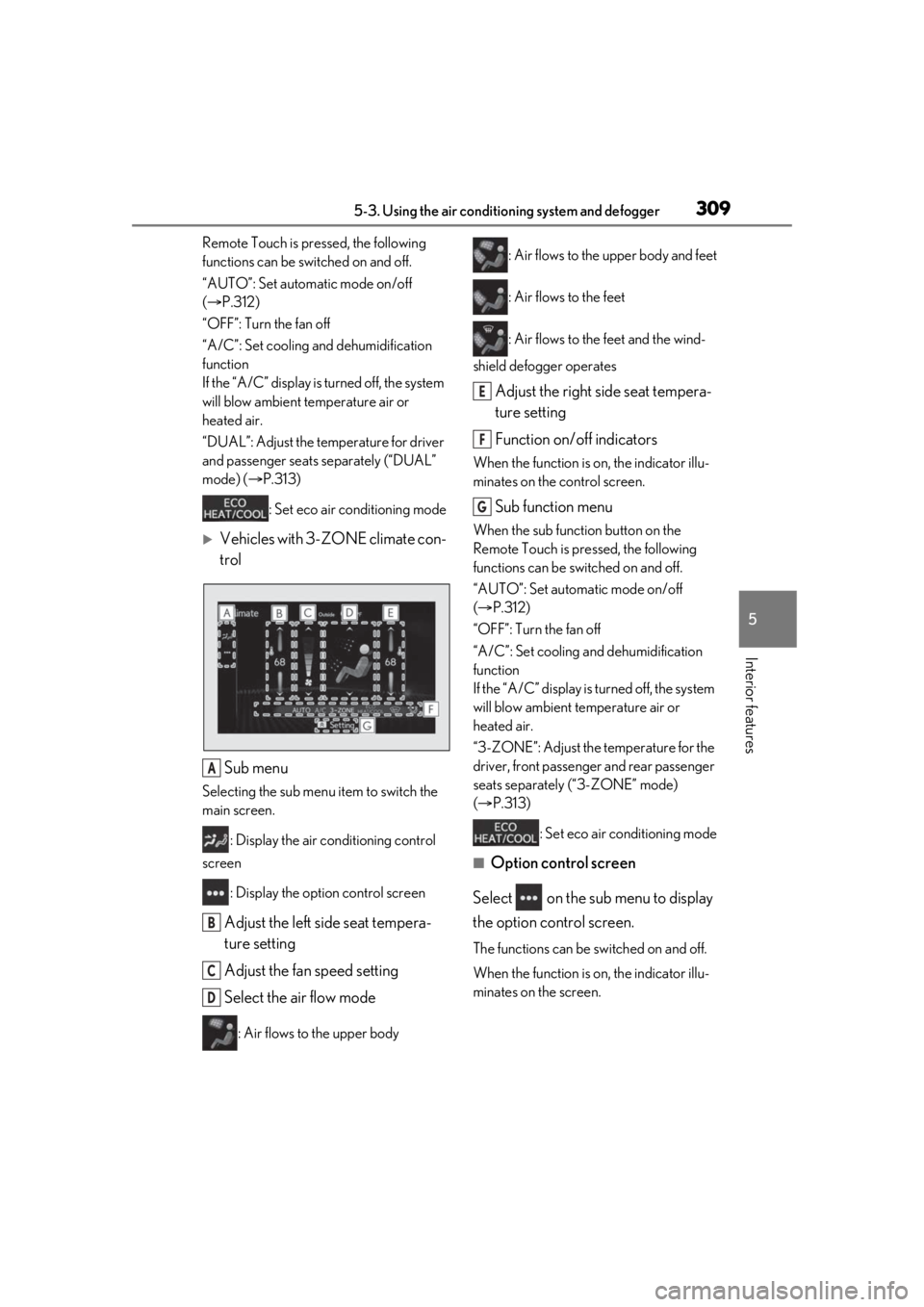
Vehicles with 3-ZONE climate con-
trol
Sub menu
Selecting the sub menu item to switch the
main screen. : Display the air conditioning control
screen
: Display the option control screen
Adjust the left side seat tempera-
ture setting
Adjust the fan speed setting
Select the air flow mode
: Air flows to the upper body : Air flows to the upper body and feet
: Air flows to the feet
: Air flows to the feet and the wind-
shield defogger operates
Adjust the right side seat tempera-
ture setting
Function on/off indicators
When the function is on, the indicator illu-
minates on the control screen.
Sub function menu
When the sub function button on the
Remote Touch is pressed, the following
functions can be switched on and off.
“AUTO”: Set automatic mode on/off
( P.312)
“OFF”: Turn the fan off
“A/C”: Set cooling and dehumidification
function
If the “A/C” display is turned off, the system
will blow ambient temperature air or
heated air.
“3-ZONE”: Adjust the temperature for the
driver, front passenger and rear passenger
seats separately (“3-ZONE” mode)
( P.313)
: Set eco air conditioning mode
■Option control screen
Select on the sub menu to display
the option control screen.
The functions can be switched on and off.
When the function is on, the indicator illu-
minates on the screen.
A
B
C
D
E
F
G
Page 315 of 528
3155-3. Using the air conditioning system and defogger
5
Interior features
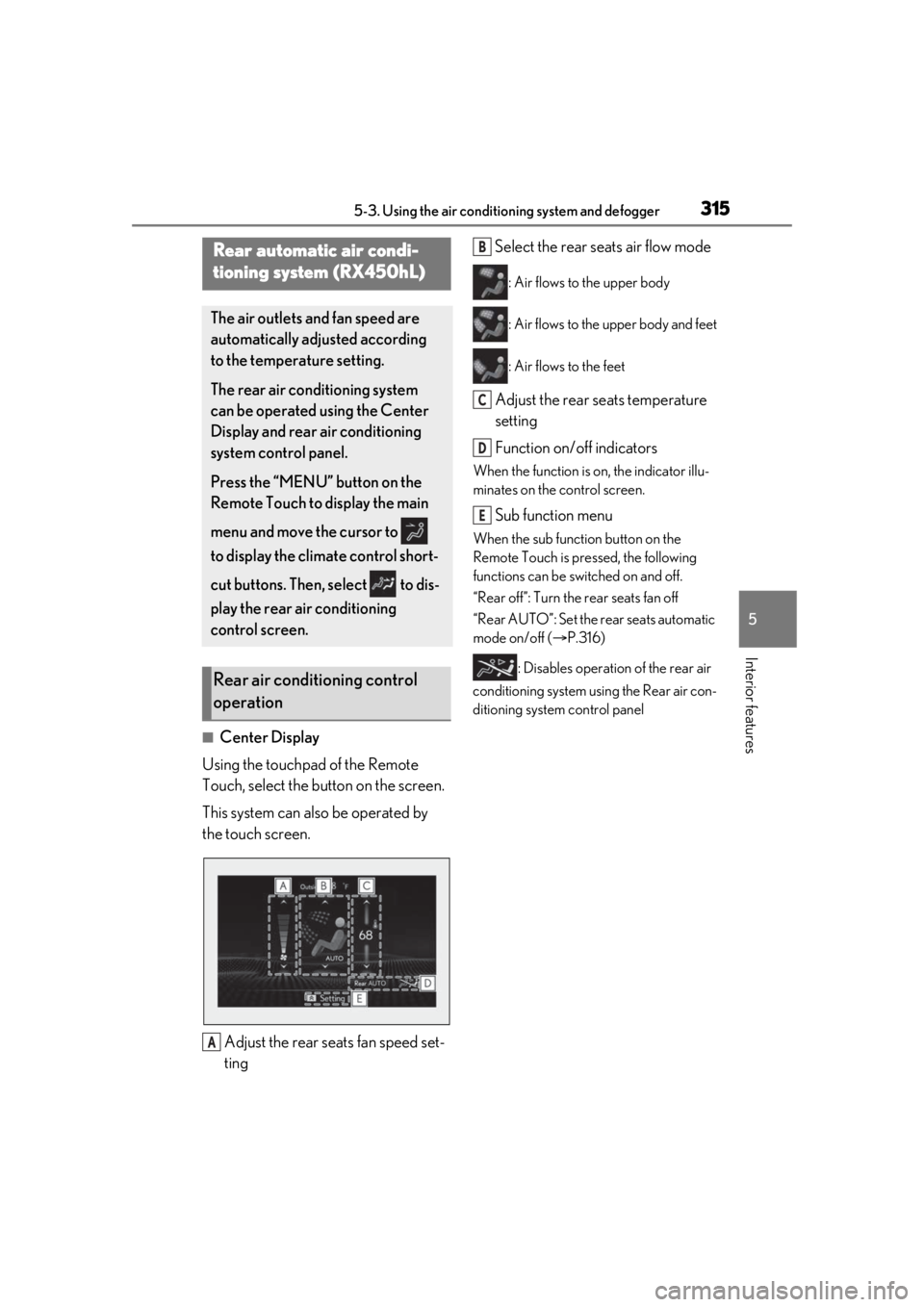
■Center Display
Using the touchpad of the Remote
Touch, select the button on the screen.
This system can also be operated by
the touch screen.
Adjust the rear seats fan speed set-
ting Select the rear seats air flow mode
: Air flows to the upper body
: Air flows to the upper body and feet
: Air flows to the feet
Adjust the rear seats temperature
setting
Function on/off indicators
When the function is on, the indicator illu-
minates on the control screen.
Sub function menu
When the sub function button on the
Remote Touch is pressed, the following
functions can be switched on and off.
“Rear off”: Turn the rear seats fan off
“Rear AUTO”: Set the rear seats automatic
mode on/off (
P.316)
: Disables operation of the rear air
conditioning system using the Rear air con-
ditioning system control panel
Rear automatic air condi-
tioning system (RX450hL)
The air outlets and fan speed are
automatically adjusted according
to the temperature setting.
The rear air conditioning system
can be operated using the Center
Display and rear air conditioning
system control panel.
Press the “MENU” button on the
Remote Touch to display the main
menu and move the cursor to
to display the climate control short-
cut buttons. Then, select to dis-
play the rear air conditioning
control screen.
Rear air conditioning control
operation
A
B
C
D
E
Page 347 of 528
3475-6. Using the other interior features
5
Interior features
●If learning failed when registering a dif-
ferent code to a HomeLink® button that
already has a code registered to it, the already registered code will not be
erased.
■Certification for the garage door opener
Except for vehicles sold in Canada
For vehicles sold in Canada
■When support is necessary
Visit on the web at
www.homelink.com/lexus
or call
1-800-355-3515.
WARNING
■When programming a garage door or
other remote control device
The garage door or other device may
operate, so ensure people and objects
are out of danger to prevent potential
harm.
■Conforming to federal safety stan-
dards
Do not use the HomeLink
® compatible
transceiver with any garage door opener
or device that lacks safety stop and
reverse features as required by federal
safety standards.
This includes any garage door that can-
not detect an interf ering object. A door
or device without these features
increases the risk of death or serious
injury.
Page 348 of 528
3485-6. Using the other interior features
■Before programming HomeLink®
During programming, it is possible
that garage doors, gates, or other
devices may operate. For this rea-
son, make sure that people and
objects are clear of the garage door
or other devices to prevent injury or
other potential harm.
It is recommended that a new bat-
tery be placed in the remote control
transmitter for more accurate pro-
gramming.
Garage door opener motors manu-
factured after 1995 may be
equipped with rolling code protec-
tion. If this is the case, you may need
a stepladder or other sturdy, safe
device to reach the “Learn” or
“Smart” button on the garage door
opener motor.
■Programming HomeLink®
Steps 1 through 3 must be performed
within 60 seconds, otherwise the indi-
cator light will stop flashing and pro-
gramming will not be able to be
completed.
1 Press and release the HomeLink
®
button you want to program and check that the HomeLink
® indica-
tor light flashes (orange).
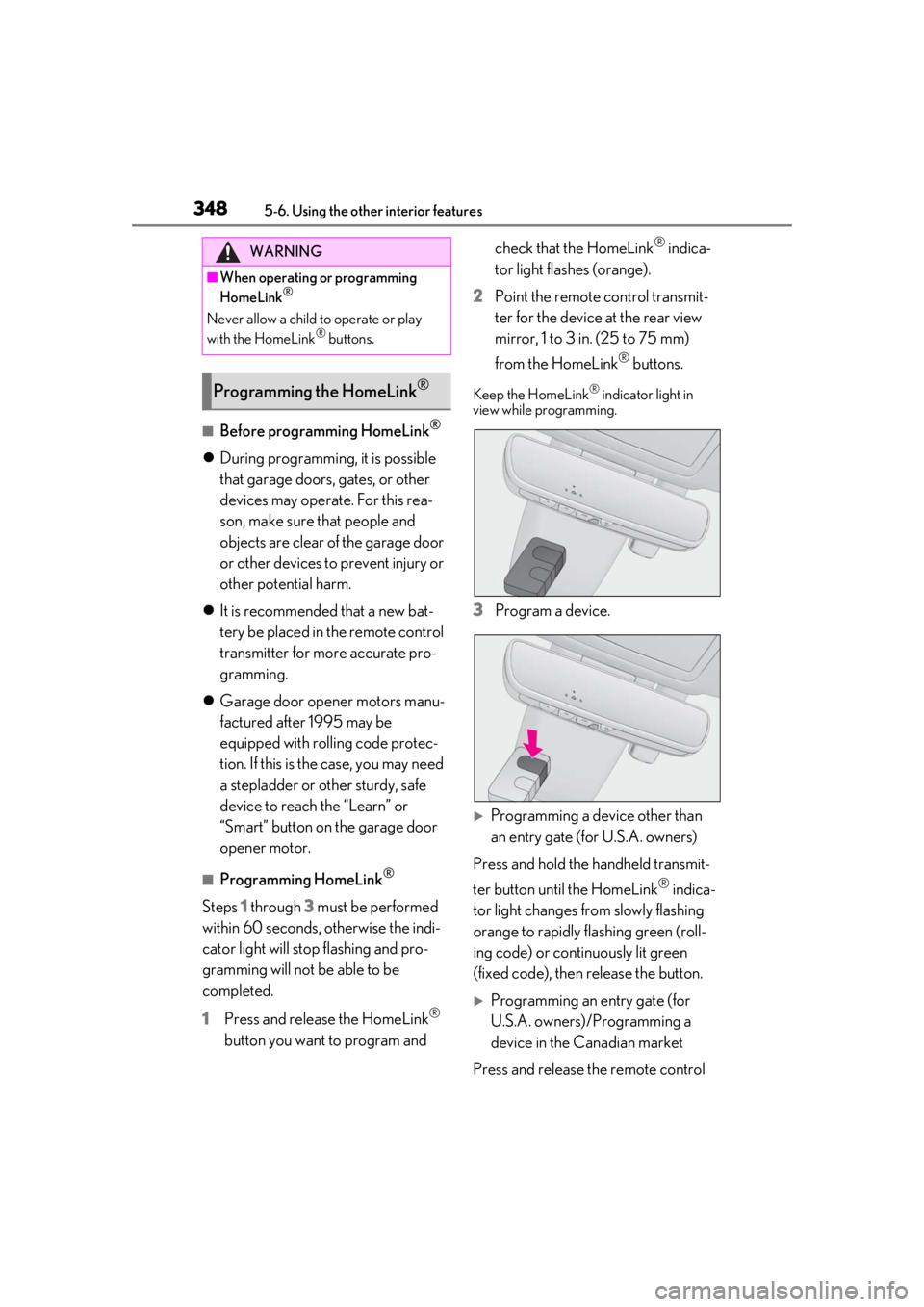
2 Point the remote control transmit-
ter for the device at the rear view
mirror, 1 to 3 in. (25 to 75 mm)
from the HomeLink
® buttons.
Keep the HomeLink® indicator light in
view while programming.
3 Program a device.
Programming a device other than
an entry gate (for U.S.A. owners)
Press and hold the handheld transmit-
ter button until the HomeLink
® indica-
tor light changes from slowly flashing
orange to rapidly flashing green (roll-
ing code) or continuously lit green
(fixed code), then release the button.
Programming an entry gate (for
U.S.A. owners)/Programming a
device in the Canadian market
Press and release the remote control
WARNING
■When operating or programming
HomeLink®
Never allow a child to operate or play
with the HomeLink® buttons.
Programming the HomeLink®
Page 377 of 528
3776-3. Do-it-yourself maintenance
6
Maintenance and care
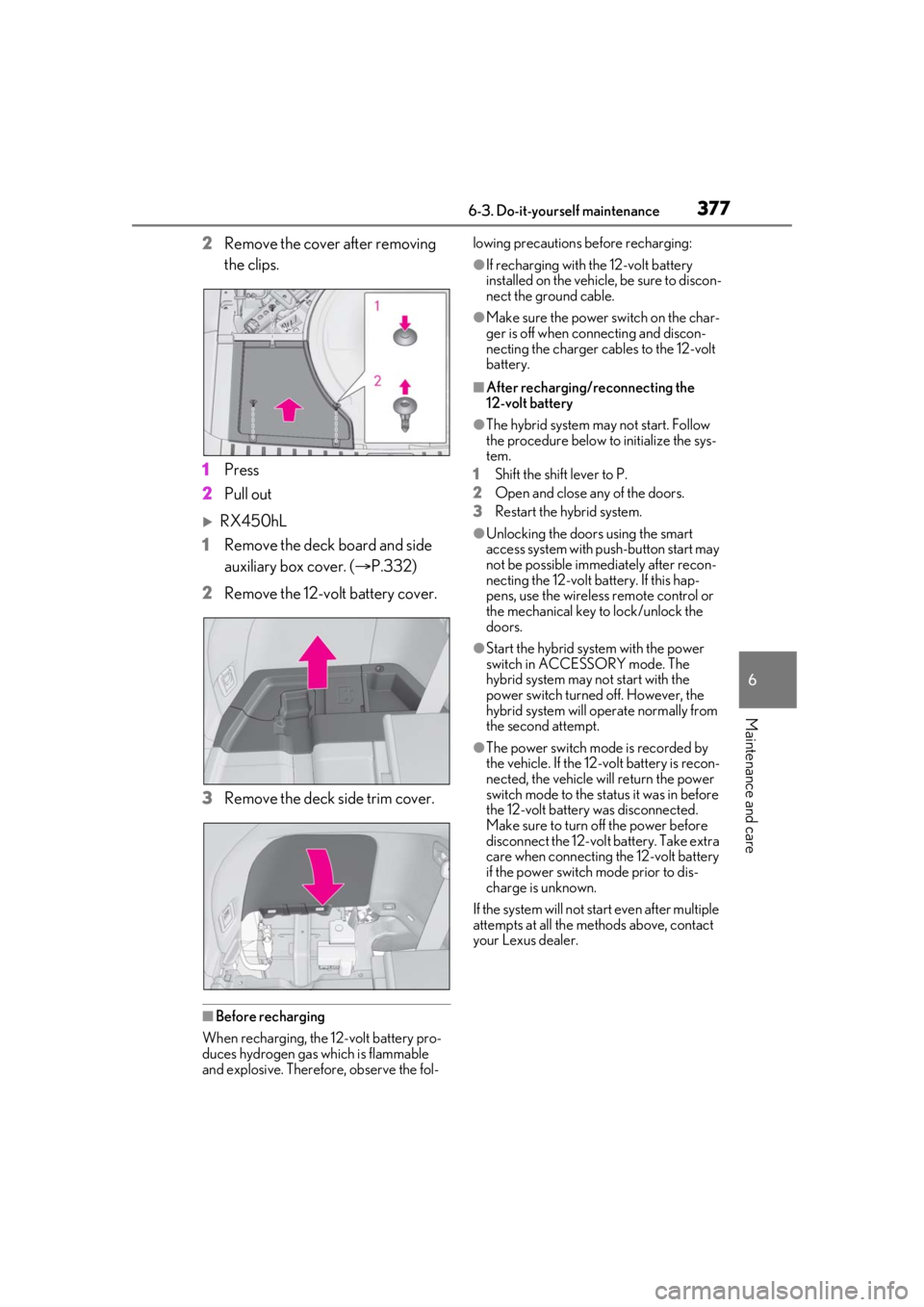
2Remove the cover after removing
the clips.
1 Press
2 Pull out
RX450hL
1 Remove the deck board and side
auxiliary box cover. ( P.332)
2 Remove the 12-volt battery cover.
3 Remove the deck side trim cover.
■Before recharging
When recharging, the 12-volt battery pro-
duces hydrogen gas which is flammable
and explosive. Therefore, observe the fol- lowing precautions before recharging:
●If recharging with the 12-volt battery
installed on the vehicle, be sure to discon-
nect the ground cable.
●Make sure the power switch on the char-
ger is off when connecting and discon-
necting the charger cables to the 12-volt
battery.
■After recharging/reconnecting the
12-volt battery
●The hybrid system may not start. Follow
the procedure below to initialize the sys-
tem.
1 Shift the shift lever to P.
2 Open and close any of the doors.
3 Restart the hybrid system.
●Unlocking the doors using the smart
access system with pu sh-button start may
not be possible immediately after recon-
necting the 12-volt battery. If this hap-
pens, use the wireless remote control or
the mechanical key to lock/unlock the
doors.
●Start the hybrid system with the power
switch in ACCESSORY mode. The
hybrid system may not start with the
power switch turned off. However, the
hybrid system will operate normally from
the second attempt.
●The power switch mode is recorded by
the vehicle. If the 12-volt battery is recon-
nected, the vehicle will return the power
switch mode to the stat us it was in before
the 12-volt battery was disconnected.
Make sure to turn off the power before
disconnect the 12-volt battery. Take extra
care when connecting the 12-volt battery
if the power switch mode prior to dis-
charge is unknown.
If the system will not start even after multiple
attempts at all the methods above, contact
your Lexus dealer.